

What is NVIDIA NemoClaw?
NVIDIA NemoClaw is an open-source reference stack for running AI agents inside NVIDIA OpenShell sandboxes on a host you operate. It packages the agent and sandbox runtime into a repeatable setup: a host command-line tool, a versioned blueprint, an agent-specific integration layer, managed inference routes, network policy and lifecycle commands. Three agent runtimes are supported: OpenClaw (the default), Hermes from Nous Research and LangChain Deep Agents Code, each with its own sandbox image and CLI alias (nemoclaw, nemohermes, nemo-deepagents). The official documentation is the primary reference, and NVIDIA also maintains a NemoClaw product page.
NVIDIA develops the project in the public NVIDIA/NemoClaw repository, created in March 2026, under the Apache 2.0 license. The platform matrix labels the project an alpha, early-preview release since March 16, 2026, and the README states that maintainers review issues and pull requests on a best-effort basis without guaranteed response times. The documentation describes the scope as a trusted operator on one host. It is not a hosted NemoClaw service, a multi-tenant control plane or an enterprise identity system.
Distribution is a hosted shell installer, curl -fsSL https://www.nvidia.com/nemoclaw.sh | bash, which installs Node.js if needed, the CLI and OpenShell, then starts onboarding. By default it follows the maintained last-known-good release; NEMOCLAW_INSTALL_TAG pins a specific tag. Sandboxes run as containers on Docker Engine, Docker Desktop or Colima, with rootless Podman as an explicit choice on qualified Linux and WSL2 paths. The tested hosts are Linux (Ubuntu 24.04 has host-level validation) and DGX Spark; macOS on Apple Silicon, Windows through WSL2 and DGX Station are listed as tested with limitations in the platform support matrix.
Versions ship as frequent v0.0.x tags with changelog entries rather than packaged GitHub releases. The latest tag at the time of writing is v0.0.142 (November 6, 2026), which limits new managed vLLM containers to loopback and the private OpenShell bridge, finds the WSL nvidia-smi and hardens the npm install path on Ubuntu. Version 0.0.141 added Switchyard routing configuration for managed Hermes, bound auxiliary agent forwards to loopback and switched operation telemetry to NVIDIA's production receiver by default. The release notes link each change to its pull request.
The CLI is written in TypeScript and requires Node.js 22.19 or later with npm 10 or later. The blueprint is a YAML package that names the sandbox image, agent manifest, network policy and inference profile; the runner checks its digest before applying it through OpenShell. OpenShell enforces the sandbox itself: Landlock, seccomp, network namespaces, privilege dropping and an L7 proxy that keeps provider credentials outside the container. Out of scope, per the matrix: Intel Macs, non-Debian Linux installers, native Kubernetes or OpenShift, air-gapped installs, non-NVIDIA GPUs, multi-user host sharing and production SLAs.
NVIDIA NemoClaw screenshots
Explore the interface. Open a screenshot to view it at full size.
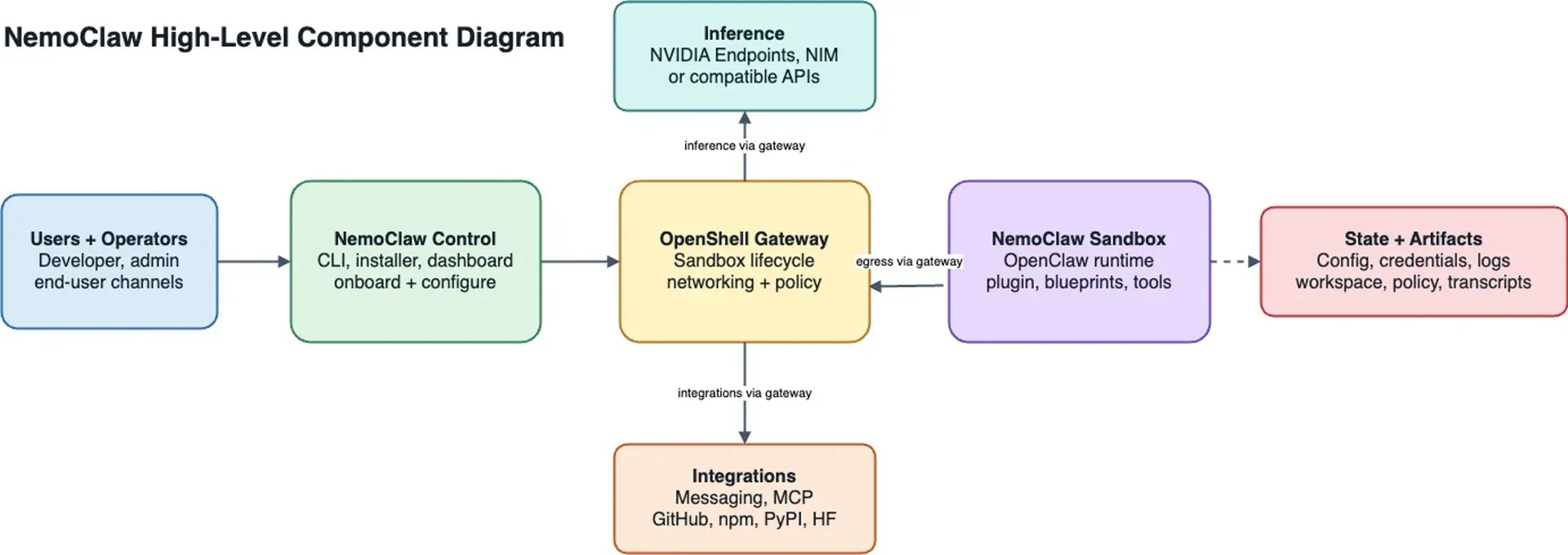
Official component diagram from the NemoClaw docs: the CLI configures the OpenShell gateway, which routes the sandbox's inference, integrations and egress.
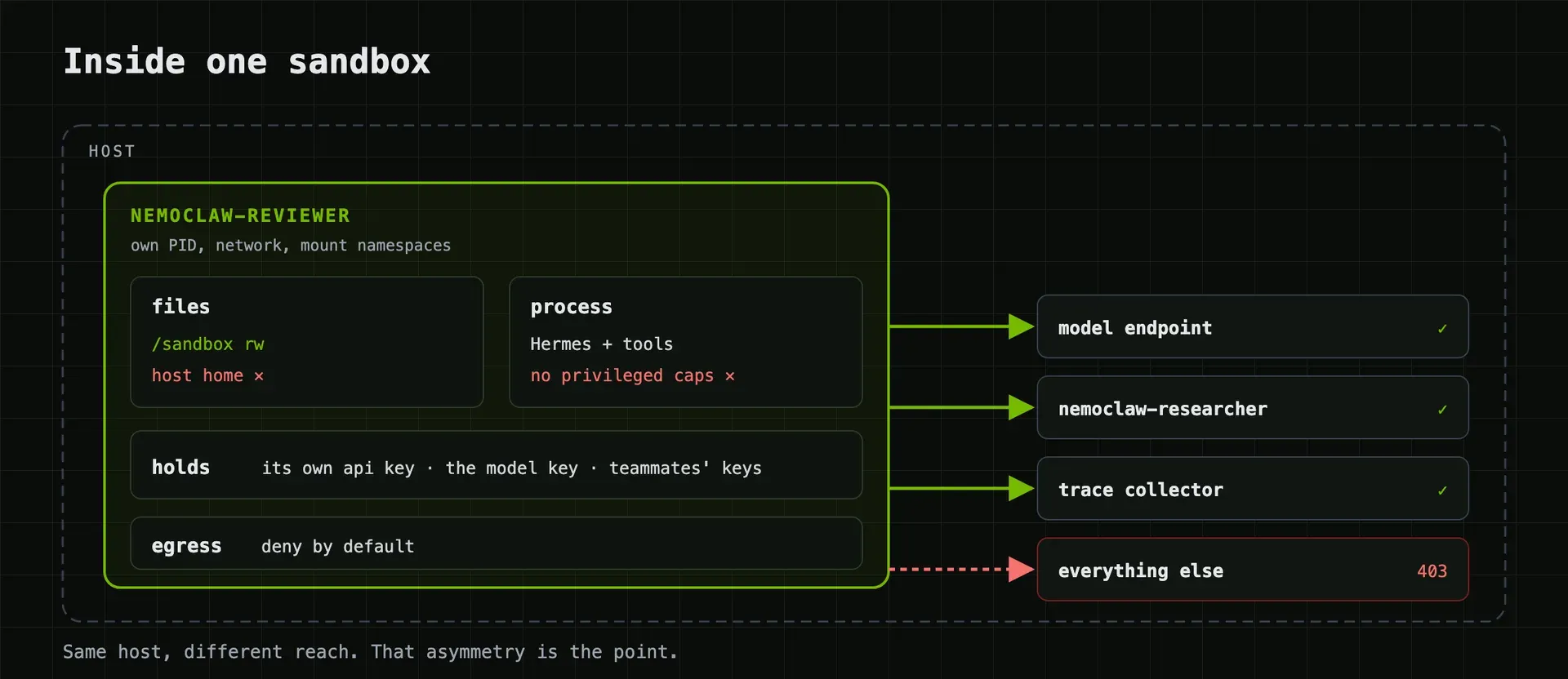
Figure from the official nemoclaw-community sandboxed Hermes bots recipe: allowed routes to the model endpoint, a peer bot and a trace collector, with all other egress refused.
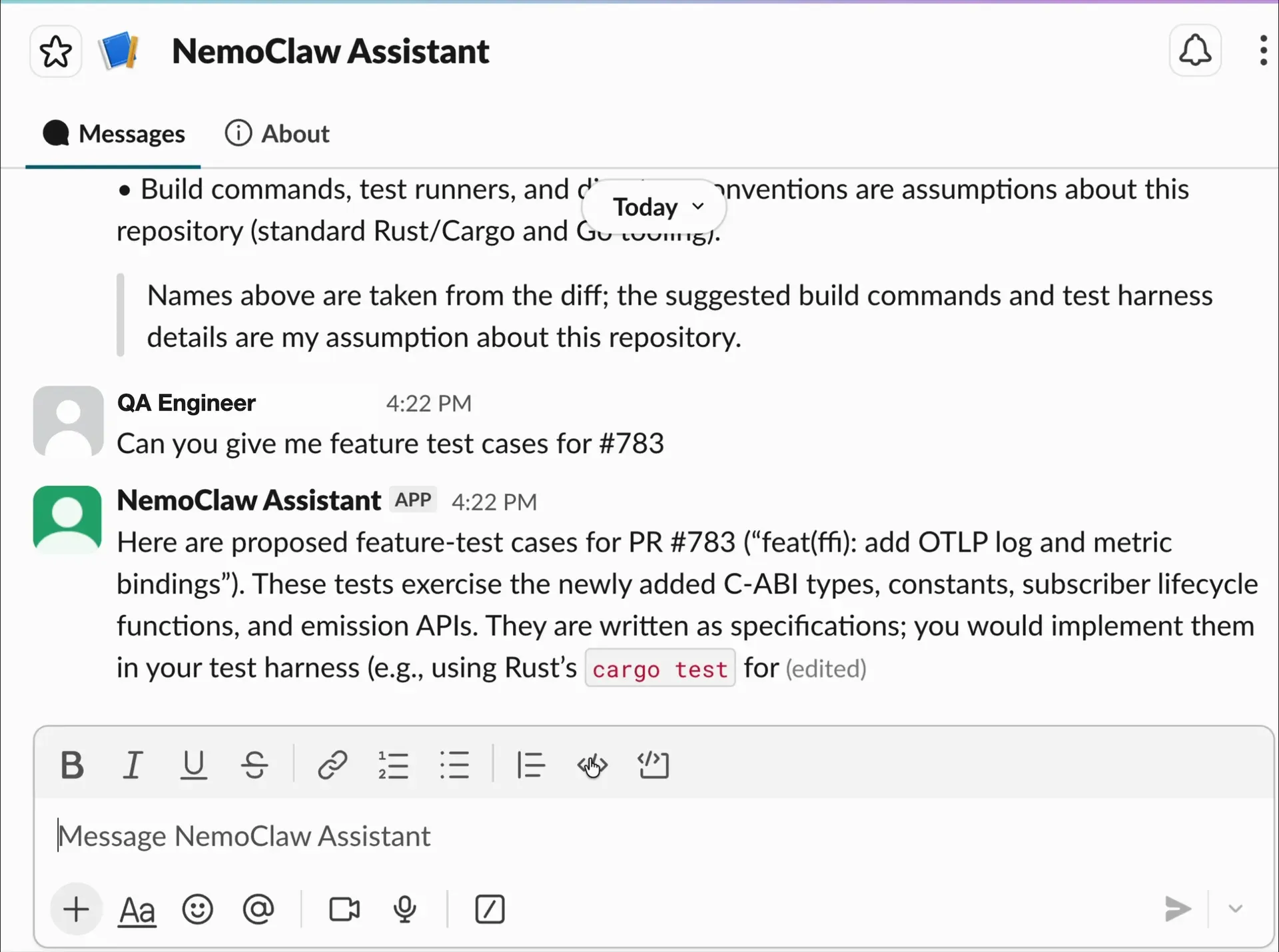
Screenshot from the official nemoclaw-community PR test case assistant recipe, showing a NemoClaw agent answering in Slack.
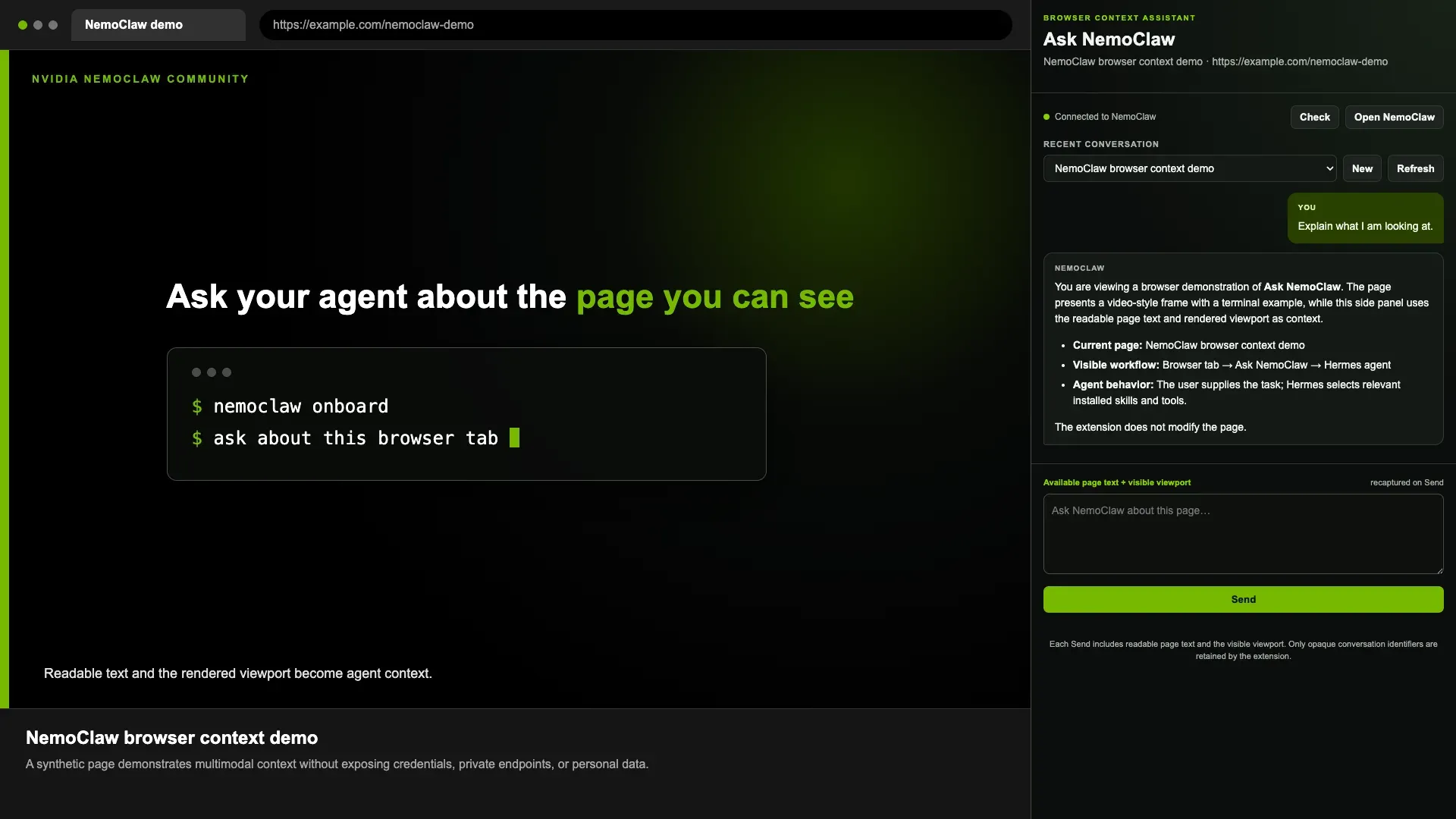
Screenshot from the official nemoclaw-community browser context recipe: a side panel sends page text and the visible viewport to a Hermes agent running in NemoClaw.
Key capabilities
- Hosted installer for Linux, macOS and WSL2 One command downloads the installer, shows a third-party software notice and installs the CLI before onboarding. Non-interactive runs set
NEMOCLAW_NON_INTERACTIVE=1,NEMOCLAW_ACCEPT_THIRD_PARTY_SOFTWARE=1, the agent, provider, credential and sandbox name as environment variables, which suits CI. Intel Macs are rejected before any download, and Linux package probes assumeapt-get. - Express install on NVIDIA hardware On DGX Spark, qualifying DGX Station GB300 systems and WSL hosts, the installer offers preset settings that finish onboarding without further prompts. DGX Spark Express can select a managed vLLM serving profile automatically. N1x hosts only get a Deferred preview that the installer discloses before confirmation.
- Guided onboarding wizard
nemoclaw onboardwalks through the agent, inference provider, model, credential, sandbox name, optional web search and messaging channels and a network policy tier. Progress is recorded, sonemoclaw onboard --resumecontinues after a failed step. The prerequisites page lists the minimum host: 4 vCPU, 8 GB RAM and 20 GB free disk, with 16 GB and 40 GB recommended. - Three supported agent runtimes OpenClaw is the default always-on assistant, Hermes adds Nous Research's skills and memory loop, and LangChain Deep Agents Code runs the
dcodeterminal coding agent. Each name maps to exactly one agent type, and side-by-side sandboxes need distinct names. Other harnesses such as AutoGen or CrewAI are listed as unsupported. - Managed inference routing Model calls leave the sandbox through OpenShell routes, so the API key stays in OpenShell provider state. NVIDIA Endpoints, OpenAI, Anthropic, Google Gemini and OpenRouter are tested; other OpenAI or Anthropic-compatible endpoints carry caveats. The provider guide explains validation and switching between providers.
- Local model servers Ollama and vLLM (managed or already running) are supported with caveats, while llama.cpp and a local NVIDIA NIM are experimental. Managed local vLLM install requires Docker. Local inference has its own memory needs; the documented DGX Spark profile accepts hosts with at least 60 GB of detected unified memory.
- Deny-by-default network policy The sandbox can reach only the endpoints in its baseline YAML policy, for example the NVIDIA inference API and the OpenClaw package hub for OpenClaw. Blocked requests appear in
openshell termfor the operator to approve or deny. Approvals last for that sandbox instance and reset when it is destroyed and recreated. - Policy presets and custom rules Operators add endpoints with
nemoclaw <name> policy add --from-file, apply presets for integrations or edit the blueprint baseline. Rules can restrict hosts, ports, HTTP methods and the binaries allowed to use them. The policy customization guide covers static and live changes. - Filesystem and process hardening System paths such as
/usr,/liband/etcare read-only, while/sandboxand/tmpstay writable for a dedicated sandbox user. The runtime image removesgcc,makeandnetcat, and the entrypoint sets best-effort limits of 512 processes and 65536 file descriptors. Landlock is best-effort for OpenClaw and Hermes but strict for Deep Agents Code, which fails closed. - Managed MCP servers
nemoclaw <name> mcp add,list,statusandremovemanage authenticated MCP servers over HTTPS Streamable HTTP for all three agents. Bearer values stay with OpenShell, which substitutes credential placeholders only at approved egress. Other MCP transports are not part of this managed path. - Messaging channels Slack, Discord and Telegram are tested; WeChat and WhatsApp work with caveats, and Microsoft Teams and Google Chat are experimental. Channel credentials configured on the host use OpenShell delivery, while QR-paired WhatsApp sessions keep their session files inside the sandbox. Channels can be added during onboarding or later with
channels add. - Lifecycle and recovery commands The CLI covers
status,logs --follow,connect,stop,start,recover,destroyandrebuild. A rebuild backs up the complete native agent home, recreates the sandbox from the current image and restores that state with integrity checks. Updating the agent in place inside the sandbox is not supported because the runtime is pinned to the image. - Backups and host readiness
nemoclaw backup-allarchives sandbox state and reports file counts per archive.nemoclaw host probeinspects a host before onboarding without changing it, including GPU indices, names and memory in text or JSON. The CLI reference documents every command and flag. - Web search through managed credentials OpenClaw and Hermes can use Brave Search or Tavily with the service key held outside the sandbox. Removing the Tavily preset also revokes its endpoint grants. Without a configured search backend, Hermes does not offer its web search tools.
- Trace export for Deep Agents Code An opt-in
--observabilitypath sends bounded OTLP/HTTP traces to a collector the operator runs on the host. NemoClaw does not manage the collector, remote exporter credentials or fleet routing. OpenClaw session logs stay as per-session JSONL inside the sandbox and are exported manually. - Documentation built for coding agents The README links a starter prompt for Cursor, Claude Code, Codex, Copilot or another local coding agent, which asks one question at a time and runs commands only after approval. The docs are also published as Markdown with an optional user-guide skill. Community recipes in the NVIDIA/nemoclaw-community repository show Slack, browser and multi-bot setups.
Where NVIDIA NemoClaw fits
Evaluating an always-on assistant before granting access
Install on a single Ubuntu 24.04 host or DGX Spark, accept the suggested sandbox name and network tier, and skip messaging and web search on the first run. Use nemoclaw my-assistant status and the dashboard URL to confirm the agent answers. Then watch openshell term while giving it real tasks: each blocked destination shows what the agent tries to reach before you decide which endpoints belong in its policy.
Running a team chat bot under policy
Add Slack, Discord or Telegram during onboarding or with nemoclaw <name> channels add, then check channels status. Keep the channel token on the host so OpenShell delivers it, and confirm that the sandbox policy lists only the channel endpoints it needs. The channel guide marks Teams and Google Chat as experimental, so test those on a non-production workspace.
Sandboxed coding agent with Deep Agents Code
Install with NEMOCLAW_AGENT=langchain-deepagents-code to run dcode inside a sandbox whose baseline policy allows inference, GitHub and PyPI. Because Landlock is strict for this agent, startup fails if the kernel cannot enforce the filesystem policy, which is the behaviour you want to verify on your host. Review edit approval cards and enable trace export only toward a collector you control.
Local inference on NVIDIA hardware
On a DGX Spark, the Express path can select a managed vLLM profile without a cloud API key; elsewhere choose Ollama or an already running vLLM server during onboarding. Check that the model fits detected memory, run nemoclaw <name> connect --probe-only to require a real model response, and note that managed vLLM ports now bind to loopback and the OpenShell bridge only on newly created containers.
Headless server deployment over SSH
Provision a tested Linux host, connect over SSH, run the installer and onboarding, and keep the OpenClaw or Hermes dashboard on loopback, reaching it through SSH port forwarding. The headless server guide states that automatic recovery after a host reboot is not guaranteed, so script and test the manual recovery steps before relying on the agent unattended.
Upgrading without losing agent state
Rerun the installer to update the CLI, run nemoclaw backup-all, then nemoclaw <name> rebuild or upgrade-sandboxes. Rebuild transfers the complete native home into the new image and keeps a journal so an interrupted rebuild can resume. After the upgrade, compare skills, memory files, channel settings and the active model, and confirm that destroy and rebuild warn before interrupting active sessions.
Install
curl -fsSL https://www.nvidia.com/nemoclaw.sh | bashReviews of NVIDIA NemoClaw
Be the first to share your experience with NVIDIA NemoClaw.
Write a review
Loading review form…
Alternatives to NVIDIA NemoClaw
 NanoClawOpen-source personal AI assistant with a small TypeScript core. Agents run in per-session Docker containers, keys stay in a credential gateway, and channels such as WhatsApp, Telegram, Slack or Discord are added as skills. Claude by default.
 ZeroClawOpen-source personal AI agent runtime in a single Rust binary. Connects your own model keys or local models to 30+ chat channels, runs tools under supervised approval and OS sandboxes, and is dual-licensed MIT or Apache 2.0.
 OpenClawOpenClaw is an MIT-licensed AI assistant that runs as a Gateway on your own machine or server, connects to Telegram, WhatsApp, Slack, Discord, iMessage and other channels, and keeps memory and credentials on hardware you control.