

What is Craft Anything?
Craft Anything is an open-source desktop app, command-line tool and MCP server published by the ArtCraft team in the storytold/craft-anything repository. It is part of the ArtCraft Craft App Suite, whose README table also lists PhotoCraft, PdfCraft, WordCraft and the community app SolidCraft. A project starts with a target (a website address, a program, a game or nothing at all) and a request such as "Recreate this website". It then runs four steps: Study inspects the original, Build has a coding agent create a new project in the language, framework or engine the request names, Check compares the build with the original and lists what does not match yet, and Ready opens or plays the result, with further change requests refining it.
The engine is written in Rust and counts 320 tools: the generated tool list shows 303 engine tools in 17 toolsets, and the AI and setup layers add the rest. They cover native programs, .NET, Java, Android, Apple, Electron and JavaScript, websites, firmware, packet captures, databases and game files, with the project's own decoders, disassembler and decompiler. Ghidra is used in Deep mode when it is installed. The same engine powers the egui desktop app, the CLI and the MCP server, and parts of it run in the browser as WebAssembly.
Building needs a coding agent on the user's computer. Claude Code is supported first and runs as the user's own unmodified claude program with the user's own sign-in. The Workflows guide lists DeepSeek Harness, GitHub Copilot CLI and Grok Build as builders that have completed a project in a real run, and OpenCode, Codex, Gemini CLI, Qwen Code, goose, Hermes and API-key backends as further options at various stages.
The first release, v0.1.0, appeared on October 31, 2026. The latest release, v0.6.0 of November 9, 2026, adds Grok Build as a coding agent over ACP, a non-interactive Aider adapter, per-project approvals for each kind of builder action (also set with /approvals), Thai interface strings, macOS window screenshots and Ghidra discovery on PATH for Linux and macOS. Its assets, documented on the install and update page, cover Windows x64 and arm64, a universal macOS app, Linux x86_64, aarch64 and riscv64, FreeBSD x86_64 and aarch64, and a WebAssembly viewer, each with SHA-256 checksums.
Craft Anything is dual-licensed under MIT or Apache-2.0; the ArtCraft name and logos in docs/brand/ are trademarks outside that license. The product page and the Craft Wiki overview mark the project as early alpha, and the status document records how each part was checked. The README lists the gaps: building with API keys and several other coding agents, and behaviour checks for apps and games, are listed as partly there, and a managed tier is listed as next. The project states that it never bypasses DRM, logins or anti-cheat, and that Clean room mode is a rule about which tools are offered, not an operating-system sandbox.
Craft Anything screenshots
Explore the interface. Open a screenshot to view it at full size.
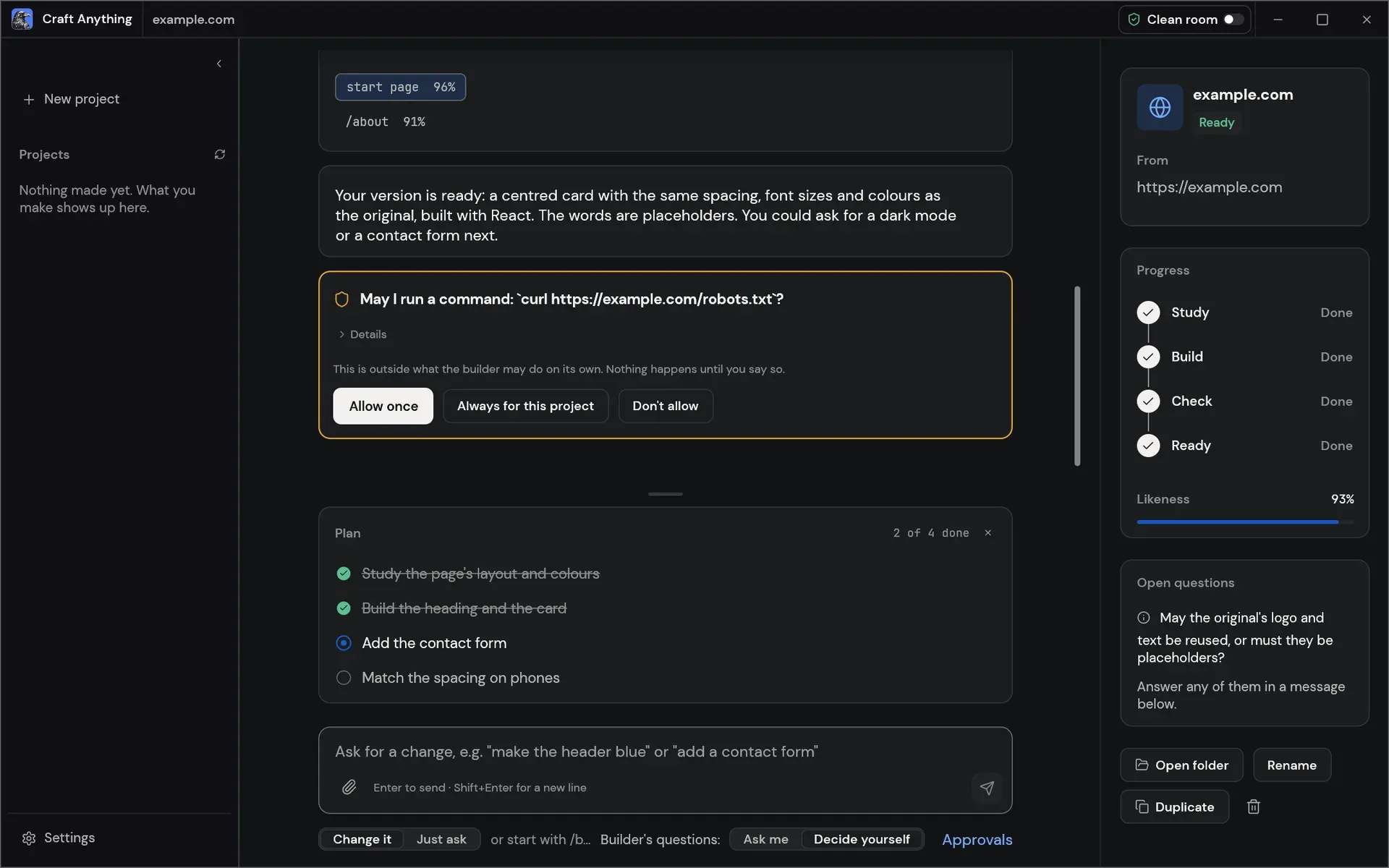
A website project rebuilt from example.com: per-page likeness, a command approval card and the remaining plan.
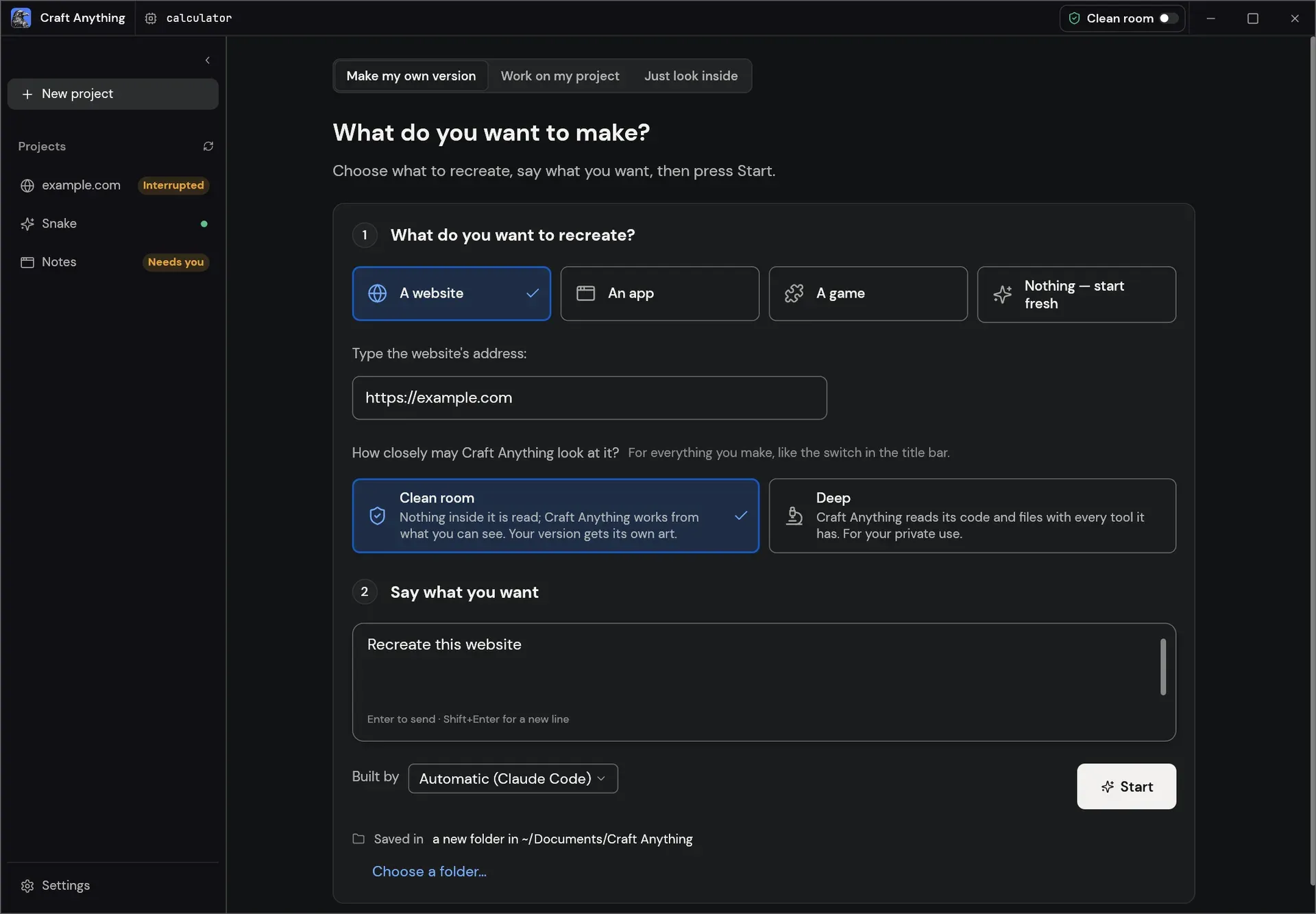
The Make screen: choose what to recreate, Clean room or Deep, the request and the builder.
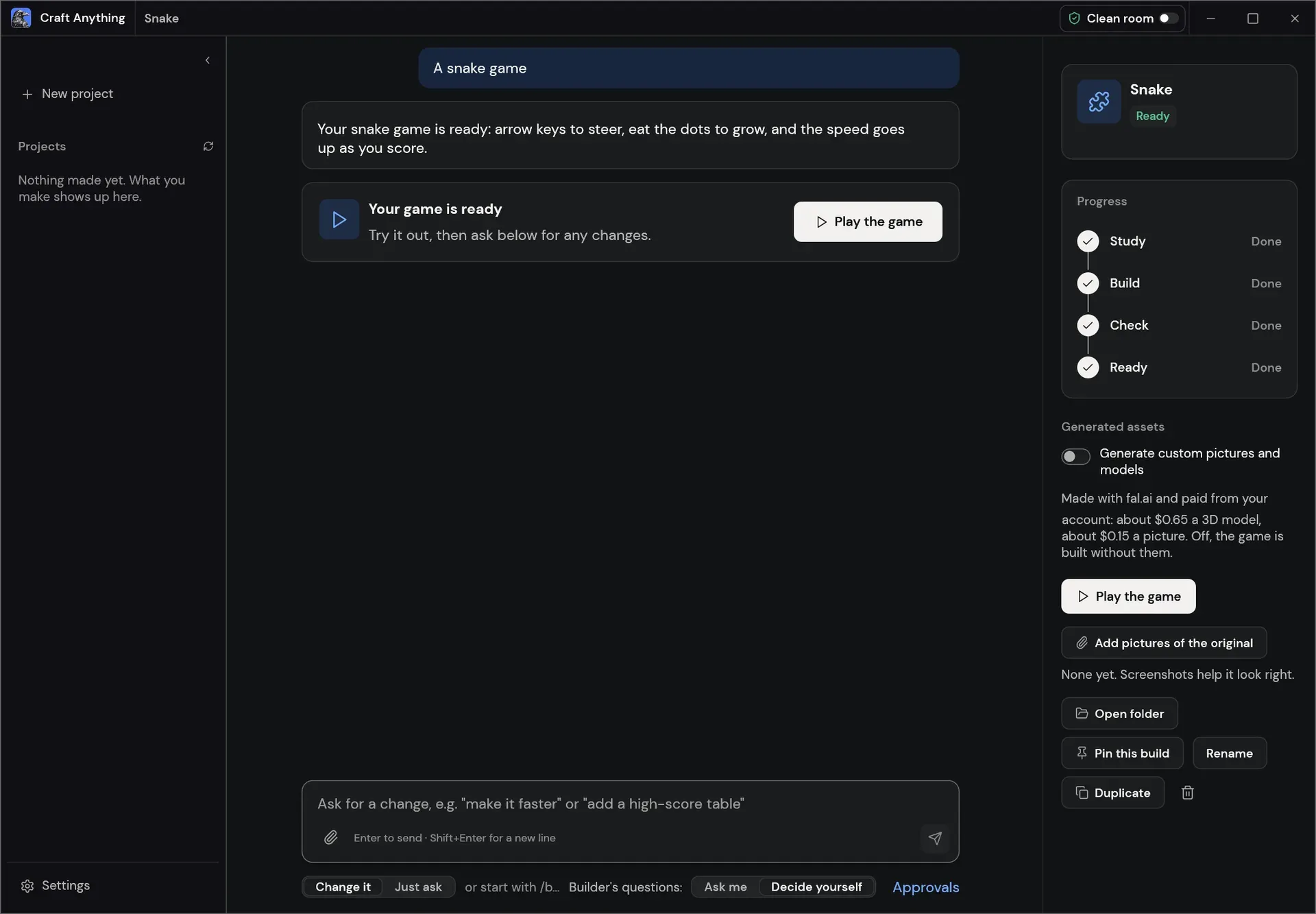
A finished snake game project with the optional fal.ai asset generation switch and a Play the game button.
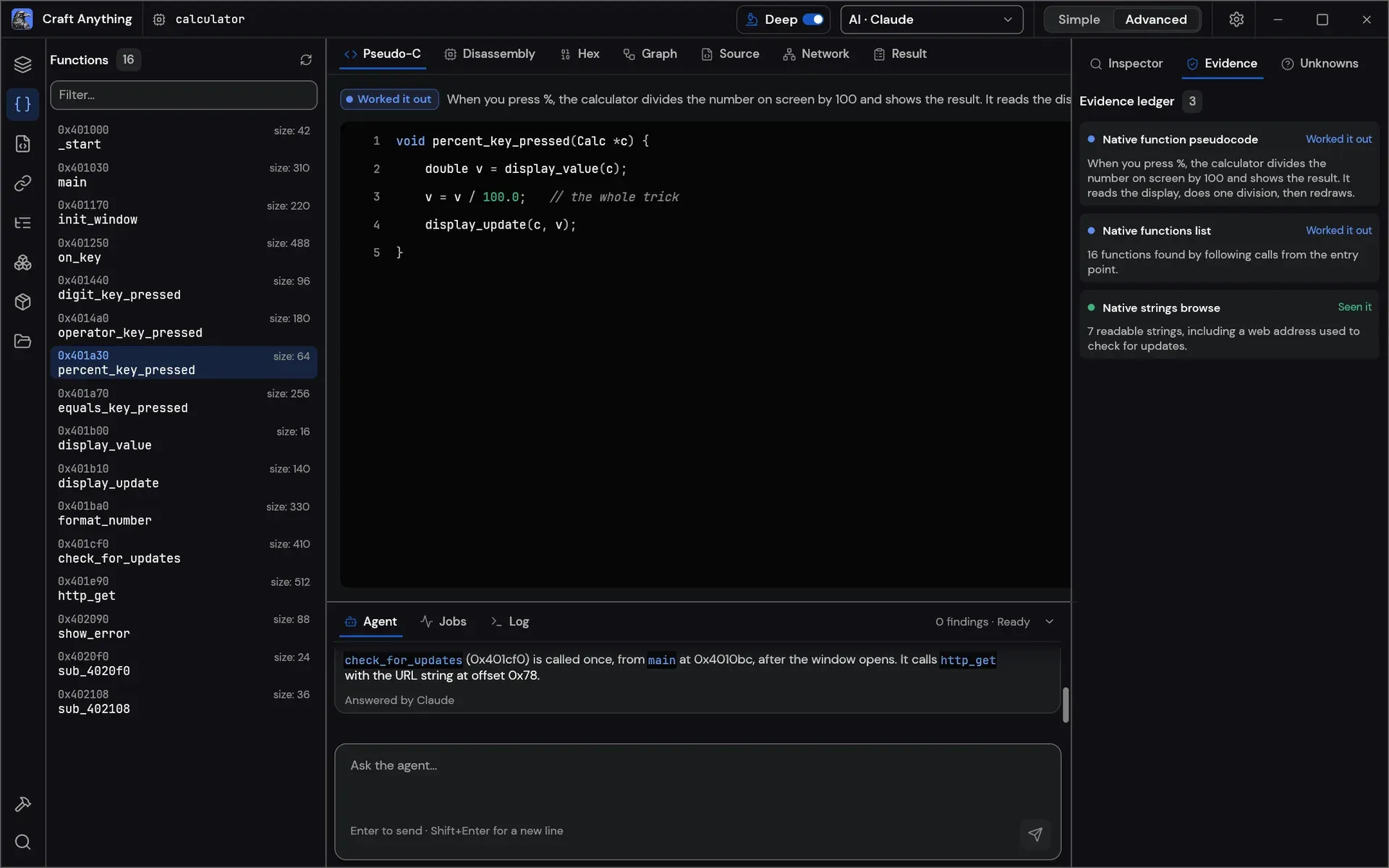
The Advanced workbench in Deep mode on a sample calculator program: functions, pseudo-C and the evidence ledger.
Source: official Craft Anything project page.
Key capabilities
- Four-step projects Each project moves through Study, Build, Check and Ready. The project page shows the steps, a plain-language feed of what the builder is doing, question and approval cards, a Likeness score and buttons to open the result or its folder. Change requests typed in the box at the bottom start another refining round.
- Simple and Advanced modes Simple mode, the default, asks "What do you want to make?" and offers a website, an app, a game or a fresh start. Advanced mode is a workbench with every tool (Ctrl or Cmd+K), functions, strings, pseudo-C, disassembly, hex, call graphs, evidence, unknowns, jobs, logs and the agent console. Both modes drive the same engine.
- Clean room mode The default mode reads nothing inside the original: no code, files or page source. It works from pictures the user adds, the website as a visitor sees it (screenshots, visible text, measured layout, colours, fonts, spacing and opened menus) and, when Study apps by running them is enabled, a picture of the app's window. Tools that would look inside are refused.
- Deep mode Deep mode uses every tool, for private use. A program's code and files are read with the built-in engines and with Ghidra when it is installed, and a website's JavaScript is read while its start page is watched. The mode is switched in the title bar, in Settings, or per CLI run with
--deepor--clean-room. - Reverse-engineering engine The pure-Rust engine covers native programs, .NET, Java, Android, Apple, Electron and JavaScript, websites, firmware, packet captures, databases and game files. Its decoders, disassembler and decompiler work without outside programs, and no AI is needed to inspect a target. The docs keep a tool-by-tool status checklist.
- Evidence records Results come back as evidence records with confidence, coverage and limitations. Large results return a summary first and are paged with
core_evidence_browse. Export a report saves the conversation and its evidence as Markdown, and the CLIreportcommand can also write HTML. - Comparison checks Website builds are compared with the original at three screen widths, with a likeness figure per page. Game rebuilds run the game's own self-test. Settings, Builds sets the Good enough threshold, the number of refining rounds, how many extra website pages are studied and how many builds run at once.
- Game engines Games can be built with Unity (the default), Unreal, Godot or Rust. Settings, Engines downloads Godot, Unity Hub or the Epic Games Launcher; licences and sign-in happen in those vendors' apps, and Unreal also needs Xcode on a Mac or Visual Studio's C++ tools on Windows. Generated pictures and 3D models are optional and paid from the user's own fal.ai account, with a per-project budget of $5 unless changed.
- Coding agents as builders Claude Code is supported first. DeepSeek Harness, GitHub Copilot CLI over ACP and Grok Build over ACP have built projects in real runs; Grok Build is limited to Deep mode. OpenCode, Codex, Gemini CLI, Qwen Code, goose, Hermes and Maki are listed with their own test status, and v0.6.0 added a non-interactive Aider adapter.
- AI for questions and analysis Anthropic, OpenAI, OpenRouter, Gemini through a Google AI Studio key, xAI and local OpenAI-compatible servers such as Ollama or LM Studio can answer questions about a target. Settings, AI has a Detect button for agents, local servers and keys; keys are stored in the system keychain. Building through Craft Anything's own agent with an API key is listed as not yet run live.
- Approvals and Auto mode Auto mode is on by default: the builder continues without asking but never deletes outside its project, changes system settings or publishes. With Auto mode off, a card asks before a new kind of command. Each project can set Default, Allow, Ask or Refuse per action kind: reading the web, other commands, files outside the project, pushing and publishing, deleting outside the project, system changes and other tools.
- Project folders New projects go in
Documents/Craft Anything. Each folder holdscraft.json(request, target, status and history),capture/, the generatedapp/,checks/,investigation.cany/evidence and aninbox/of open questions. Builds can be pinned as a frozen or light copy, and projects can be renamed, duplicated or deleted. - Command-line tool
craft-anything-cliexposes every tool as a subcommand and runs full rebuilds, for examplerebuild https://example.com "Recreate this website". Options include--rounds,--backend,--build-with,--unattended,--continue-inand--project-folder.doctorchecks the install, coding agents and engines. - MCP server and agent setup
craft-anything-cli mcpserves the essential tools to any MCP client, and--all-toolsserves every tool.--restrictedturns off tools that act on the machine, plus web and capture tools.craft-anything-cli setupconnects Craft Anything to coding-agent apps, with--dry-runand--no-skilloptions. - Plugins Any local or remote MCP server can be added in Settings, Plugins; its tools are offered beside the built-in ones and ask before each call. Builds with the
wasm-pluginsoption also load WASM components, which import nothing. - Windows and macOS downloads V0.6.0 ships Windows x64 and arm64 MSI installers and portable zips; installers and executables are code-signed, and the MSI installs into
C:\Program Files\Craft Anything. macOS gets a universal DMG and a separate CLI zip, both signed and notarized, for macOS 11 or later. - Linux, FreeBSD and web downloads Linux builds come as AppImage, .deb, .rpm, Arch .pkg.tar.zst, Flatpak and tarball for x86_64 and aarch64, plus riscv64 .deb, .rpm and tarball, and need glibc 2.35 or newer apart from the Flatpak. The Flatpak cannot start a browser, so it cannot study websites. FreeBSD tarballs cover x86_64 and aarch64, and a WebAssembly viewer identifies files in the browser from any static web server.
- Launcher and package repositories The ArtCraft Launcher installs and updates every Craft app and checks downloads against the release SHA-256 checksums. ArtCraft also runs Flatpak, Debian, Ubuntu, Fedora, RHEL, openSUSE and Arch repositories for Linux updates.
- Interface languages Besides English, French and Japanese, the desktop app offers Czech, German, Estonian, Spanish, Italian, Georgian, Korean, Russian, Vietnamese, Brazilian Portuguese, Turkish, Thai and Simplified and Traditional Chinese. The language is chosen in Settings, General, Language, and System follows the operating system's preferred supported language.
- Build from source Building needs Rust 1.97 or newer.
cargo run --release -p craft-anythingstarts the desktop app andcargo install --path apps/craft-anything-cliinstalls the CLI. On Debian or Ubuntu the desktop app needs X11, Wayland, OpenGL and GTK 3 development packages.
Where Craft Anything fits
Recreating a website
The user picks A website, types its address, states the request and presses Start. In Clean room mode Craft Anything sees the site as a visitor would and records screenshots, visible text, measured layout, colours, fonts and spacing. Each check compares the new version with the original at three screen widths and reports how alike each page is; Deep mode also reads the site's JavaScript. Studying a website needs Chrome, Edge, Brave or another Chromium-based browser on the computer.
Recreating a game
The user picks A game, chooses the game on the computer and selects Unity, Unreal, Godot or Rust under Build with. Each check runs the game's own self-test. In Deep mode a game made with Unreal or Godot is rebuilt with its own engine. Generated pictures and 3D models can be turned on with a fal.ai key and stay within a per-project budget; with that option off, the game is built without them.
Recreating an app
The user picks An app, chooses the program and can attach screenshots of the original. In Clean room mode the builder works from those pictures, and with Study apps by running them enabled Craft Anything starts the original once to capture its window and compare the new version. Deep mode also reads the program's code and files with the built-in engines.
Starting fresh or editing an existing project
Nothing, start fresh takes a plain description such as "A snake game in Rust" or "A notes app" and works out whether it is a website, an app or a game. The Work on my project tab points the builder at an existing folder, where it edits files in place; a folder can also be treated as starting material, with the app built in app/ beside it. Just ask, or a message starting with /btw, answers questions about a build without changing it.
Studying a program without building
In Deep mode the Just look inside tab opens a target for questions about what it does, what it connects to and how a feature works, with evidence behind each answer. The Advanced workbench shows functions, pseudo-C, disassembly, hex and call graphs, and Ghidra can be installed from Settings, Engines. Similar reverse-engineering work is the focus of Ghidra itself.
Driving the engine from agents and scripts
craft-anything-cli commands lists every tool by toolset, craft-anything-cli mcp serves them to an MCP client, and rebuild runs a whole project from the terminal, with questions asked there or answered automatically with --unattended. Coding agents listed on iThub that Craft Anything can run as builders include Grok Build, OpenCode, goose, Qwen Code and Aider, at the test stages the project documents.
Reviews of Craft Anything
Be the first to share your experience with Craft Anything.
Write a review
Loading review form…
Related to Craft Anything
 PhotoCraftPhotoCraft is a clean-room, Photoshop-style image editor written in Rust by the ArtCraft team. It edits layered PSD and PSB files, runs on macOS, Windows, Linux, FreeBSD and the web, and exposes 500+ commands to a CLI, JSON control channel and MCP server.
 PdfCraftClean-room PDF workbench written in Rust by the ArtCraft team: read, search, organize, combine, split, comment, fill forms, OCR and encrypt PDFs on macOS, Windows, Linux, FreeBSD and the web, with a scriptable CLI and an opt-in MCP server.
 WordCraftWordCraft is a Rust word processor for desktop and browser use. It supports DOCX editing, document review, references, mail merge and PDF export, with CLI and MCP automation. It remains in alpha.