

What is Qwen Code?
Qwen Code is an open-source AI coding agent maintained by the Qwen Code team in the QwenLM/qwen-code repository. Started in a project directory with qwen, it reads the code base, plans a change, edits files, runs shell commands and can create Git commits. The project was originally based on Google Gemini CLI v0.8.2 and, from Qwen Code v0.1, stopped syncing with upstream to develop independently as a multi-protocol agent. The same agent is reachable from the terminal, a desktop app, a browser-based Web Shell, VS Code, Zed and JetBrains editors, and chat platforms. The official documentation covers each surface.
The recommended install is a standalone installer script, hosted on an Alibaba Cloud OSS bucket in Hangzhou, for Linux and macOS (curl) and Windows (PowerShell). It uses a self-contained archive when one exists for the platform and otherwise falls back to npm, which needs Node.js 22 or later. The CLI is also published as the npm package @qwen-code/qwen-code and as the Homebrew formula qwen-code. Each GitHub release carries archives for macOS arm64 and x64, Linux arm64 and x64 and Windows x64, a SHA256SUMS file, preview archives for an alternative OpenTUI terminal interface and a Java managed-agent server JAR. Qwen Code Desktop ships under separate desktop-v tags.
The current release is Qwen Code v0.26.9, published on November 6, 2026 with no known breaking changes. It adds Skill ZIP installation through the daemon API, the TypeScript SDK and the Web Shell, a route that enables or disables 1 to 100 user Skills in one request, OSC 7501 status reporting to terminals, image input for Llama 3.2 Vision, Llama 4, LLaVA, Pixtral and Mistral Small 3.1 and 3.2, and an 8 MiB per-session memory cap for daemon replay. Version 0.26.8, released a day earlier, added Qwen subscription sign-in across the CLI, VS Code and Desktop. Seven stable CLI releases shipped between October 28 and November 6, 2026, alongside nightly tags.
The code base is a TypeScript monorepo running on Node.js. User settings live in ~/.qwen/settings.json, project files in .qwen/, and persistent instructions in a QWEN.md file loaded at the start of every session. Editors connect through the Agent Client Protocol (ACP). qwen serve runs the agent as a long-lived daemon with an HTTP and Server-Sent Events API and the Web Shell on 127.0.0.1:4170. The desktop app is a Tauri 2 shell around that Web Shell: it starts qwen serve on an ephemeral loopback port with a per-launch bearer token. The repository is licensed under Apache-2.0.
No model is bundled. The legacy free Qwen OAuth allowance was discontinued on April 15, 2026, so the agent needs a Qwen Plus or Pro subscription from chat.qwen.ai, a QwenCloud or Alibaba Cloud Model Studio key, a third-party API key, or a custom OpenAI-, Anthropic- or Gemini-compatible endpoint such as a local Ollama, vLLM or LM Studio server. The authentication guide lists each route. Several surfaces, including the Web Shell, daemon mode, Agent Arena and the SDKs, are marked experimental in the documentation.
Qwen Code screenshots
Explore the interface. Open a screenshot to view it at full size.
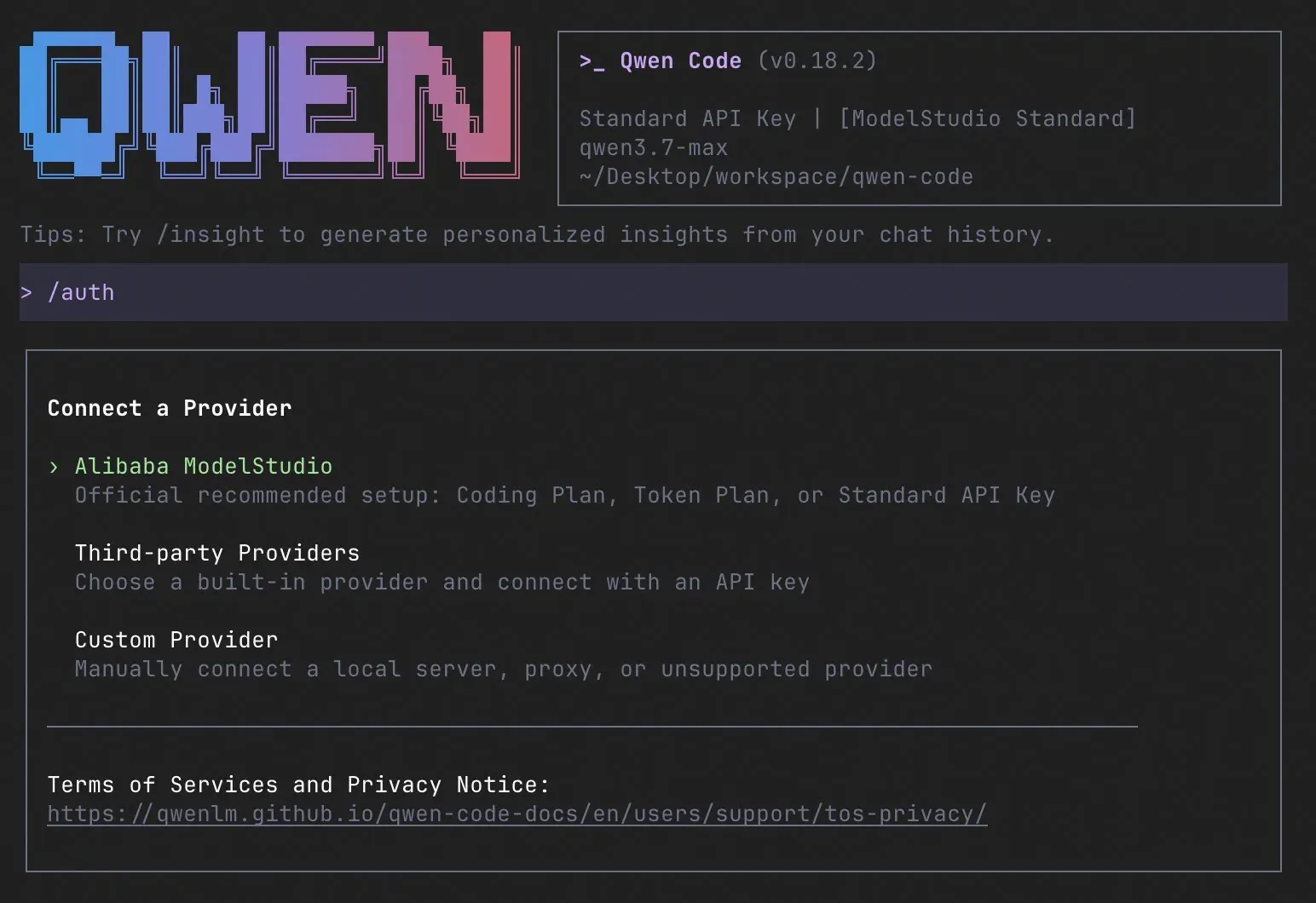
The /auth provider menu in the Qwen Code terminal UI. Official README image from v0.18.2; the current menu adds Qwen subscription and QwenCloud entries.
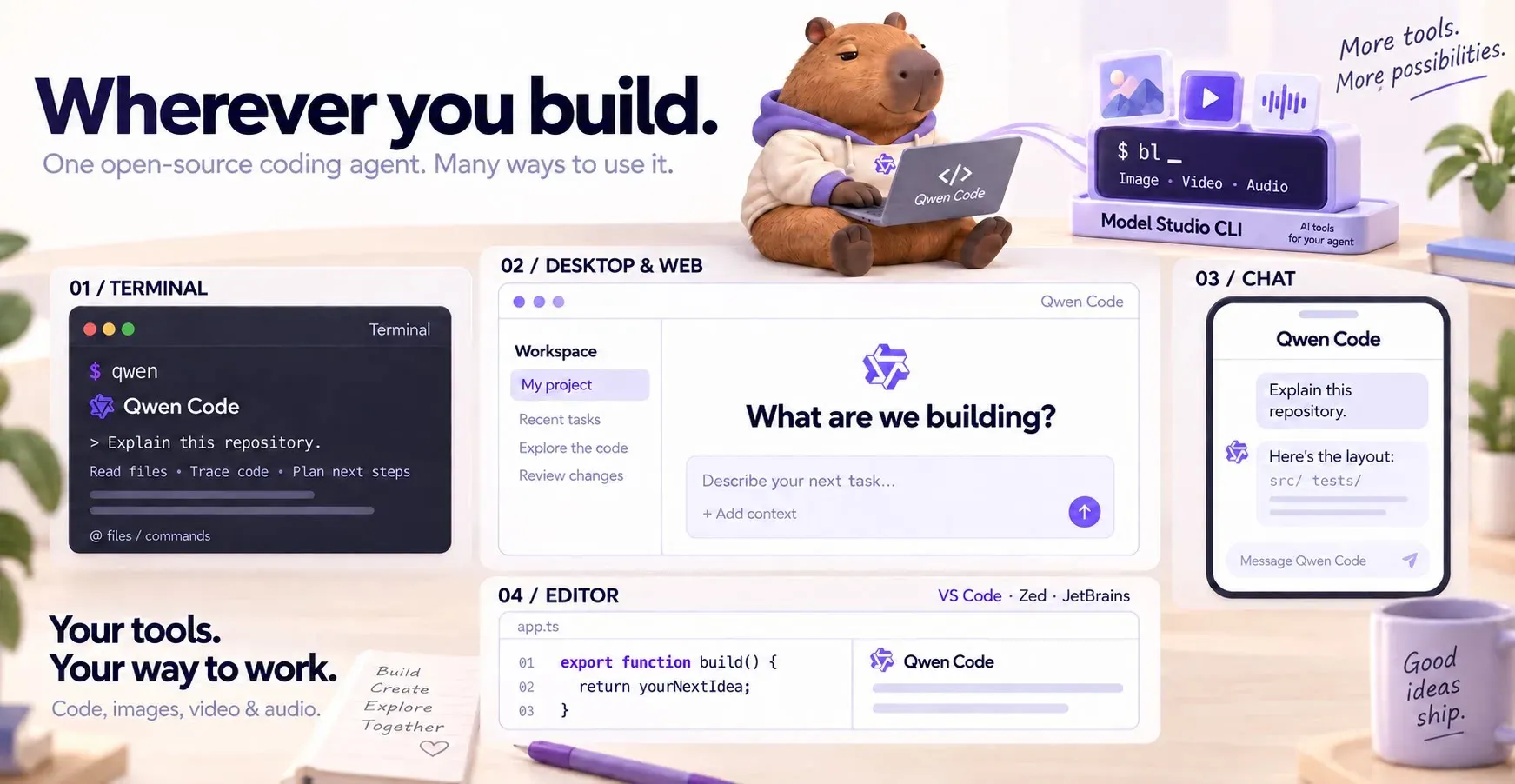
Official README illustration of the four ways to use Qwen Code: terminal, desktop and web, chat, and editor. The interface panels are stylized, not literal screenshots.
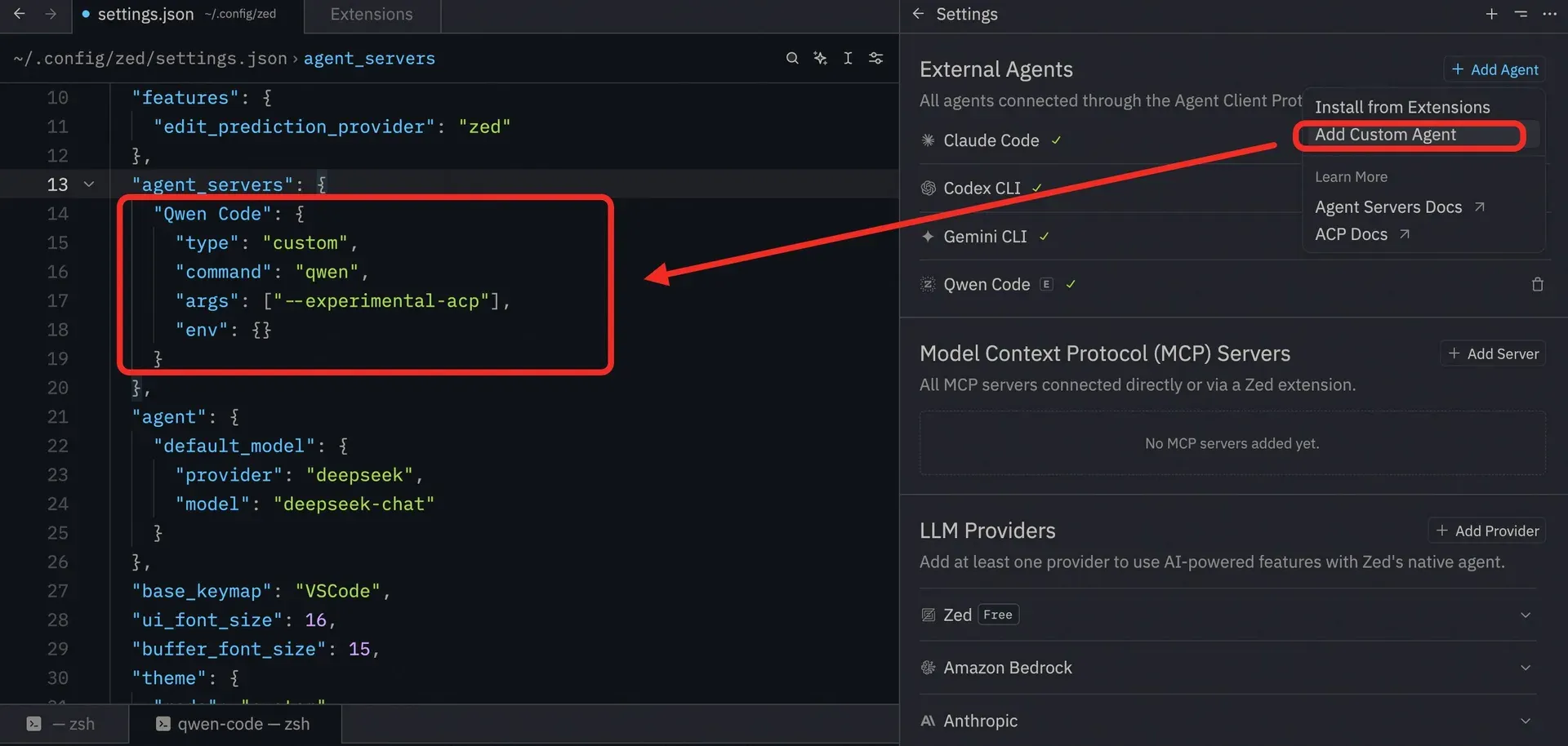
Registering Qwen Code as a custom ACP agent in Zed. Image from the official Zed integration guide.
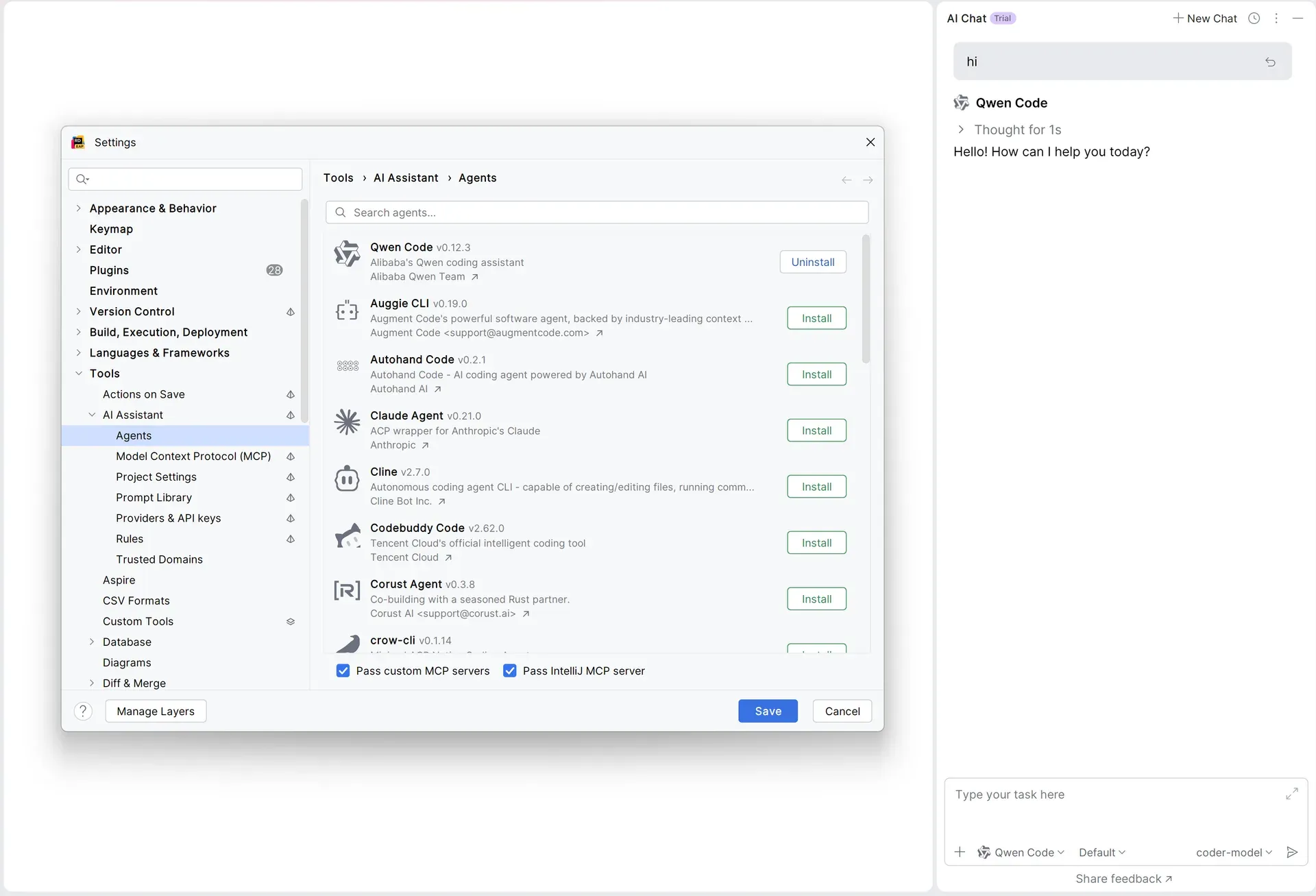
Qwen Code installed from the JetBrains AI Assistant agents list and answering in AI Chat. Image from the official JetBrains integration guide, showing an older v0.12.3 entry.
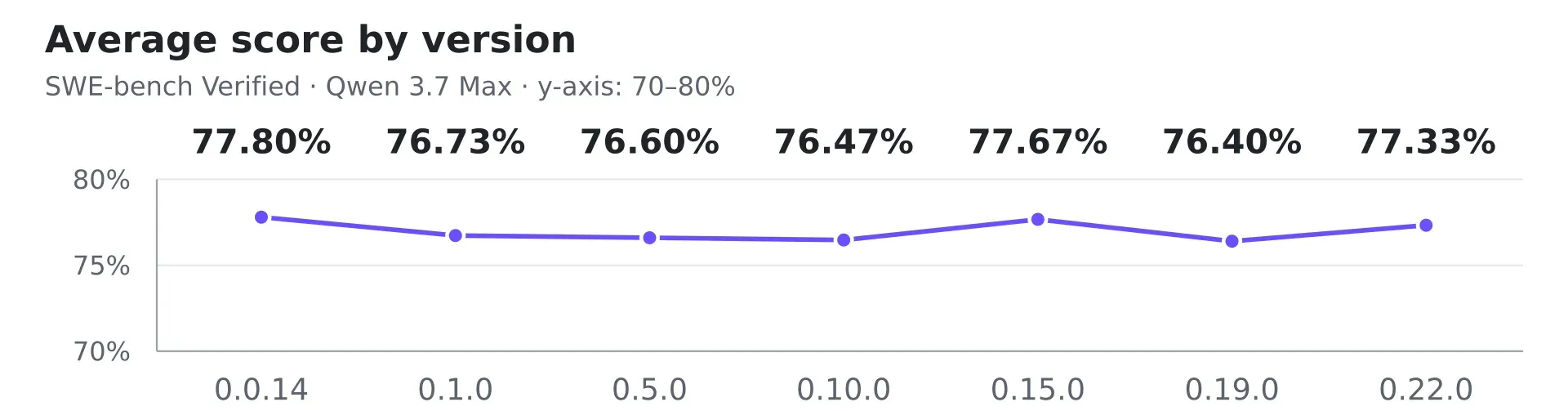
Official chart from the README: average SWE-bench Verified score per Qwen Code version with Qwen 3.7 Max, 500 tasks and three trials each.
Source: official Qwen Code project page.
Key capabilities
- Install on Linux and macOS Run
curl -fsSL https://qwen-code-assets.oss-cn-hangzhou.aliyuncs.com/installation/install-qwen-standalone.sh | bashand restart the terminal so thatqwenis on PATH. The script prefers a standalone archive and falls back to npm, which then needs Node.js 22 or later with npm on PATH. For offline installation, download a release archive and run the installer with--archive PATH, keeping SHA256SUMS next to the archive. - Install on Windows Run
irm https://qwen-code-assets.oss-cn-hangzhou.aliyuncs.com/installation/install-qwen-standalone.ps1 | iexin PowerShell, or download theqwen-code-win-x64.ziparchive from the latest GitHub release. Releases publish a Windows x64 build only for the CLI. - npm, Homebrew and release archives
npm install -g @qwen-code/qwen-code@latestinstalls the CLI on any platform with Node.js 22 or later, andbrew install qwen-codeworks on macOS and Linux. GitHub releases add per-platform tar.gz archives for macOS and Linux on arm64 and x64, plus-opentui-previewvariants that package an alternative terminal interface still in preview. - Qwen Code Desktop The desktop app is downloaded from the desktop-latest release: macOS DMGs for arm64 and x64, a Windows x64 setup executable, DEB and AppImage packages for Linux amd64 and arm64, and RPMs built for Fedora 44 and RHEL 10, with signature files and SHA256SUMS. It bundles Node.js, the
qwenCLI and the Web Shell. Settings, Daemon, Local Control can temporarily share the session with a phone on the same Wi-Fi through a QR code. - Interactive terminal agent
qwenopens the terminal UI and/authconnects a model provider./helplists commands and/doctorchecks the current configuration. Follow-up suggestions appear as ghost text that Tab accepts, and sessions are recorded per project so that they can be resumed later. - Five approval modes Plan is read-only, Ask Permissions confirms every edit and shell command, Auto-Edit approves file edits but asks before shell commands, Auto sends each tool call to an LLM classifier, and YOLO approves everything. The approval documentation names Auto as the out-of-the-box default.
/planenters and leaves Plan mode, and/approval-modeor Shift+Tab switches modes during a session. - Command sandboxing On Linux,
tools.executionSandboxconfines shell and file tools with Bubblewrap at/usr/bin/bwrap, or with a bundled Landlock helper that only reports partial enforcement and cannot close the network.qwen sandbox --verifychecks the active boundary before a task. macOS Seatbelt and Docker or Podman containers remain available for the whole CLI. The Linux execution sandbox is rejected by ACP,qwen serveand web terminals, as the sandbox guide explains. - Trusted folders Folder trust is disabled by default, which means every folder counts as trusted and a project's
.qwen/settings.json, MCP servers and hooks load without a prompt. Enabling the feature in user settings makes Qwen Code ask before it loads a new folder's configuration. - Multi-protocol model providers The
/authmenu offers a Qwen Account with Subscription, QwenCloud Token Plan or pay-as-you-go keys for China or International endpoints, Alibaba Cloud Model Studio Coding Plan, Token Plan or API keys, and built-in third-party providers such as DeepSeek, Grok, MiniMax, Z.AI, Kimi, ModelScope and OpenRouter. Custom providers use theopenai,openai-responses,anthropicorgeminiprotocol, and local Ollama, vLLM and LM Studio servers connect through an OpenAI-compatible base URL. - QWEN.md, Skills and subagents QWEN.md holds project instructions that load into every session. Skills are folders with a
SKILL.mdfile in.qwen/skills/for a project or~/.qwen/skills/for a user, and personal Skills are also read from~/.agents/skills/. Subagents are created with/agents createand stored in.qwen/agents/or~/.qwen/agents/. - MCP servers
qwen mcp add --transport http my-server http://localhost:3000/mcpregisters a Model Context Protocol server, with--scope userfor all projects and-efor environment variables. Both routes writemcpServersentries insettings.json. - Code review with /review
/reviewreviews uncommitted changes, a pull request number or URL, or a single file.--commentposts inline comments on the pull request,--fixapplies findings to the working tree and--resumecontinues an interrupted review.--effort low|medium|hightrades depth for cost: a high-effort review of a small diff can run up to 16 agents, including one that executes build and test commands. - Agent Arena
/arena --modelsruns the same task with several models, each as a full agent in its own Git worktree under~/.qwen/arena/, then lets you compare results and apply the winner. The feature is experimental and uses far more tokens than a single session. - Git worktrees
qwen --worktreestarts a session in a temporary Git worktree with a generated or explicit name, under.qwen/worktrees/, so wide-ranging edits stay out of the main checkout. Mid-session, an explicit request for a worktree makes the model move every later edit and shell command into one. - Headless mode for scripts and CI
qwen -p "task"or piped stdin runs without a UI.--output-format jsonorstream-jsonproduces machine-readable output,--continueand--resume <id>reuse project-scoped sessions stored as JSONL under~/.qwen/projects/, and--max-session-turns,--max-wall-timeand--max-tool-callsbound runaway runs with distinct exit codes 53 and 55. See the headless mode guide. - Daemon mode and Web Shell
qwen serve --openstarts the daemon onhttp://127.0.0.1:4170and opens the Web Shell with chat, diffs, commit history, tool calls and permission prompts, whileqwen daemon start,status,logsandstopmanage it in the background. Loopback binds start without bearer authentication;--require-authwithQWEN_SERVER_TOKENprotects shared hosts, and non-loopback binds generate a token when none is supplied. - SDKs for TypeScript, Python and Java
npm install @qwen-code/sdkrequires Node.js 22 and has bundled the CLI since v0.1.1.pip install qwen-code-sdkrequires Python 3.10 and an installedqwenCLI, and speaks the stream-json protocol. The Java SDKcom.alibaba:qwencode-sdk0.1.0-alpha requires Java 11 and talks toqwen serveor to the legacy stdio interface. - VS Code, Zed and JetBrains The Qwen Code Companion extension, in beta, needs VS Code 1.96.0 or later and adds a sidebar with auto-accept edits, file mentions, history and parallel sessions. Zed and JetBrains IDEs connect to the CLI as an external ACP agent, as documented in the Zed integration guide.
- Chat channels
qwen channel startconnects one ACP agent process to Telegram, WeChat, QQ, DingTalk, WeCom, Feishu, GitHub or an IMAP and SMTP mailbox configured underchannelsinsettings.json. Each channel sets its own working directory, model and user allowlist. - GitHub Action
qwen-code-actionreviews pull requests, triages issues and answers mentions such as@qwencoder /reviewin issues and pull requests./setup-githubin the CLI installs the example workflows, and the documented setup stores an Alibaba Cloud API key as theQWEN_API_KEYrepository secret.
Where Qwen Code fits
Getting oriented in an unfamiliar repository
Commit or stash local work, run qwen in the project root and connect a provider with /auth. Start in Plan mode with /plan so the first exploration is read-only, ask for the structure and entry points, then switch to Ask Permissions for the first change. Record build and test commands in QWEN.md so later sessions start with the same context. Check every diff before accepting it, and run /doctor when the provider or settings look wrong.
Choosing a model provider or a local model
Decide first where code context may go. A Qwen Plus or Pro subscription suits individual interactive use, while CI and unattended containers need an API-key route because the subscription sign-in is a browser flow. For QwenCloud, pick China or International explicitly, since that choice sets the endpoint. To keep prompts on your own hardware, point an openai provider at a local Ollama, vLLM or LM Studio base URL as described in the model providers reference, and test tool calling and image input with the exact model before rolling it out.
Running Qwen Code in CI and scripts
Use qwen -p with --output-format json and parse the final result with a tool such as jq, or stream-json for event-level progress. Store the API key as a CI secret, pin the CLI version, and set --max-session-turns, --max-wall-time or --max-tool-calls so a failing task stops with a known exit code. Avoid YOLO on shared runners unless the job runs in an isolated container, and keep .qwen/ out of version control as the GitHub Action guide recommends.
Reviewing pull requests
Run /review 123 for a pull request or plain /review for uncommitted changes. Use --effort low for a quick unverified pass and the default high effort for pull requests that matter, keeping in mind that high effort fans out into many model calls and runs build and test commands. Add --comment only after checking the findings locally. For repository-wide automation, the GitHub Action reacts to @qwencoder /review comments, and its output should be treated as review input confirmed by tests.
Confining commands on Linux workstations
Install Bubblewrap at /usr/bin/bwrap, then set tools.executionSandbox in user or system settings with filesystem set to workspace-write and network set to closed. Workspace settings cannot change this policy. Run qwen sandbox --verify, confirm that a write outside the workspace fails, and then run an ordinary task. Note that reads remain broad, MCP, hooks and worktree management are disabled in this mode, and the daemon and ACP clients reject it.
Sharing one agent through the daemon and Web Shell
Start qwen serve when browser, editor, SDK and chat clients should share sessions without each spawning a process. On a single-user laptop the loopback default is convenient, but any local process can then run code as the daemon user, so set a stable QWEN_SERVER_TOKEN and --require-auth on shared machines. For phone or LAN access, bind with --hostname, serve HTTPS with a locally trusted certificate and allow the browser origin, following the daemon guide.
Install
curl -fsSL https://qwen-code-assets.oss-cn-hangzhou.aliyuncs.com/installation/install-qwen-standalone.sh | bashReviews of Qwen Code
Be the first to share your experience with Qwen Code.
Write a review
Loading review form…
Alternatives to Qwen Code
 Codex CLIOpen-source Rust CLI from OpenAI that reads a repository, edits files and runs local commands inside a sandbox with approval prompts. Includes code review, MCP, skills, codex exec for CI, a TypeScript SDK and an app-server.OOpenCodeOpenCode is an open-source AI coding agent available through a command-line interface and a beta desktop app. It provides separate agents for development work and read-only code exploration.
 ClineApache-2.0 coding agent from Cline Bot Inc. that edits files, runs commands and uses MCP tools with per-action approval. Ships as a VS Code extension, JetBrains plugin, npm CLI, desktop app and TypeScript SDK, with BYOK or Cline-billed models.