

What is PhotoCraft?
PhotoCraft is an open-source raster image editor written entirely in Rust. The project README describes it as a clean-room reimplementation of the Adobe Photoshop workflow, built from public specifications and observed behaviour without proprietary code, shaders or assets. It provides layers, masks, adjustment layers, layer styles, type, vector shapes, a brush engine and filters, and it opens and saves layered PSD and PSB documents. The project states that it is not affiliated with Adobe.
The editor is made by the ArtCraft team and is one of the free Crafting Apps listed on getartcraft.com, alongside sister projects such as VectorCraft, FilmCraft and LightCraft. The repository was created in September 2026. The code is dual-licensed under MIT or Apache-2.0 at the user's option; the ArtCraft name and logos are trademarks that are excluded from that license, and bundled fonts and assets keep their own licenses.
The README labels PhotoCraft as early alpha and states that it is not yet a Photoshop replacement for daily professional work. The listed gaps are AI and generative features, 15 missing tools, typography depth, professional workflows and plug-in compatibility. Every Photoshop menu item is wired to a command, and the project notes that this measures wiring rather than behaviour; the roadmap and a parity assessment describe the status per area.
Releases are frequent: 0.19.0 appeared on November 1, 2026 and the latest, v0.22.0, on November 9, 2026. Its notes list over 200 changes, including a Path mode for the Shape tools, a Group filter in the Layers panel, a contextual task bar for Crop, new interface languages (Thai, Hebrew, Urdu, Tamil, Azerbaijani, Romanian and Korean), decoding of Canon sRAW and mRAW CR2 files, slice export in Save for Web, Japanese paper sizes for printing, and performance work on PSD compression and colour conversion.
Internally, PhotoCraft has a pure-data document model and a command engine split across 24 crates, with a thin egui interface on top. A CPU compositor serves as the reference and a wgpu compositor (Metal, Vulkan, DX12, WebGPU) draws the canvas on the GPU; documents are stored as 256 by 256 copy-on-write tiles. The project reports more than 1,700 tests, including PSD round trips against the psd-tools and ag-psd corpora. Similar editors on iThub include GIMP, Krita and Graphite.
PhotoCraft screenshots
Explore the interface. Open a screenshot to view it at full size.
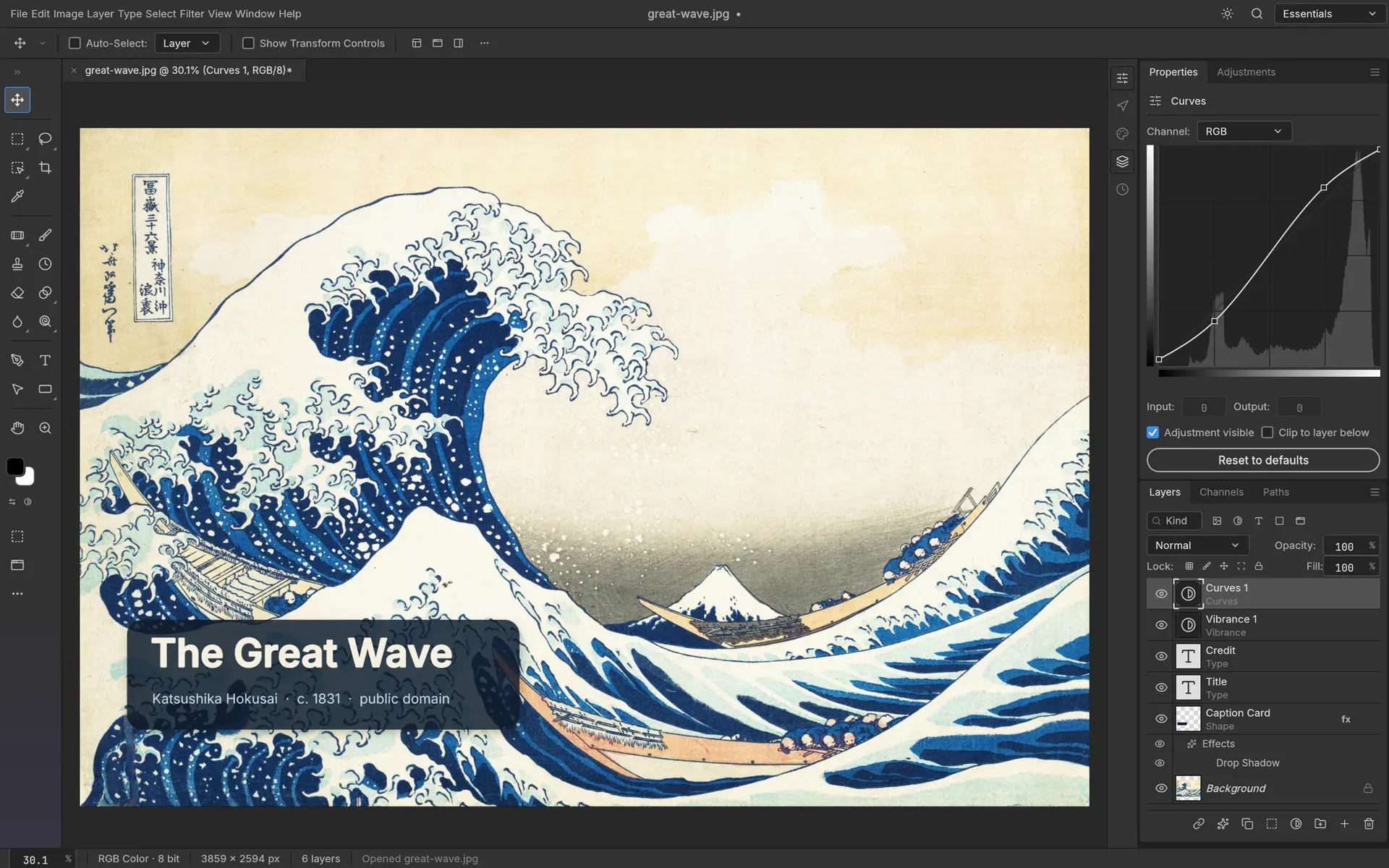
PhotoCraft with Curves and Vibrance adjustment layers, type layers and a caption card with a drop shadow.
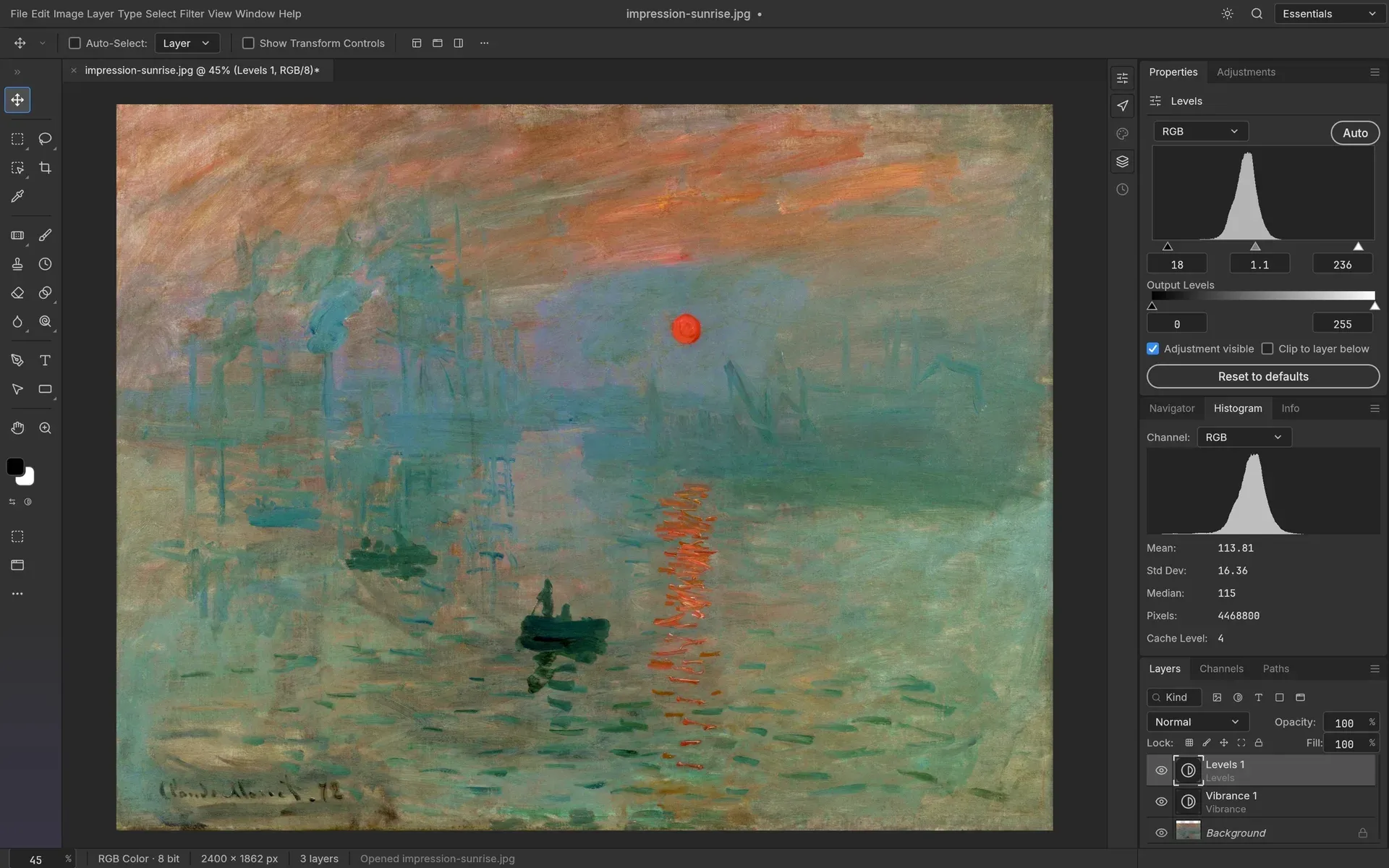
Levels and Vibrance adjustment layers with the Histogram panel showing mean, standard deviation and median.
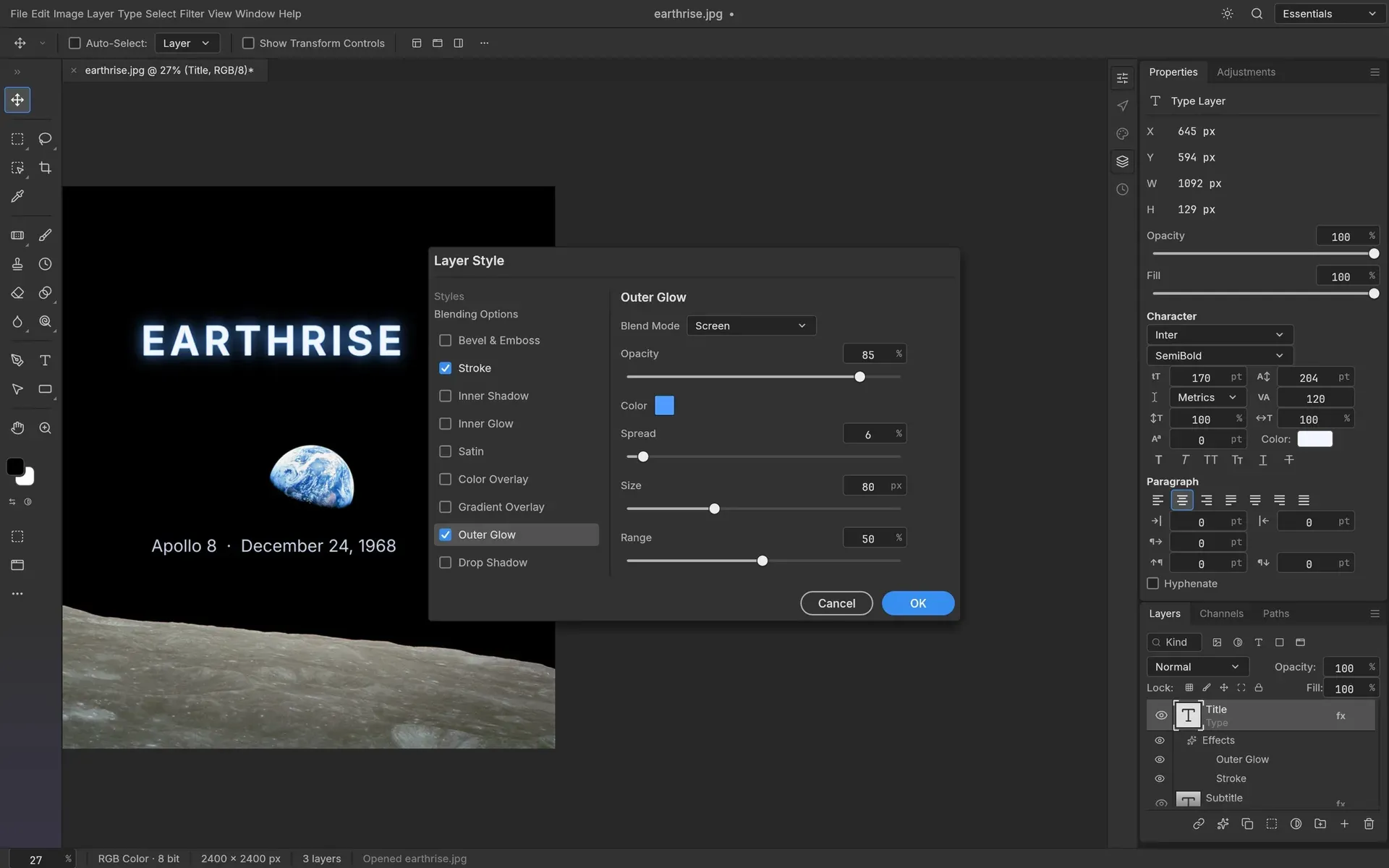
The Layer Style dialog with Outer Glow and Stroke on an editable type layer, with Character and Paragraph controls.
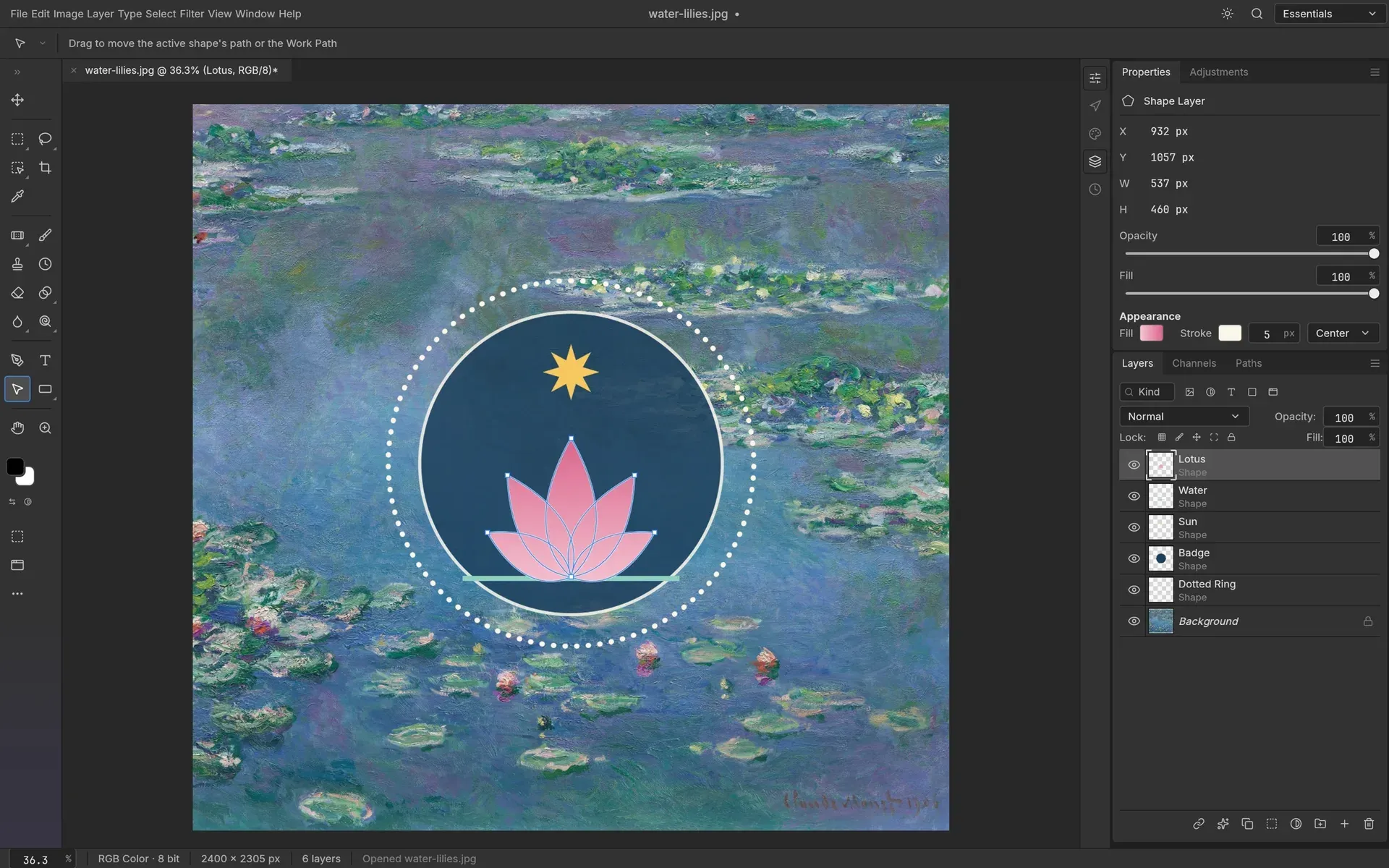
A badge built from shape layers with a gradient-filled lotus path selected for editing.
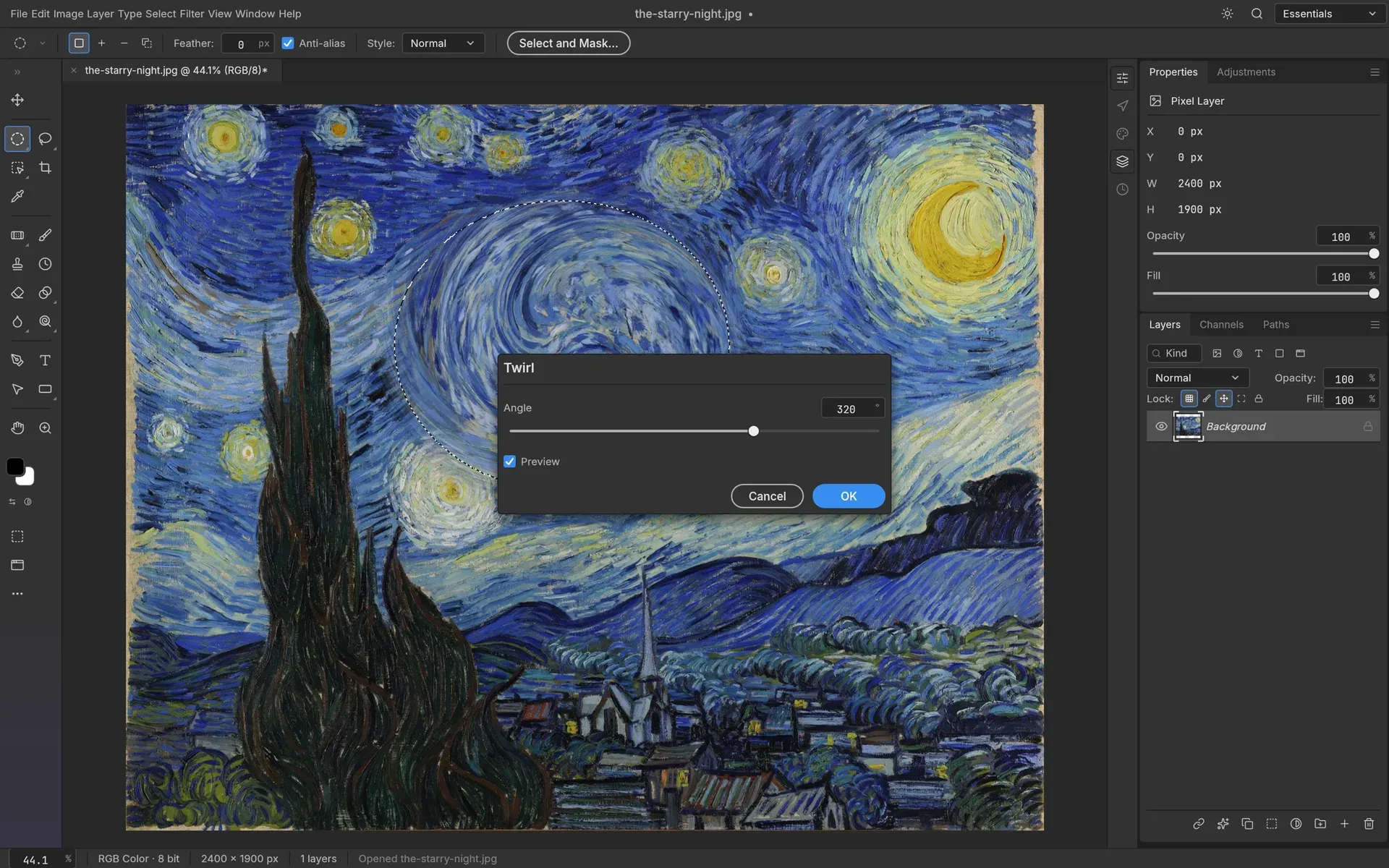
The Twirl filter previewing live on the canvas, limited to an elliptical selection.
Source: official PhotoCraft project page.
Key capabilities
- Layers and masks Groups, clipping masks, pixel and vector masks, fill layers (solid, gradient, pattern), smart objects with smart filters, alpha channels and Quick Mask are supported. The README lists 27 Photoshop blend modes plus six Paint.NET variants, layer locks, colour labels, a layer kind filter, merge, flatten and rasterize.
- Adjustment layers Sixteen adjustment types, including Curves with per-channel editing, Levels with a live histogram, Vibrance, Hue/Saturation, Black and White, Channel Mixer, Gradient Map, Selective Color and Color Lookup with .cube, .3dl and .look files. The same adjustments can also be applied directly to pixels, together with Shadows/Highlights, Replace Color, Match Color and HDR Toning.
- Layer styles Drop Shadow, Inner Shadow, Outer and Inner Glow, Bevel and Emboss, Satin, Stroke and Color, Gradient and Pattern Overlay can be applied to any layer, including type. Patterns can be defined from a selection or imported and exported as
.patfiles, and styles stored in PSD files are read. - Selections Marquee, lasso, Magnetic Lasso and Magic Wand tools sit next to Quick Selection, Object Selection, Select Subject and Select and Mask. The README states that smart selection runs locally, without a cloud service or account. Selections can become layer masks, paths or shapes.
- Type and vectors Point and paragraph text is edited on the canvas with Character and Paragraph controls and stays editable in PSD round trips. Shape layers come from Rectangle, Ellipse, Polygon, Star, Line and the Pen, Freeform Pen and Curvature Pen tools, with gradient fills, dashed strokes and path operations.
- Brush engine and 69 tools Brushes support shape dynamics, scattering, texture, dual brush, colour dynamics, wet edges and smoothing driven by pen pressure, tilt and rotation. The tool set includes healing, clone, content-aware move, dodge and burn, crop, perspective crop, slices and measurement tools.
- Filters with live preview Blur filters (including Tilt-Shift, Iris, Field, Spin and Path blur), sharpening, Reduce Noise, distortions such as Twirl, Wave and Displace, Pixelate, Stylize and Render filters preview on the canvas through the active selection. Filters run on a smart object stay editable.
- Colour modes and colour management RGB, Grayscale, CMYK and Lab documents are supported at 8, 16 and 32 bits per channel. ICC colour management is implemented in Rust, with Assign and Convert to Profile, four rendering intents, black point compensation, soft proofing and a gamut warning drawn on the GPU.
- PSD and PSB support A standalone PSD crate written from Adobe's public specification opens and saves layered documents, including PSB, 16-bit, 32-bit, CMYK and Lab files. The project reports that re-saving keeps the render for 307 of 309 files in the psd-tools test set, while noting that re-saved files are not byte-identical to their source.
- Other file formats Layered TIFF, OpenRaster and the native
.pcraftformat are read and written; Paint.NET PDN, GIMP XCF, Krita .kra and Affinity documents are read-only imports. Flat formats include PNG, JPEG, WebP, GIF, BMP, TGA, OpenEXR, Radiance HDR and FITS. HEIC is read-only, AVIF is write-only with an optional build feature, and JPEG XL is not supported. - Command-line interface
photocraft-cli runopens a file, applies commands with JSON parameters and writes the result, andphotocraft-cli batchapplies an action list to a folder of images. The development guide documents the headless CLI, which is also bundled in the Linux AppImage and shipped as a signed macOS zip. - MCP server and control channel
photocraft-cli mcpstarts an MCP server on stdio, headless or bridged to the running app. The desktop app also offers a JSON control channel that listens on loopback only and requires a 256-bit token on each connection, as described in the control protocol documentation. All of these interfaces call the same registry of 500+ commands as the menus. - History and actions Full history, Toggle Last State and the History Brush allow undo down to single strokes. Actions can be recorded and replayed, and a command palette searches all commands.
- Desktop downloads Each GitHub release attaches a signed and notarized universal DMG for macOS, code-signed MSI installers and portable zips for Windows x64, arm64 and x86, and Linux AppImage, Flatpak, .deb, .rpm, Arch package and tarball builds for x86_64 and aarch64, plus RISC-V builds and FreeBSD tarballs. A
SHA256SUMS.txtfile lists checksums, and the website offers an ArtCraft Launcher that installs and updates the Crafting Apps. - Web build and self-hosting The engine and interface compile to WebAssembly, and each release includes a static site zip that runs in a modern browser on any static web server. A community-maintained Dockerfile builds the web version and serves it with NGINX on port 8080; HTTPS enables WebGPU and browser clipboard APIs.
- Building from source The source builds with
cargo run --release -p photocraft; the website lists Rust 1.90 or newer. Japanese UI and Type fonts come from an optional craft-fonts input, and release builds always include it.
Where PhotoCraft fits
Editing layered Photoshop documents
PSD and PSB files open with their layers, masks, adjustment layers, type and layer styles, can be edited and are saved back as PSD. Elements that PhotoCraft does not model yet, such as unknown blocks and descriptors, are carried over rather than dropped. The README lists the corpus results and the cases where the render of a re-saved file differs.
Non-destructive photo correction
Levels, Curves, Vibrance and other adjustment layers are stacked above the original pixels, masked to an area with a selection and switched on or off at any time. The Histogram panel shows mean, standard deviation and median values while adjustments are edited.
Batch processing from the command line
A recorded or hand-written action list in JSON is applied to every image in a folder with photocraft-cli batch, and single files are processed with photocraft-cli run and a sequence of --cmd steps. Since 0.22.0, Batch reports which files failed.
Driving the editor from an AI agent
An agent connects to photocraft-cli mcp over stdio and calls the same commands that the menus and tools use. For inspection of the running desktop app, the authenticated loopback control channel exposes UI state, pointer events for tools and offscreen screenshots; the project states that the images in its README were rendered this way.
Running the editor in a browser
The WebAssembly release zip is unpacked on a static web server, or the web build is produced with the Dockerfile and served from a container. The packaging documentation covers HTTPS reverse proxies, hosting under a subpath and the memory needed for the build.
Converting between editor formats
Files from GIMP (XCF), Krita (.kra), Paint.NET (PDN) and Affinity are opened as layered documents and can be saved as PSD, layered TIFF or OpenRaster for use in other editors. The codec capability matrix lists which bit depths each flat format keeps on export. Related listings on iThub include miniPaint.
Reviews of PhotoCraft
Be the first to share your experience with PhotoCraft.
Write a review
Loading review form…
Alternatives to PhotoCraft
 GIMPGIMP, the GNU Image Manipulation Program, is a free and open source cross-platform image editor for GNU/Linux, macOS and Windows with scripting and plug-ins.
 KritaKrita is a free, open source painting application for illustrators, comic artists and animators. It offers brush engines, layers, drawing assistants, frame animation and color management on Windows, macOS, Linux and Android.GGraphiteGraphite is a free, open-source vector and raster graphics engine in alpha. Its editor combines nondestructive layer-based workflows with a node graph for procedural graphics and generative design.