

What is Grok Build?
Grok Build is the terminal coding agent from SpaceXAI, the company behind the Grok models. Started with the grok command inside a project, it reads the codebase, edits files, runs shell commands, searches the web and tracks longer tasks in a full-screen terminal UI with mouse support. The same binary also runs headless for scripts and CI, and as an Agent Client Protocol (ACP) server for editors. The product page is x.ai/cli, and the online documentation starts at the Grok Build overview. The name also appears on a separate in-chat app builder in the Grok web and mobile apps; this listing covers only the terminal agent.
SpaceXAI announced an early beta on May 25, 2026 for SuperGrok and X Premium Plus subscribers, published the source on July 15, 2026 and shipped version 1.0.0 on August 7, 2026. The official changelog lists 1.0.70, dated October 23, 2026, as the latest build at the time of checking; recent releases reworked the agent dashboard, made Vim navigation a single [keys] vim setting, let worktrees reuse saved approvals from the main checkout, and changed auto mode so a shell command runs without review only when every segment matches an allowlist entry. Releases arrive several times a week, so pin a version in automation.
Prebuilt binaries are installed with curl -fsSL https://x.ai/cli/install.sh | bash on macOS, Linux and Git Bash, or irm https://x.ai/cli/install.ps1 | iex in Windows PowerShell. A WinGet package (xAI.GrokBuild) tracks the stable channel, and WSL receives the Linux binary. The installer accepts a specific version and a GROK_CHANNEL of stable, alpha or enterprise. There are no GitHub releases in the repository: binaries come from the x.ai installer.
The xai-org/grok-build repository holds the Rust source of the CLI, the TUI and the agent runtime. It is synced periodically from an internal monorepo, and a SOURCE_REV file records the monorepo commit. Building from source needs the Rust toolchain pinned in rust-toolchain.toml (1.94.0 at the time of checking), DotSlash for the hermetic protoc, and macOS or Linux as the build host; Windows builds are described as best effort. The binary is named xai-grok-pager and official installs ship it as grok. First-party code is licensed under Apache-2.0, while vendored code, including ports of openai/codex and sst/opencode tool implementations and a Mermaid diagram stack, keeps its original licenses.
The project does not accept external pull requests; the contribution policy describes the public tree as published for source transparency and local builds, and security reports go to the HackerOne program. Inference is not bundled: the default models are hosted by SpaceXAI and require a grok.com sign-in or an xAI API key, although custom models can point at OpenAI-compatible, Anthropic Messages or local Ollama endpoints.
Grok Build screenshots
Explore the interface. Open a screenshot to view it at full size.
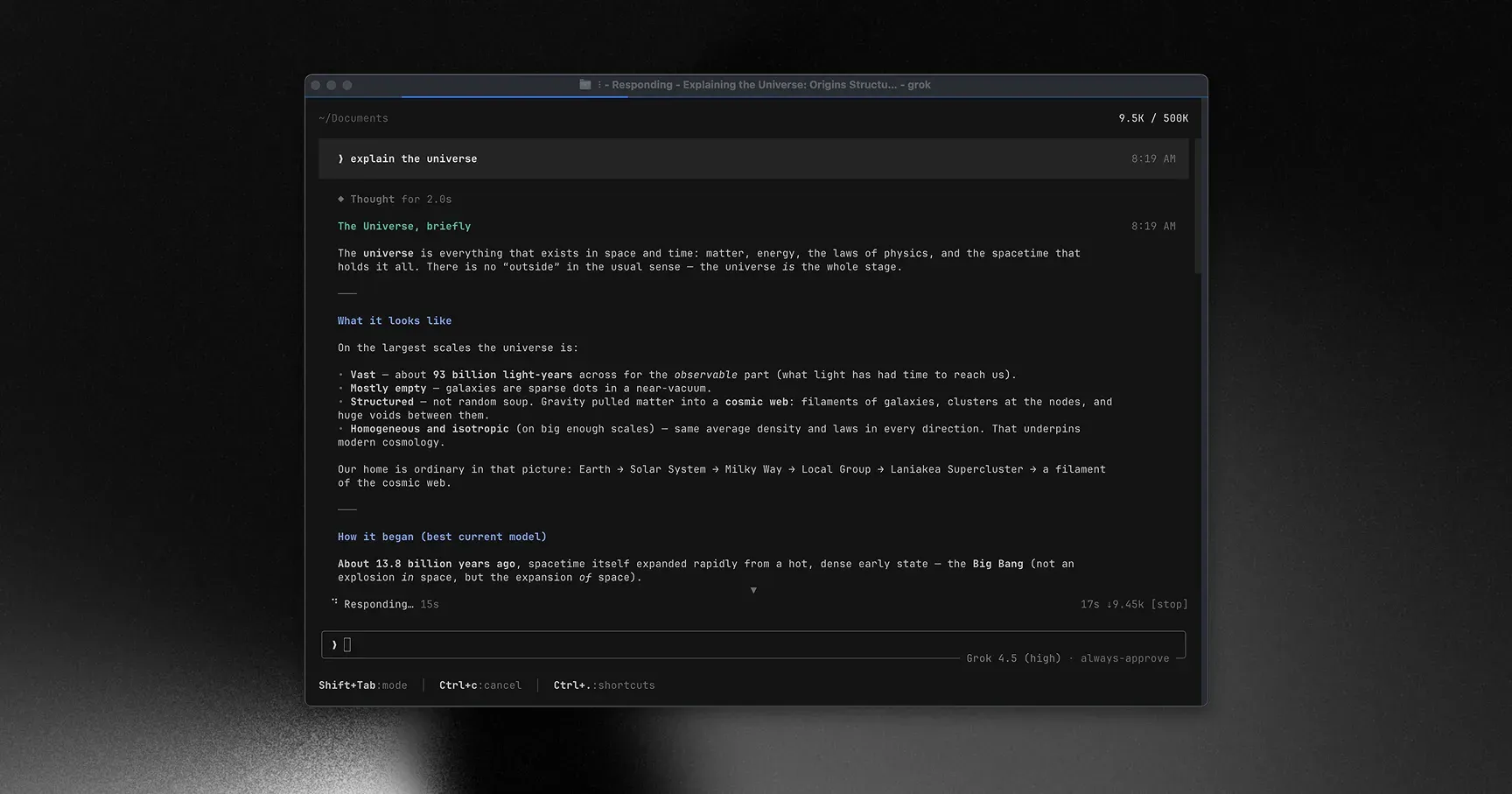
Official README screenshot of the Grok Build TUI: scrollback with a reasoning block, a streamed answer, the 500K context counter and the Grok 4.5 model indicator.
Source: official Grok Build project page.
Key capabilities
- Install on macOS and Linux Run
curl -fsSL https://x.ai/cli/install.sh | bash; ending the pipe withbash -s <version>instead installs a specific release. The script needs curl or wget and also readsGROK_CHANNEL(stable, alpha or enterprise) andGROK_BIN_DIR. Rungrok --versionto confirm the install andgrok updateto move to the latest build. - Install on Windows The PowerShell installer (
irm https://x.ai/cli/install.ps1 | iex) adds%USERPROFILE%\.grok\binto the user PATH, and$env:GROK_VERSIONpins a version. Git Bash and MSYS2 can use the bash script, and WSL gets the Linux binary. A WinGet install is updated withwinget upgrade --id xAI.GrokBuild -e; on that installgrok updateonly prints the command, and new releases can take a few days to reach the WinGet channel. - Build from source
cargo build -p xai-grok-pager-bin --releaseproducestarget/release/xai-grok-pager. DotSlash must be on the PATH before the first build, and the rootCargo.tomlis generated, so per-crate manifests are the place for local changes. The SpaceXAI open-source announcement describes a local-first setup: compile the binary, point it at your own inference and configure everything inconfig.toml. - Full-screen terminal UI The TUI splits into a scrollback with prompts, collapsible reasoning blocks, inline diffs and tool output, and a prompt area at the bottom.
@attaches files or line ranges through a fuzzy picker that respects.gitignore, and@!searches hidden files. Vim-style navigation, themes, a configurable status line and an experimental--minimalscrollback-native mode are documented in the user guide. - Built-in tools The agent reads and edits files with line-precise search and replace, searches with ripgrep, lists directories, runs terminal commands, searches and fetches web pages, keeps a task list, spawns subagents and searches its memory. Everything else is added through MCP servers. Read-only tools and a fixed list of read-only shell commands run without a prompt in every mode unless a deny rule or hook blocks them.
- Permission modes and rules The default ask mode prompts before shell commands and edits; auto mode checks calls with a classifier and asks only for what it will not allow;
dontAskruns only pre-approved tools; always-approve (--yolo,Ctrl+O) skips ordinary prompts. Allow, ask and deny rules merge from global, project and personal scopes with deny taking precedence, and administrators can lock always-approve off. The permissions guide lists the matching rules and dangerous-command handling. - OS-level sandbox Sandbox mode is off by default. The
workspace,read-only,strictanddevboxprofiles use Landlock on Linux (kernel 5.13 or later) and Seatbelt on macOS, applied to the whole process at startup and fixed for the life of a session. Child-process network blocking works only on Linux through seccomp. If a built-in profile cannot be applied, Grok warns and continues without enforcement, while a custom profile with a deny list refuses to start instead. - Environment variable filtering A
[shell_environment_policy]table controls which variables commands inherit: all, a core set such asPATHandHOME, or none, with default exclusion of names matching*KEY*,*SECRET*and*TOKEN*. The default leaves the environment unchanged until you configure a policy. - Headless mode for scripts and CI
grok -p "prompt"runs one task and exits, with plain, json, streaming-json or streaming-messages-json output. Flags restrict built-in tools (--tools,--disallowed-tools), cap turns (--max-turns) and add allow or deny rules; exit codes distinguish success, errors, SIGINT and SIGTERM. The JSON output includes a session ID for follow-up calls with--resume. - ACP agent server for editors
grok agent stdiospeaks Agent Client Protocol JSON-RPC over stdin and stdout for clients such as Zed, Neovim and Emacs, andgrok agent serve --bind 127.0.0.1:2419 --secret <token>exposes a WebSocket server. Sessions, streamed replies, tool updates and permission prompts travel over the protocol, as described in the agent mode guide. - Plan mode and questions Plan mode blocks edits until you approve a written plan; you can approve, comment on individual steps or rewrite it, and
--permission-mode planstarts a session there. For ambiguous tasks the agent can ask multiple-choice questions whose answers feed the plan. - Subagents, worktrees and the agent dashboard Subagents run in parallel with their own context windows and can be launched in separate git worktrees.
grok -wor--worktree=<name>starts a session in a new worktree, optionally based on another ref.grok dashboardorCtrl+\shows every top-level session grouped by state, with peek, reply, stop and dispatch actions. - Skills, plugins, hooks and MCP Skills use the SKILL.md format and can be captured from a session with
/skillify. Plugins bundle skills, commands, agents, hooks and MCP servers and install from marketplaces, including self-hosted git repositories with organization controls. Hooks run commands or HTTP callbacks before and after tool use; since 1.0.64, untrusted folders run only managed hooks from your organization. - Compatibility with other agents Grok Build reads
AGENTS.md,CLAUDE.mdand rules under.claude/rules/and.cursor/rules/, plus skills, commands and MCP servers from Claude Code and Cursor locations./import-claudepreviews and copies permissions, environment variables, MCP servers and hooks into the Grok config, andgrok inspectlists every discovered source. - Custom and local models Default models are hosted by SpaceXAI; the repository guide names
grok-4.5as the default for new sessions, while the product page says Grok Build is powered by Grok 4.7.[model.*]entries add endpoints using the OpenAI Chat Completions (default), OpenAI Responses or Anthropic Messages protocol, with examples for Ollama on localhost, Amazon Bedrock and Together AI. A model withoutcontext_windowis treated as 200,000 tokens. See the custom models guide. - Sessions and memory Sessions are saved under
~/.grok/sessions/and can be resumed, continued, forked, rewound or compacted. Memory keeps notes on conventions, decisions and project facts in aMEMORY.mdindex of topics that later sessions read, managed with/memory,/flushand/dream. - Authentication options The default is a browser sign-in through SpaceXAI OAuth, with tokens stored in
~/.grok/auth.jsonwith owner-only permissions. Alternatives are a device-code flow for remote machines, anXAI_API_KEYfrom the xAI console, enterprise OIDC with PKCE against an IdP such as Okta, Azure AD or Auth0, and an external auth provider command. - Telemetry controls and external OpenTelemetry Product telemetry, session trace upload and coding-data sharing are separate settings:
[features] telemetryorGROK_TELEMETRY_ENABLED,[telemetry] trace_upload, and the coding data row that/privacyopens. Since 1.0.65 any value ofDISABLE_TELEMETRYorDISABLE_ERROR_REPORTINGturns them off. A separate opt-in stream sends a content-free usage schema to your own OTLP collector.
Where Grok Build fits
Fixing a failing test in an existing repository
Start grok in the repository root, or pass --cwd to point at a subproject in a large monorepo so discovery of AGENTS.md, skills and git history stays small. Attach the failing test file with @, describe the failure and keep the default ask mode for the first sessions so every shell command and edit is visible. Review each inline diff before approving, then confirm the test run in the scrollback rather than relying on the agent summary. A short AGENTS.md with the right build and test commands prevents the agent from guessing them.
Reviewing untrusted or third-party code
Launch with grok --sandbox strict or read-only to limit writes to the working directory, session files and temp directories. On Linux these profiles also block child-process network; on macOS they do not, so treat network isolation as Linux-only. Add a custom profile with a deny list for .env files or **/*.pem when secrets live near the code, and check the startup output for a warning that the sandbox could not be applied. The sandbox guide lists what each profile covers.
Running the agent in CI
Authenticate with XAI_API_KEY or the device-code flow, then call grok -p with --output-format json, an explicit tool allowlist and --max-turns. Prefer deny rules and a narrow --tools list over --yolo alone, and handle exit codes 1, 130 and 143 in the pipeline. Pin the CLI version through the installer argument so a new build does not change behavior between runs, and capture RUST_LOG=debug output when a job needs diagnosis.
Using Grok Build from an editor
Configure the editor's ACP client to start grok agent stdio. Decide whether the session should prompt for permissions or start with always-approve; with always-approve, deny rules and hooks remain the only stop points. For a remote client, the WebSocket server needs a bind address and a shared secret; keep it on a loopback or private interface. Check that tool updates, reasoning streams and permission prompts appear in the editor as expected before relying on it.
Running parallel work across worktrees
Start sessions with grok -w so each task gets its own git worktree, then follow them from grok dashboard. Worktree creation copies tracked files, and since 1.0.68 it reports files that could not be copied and fails cleanly on low disk space. Remember that worktrees reuse saved always-allow approvals from the main checkout unless [features] worktree_inherits_main_approvals = false is set. Merge results through normal review rather than letting several agents push to the same branch.
Moving from Claude Code, Cursor or Codex
Run grok inspect in a repository to see which rules files, skills, MCP servers and hooks were picked up from CLAUDE.md, .claude/, .cursor/ and AGENTS.md. Use /import-claude to copy selected settings into .grok configuration, and disable individual compatibility sources in [compat.claude] or [compat.cursor] when they should not apply. Re-test hooks that matched tool names, because most run unchanged but not all behaviors are identical.
Install
curl -fsSL https://x.ai/cli/install.sh | bashReviews of Grok Build
Be the first to share your experience with Grok Build.
Write a review
Loading review form…
Alternatives to Grok Build
 Codex CLIOpen-source Rust CLI from OpenAI that reads a repository, edits files and runs local commands inside a sandbox with approval prompts. Includes code review, MCP, skills, codex exec for CI, a TypeScript SDK and an app-server.OOpenCodeOpenCode is an open-source AI coding agent available through a command-line interface and a beta desktop app. It provides separate agents for development work and read-only code exploration.
 Qwen CodeApache-2.0 coding agent from the QwenLM team that edits files and runs commands from your terminal. Works with Qwen subscriptions, OpenAI, Anthropic, Gemini or local models, and adds a desktop app, daemon, SDKs, IDE and chat integrations.