

What is PdfCraft?
PdfCraft is an open-source PDF reader and editor written from scratch in Rust. It opens, renders and searches PDFs and edits them at page and document level: organizing pages, combining, extracting and splitting files, comments, form filling, OCR, passwords and document properties. The same engine is available in a native desktop app, a WebAssembly build for the browser, a command-line tool named pdfcraft-cli, an opt-in MCP server for AI agents and a Rust API. The project page is getartcraft.com/apps/pdfcraft and the source is at github.com/storytold/pdfcraft.
PdfCraft is one of the Crafting Apps from the ArtCraft team, a set of free, open-source creative tools each written in Rust (others include PhotoCraft, VectorCraft, WordCraft and FilmCraft). It is dual-licensed under MIT or Apache-2.0 at the user's option; bundled fonts, icons and images keep their own open licenses, and the ArtCraft name and logos are trademarks that forks must remove. According to the README, the Windows MSIs and executables are signed through Azure Trusted Signing with a certificate issued to Learning Machines Inc (Atlanta, Georgia, US), and the macOS app and CLI are signed with a Learning Machines LLC Developer ID and notarized.
The README describes the project as alpha and gives its own status as of October 2026: 57% of the features tracked in its parity document and 94% of core essentials exist in some form. Listed as working are viewing and search, page organization, most comment types, form filling and authoring with sandboxed JavaScript, passwords, redaction and sanitizing, basic digital signatures, printing, an Accessibility Checker and agent control. Listed as thin or missing are reliable editing of existing text (especially CJK and right-to-left), OCR beyond Latin script, office document import and export, Preflight and PDF/X/UA, printing from the web build and full XFA forms. Pages are currently drawn by the hayro crate while the project's own renderer is built.
Releases ship frequently. The latest, v0.20.0 (November 9, 2026), includes Copy with formatting as HTML, an opt-in window.pdfcraft page command API in the web build, OCR in the browser through Web Workers with SIMD, a dry-run preview for batch processing, validation state on signed appearances, ruled tables in Word export, Crop pages in the quick toolbar, regex-based redaction marks, Thai text editing and line breaking, copy and paste of page objects between documents, and file-backed Windows printing. Its assets include MSI installers and portable zips for Windows x64 and ARM64, a universal macOS DMG, Linux AppImage, Flatpak, deb, rpm, Arch package and tarballs for x86_64 and aarch64, RISC-V packages, FreeBSD tarballs, CLI archives, a web zip and signed SHA-256 checksums.
The code is a Cargo workspace of focused crates layered so the core never depends on the UI, including pdfcraft-cos for the object layer, pdfcraft-crypt for the security handler, pdfcraft-render, pdfcraft-forms, pdfcraft-annot, pdfcraft-engine, pdfcraft-automation and the egui-based interface. The README calls it a clean-room implementation based on ISO 32000 and black-box observation, and reports that 963 of the 983 pdf.js test files open and render cleanly with 0 crashes and that 958 succeed in open, edit and save round trips. Building requires Rust 1.95 or later. Other PDF tools on iThub include Stirling PDF, qpdf and SumatraPDF.
PdfCraft screenshots
Explore the interface. Open a screenshot to view it at full size.
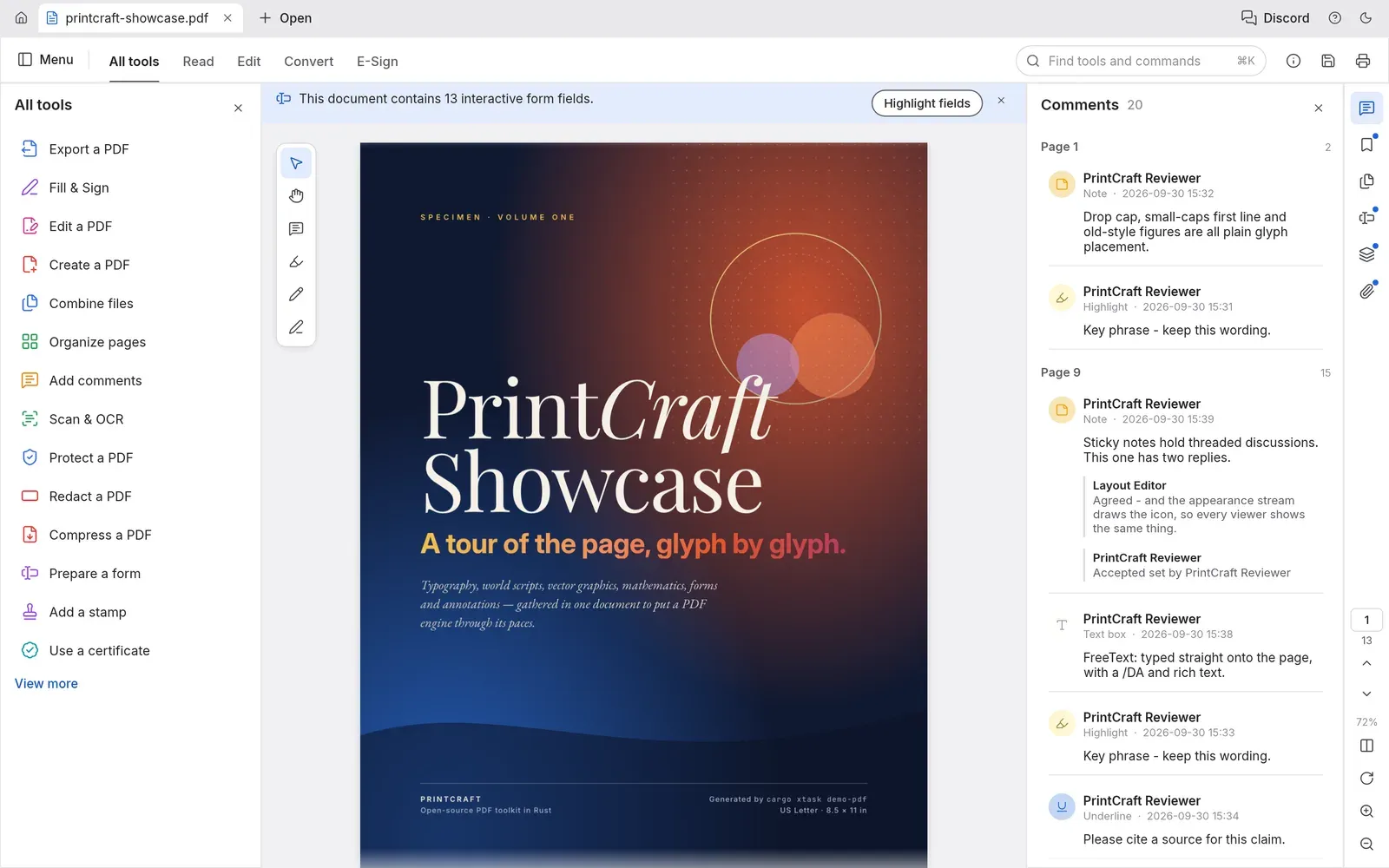
Official README screenshot: the 13-page showcase PDF open with the All tools panel and the Comments panel.
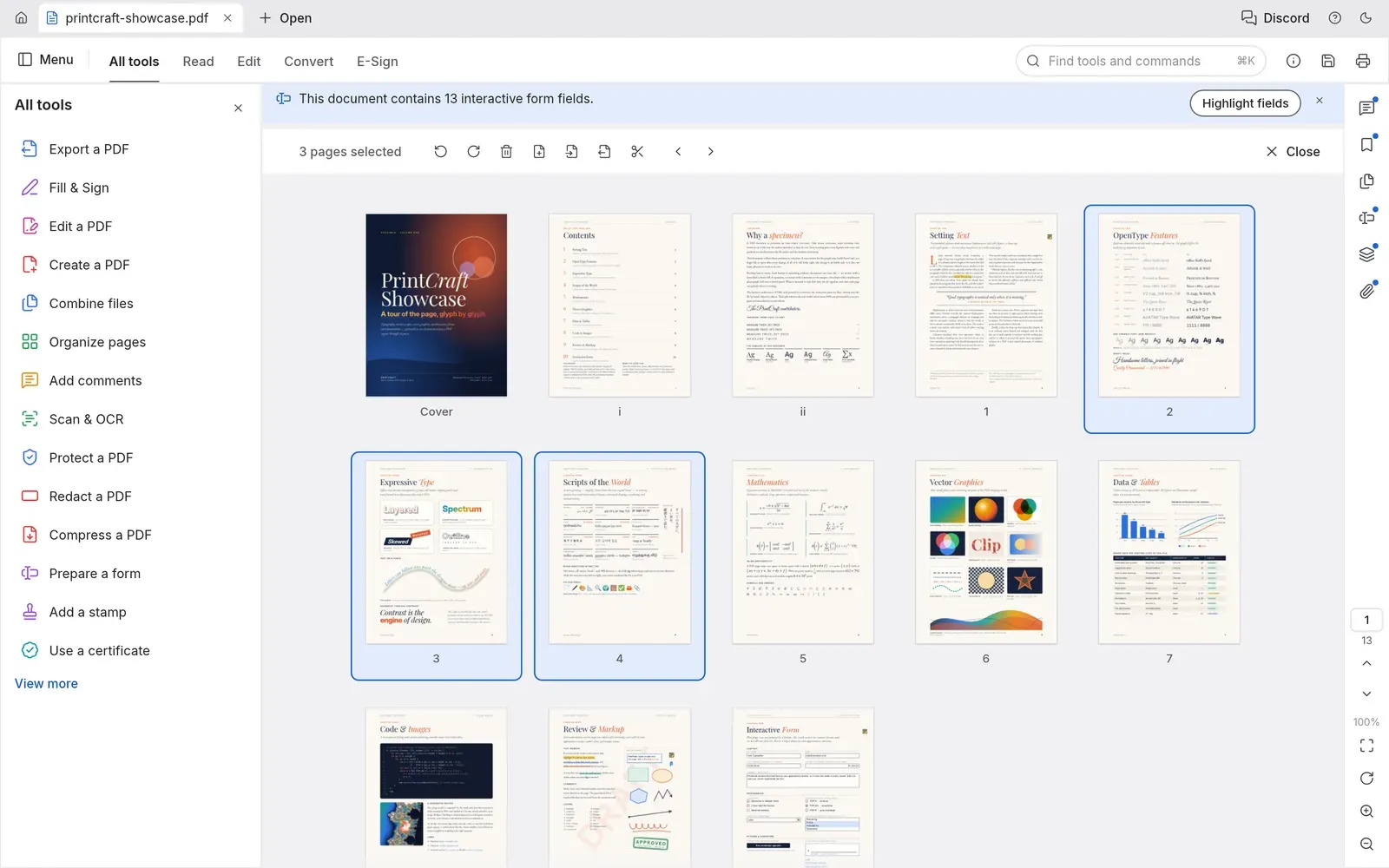
Official README screenshot of Organize pages with three pages selected and rotate, delete, insert and split tools in the toolbar.
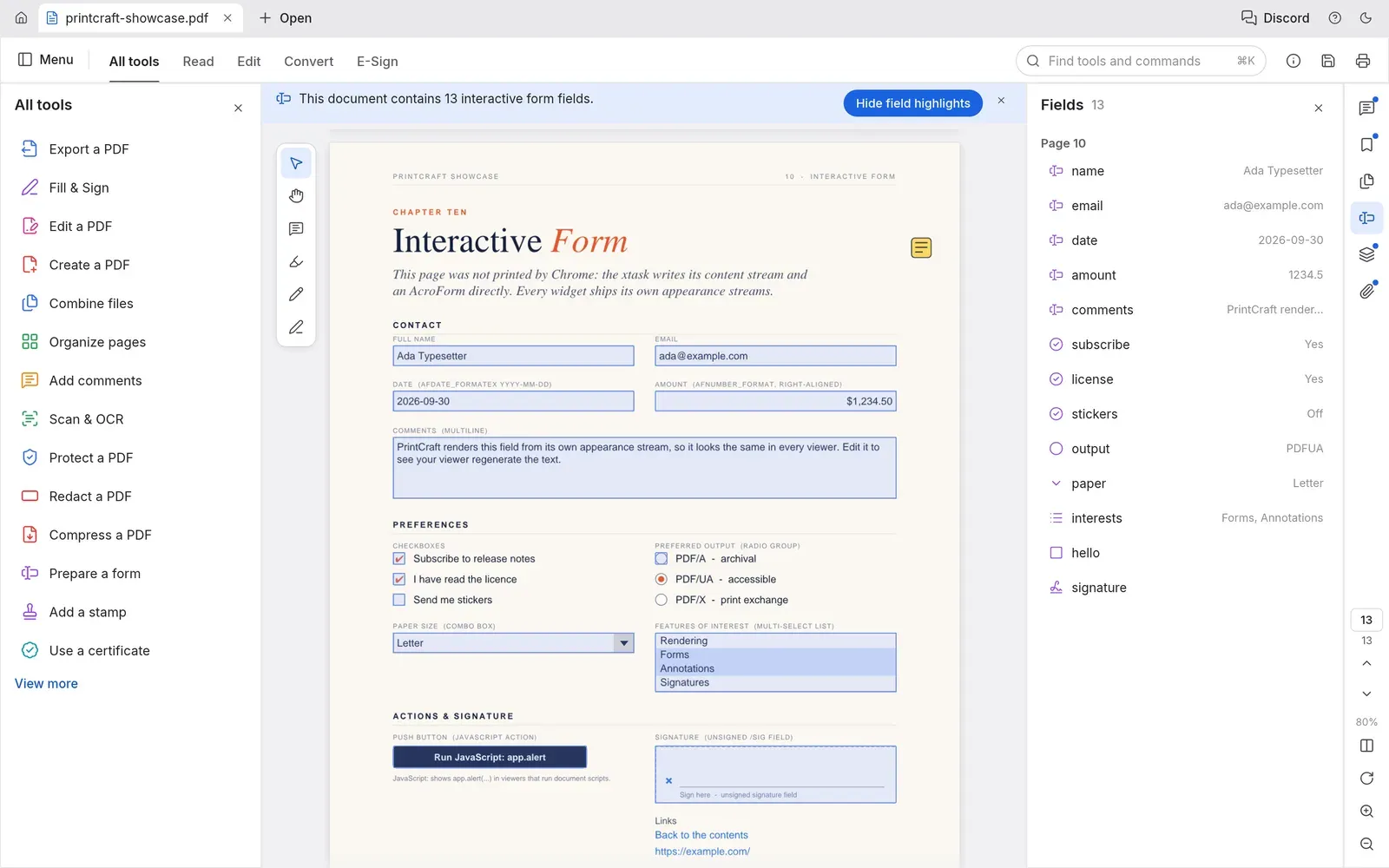
Official README screenshot of an interactive form with field highlighting and the Fields panel showing each value.
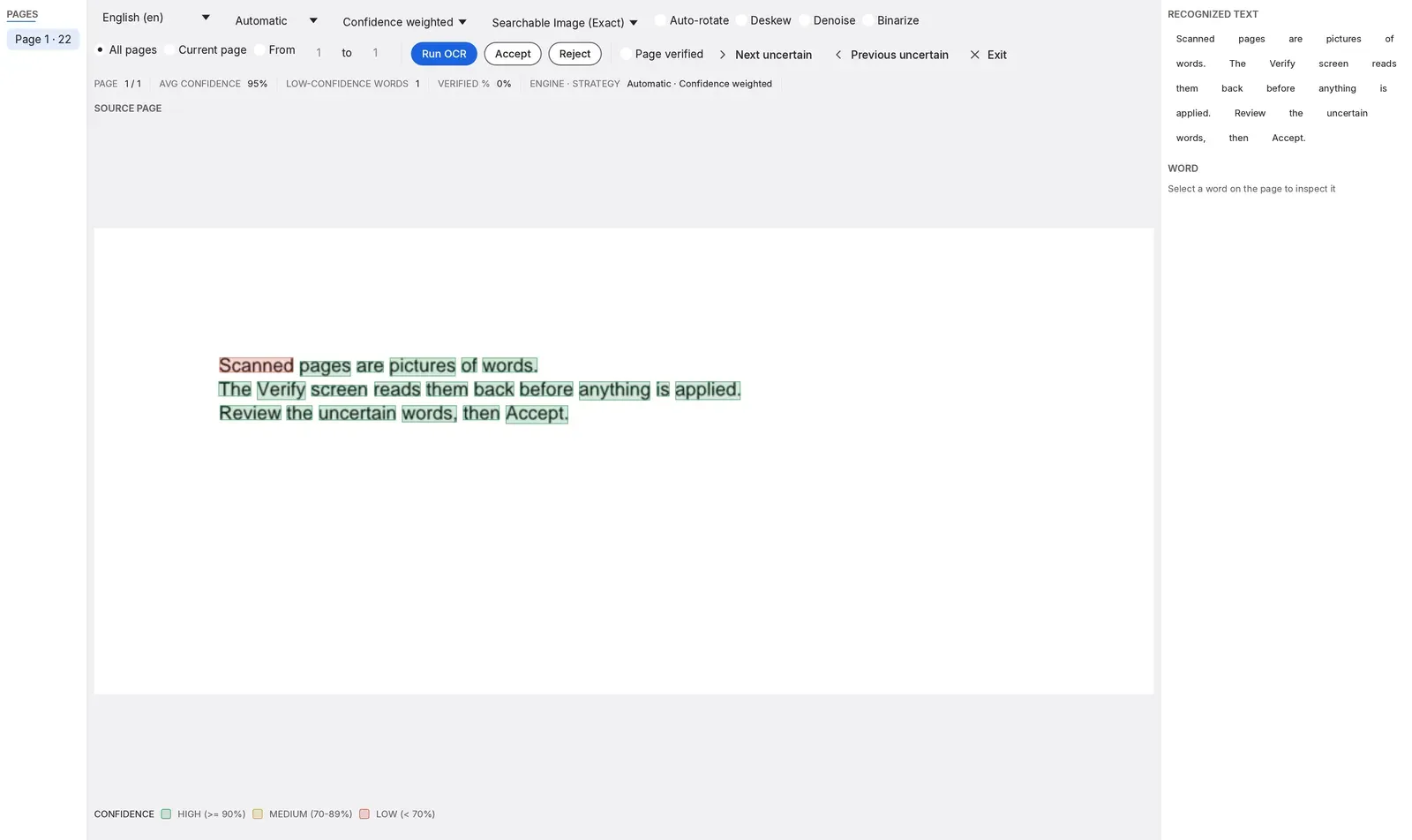
Official README screenshot of the OCR Verify screen, where recognized words are reviewed by confidence before they are applied.
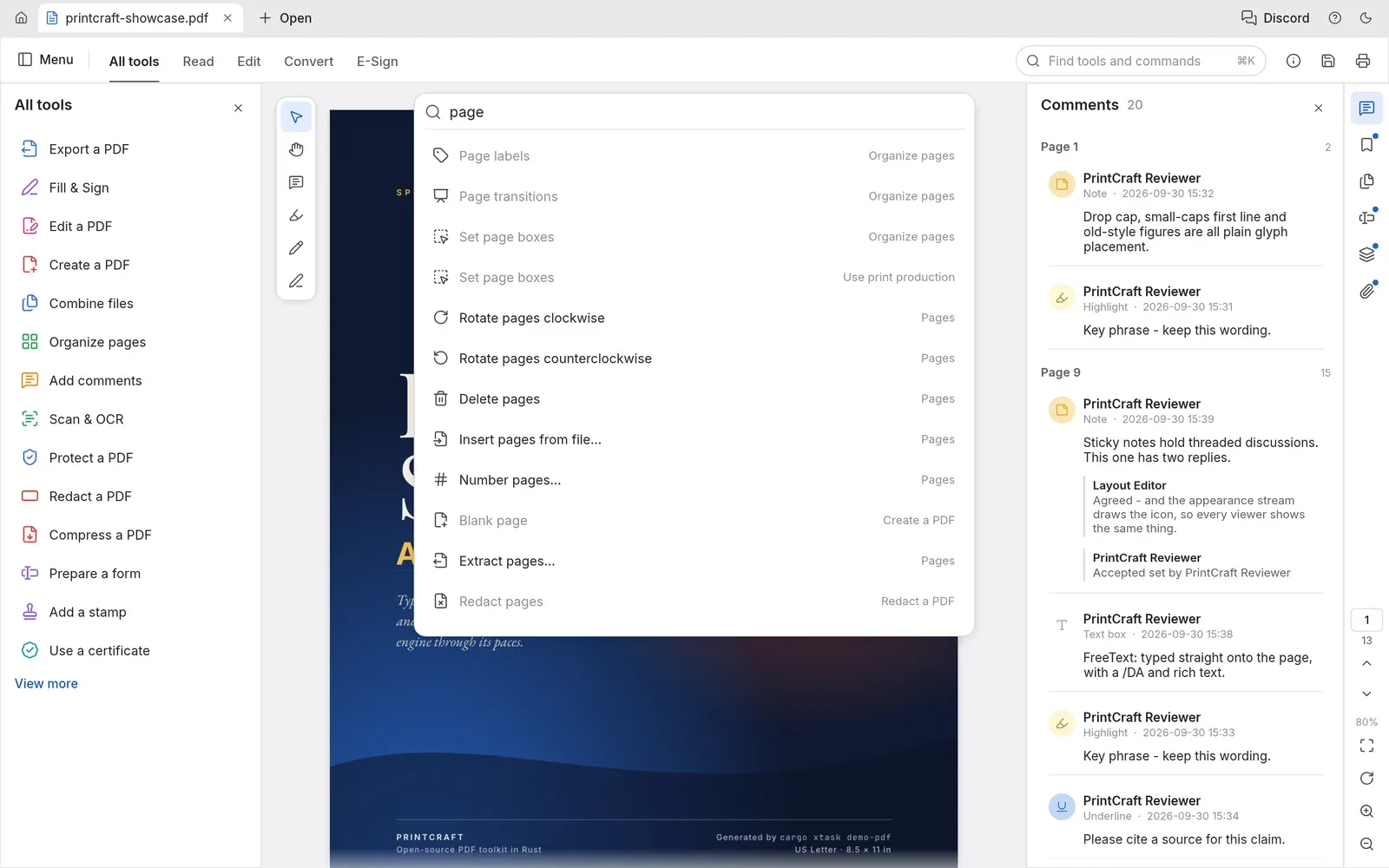
Official README screenshot of the command palette opened with Cmd+K and filtered for page tools.
Source: official PdfCraft project page.
Key capabilities
- Rendering of complex documents The viewer handles kerning and ligatures, right-to-left and complex scripts, vertical CJK text, colour emoji, shadings, blend modes, soft masks and optional content. Large pages render in tiles so text stays sharp at high zoom, and every page renders in isolation so damaged documents can be repaired on open.
- Reading layouts and navigation Layouts include continuous, single page, two-up, view rotation, full screen and a distraction-free Read mode, with light and dark themes. Bookmarks (searchable), page thumbnails with adjustable size from 50 to 150% and the document's own page labels help in long files. The launch option
--two-pagedopens command-line PDFs in two-page view. - Find and text selection Search runs across the whole document as the user types, with match stepping, and selected text is copied in reading order, including columns, right-to-left runs and CJK. Version 0.20.0 adds copying with formatting as HTML.
- Organize pages The Organize pages grid shows all pages for multi-selection and lets users rotate, delete, insert blank pages, insert pages from another file and reorder pages. Every change is a named step in an undo history that also works after saving.
- Combine, extract and split Combine files merges any number of PDFs and adds one bookmark per source file with its bookmarks nested underneath. Extract copies selected pages to a new document, and Split divides a file every n pages or before chosen pages. Links, named destinations, form fields, layer defaults and attachments are carried over.
- Incremental, atomic saves Ordinary saves append an incremental update so the original bytes stay intact, and writes go to a temporary copy that is then swapped in. CI checks the output with qpdf and hayro. Unsaved documents are marked on their tab, changes are autosaved every minute and the app offers recovery after an unexpected quit.
- PDF security handler PdfCraft implements the standard security handler from 40-bit RC4 to AES-256, user and owner passwords including Unicode passwords normalised with SASLprep, crypt filters and attachment-only encryption. It honours author permissions, lifts them when the owner password is entered, and saves edits to encrypted documents encrypted with the same keys.
- Document Properties A dialog shows and edits title, author, subject and keywords, and lists the fonts and whether they are embedded, PDF version, page size, tags, fields, layers, attachments, encryption method, the password used to open the file and each permission.
- Comments, forms, layers and attachments Comments appear as threaded conversations. The Fields panel lists every form field with its value, and checkboxes, radio buttons, lists and signature fields are drawn from their own appearances. Optional content layers can be switched on and off, and attachments can be opened or saved.
- Scan and OCR Recognize text turns scans into searchable text for a page, a range or a folder of files, with optional auto-rotate, deskew, denoise and binarize. An installed Tesseract can run alongside the built-in engine. The OCR Verify screen colours each word by confidence and allows corrections, a user dictionary and re-OCR of a region before the result is accepted.
- Command palette and tool catalogue
Cmd+Ksearches every tool and command, and the All tools panel lists tools such as Export, Fill & Sign, Edit, Create, Redact, Compress, Prepare a form, Add a stamp and Use a certificate. Tools still in development are marked with their target milestone. - Command-line tool
pdfcraft-cliinspects structure as JSON, extracts reading-order text, renders pages, edits rotation, deletion and metadata, and runscombine,extractandsplit.pdfcraft-cli runcalls any engine tool with key=value arguments or JSON scripts, and--rootconfines all file access to one directory. - Opt-in MCP server
pdfcraft-cli mcpexposes the JSON-Schema tool table to AI agents over stdin and stdout. It opens no network port, runs only while an agent launches it, and--compactreduces the tool list to about ten core tools plus search and call tools. Builds without the server usecargo build -p pdfcraft-cli --no-default-features. - App control for agents Starting the app with
--controland a token file lets an agent inspect the widget tree, click, type, send keys and commands, resize the window and take screenshots. It is off by default, listens only on loopback and requires a random token from a file that only the user can read. - Rust API
pdfcraft_automation::Automation::callgives embedding applications the same tool table. Edits stay in memory and undoable untildoc_save. - Windows installers and portable builds Per-user MSI installers work without administrator rights;
ALLUSERS=1installs for all users. The MSI adds Edit with PdfCraft and Combine files in PdfCraft to the PDF context menu and Create PDF with PdfCraft to image files, each removable with an MSI property. The portable zip keeps settings in aPdfCraftDatafolder next to the executable. - macOS, Linux, FreeBSD and web builds MacOS gets a signed, notarized universal DMG and a CLI zip. Linux builds come as AppImage with zsync updates, Flatpak, deb, rpm and tarballs for x86_64 and aarch64 and need glibc 2.35 or newer; RISC-V builds need glibc 2.39. The web build is a static site zip that can be hosted on any static server. The ArtCraft Launcher can also install and update PdfCraft.
- Privacy model The project states that PdfCraft needs no account, sends no telemetry and does no cloud processing; documents stay on the user's machine and the app works offline.
- Interface languages The interface language is set in Preferences, with Auto following the system language. Japanese covers commands, dialogs, panels and shortcuts, using fonts from the optional craft-fonts build input that release builds include.
Where PdfCraft fits
Reading and searching long documents
The desktop app opens PDFs in tabs with continuous, single-page or two-up layouts, a Read mode and light or dark themes. Find-as-you-type search, searchable bookmarks and the document's page labels support navigation, and the Craft Wiki PdfCraft documentation covers getting started, workflows and troubleshooting.
Assembling and splitting documents
Combine files merges several PDFs with a bookmark per source, Extract copies selected pages to a new file and Split cuts a document every n pages. The same operations run from the command line, for example pdfcraft-cli combine report.pdf appendix.pdf --out combined.pdf or pdfcraft-cli split report.pdf --every 10 --out-dir parts/. On Windows, the MSI adds a Combine files in PdfCraft entry to the Explorer context menu for selected PDFs.
Filling forms and reviewing comments
The Fields panel lists interactive form fields and their values, and field highlighting marks them on the page. Comments such as notes, highlights, text boxes, shapes, ink and stamps are shown as threads with replies in the Comments panel, and layers can be toggled to show or hide content such as watermarks.
Making scans searchable
Scan & OCR, Recognize text runs on the current page, a range or a folder of files and writes a searchable layer as one undoable step. With the Editable text output, the OCR Verify screen shows each recognized word coloured by confidence, with thresholds for high, medium and low confidence, so words can be corrected before Accept writes the document.
Opening and protecting encrypted files
Password-protected PDFs from RC4 to AES-256 open with user or owner passwords. Document Properties shows the encryption method and each permission, and the Protect a PDF tool sets passwords. Edits to encrypted files are saved encrypted under the same keys.
Automating PDF tasks with scripts and AI agents
pdfcraft-cli tools prints every tool with its JSON Schema, and pdfcraft-cli run --script steps.json --report runs several steps in one session and returns a JSON report per step. For agents such as Claude, the MCP server is configured with pdfcraft-cli mcp --root /path/to/pdfs in the agent's MCP settings and offers tools to find text, add comments, fill fields, set metadata, protect, combine and save. The roadmap lists the next milestones, starting with office-document-to-PDF conversion and a layout-preserving .docx export.
Reviews of PdfCraft
Be the first to share your experience with PdfCraft.
Write a review
Loading review form…
Alternatives to PdfCraft
 Stirling PDFStirling PDF edits, converts, signs, redacts and OCRs PDFs on the desktop, in the browser or on your servers, with REST APIs and no-code pipelines.PBPDFsam BasicPDFsam Basic is a free, AGPL-licensed desktop app for Windows, macOS and Linux that splits, merges, mixes, rotates and extracts pages from PDF files.SSumatraPDFSumatraPDF is a free, open-source Windows reader for PDF, EPUB, MOBI, comic archives, DjVu, XPS and CHM, with a portable option.