

What is Stirling PDF?
Stirling PDF is an open-core PDF editing platform. It can run as a personal desktop app, in the browser, or on your own servers with a private API, so documents are edited, signed, redacted, converted and automated without being sent to external services. The README lists more than 50 tools, including merge, split, OCR and compress, and the website describes a private PDF editor that runs anywhere and automates everything.
For automation, no-code pipelines can be built in the user interface, and REST APIs are available for nearly all tools so that PDF processing can be wired into existing systems. The interface is available in more than 40 languages.
The quickest way to try the server is the Docker command shown in the README, which starts it on port 8080. Installation guides also cover desktop and Kubernetes. The licence is described as open-core, which means some features sit in paid plans. The pricing page lists a free plan, a Team plan with single sign-on and 100 users included, and an Enterprise plan with air-gapped deployment. The project began as a weekend experiment and the company now reports more than 30 million downloads.
Stirling PDF screenshots
Explore the interface. Open a screenshot to view it at full size.
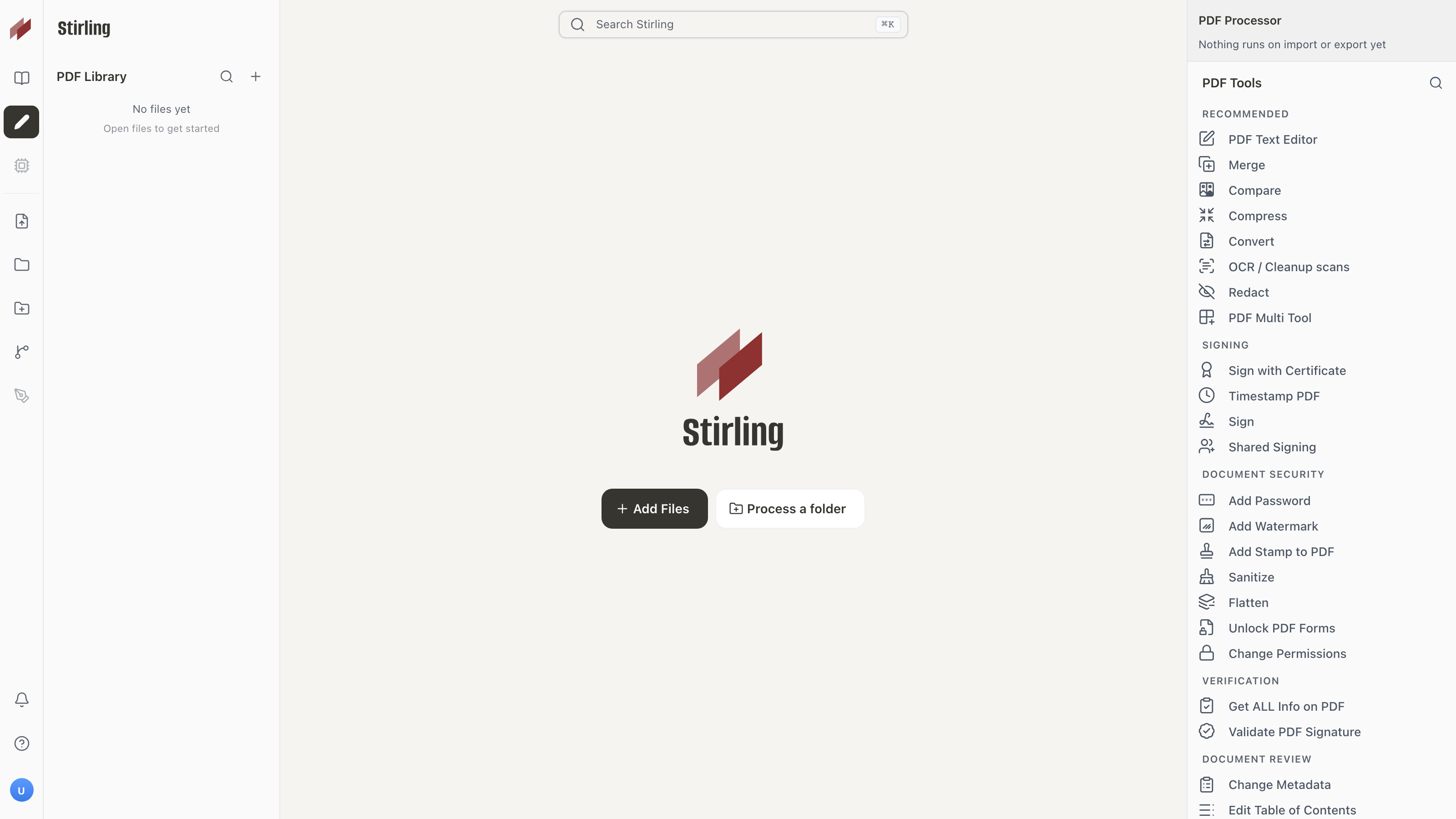
Source: official Stirling PDF project page.
Key capabilities
- PDF tools 50+ tools for editing, merging, splitting, signing, redacting, converting, OCR and compression.
- Three ways to run it Desktop app, browser UI or a self-hosted server with a private API.
- No-code pipelines Automation built directly in the user interface.
- REST APIs Endpoints for nearly all tools.
- Multilingual interface Available in 40+ languages.
- Plans A free tier with 1,000 monthly credits for automation, and paid Team and Enterprise tiers.
Where Stirling PDF fits
- Editing and conversion More than 50 tools cover editing, merging, splitting, converting and compressing PDFs in everyday work.
- OCR and redaction OCR and redaction sit in the same tool list, so scanned files can be made searchable and sensitive content removed.
- Digital signing Documents can be signed without being sent to external services.
- No-code automation Build pipelines directly in the interface, with APIs to process millions of PDFs.
- REST APIs REST APIs are available for nearly all tools, so PDF processing can plug into existing systems.
- Processor and MCP The Processor classifies, standardises and routes thousands of PDFs at once, and an MCP server lets agents run Stirling tools.
- Desktop client Install the editor on Windows, Mac or Linux and work offline.
- Self-hosted and air-gapped Run it on your own servers; the Enterprise plan adds air-gapped deployment, SCIM provisioning and audit logs.
Install
docker run -p 8080:8080 docker.stirlingpdf.com/stirlingtools/stirling-pdfReviews of Stirling PDF
Be the first to share your experience with Stirling PDF.
Write a review
Loading review form…
Alternatives to Stirling PDF
 BentoPDFBentoPDF is an open-source browser toolkit for editing, organizing, converting and processing PDFs without server-side document processing. It supports self-hosting and visual PDF workflows.
 DocuSealDocuSeal is an AGPL-3.0 platform for building fillable PDF forms and collecting e-signatures, with SMTP email, S3 storage, API, webhooks and mobile apps, available self-hosted with Docker or as DocuSeal Cloud with a Pro plan.
 DocumensoAGPL-licensed document signing platform built with TypeScript, React Router and PostgreSQL. Use Documenso Cloud or self-host it with Docker, with templates, a REST API, webhooks, embedded signing and X.509 sealed PDFs.