

What is Documenso?
Documenso is an open-source electronic signature platform: a team uploads a PDF, adds recipients, places signature and form fields, sends the document and receives a sealed copy once everyone has acted. It is developed by Documenso and is positioned as an open alternative to proprietary signing services. The project argues that a signing provider is a party to every signature, so the software should be inspectable and, where needed, run on infrastructure the customer controls. The product is available as the hosted Documenso Cloud and as software you operate yourself.
The Community Edition is published under the AGPL-3.0 license, and the licensing documentation describes a separate commercial Enterprise Edition for organisations that cannot meet AGPL source-disclosure terms or need features such as SAML and OIDC single sign-on, document action reauthentication and an embedded editor. Official container images are published on Docker Hub and the GitHub Container Registry, and the self-hosting guide covers Docker, Docker Compose, Kubernetes, Railway and manual deployment on a Linux server.
The code base is a TypeScript monorepo. The README lists React Router v7 with Hono on the server, Prisma as the ORM, tRPC, Tailwind CSS with shadcn/ui and Radix UI, and PDF handling through libpdf, pdf.js and pdf-lib. PostgreSQL 14 or newer is the only supported database, and an SMTP or API email transport is needed so that recipients receive signing requests. Documenso does not ship a signing certificate: a .p12 X.509 certificate must be generated or provided, otherwise signing fails.
The latest GitHub release at the time of review is v2.21.1, published October 22, 2026. Its notes list persistence of signatures for authless embed signers and a fix that stops passkeys from being removed when a user is disabled. Version 2 of the product unified documents and templates into envelopes, which is documented in the migration guide. The project states that it no longer accepts external pull requests apart from a small trusted group; issues are the supported way to contribute. This profile is based on public documentation and release notes and does not claim that iThub ran the software.
Documenso screenshots
Explore the interface. Open a screenshot to view it at full size.
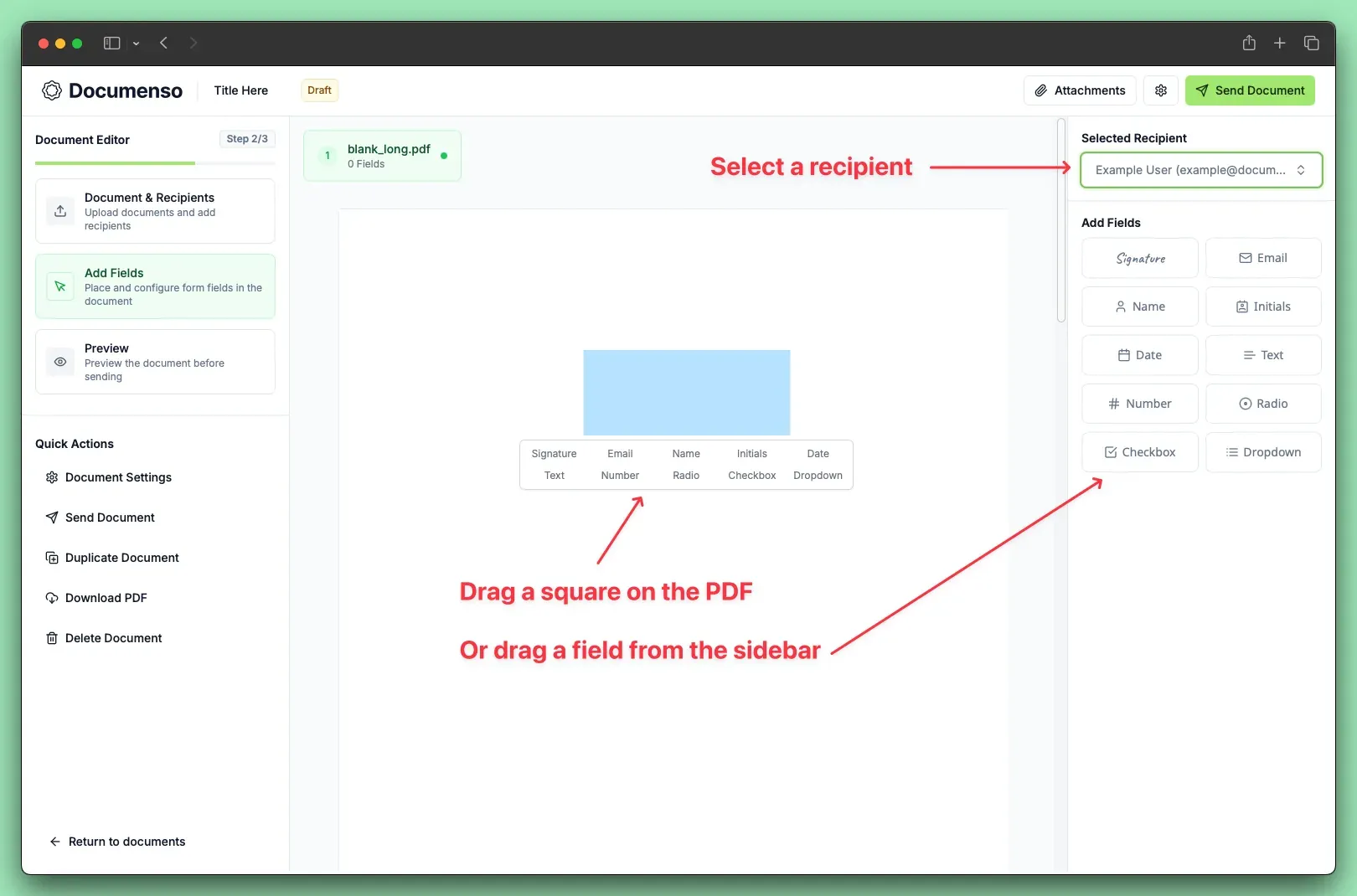
Official documentation screenshot of the Add Fields step, showing field types for a selected recipient.
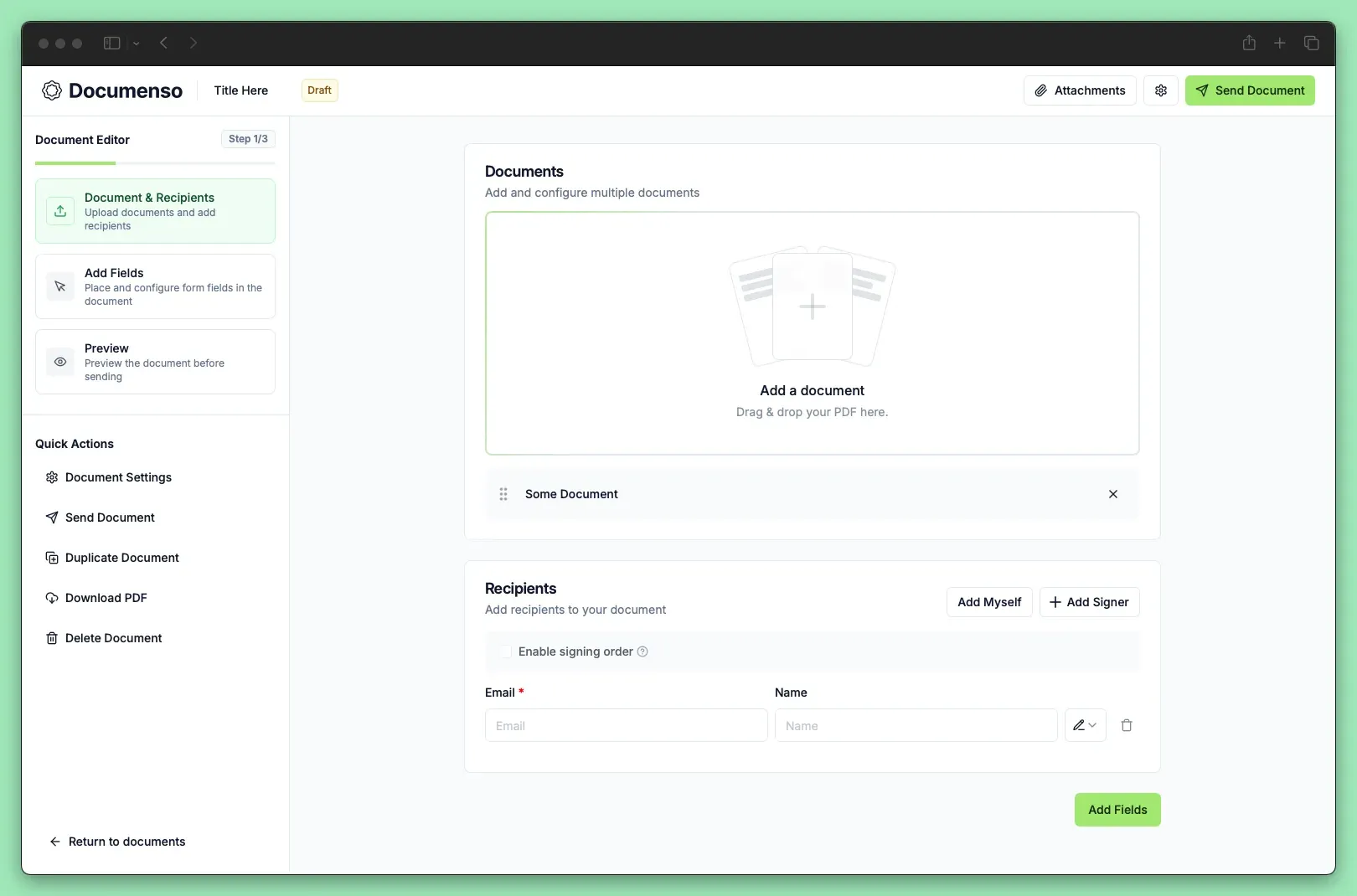
Official documentation screenshot of the first editor step with a document area and recipient entry.
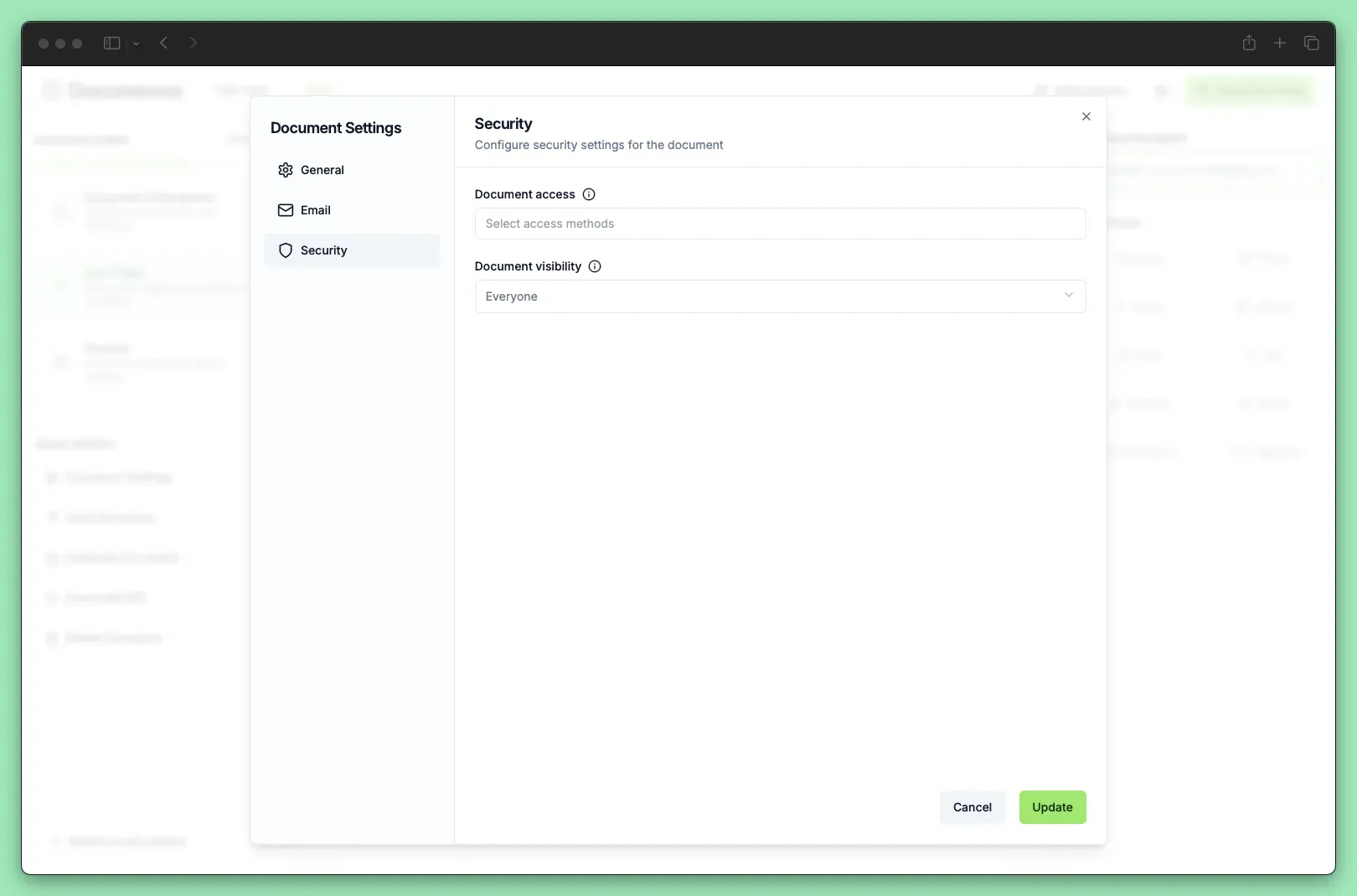
Official documentation screenshot of per-document access and visibility settings.
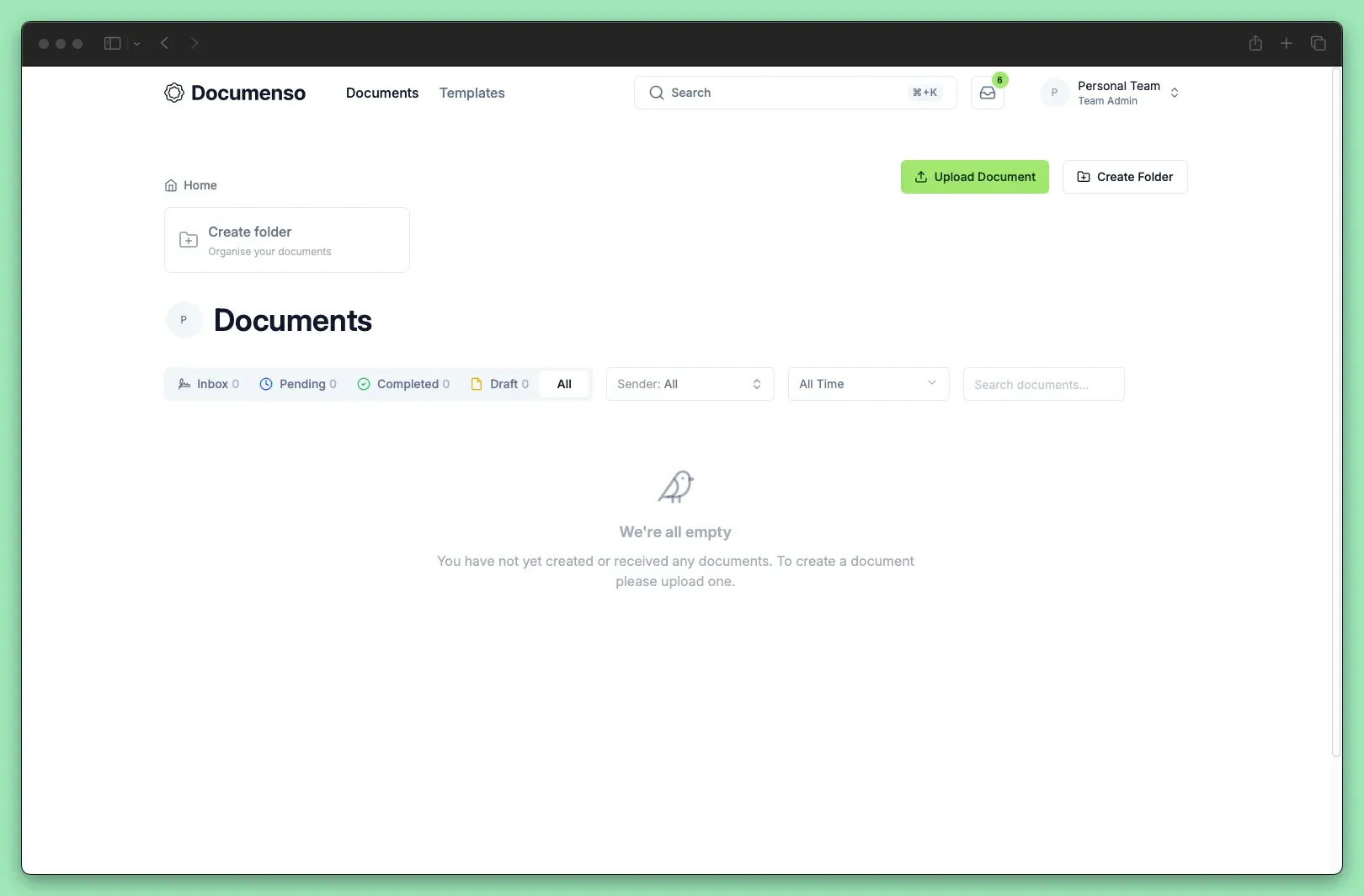
Official documentation screenshot of the documents dashboard with status tabs and folders.
Source: official Documenso project page.
Key capabilities
- Document preparation editor A three-step editor takes a PDF, the recipient list and the field layout, then previews the document before it is sent. Multiple PDFs can be added to one envelope. Document settings cover general options, email wording and security. The user guide walks through upload, recipients, fields and sending.
- Field types The editor offers signature, email, name, initials, date, text, number, radio, checkbox and dropdown fields. Fields can be dragged from the sidebar or drawn directly on the page. A developer mode exposes field and recipient identifiers and coordinates for API work. Field behavior is described in the field types reference.
- Recipient roles and signing order Recipients can act as signers, approvers, viewers, assistants or CC recipients. An optional signing order makes one recipient act before the next is notified. Reminders and completion notifications are sent by email. The role definitions explain what each role may do.
- Templates and direct links Documents that are sent repeatedly can be saved as templates and reused. A direct link, or an embedded iframe, lets a person sign without receiving an email invitation, which suits public intake forms. Direct links do not remove the need to decide who may see the resulting documents.
- Teams and organisations Organisations contain teams and members with assigned roles. Team-scoped API tokens limit integrations to one team. Branding preferences, default recipients and, with a licence, custom email domains are configured at organisation or team level. Single sign-on through SAML or OIDC is an Enterprise Edition feature.
- Sealed PDFs and audit trail When all recipients finish, Documenso applies an X.509 digital signature to the PDF so later changes invalidate it, and can include a trusted timestamp from a time stamping authority. A signing certificate, which can be self-signed or issued by a CA, is required. See signing certificates for trust and validation behavior in PDF readers.
- Signature levels and compliance The signature levels page lists ESIGN and UETA as compliant, eIDAS simple signatures as compliant, and advanced and qualified eIDAS signatures as planned. The certifications page reports SOC 2 as compliant, ISO 27001 as planned, and 21 CFR Part 11 and HIPAA as compliant under the Enterprise licence. Check these statements against your own legal needs.
- Recipient authentication Account holders can protect their login with two-factor authentication and passkeys. Per-document access settings control who can open a document, and the Enterprise Edition adds reauthentication with a passkey or 2FA before a recipient signs. Documents also have a visibility setting that limits which team members see them.
- REST API and webhooks The public REST API covers documents, recipients, fields and templates, with API-key authentication and published rate limits. Webhooks notify other systems about document events and carry a verification signature. The API moved to an envelope model in version 2, so older document and template create endpoints are deprecated.
- Embedded signing Official embedding SDKs and an iframe option place the signing experience inside another application, with CSS variables for styling. Embedded signing is part of the Teams and Platform plans on Documenso Cloud. The embedded editor and its white-label option require an Enterprise licence.
- AI field and recipient detection The documentation describes buttons that detect fields and recipients in an uploaded document with AI assistance. Detected suggestions should be reviewed before sending, because a missed or misplaced field changes what a signer is asked to complete. Check the data-processing terms of any AI provider configured on a self-hosted instance.
- Docker and Compose deployment The project publishes images to Docker Hub and the GitHub Container Registry. The Compose guide deploys the application with PostgreSQL, while the Docker guide targets an external database on container platforms. One-click deploy templates exist for Railway, Render, Koyeb and Elestio.
- Storage backends Uploaded and signed documents are stored in the database by default, as base64-encoded data in PostgreSQL. For production the storage configuration supports S3-compatible object storage and native Azure Blob Storage. Database storage is simple but limited in scale.
- Email, jobs and configuration Supported email transports are SMTP with a password, SMTP with an API key, Resend and MailChannels. Background jobs handle email delivery, document processing and webhook dispatch. The environment variable reference lists every setting, and per-organisation limits can be set from the admin panel.
- Telemetry and updates Self-hosted instances can report telemetry, described on the telemetry page. Review that page and the network egress of your deployment before installing it in a restricted environment. Upgrades run database migrations, so back up PostgreSQL first.
- Cloud plans Documenso Cloud has a free plan with 5 documents per month and up to 10 recipients per document. Paid plans listed on the pricing page are Individual at 25 USD per month, Teams at 40 USD per month for five users, and Platform at 250 USD per month, all billed yearly. Enterprise licences are quoted individually.
- Internationalisation The interface is translated through Lingui with community translation workflows, and emails are built with react-email. Language coverage changes with releases, so check the translation list for the languages your signers need.
Where Documenso fits
Sending contracts and agreements
Upload the PDF, add each signer with the right role, place a signature field per signer and preview the result. Use signing order when approval must precede signature. Afterwards confirm that the completed PDF opens in a standard reader with the signature panel showing the expected certificate and no modification warning.
Reusable templates for repeated paperwork
Save a template for onboarding forms, NDAs or order forms, with placeholder recipients and fields already positioned. Create documents from it through the interface or the Templates API. Review the template whenever the underlying PDF changes, because field coordinates belong to a specific layout.
Embedding signing in a product
Generate an API token, create the envelope with the REST API, and render the signing page through an SDK or an iframe. Subscribe to webhooks to update your own records on completion and verify each webhook signature. Test the case where a signer closes the page early and returns later.
Running a private instance
Provision PostgreSQL 14 or newer, an SMTP service, a reverse proxy and a signing certificate, then deploy the container image. Decide between database and S3 storage before real documents arrive, and schedule database backups. The tips and pitfalls guide is a useful pre-production read.
Public signing links
Create a direct link for a form that many people sign, such as a waiver or a consent form. Each completion creates its own document in your account, so plan retention and who can see them. Consider whether a link on a public page needs additional identity checks.
Meeting regulated signing requirements
Map the signature level you need to the compliance pages. Simple signatures and ESIGN or UETA workflows are documented as supported, while advanced and qualified eIDAS signatures are listed as planned. Regulated pharmaceutical or health workflows involve Enterprise features and should be validated with your compliance team.
Reviews of Documenso
Be the first to share your experience with Documenso.
Write a review
Loading review form…
Alternatives to Documenso
 DocuSealDocuSeal is an AGPL-3.0 platform for building fillable PDF forms and collecting e-signatures, with SMTP email, S3 storage, API, webhooks and mobile apps, available self-hosted with Docker or as DocuSeal Cloud with a Pro plan.
 Stirling PDFStirling PDF edits, converts, signs, redacts and OCRs PDFs on the desktop, in the browser or on your servers, with REST APIs and no-code pipelines.