

What is Kilo Code?
Kilo Code is an open-source AI coding agent published by Kilo Code, Inc. It reads a project, plans a change, edits files, runs terminal commands and calls tools from VS Code, JetBrains IDEs and a terminal interface. Further surfaces include Cloud Agents in the browser, iOS and Android apps, a Slack bot and a desktop app in beta. The Kilo-Org/kilocode repository was created in March 2025 and is licensed under MIT. In July 2026 Anaconda announced that it is acquiring Kilo Code; the announcement says Kilo remains available to individual builders, teams and organizations, and kilo.ai now shows an acquisition notice.
Since version 7 all clients share one agent runtime. The Kilo CLI is a fork of OpenCode adapted to the Kilo platform. Every VS Code VSIX bundles the platform-specific CLI binary, so the extension needs no separate install, and the JetBrains plugin either downloads the same Kilo Core after installation or ships it inside a bundled build for locked-down networks. Agent settings live in kilo.jsonc files, globally under ~/.config/kilo/ and per project, and apply to the CLI, the extension and the plugin alike. The TypeScript monorepo also contains the JetBrains plugin source, the documentation site, the indexing package and the gateway client.
The CLI is published on npm as @kilocode/cli, through a curl install script, pnpm, bun, a Homebrew tap, the AUR package kilo-bin and a kilo-cli conda package on Anaconda.org. GitHub releases carry native archives for Windows, macOS and Linux on x64 and arm64, musl builds for Alpine and baseline builds for CPUs without AVX, together with VSIX files for eight targets, SHA256 checksum files and CycloneDX SBOMs. According to RELEASING.md, the release workflow also pushes a multi-arch Docker image to ghcr.io/kilo-org/kilocode.
The latest GitHub release is v7.8.27, published on November 5, 2026, with no separate notes; it follows a series of pre-releases. Version 7.8.26 lets Agent Manager continue a local worktree in Cloud and adds a Show Open Tabs command. Version 7.8.21 lets the local session-host API list, create and delete hosted Cloud workspaces, exchanging the stored credential for a short-lived token so the original credential never reaches the Cloud worker. Version 7.8.16 limited browser links and MCP OAuth URLs to HTTP(S) and stopped MCP prompts from executing shell expressions locally. The JetBrains plugin has its own tags: 7.1.12 is the current stable build and 7.2.1-rc.1 a release candidate.
Kilo does not run a model of its own. Prompts and code context go to the provider you select: Kilo Gateway, which the pricing page describes as 500+ models from 60+ providers billed at provider rates with no markup, your own API keys, or a local server such as Ollama or LM Studio. The README states that main currently accepts only bug fixes while new features target a v2 branch. Kilo Deploy, an earlier hosting feature, is end of life, and the kilo console browser interface is deprecated.
Kilo Code screenshots
Explore the interface. Open a screenshot to view it at full size.
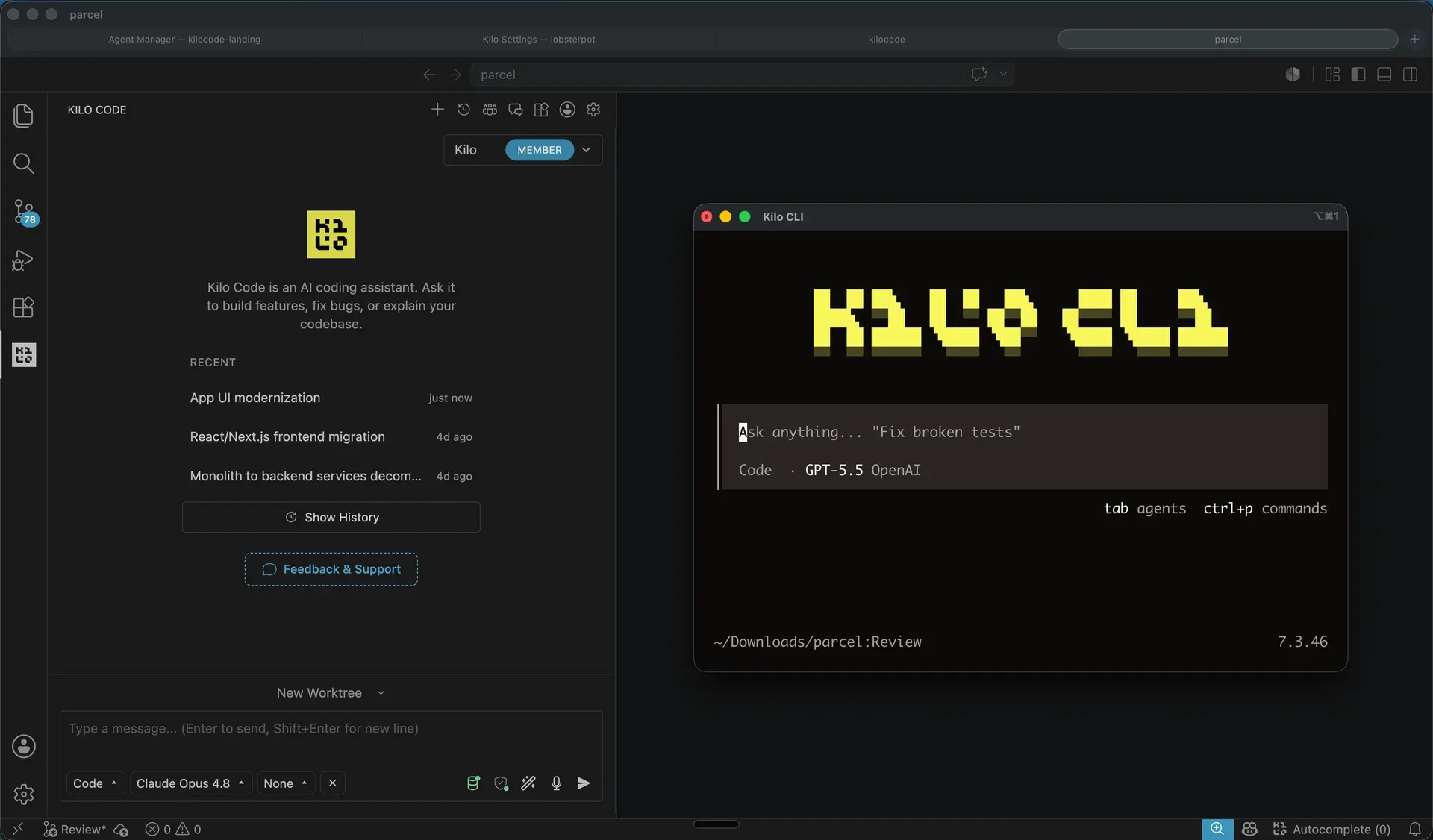
Official README image: the Kilo Code VS Code extension beside the Kilo CLI terminal interface.
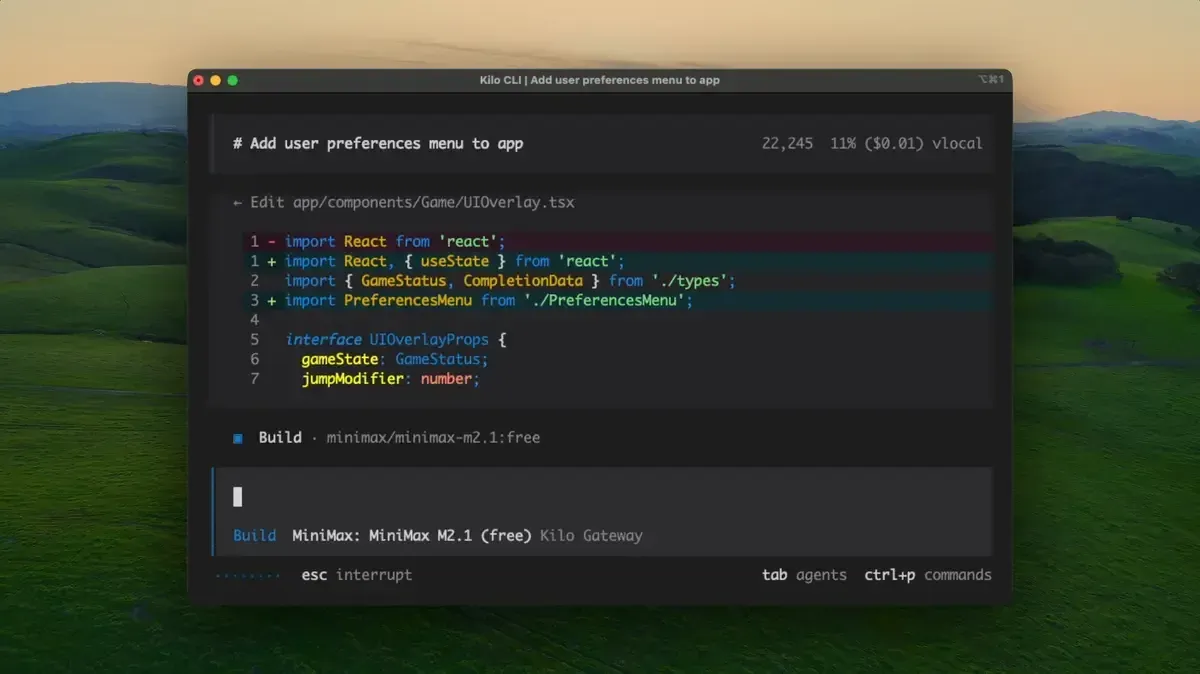
Official screenshot of the Kilo CLI editing a React component with a free model through Kilo Gateway.
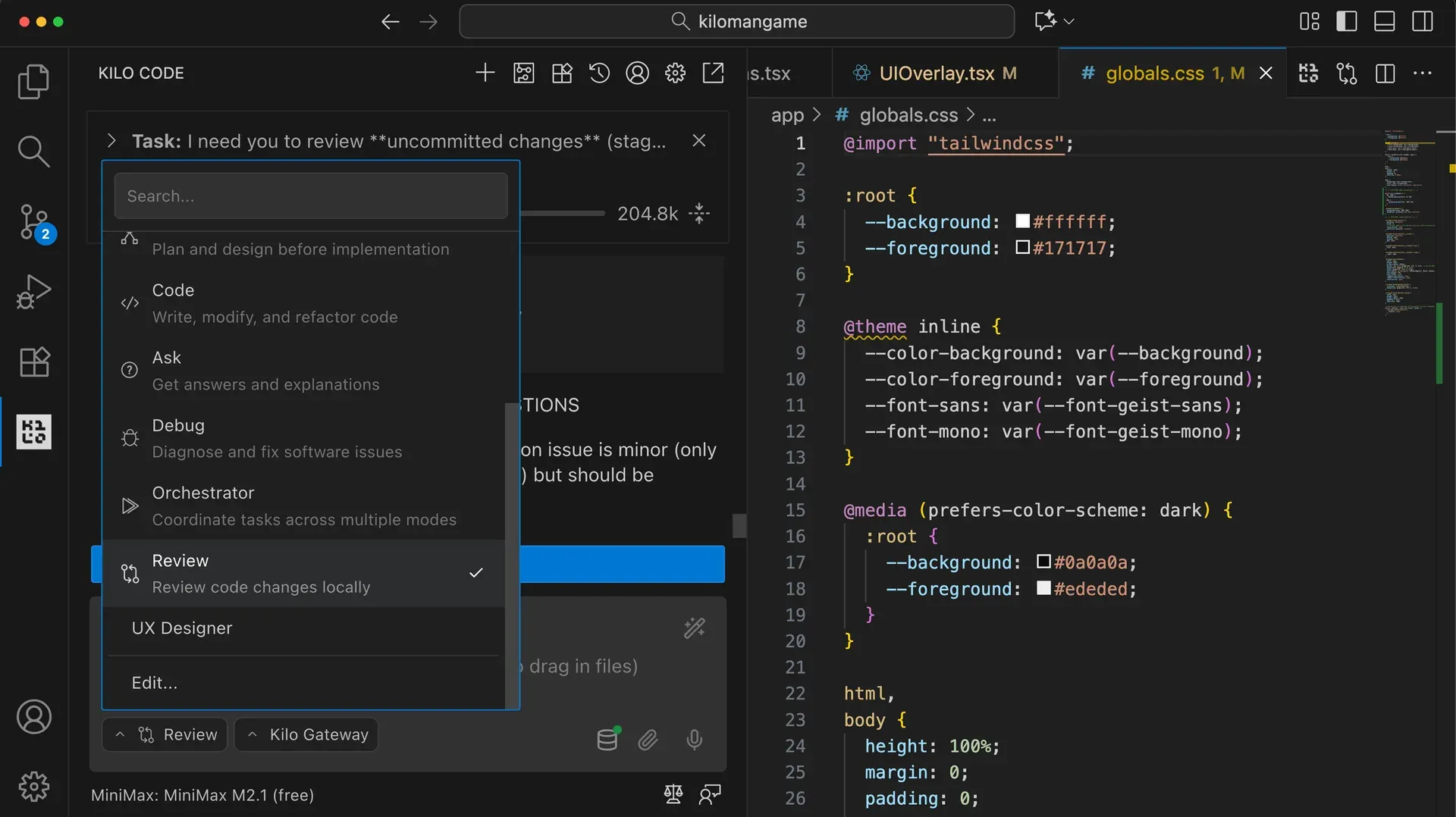
Documentation screenshot of the agent picker with Review selected for local review of uncommitted changes.
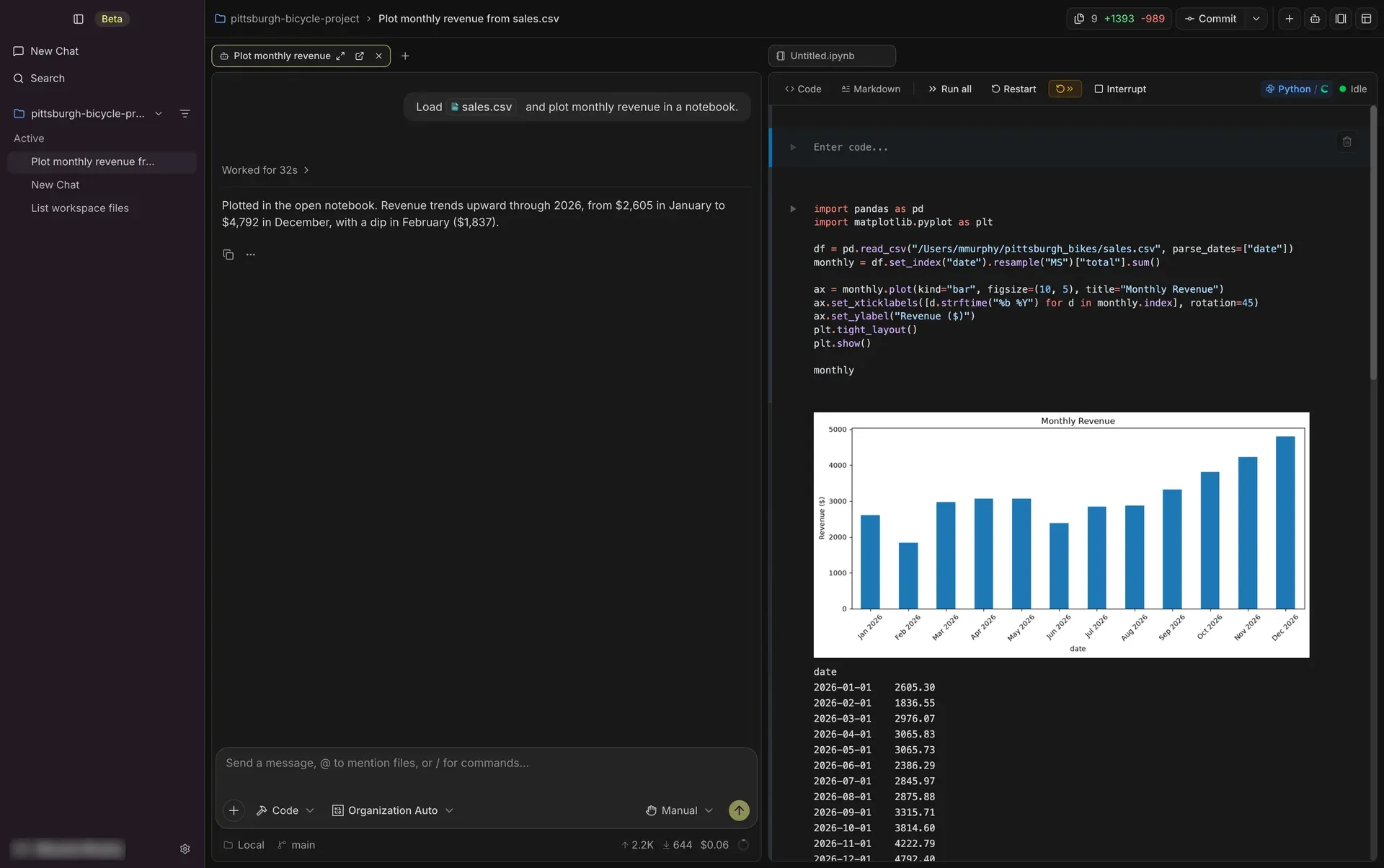
Documentation screenshot of Kilo Desktop (beta) running an agent chat next to a Jupyter-style notebook.
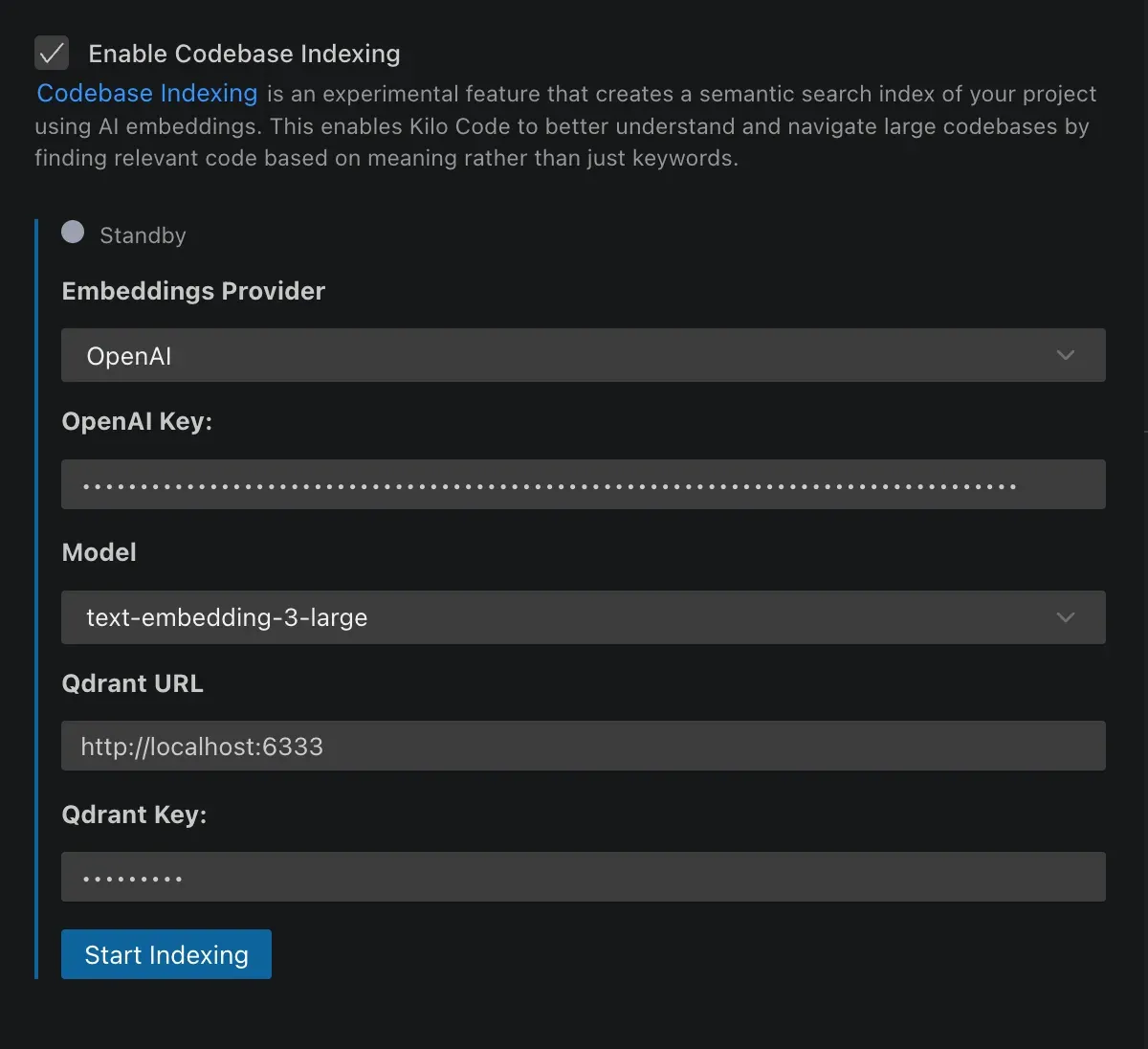
Documentation screenshot of the codebase indexing settings; the current extension also offers LanceDB as the default store.
Source: official Kilo Code project page.
Key capabilities
- VS Code extension Install "Kilo Code" from the Visual Studio Marketplace, where the installation guide asks you to choose Install Pre-Release Version; Kilo describes that channel as stable and recommended. The 7.8.27 manifest requires VS Code 1.105.1 or later. VSCodium, Windsurf, Eclipse Theia and Gitpod install it from Open VSX, Cursor from its own extension view, and each GitHub release attaches VSIX files for offline installs or for pinning an older version.
- JetBrains plugin The plugin installs from the JetBrains Marketplace into IntelliJ IDEA, PyCharm, WebStorm and other JetBrains IDEs, uses a native interface and does not require Node.js. A bundled Kilo Core build, available from a custom plugin repository, avoids downloading the runtime after installation behind strict proxies or in offline environments. In this plugin, file edits ask for approval by default.
- Terminal interface
npm install -g @kilocode/cli,brew install Kilo-Org/tap/kiloor the curl script installs the CLI;kiloopens the TUI in the current directory and/connectadds provider credentials.kilo upgradeupdates the binary. Providers, models, permissions and MCP servers live inkilo.jsonc, while themes, notifications and keybindings live intui.jsonc. - Autonomous mode for CI
kilo run --auto "task"runs without prompts and approves permission requests unless a rule denies them. Exit codes are 0 for success, 1 for errors and 124 for a timeout. Without--auto, a non-interactive run auto-rejects every permission request and exits 1, and follow-up questions from the model are answered with an instruction to decide on its own. - Agents and subagents Code is the default agent; Plan writes designs and plans, Ask answers questions without touching files and Debug traces problems. Custom agents are Markdown files in
.kilo/agents/with their own permission frontmatter. Agents with full tool access delegate work through thetasktool in the foreground or background; the older Orchestrator mode is deprecated. - Agent Manager A full editor tab runs several sessions in parallel, each in an isolated git worktree or in the shared local workspace. It adds a diff panel against the parent branch, a terminal per session, setup scripts, automatic copying of
.envfiles and import from existing branches or GitHub PR URLs. The Agent Manager guide explains when to use worktrees and when a subagent is enough. - Permission rules Each tool call is allowed, asked or denied, with glob patterns per tool, path or shell command, and the last matching rule wins. Shell blocks are parsed into separate commands, and one denied command rejects the whole request. Most tools default to allow; the exceptions that prompt are reading
.envfiles, access outside the project and repeated failure loops, as listed in Auto-Approving Actions. - Optional operating-system sandbox On macOS and Linux an opt-in sandbox restricts where tools can write and blocks outbound network access from model-originated commands, including child processes. Project configuration can only tighten the global policy. It does not restrict reads, does not cover provider traffic and is not available on Windows; the sandboxing page lists the limits.
- Snapshots and session cleanup Checkpoints, called snapshots in the current extension, are on by default and are stored in a dedicated Git repository outside your project, so the project history is not modified. The
snapshotkey turns them off. Automatic session cleanup is off by default; when enabled it deletes sessions older than a set number of days (default 30) for every Kilo client on the machine. - Codebase indexing Opt-in semantic search parses code with Tree-sitter, embeds functions and classes and exposes a
semantic_searchtool to the agent. Embedding providers include OpenAI, Ollama, OpenAI-compatible endpoints, Gemini, Mistral, Bedrock, OpenRouter and Voyage. Vectors go to an embedded LanceDB store by default or to a Qdrant server for larger or shared setups. - Inline autocomplete Fill-in-the-middle suggestions appear as ghost text and are accepted with Tab; autocomplete is on by default. The default model, Mistral Codestral, is routed through Kilo Gateway and billed to Kilo credits unless you add a Mistral key. Inception Mercury Edit 2 is available with your own Inception key.
- Model access and Kilo Gateway Kilo Gateway is an OpenAI-compatible API at
https://ai-gateway.kilo.ai/api/v1that also works outside the agent with the OpenAI SDK or Vercel AI SDK. It stores BYOK keys encrypted at rest, tracks per-request cost and supports organization model allowlists and per-user daily limits. Direct providers such as Anthropic, OpenAI, Gemini, Bedrock, Vertex and OpenRouter, plus local Ollama and LM Studio, are configured separately. - MCP, skills and marketplace MCP tools use the same allow, ask and deny rules as built-in tools, with names in the form
{server}_{tool}so rules likegithub_*work. Skills load instructions fromSKILL.mdfiles, workflows store reusable prompts as Markdown and the Kilo Marketplace installs agents, skills, MCP servers and plugins. - Local and cloud code review
/reviewchecks uncommitted changes, a branch against its base, a commit or a pull request before anything is pushed. Cloud Code Reviews comment on GitHub pull requests through a GitHub App and on GitLab merge requests through OAuth or a token, with review style, focus areas and a repositoryREVIEW.md. Organizations get up to 20 concurrent reviews and personal accounts 1 or 3, depending on credit balance. - Cloud Agents Sessions run in hosted containers against GitHub, GitLab or Bitbucket repositories (Bitbucket for organizations only), with environment variables, secrets and startup commands. Compute is billed per second at $0.60 per hour for Small and Docker sizes and $1.20 for Standard, separately from inference, and launching needs a balance of at least $5. BYOK users still pay for compute, as the Cloud Agent page notes.
- Desktop app (beta) Kilo Desktop installs on macOS (Apple Silicon), Windows and Linux (x64 or ARM64) and drives a local copy of the Kilo CLI through a chat window. It adds Python notebooks, conda environments, git review with git 2.17 or newer and local inference from GGUF model files. Signing in is required for the local model server, notebooks and conda environments.
- Mobile apps and session import IOS and Android apps follow Cloud Agents and remote CLI or editor sessions, queue follow-up messages and review pull requests. In the CLI,
/resume-claudeand/resume-codeximport recent Claude Code or Codex CLI sessions for the current directory into an empty session, skipping content Kilo cannot represent.
Where Kilo Code fits
Editing a project with approvals in VS Code or JetBrains
Install the extension or plugin, sign in or add a provider key, and start in Plan or Ask before letting Code change files. Review the per-turn diffs and keep snapshots enabled so a bad step can be reverted. Because most tools default to allow in VS Code and the CLI, set edit and bash to ask in the global kilo.jsonc first if every change should be confirmed, then add allow rules for routine commands such as git status * or the test runner.
Running parallel tasks in isolated worktrees
Open Agent Manager, create a worktree per task and add a .kilo/setup-script that installs dependencies. The setup script starts in a terminal but the session does not wait for it, so let it finish before asking the agent to build. Compare each worktree's diff against its base branch, run tests there and merge only the branches that pass. Use task subagents instead when the work belongs in the same directory and no branch isolation is needed.
Automating fixes and checks in CI
Install the CLI in the pipeline and run kilo run --auto with a narrow instruction such as running tests and fixing failures. Write explicit deny rules for commands that must never run, because --auto approves everything else. Check exit codes 1 and 124 in the job, keep the run inside the pipeline container, and store provider keys as pipeline secrets referenced from trusted global config, since project config cannot resolve {env:...} references.
Reviewing changes before and after a pull request
Run /review or /review branch main locally before pushing to catch problems without opening a PR. For team review, connect GitHub or GitLab in the Kilo dashboard, enable Code Reviews per repository, choose a model, style and focus areas, and commit a REVIEW.md with your standards. Compare the first reviews with human review comments before relying on them, and watch credit use, since model reasoning is billed even while review compute is free in the beta.
Keeping code on local or contracted models
Point Kilo at Ollama or LM Studio, or at a provider already covered by your data agreements through BYOK. If you enable codebase indexing, pair an Ollama embedding model with the embedded LanceDB store so embeddings also stay local. Autocomplete is separate: by default it calls Codestral through Kilo Gateway, so add a Mistral key or turn it off when code must not leave approved providers. Confirm the result by checking the network traffic of a short session.
Rolling out to a team
The Teams plan adds centralized billing, shared BYOK, shared custom agents and usage analytics; Enterprise adds SSO, OIDC, SCIM, audit logs, model and provider limits and a private gateway. Distribute a global kilo.jsonc with permission rules, sandbox settings on macOS and Linux, and the telemetry setting your policy requires. Pin extension and CLI versions during the pilot, because Kilo ships several pre-releases a week and VS Code updates extensions automatically.
Install
npm install -g @kilocode/cliReviews of Kilo Code
Be the first to share your experience with Kilo Code.
Write a review
Loading review form…
Alternatives to Kilo Code
 ClineApache-2.0 coding agent from Cline Bot Inc. that edits files, runs commands and uses MCP tools with per-action approval. Ships as a VS Code extension, JetBrains plugin, npm CLI, desktop app and TypeScript SDK, with BYOK or Cline-billed models.OOpenCodeOpenCode is an open-source AI coding agent available through a command-line interface and a beta desktop app. It provides separate agents for development work and read-only code exploration.
 Codex CLIOpen-source Rust CLI from OpenAI that reads a repository, edits files and runs local commands inside a sandbox with approval prompts. Includes code review, MCP, skills, codex exec for CI, a TypeScript SDK and an app-server.