

What is Neovim?
Neovim is a modal text editor that started in 2014 as a refactoring of Vim. The project states its goals as simpler maintenance, work split across more developers, the ability to build advanced user interfaces without changing the core, and maximum extensibility. It runs in a terminal through its built-in text UI, and separate graphical front ends can attach to the same editor core over an API. The command is nvim, not neovim.
The code is developed in the open at github.com/neovim/neovim by a community of maintainers and contributors, with the website and documentation at neovim.io. The core is written mainly in C with a Lua runtime and Vimscript compatibility, and LuaJIT is used in release builds. Source layout, build steps and supported platforms are documented in the repository and in the support page.
Neovim is distributed as pre-built archives on the GitHub releases page: .tar.gz and AppImage files for Linux x86_64 and arm64, .tar.gz files for macOS Intel and Apple silicon, and MSI and zip files for 64-bit Windows and Windows on Arm. The installation guide also lists Homebrew, winget, Chocolatey, Scoop, Flatpak, Snap and Linux distribution packages. The reviewed release is v0.12.6, published October 9, 2026, from the 0.12 series. A nightly prerelease is published separately for people who track development.
The 0.12 series added a built-in plugin manager, vim.pack, LSP inline completion and the :lsp command, the :restart and :connect commands for reattaching interfaces, :Undotree and :DiffTool, and an experimental redesign of messages and the command line called ui2. The maintainers publish breaking changes in :help news, and it is worth reading before upgrading across a minor version.
Contributions since a documented commit are licensed under Apache 2.0, except for code copied from Vim, which keeps the Vim license; the repository's LICENSE.txt describes the split. Neovim is an editor and an API host, not a full IDE: language support, completion sources, file trees and similar features come from the built-in LSP and Tree-sitter clients combined with plugins you choose.
Neovim screenshots
Explore the interface. Open a screenshot to view it at full size.
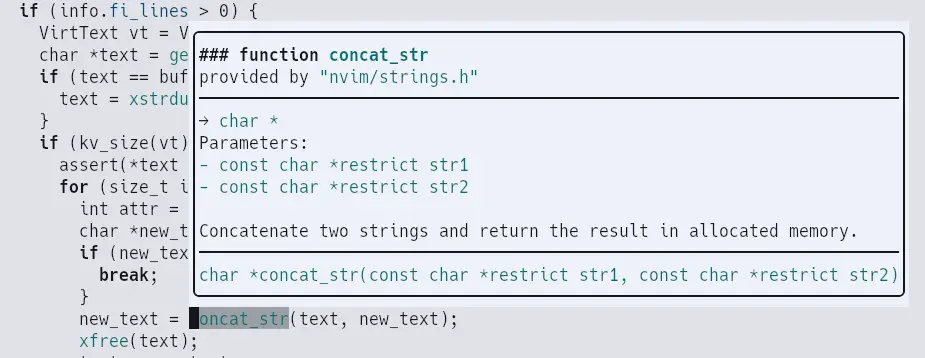
Official showcase image: pressing K with a language server attached opens hover documentation in a floating window.
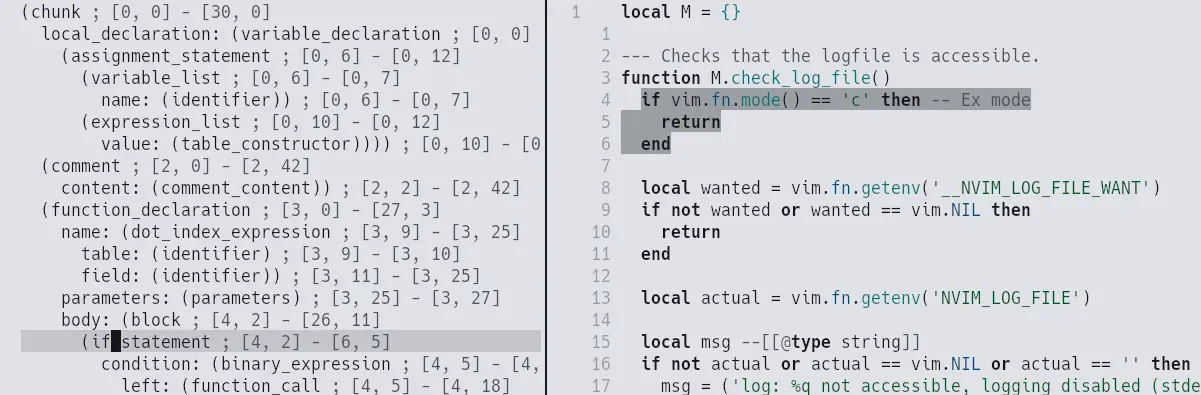
Official showcase image: the syntax tree of a Lua buffer beside the code, with the selected node highlighted.

Official showcase image of the experimental ui2 command line, shown as a floating box over the buffer.
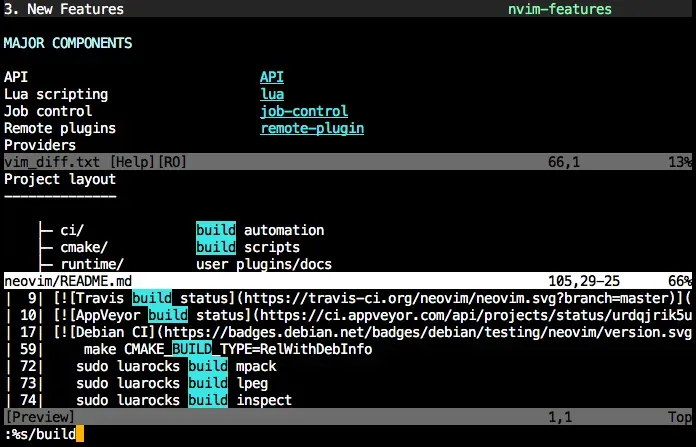
Official screenshot: split windows with help text and a live preview of a substitute command in the terminal UI.
Source: official Neovim project page.
Key capabilities
- Modal editing compatible with Vim Neovim keeps the Vim editing model, text objects, registers, macros and Vimscript, and the project states that most Vim plugins work. Differences from Vim are listed in
:help vim_diff, and:help nvim-from-vimexplains how to reuse an existingvimrc. - Lua as a first-class language Configuration can live in
init.lua, and plugins can be written in Lua using thevim.*standard library. The Lua reference covers the API, options, autocommands, keymaps and the engine, which is LuaJIT in official builds. - Built-in LSP client Neovim talks to Language Server Protocol servers for diagnostics, go-to-definition, hover, rename, code actions and completion. Servers are not bundled; you install the language servers you want and register them with
vim.lsp.config. Release 0.12 added LSP inline completion support and an interactive:lspcommand. See the LSP documentation. - Tree-sitter integration A parser interface provides incremental syntax trees used for highlighting, queries, folds and incremental node selection. Parsers are separate libraries that you install per language. Tools such as
:InspectTreeshow the parsed tree next to the buffer. See the Tree-sitter reference. - Built-in plugin manager
vim.packwas added in the 0.12 line to install and update plugins from Git sources without an external manager. It sits alongside the older native package mechanism and third-party managers, and its interface is described in the pack documentation. - RPC API and remote plugins Neovim exposes a versioned msgpack-RPC API that can be called from Lua, Vimscript or external processes. The README lists client libraries for languages such as Python, Node.js, Go, Rust and Ruby. Remote plugins and graphical front ends use the same interface. See the API reference.
- Embedded terminal emulator
:terminalruns a shell or program inside a buffer that can be scripted like text. Release 0.12 added support for synchronized output and shows exit status for terminated processes. On Windows,:terminalrequires Windows 10 version 2004 or later. See terminal. - Asynchronous jobs and a shared data file Jobs run in the background without blocking the editor, and the shada file keeps registers, marks and history across multiple editor instances. Both features are listed in the README as part of the original design.
- Attachable user interfaces The core can run headless or as a server, and a UI connects over RPC. The
:connect,:detachand:restartcommands let a session move between interfaces. Graphical front ends are listed on the project's related-projects wiki page, which is maintained separately from the core. - Floating windows and extmarks The API supports floating windows, virtual text, signs and decoration providers. Plugins use them for completion menus, diagnostics and previews. Release 0.12 lets floating windows show a statusline and move between tabpages.
- Diagnostics framework The
vim.diagnosticmodule collects diagnostics from LSP servers, linters and plugins and displays them as signs, virtual text or virtual lines. The 0.12 line added filtering by enabled state and a status function. - New experimental message UI
ui2redesigns messages and the command line to avoid "Press ENTER" interruptions and provide a pager as a normal buffer and window. It is documented as experimental and must be enabled explicitly, so treat it as optional. - Packages for Linux, macOS and Windows Tier 1 platforms in the support policy are Linux x86_64 and arm64, macOS x86_64 and arm64, and 64-bit Windows 10 version 2004 or later. FreeBSD, OpenBSD and MinGW are tier 2, which means supported without guaranteed CI coverage.
- Source build with CMake You can build with
make CMAKE_BUILD_TYPE=RelWithDebInfoand install withsudo make install, after installing the build dependencies described inBUILD.md. An experimental Zig-based build is available in the 0.12 line as an alternative to CMake. - Security controls for local configuration Project-local
exrcfiles and trusted directories use a trust mechanism, and the 0.12 line changed theexrcprompt so that you view a file before allowing it. Windows builds no longer search the current directory for executables, per the 0.12 release notes. - Built-in help and tutorial
:helpcovers every option, function and event,:Tutoroffers an interactive lesson for beginners, and:checkhealthreports missing providers, clipboard tools and other environment problems.
Where Neovim fits
Replacing Vim or a basic terminal editor
Install the stable release, run :checkhealth, then port a minimal init.lua or reuse vimrc following :help nvim-from-vim. Compare defaults first, because Neovim changes several defaults relative to Vim, and add only the settings you need.
Editing code with language servers
Install a language server for your language, register it with vim.lsp.config and enable it for the matching file types. Confirm that diagnostics, hover, rename and formatting work on a real project, and check :lsp or :checkhealth when something does not attach. Tree-sitter parsers are installed separately from servers.
Building a reproducible configuration
Keep the configuration in a version-controlled directory under stdpath("config"), use vim.pack or another manager with pinned revisions, and record the Neovim version in the repository. After each minor release, read the breaking changes section of :help news before upgrading plugins and run :checkhealth.
Editing over SSH and in containers
Release archives include a self-contained runtime, so you can unpack the tarball on a server without administrator rights. Check clipboard behavior, because a remote host needs a clipboard provider or a terminal-based mechanism described in the documentation, and test that your terminal passes the keys you use.
Scripting and automation
Run nvim --headless with -l to execute Lua scripts, or drive a running instance through the RPC API from another process. Pin the API level your client relies on, since the API reference marks experimental functions, and test scripts against the version used in CI.
Embedding the editor in another interface
A graphical program can start nvim --embed and render the UI events the core emits. Read the UI protocol documentation, handle multigrid and message events explicitly, and check the compatibility notes for each release because message events changed in 0.12.
Install
brew install neovimReviews of Neovim
Be the first to share your experience with Neovim.
Write a review
Loading review form…
Alternatives to Neovim
 ZedZed is an open source code editor from Zed Industries, written in Rust for speed, with AI agent editing, real-time collaboration and native Git support.NNotepad++Notepad++ is a free, open-source Windows editor for source code and text, with installer and portable packages for x64 and ARM64 and GPL source.
 AthasAthas is an AGPL-licensed desktop code editor for macOS, Windows and Linux built with Tauri, Rust and React. It combines CodeMirror 6 editing, Git and GitHub views, terminals, database viewers and AI agents, with optional paid hosted AI and Cloud Agents.