

What is Athas?
Athas is an open-source code editor for macOS, Windows and Linux, published by Athas Industries. It puts a file tree, a CodeMirror 6 editor, Git and GitHub views, an integrated terminal, database viewers and AI agents into one desktop workspace. Local editing works without an account. Hosted AI, settings sync, sharing, preview links, Cloud Agents and Teams collaboration are account-backed services, and each one is tied to a plan on the Athas pricing page.
Each stable build is attached to the GitHub releases page: DMG images for Apple Silicon and Intel Macs, NSIS and MSI installers for Windows x64 and ARM64, and Linux .deb, .rpm, AppImage and portable .tar.gz bundles for x86_64 and aarch64, each with a signature file plus a SHA256SUMS.txt list. The shell install scripts for macOS, Linux and Windows download the latest stable release and verify its SHA256 checksum when one is available. Signed APT and DNF repositories for x64 and ARM64 track stable releases only. The Homebrew cask and the athas-bin AUR package are community maintained, and the project publishes neither a Nix package nor a Flatpak; the standalone Flatpak bundle was dropped in 0.16.2.
Version 0.17.0, released on October 15, 2026, is the current stable release. It added Cloud Agents, which run Claude Code or Codex against a GitHub repository in a hosted sandbox and return a draft pull request, plus preview links for local development servers and realtime rooms with STUN and TURN servers for collaboration calls. The same release runs the workbench in a browser as the Athas web editor, connects Claude Code to Athas through /ide and fixes a black screen after opening a remote SSH workspace. Version 0.16.0 moved every editor feature to CodeMirror 6 for large files, added browser tabs, redesigned the agent chat with checkpoints and turned Quick Open into a search hub. Pre-releases 0.18.0-beta.1 and beta.2, from early November 2026, reach users on the opt-in beta channel. The What's new page lists every stable release.
The desktop shell is Tauri 2 with a Rust backend (Rust edition 2024) and a React 19 and TypeScript frontend. Athas uses the operating system webview, so Linux builds depend on the system WebKitGTK 4.1 package. Tree-sitter grammars for 34 languages are bundled, while language servers, formatters, database providers, themes and agents arrive as integrations from a catalog that the Athas team builds and maintains; there is no third-party publishing marketplace. Building from source requires Node.js 24, Bun 1.3.14 and a Rust toolchain, as described in the contributing guide.
The code is licensed under the GNU Affero General Public License, version 3 or later. The README also states that Athas may be distributed under other terms, such as through the Mac App Store or in commercial editions, and pull requests require agreement to a Contributor License and Feedback Agreement that grants those rights for code contributed on or after October 15, 2026. Some things remain outside the product: collaboration shares presence and cursor metadata, not live co-editing of source text; Vim mode does not load a Neovim configuration; and Cloud Agents cannot reach local files or services. The Athas documentation states account and plan limits per feature.
Athas screenshots
Explore the interface. Open a screenshot to view it at full size.
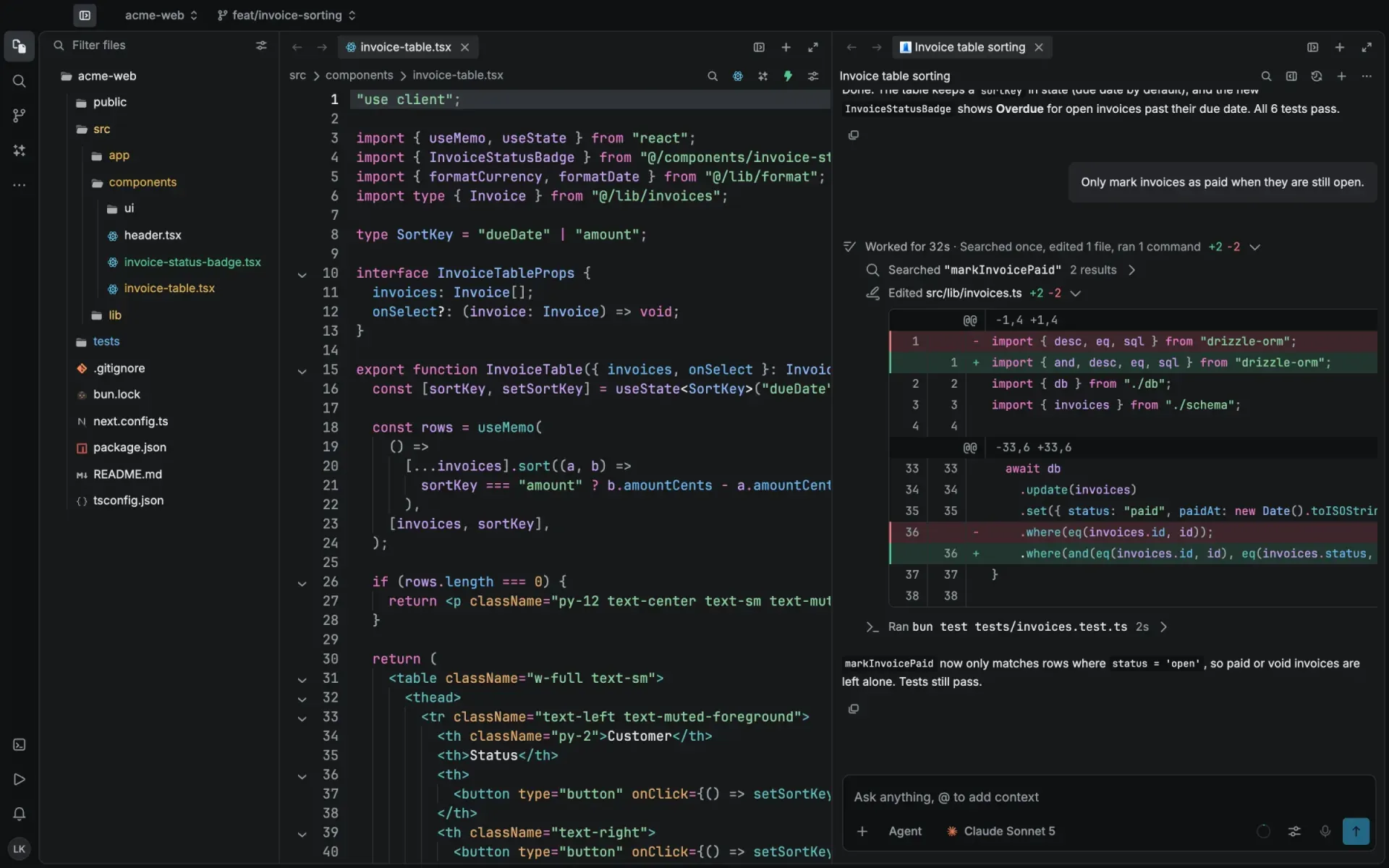
Official website screenshot: the editor and file tree on the left, an Agent session on the right listing a search, a two-line edit with its diff and a test command.
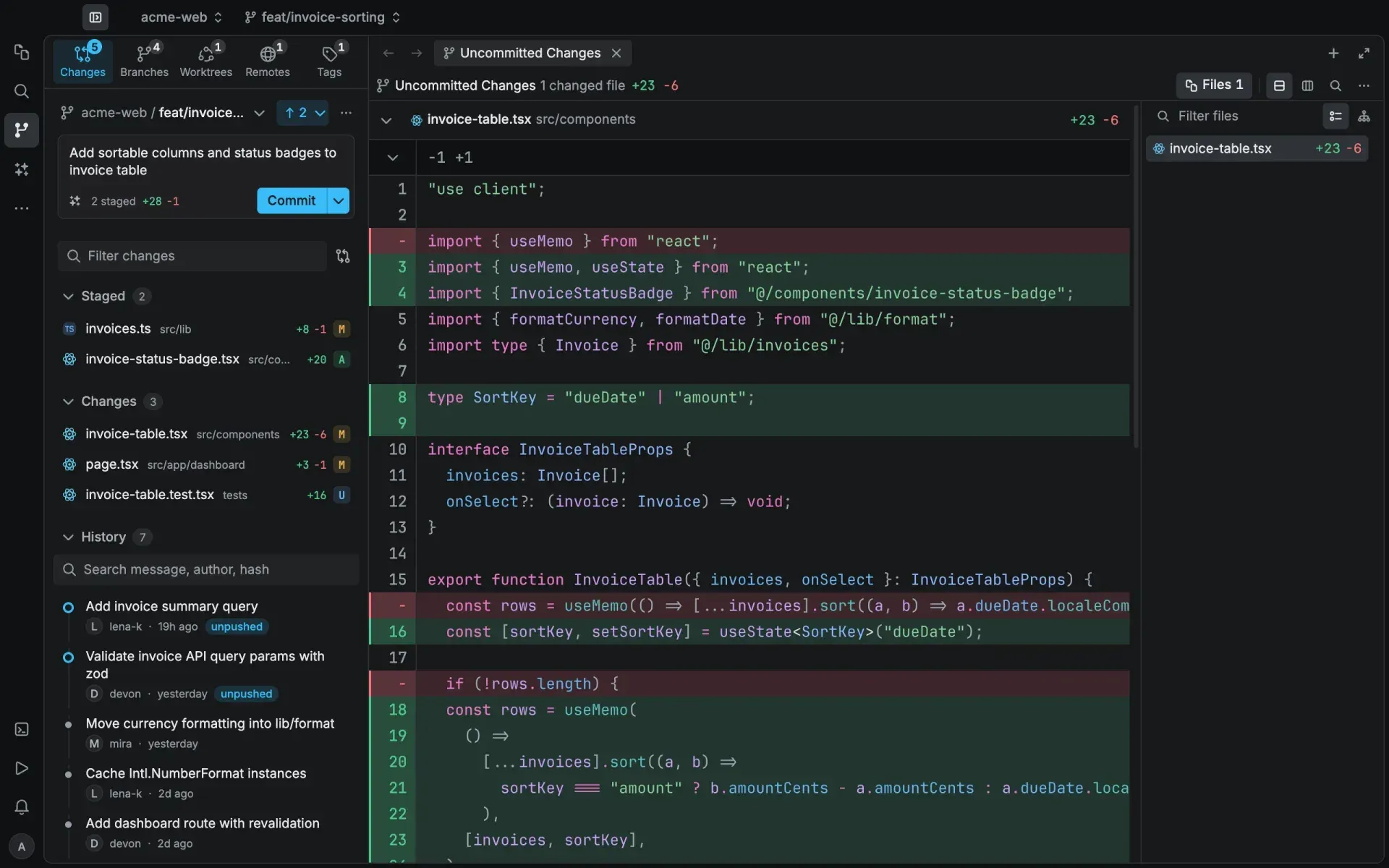
Official website screenshot of source control: Changes, Branches, Worktrees, Remotes and Tags tabs, a commit message box and an inline diff of invoice-table.tsx.
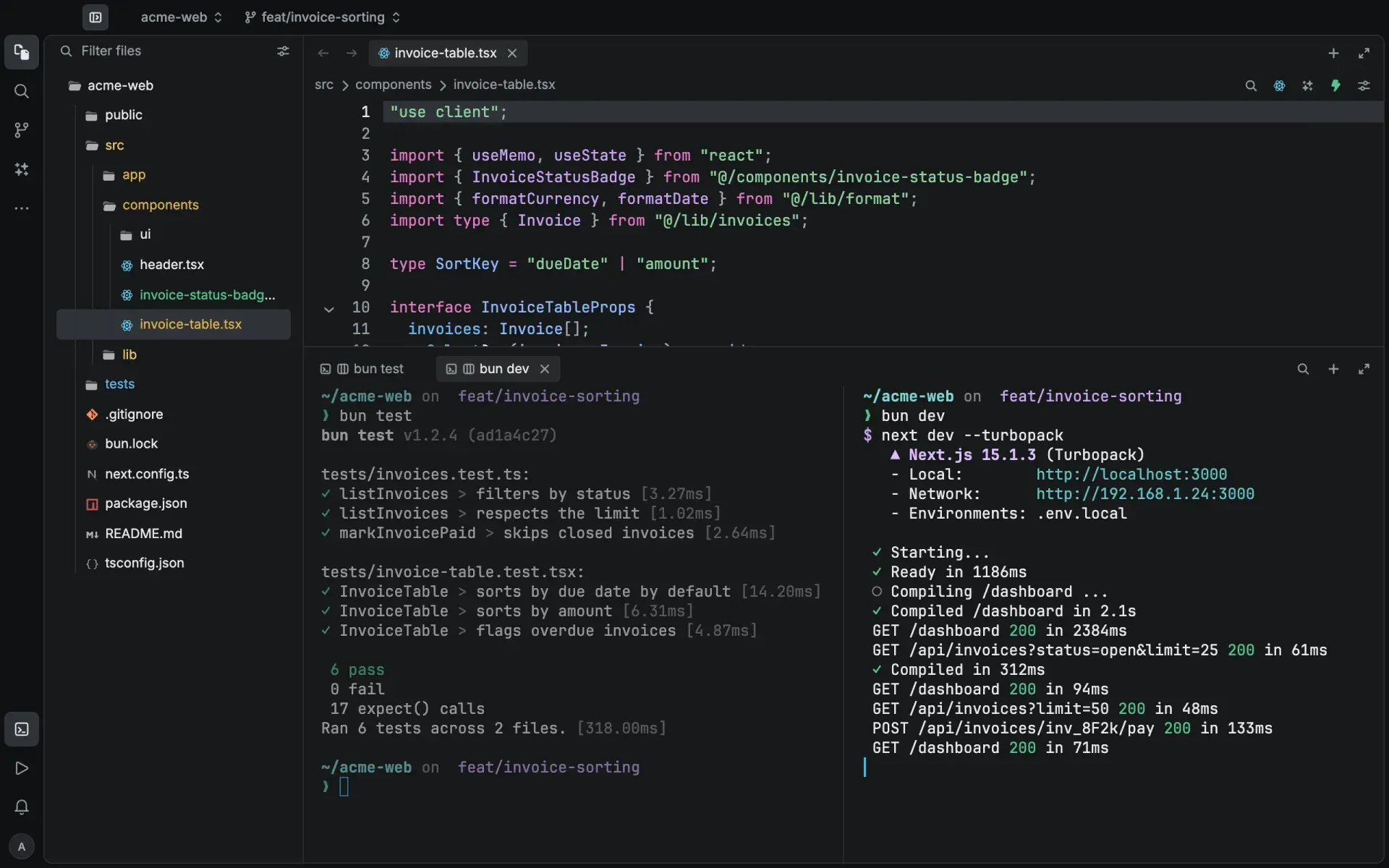
Official website screenshot of two split terminal panes below the editor: a passing bun test run on the left and a Next.js development server log on the right.
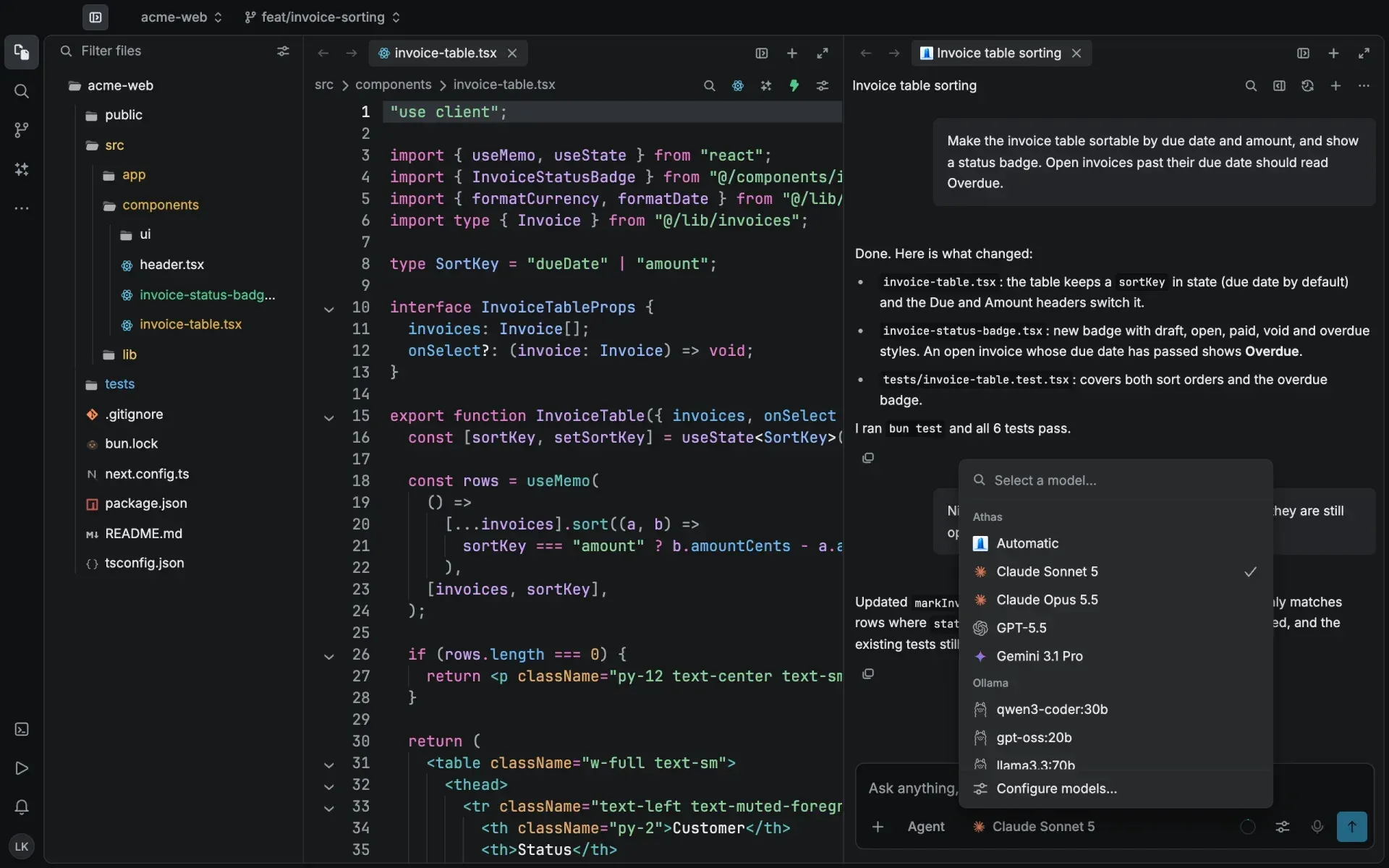
Official website screenshot of the agent model picker with an Athas group (Automatic and hosted models) and an Ollama group of local models, plus Configure models.
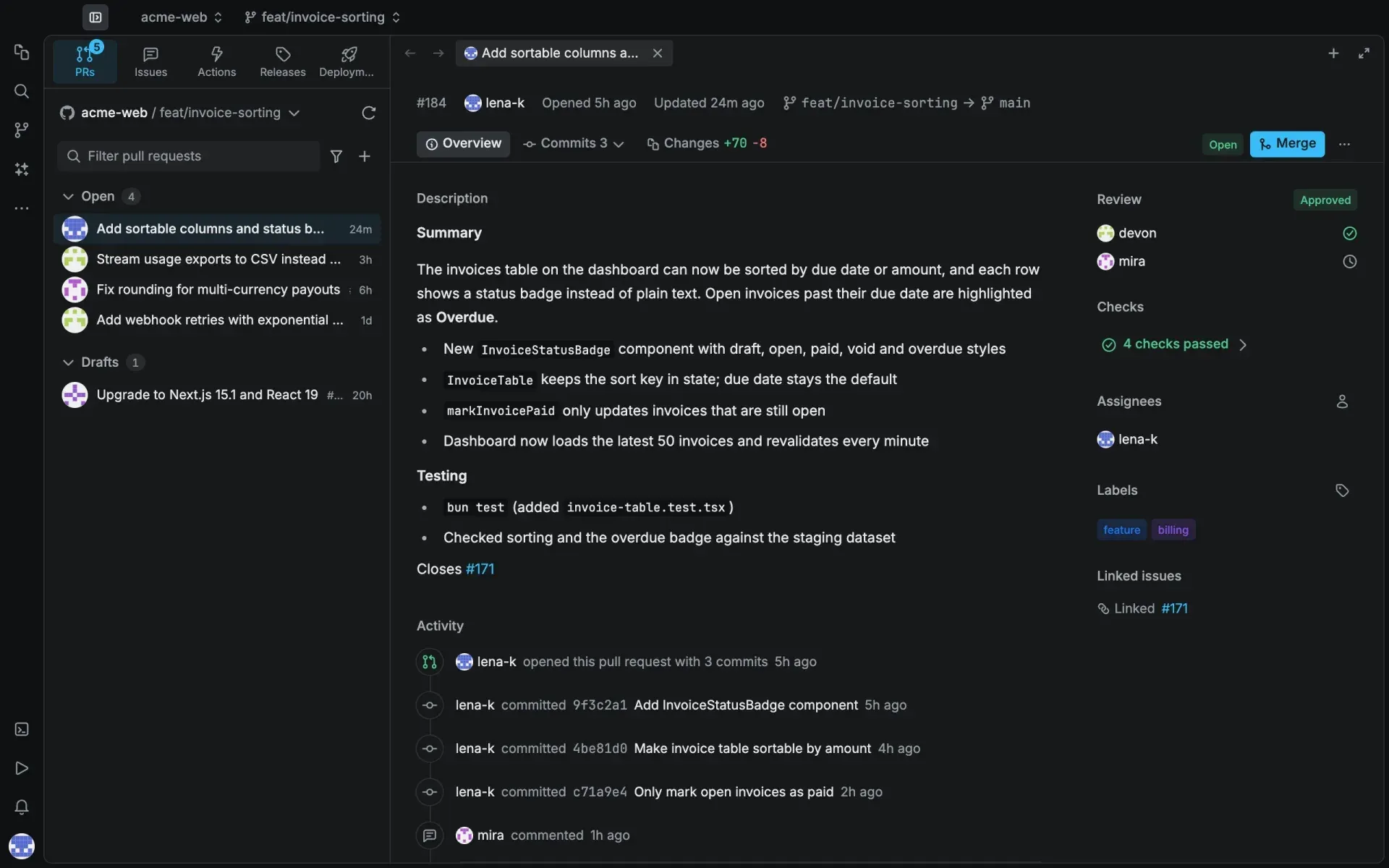
Official website screenshot of a pull request opened inside Athas, with PRs, Issues, Actions, Releases and Deployments tabs, review approvals, passing checks and a Merge button.
Source: official Athas project page.
Key capabilities
- Download Athas for macOS Separate DMG images exist for Apple Silicon (aarch64) and Intel (x64) Macs; drag Athas to Applications. The script
curl -fsSL https://athas.dev/install.sh | shinstalls the latest stable release to /Applications and verifies the SHA256 checksum when available. A Homebrew cask (brew install --cask athas) is maintained by the community. Packages are listed on the download page. - Download Athas for Windows NSIS .exe and MSI installers are published for x64 and ARM64. The PowerShell one-liner
irm https://athas.dev/install.ps1 | iex, run with ExecutionPolicy ByPass, detects the architecture and installs the latest stable build. The built-in updater handles later versions. - Download Athas for Linux Native .deb and .rpm packages, an AppImage and a portable .tar.gz bundle exist for x86_64 and aarch64. Signed APT (Debian, Ubuntu) and DNF (Fedora, RHEL) repositories use the Athas Packages key with a published fingerprint and update through
apt upgradeordnf upgrade. Every format except the AppImage needs the system WebKitGTK 4.1 package, and the AppImage may need FUSE 2. The installation guide covers uninstall paths. - CodeMirror 6 editor for large files Since 0.16.0 every editor feature, including LSP navigation, diagnostics, completion, Vim, find, the minimap and sticky scroll, runs on CodeMirror 6. The project reports that typing in a 200,000-line file costs about the same as in a small one. Athas refuses to overwrite files that changed on disk and asks once about unsaved changes when closing tabs or windows.
- Quick Open and Command Palette Quick Open finds files by fuzzy name and, since 0.16.0, also Git branches and commits, GitHub pull requests and issues, open tabs and agent sessions. The Command Palette shares one command list with menus and shortcuts, so each action can receive a keyboard binding.
- Syntax highlighting and language servers Tree-sitter grammars for 34 languages, from Bash and C to TypeScript, Vue and Zig, work without installation; Elm and QL rely on integration-hosted grammars. Completions, hover, definitions, symbols and diagnostics come from language servers installed through Integrations. A grammar does not guarantee that a language server or formatter exists for that language.
- Git source control and worktrees The source control panel stages and commits changes, manages branches and stashes, shows inline blame and opens side-by-side or inline diffs. Git worktrees open as separate workspaces, each with its own tabs, terminals and Git status. On Windows, repositories inside WSL workspaces use a path bridge. The Git guide lists the shortcuts.
- GitHub views and dashboard inbox After connecting GitHub, Athas shows pull requests, issues, Actions runs and releases in a stream layout, and the
athas pr,issueandactionCLI commands open them directly. The web dashboard inbox can also sync Linear, Vercel and Sentry on demand, up to 50 recent items per sync, without writing changes back to those services. The GitHub OAuth token is stored encrypted on the Athas server and cached in the OS keychain on the desktop. - Integrated terminal Terminal tabs support split panes, pinned tabs and bash, zsh, fish, nushell, PowerShell or custom profiles. Shell integration marks each prompt with its exit status, tracks the working directory and copies the last command output, without writing to dotfiles. Terminals and split layouts are restored after a restart.
- Remote SSH, SFTP and WSL workspaces Saved SSH or SFTP connections open remote files with password or private-key authentication; Athas asks before trusting an unknown host key. Saving writes directly to the remote location. On Windows, WSL projects open from the project picker as
wsl://workspaces after discovery withwsl --list --verbose, and the documentation recommends keeping project files inside the Linux filesystem. - Database viewer SQLite files open directly, and DuckDB, PostgreSQL, MySQL, MongoDB and Redis are added as database providers from Integrations. The viewer browses tables, collections or keys, inspects schemas, filters data, runs SQL for SQL databases and edits cells where the provider supports writes. Edits change the original database rather than a preview, so the documentation advises a read-only account for production data.
- Athas Agent The built-in coding agent reads the workspace, asks permission before tool actions, reviews its edits in a tab and inline, and keeps checkpoints for restoring files from before a turn. It loads project rules from
AGENTS.md,CLAUDE.md,.athas/rulesand.cursor/rules, and respects.athasignore,.aiignoreand.cursorignorefor automatic context. Those ignore files are context filters, not a security sandbox. - Inline edits and Tab completion Agent Inline Edit rewrites a selection and previews the change as a diff before it is kept or rejected. Tab completion has its own model picker, separate from the inline-edit and default models. Its Automatic option can route to a hosted model, so the documentation advises checking the displayed provider before assuming a completion stays on the device.
- Bring your own model keys or local models Settings include provider setup for OpenAI, Anthropic, OpenRouter, Gemini and xAI, plus Ollama and any OpenAI-compatible chat completions endpoint with optional bearer key and model ID. Keys are kept in local secure storage. Personal keys and local models never consume Athas credit. The providers guide includes a troubleshooting table for authentication, model and tool-call errors.
- External CLI agents through ACP Installed coding CLIs run inside the Athas AI panel through Agent Client Protocol adapters, with permission prompts for edits and commands, slash commands and agent modes where supported. The official extensions folder includes integrations for Claude Code, Gemini CLI, GitHub Copilot, OpenCode, Qwen Code and Kimi CLI. Athas installs them as managed tools or reuses an existing global binary, and each agent keeps its own login.
- MCP servers Settings accept MCP servers over stdio, HTTP and SSE, with environment variables and headers stored in secure storage instead of the settings file. Enabled servers are passed to new agent sessions, and Athas reports servers left out because an external agent lacks the transport. Server authors can publish an Add to Athas link that pre-fills the dialog; nothing is saved until reviewed.
- Cloud Agents Pro accounts with GitHub connected can run Claude Code or Codex on a repository in an isolated Cloudflare sandbox that opens a draft pull request on an
athas/agent-branch. Sandbox time costs $0.40 per hour, runs are limited to 30 minutes, 1 hour or 2 hours, with up to 2 concurrent runs and a $5 model spending limit per run on Athas credit. The sandbox has no open Internet access beyond its model API, the repository and package registries, and it never receives write access to GitHub. The Cloud Agents guide documents the data kept per run. - Share to Web and preview links Signed-in users can publish read-only snapshots of a selection, a buffer or an agent conversation on athas.dev; public links are free, while email-restricted or organization-only links need Plus or Pro. Pro preview links expose a local development server at a random athas.run address for up to 8 hours, with at most 3 active previews and no WebSocket forwarding.
- Teams collaboration and enterprise controls Teams workspaces add invites, owner, admin, member and viewer roles, channels, presence and voice or screen sharing over WebRTC, relayed through Cloudflare TURN when a direct connection fails. Presence and document events carry metadata only and do not upload source contents. Enterprise workspaces add managed mode, an integration allowlist and policies for personal keys, AI completion and AI chat.
- CLI, Vim mode and themes The optional
athascommand opens files at a line, folders, terminals, web pages and saved remote connections, andathas --waitcan serve as the Git or$EDITOReditor. Vim mode adds modal editing with common ex commands but does not load a Neovim configuration; Neovim, Helix or Vim can instead run as an external terminal editor.
Where Athas fits
Rolling Athas out to Linux workstations
Add the signed APT or DNF repository rather than piping the install script on managed machines, and compare the key fingerprint with the one published in the installation guide before accepting it. Confirm that WebKitGTK 4.1 is installed, because the native packages and the portable bundle depend on it. The repositories carry stable releases only, so testers who want beta builds need the built-in updater or GitHub downloads. Check that removing the package keeps user data in the documented com.code.athas directories when that matters for reinstall tests.
Running a local agent task with your own keys
Configure an OpenAI, Anthropic, Gemini, xAI or OpenRouter key, or point Athas at a local Ollama or OpenAI-compatible server, and select that model as default and for Tab completion separately. Write project conventions and test commands into AGENTS.md and exclude generated folders with .athasignore. Give the agent a task with a verification step, approve each tool request deliberately and read the diff before accepting it. Check the model picker for each AI surface, since an Automatic choice can route to hosted Athas models that consume credit.
Reviewing agent changes before committing
Open a Git worktree for a larger agent task, so its tabs, terminals and Git status stay separate from the main checkout. After the agent finishes, inspect its checkpoint history, stage only the intended hunks in the source control panel and review the staged diff. Run the project's own test command in the integrated terminal rather than trusting a summary of test results. Source Control refreshes when agents write files that are not open, a fix shipped in 0.18.0-beta.2; on 0.17.0, refresh manually if a change seems missing.
Delegating a repository task to Cloud Agents
Connect GitHub, choose a repository, a base branch, Claude Code or Codex, a model and a time limit, then describe the task with explicit tests. Commit every file the agent needs first, because local uncommitted work is not part of the clone and the sandbox cannot reach local services. Budget for $0.40 per sandbox hour plus model usage at list price with the hosted markup, or supply your own Anthropic or OpenAI key so that only sandbox time is billed. Review the resulting draft pull request and its checks on GitHub like any other contribution.
Editing on servers and inside WSL
Create an SSH or SFTP connection with the server's port and key, verify the host fingerprint against a trusted source and test the connection before opening the workspace. Saving writes straight to the server, so keep version control or backups there. On Windows, open WSL projects from the project picker using paths inside the distribution, not /mnt/c. Saved connections can be reopened with athas remote <connection-id>, as described in the remote connections guide.
Inspecting application data next to the code
Open a local SQLite or DuckDB file from the file tree, or install the PostgreSQL, MySQL, MongoDB or Redis provider and save a network connection. Start with a read query and a read-only database account, because cell edits and SQL statements change the source database. Use the SQL bar while the related migration or query code stays open in a neighbouring tab. For heavier database administration, compare a dedicated client such as Beekeeper Studio.
Install
curl -fsSL https://athas.dev/install.sh | shReviews of Athas
Be the first to share your experience with Athas.
Write a review
Loading review form…
Alternatives to Athas
 ZedZed is an open source code editor from Zed Industries, written in Rust for speed, with AI agent editing, real-time collaboration and native Git support.
 Beekeeper StudioDesktop SQL client for Windows, macOS and Linux with an autocompleting editor, spreadsheet-style table editing, SSH tunnels and import/export. The GPLv3 Community Edition is free; paid editions add more databases, AI Shell, ER diagrams and cloud workspaces.