

What is Beekeeper Studio?
Beekeeper Studio is a desktop SQL editor and database manager for Windows, macOS and Linux, developed by Beekeeper Studio, Inc. It connects directly from the user's computer to relational and several non-relational databases, then offers a query editor with autocomplete, a spreadsheet-style table view, schema editing and data import and export. The project began in 2019 as an experimental fork of the Sqlectron core database libraries, and the README still credits that origin.
One download covers every edition. The Community Edition is built from the GPLv3 code in the GitHub repository and supports PostgreSQL, MySQL, MariaDB, SQLite, SQL Server, Amazon Redshift, CockroachDB, TiDB, Google BigQuery, Redis and GreengageDB. Paid features unlock inside the same application through a license key: Oracle, Cassandra, ScyllaDB, ClickHouse, DuckDB, MongoDB, Snowflake, Trino, SurrealDB, LibSQL, Firebird and SQL Anywhere connections, plus file import, the ER diagram, the AI Shell and cloud workspaces. The paid code also lives in the repository, under a commercial source-available license rather than GPLv3.
The current release is version 6.2.2, published November 6, 2026, which fixes Azure CLI authentication. Version 6.2.1 repaired the Windows ARM64 build. Version 6.2.0, released October 28, 2026, opened the plugin system to everyone through Tools, Manage Plugins, added Dracula and GitHub light and dark themes, introduced native Windows ARM64 builds and shipped an MSI package for both Windows architectures. It also moved the application to Node 24 and Electron 44. Version 6.1.0 made query and connection folders and read-only mode free in the Community Edition and added connection import.
The application is written in TypeScript with Vue.js on Electron, in a monorepo where the desktop app lives in apps/studio. Releases are published as Windows installers, portable executables and MSI packages, macOS DMG and ZIP files for Intel and Apple Silicon, and Linux AppImage, DEB, RPM, pacman, Flatpak and Snap packages for x86_64 and ARM64. APT and RPM repositories and two team-maintained AUR packages are documented in the Linux installation guide.
Beekeeper Studio is a desktop client, not a hosted service or a database server. Saved connections and queries stay in a local SQLite file unless the user opts into cloud workspaces, and telemetry is opt-in. The trademarks and logo are not open source and are covered by separate trademark guidelines. Full user and administrator documentation is published at docs.beekeeperstudio.io.
Beekeeper Studio screenshots
Explore the interface. Open a screenshot to view it at full size.
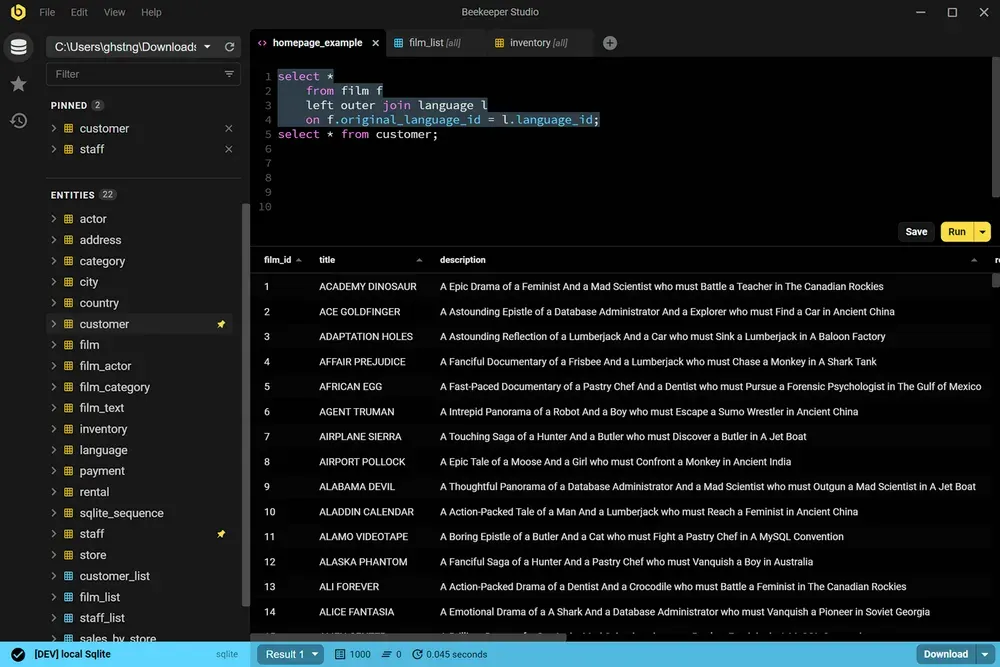
Official README screenshot: SQL editor with a join query, pinned tables in the sidebar and the result grid of a local SQLite database.
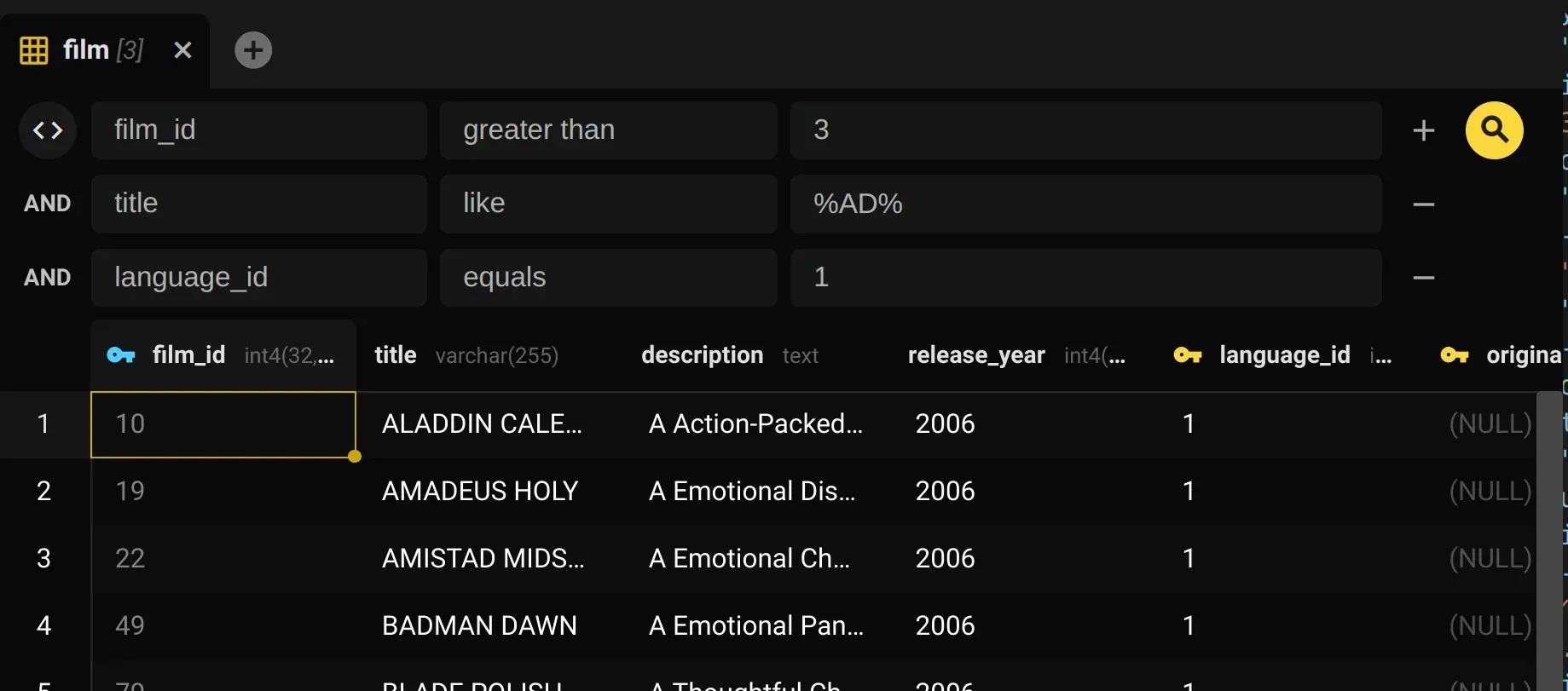
Table view with column filters (film_id greater than 3, title like %AD%, language_id equals 1) above the filtered rows, from the official docs.
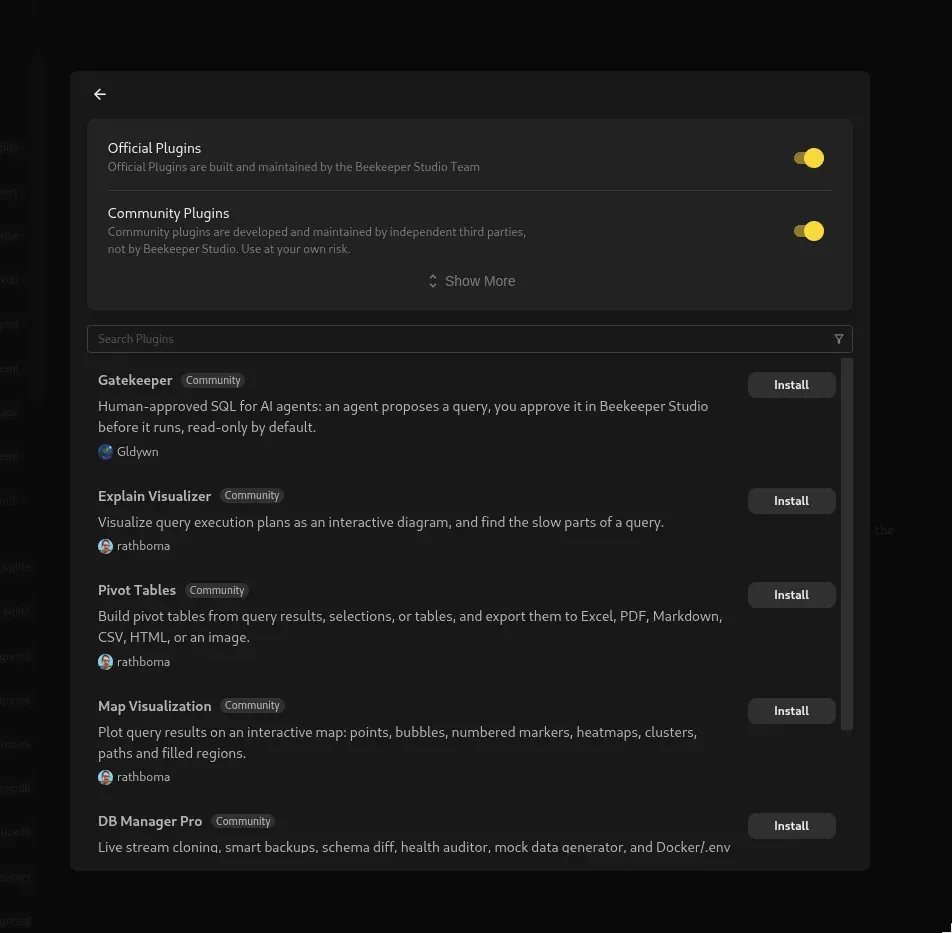
Plugin manager from the 6.2.0 release notes, with official and community plugin toggles and community plugins such as Explain Visualizer and Pivot Tables.
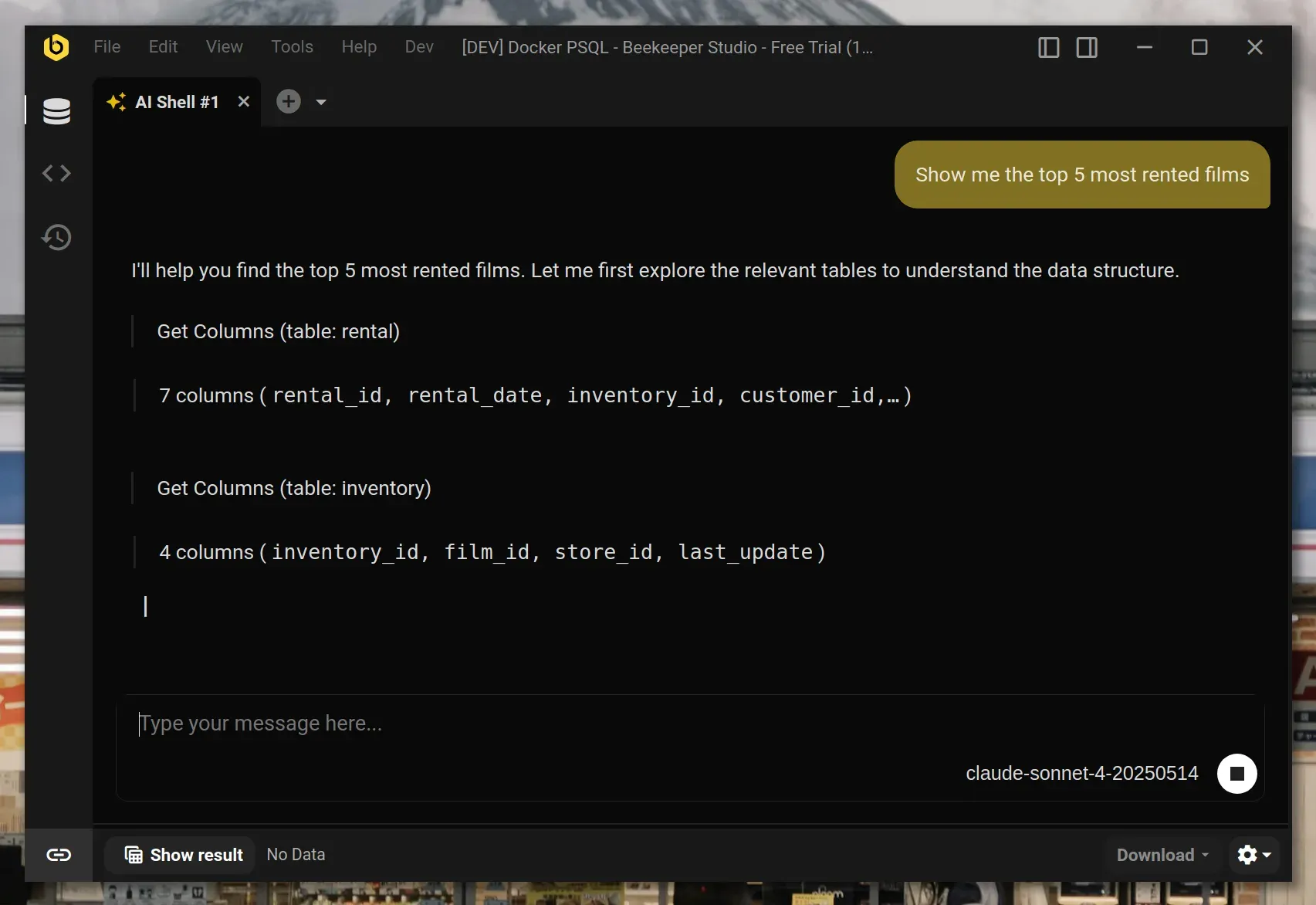
AI Shell tab from the official docs: the model inspects table columns before writing SQL for the question about most rented films.
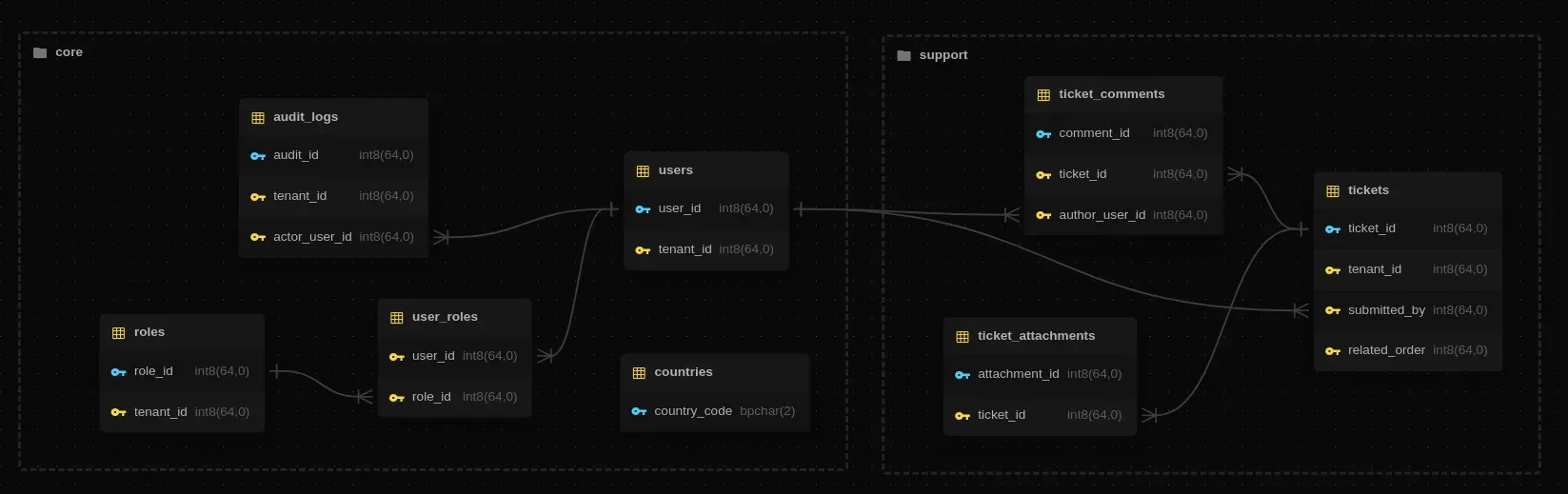
ER diagram from the official docs, showing tables in two schemas and the foreign keys between them.
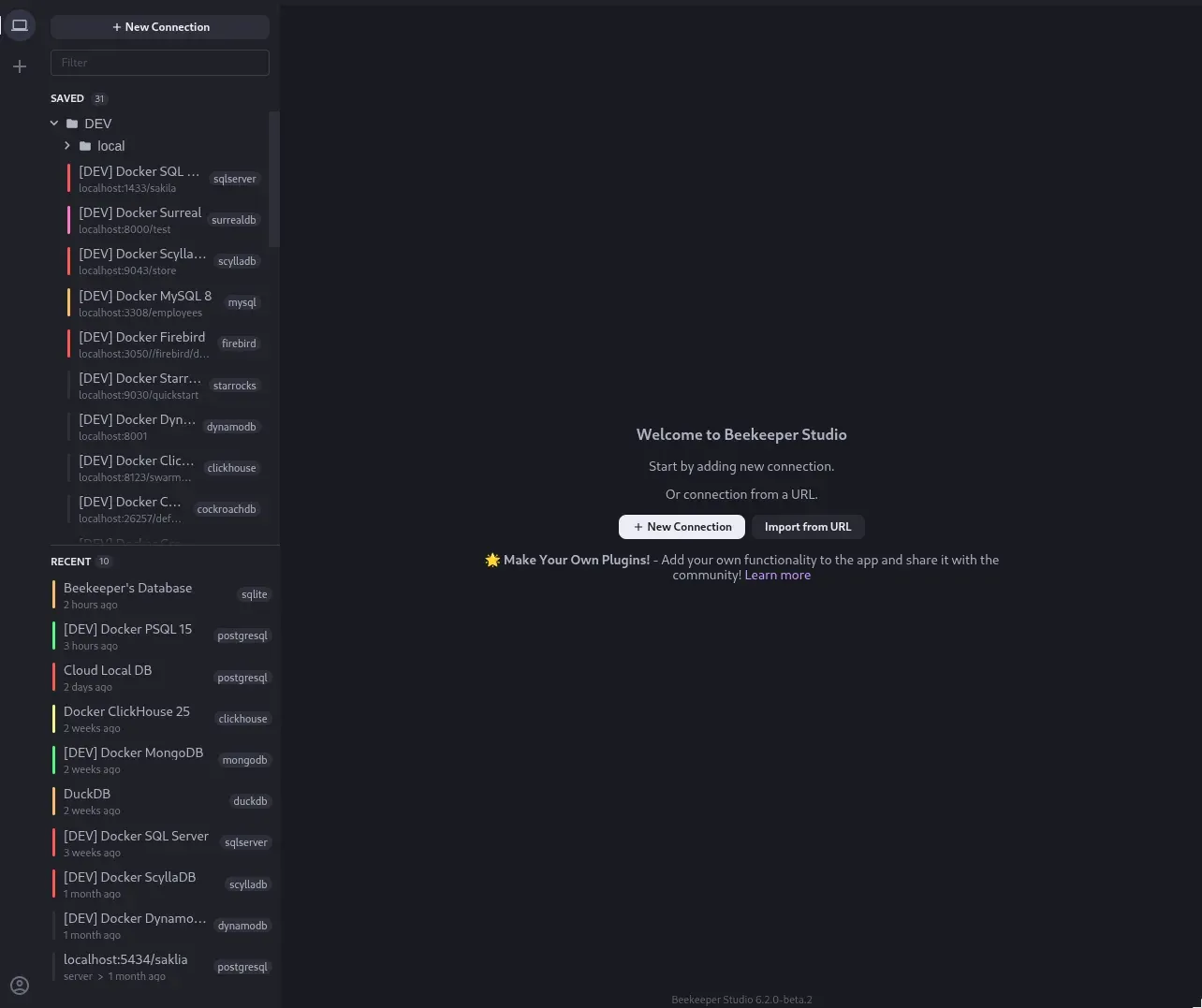
Connection screen in a 6.2.0 beta with one of the new themes, saved connections grouped in folders and a recent list across many engines.
Key capabilities
- Download for Windows Release 6.2.2 ships a per-user Setup installer, a portable executable and an MSI package, each for x64 and ARM64. The ARM64 build runs natively on Windows on ARM PCs such as Snapdragon X devices. On ARM64, LibSQL is unsupported, Oracle connects in thin mode only, MongoDB client-side field level encryption is unavailable and SQL Anywhere cannot load its client library. The Windows guide lists these limits.
- Windows enterprise deployment with MSI The MSI installs for all users under
C:\Program Files\Beekeeper Studioand supports silent installs withmsiexec /i ... /qnthrough Intune, Configuration Manager or Group Policy. It requires the matching Microsoft Visual C++ Redistributable and fails with exit code 1603 without it. MSI installs never update themselves; they check GitHub at startup and daily and show a notice, which administrators can turn off. Every release uses a new product code with a fixed upgrade code, as described in the enterprise deployment guide. - Download for macOS DMG and ZIP packages are published for Intel and Apple Silicon Macs. Oracle client libraries are not available for Apple Silicon, so Oracle users need the Intel build running under Rosetta 2. The DMG is installed by dragging the application into Applications.
- Download for Linux AppImage is the recommended format and updates itself; Ubuntu 22.04 and later needs
libfuse2for it. DEB and RPM packages for x86_64 and ARM64 register the official APT or RPM repository on install. Pacman packages, Flatpak files, the Snap Store package and the AUR packages beekeeper-studio-appimage and beekeeper-studio-bin are also available. The Snap cannot reach the SSH agent, and the Flatpak needs a filesystem override to open SQLite files outside its sandbox. - SQL editor with autocomplete The editor provides syntax highlighting, schema-aware autocomplete, a query formatter with presets, Vim mode and tabbed work across many queries. Since 6.1.0, schema completion and keyword completion can be disabled separately. Version 6.2.0 added relative line numbers in Vim mode. Saved queries, folders and a run history help recover earlier statements.
- Spreadsheet-style table browsing and editing Tables open in a grid that can be sorted, filtered with column conditions or raw SQL filters, and edited inline. Cell ranges can be copied and pasted from Excel or Google Sheets, and Backspace sets a selected range to NULL. Rows can be viewed as JSON, and the JSON sidebar, listed as a paid feature on the pricing page, shows a structured view of the selected row.
- Schema editing without writing SQL Tables can be created through a form that adds an autoincrement primary key by default, and Copy to SQL opens the generated CREATE TABLE statement in an editor tab instead. The structure view alters columns, indexes, relations and triggers where the engine supports it, and read-only mode, free since 6.1.0, prevents accidental writes on sensitive connections. Generated statements still run against the live database, so review them on production systems.
- Manual transaction management A transaction mode in the editor reserves a connection for the tab and exposes Commit and Rollback buttons. Idle transactions roll back after 10 minutes by default, with a 1-minute warning, and by default two reserved connections are allowed at a time. These values are configurable per database. The mode is available for PostgreSQL, CockroachDB, Redshift, MySQL, MariaDB, SQL Server, Firebird and Oracle.
- Data export Query results download as CSV, Excel, JSON, Markdown or Excel-friendly TSV, or copy to the clipboard. Results are capped at 20,000 rows by default, and a Download full results option streams the complete result to JSON or CSV. Whole tables, filtered table views and multiple tables can be exported, with one file per table, as described in the export guide.
- File import into new or existing tables With a paid license, CSV, JSON, JSON Lines and XLSX files can be imported into an existing table or used to create a new one. Separators are detected automatically, NULL markers are configurable and a preview shows the first 10 rows. For new tables, column types are inferred from the first five rows, which is worth checking before the import runs.
- Backup and restore through native tools A guided interface builds commands for
pg_dumpandpg_restore,mysqldumpandmysql, andsqlite3. The final step shows the generated command, with credentials passed through environment variables, and it can be copied or run inside the app with a live log. The vendor tools must be installed locally. - Secure connections Connections can use SSL or an SSH tunnel; the app reads
~/.ssh/configonly when the file is owned by the user and not writable by others. Higher tiers add Amazon IAM, Azure Entra ID and Kerberos or Windows authentication. Version 6.2.2 fixes Azure CLI authentication, and 6.2.0 fixed tunnels whose IdentityFile points to a public key only. - Plugins Since 6.2.0, every edition can install plugins from Tools, Manage Plugins. Plugins are web applications that run in a sandboxed iframe and talk to the app through a message API; discovery uses a public plugin index on GitHub. Official plugins are maintained by the Beekeeper Studio team, while community plugins come from third parties. Plugins update automatically unless auto-update is turned off per plugin.
- AI Shell The AI Shell is a paid plugin that lets an AI model list schemas, inspect relations, read saved queries and open tabs, and write SQL. It asks for permission before running SQL, with an option to allow read-only queries automatically. Users supply their own provider API key and pay that provider directly; table names, structure, executed queries and approved results are sent to the provider, not to Beekeeper Studio. The AI Shell documentation lists the shared data.
- Entity relationship diagrams Paid editions include an ER diagram opened from the Tools menu, a table or schema context menu or the structure tab. It shows relationships that cross schema boundaries with a visual distinction. Diagrams can be saved as an image or copied to the clipboard for documentation.
- Query Magics Renaming a result column with a suffix such as
__format__linkchanges how values render: clickable links and email addresses, images from URLs, star ratings, progress bars, localized money, readable Unix timestamps and links to other tables. Custom enum labels are read from anenums.jsonfile in the user data folder. The formatting applies to the result grid only. - Cloud workspaces Professional and Business subscriptions include workspaces that sync connections and saved queries across machines and share them with a team. Each member has a personal folder; items moved to the team folder are visible to all members. Workspace items are usable only inside the desktop app, not through a web interface, and saved passwords are encrypted by the application before storage.
- Security controls and administrator configuration A three-tier INI configuration system (default, user, administrator) lets IT enforce settings machine-wide through
system.config.ini. Options include PIN lock before connecting, auto-disconnect on idle, lock or suspend, disabling SSH configMatch execblocks, turning off update checks and disabling the AI Shell. Privacy Mode hides host, port and database names while screen sharing. - Themes and appearance Version 6.2.0 rebuilt styling around a theme system and added Dracula light and dark and GitHub light and dark themes, selected under View, Appearance. A theme guide documents the color system for anyone creating a custom theme. The dark theme remains the default look shown in official screenshots.
Where Beekeeper Studio fits
Daily query work on development databases
Create a connection for each local or staging database, and group them in folders by project or environment. Write queries in tabs, keep useful ones as saved queries and use the run history to recover earlier statements. Check that autocomplete sees the right schema, and turn off keyword or schema completion separately if it gets in the way. Mark shared or production connections as read-only so that table edits cannot be committed by mistake.
Reaching databases behind a bastion host
Configure an SSH tunnel in the connection form, or rely on matching entries in ~/.ssh/config. Confirm that the config file is owned by your account and not group-writable, otherwise it is ignored. On the Snap package, connect the ssh-keys interface and avoid agent-based keys; the DEB or AppImage builds reach the SSH agent. For cloud identities, check which edition includes Amazon IAM, Azure Entra ID or Kerberos authentication before rollout.
Moving data in and out of tables
Export a query result or a filtered table view to CSV, Excel, JSON or Markdown, and remember that on-screen results stop at 20,000 rows unless you choose Download full results. For imports, preview the first 10 rows, map columns explicitly and verify inferred types for new tables, since they come from the first five rows. Use the import guide for NULL markers and trimming options.
Backing up and restoring a database
Open Backup or Restore from the Tools menu, choose the entities, then review the generated pg_dump, mysqldump or sqlite3 command before running it. The tools must be installed and their path set in the wizard. Running the command in a terminal is possible after copying it, but credentials then need to be supplied through environment variables. Test a restore into a scratch database before relying on the output, using the backup and restore guide.
Rolling out to a managed Windows fleet
Deploy the Visual C++ Redistributable first, then assign the x64 MSI to x64 PCs and the ARM64 MSI to Windows on ARM PCs, never both to one device. Target the ARM64 package with device filters, because deployment tools read it as x64. Ship a system.config.ini with PIN lock and auto-disconnect if policy requires it, and plan to deploy each new MSI because installs do not self-update. User data in %APPDATA%\beekeeper-studio survives upgrades and uninstalls.
Extending the client with plugins
Browse official and community plugins in Tools, Manage Plugins, and enable community entries only after reading their source, because third parties maintain them. To build one, create a folder whose name matches the id in manifest.json, add an HTML entry page and use the optional SDK for the message API. Publishing requires a GitHub repository with a README and a release ZIP, as explained in the plugin development guide.
Install
sudo snap install beekeeper-studioReviews of Beekeeper Studio
Be the first to share your experience with Beekeeper Studio.
Write a review
Loading review form…
Alternatives to Beekeeper Studio
 MetabaseMetabase is open-source business intelligence for asking questions of your database, building dashboards and embedding analytics. Run the AGPL edition yourself with Docker or the JAR, or use paid Cloud, Pro and Enterprise plans.
 MCP PostgreSQL ServerArchived MCP reference server that gives AI clients read-only SQL queries and table schema information for a PostgreSQL database.