What is Metabase?
Metabase is an open-source business intelligence and embedded analytics application. People connect it to a database, ask questions through a point-and-click query builder or a SQL editor, save the results as charts, and arrange them on dashboards that can be filtered, shared, scheduled and embedded in other products. It is developed by Metabase, Inc. in the public metabase/metabase repository, written mostly in Clojure with a TypeScript front end, and documented at metabase.com/docs.
There are two code lines in the one repository. The Open Source edition is released under the GNU AGPL. The Enterprise code is source available and released under the Metabase Commercial Software License, and its features are unlocked only with a paid plan; the license page explains the difference, including the options for embedding iframes without the AGPL. The README also notes that the repository holds both editions.
Metabase ships as a single Java JAR and as the official Docker images metabase/metabase (Open Source) and metabase/metabase-enterprise. The installation guide also covers Podman, a systemd service, Azure Web Apps and building from source, and states that there is no officially supported Helm chart and no AWS or Azure marketplace listing. Metabase Cloud is the hosted option, and the vendor offers an air-gapped edition for restricted networks.
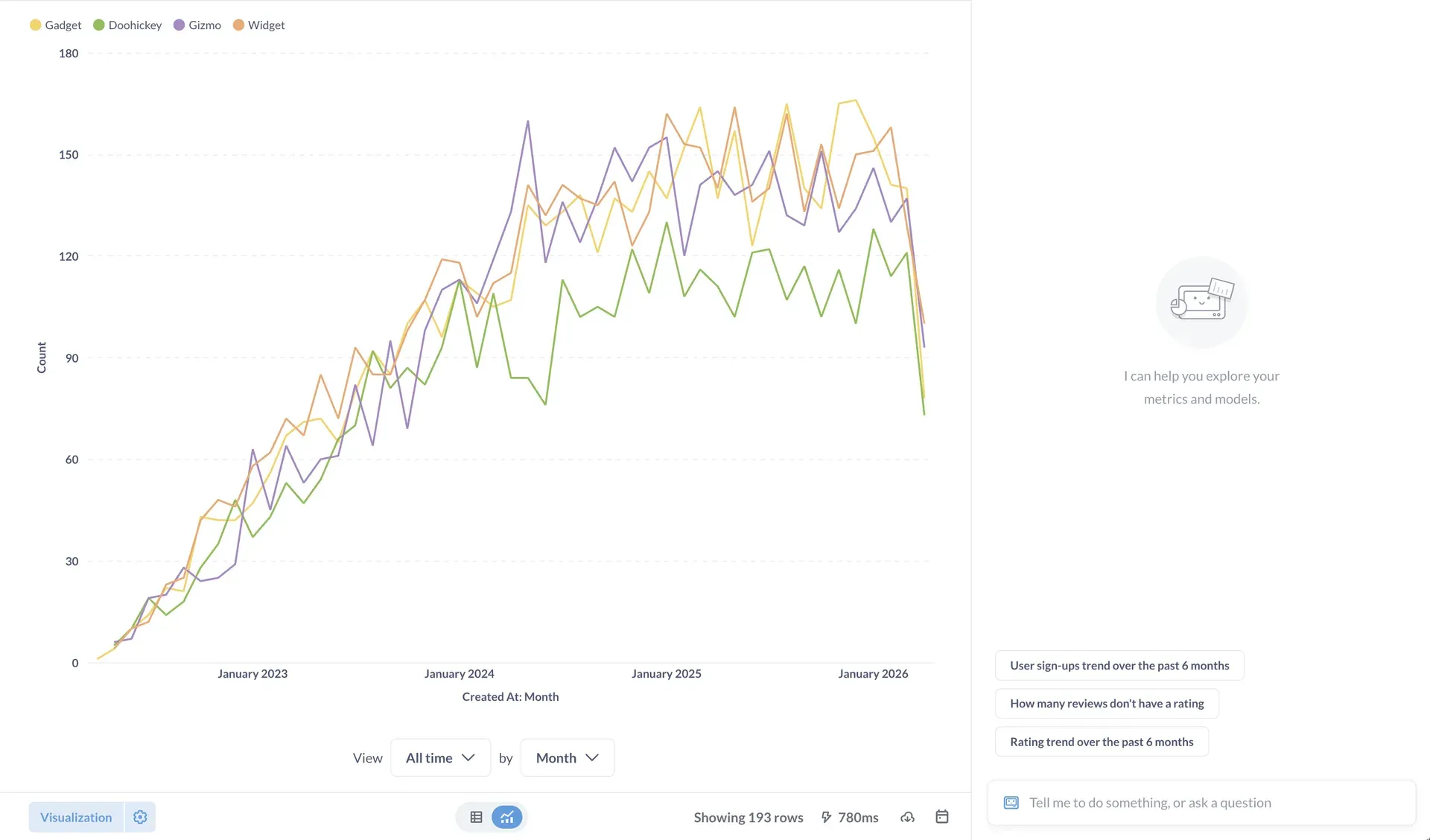
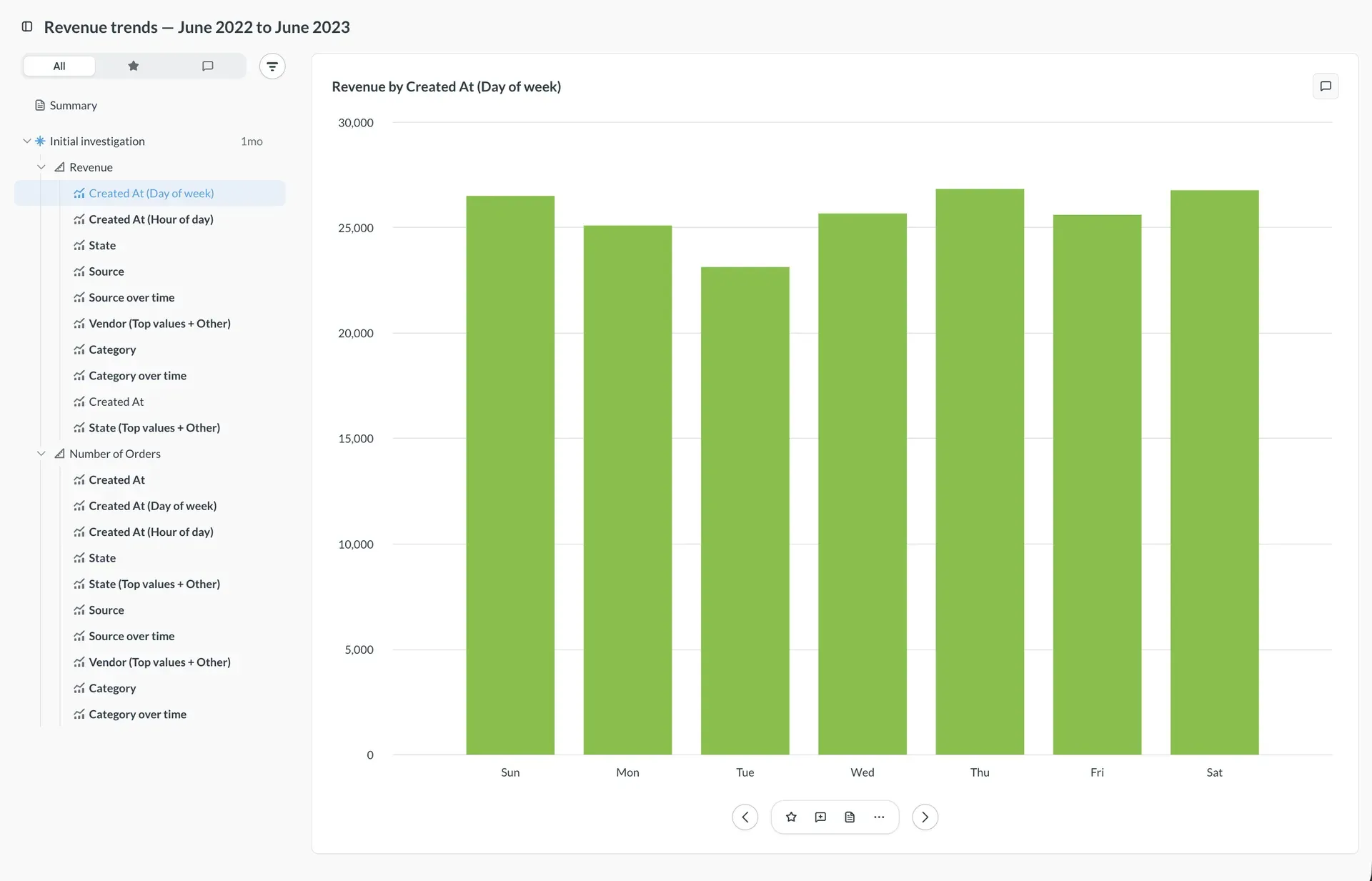
The latest release is Metabase 65.3, published on November 6, 2026. Version 65 added a Research mode that plans and runs combinations of metrics, dimensions and event timelines, beta data apps for Pro and Enterprise, an Embedding hub, per-group control of MCP tools, and more AI providers including Ollama for self-hosted models. It also changed defaults: Metabot can now read query results, which means they go to the configured AI provider unless an admin turns that off, only admins can create actions, and remote sync only covers the Library. Release 65.3 adds an SQL parsing timeout setting and sends anonymous usage analytics by default on self-hosted instances, controlled by the anonymous tracking setting. The documentation marks 0.64 and 0.58 as long-term support versions.
Metabase is not a data warehouse, an ETL tool or a replacement for a database: it reads from your sources and keeps its own application database for questions, dashboards, users and permissions. Its documentation describes the official drivers as covering the oldest supported database version up to the latest stable one, with community drivers for others.
Key capabilities
- Run it with Docker The Docker guide starts Open Source Metabase with one
docker runcommand on port 3000. That default keeps application data in an embedded H2 file that disappears with the container, so production deployments setMB_DB_TYPEand related variables to point at PostgreSQL or another production application database and back that up. - Run the JAR or other packages Because Metabase is a Java JAR, it runs wherever Java is available, and the docs cover a systemd service, Podman and Azure Web Apps. Back up the application database before each upgrade, as every release note reminds you, and follow the upgrading guide.
- Metabase Cloud The hosted service handles setup, backups and upgrades. Its Starter plan is listed at $100 per month with five users included and $6 per additional user per month, and Pro at $575 per month with ten users included and $12 per extra user per month; Enterprise pricing is custom. Check the pricing page for current figures and the 14-day trial.
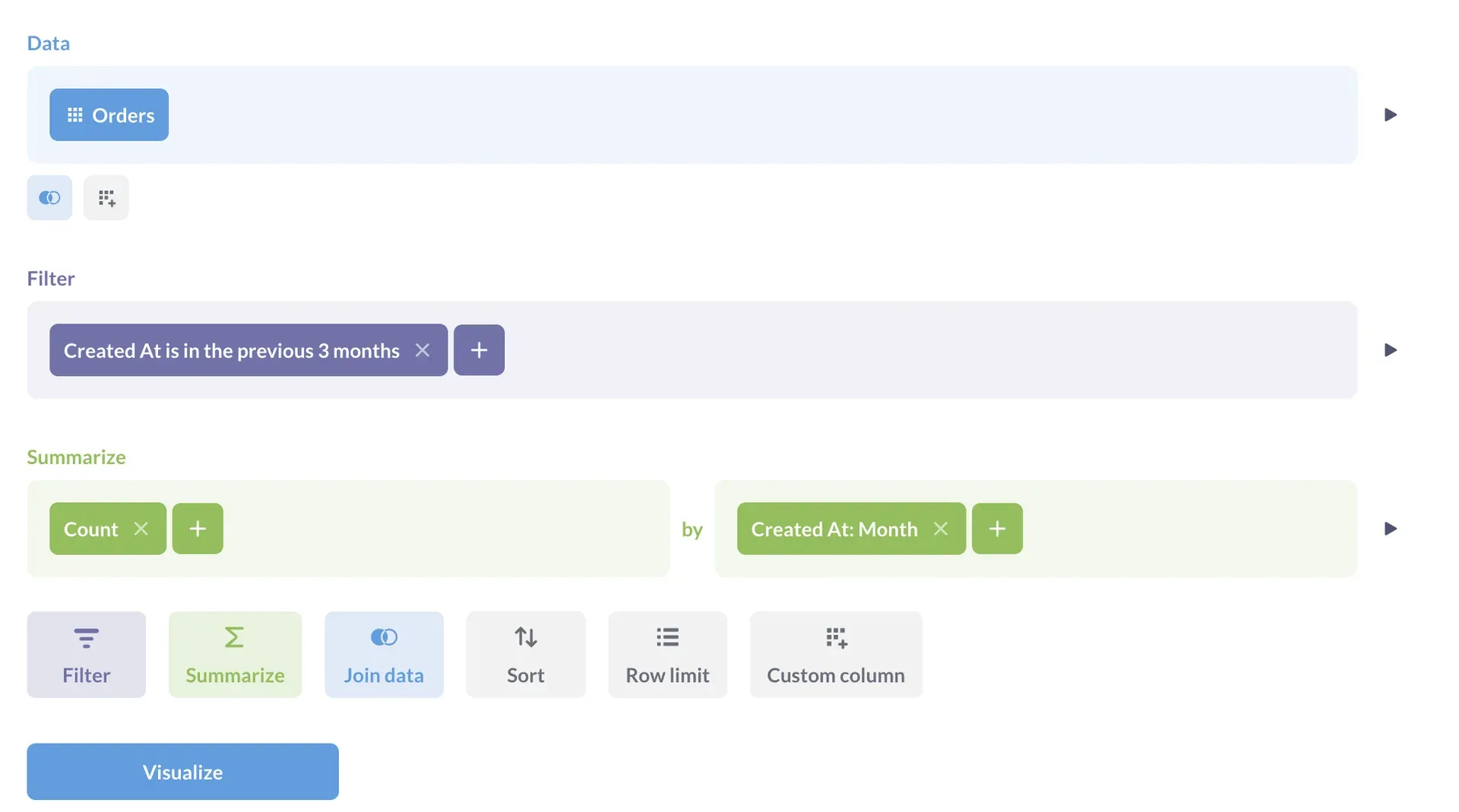
- Query builder for non-SQL users The notebook editor lets people pick a table, add filters, summarize by a field and join data in steps, without writing SQL. It suits recurring business questions, and results can be saved, visualized and added to dashboards. See the questions documentation.
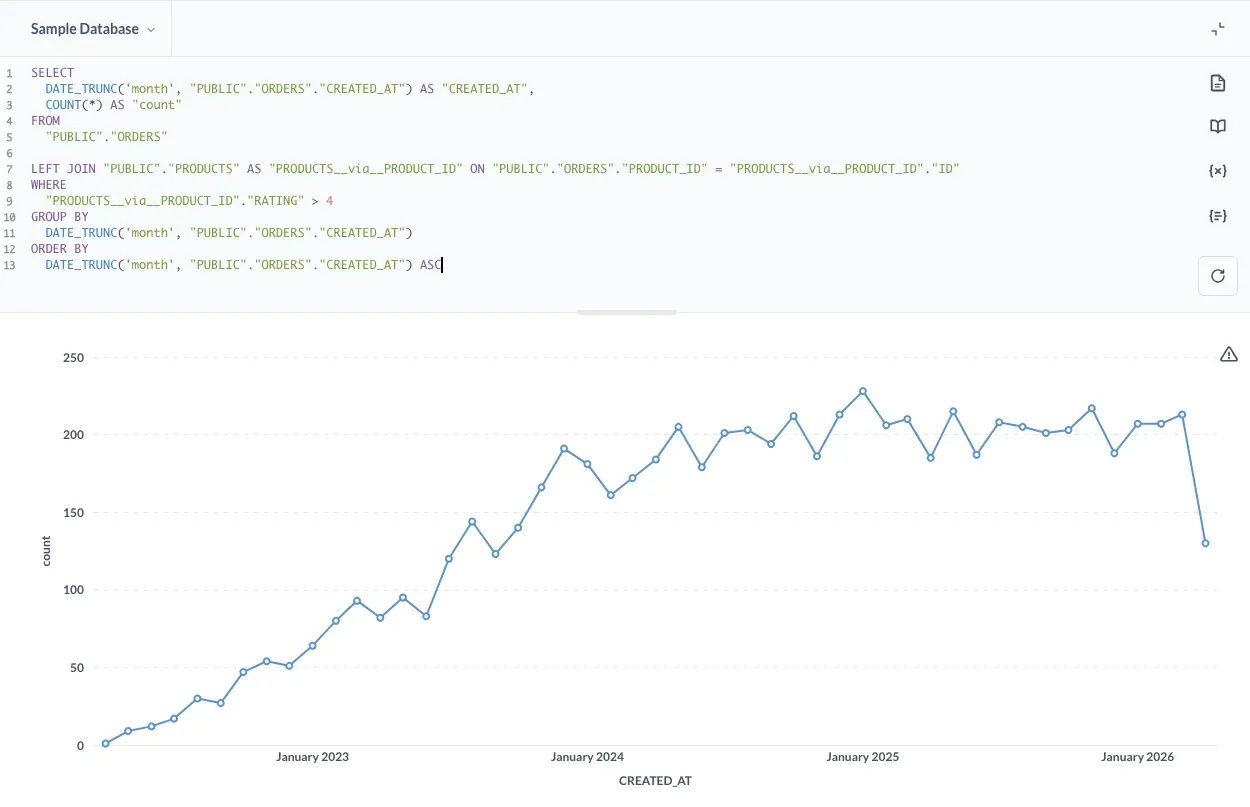
- SQL editor Analysts write native SQL against a connected database, use variables for filters and turn the result into charts. Access to native queries is a permission, so you can allow it for some groups and not others.
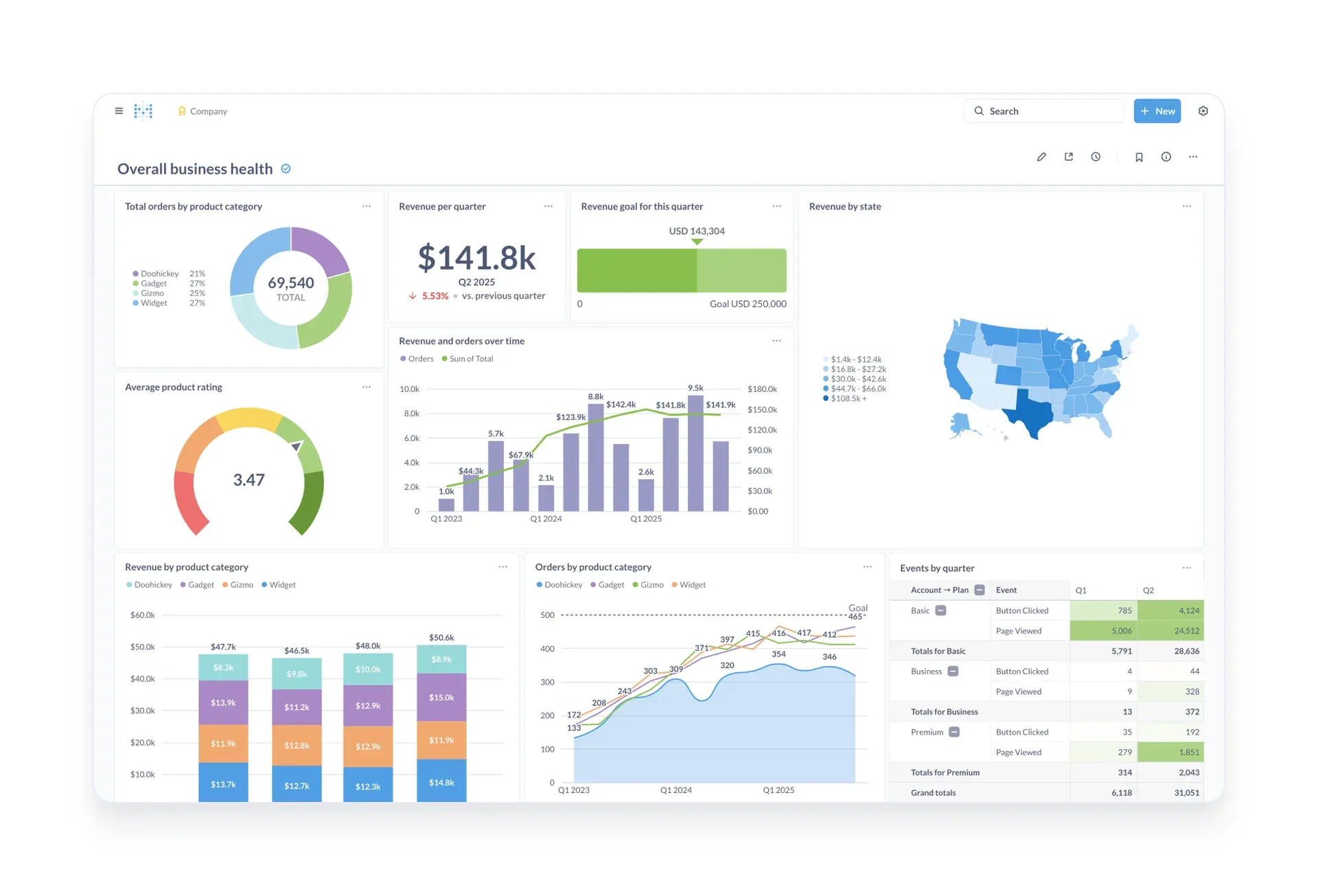
- Dashboards with filters and subscriptions Dashboards combine cards, tabs, filters, cross-filtering, click behavior, auto-refresh and full-screen display. Admins and users can schedule dashboard subscriptions to email, Slack or a webhook, and set alerts on questions.
- Metabot and AI features Metabot answers questions, helps write queries and charts, and can be backed by providers an admin connects under Admin, AI, including Ollama for models you host. Version 65 adds Research mode and lets Metabot read query results by default, so review that setting before enabling it for sensitive data. The Metabot docs describe usage limits.
- MCP server and agent API Open Source lists an MCP server so external AI clients can query data through Metabase, and the README points to an agent API for building your own agents. On Pro and Enterprise, admins can choose which MCP tools each user group may use.
- Documents Long-form analysis can be written in documents that mix text and live data, with comments, so that findings and the charts behind them stay together.
- Data Studio, transforms and metrics Data Studio lets modelers transform raw data into analytics-ready tables, find broken dependencies and define canonical metrics. The Library organizes curated content for the whole company, and remote sync can version it with Git. Version 65 limits default remote sync to the Library.
- Data connections Official drivers include PostgreSQL, MySQL, MariaDB, SQL Server, Oracle, SQLite, MongoDB, ClickHouse, BigQuery, Snowflake, Redshift, Databricks, Athena, Druid, Presto, SparkSQL, Starburst and Vertica, with community drivers for more. Metabase asks for a database user with the privileges you choose; a read-only account is a sensible default. See connecting databases.
- Permissions and sandboxing Groups control which databases, tables and collections people can see or query. Row and column level permissions, SSO, caching controls and usage auditing are Pro or Enterprise features, so confirm the plan before designing a multi-customer setup around them.
- Modular and full-app embedding Charts, dashboards, the query builder, AI chat and a collection browser can be embedded in your own application through the Embedding hub, or an entire Metabase can be embedded in an iframe. Guest embeds suit simple sharing, while SSO-based embeds with tenants, drill-through and the query builder require Pro or Enterprise.
- Public links and exports Questions and dashboards can be shared through public links, and results can be downloaded. Pro and Enterprise can disable downloads, which matters if embedded viewers should not extract raw data.
- REST API Metabase exposes an API for automation and integration; the API reference is generated per version. Some unused endpoints were removed in version 65, so scripts should be tested against the target release.
- Custom visualizations and theming Custom visualization projects have a template in the repository, dark mode and content translations are available, and embeds can use themes. Advanced theming and custom visualizations in embeds belong to the SSO tier.
- Security and administration Pro and Enterprise add SSO, IP allowlists or required two-factor authentication, and auditing, while Starter adds two-factor authentication. The project publishes a security policy for vulnerability disclosure, and SOC 2 Type 2 auditing is cited for Metabase Cloud.
Where Metabase fits
Giving a team self-service reporting on a SQL database
Connect a read-only user for PostgreSQL, MySQL or another supported source, let Metabase sync the schema, then hide irrelevant tables and describe key fields. Create groups and collections per team, and let non-technical people use the query builder while analysts keep the SQL editor. Verify that the figures in a saved question match a trusted query before the dashboard is shared. The permissions guide shows how access is granted.
Publishing recurring dashboards and alerts
Build a dashboard from saved questions, add filters, and set a subscription to email, Slack or a webhook on a schedule. Check the timezone setting and caching, because a dashboard that looks current but serves cached data can mislead. Alerts on a single question are useful for thresholds such as failed jobs or an empty table.
Embedding analytics in a customer-facing product
Decide first whether guest embeds are enough. If customers need drill-through, their own filters and data isolation, plan for Pro or Enterprise with SSO and tenants, and test that one customer cannot see another's rows. Check the AGPL and embedding license terms before shipping iframes, and use the embedding documentation to choose modular or full-app embedding.
Asking questions with AI on your own data
Connect an AI provider, or Ollama for a model you host, and try Metabot on a sample database before real data. Decide whether Metabot may read query results, since version 65 enables that by default and results then go to the provider. Restrict who can use AI features and review usage limits and audit options where your plan provides them.
Governing metrics and content as the instance grows
Use the Library and Data Studio for approved metrics, models and transforms, and remote sync to keep that content in Git. Retire duplicated questions, assign collection owners and keep one definition for each KPI. After each upgrade, confirm that remote sync, actions and API scripts still behave as documented in the release notes.
Operating a self-hosted instance safely
Run on PostgreSQL for the application database, put the server behind TLS, store secrets outside the command line, schedule backups of the application database and rehearse a restore. Pin an image tag instead of latest, choose a long-term support version if you upgrade rarely, and follow the upgrade guide in a staging copy first.
Install
docker run -d -p 3000:3000 --name metabase metabase/metabaseReviews of Metabase
Be the first to share your experience with Metabase.
Write a review
Loading review form…
Found Metabase useful? Upvote it todayYour vote helps other IT teams find it in the daily ranking.