

What is Continue?
Continue is an open-source AI coding agent built by Continue Dev, Inc. It runs as a VS Code extension, a JetBrains plugin and a terminal CLI called cn. Inside the editor it offers four modes: Agent, which can read files, edit code and run commands through tools; Chat, for questions about selected code; Edit, for targeted changes to a highlighted range; and Autocomplete, for inline suggestions while typing. Every model is configured by the user, from hosted APIs such as Anthropic, OpenAI, Mistral or Amazon Bedrock to local runtimes such as Ollama, LM Studio and llama.cpp.
The project's status changed in 2026. The continue.dev website now states that Continue was acquired by Cursor and that the open-source codebase stays available as a foundation for others. The GitHub repository README says the repository is no longer actively maintained and is read-only. Before closing, the team published a final 2.0.0 release of the VS Code extension, the CLI and the JetBrains plugin. According to the README, that release removed anonymous telemetry, pulled out authentication and fixed outstanding bugs.
The latest GitHub release is v2.0.0-vscode, published June 19, 2026, with a v2.1.0-vscode pre-release cut the same day; the VS Code Marketplace and Open VSX both serve 2.1.0. The stable 1.2.24 release notes describe the final cleanup: the CLI-install banner and the Generate Rule feature were removed, and onboarding now writes explicit model definitions instead of Hub slugs, because Hub package resolution no longer works. The CLI is published on npm as @continuedev/cli, last at 1.5.47 (June 18, 2026). The JetBrains Marketplace lists plugin 1.0.67 from March 2026, compatible with IntelliJ-based IDEs from 2024.1.
The codebase is a TypeScript monorepo: a shared core package with model providers, tools and configuration loading, a React gui rendered in the editor sidebar, the VS Code extension, a Kotlin IntelliJ plugin that talks to a bundled binary, and the CLI. Configuration lives in ~/.continue/config.yaml (schema v1), with optional project rules under .continue/rules. The license is Apache-2.0, copyright 2023 to 2026 Continue Dev, Inc.
Out of scope now: new features, security patches, the hosted Continue Hub and account sign-in, and the Mission Control cloud agents promoted on the former website. The documentation remains online, but some pages still mention Continue accounts, cn login and uses: Hub blocks that the final release no longer supports. Treat Continue as a stable, forkable snapshot rather than a supported product.
Continue screenshots
Explore the interface. Open a screenshot to view it at full size.
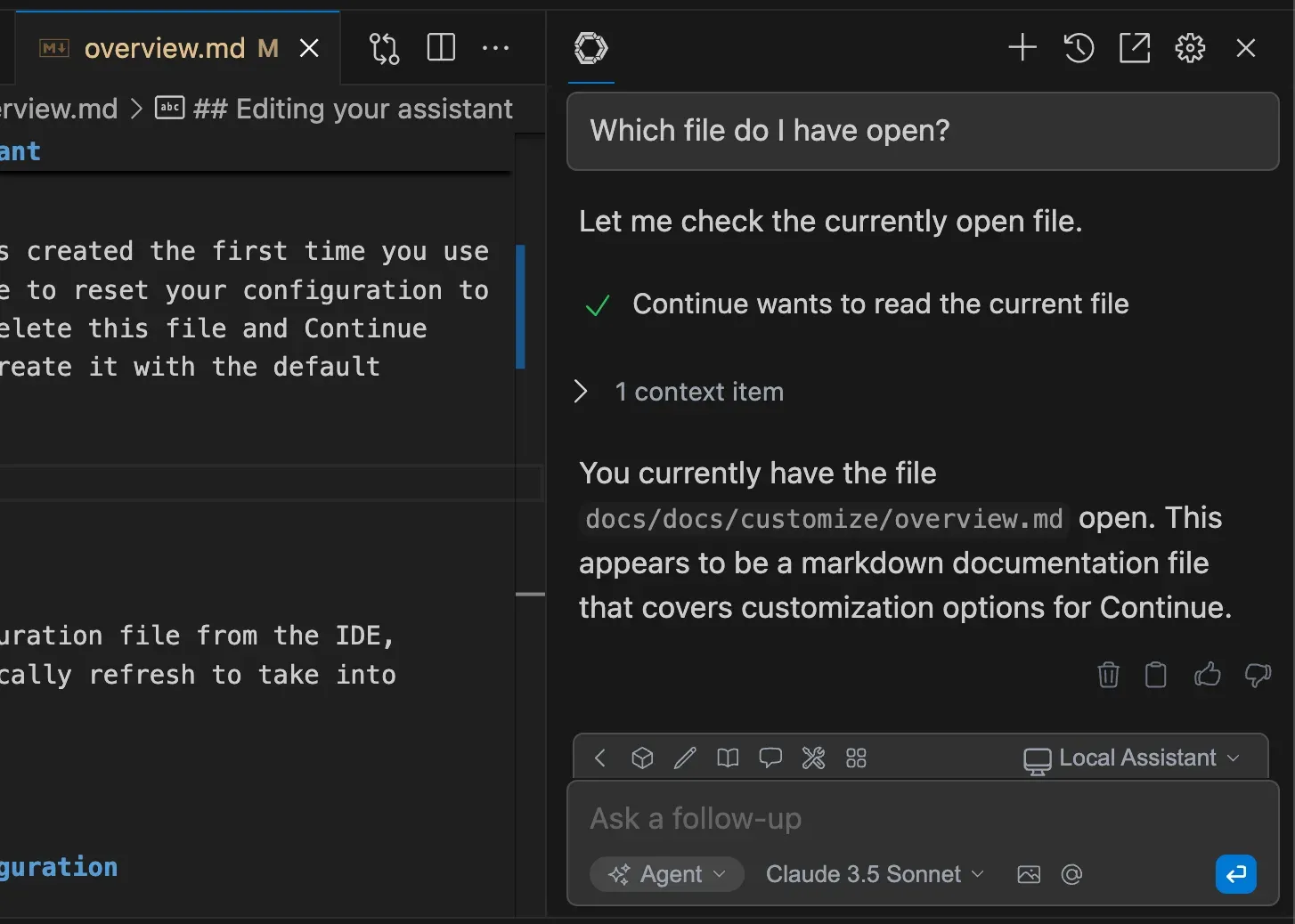
Official documentation screenshot of Agent mode: a read-file tool call, the context item and the model answer in the Continue sidebar.
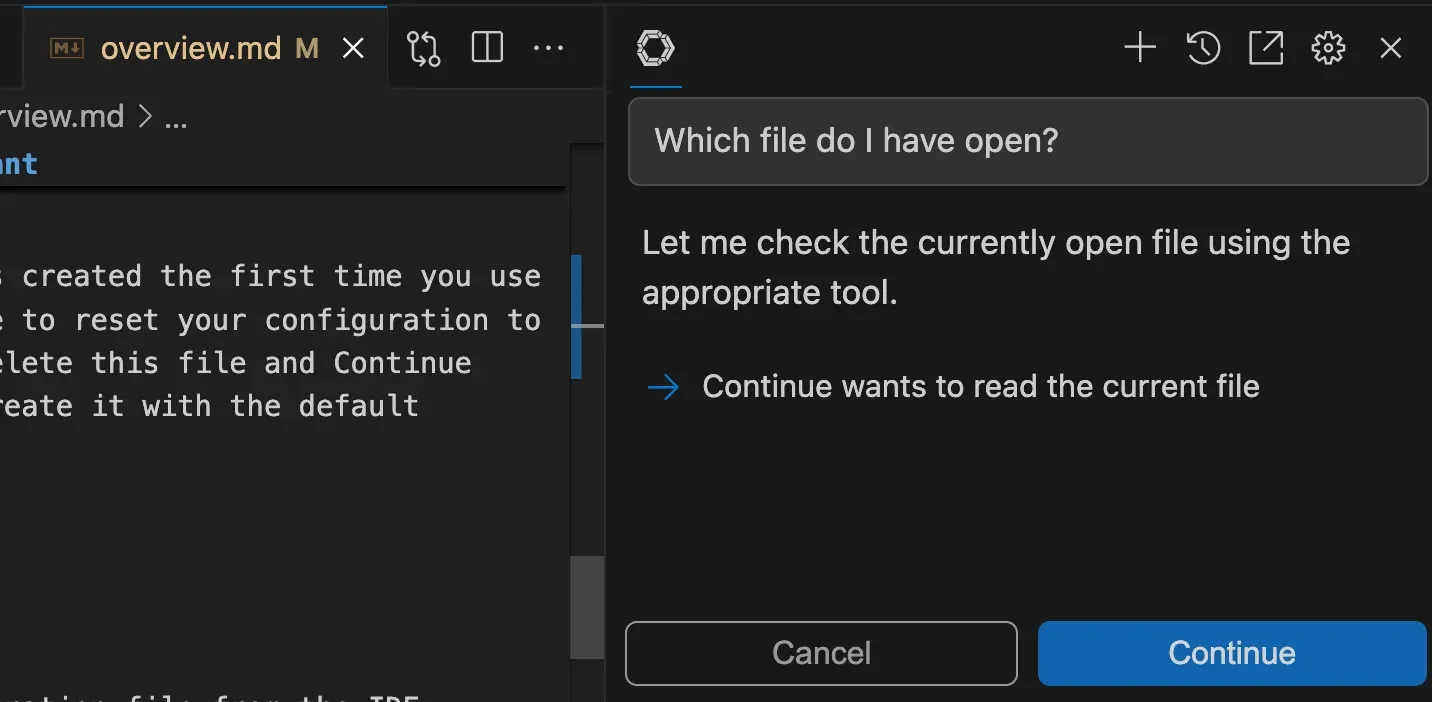
Official documentation screenshot of the tool approval prompt that appears before Agent mode runs a tool.
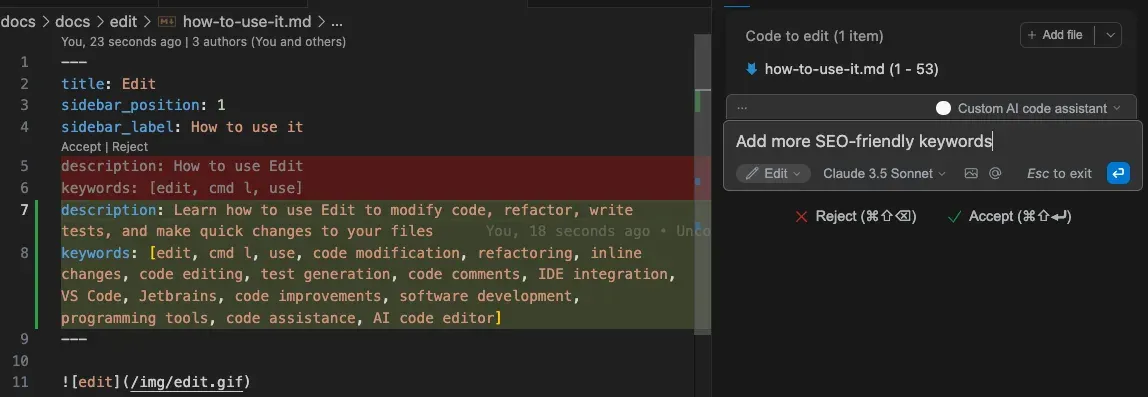
Official documentation screenshot of Edit mode applying a requested change to a selected file as an inline diff.
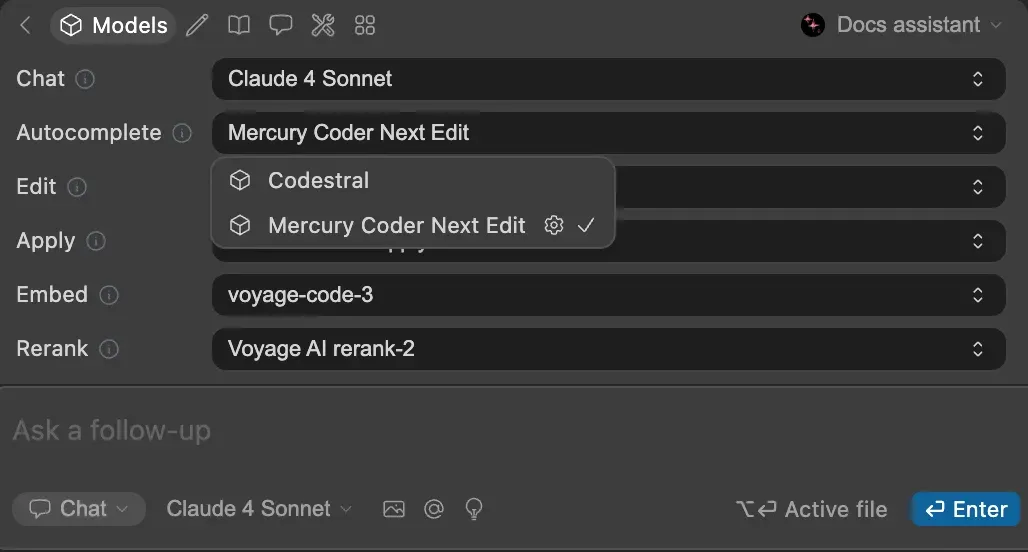
Official documentation screenshot of per-role model selection, with Mercury Coder Next Edit chosen for autocomplete.
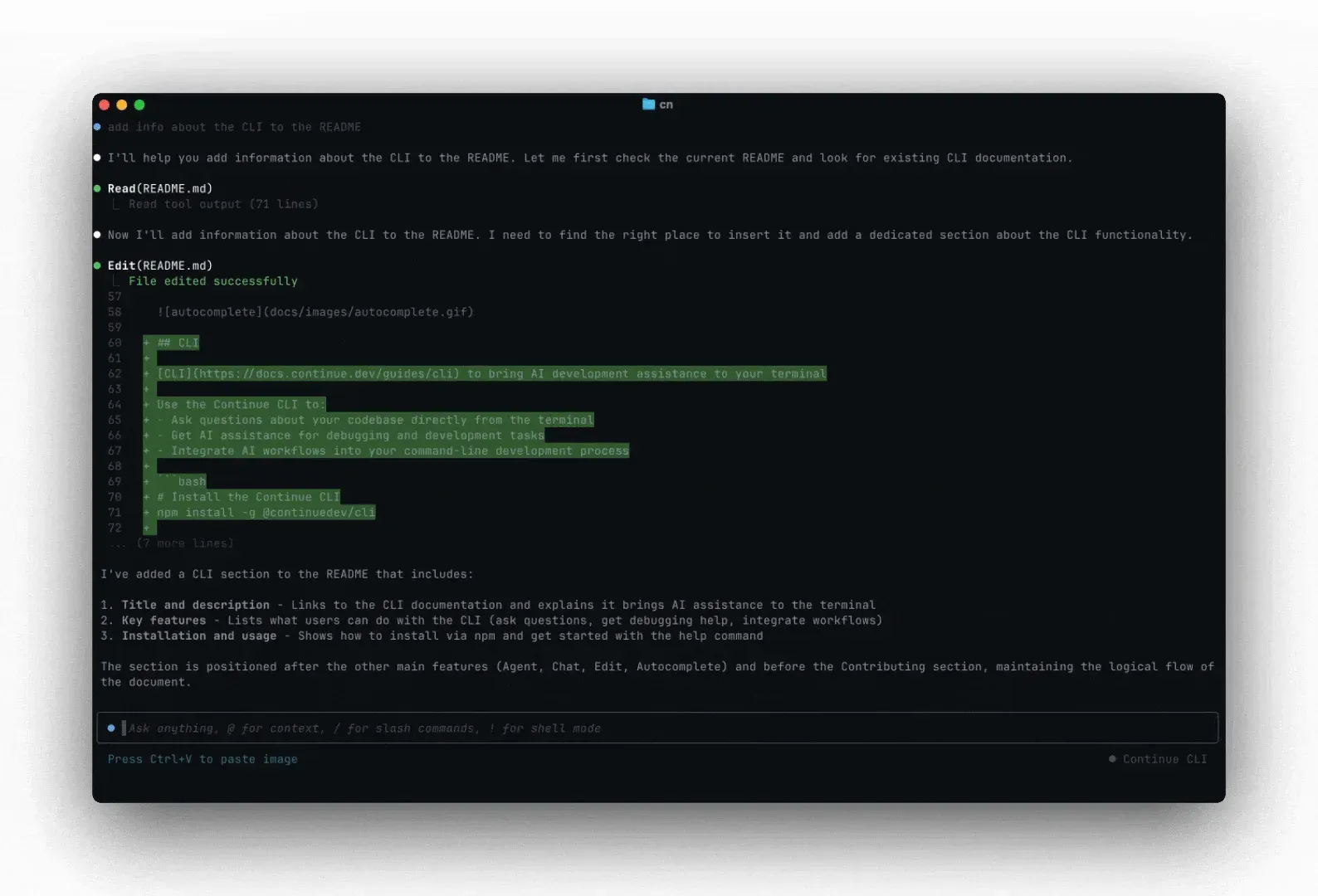
Final frame of the official cn CLI demo animation from the documentation, showing Read and Edit tool calls with a diff.
Source: official Continue project page.
Key capabilities
- Agent mode in the IDE Agent mode gives the selected model built-in tools to read files, search the workspace, create or edit files and run terminal commands. Each tool call is shown in the sidebar, and calls that change state wait for an explicit Continue or Cancel. Agent mode only works with models that support tool calling; the troubleshooting guide explains how to declare capabilities for models Continue does not recognize.
- Chat and Edit modes Chat answers questions about highlighted code or the open file without using tools. Edit applies a change to a selected range and shows it as an inline diff with Accept and Reject controls, opened with
Cmd/Ctrl+I. Both modes use the models assigned to the chat and edit roles inconfig.yaml. - Plan mode Plan mode sits between Chat and Agent: the tool list is filtered to read-only tools such as file reads, glob and grep search, repository maps and git diff, plus a planning system message. The documentation warns that MCP tools are not filtered in Plan mode, so an MCP server with write actions can still change systems. Switch to Agent mode to apply the plan.
- Autocomplete and Next Edit Inline completions use a dedicated autocomplete model; the docs recommend Codestral through the Mistral API or a local model through Ollama. Next Edit, marked experimental, predicts multi-line changes as diff overlays and requires Instinct or Mercury Coder as the autocomplete model. It is VS Code only. Instinct is Continue's open 7B next-edit model, fine-tuned from Qwen2.5-Coder-7B and runnable with Ollama.
- Model roles Each model in
config.yamldeclares roles:chat,edit,apply,autocomplete,embedandrerank. A team can use a large hosted model for chat, a small local model for completions and a separate embeddings model. The default roles are chat, edit, apply and summarize, as documented in the config.yaml reference. - Wide model provider support The provider overview lists Anthropic, OpenAI, Azure, Amazon Bedrock, Google Gemini and Vertex AI, Mistral, DeepSeek, xAI, OpenRouter, Groq, Together AI, Hugging Face and more. Local options include Ollama, LM Studio, llama.cpp, llamafile and LlamaStack, and enterprise entries cover SageMaker, watsonx and SambaNova. API keys are stored in your own config, not in a Continue account.
- Rules and prompts Rules are plain files in
.continue/rules, versioned with the repository, and apply in Agent, Chat and Edit modes. Prompts define reusable slash commands. Both can also be declared inconfig.yaml, which makes coding standards and review checklists part of the project rather than personal settings. - MCP servers The
mcpServerssection connects Model Context Protocol servers so the agent can call external tools, such as GitHub, Sentry, Supabase or a database. The docs include cookbooks for several servers. MCP servers run with whatever permissions you give them, so review each one before enabling it. - Context providers The
contextsection enables providers such as file, code, diff, terminal and http, referenced with@in the input box. The older@Codebaseand@Docsproviders, built on local embeddings indexing, are marked deprecated in favor of agent-driven search. Codebase indexing also needs AVX2 and FMA CPU support on Linux. - Continue CLI (cn) The CLI runs the same agent in a terminal UI: reference files with
@, approve tool calls, resume sessions with--resumeand switch modes with Shift+Tab. It reads the sameconfig.yaml. After the final release it runs without a Continue login, using local configuration or an Anthropic API key entered on first run. - Headless mode for scripts and CI
cn -p "prompt"runs one task to completion and prints the result to stdout, with--silentfor clean piping and--format jsonfor structured output. Standard input can be piped in, for example a staged git diff. Tools that would ask for approval are excluded in headless mode unless allowed explicitly, as described in the headless mode guide. - Tool permission policies Every CLI tool is
allow,askorexclude. Reads default to allow, while Edit, Write and Bash default to ask. Flags accept glob patterns such as--allow "Write(**/*.ts)"or--exclude "Bash(npm install*)", persistent choices go to~/.continue/permissions.yaml, and--readonlyor--autooverride everything. - Local development data Continue records interaction data as a byproduct of use and saves it to
.continue/dev_dataon the local machine by default. Thedatasection ofconfig.yamlcan forward these events to your own HTTP endpoint or directory using versioned schemas 0.1.0 or 0.2.0. Review this setting if prompts or code must not be written to disk. - Offline and air-gapped use The offline guide describes installing a VSIX from GitHub releases and pointing every role at a local model. Earlier releases attached VSIX packages for Windows x64 and ARM64, macOS Intel and Apple Silicon, Linux x64, ARM64 and ARMhf, and Alpine x64. The final 2.0.0 GitHub release has no attached files, so offline installs need an earlier VSIX or a build from source.
- VS Code installation Install from the Visual Studio Marketplace or from Open VSX for VSCodium and other compatible editors; both serve version 2.1.0. The extension declares VS Code 1.70 or later. The docs recommend moving the Continue view to the right sidebar, where it opens with
Cmd/Ctrl+L. - JetBrains installation Search for Continue under Settings, Plugins, Marketplace in IntelliJ IDEA, PyCharm, WebStorm, PhpStorm or another IDE from 2024.1 onward. The README now recommends the CLI instead of the JetBrains plugin. Next Edit and the local transformers.js embeddings are not available in JetBrains.
- CLI installation Run
npm i -g @continuedev/cliwith Node.js 20 or later, or use the shell installer (install.shfor macOS and Linux,install.ps1for Windows PowerShell), which bundles its own runtime. Confirm withcn --version. The installers are fetched from the main branch of the read-only repository. - Apache-2.0 source for forks The full monorepo, including core, GUI, extensions, CLI and the config-yaml package, is Apache-2.0. Teams that depend on Continue can fork it, rebuild the VSIX and plugin, and maintain their own patch stream. Contribution guides remain in the repository, but upstream pull requests are no longer accepted.
Where Continue fits
Local, private code assistance with Ollama
Install Ollama, pull a chat model and a small completion model, then declare both in ~/.continue/config.yaml with provider: ollama and the right roles. The Ollama guide covers remote hosts, WSL and Docker networking. Check that Agent mode works with your model's tool support, that autocomplete latency is acceptable on your hardware, and that no role still points at a hosted provider.
Bring-your-own-key coding agent in VS Code
Add an Anthropic, OpenAI, Mistral or Bedrock model with your own key and use Agent mode for multi-file changes. Approve each write and command in the sidebar, and review diffs before accepting. Verify where keys are stored, which provider receives code, and whether your provider contract covers retention and training terms for the code you send.
Scripted tasks and CI with the cn CLI
Use cn -p in git hooks or pipelines, for example to draft commit messages from git diff --staged or fix lint errors with --allow Edit --allow Write. Pin the npm package version, keep the config file in the repository, and set the narrowest tool permissions that work. Use --format json when a later step parses the output, and log the exact prompt for reproducibility.
Team rules and shared configuration
Commit .continue/rules files that describe coding standards, migration habits or security requirements, and share a project config with fixed models and MCP servers. Because the Hub is gone, every block must be written out explicitly rather than referenced with uses:. Test that each developer's editor picks up the rules and that secrets are injected from the environment, not committed.
Migrating an existing Continue setup
Existing users should move any Hub-based assistants into a local config.yaml with explicit model, rule and MCP definitions, then upgrade to the final extension and CLI. Remove uses: slugs, which now fail with a slug resolution error. Decide whether to keep the frozen release, maintain an internal fork, or plan a move to an actively maintained agent, and record that decision with a review date.
Using the codebase as a foundation
Developers building their own assistant can study or fork the Apache-2.0 code: provider adapters in core/llm, the YAML schema in packages/config-yaml, the tool permission system in the CLI and the IDE protocol shared by VS Code and JetBrains. Keep the Apache-2.0 license and copyright notices, rename the product to avoid confusion with the original, and plan your own security update process.
Install
npm i -g @continuedev/cliReviews of Continue
Be the first to share your experience with Continue.
Write a review
Loading review form…
Alternatives to Continue
 ClineApache-2.0 coding agent from Cline Bot Inc. that edits files, runs commands and uses MCP tools with per-action approval. Ships as a VS Code extension, JetBrains plugin, npm CLI, desktop app and TypeScript SDK, with BYOK or Cline-billed models.
 Kilo CodeOpen-source coding agent from Kilo Code, Inc., now owned by Anaconda. One runtime, forked from OpenCode, powers the VS Code extension, JetBrains plugin and CLI, with parallel worktree sessions, permission rules, cloud agents and PR reviews.OOpenCodeOpenCode is an open-source AI coding agent available through a command-line interface and a beta desktop app. It provides separate agents for development work and read-only code exploration.