What is LoopForge?
LoopForge is a self-hosted workspace for delivering software with coding agents, published by Tencent on GitHub under the MIT license. A team describes a requirement to Main Bot in a chat, and Main Bot opens a Docker sandbox, checks out the project repositories, hands work to project roles and opens a pull request. Work that follows a fixed sequence can be saved as an SOP (standard operating procedure): a graph of agent steps, shell scripts, human approval gates and sub-workflows that the engine runs in order for every new requirement. Both paths are tied to the same requirement records and cost reports.
LoopForge does not include its own coding model. Each agent step and each chat turn runs one of ten coding-agent CLIs: CodeBuddy, Codex, Claude Code, OpenCode, Cursor CLI, Antigravity, Kimi Code, Pi, DeepSeek Harness and ZCode. The platform adds roles, sandboxes, checkpoints, approvals and run history around them, and users bring their own model credentials. The official site at loopforge.cn (in Chinese) describes it as a self-deployable cloud platform for AI software development with always-on sandboxes, shared sessions, SOPs with quality gates and GitHub issue automation.
The platform is distributed as a container image, ghcr.io/tencent/loopforge, published for linux/amd64 and linux/arm64. The documented installation clones the repository and runs ./start.sh, which checks prerequisites, generates secrets, starts MySQL and the platform service, and imports starter SOPs and a welcome project. The service listens on port 8090. A second distribution, LoopForge Local, is an npm package (loopforge-cli) that installs the built-in delivery workflows into Claude Code, CodeBuddy, Codex, Cursor and other assistants without a server.
The repository was created in July 2026, and v0.3.0, the first platform edition release, followed on November 6, 2026. The current release is v0.3.8, published on November 12, 2026. According to the changelog, it hardens header-based sign-in behind reverse proxies, makes copied MCP and REST snippets use HTTPS, and adds a MIRROR option for pulling the image through another registry. Release 0.3.4 added ARM64 images and 0.3.5 added ZCode and parallel SOP branches. A pre-release, v0.3.9-rc.1, was published on November 13, 2026.
The server is written in Go and keeps the upstream module name agentflow and its AGENTFLOW_ environment variables. The architecture notes list an API and worker process, execution-machine runners, MCP servers, the SOP engine and MySQL persistence. The public scope document states that the repository is a public adaptation of an internal codebase, with private deployment data excluded. The project describes the installation as built for a trusted team, not for untrusted multi-tenant isolation. Comparable coding-agent orchestrators listed on iThub include Archon, Omnigent and AgentRun.
Key capabilities
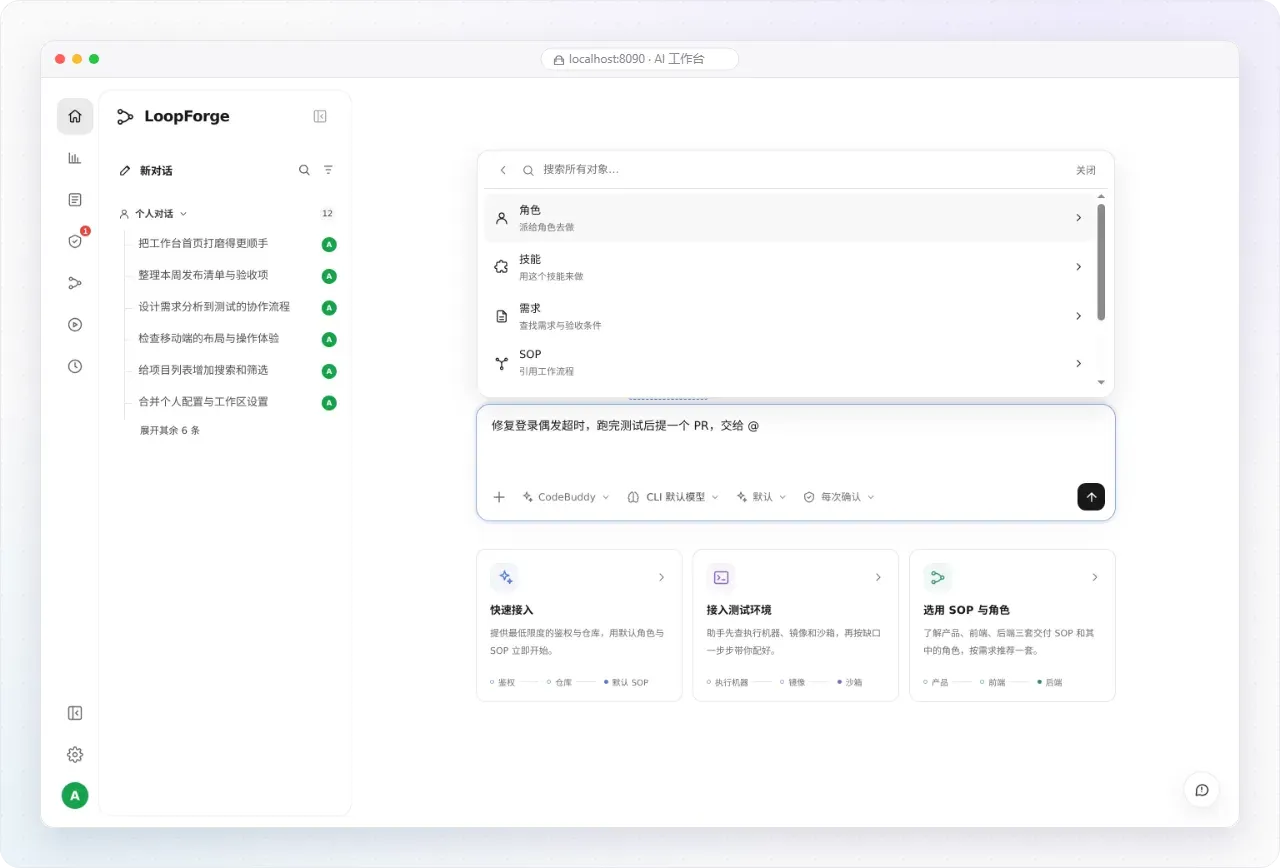
- Main Bot chat workbench The home page is a chat composer where each conversation picks its executor CLI, model and permission mode. Typing
@references a role, Skill, requirement, SOP or repository. Messages sent while a reply is running are queued, and Steer interrupts the current reply to send at once. Generated files open in a side panel with preview, source and download views. The README notes that management pages are available in English and Chinese, while the chat workbench is currently in Chinese only. - Conversation workspaces Main Bot opens a Docker sandbox on demand with the project's repositories checked out and calls project roles as native subagents. When the workspace is opened, the user picks the branch mode, base branch and per-repository branches. A chat can deliver a pull or merge request, or merge directly into a shared branch with
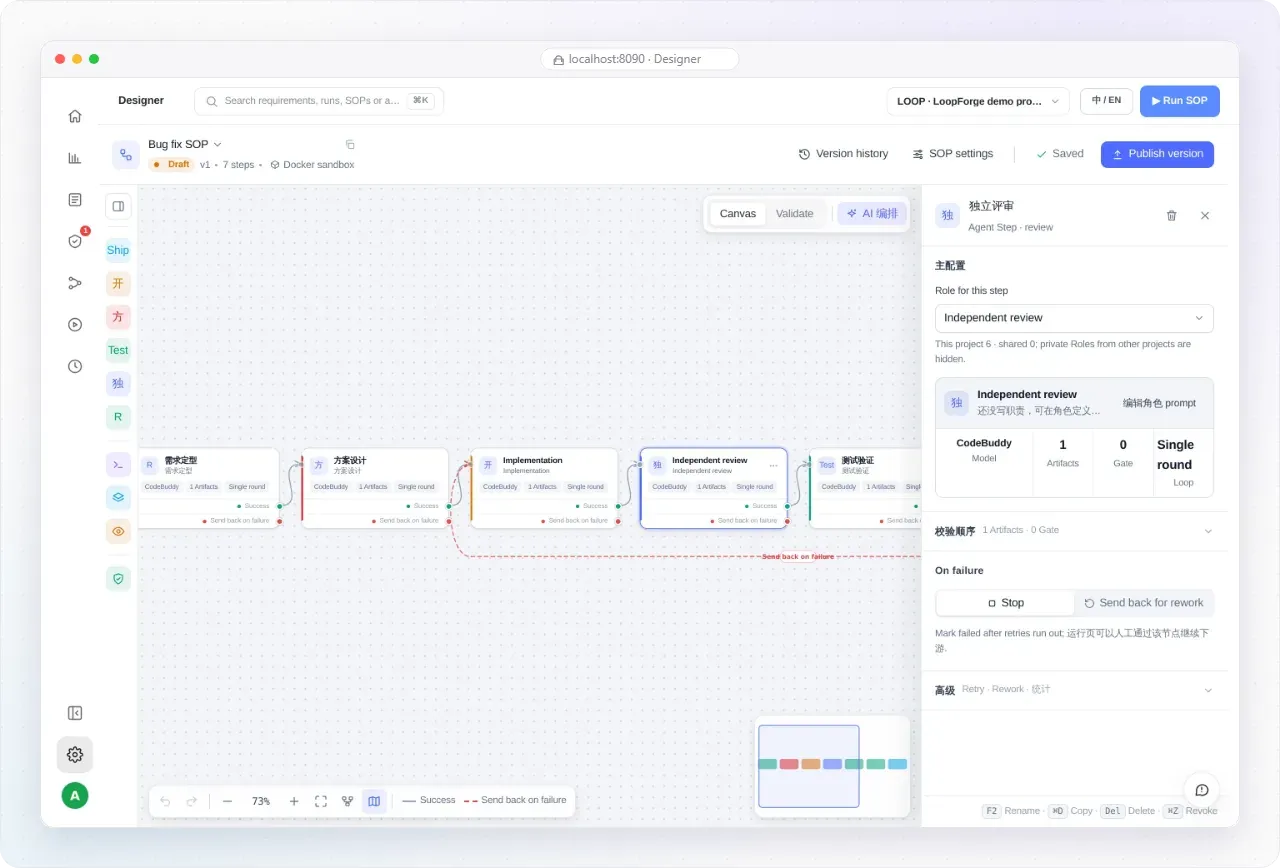
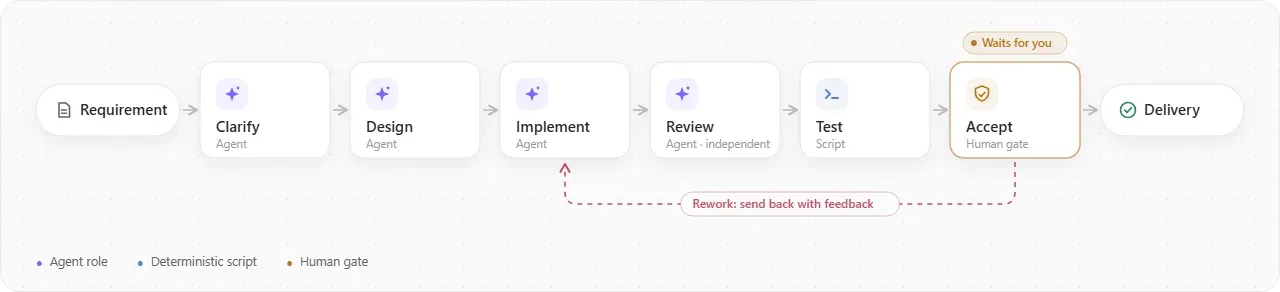
mode=direct. From chat, Main Bot can also start, pause, resume or take over a running SOP. Details are in the conversation workspace guide. - Visual SOP designer SOPs are built on a canvas with five node types: Agent, Script, Human gate, Sub-SOP and Preview build. Edges can send work back to an earlier step when a check fails, and each node declares its artifacts and dependencies so the engine starts it once its inputs are complete. The designer validates the graph, keeps version history and publishes versions; since 0.3.5, saving an unchanged workflow no longer creates a revision. The canvas also has an AI orchestration assistant, which since 0.3.5 chooses its own CLI and model.
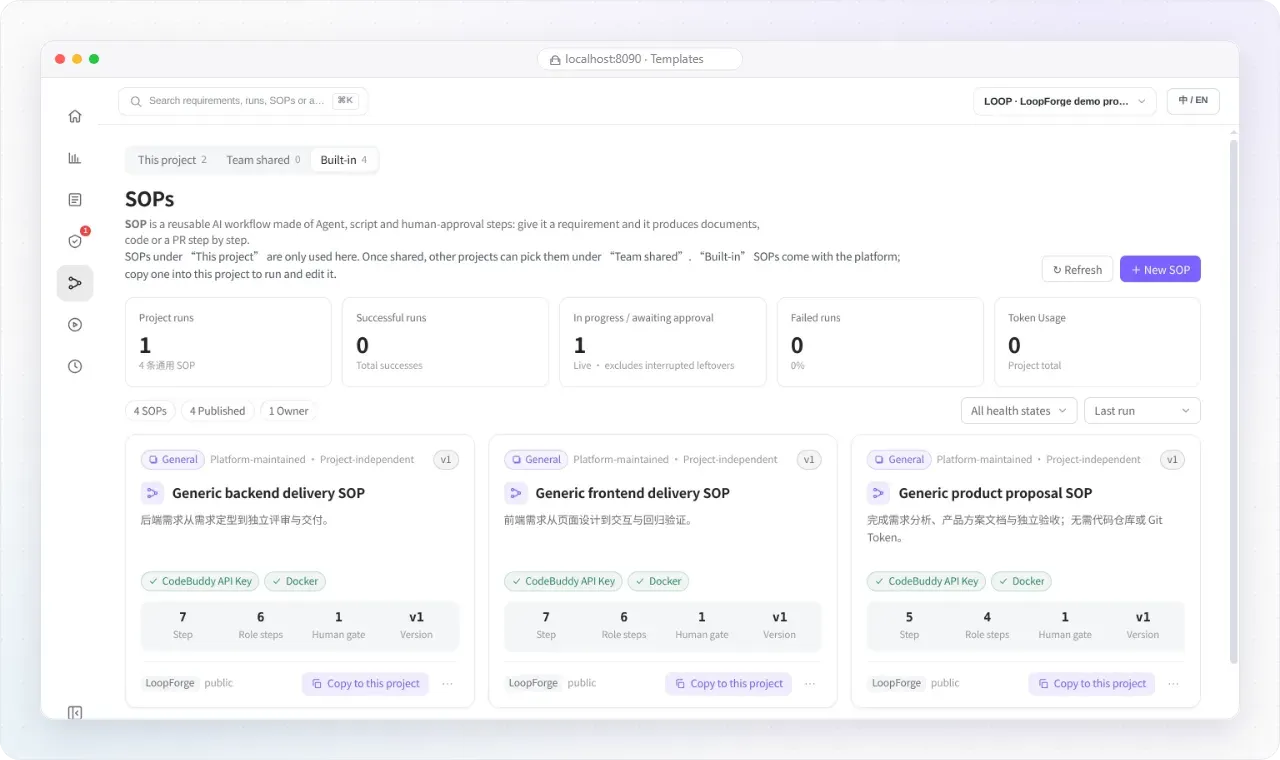
- Built-in SOP templates Four platform-maintained SOPs ship with the installation: generic backend delivery, generic frontend delivery, product proposal and bug fix. They are read-only blueprints that are copied into a project to run and edit. The Templates page shows the backend and frontend SOPs with seven steps and one human gate, and the product proposal SOP with five steps and no need for a code repository or Git token. A separate demo SOP, Platform check, consists only of a script and an approval step.
- Reusable roles A role bundles a prompt, executor, model, rules, Skills, MCP tools, expected artifacts and gates. The same role definition can run as an SOP node or as a subagent in chat, so planning, implementation, review and testing each keep their own instructions and tooling. Built-in roles default to CodeBuddy, and every SOP role can select a different executor independently.
- Ten executor CLIs CodeBuddy and Codex are bundled in the platform image. Claude Code, which the changelog describes as proprietary, is installed from npm on first use and then cached, as are OpenCode, Kimi Code and Pi. Cursor CLI and Antigravity use the provider installer on first chat use and are not installed into SOP sandboxes, and ZCode must be on the PATH of the service or execution machine. The changelog adds DeepSeek Harness to the image after v0.3.8. Codex and Claude Code can also use a connected execution machine's local login.
- Requirement tracking to delivery Requirements are tracked from intake to delivery whether they are shipped by an SOP or straight from chat, with PR and MR status tracking, merge detection and direct-branch merges. Since 0.3.8 the assistant asks before handing a requirement to an SOP and does not run a rejected proposal.
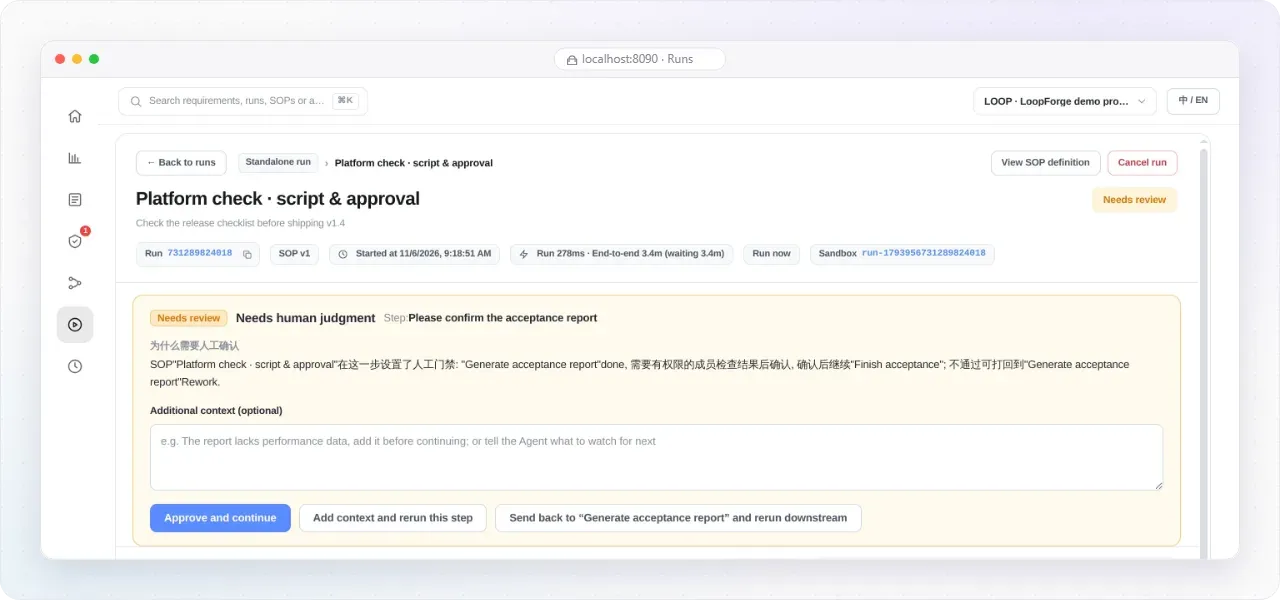
- Runs, approvals and the Needs review inbox Run pages show live node status, tool traces, worker logs, per-node artifact snapshots and workspace previews. Every human gate waiting on a user appears in a single Needs review inbox. At a gate the reviewer can approve and continue, add context and rerun the step, or send the work back to a chosen upstream step. Failed steps can be retried and a run can be rerun from any node; since 0.3.5, SOP branches whose dependencies are ready run in parallel.
- AI scheduled tasks Recurring agent tasks get workspace, SOP and MCP access and run as ordinary chat turns on the CLI they were created with. A shared market holds versioned, parameterized task templates that other projects can subscribe to, and new requirements can be dispatched to an SOP automatically. Capabilities and limits are documented in the scheduled task guide.
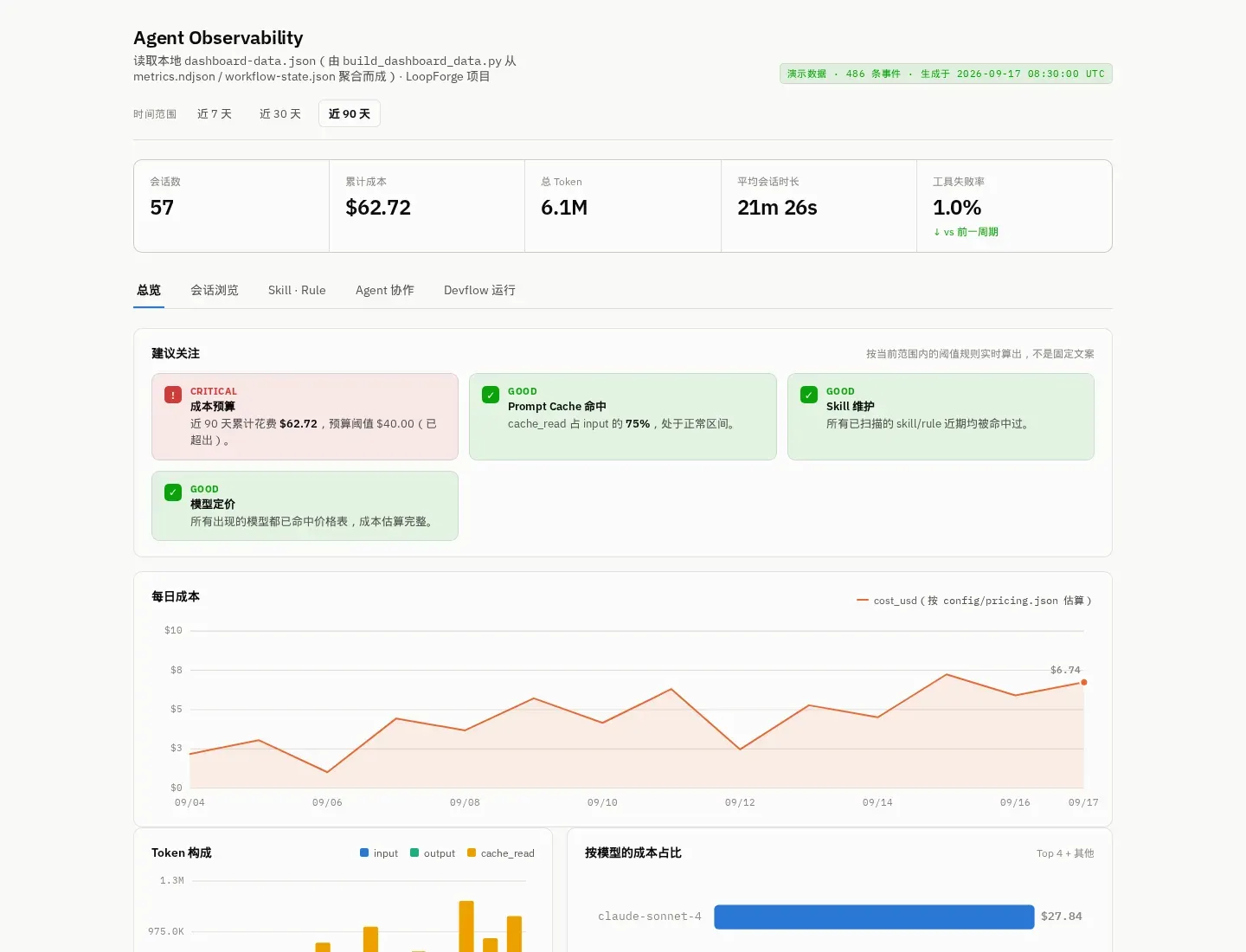
- Insights and token cost accounting The insights area reports engineering metrics and business-domain reports, with export to static HTML and SVG. Token use and cost are accounted for both SOP runs and conversations, calculated from public list prices as described in the token pricing notes. Model usage itself is not included in LoopForge; each user supplies credentials for the executor they choose.
- Execution environments and runners Work can run on platform workers, in Docker sandbox containers or on a connected local execution machine that uses its own tools and repositories. Personal runners are bound with a short-lived code, and the platform image bundles runner and gate binaries for Linux and macOS on amd64 and arm64. The Go process runs as
api,workeror both, and separate API and worker instances share one MySQL database. - GitHub and other Git hosts GitHub is connected from personal settings through a built-in OAuth app and a device code, with manual personal access token entry still available. GitLab, Gitea, Gogs and other hosts are reached over Git SSH for clone and push; PR or MR and issue automation on those hosts needs a hosting API token or a separately configured MCP server.
- HTTP and MCP API The platform exposes an OpenAPI-described HTTP API and an MCP endpoint. REST and MCP clients authenticate with personal Bearer tokens that are shown once, carry an expiry and last-use time, and can be revoked immediately. JSON request bodies are limited to 2 MiB. The API reference is written in Chinese and covers collaboration, the capability registry, orchestration and shared schedules.
- Accounts and access model The first account created in the browser becomes the platform administrator. Self sign-up is on by default and can be turned off with
AGENTFLOW_ALLOW_SIGNUP=false; administrators can then create accounts and reset passwords from the platform administration pages. Password hashes use bcrypt, and browser sessions use signed HttpOnly cookies that expire after seven days. The deployment guide states that every signed-in account can list all projects, requirements and runs, and that Docker socket access is equivalent to root on the host. - Container installation and upgrades
./start.shpulls the GHCR image pinned incompose.yamlwithout building, withlogs,stop,restartandpullsubcommands, and./start.sh devbuilds the checkout from source. Upgrades check out a newer release tag and run./start.sh pull. Python and curl can be installed with apt, dnf or yum on Linux; macOS needs Docker Desktop and Python 3. Running natively for development requires Go 1.26.11 or newer. - LoopForge Local for coding assistants LoopForge Local installs the built-in delivery workflows into a project with
npx -y loopforge-cli@latest install claudeor the equivalent for another host, after which/start-devflowstarts a workflow in Claude Code. The Classic edition (default) supports Claude Code, CodeBuddy, Codex and Cursor; the Portable edition adds Pi, DeepSeek Harness and Hermes Agent. It needs Node.js 20 or newer and Python 3.8 or newer, writes artifacts underartifacts/{task_slug}/and offers an optional local dashboard. See the local guide and edition notes. - Themes, languages and validation records The interface offers light, dark and system themes, applied before first paint, and an English or Chinese language preference. The project publishes a validation record and an acceptance matrix describing which flows its automated acceptance tests cover. Vulnerabilities are reported privately through the security policy.
Where LoopForge fits
Trying the platform without a model key
New accounts join the LoopForge demo project. The README describes opening Templates, selecting Platform check (script and approval), and clicking Run SOP: a real script writes a report, the run pauses at the approval step, and approving it from Needs review or the run page lets the run finish with its final artifact. No API key or repository is involved in this flow.
Fixing a bug with the built-in bug-fix SOP
The bug-fix SOP is copied into a project and has seven steps, including requirement shaping, solution design, implementation, independent review and test verification, with failed checks able to send work back to an earlier step. Each step uses a role with its own executor and model. The project needs source code and reproduction details for this SOP, a connected repository to open a pull request, and credentials for the chosen executor. The README describes one such delivery in which four CodeBuddy roles planned, implemented, reviewed and summarized a Python fix before a human approval step; its scope is set out in the validation record.
Changing a repository from chat
After GitHub is connected in personal settings and executor credentials are set, a user asks Main Bot to change the code. Main Bot opens a conversation workspace with the repository checked out, delegates to project roles as subagents and submits a pull or merge request, or merges into a shared branch in direct mode. The change is linked back to the requirement it came from. Hosts other than GitHub are reached through Git SSH, as described in the deployment guide.
Producing documents or new projects without a repository
The built-in generic SOPs run without a repository. The product proposal SOP covers requirement analysis, a product plan document and an independent acceptance step and delivers documents, while new frontend or backend projects deliver source files in the task workspace. Generated files can be previewed, viewed as source or downloaded from the chat side panel.
Running recurring agent work
AI scheduled tasks run a recurring agent job with workspace, SOP and MCP access on a selected CLI, using the project owner's key. Teams can publish versioned, parameterized templates to a shared market, and new requirements can be dispatched to an SOP automatically. Token use from these runs appears in the cost reports alongside SOP runs and conversations.
Using the workflows inside a coding assistant
A single developer who does not run a server installs LoopForge Local into a project with npx and starts the Classic or Portable workflow from the assistant's command, for example /start-devflow in Claude Code. The workflow keeps artifacts in the project and can show them in an optional local dashboard. The local guide notes that Local runs the built-in workflows only; exporting a platform SOP for standalone local execution is planned. For comparison, the project FAQ describes Dify and n8n as general-purpose workflow builders rather than software-delivery tools.
Install
git clone https://github.com/Tencent/LoopForge.git && cd LoopForge && ./start.shReviews of LoopForge
Be the first to share your experience with LoopForge.
Write a review
Loading review form…
Found LoopForge useful? Upvote it todayYour vote helps other IT teams find it in the daily ranking.