

What is Dify?
Dify is an LLM application development platform made by LangGenius, Inc. Its web console combines a visual workflow canvas, a RAG pipeline for knowledge bases, agents, a prompt IDE, model management and logging in one workspace. Every app built in Dify is also exposed through an API, which the project describes as Backend-as-a-Service. The source code is published in the langgenius/dify repository, and the product overview, plans and editions are on dify.ai.
There are three ways to run it. Dify Cloud is the hosted SaaS operated by LangGenius. The Community Edition is the open-source code, deployed on one's own infrastructure, mainly with the Docker Compose file in the repository's docker folder. Dify Enterprise is a private deployment with a commercial license, multiple workspaces, SSO and support SLAs, sold through the sales team.
The current release is Dify 1.19.0, published on November 4, 2026. It extends the external traces sent to observability tools such as Langfuse with the steps inside called Workflow Tools, packages the workflows behind Workflow Tools inside app exports (package format v2), adds parallel uploads and inline PDF and source previews for Agent files, and adds six difyctl commands for managing workspace Skills. The bundled plugin daemon moves to 0.6.14-local, and Docker Compose 2.35.0 or later is now required. The 1.18.0 release before it introduced the Console drilldown that this tracing builds on.
The backend is written in Python (Flask with Celery workers and a scheduler), the web console is a Next.js application, and the Docker Compose stack adds PostgreSQL 15 or MySQL 8.0, Redis, a code sandbox, a local Agent sandbox, a plugin daemon, an Agent backend, an SSRF proxy based on Squid and Nginx. The compose file also contains optional service definitions for vector stores, among them Weaviate, Qdrant, pgvector, Milvus, Chroma, OpenSearch, Elasticsearch and OceanBase. Source deployments of 1.19.0 use Python 3.13, Node.js 24.22.1 or later in the 24.x line and pnpm 12.16.1.
The code is released under the Dify Open Source License, which is a modified Apache License 2.0 with additional conditions, not plain Apache-2.0. Commercial use is allowed, including as a backend service or an enterprise development platform, but a commercial license from LangGenius is required to operate a multi-tenant environment from the source code (one tenant equals one workspace) unless Dify authorizes it in writing, and the logo and copyright information in the console and apps may not be removed or modified when the frontend (the web/ directory or the web image) is used. Contributors agree that the license may be made stricter or more relaxed and that their code may be used commercially, including in the cloud business. The license also states that the interactive design is protected by an appearance patent. All other terms follow Apache 2.0.
Dify screenshots
Explore the interface. Open a screenshot to view it at full size.
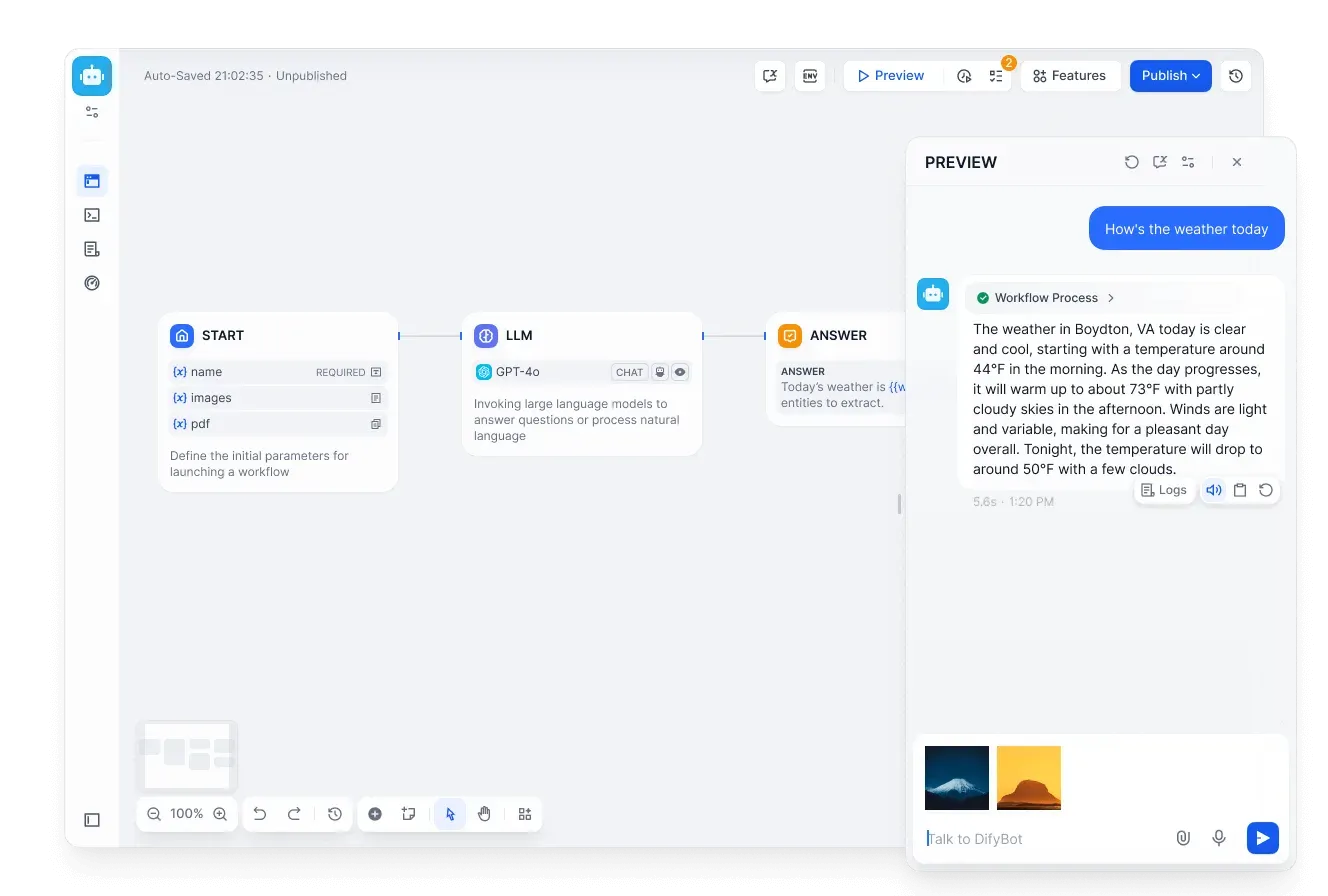
Chatflow editor with a three-node flow and the preview chat, from the Dify repository.
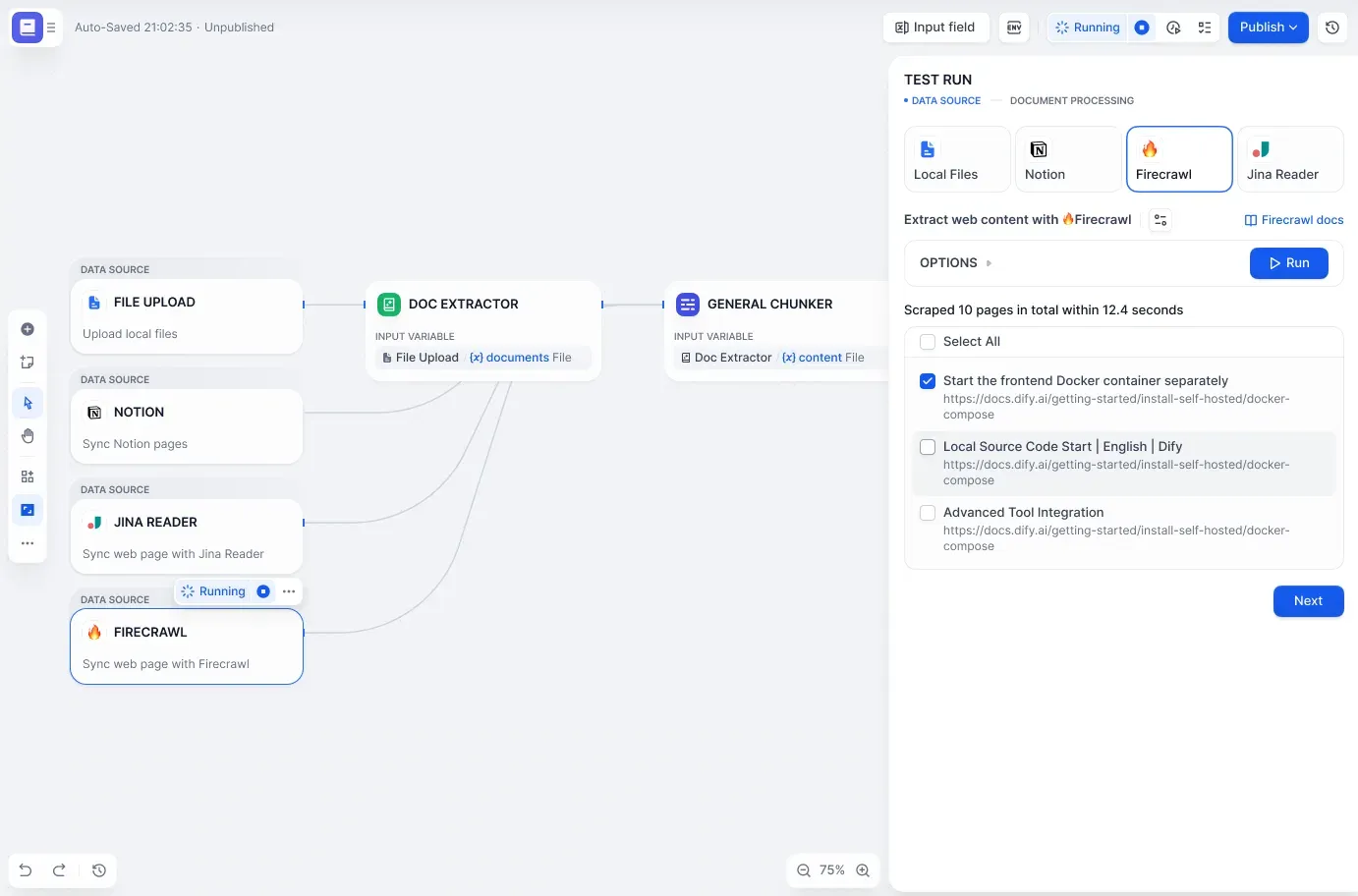
Knowledge pipeline test run with a Firecrawl data source, from the Dify repository.
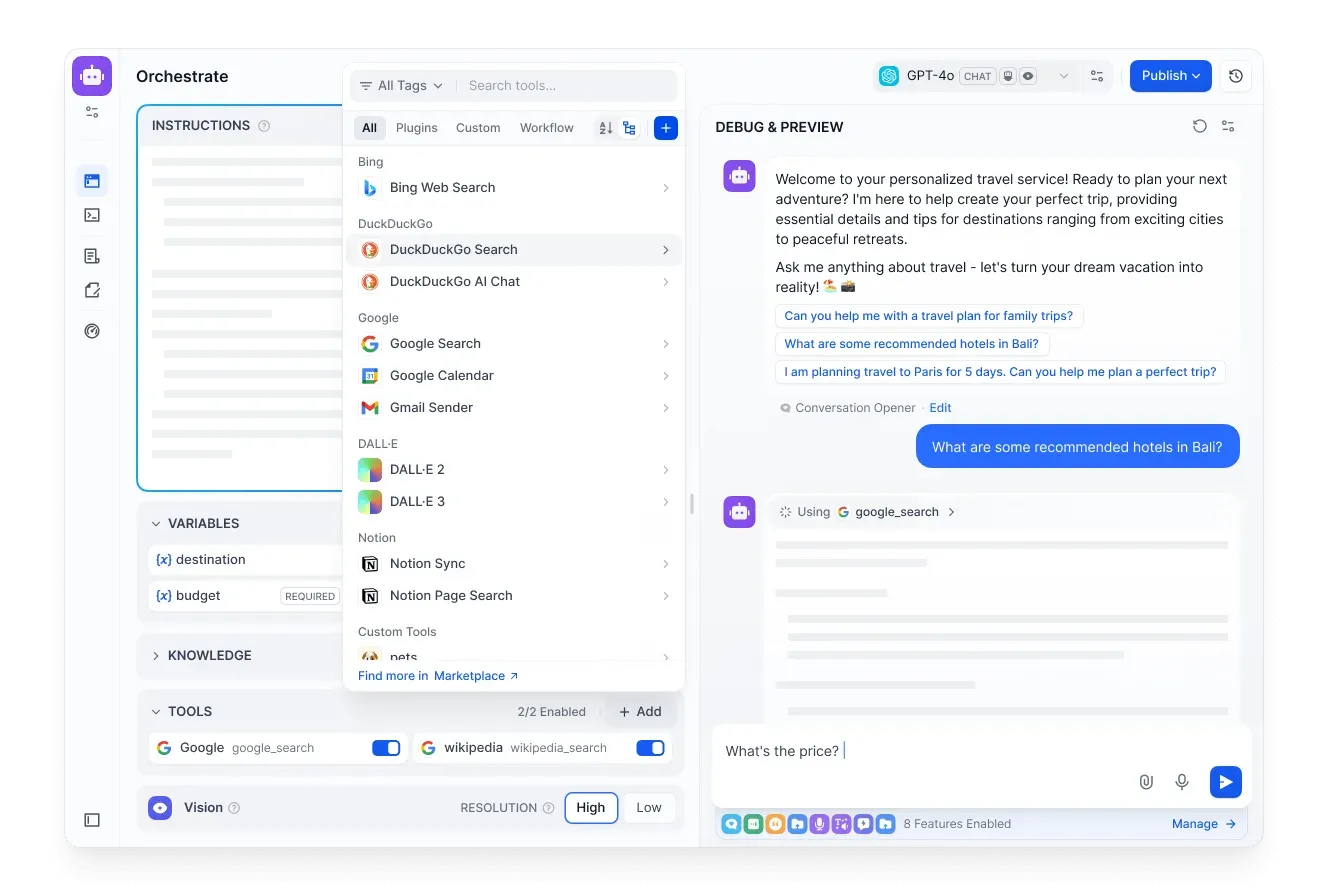
Agent configuration with the tool picker open and a debug conversation, from the Dify repository.
Source: official Dify project page.
Key capabilities
- Visual workflow canvas Workflows and Chatflows are built by connecting nodes such as Start, LLM, Answer, knowledge retrieval, code and tool nodes on a canvas, with auto-save, a preview panel and a Publish action. Workflows can be started by plugin, schedule or webhook triggers. On Dify Cloud the number of trigger events and triggers per workflow depends on the plan, from 3,000 events and up to 2 triggers per workflow on Sandbox.
- Model provider support The README lists support for hundreds of proprietary and open-source models from dozens of inference providers and self-hosted solutions, including GPT, Mistral and Llama models and any OpenAI API-compatible endpoint. The model provider list in the documentation covers the available integrations.
- Prompt IDE A prompt editor lets builders write prompts, compare model output and add app features such as text-to-speech to chat-based apps. Variables defined in the app are referenced inside prompts, and a debug and preview panel shows the conversation next to the configuration.
- Knowledge pipeline (RAG) Knowledge bases cover ingestion through retrieval, with text extraction from PDF, PPT and other common document formats. Pipelines start from data sources such as local file upload, Notion, Jina Reader and Firecrawl, pass documents through extractor and chunker nodes and can be test-run step by step. Documents processed in the High Quality indexing mode consume knowledge storage, which is capped per Cloud plan.
- Agents with their own sandbox According to the README, agents run in a sandbox where they can execute commands, install software and work with files for open-ended tasks. An agent can be described in natural language, given skills and tools from the Dify Marketplace, MCP servers or custom APIs, and used either as a chat app or as a step inside a workflow. Release 1.19.0 adds batch file uploads and inline previews of PDFs and syntax-highlighted source files.
- Plugins and Marketplace Tools, data sources, triggers and other extensions are distributed as plugins and run by the separate dify-plugin-daemon service. The Marketplace lists tools, models and integrations that can be installed into a workspace. Marketplace use is governed by a separate Marketplace Agreement on the Dify website.
- App types The API reference lists Chatflow (advanced-chat), Workflow, Agent, Chatbot and Legacy Agent (chat, agent-chat) and Text Generator (completion) apps, each with its own set of endpoints. Apps can be exported and imported; since 1.19.0 exports use package format v2 (
.ifpkg) and include the workflows behind bound Workflow Tools, while explicit YAML export remains available. - Backend-as-a-Service API Each app has its own API keys, sent as a Bearer token. The Cloud base URL is
https://api.dify.ai/v1; self-hosted instances use their own base URL. Knowledge bases have a separate API with its own key type. The API getting-started guide walks through a first call to the app info endpoint. - difyctl command-line client The release assets of 1.19.0 include
difyctlbinaries for macOS (arm64 and x64), Linux (arm64 and x64) and Windows (x64) with a checksum file. Version 1.19.0 adds commands to list, describe, export, import and publish workspace Skills through OpenAPI; importing does not publish, and importing over an existing Skill is classed as destructive. - LLMOps logs and annotations Application logs and performance can be monitored over time, and responses can be annotated to improve prompts, datasets and models from production data. Annotation replies apply to chat apps, with a quota of 10 on Sandbox, 2,000 on Professional and 5,000 on Team. Log history is kept for 30 days on Sandbox and without limit on the paid Cloud plans.
- External observability Traces can be sent to tools including Opik, Langfuse and Arize Phoenix. Since 1.19.0, new traces include the persisted steps inside called Workflow Tools, nested under the tool span with prompts, responses and token usage. Historical traces are not backfilled, and self-hosted rolling upgrades move tracing to a new
ops_trace_v2queue. - Docker Compose self-hosting The minimum documented machine is 2 CPU cores and 4 GiB of RAM, with Docker, Docker Compose 2.35.0 or later and OpenSSL. Setup copies
.env.exampleto.env, setsDIFY_AGENT_LOCAL_SANDBOX_AUTH_TOKENto a value fromopenssl rand -hex 32, runsdocker compose up -dand completes installation at/install. The self-hosting documentation also covers source-code deployment. - Dify Cloud plans Sandbox is free with 200 message credits, 1 member, 5 apps, 50 knowledge documents and 50 MB of knowledge storage. Professional costs $590 per workspace per year with annual billing (5,000 message credits per month, 3 members, 50 apps, 5 GB) and Team $1,590 per workspace per year (10,000 credits per month, 50 members, 200 apps, 20 GB). Message credits cover models from OpenAI, Anthropic, Gemini, xAI and Tongyi; afterwards a workspace can switch to its own API key. Prices exclude taxes, per the pricing page.
- Enterprise edition Dify Enterprise is priced on request and adds scalable deployment options, commercial license authorization, multiple workspaces with enterprise management, SSO, negotiated SLAs through partners, security controls, official updates and maintenance, and technical support. The Community Edition is listed as free with all core features from the public repository and a single workspace.
- Interface languages The console is translated through the
web/i18nlocale files, with a contributor guide for adding or updating a language. The README itself is available in more than fifteen languages, including Chinese, Japanese, Korean, German, French, Spanish and Portuguese. - Security reporting Vulnerabilities are reported privately through GitHub Security Advisories as described in the project's security policy, not in public issues or discussions. The Docker Compose stack includes two SSRF proxy containers (
ssrf_proxyandagent_ssrf_proxy) based on Squid.
Where Dify fits
Building a chat assistant on company documents
A knowledge base is created from uploaded files, Notion pages or crawled websites, chunked and indexed, and then attached to a Chatflow or chat app. The LLM node answers with retrieved passages, and the preview panel shows the conversation and logs. On Dify Cloud, the number of documents, storage and knowledge requests per minute depend on the plan; on the Community Edition they depend on the deployed infrastructure and vector store.
Automating multi-step LLM tasks as workflows
Workflow apps chain LLM calls, code steps, knowledge retrieval and tools, and can be started from schedules, webhooks or plugin triggers as well as through the API. Published workflows can be reused as Workflow Tools inside other apps, and since 1.19.0 app exports carry those tool workflows with them.
Running sandboxed agents
An agent is described in natural language and receives skills, Marketplace tools, MCP servers or custom APIs. It works in its own sandbox, where it can run commands and handle files, and it can be published as a chat app or placed as a step in a workflow. Agent configuration files can be uploaded in batches and previewed in place.
Adding LLM features to an existing product
Because each app exposes REST endpoints with its own API key, a product can call a Dify chat, completion or workflow app from its backend instead of calling model providers directly. Model choice, prompts and knowledge stay configurable in the console. The API reference documents endpoints per app type.
Tracing and improving production apps
Logs, annotations and external tracing to Langfuse, Opik or Arize Phoenix are used to follow each run from the outer workflow down to individual LLM calls, with prompts, responses and token counts. Annotated answers can be fed back as replies in chat apps.
Operating a private deployment
Organizations deploy the Community Edition with Docker Compose or from source on their own servers, choose PostgreSQL or MySQL and a vector store, and upgrade by switching the release tag, pulling matching images and running migrations, as described in each release's upgrade guide. Multi-tenant operation and changes to the console branding require a commercial license under the Dify Open Source License. Similar platforms listed on iThub include Langflow, Flowise and n8n.
Reviews of Dify
Be the first to share your experience with Dify.
Write a review
Loading review form…
Alternatives to Dify
 LangflowLangflow is an MIT-licensed platform for composing AI agents and retrieval workflows from Python components on a visual canvas. Flows run in the Playground, through a REST API or as MCP tools, from Desktop, Docker or a pip install.
 FlowiseFlowise is an open-source visual builder for agent systems and chatbots that is being sunset: the repository is archived and core support has ended.
 BotpressBotpress is a cloud platform for building AI chat agents in a visual Studio or in TypeScript, then deploying them to web, WhatsApp, Slack, Teams and more. Its GitHub repository holds the open-source Hub integrations, SDK, CLI and API clients.