

What is Langflow?
Langflow is an open-source platform for building AI agents and retrieval workflows on a visual canvas, then serving them through a REST API or as MCP tools. A flow is a graph of components: chat inputs and outputs, language models, prompt templates, file loaders, vector stores, agents and tools. Every component is a Python class whose code can be opened and changed, and the Playground runs a whole flow or a single component while it is being built. Flows are not tied to one model provider or vector database.
The project is developed in the langflow-ai GitHub organization; the repository was created in February 2023. Langflow came to IBM through its acquisition of DataStax, and IBM's acquisition announcement commits to continued support of the open-source Langflow community. The security policy routes vulnerability reports to IBM's HackerOne program. The code is MIT licensed.
There are three main ways to run it. The langflow Python package installs with uv on Python 3.10 to 3.14 and includes curated provider extensions, while langflow-base installs the UI and API without them. The langflowai/langflow Docker image serves the same application on port 7860. Langflow Desktop bundles its dependencies for Windows and for macOS 13 or later, without the Shareable Playground and Voice Mode. To execute exported flow files without the full server, the lighter LFX executor provides lfx run and lfx serve.
The latest release is Langflow 1.13.1, published November 4, 2026. It is a security and dependency release: file loaders are confined to their repository or directory, MCP HTTP calls follow a destination policy, credentials are redacted from logged query strings and untrusted imports in generated code require isolation. Version 1.13.0 (October 22, 2026) added schedule, webhook, Slack, Google and Microsoft triggers, persistent OAuth connections, an append-only audit log, concurrent-editing protection, a guided migration page and a langflow admin CLI. It also disabled automatic login in official packages and images and moved local knowledge and memory storage from Chroma to SQLite. Patch releases continue on the 1.12 line, most recently 1.12.10 on November 5, 2026.
The backend is Python, built on FastAPI and Uvicorn with LangChain 1.3 among its dependencies; the editor is a React and TypeScript application on React Flow. SQLite is the default database and PostgreSQL is recommended for production. Langflow does not host models itself: it calls the provider APIs or local runtimes you configure. The website mentions a free cloud account but publishes no plans or prices, and professional services and premier support are offered through the contact page.
Langflow screenshots
Explore the interface. Open a screenshot to view it at full size.
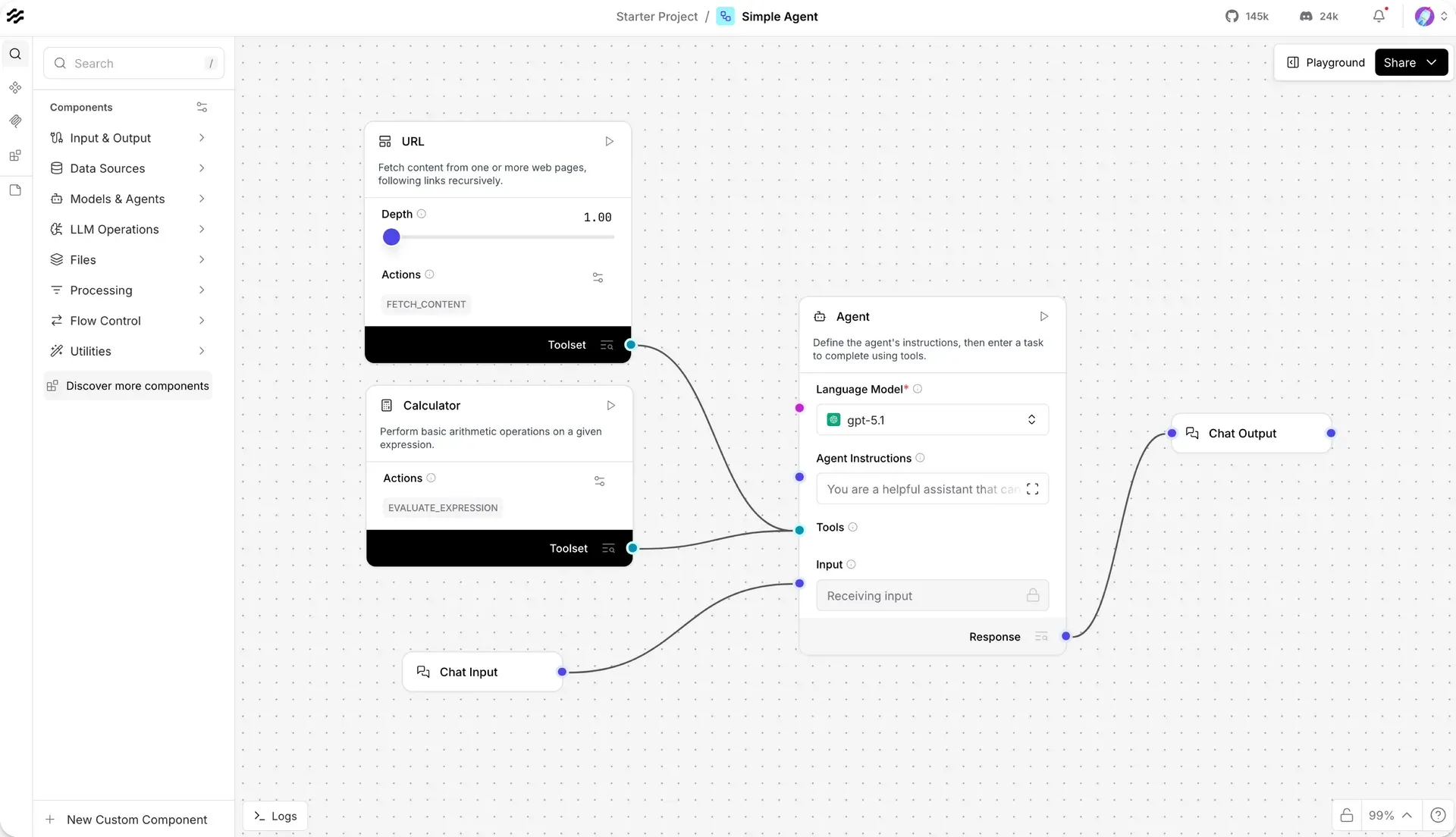
Simple Agent starter project in the visual editor, with two components in Tool Mode feeding the Agent, from the Langflow quickstart docs.
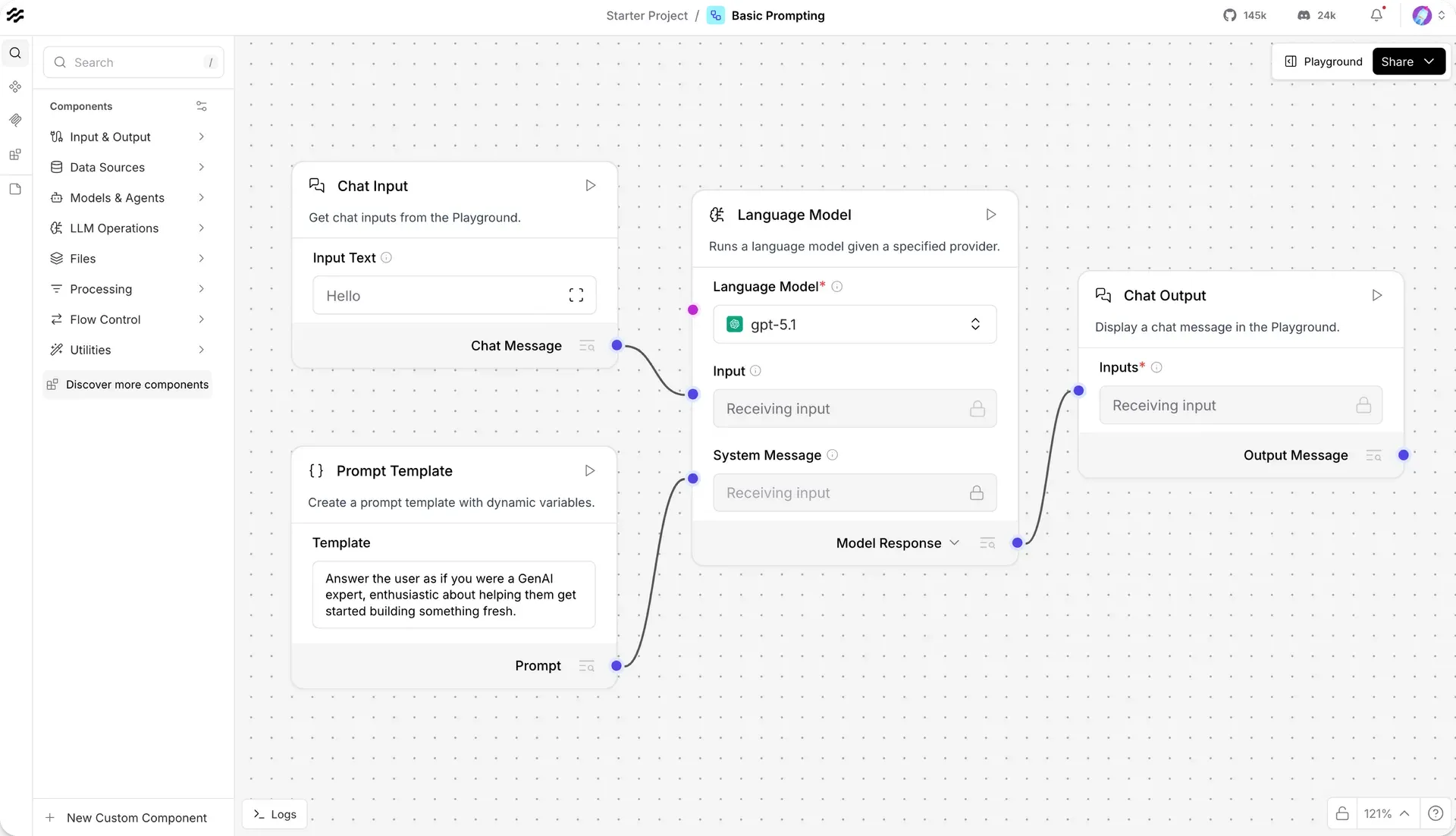
Basic Prompting starter flow with the component sidebar categories on the left, from the official documentation.
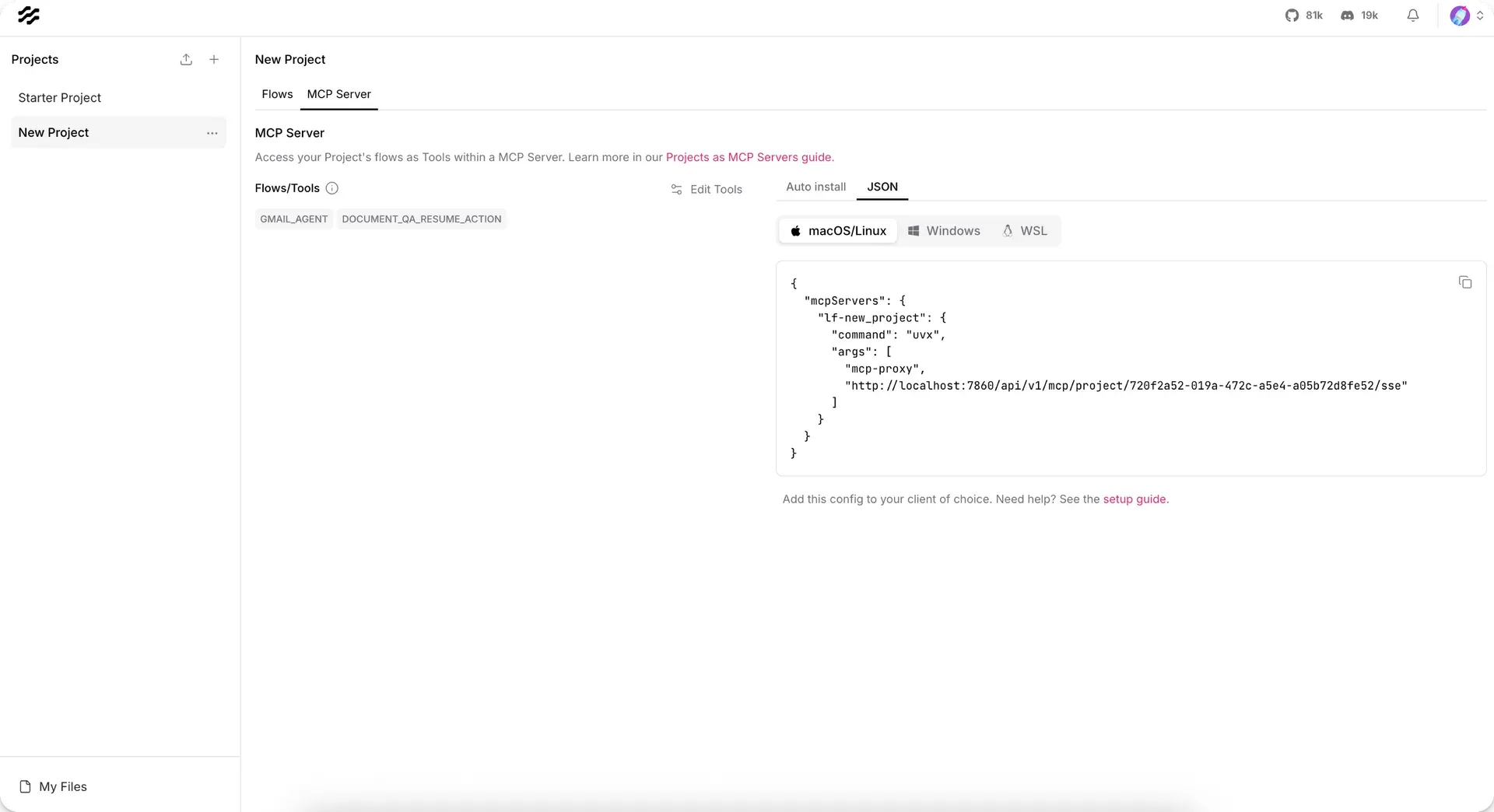
Project MCP Server tab with exposed tools and client JSON, from the MCP server docs. This older capture shows an SSE URL; current releases default to streamable HTTP.
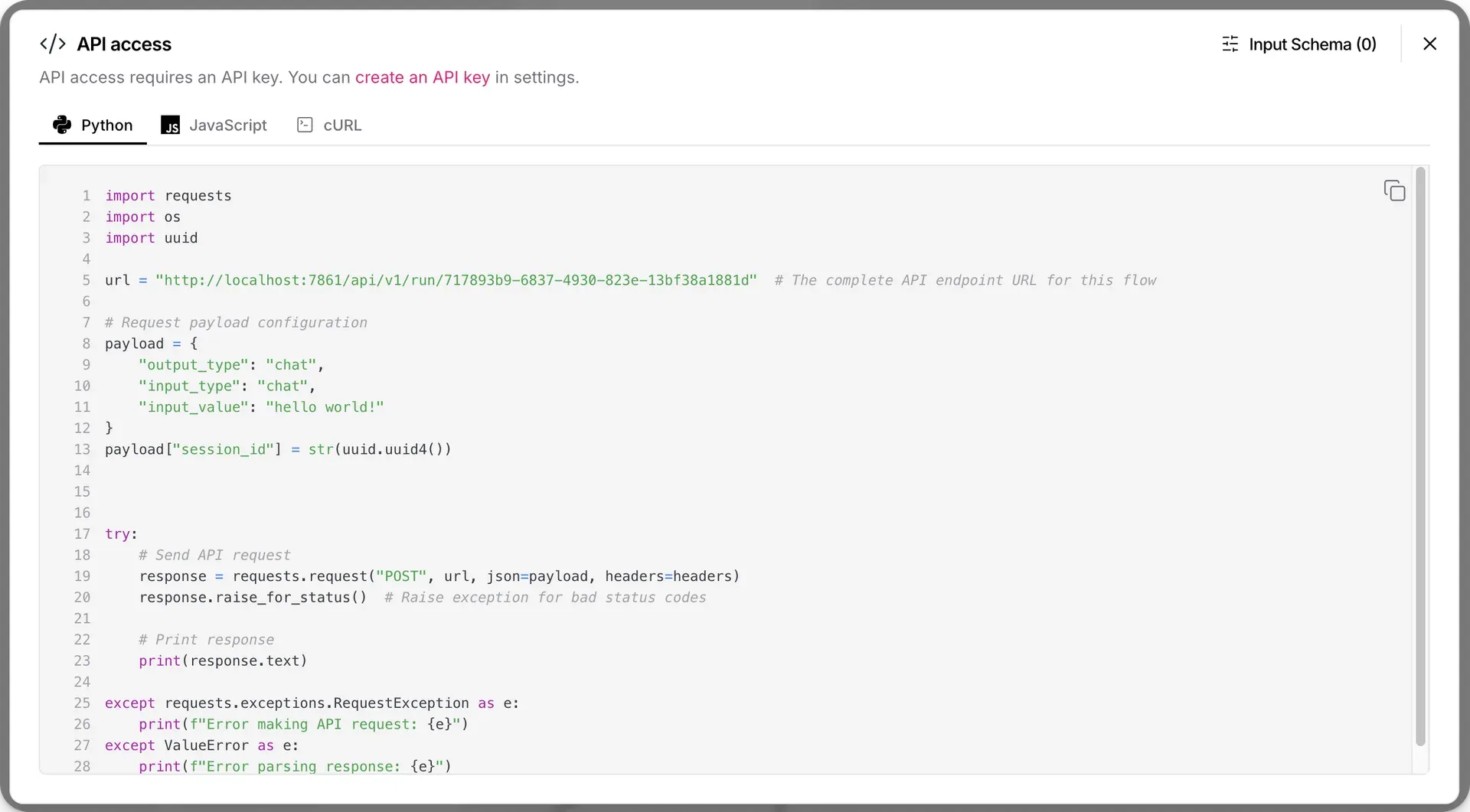
API access pane generating code to call a flow through /api/v1/run, from the official documentation.
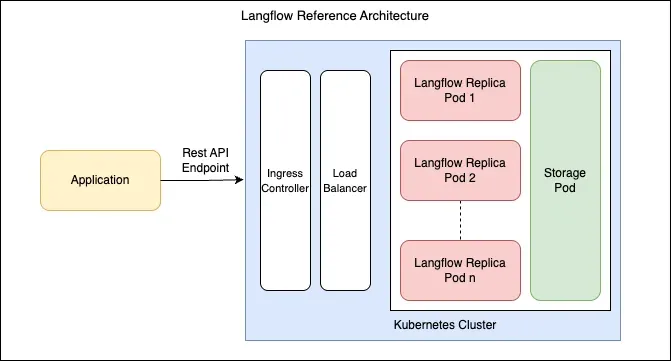
Langflow reference architecture for Kubernetes deployments, from the production best-practices docs.
Source: official Langflow project page.
Key capabilities
- Python package for Windows, macOS and Linux Install with
uv pip install langflow -Uon Python 3.10 to 3.14, then start it withuv run langflow run; the editor opens at http://127.0.0.1:7860 and the first start can take a few minutes. The documented minimum is a dual-core CPU and 2 GB of RAM, with a multi-core CPU and at least 4 GB recommended.langflow-baseis the smaller distribution without bundled provider extensions. See the installation guide. - Docker image
langflowai/langflow:latestmaps port 7860 and requiresLANGFLOW_SUPERUSER_PASSWORD, because official images disable automatic login. Sign in aslangflowor the name set inLANGFLOW_SUPERUSER. Existing auto-login installations need the documented upgrade steps before switching. The Docker guide covers volumes and configuration. - Langflow Desktop for Windows and macOS Desktop bundles Python and dependencies, so no environment has to be managed by hand. The 1.13.0 release assets include a Windows x64 MSI and macOS DMGs for Apple Silicon and universal builds; macOS 13 or later is required, and the website asks for a name, email and country before download. On Windows a missing C++ Build Tools error requires Microsoft C++ Build Tools or Visual Studio. The Shareable Playground and Voice Mode are not available in Desktop.
- Visual flow editor Components are grouped into Input and Output, Data Sources, Models and Agents, LLM Operations, Files, Processing, Flow Control and Utilities, with more available as bundles. Starter projects such as Basic Prompting and Simple Agent show working graphs. Version 1.13.0 added protection for flows opened by several users at once and a Korean interface locale.
- Editable Python components Each component exposes its Python source, and new ones are written as custom component classes. This is how teams wrap internal APIs or business logic as nodes. Code-execution components run Python inside the server process unless the opt-in exec-sandbox microVM backend added in 1.12 is configured, so treat flow editing rights as code execution rights. See custom components.
- Playground and run logs The Playground sends chat input to a flow, shows each tool call with its JSON input, output and duration, and can run individual components in isolation. Chat history is grouped by
session_id. Logs and message history help trace which component produced an answer. - Agent component and tool mode The Agent component takes a language model, instructions, input and a Tools port. Any component switched to Tool Mode exposes a Toolset port, and agents can be attached as tools to other agents for multi-agent setups. Chat memory is on by default, and the Message History component connects external memory such as Mem0. Using both the Response and Structured Response outputs triggers two separate model calls.
- Model providers and governance API keys are added once under Settings, Model Providers, and enabled models then appear in agent and model components; any language model component can also be wired in directly. Release 1.12 added a provider policy store and a deployment-wide deny list for blocked models. Local runtimes such as Ollama are available as components.
- Knowledge bases and vector stores Since 1.13 local Knowledge and Memory use SQLite instead of a local Chroma database, and the Chroma DB and Local DB components are legacy. Remote vector stores are supported through components, and the production profile expects pgVector. Version 1.13 can write precomputed vectors to a knowledge base without re-embedding and move vectors between backends with
relocate-kb. - REST API Flows run through
POST /api/v1/run/{flow_id_or_name}with anx-api-keyheader, with streaming controlled by a query parameter. Webhook, file, build and monitor endpoints exist, andPOST /api/v1/responsesaccepts an OpenAI-compatible request format. Each instance publishes its OpenAPI specification at/docs. The API reference lists the v1 and v2 endpoints. - Projects served as MCP servers Each project has its own MCP server at
/api/v1/mcp/project/PROJECT_ID/streamable, with SSE as a fallback that can be turned off. Authentication per project is an API key, OAuth 2.0 through an MCP Composer proxy, or none. A flow needs a Chat Output component to become a tool, and tools should be given clear names and descriptions. Defaults are a 180 second tool timeout, a 60 second server timeout and 10 sessions per server. See Langflow as an MCP server. - MCP client The MCP Tools component lets an agent call tools from external MCP servers over stdio or HTTP. Superusers can set
LANGFLOW_MCP_SERVERS_LOCKED=trueto stop other users from changing server connections. Release 1.13 lets a deployment declare and provision the MCP servers a flow needs. - Triggers and background jobs Version 1.13.0 introduced triggers that start flows from a schedule, an inbound webhook, Slack messages and reactions, or Google and Microsoft source events. A separate listeners process holds connections, while a leased dispatcher handles retries and dead-lettering. Retention for finished jobs is opt-in. These features are new in this release line, so pilot them before relying on them.
- Persistent connections Google Workspace, Microsoft 365 and Slack accounts can be stored as persistent connections with delegated OAuth, then selected in components through a connection picker. Connections are resolved per executing user. Treat them as stored credentials and review which users and flows can use each one.
- Users, roles and audit Official builds start with authentication enabled. Superusers manage users, teams and roles through the administration API or the
langflow adminCLI, building on role-based access control added in 1.12. SettingLANGFLOW_AUDIT_ENABLED=truerecords an append-only history of flow and project operations, queried at/api/v1/flows/auditsand/api/v1/projects/audits. Version 1.13 also added GDPR data subject erase requests. - Instance migration and database tools A guided Settings, Migration page moves users, projects, flows, settings, files and local knowledge bases to a new instance with backup, pause and secret-key verification steps. CLI commands convert a SQLite database to PostgreSQL, run
migration-preflightandcheck-integrity, and copy uploaded files to S3, each with JSON output. - Observability Tracing integrations include LangSmith and Langfuse, and 1.12 added export of application telemetry to any OTLP backend with spans for flow runs, MCP tool calls and database access. Prometheus metrics are enabled with
LANGFLOW_PROMETHEUS_ENABLED=Trueon port 9090 by default. - LFX executor LFX runs exported flow JSON files statelessly, without the database or UI.
lfx runexecutes a flow once andlfx serveexposes flows as HTTP endpoints at/flows/{flow_id}/run. Anything stateful, such as stored messages, does not persist between runs.
Where Langflow fits
Prototyping a document question-answering flow
Start from a retrieval starter project, load a few representative files, split them, embed them into a knowledge base and connect retrieval to a language model and Chat Output. Test answers in the Playground and inspect which chunks were retrieved before tuning prompts. Check that the embedding model used for ingestion is also used for queries, and remember that local knowledge now lives in SQLite: plan pgVector or a remote vector store before moving to shared deployments.
Building a tool-using agent
Add an Agent component, choose an enabled model and switch the components it should call, such as URL, Calculator or an internal API wrapper, into Tool Mode. Write precise tool descriptions, then watch each tool call, its arguments and timing in the Playground. Limit the toolset to what the task needs; the agents and tools guide covers agents used as tools for multi-agent designs.
Exposing flows to MCP clients
Open the MCP Server tab of a project, select the flows to expose with Edit Tools and rename each tool from its default flow ID to a descriptive name. Copy the JSON configuration, which runs uvx mcp-proxy against the project endpoint, or use auto install for a local Cursor, Claude or Windsurf client. Keep API key or OAuth authentication on, and confirm the tool list with MCP Inspector before handing it to an agent.
Embedding a flow in an application
Use the API access pane to copy a Python, JavaScript or cURL snippet for /api/v1/run, create a dedicated API key and pass a session_id when conversation history matters. Tweaks override component settings per request. For services that do not need the editor, consider a backend-only runtime deployment or LFX with exported flow JSON, and pin the Langflow version that produced the flow.
Running Langflow for a team
Follow the production best practices: separate IDE deployments (editor plus API) from runtime deployments (headless API, minimum 2Gi RAM and 1000m CPU per instance, three replicas). Use PostgreSQL through LANGFLOW_DATABASE_URL, shared storage or S3, a stable LANGFLOW_SECRET_KEY and Kubernetes secrets. Setting LANGFLOW_DEPLOYMENT_PROFILE=prod makes startup fail when those prerequisites are missing. Helm charts are maintained in a separate repository.
Starting flows from events
On 1.13, add a schedule or webhook trigger to a flow, or connect a Slack, Google or Microsoft account and choose a source event. Run the listeners process alongside the server, then check retries, dead-lettered events and job retention in a test workspace. Withdrawn background consent stops listeners as of 1.13.1, so verify that revoking a connection really stops the flow.
Install
uv pip install langflow -UReviews of Langflow
Be the first to share your experience with Langflow.
Write a review
Loading review form…
Alternatives to Langflow
 DifyDify by LangGenius combines a visual workflow builder, knowledge pipelines, sandboxed agents, model management and app APIs. It runs as Dify Cloud or self-hosted with Docker Compose under a modified Apache 2.0 license.
 FlowiseFlowise is an open-source visual builder for agent systems and chatbots that is being sunset: the repository is archived and core support has ended.
 n8nn8n is a fair-code workflow automation platform from n8n GmbH in Berlin. It combines a node-based visual editor with JavaScript and Python code, AI agent nodes, 1500+ integrations, a REST API and an MCP server, self-hosted or on n8n Cloud.