What is EffectCraft?
EffectCraft is an open-source motion graphics, visual effects and compositing application written in Rust. A composition is built from layers (solids, shapes, text, footage and nested compositions), their properties are animated with keyframes, effects are stacked on them, and the result is rendered through a Render Queue. The roadmap names Adobe After Effects 2026 as its reference and aims for the same panels, menus and behaviour, written from scratch. The README describes the work as clean room: built from public documentation and observable behaviour, without proprietary files, icons, presets or code, and without code copied from GPL projects.
EffectCraft is made by the ArtCraft team and is one of the free Crafting Apps on getartcraft.com. Its first commit was made on October 1, 2026. It shares its time model and text engine design with the sibling video editor FilmCraft and takes its H.264, ProRes and AAC codecs from FilmCraft, next to its own VP9, AV1, HEVC and Opus encoders, so no FFmpeg is bundled. The code is dual-licensed under MIT or Apache-2.0 at the user's option (GitHub's license detection shows Apache-2.0); the ArtCraft name and logos are trademarks excluded from that license.
The project labels itself alpha and states that it is not yet recommended for production client work. The README reports that about 91 percent of the features tracked in its parity document exist and estimates the app at about 45 percent of the way to full professional production work; docs/gaps.md lists every known shortfall. The roadmap gives its remaining work to beta as an estimate in AI agent hours. macOS is described as the most tested platform, Linux and Windows users have reported basic interaction bugs, and automated rendering tests currently focus on small compositions.
27 releases have been published on GitHub since v0.1.0 on October 2, 2026. Version 0.23.0 added Un-precompose, WebAssembly plug-in ABI 2 with access to neighbouring frames, and Lumetri Color in After Effects project import. Version 0.24.0 (November 11, 2026) made After Effects projects importable from File, Import and by drag and drop, added snapping when Shift-dragging layer bars and audio preview at the selected frame rate. The latest, v0.24.1 from November 12, 2026, lists every loss detail in the .aep import prompt, imports Orientation expressions, sets resource limits in the SVG, PSD, EPS, PDF and Lottie importers and fixes Flatpak updates.
The workspace has 35 library crates and three applications (desktop, command line and web), with the egui interface on top and nothing below it depending on it. Rendering runs on a GPU compositor with a processor fallback; the craft.wiki overview lists a DirectX 12, Vulkan or Metal graphics card as best. The README states that the app sends no telemetry and uses the network only when asked. Sibling listings on iThub include the video editor FilmCraft, the animation editor AniCraft, PhotoCraft and VectorCraft.
Key capabilities
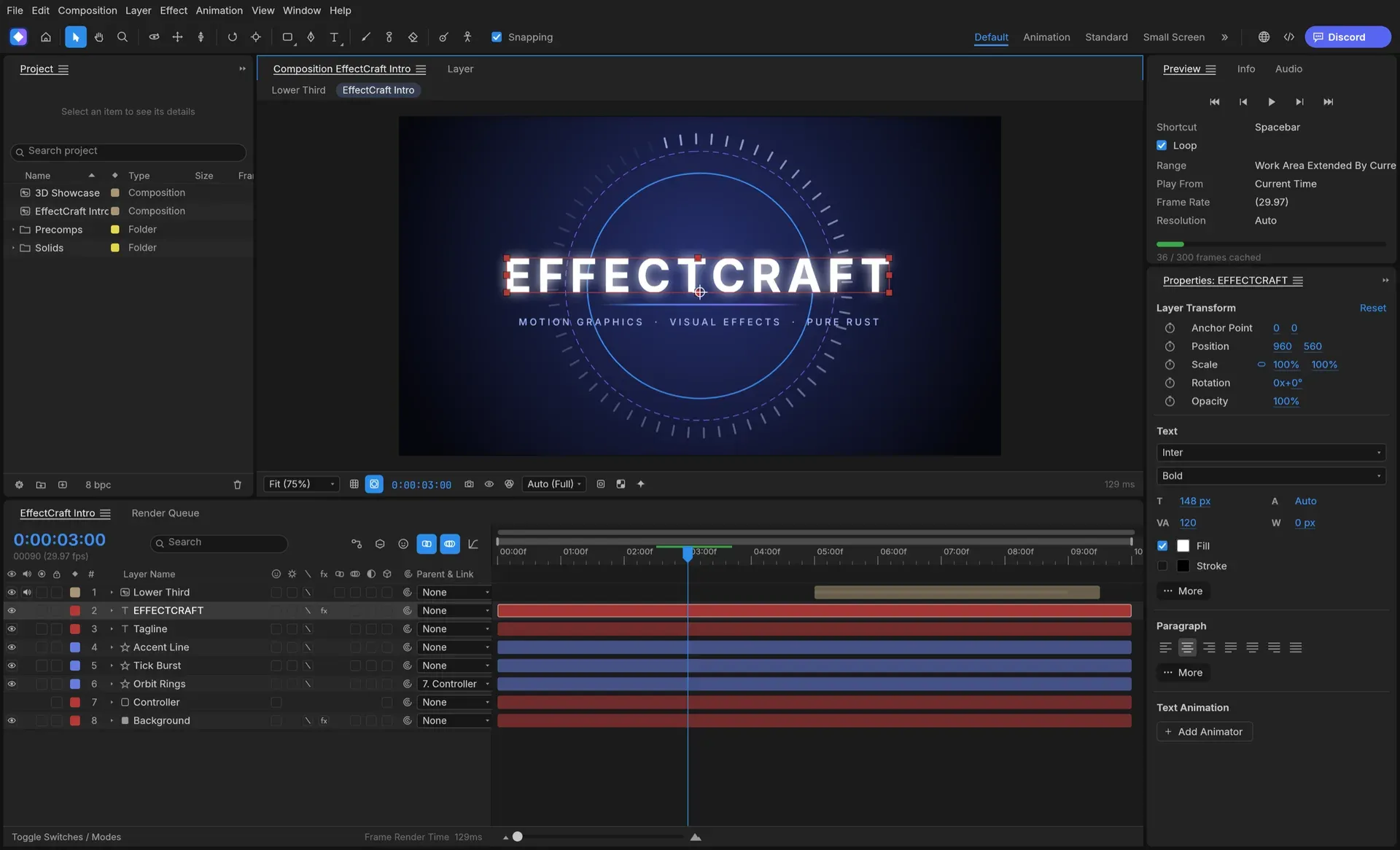
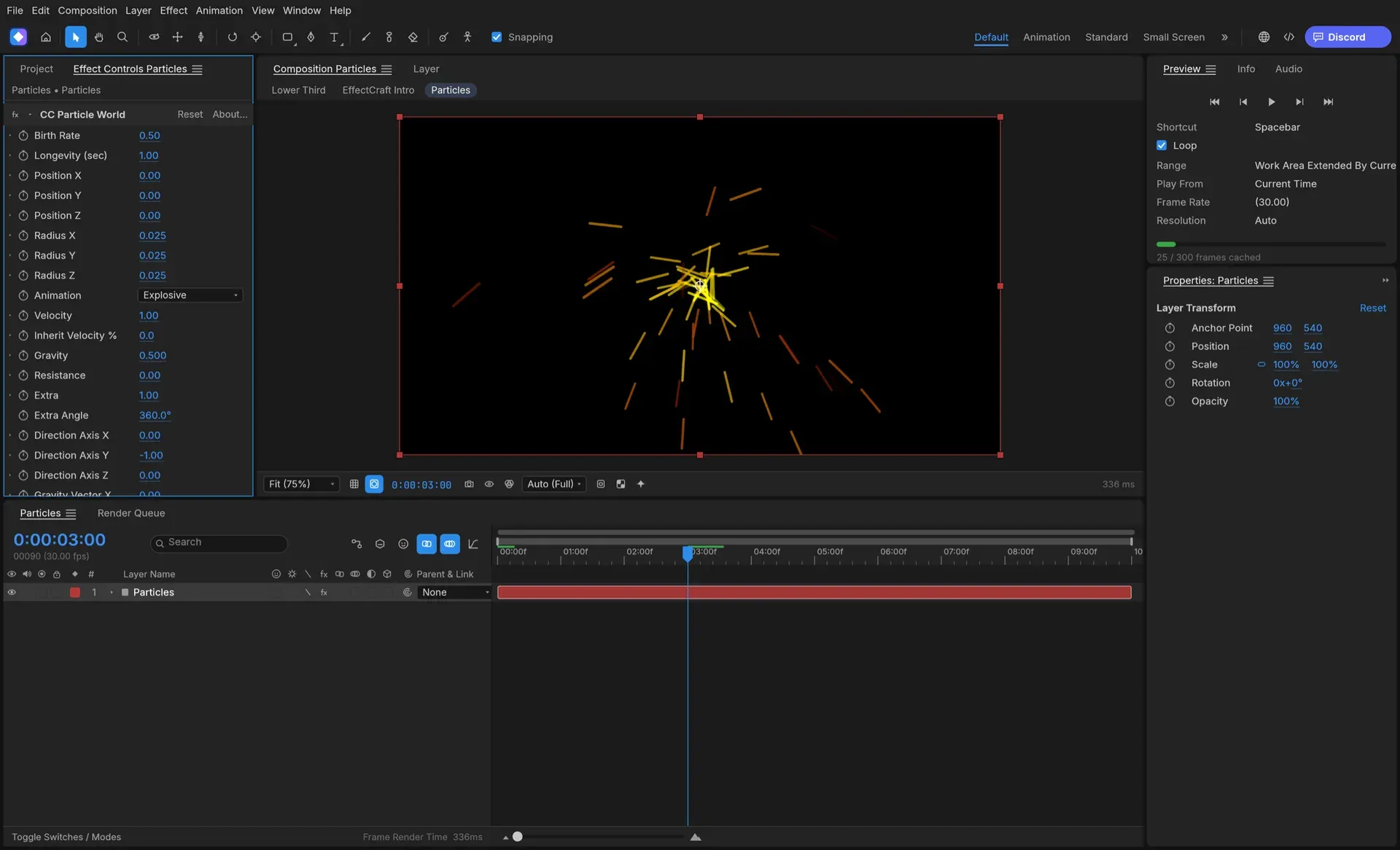
- Motion design workspace The interface has Project, Composition, Timeline, Layer, Footage, Effect Controls, Tools, Preview, Effects & Presets, Audio, Info, Character, Paragraph, Align, Progress and Render Queue panels with standard motion graphics shortcuts. Footage, compositions and effects can be dragged onto the viewer, where they land under the pointer, or into the Timeline between layers.
- Layers of every kind Compositions hold solids, shapes, text, footage, nested compositions, nulls, adjustment layers, cameras and lights. Layers support parenting, track mattes, 38 blend modes and motion blur, and the Timeline offers the usual property shortcuts such as P, S, R and T and their double presses.
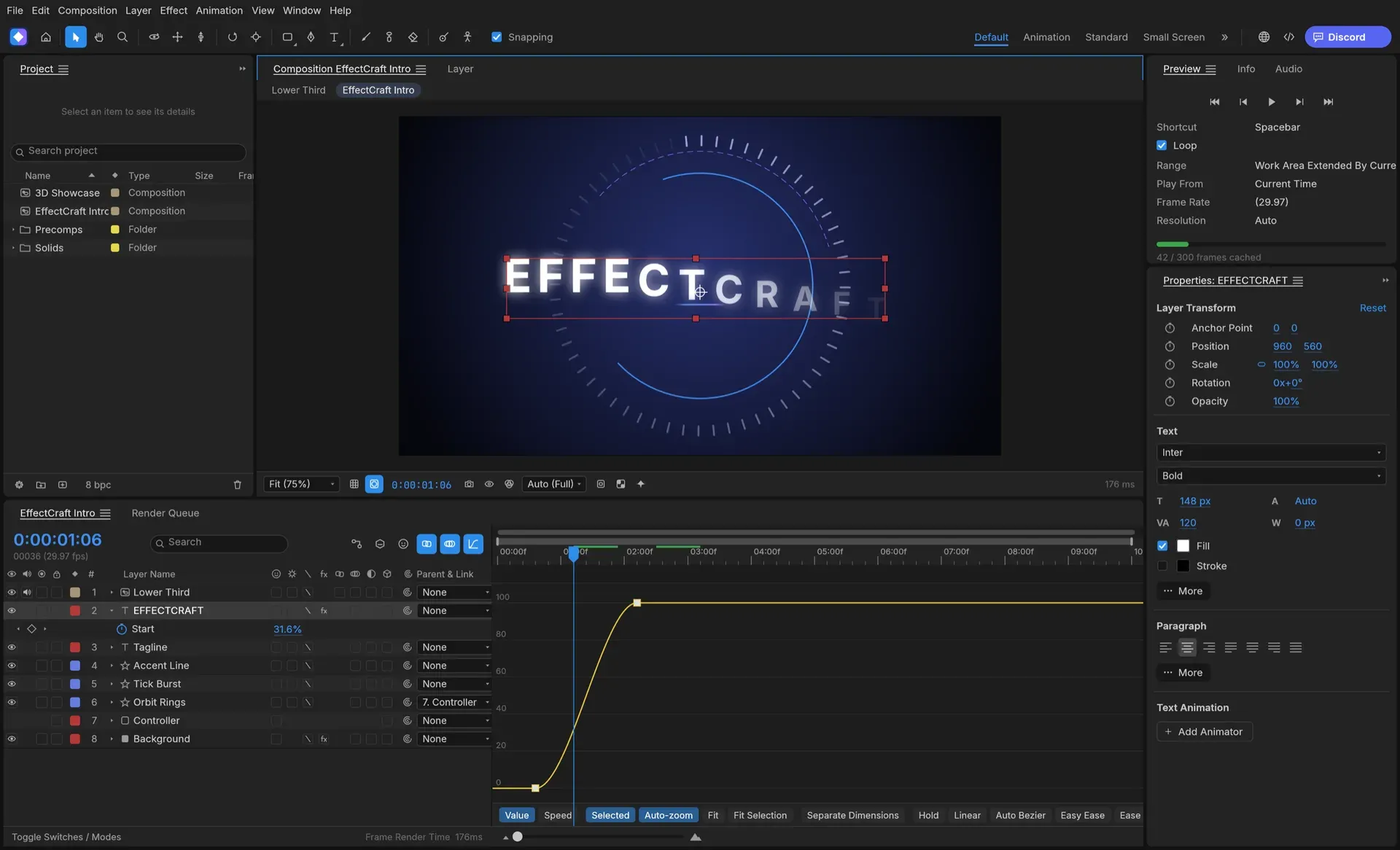
- Keyframes, Graph Editor and time Keyframes can be linear, Bezier, hold, auto or continuous Bezier, with roving keys, Easy Ease (F9) and Keyframe Velocity and Interpolation dialogs. The Graph Editor shows value and speed graphs with draggable handles. Time remapping, time stretch, time reverse, freeze frame, markers and frame-accurate timing at every frame rate, including 29.97 drop-frame, are included.
- Shapes, masks and text Shape layers support trim paths, repeaters, round corners, offset, zig zag, twist, wiggle, merge paths and gradient strokes. Masks are drawn with the pen tool and have modes, feather, expansion and vertex editing in the viewer. Point and paragraph text is shaped with any installed font and animated with text animators and range selectors.
- JavaScript expressions Expressions use JavaScript with the standard motion expression model, including
wiggle,loopOut,thisComp.layer()and vector maths on arrays. They are edited inline with an error bar, a pick whip and an Expression Language menu; the scripting parity document lists edge-case behaviour as not yet measured against the reference application. - 308 effects and nine layer styles The generated effects list counts 308 effects with 2,988 parameters, all processing 32-bit float pixels and 280 of them also running on the GPU compositor. Categories cover blur and sharpen, colour correction (Curves, Levels, a colour-grading panel), distort, generate, keying, matte, noise, simulation (Particle Emitter 3D, Shatter, Card Dance, Caustics), stylize, time, audio, transitions and expression controls. All nine layer styles are available with Global Light.
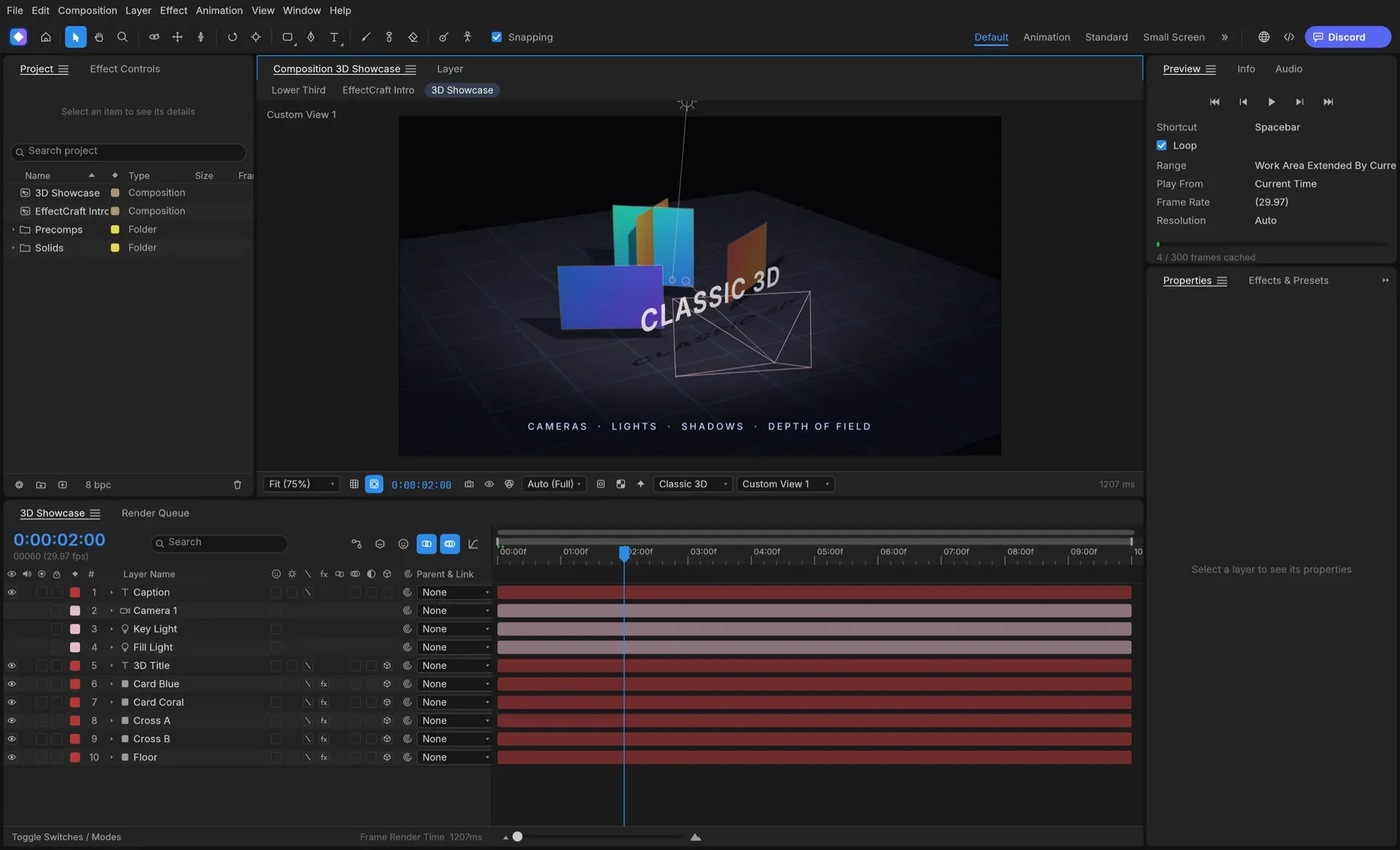
- Classic 3D compositing 3D layers have orientation and material options, cameras come in one-node and two-node versions with depth of field, and parallel, spot, point and ambient lights cast soft ray-traced shadows. Layers intersect correctly in 3D, and orbit, pan and dolly tools work with Front, Top, Left and Custom views.
- Puppet tools Position, Advanced, Bend, Starch and Overlap pins deform a mesh built from the layer. Pins can be recorded in real time, driven by or carrying nulls for rigging, and given follow-through for hair and cloth.
- Tracking and rotoscoping Motion tracking, Warp Stabilizer, a 3D Camera Tracker and Roto Brush are included, and a solved camera can be exported as a Python script for Blender 4.0 or newer. Roto Brush can use MobileSAM as an optional 40 MB download, or SAM 2.1 Tiny installed from a 155.9 MB model file, and face tracking can use the optional 3.8 MB MediaPipe Face Landmarker; the README notes these models are still being evaluated and tuned.
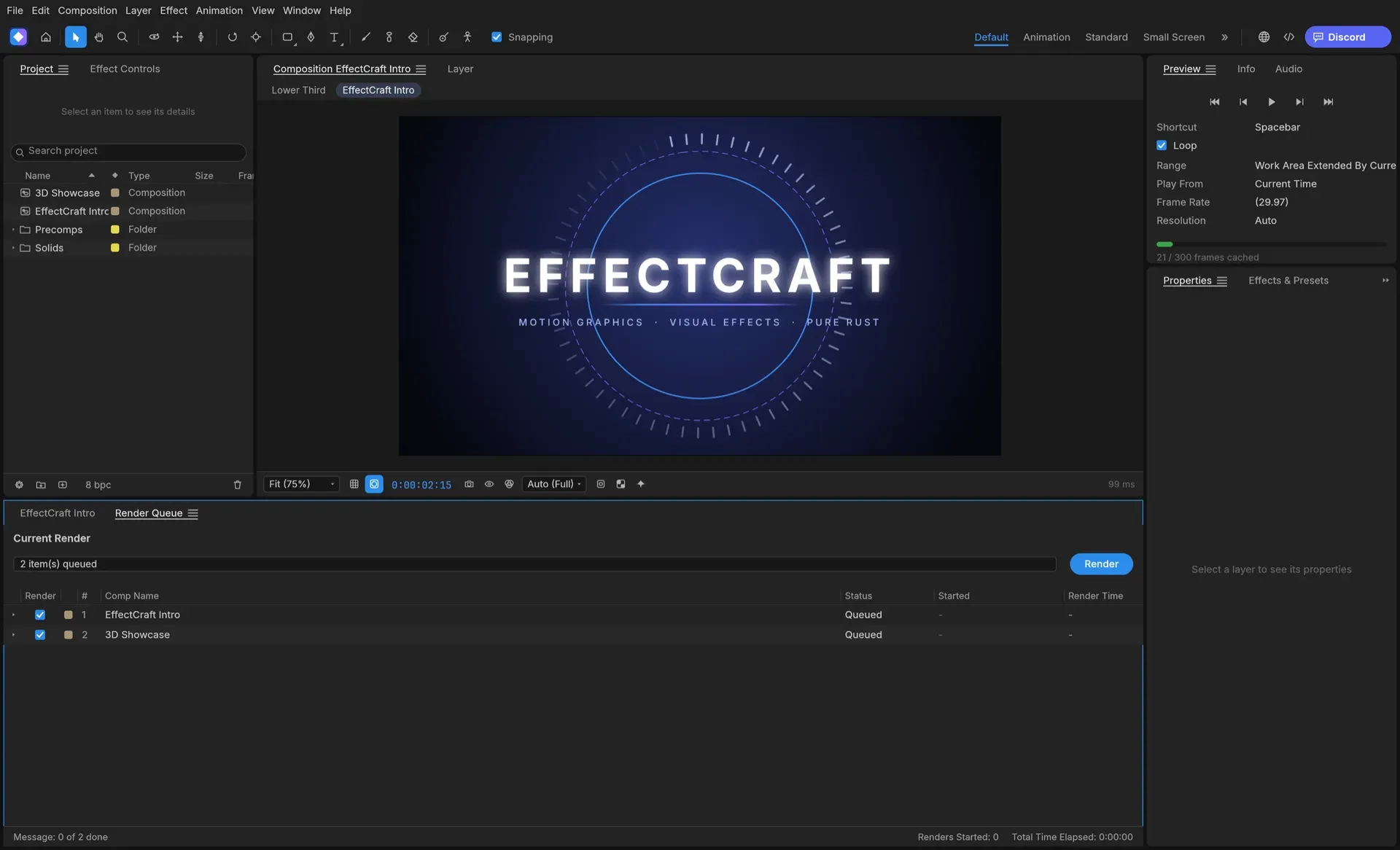
- Render Queue and formats The Render Queue writes H.264 MP4, ProRes MOV from Proxy to 4444 XQ with alpha, HEVC Main and Main 10, AV1 MP4, WebM with VP9 (with alpha) or AV1 and Opus audio, PNG, JPEG, TIFF, Targa and 32-bit EXR sequences, animated GIF and WAV or AIFF. Render Settings and Output Module templates, field rendering with 3:2 pulldown, post-render actions, storage overflow and render logs are supported. Every encoder is written in Rust and no FFmpeg is included.
- Lottie import and export File, Export, Lottie JSON writes a composition with precomps, shape, solid, image, text and null layers, eased and spatial keyframes, masks, track mattes, blend modes, time remapping and optionally expressions as
.jsonor.lottie, and lists anything Lottie cannot express. File, Import, Lottie opens a Lottie file as a new composition. - After Effects project import and export .aep and .aepx projects import through File, Import or by dropping them on the window. Anything that cannot be carried over exactly is listed before changes are made, with Import Anyway or Cancel, and the whole import is one undo step. File, Export, After Effects Project writes an .aep for After Effects 2026 with the same loss report; After Effects plug-ins do not run, so their effects are left out.
- Footage and interchange Video, audio, stills, image sequences, multi-layer OpenEXR, Photoshop, PDF and Illustrator files import as footage or compositions, with Interpret Footage and Relink Missing Footage. For Premiere Pro, Final Cut Pro XML is written, and Final Cut Pro XML, FCPXML, OpenTimelineIO, EDL, AAF and OMF are read; Premiere's .prproj format is not supported. Native projects are saved as versioned JSON (
.ecproj) that diffs in version control. - Scripts, plug-ins and effect helpers Scripts in .jsx or .js run from File, Scripts, ScriptUI panels dock like built-in panels, and startup and shutdown script folders are supported, while the binary .jsxbin format is not supported. Effect plug-ins are WebAssembly modules (ABI 1 and 2) or Rust, loaded from a Plug-ins folder at start-up, and external effect helpers run native code such as an OpenFX host in a separate process started only on request. After Effects SDK plug-ins cannot run.
- Command-line tool
effectcraft-climakes one-shot calls with JSON output: setting a property at a time, executing any engine command such as a Lottie export, or rendering a composition, for exampleeffectcraft-cli render --comp Main --out main.mp4. The same Render Queue runs from the command line, and the CLI ships beside the desktop app (as a separate zip on macOS). - MCP server and control channel
effectcraft-cli mcpis a Model Context Protocol server on stdio, headless or bridged to the running app, with tools for the command catalogue, single commands, batches, project inspection and rendered previews, as described in docs/agents.md. File access can be confined with read and write root options, which also block scripts. The desktop app's control channel (effectcraft --control 9877) listens on 127.0.0.1 only and accepts JSON lines to run commands, inspect and click widgets and take screenshots. - Windows and macOS downloads V0.24.1 has code-signed MSI installers and portable zips for Windows x64 and native ARM64. The MSI installs per user into
%LOCALAPPDATA%\Programs\ArtCraft\EffectCraftby default without an administrator prompt, offers an all-users install and supports silent installs withINSTALLFOLDERandALLUSERS=1. The README and craft.wiki also list 32-bit x86 builds, which are not attached to v0.24.1. macOS gets a signed and notarized universal DMG for Apple silicon and Intel and a separate CLI zip. - Linux and FreeBSD downloads Linux builds are published as AppImage with zsync update files, Flatpak, .deb, .rpm, Arch package and tarball for x86_64 and aarch64, plus riscv64 .deb, .rpm and tarball builds that need glibc 2.39 or newer. FreeBSD tarballs exist for x86_64 and aarch64, and ArtCraft also runs Flatpak, APT and RPM repositories. On native Wayland sessions file drag and drop does not work, and File, Import is the documented fallback.
- Web build Release v0.24.1 includes
effectcraft-web-0.24.1.zip, a static site that runs the same engine and interface in the browser on WebGPU with a WebGL2 fallback and can be hosted on any static server. According to docs/web.md, nothing is uploaded: projects, media, settings and renders stay in the browser's private storage and on the user's machine. - Building from source The source builds with Cargo and Rust 1.95 or newer;
cargo run --release -p effectcraftstarts the app, and adding--demoopens the bundled demo project.cargo xtask webbuilds the browser version, and the ArtCraft Launcher can install and update the released builds alongside the other Crafting Apps.
Where EffectCraft fits
Animated titles and lower thirds
A text layer is animated with a text animator and range selectors, and its keyframes are shaped in the Graph Editor with Easy Ease or custom handles. The demo project, opened with --demo, contains an EffectCraft Intro title composition with a Lower Third precomp and a 3D Showcase composition. The finished composition is added to the Render Queue and written as H.264, ProRes or an image sequence.
Bringing After Effects projects across
An .aep or .aepx file is imported through File, Import, After Effects Project or dropped on the window. The import report names what will be left out or changed, such as unmapped effects with their instance counts, before Import Anyway or Cancel. Footage keeps its stored paths and is relinked when missing, and fonts are matched by name with a fallback for missing ones, as described in the After Effects projects guide.
Delivering animations as Lottie
A composition built from shape, text, solid, image and null layers is exported with File, Export, Lottie JSON as .json or .lottie for web and app players. Features Lottie cannot express are listed at export, and an existing Lottie file can be opened again as a composition for further editing.
Compositing and finishing footage
Footage and image sequences are imported, interpreted and layered with keying, mattes, colour correction and adjustment layers. Tracking, Warp Stabilizer and Roto Brush isolate or stabilise elements, and the 3D Camera Tracker can hand its solved camera to Blender. Results are written as ProRes 4444 with alpha, 32-bit EXR sequences or other Render Queue formats.
Headless rendering in pipelines
Scripts and CI jobs call effectcraft-cli without a window: set changes a property at a given time and saves the project, exec runs any engine command such as a Lottie export, and render writes a composition to a file. Commands return JSON, and Render Queue outputs are not allowed to replace footage, proxies or the project file.
Building compositions with an AI assistant
An MCP client such as Claude Code, Claude Desktop or Cursor starts effectcraft-cli mcp and can create compositions, add layers, set keyframes, apply effects, look at rendered frames and render. The AI agents guide shows how to limit the folders the assistant may read and write and how to bridge to a running app started with a control port to watch changes live.
Reviews of EffectCraft
Be the first to share your experience with EffectCraft.
Write a review
Loading review form…
Found EffectCraft useful? Upvote it todayYour vote helps other IT teams find it in the daily ranking.