

What is LosslessCut?
LosslessCut is a free, open-source desktop application for cutting, trimming, merging and remuxing video and audio files without re-encoding them. It is a graphical front end for FFmpeg: instead of decoding and compressing every frame again, it copies the existing audio and video streams into new files. A rough cut of a multi-gigabyte camera, drone or GoPro recording therefore finishes in seconds and keeps the original quality. The application is written and maintained by Mikael Finstad (mifi.no) as a solo project, has been developed on GitHub since 2016 and is licensed under GPL-2.0. Documentation lives on the official site at losslesscut.app.
The free builds are published on the GitHub releases page: Windows x64 and ARM64 as 7z archives that are extracted and run without an installer, macOS DMG images for Intel and Apple Silicon, and Linux x64 tar.bz2 and AppImage plus an arm64 tar.bz2. Release assets marked DONT-USE-THIS-FILE (macOS PKG, Windows APPX) are not meant for installation. Signed, automatically updating builds are sold in the Mac App Store and Microsoft Store, and a Snap package is published for Linux. Store builds carry the same features but often trail GitHub by a few versions; the author describes the newest GitHub builds as a public beta. Flathub, WinGet and Homebrew packages are unofficial.
The current release is 3.70.2, published October 28, 2026. It fixes black-frame and silence detection on Windows, which found nothing in 3.70.0 and 3.70.1 and adds FFmpeg to the Linux arm64 build. Version 3.70.1 restored the ffmpeg.exe file missing from the Windows x64 build. The larger 3.70.0 update moved the bundled FFmpeg to 8.1 (fixing CVE-2026-8461), added a System, Dark or Light theme setting, extended the metadata editor, removed the libfuse2 requirement from the AppImage and made the HTTP API reject requests from web browsers. Version 3.69.0 in June 2026 added lossless cropping, per-file track shifting, a keyframe decimation tool and a native Windows ARM64 build.
Technically, LosslessCut is an Electron application written in TypeScript with a React interface. Preview uses Chromium's HTML5 player, which natively handles MP4, MOV, WebM, Matroska, OGG and WAV with codecs such as H.264, H.265, AV1, VP9, AAC and Opus. Files the player cannot decode are shown through FFmpeg-assisted playback, while the export still reads the original streams. FFmpeg and FFprobe are bundled, and a custom FFmpeg folder can be set. Settings, shortcuts and logs are stored in config.json and related files under the user's appData folder, so the application is not portable by default.
The scope is deliberately narrow. LosslessCut is neither a non-linear editor nor a transcoder: it does not add effects, transitions, text overlays, burned-in subtitles, volume changes or resizing, all of which require re-encoding. Lossless cuts can only begin on a keyframe, so an export may start a fraction of a second to several seconds before the chosen point; an experimental smart cut mode re-encodes only that short stretch. The feature list and troubleshooting guide document these limits in detail.
LosslessCut screenshots
Explore the interface. Open a screenshot to view it at full size.
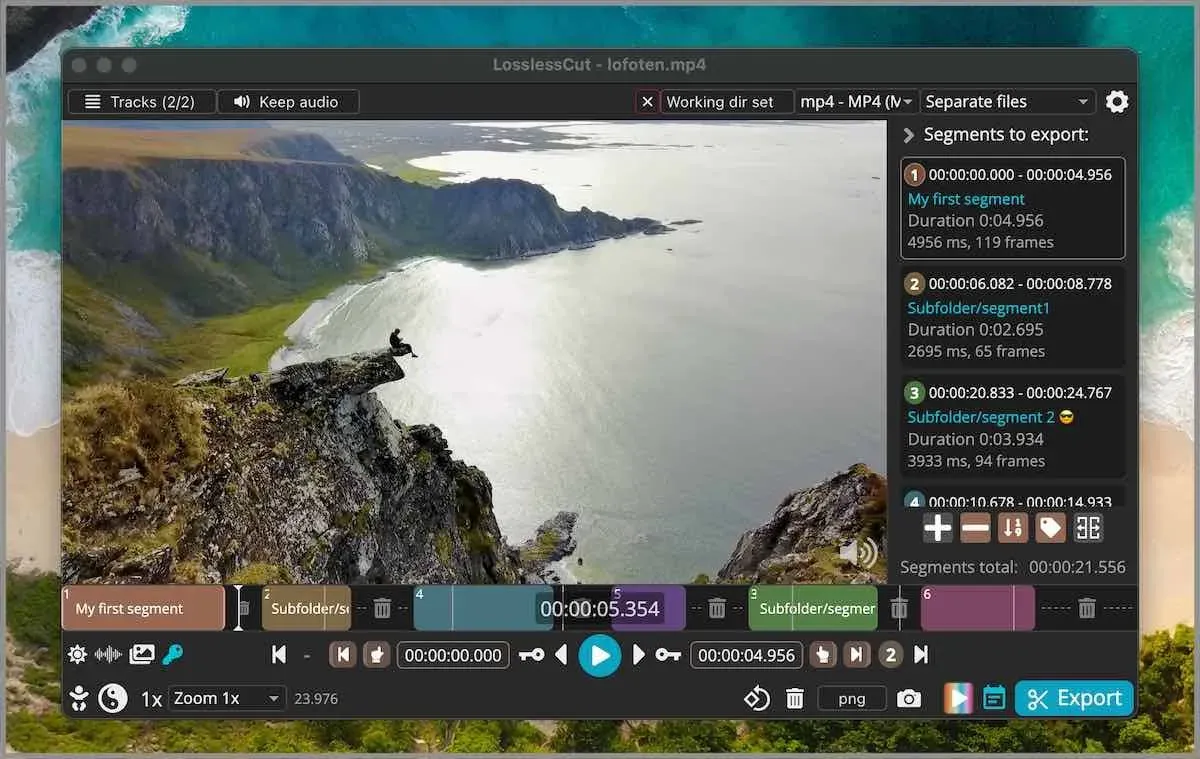
Main editor with labelled segments on the timeline, the segment list and export controls. Official screenshot from the project README (macOS window).
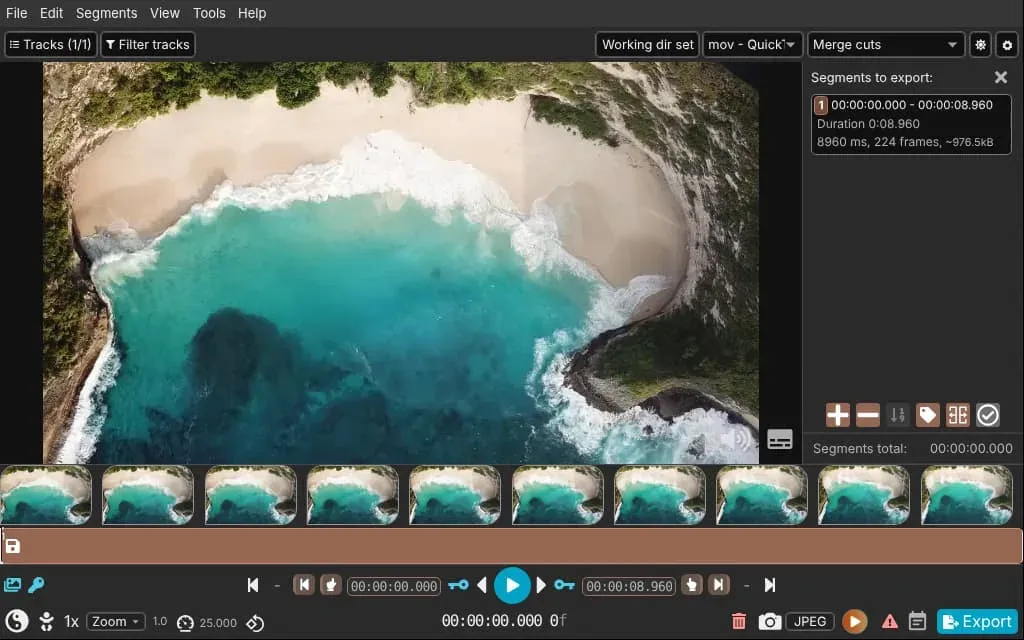
A video opened with timeline thumbnails, cut start and end times and the Merge cuts mode. Poster frame of the official demo on losslesscut.app.
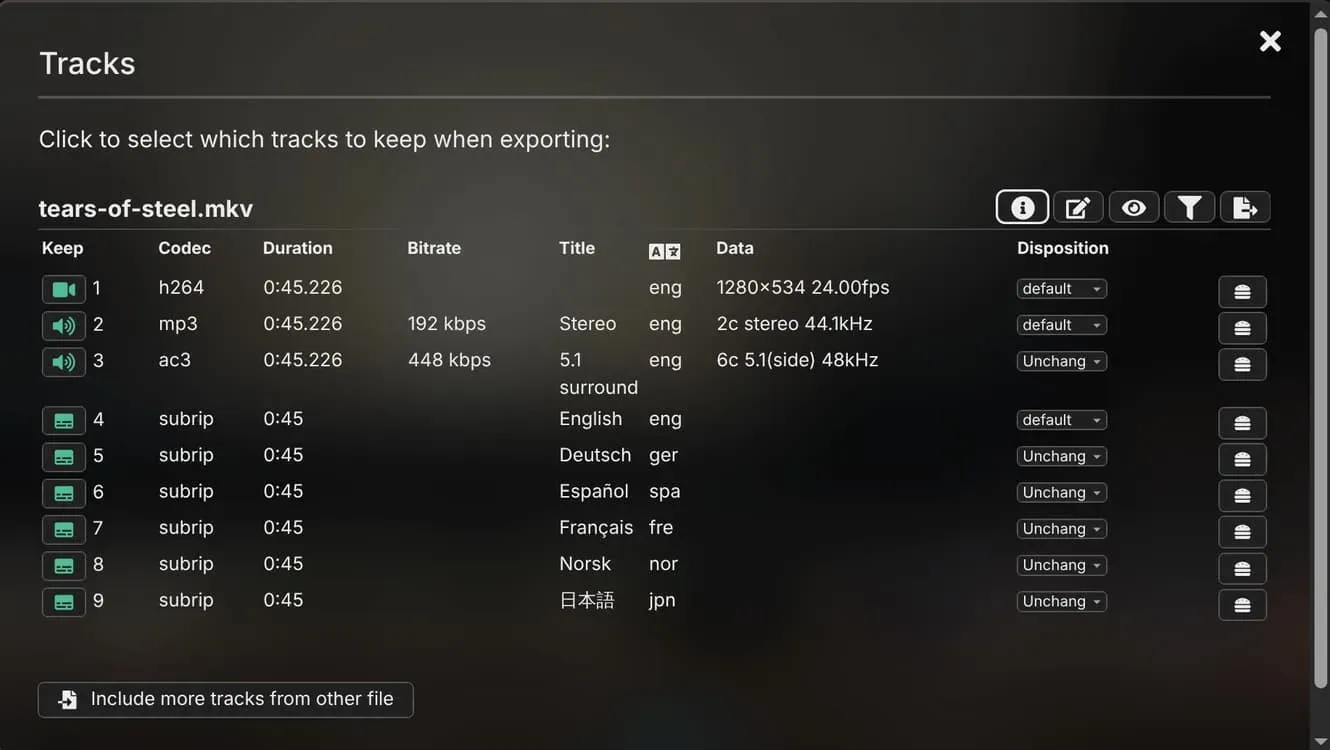
Tracks dialog for choosing which video, audio and subtitle streams to keep, with codec, bitrate, language and disposition. Official website demo poster.
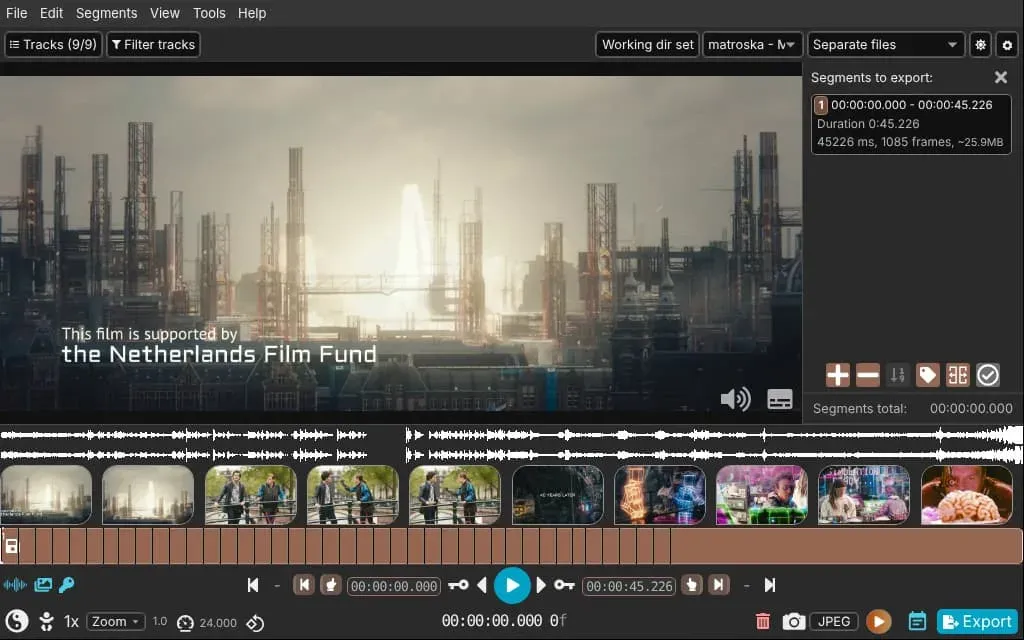
A Matroska film with nine tracks, waveform and thumbnails, split into one segment per detected scene. Official website demo poster; footage is Tears of Steel (CC) by the Blender Foundation.
Source: official LosslessCut project page.
Key capabilities
- Download LosslessCut for Windows Windows 10 and 11: the
LosslessCut-win-x64.7zorLosslessCut-win-arm64.7zarchive from the latest release, extracted with 7-Zip; there is no installer, and uninstalling means deleting the folder. The GitHub build is not code signed, so SmartScreen and antivirus tools may warn. The Microsoft Store edition is signed, updates itself and costs a small amount. Windows 7, 8 and 8.1 are no longer supported. - Download LosslessCut for macOS Separate DMG images exist for Intel (
mac-x64) and Apple Silicon (mac-arm64); mount the image and drag the app to Applications. The universal PKG in the release assets does not work. The requirements page lists macOS 13 or newer and notes that version 3.71.0 drops macOS 12. The Mac App Store edition is sandboxed, asks for an output folder before writing and cannot open VOB files. - Download LosslessCut for Linux Official options are the Snap Store package (
sudo snap install losslesscut), an x86_64 AppImage, which no longer needs libfuse2 since 3.70.0, and tar.bz2 archives for x64 and arm64. Release 3.70.2 is the first whose arm64 build bundles FFmpeg. Since 3.70.0 the AppImage and Snap can register as an Open with application for video and audio files. Flathub exists but is not maintained by the author. - Lossless cutting and trimming Mark one or many segments on a zoomable timeline with thumbnails and an audio waveform, type exact cut times or jump between frames and keyframes. Export keeps or removes the marked parts, writing each segment to its own file, merging them into one, or both. Because streams are copied, cuts start at the previous keyframe; the keyframe cut toggle and the
avoid_negative_tsexport option change how FFmpeg seeks. Version 3.70.0 compensates for early seeks in MKV and WebM files with B-frames. - Experimental smart cut Smart cut re-encodes only the stretch between the cut point and the next keyframe, then copies the remaining stream, which allows starts between keyframes. The documentation states plainly that it does not work for many files. If it produces duplicated parts, the Shift all start times export option is the first thing to try; otherwise fall back to keyframe cuts or a full re-encode in another tool.
- Segments, markers, labels and tags Segments can be divided by duration, target file size or count, generated from keyframes or chapters, and inverted, split, duplicated, shifted, shuffled or aligned to keyframes. Markers are segments without an end. Labels and tags can drive output folder structure, and a JavaScript expression language selects or edits segments, for example
segment.duration < 5. Segment changes support undo and redo via keyboard shortcuts. - Scene, black-frame and silence detection FFmpeg filters find scene changes, black sections and silent audio and turn the results into segments. Typical uses are splitting a film into one file per scene or removing silent parts of a recording. Scene-based cuts usually need shifting afterwards because cuts still snap to keyframes. On Windows, detection returned nothing in 3.70.0 and 3.70.1; 3.70.2 fixes this.
- Lossless merging of files Files with identical codec parameters, such as clips from the same camera or phone, can be concatenated without re-encoding. A compatibility check runs before the merge, and chapters can be created from the source files. Files with different parameters can merge into output that plays only the first part or shows corrupt video, which the troubleshooting guide covers.
- Track management The Tracks dialog shows every stream with codec, duration, bitrate, language and disposition, and selects which ones to keep. Tracks from other files can be added, for example a music or subtitle track, and shifted in time to sync separately recorded audio. All tracks, including subtitles and attachments, can be extracted to separate files, and data tracks such as GoPro GPMF telemetry are kept.
- Remuxing to another container Opening a file, choosing another output format and exporting without segments changes the container without touching the streams, for example MKV to MP4 or MPEG-TS to MP4. Matroska and MOV accept the widest range of codecs. Not every codec is allowed in every container, so the output format list matters when an export fails.
- Metadata, rotation and codec tags The metadata editor changes file and per-track metadata and dispositions, copies values from another track or loaded file, and suggests common keys and language codes. Rotation flags can be corrected, the codec tag set to
hvc1so H.265 plays on Apple devices, bitstream filters applied and cover art taken from a frame. FFmpeg does not preserve all EXIF data, so the documentation suggests exiftool for complete transfers. - Lossless crop, frame rate and decimation Since 3.69.0, H.264 and H.265 video can be cropped or given a different aspect ratio through bitstream and container metadata, which some players ignore. Playback speed changes by rewriting the frame rate, which accepts fractions such as
30000/1001, and must be done as a separate step. The decimate tool keeps only keyframes, for example to make a timelapse. - Cut list import and export Segments import from MP4 and MKV chapters, CSV, MPlayer and CMX 3600 EDL, YouTube chapter text, CUE, PotPlayer bookmarks, SRT, OpenTimelineIO, DaVinci Resolve and Final Cut Pro XML or FCPXML. They export as CSV, TSV, SRT or YouTube chapter timestamps, or become chapters in an otherwise unchanged file. Segments are saved per media file in an
.llcproject file next to it, which can be disabled. - Snapshots and frame export Full-resolution snapshots save as JPEG or PNG or copy to the clipboard. Frame ranges export as images: every frame, every nth frame or second, at scene changes or the best image per interval, optionally with timestamps in the file names. These image exports are re-encoded by nature and are not lossless.
- Stream download and FFmpeg command log Video served over HTTP, including HLS
.m3u8streams, can be saved losslessly to an MKV file. A Last FFmpeg commands page shows exactly what ran, which is useful for reproducing an operation on the command line or in a script. Hardware acceleration via-hwaccel autois an optional setting. - Command line interface The CLI opens files, overrides settings with
--settings-json, sets a custom--config-dir, disables all networking with--disable-networkingand sends--keyboard-actioncommands to a running instance. Actions that open a dialog cannot be scripted. Since 3.70.0, relative paths resolve correctly and settings input is validated before it is written. - Local HTTP API Started with
--http-api(default port 8080), the experimental HTTP API runs keyboard actions throughPOST /api/action/:actionand waits forexport-startorexport-completeevents. It listens only on 127.0.0.1 and has no authentication, so any local program can control the app while it is enabled. Requests with an Origin header or a non-localhost Host header are rejected. - Batch list and working modes Many files can be opened as a batch list and processed one at a time, or converted to a supported format together, but there is no batch export; the batch processing guide recommends scripting FFmpeg directly. A simple mode hides advanced controls. The interface supports customizable keyboard shortcuts, dark and light themes and 26 languages, and the input file can never be overwritten.
Where LosslessCut fits
Rough-cutting camera, drone and GoPro footage
Open the recording, add a segment for each part worth keeping and choose Separate files or Merge cuts as the export mode. Keyframe cut mode suits most camera files. Check the first second of every output, since cuts start at the previous keyframe, and confirm that telemetry or GPS tracks needed later are still selected in the Tracks dialog. Disk savings come from discarding material, not from compression.
Removing commercials from a TV recording
Mark the advertising blocks, use the invert option so the program parts become the segments to keep, and export them merged. MPEG-TS recordings can be awkward to cut, so the documentation recommends remuxing them to MP4 or MKV first and disabling tracks that are not needed. Play the joins in a separate player before deleting the source recording.
Adding, replacing or relabelling audio and subtitle tracks
Use Include more tracks from other file to add a music, dubbed audio or SRT subtitle track, and set Shift by seconds if it was recorded separately. Copy titles and language codes from another file with the metadata editor's Copy from menu. For H.265 files meant for iPhone or Apple TV, set the hvc1 codec tag and export to MP4 or MOV; the export dialog warns when it is missing.
Splitting by chapters, scenes or upload limits
Create segments from existing MP4 or MKV chapters, from detected scene changes, or by maximum length or file size for a platform limit. Size-based splits are approximate because cuts follow keyframes, so leave some margin. Use an output file name template with variables or JavaScript expressions to number and organize the parts, and use segment tags to place them in subfolders.
Exchanging cut lists with other tools
A list of times from another editor, a logging tool or a comment on a downloaded video can be imported as CSV, EDL, YouTube chapters, OpenTimelineIO or Final Cut Pro and DaVinci Resolve XML. Review the imported segments on the timeline before exporting, especially one-clip XML files, which 3.70.0 fixed. The same segments can be exported as YouTube chapter timestamps for a video description.
Scripting repeated jobs
For the same operation across many files, copy the command from the Last FFmpeg commands page into a shell or batch script, as the batch guide suggests. For semi-automated work, start the app with --http-api, open saved .llc projects in turn and trigger export through curl, waiting on the export-complete event. Treat the API and CLI as experimental and pin the LosslessCut version used by a script.
Install
sudo snap install losslesscutReviews of LosslessCut
Be the first to share your experience with LosslessCut.
Write a review
Loading review form…
Alternatives to LosslessCut
 OpenCutOpenCut is a free, open-source CapCut alternative. The public website runs OpenCut Classic; the main repository is being rebuilt around Rust, with plugins, an Editor API and automation on its roadmap.