
What is TextureCraft?
TextureCraft is an open-source 3D texture painting application written in Rust by the ArtCraft team. According to the project README, it paints physically based (PBR) materials directly onto 3D models in layers with masks, bakes mesh maps, drives smart materials from those maps and exports texture sets for game engines and other 3D applications. The layout uses texture sets, a layer stack with per-channel blending, masks with generators, smart materials, a tool shelf and side-by-side 3D and 2D UV views. The project roadmap states that it aims for parity with the texturing workflow of Adobe Substance 3D Painter.
TextureCraft is one of the free Crafting Apps on getartcraft.com, a family that also includes PhotoCraft, PdfCraft, WordCraft and Craft Anything. The repository was created in October 2026 and the first release, v0.1.0, followed on October 24, 2026. The code is dual-licensed under MIT or Apache-2.0 at the user's option. Every material, environment, brush alpha and built-in mesh is generated procedurally by the app, bundled fonts and assets keep their own licenses, and the ArtCraft name and logos are trademarks outside the code license.
The project describes TextureCraft as under active development. The README estimated on November 1, 2026 that about 93% of a texture artist's daily workflow works end to end, and the roadmap gives about 94% on November 4, 2026; both figures are self-assessed from the code against public documentation. Listed gaps are hardware ray tracing in Rendering mode, pen tilt, pen pressure on Linux, macOS and desktop browsers (where a pen currently acts as a mouse), Alembic files in the older HDF5 container and Alembic animation, and a native-speaker review of the translations.
Releases are frequent: 0.5.0 appeared on November 9, 0.6.0 on November 11 and v0.6.1 on November 12, 2026. Version 0.6.0 added a live bake preview that shows each mesh map on the model as it finishes, Levels editing on the histogram, a movable symmetry plane, a live preview for the Path tool, live layer thumbnails, opening projects without a size limit and saving large projects three to four times faster. Version 0.6.1 fixes Flatpak updates. Version 0.5.0 brought curvature baking from the mesh by default, display of the high poly, cage and ray misses in Bake mode, a color selection editor for ID maps and import of baked maps when a project is created.
The workspace is split into crates for core types, texels, geometry, compositing, baking, painting, file formats, the engine, rendering, automation and the egui interface, plus desktop, CLI and web apps. Texture data lives in sparse copy-on-write tiles processed on every CPU core, and the wgpu viewport runs on Vulkan, Metal, DirectX 12 and WebGPU. The project states that mesh maps bake on the GPU about 12 times faster than on the CPU and that 8K texture sets stay responsive while painting. A graphics card with Vulkan, Metal or DirectX 12 support is required on the desktop. Related listings on iThub include SolidCraft, a community CAD app in the same family, and Krita.
TextureCraft screenshots
Explore the interface. Open a screenshot to view it at full size.
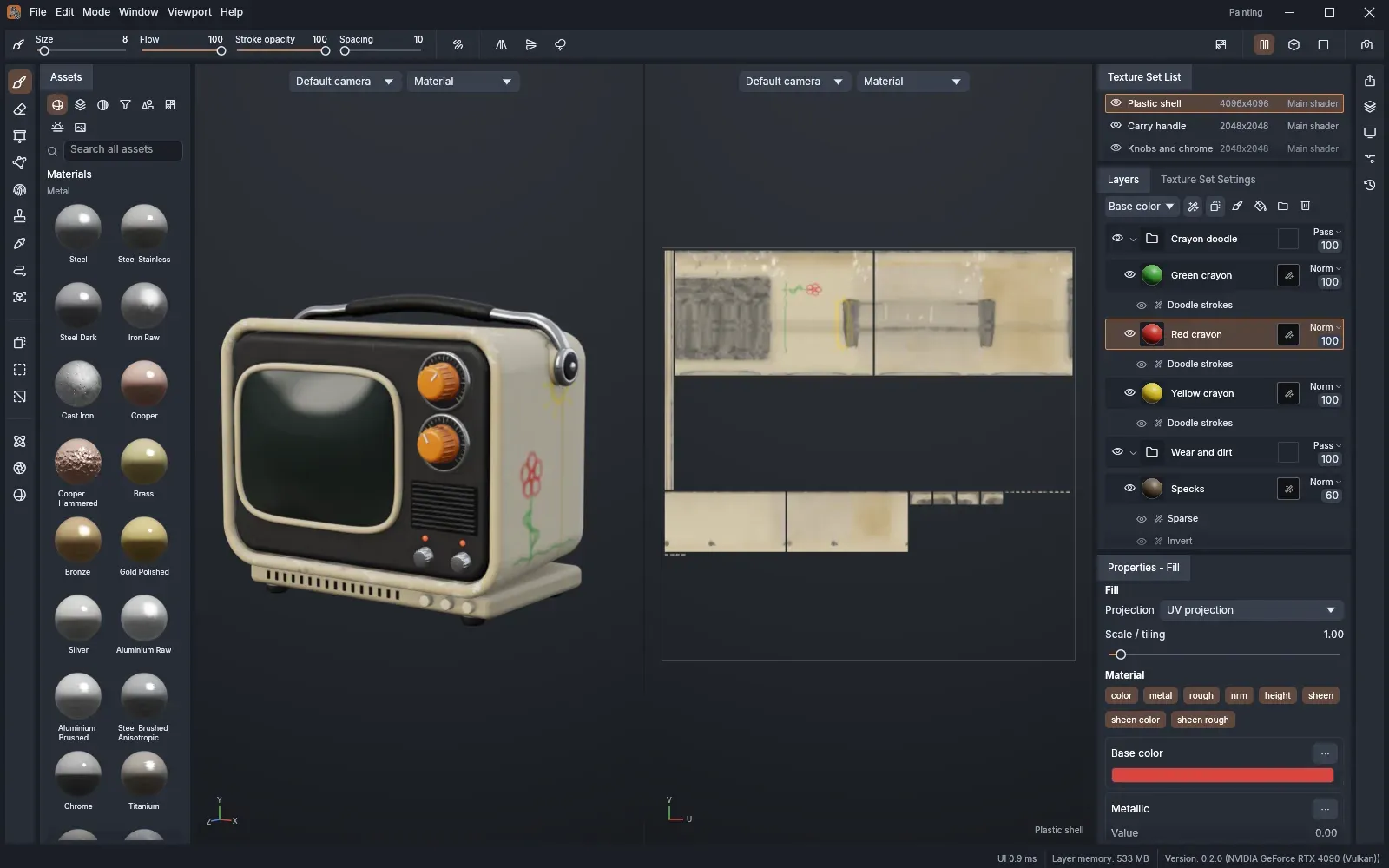
The workspace: material shelf, 3D viewport and 2D UV view of a 1970s portable TV with crayon doodles, texture set list, layer stack with wear and dirt folders, and fill properties.
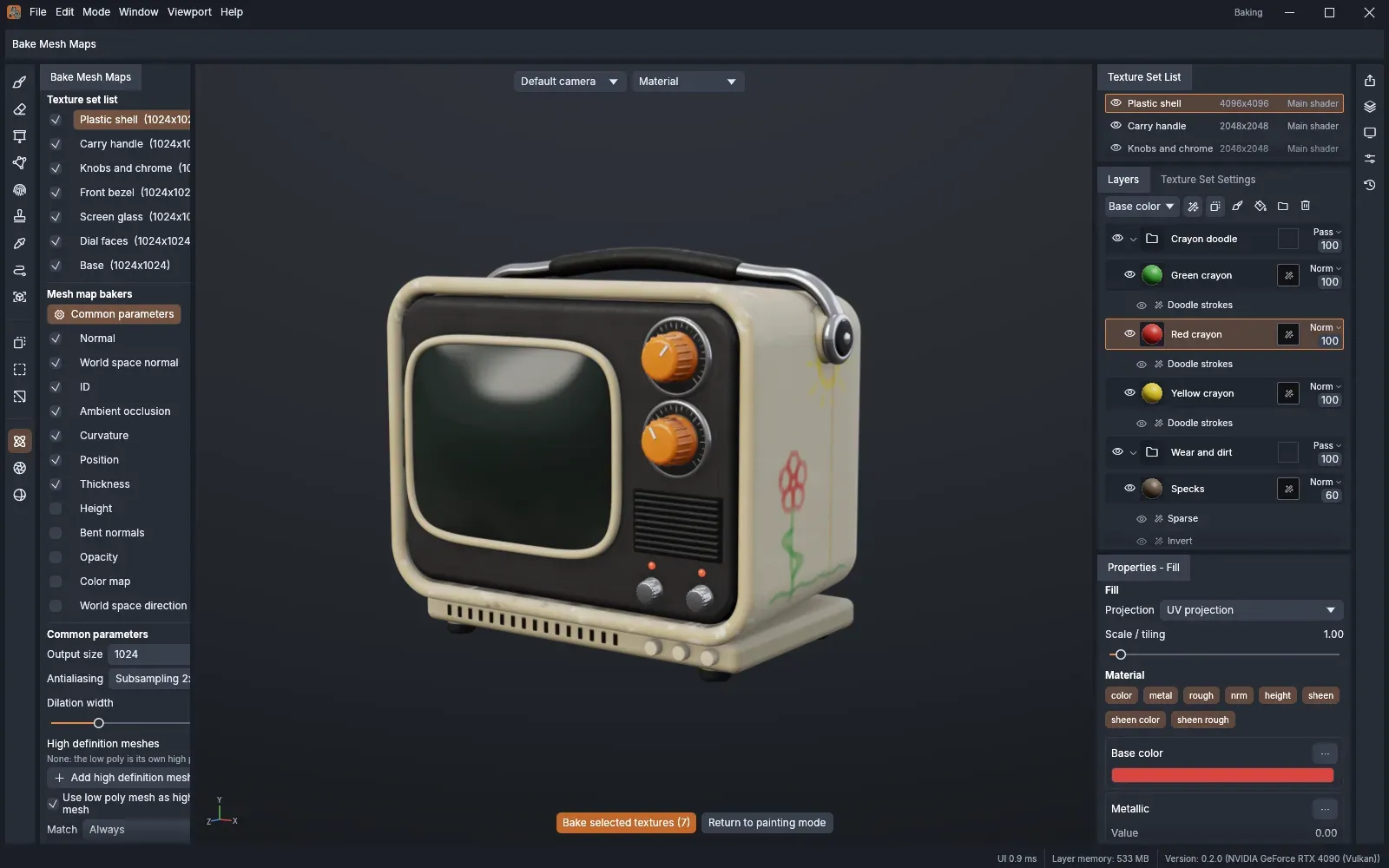
Bake mode with seven texture sets, mesh map bakers such as ambient occlusion, curvature and thickness, and the common bake parameters.
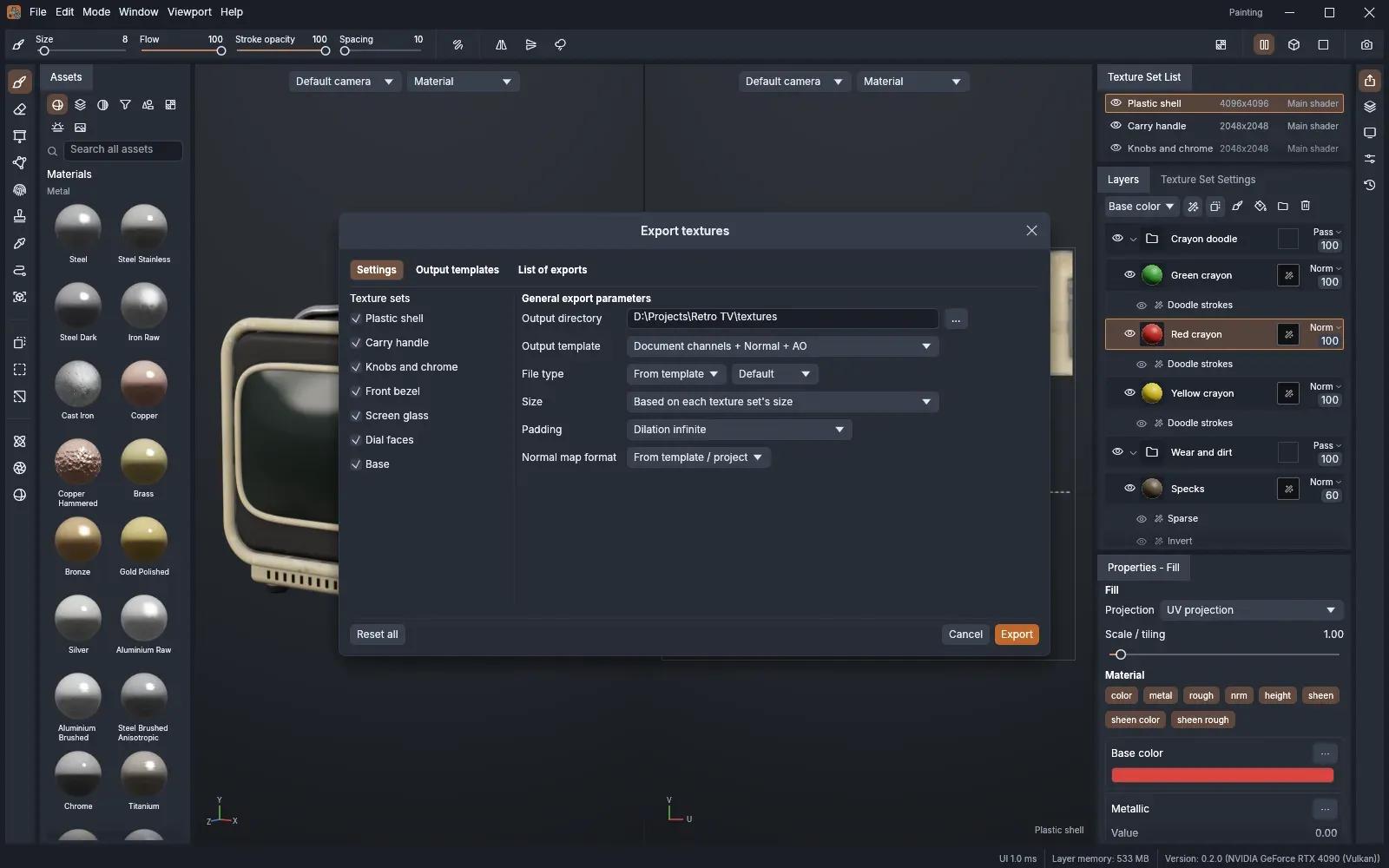
The Export textures dialog with texture sets, output directory, output template, file type, size, padding and normal map format.
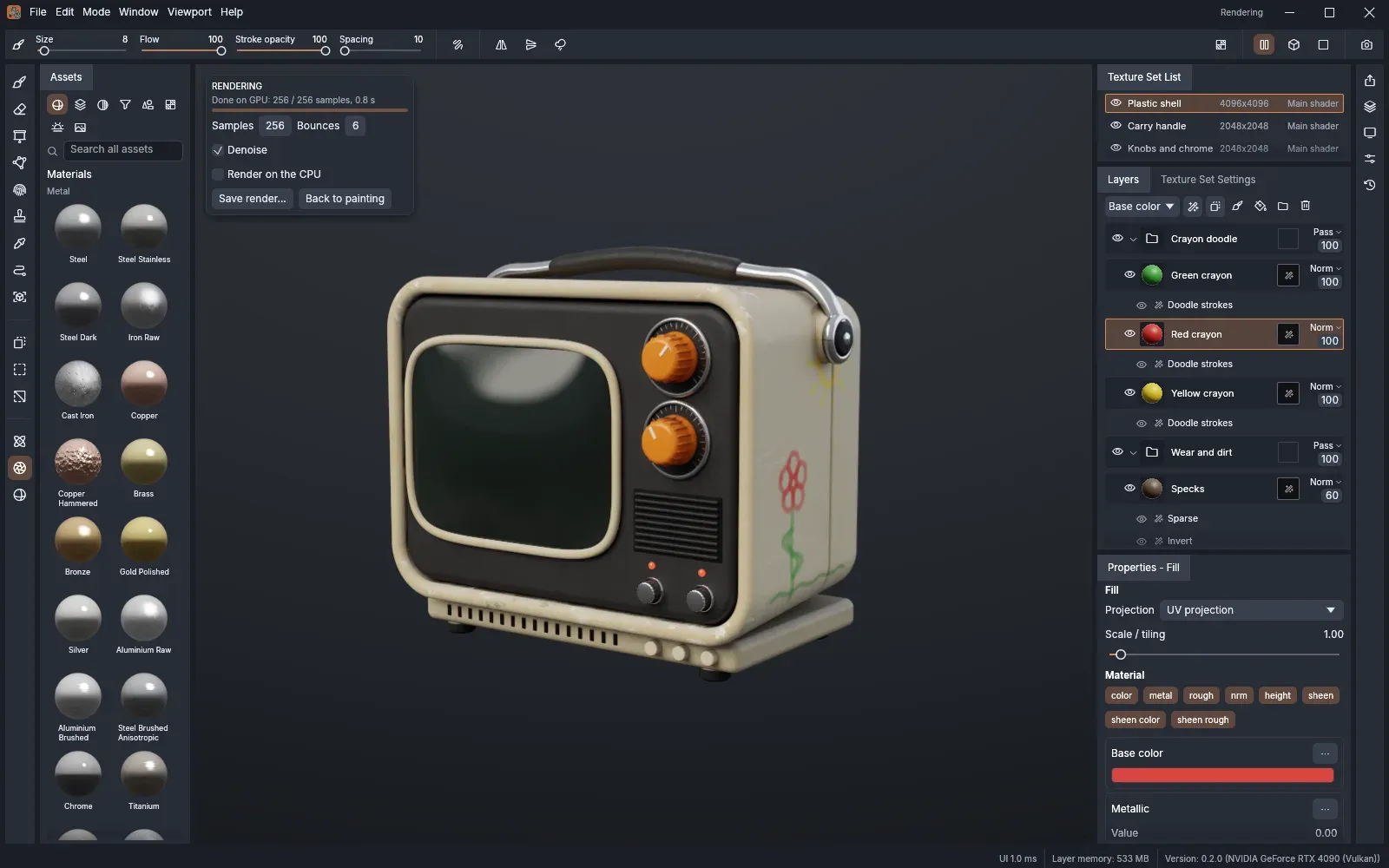
Rendering mode path tracing the textured TV on the GPU at 256 samples with denoising, with the render settings card over the viewport.
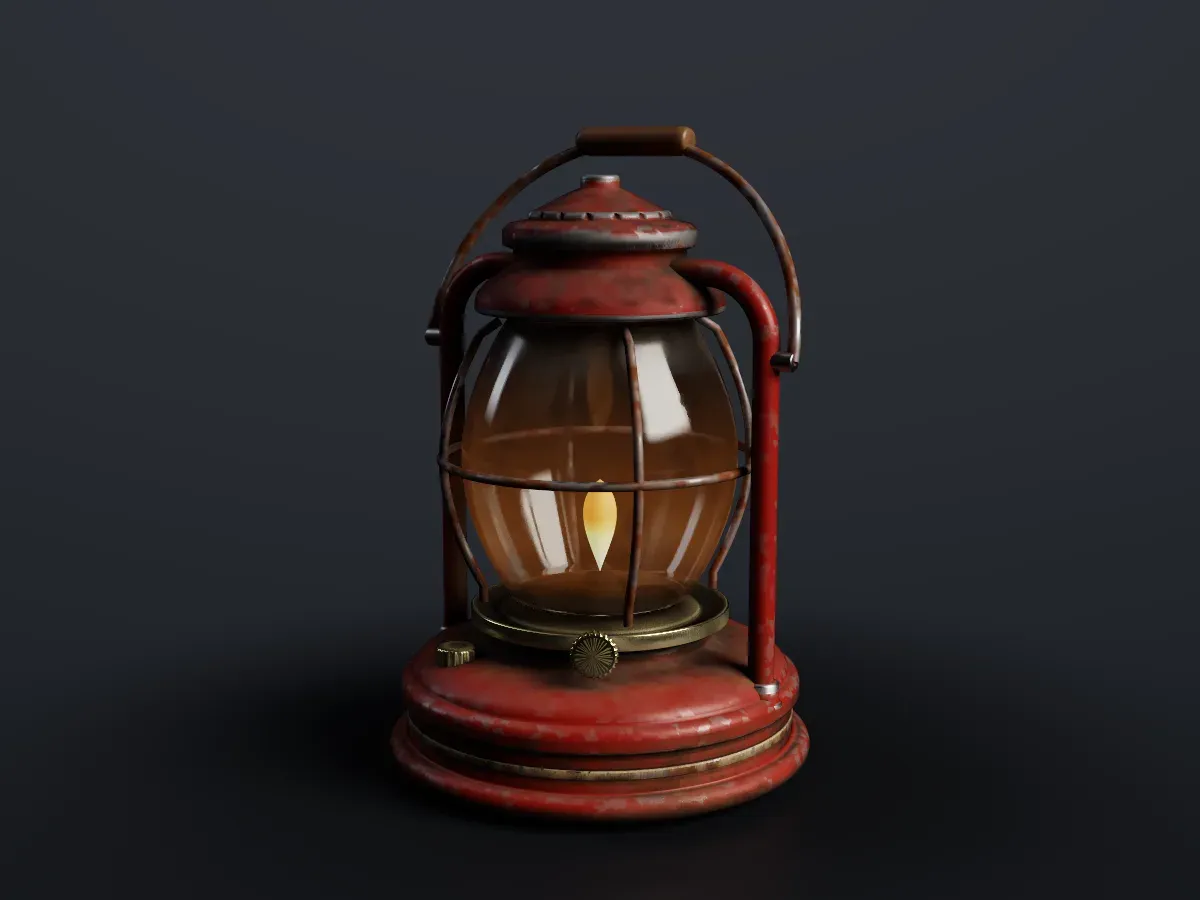
A storm lantern textured over eight texture sets with chipped enamel, rust and soot, path traced by texturecraft-cli render.
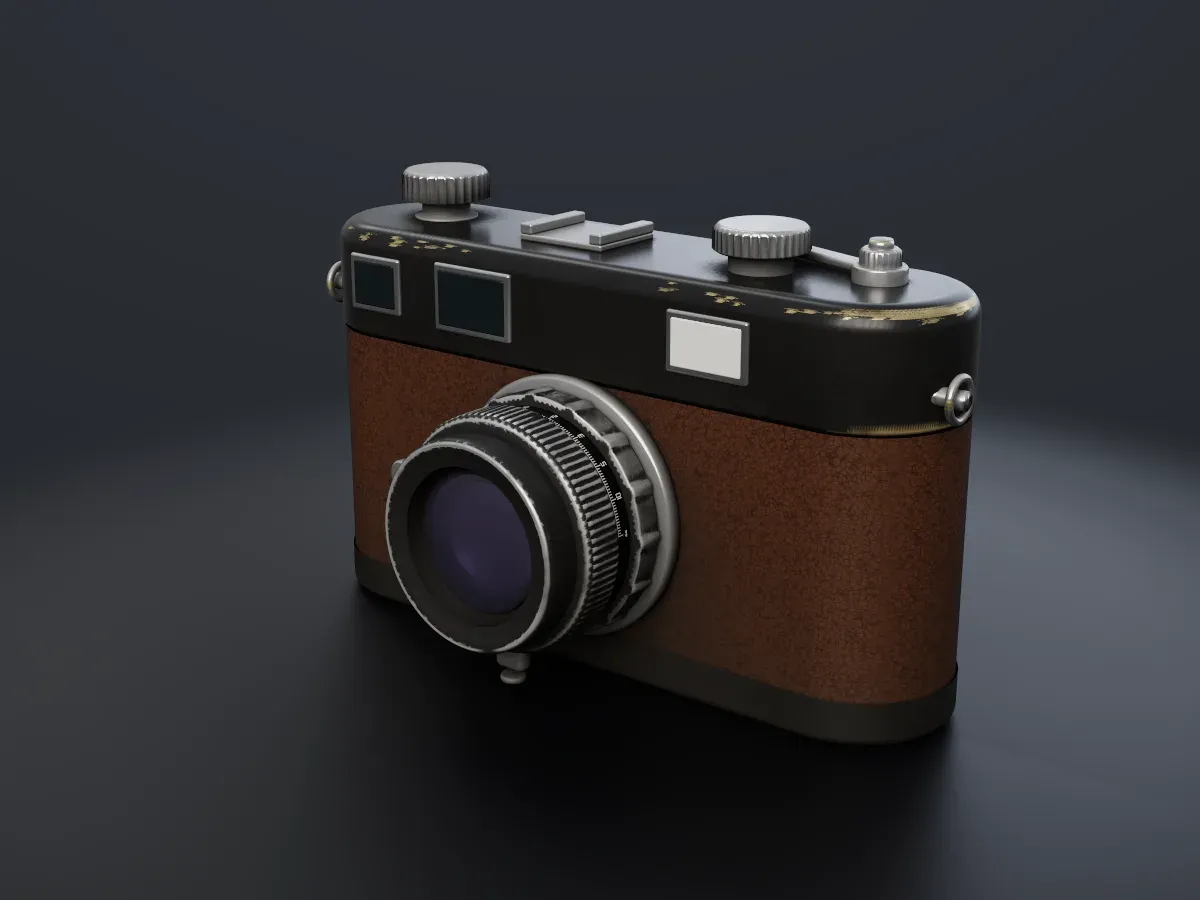
A rangefinder camera with black paint worn through to brass, leatherette, knurled chrome dials and coated glass, path traced in TextureCraft.
Source: official TextureCraft project page.
Key capabilities
- Painting tools The tool set covers paint, eraser, projection with image stencils, polygon fill by triangle, UV island or whole mesh, path and lasso fill, a particle brush, smudge, clone, color picker, quick mask and Shift+click straight lines. Brush stamps are placed on the 3D surface, so strokes continue across UV seams, and backface culling keeps paint off the far side of the model. Painting also works directly in the 2D UV view.
- Brushes and pen input Brushes have size, flow, stroke opacity, spacing, hardness, angle, follow path, jitter, lazy mouse, X, Y and Z mirroring and radial symmetry. There are 67 procedural brush alphas and 18 brush presets, and any imported image can act as an alpha. Pen pressure works with Windows Ink pens and with touch-event pens in the browser; on Linux, macOS and desktop browsers a pen acts as a mouse for now.
- Text, decals and material channels Text in any installed font is shaped with kerning and ligatures and can be stamped as a brush alpha or placed as a decal, and geometry decals stay editable fill layers. A stroke can write base color, metallic, roughness, height, normal, emissive, opacity, ambient occlusion and specular level, plus clear coat, sheen, anisotropy, subsurface scattering and transmission, each switched per stroke.
- Layer stack Paint, fill, folder and instance layers support 32 blend modes per channel, per-channel opacity, color tags, grouping, flattening and copy and paste across texture sets. Geometry masks restrict a layer to selected mesh parts, and anchor points record the stack at a layer so masks and fills higher up can react to it.
- Masks, generators and filters Masks combine painted strokes, fills, filters, ID color selection and mesh-map generators for edge wear, dirt, thin areas, curvature, ambient occlusion and position or direction gradients with world-space noise. The feature list counts 31 filters, among them HSL, levels with a histogram, gradient map, blur, sharpen, high pass, bevel, warp and edge detect.
- Fill layers and projections Fill layers take uniform values, 23 procedural patterns such as clouds, grunge, scratches, wood grain, bricks, fabric weave and marble veins, or imported images per channel. Projection can be UV, tri-planar, planar, spherical, cylindrical or decal, with scale, rotation and offset controls, and normal maps made for DirectX are marked as such.
- Procedural material library The shelf holds 72 procedural materials (metals from measured reflectance, car paint, woods, stone, fabrics, leather, glass and more), 21 smart materials such as rusted iron, worn paint and oxidized copper, and 24 smart masks, all resolution-independent. A layer or folder can be saved as a personal smart material, including its pixels and images.
- MaterialCraft materials Node-based materials from the sibling app MaterialCraft (
.mcmator.mcraft) are added as fill layers whose exposed graph inputs stay editable. Each change re-cooks the maps through the MaterialCraft command line at the texture set's resolution, with the set's baked mesh maps feeding inputs of the same name; in the browser the cooked maps paint but the inputs are read-only. - Mesh import and texture sets Models open from glTF and GLB, FBX (binary and ASCII), COLLADA, USD (usda, usdc, usdz), Alembic, OBJ, PLY and STL, and UVs are generated when a mesh has none. Texture sets range from 128 to 8192 px per material with 21 channel types, UDIM tiles can have their own resolution each, and a reimported mesh keeps the painted strokes on its surface.
- Mesh map baking Ambient occlusion, curvature, thickness, world-space normal, position, ID, bent normals, opacity, color and direction maps bake on the GPU by ray tracing or on all CPU cores, as do normal and height maps from high-poly meshes with a cage, ray distances and name matching. Images baked elsewhere can be used as mesh maps, and since 0.6.0 each map appears on the model as soon as it is finished.
- Texture export Presets cover glTF PBR Metal Roughness, Unreal Engine (packed), Unity HDRP and Standard, Blender Principled BSDF, Godot 4 (ORM) and OpenPBR, plus separate maps and mesh maps. Files are written as PNG, JPEG, TGA, TIFF, BMP, WebP, EXR or HDR at 8, 16 or 32 bits with UV padding, size override, OpenGL or DirectX normals and one file per UDIM tile. An output template editor builds custom channel packing and shares it as JSON.
- Mesh export The textured model can be written as OBJ with an MTL material library and its maps, as GLB with clear coat and sheen, or as USD with clear coat. UV-tiled sets keep their UDIM UVs on OBJ export.
- Viewport and Rendering mode The viewport shades metallic/roughness or specular/glossiness PBR with clear coat, sheen, anisotropy, subsurface scattering, transmission, parallax occlusion and displacement, under six procedural environments or imported HDR and EXR panoramas, with ACES or linear tone mapping, depth of field and saved cameras. Rendering mode (F10) is a progressive path tracer with a denoiser and PNG save, running in GPU compute shaders (about 25 times the CPU tracer, according to the project) or on the CPU.
- Projects and interface A project is a single
.tcraftfile holding the mesh, every layer (sparse and lossless), baked maps and imported images, and project templates start new work from a saved setup. The interface offers four brightness levels, seven accent colors, dockable and floating panels, a shortcut editor with conflict detection and a History panel. It is available in English, French, German, Spanish, Portuguese, Italian, Japanese, Chinese, Korean and Arabic. - CLI, MCP server and control channel
texturecraft-clihasnew,bake,export,render,run,batch,commandsandinfosubcommands. Its MCP server runs headless with file access only below the folders given by--read-rootand--write-root, or bridged to the running app. The app's control channel listens on 127.0.0.1 only and requires a token, either set inTEXTURECRAFT_CONTROL_TOKENor generated per session, as described in the control protocol. - Desktop downloads The v0.6.1 release attaches a signed and notarized universal DMG plus a CLI zip for macOS, MSI installers and portable zips for Windows x64 and arm64, Linux AppImage, Flatpak, .deb, .rpm, Arch package and tarball builds for x86_64 and aarch64, RISC-V tarball, .deb and .rpm builds, and FreeBSD tarballs for x86_64 and aarch64, with a
SHA256SUMS.txtfile. The website also offers the ArtCraft Launcher and Flatpak, APT, RPM and Arch repositories on its Linux page. - Web build Each release includes
texturecraft-web-0.6.1.zip, a static site with no server-side code that runs from any static web server serving.wasmas application/wasm. WebGPU needs HTTPS or localhost, otherwise the app falls back to WebGL2. In the browser, Save downloads the project and exported textures download as a zip. - Building from source The source builds with Rust 1.95 or newer through
cargo run --release -p texturecraft, which opens a baked sample project. Japanese, Chinese, Korean and Arabic interface text uses fonts from the optional craft-fonts input, which release builds always include.
Where TextureCraft fits
Texturing a game asset from a mesh
File, New project starts from a mesh file, a built-in mesh or a project template, with UVs generated when the mesh has none. After the mesh maps are baked in Bake mode, smart materials are dragged from the shelf onto the layer stack or straight onto the model, and their generators pick up the baked curvature, ambient occlusion and thickness. The TextureCraft wiki has getting started and workflow guides.
Adding wear, dirt and hand-painted detail
Fill layers with masks driven by edge wear, dirt and curvature generators add aging that follows the shape of the model, and painted strokes on the mask refine it. Brushes, stencil projection, decals and text add details by hand, and strokes continue across UV seams.
Exporting textures for a game engine
The Export textures dialog selects the texture sets, an output directory, a preset for Unreal Engine, Unity, Godot, Blender, glTF or OpenPBR, the file type, size, padding and normal map format. UDIM projects write one file per tile, and custom output templates define channel packing for other pipelines.
Using procedural materials from MaterialCraft
A material built as a node graph in MaterialCraft is sent to TextureCraft with File, Send to TextureCraft, or imported as a .mcmat file, and lands on the shelf as a smart material. Its exposed inputs stay as sliders, colors and presets in the layer properties and re-cook at the texture set's resolution with that mesh's baked maps.
Rendering a textured model
Rendering mode (F10) path traces the textured model with a set number of samples and bounces and an optional denoiser, then saves a PNG. The same render runs headless with texturecraft-cli render, which is how the storm lantern and rangefinder camera images in the README were produced.
Automating texturing through an agent
An MCP client such as Claude Code registers texturecraft-cli mcp with read and write roots for a project folder, then creates projects, adds layers and masks, paints strokes, bakes, exports textures and the mesh, and renders previews. Bridge mode drives the running desktop app instead, and the CLI's bake, export and batch commands cover scripted pipelines.
Install
flatpak install --user https://getartcraft.com/apps/texturecraft/texturecraft-oci.flatpakrefReviews of TextureCraft
Be the first to share your experience with TextureCraft.
Write a review
Loading review form…
Related to TextureCraft
 MaterialCraftMaterialCraft is a node-based procedural material designer written in pure Rust by the ArtCraft team. It builds tileable PBR maps in a node graph with live 2D and 3D previews, saves SBS packages and runs on macOS, Windows, Linux, FreeBSD and the web.
 CADCraftCADCraft is a pre-alpha, clean-room 2D drafting application written in Rust by the ArtCraft team. It opens and saves DXF and DWG, plots layouts to PDF, runs AutoLISP and scripts, and offers a headless CLI and MCP server on Windows, macOS, Linux, FreeBSD and the web.
 PhotoCraftPhotoCraft is a clean-room, Photoshop-style image editor written in Rust by the ArtCraft team. It edits layered PSD and PSB files, develops camera raw files, runs on macOS, Windows, Linux, FreeBSD and the web, and exposes 500+ commands to a CLI and MCP server.