
What is MaterialCraft?
MaterialCraft is an open-source, node-based material designer written from scratch in Rust. Materials are built by connecting primitive nodes and function graphs in a node graph, previewed live in a 2D view and on a 3D model, and exported as base color, normal, roughness, metallic, height, ambient occlusion and other maps for a game engine or 3D application. The project README describes it as an independent, clean-room implementation of a node-based procedural material workflow that is not affiliated with any other software vendor.
The application is made by the ArtCraft team and is one of the free Crafting Apps listed on getartcraft.com, alongside sister projects such as PhotoCraft, LightCraft and TextureCraft, which receives MaterialCraft materials for 3D texture painting. The repository was created on November 1, 2026. The code is dual-licensed under MIT or Apache-2.0 at the user's option; the ArtCraft name, wordmark and logos are trademarks outside that license, and bundled icons, images and other assets keep their own licenses. The MaterialCraft guide on craft.wiki covers getting started, installation, workflows and troubleshooting.
The project is in active development. In the 0.2 series the earlier Rust procedural library, with its ready-made noises, patterns and sample materials, was removed and replaced by a catalog of native primitives: 26 main-graph primitives plus four graph input and output items, 85 function operations and the Quadrant, Switch, Iterate and Dot pattern nodes. The roadmap states that rendering parity with the reference application and arbitrary SBS round trips have not been established, and that the redistribution rights of a converted function library remain unverified. The README notes that its screenshots show the earlier procedural library.
Releases have followed quickly since 0.1.0 on November 3, 2026, which introduced portable .mcmat materials for TextureCraft. Version 0.2.0 added alpha in the 3D view, wire selection, swapping and reroute dots, a Levels editor drawn over a histogram, an Arabic interface, an MCP tool for exporting materials and a hardened control-channel token. Version 0.3.0 added graph node instancing, standard function library parity, SBS resources and .mcraft ZIP projects, in-app update checks, and refused export file names that already exist. Version 0.4.0 added parameter-owned function graphs, the listing of nodes from a custom functions.sbs and clipboard shortcuts for nodes, and the latest release, v0.4.1 of November 12, 2026, fixes Flatpak permissions for update checks and self-updates.
The code is a Cargo workspace of small crates in strict layers: the document model, images and geometry at the bottom, then the node catalog, the cooking evaluator and the file formats, the engine with its command registry, the 3D renderer, the automation layer with the MCP server, and an egui interface on top. Everything below the interface builds for WebAssembly. The 3D view ray-casts a BVH with GGX shading, prefiltered image-based lighting and ACES tone mapping, and the height output displaces a subdivided mesh. Contribution rules forbid panics in shipped code and require that every bundled asset be listed with its license in the attribution file.
MaterialCraft screenshots
Explore the interface. Open a screenshot to view it at full size.
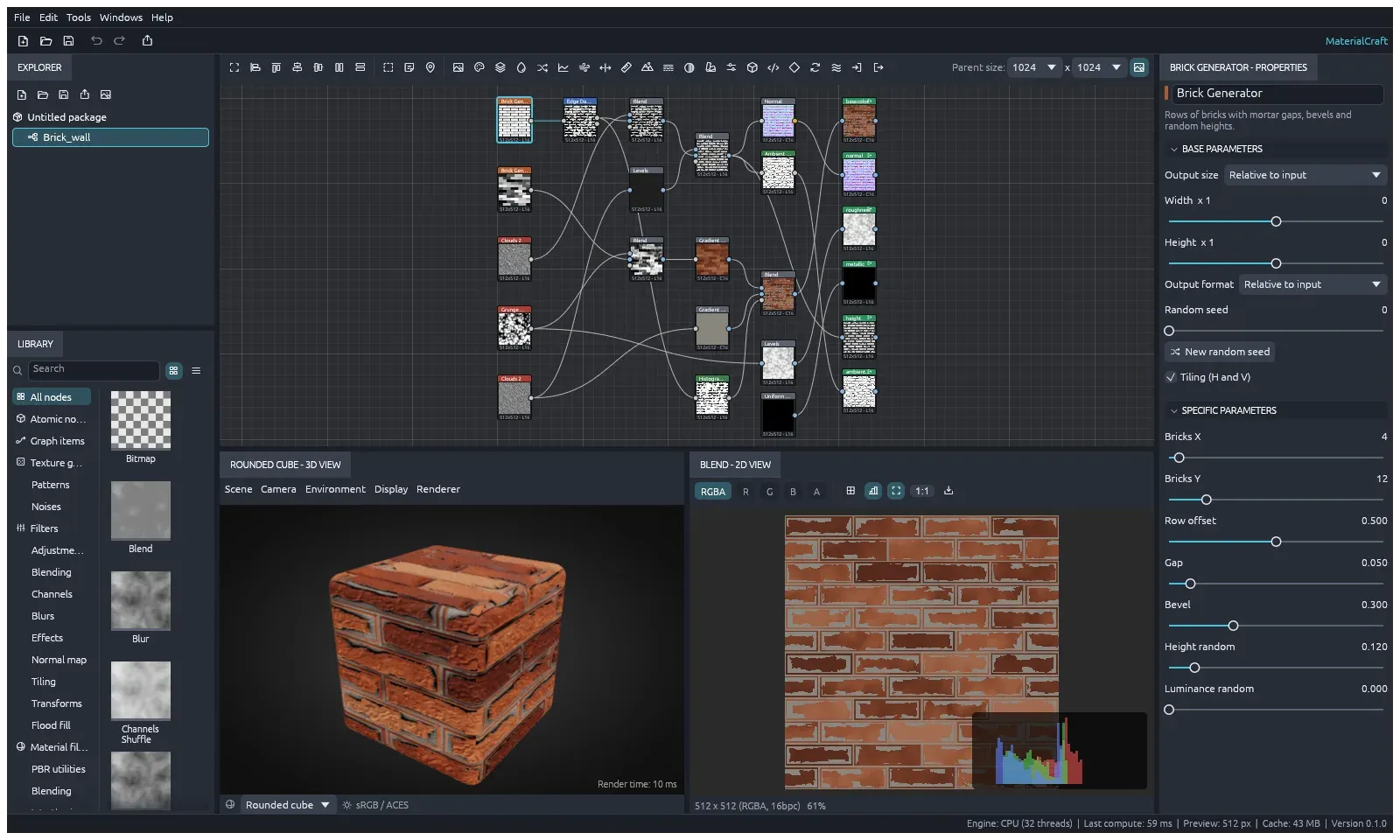
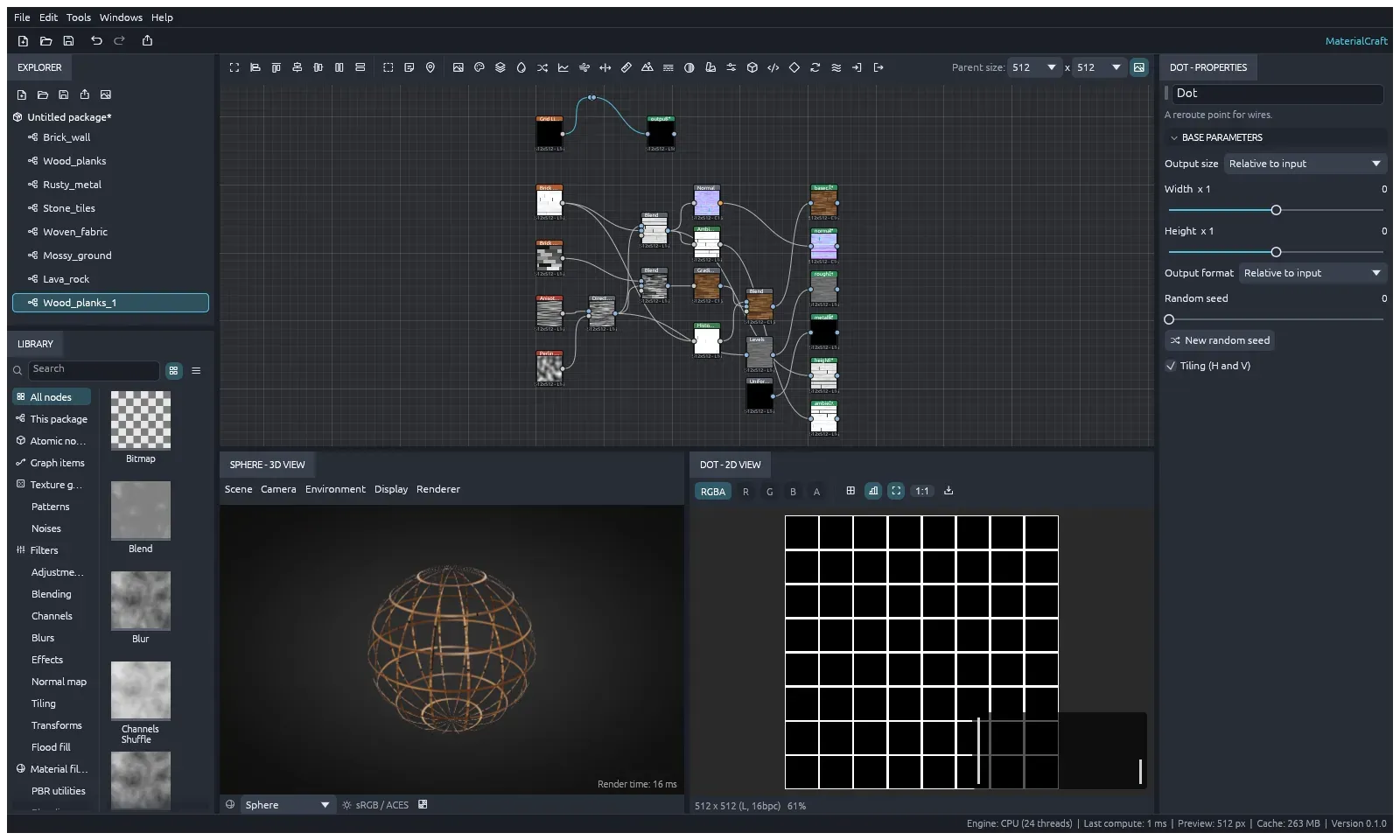
The MaterialCraft workspace in version 0.1: explorer, library, node graph, 3D view, 2D view and properties.
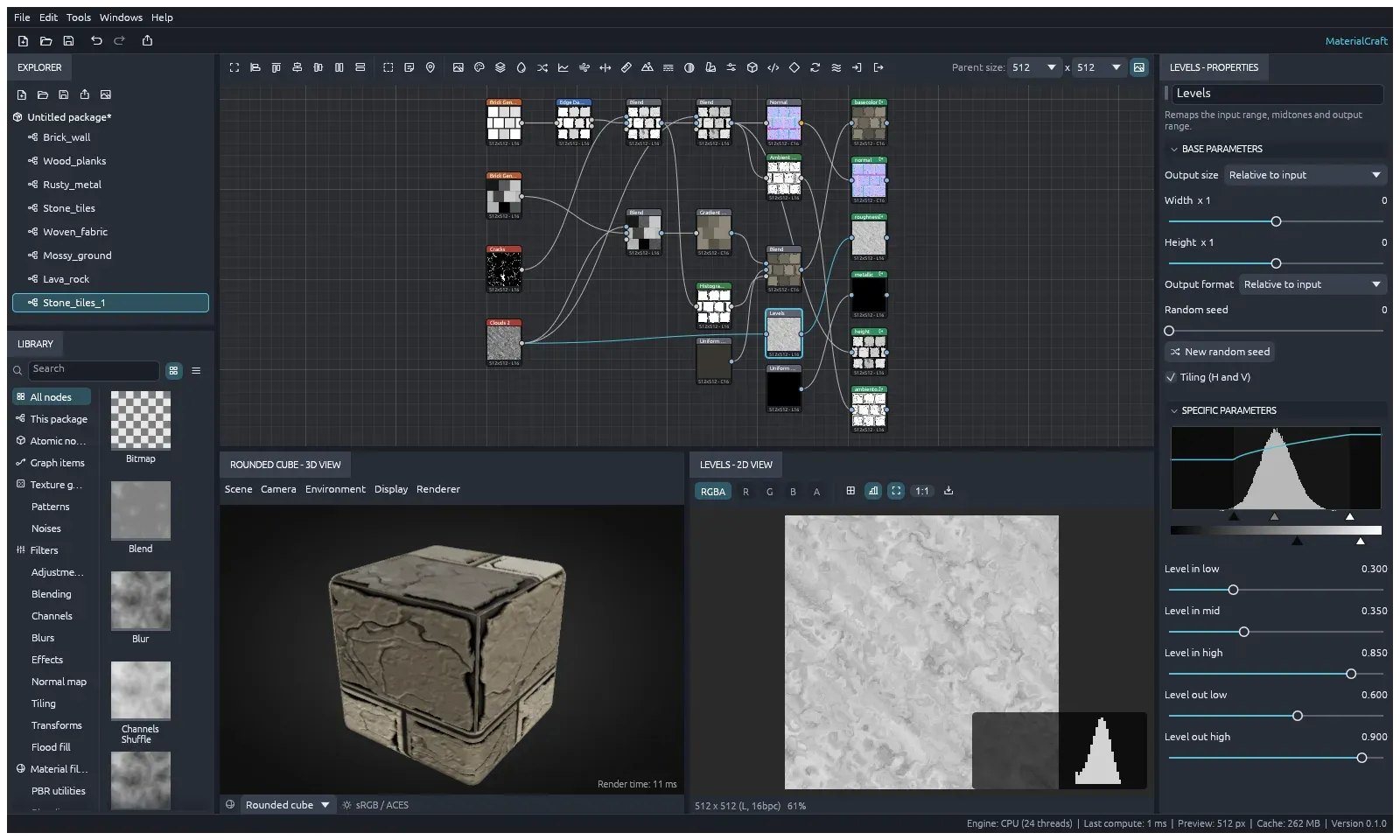
The Levels editor: a histogram of the node's input with the levels curve, input and output handles, on a stone tiles material.
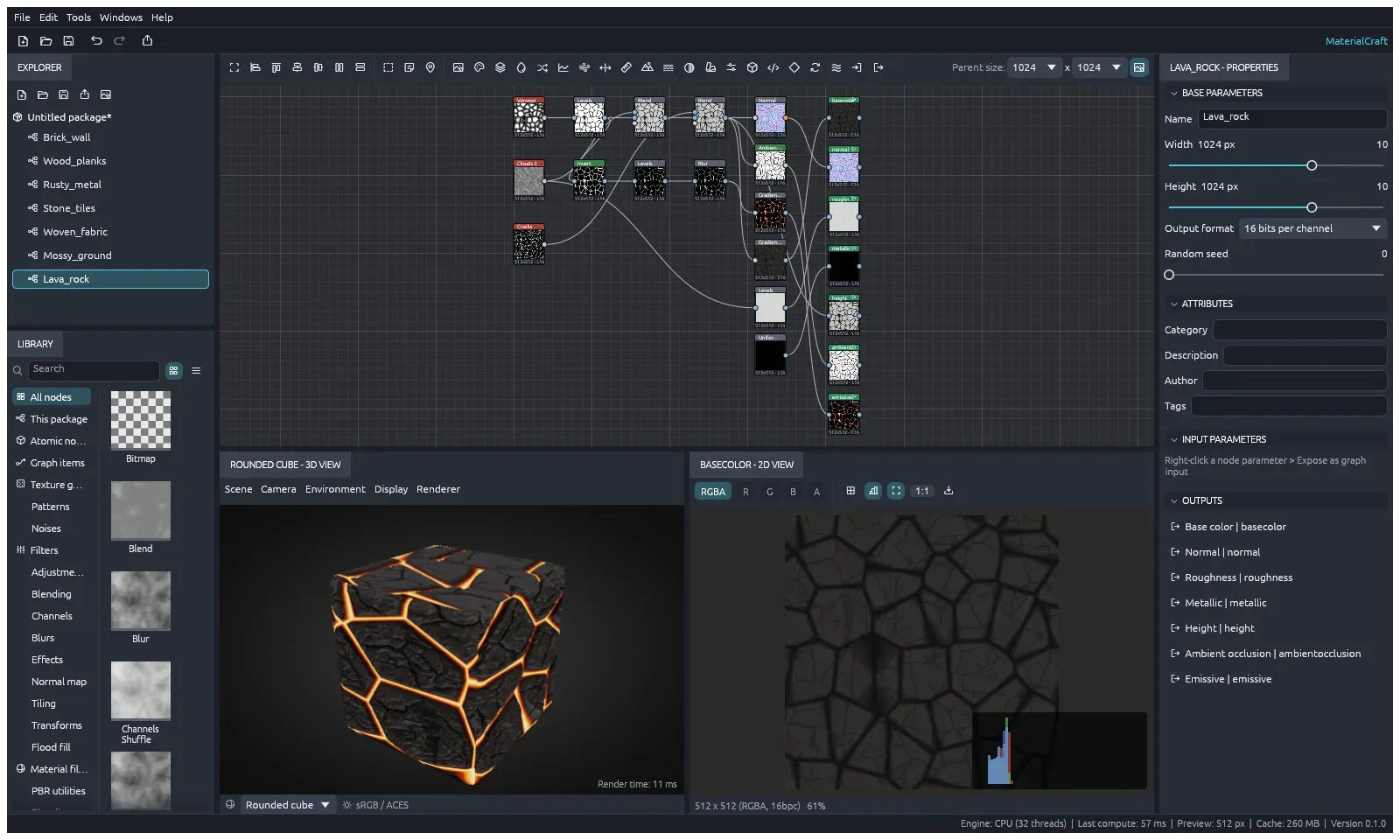
A lava rock graph from the earlier procedural library, with an emissive output for the glowing cracks.
Alpha in the 3D view: an opacity output makes the gaps of a wood planks sphere see-through, and a reroute dot bends a wire in the graph.
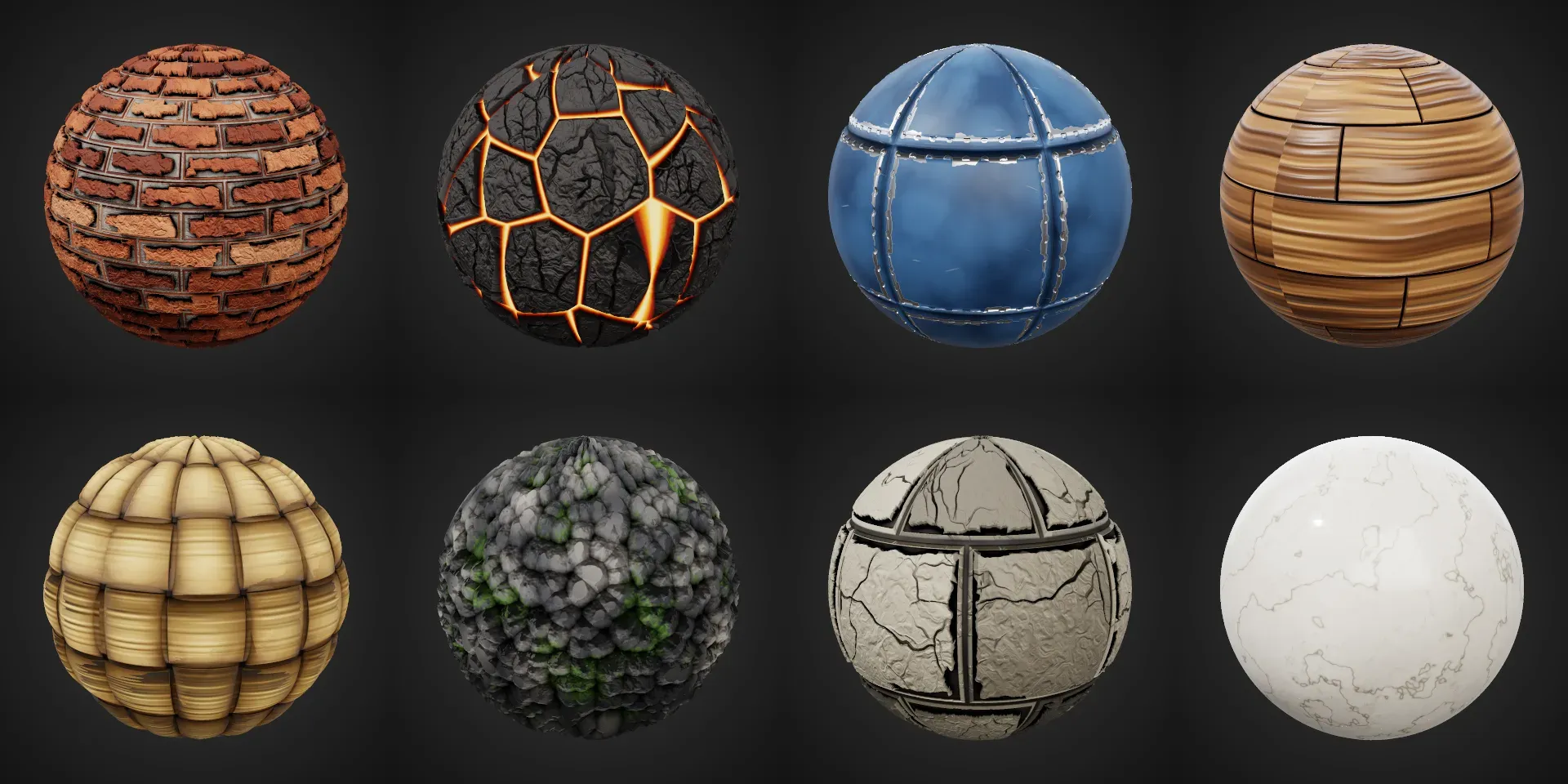
Historical high-quality renders of eight materials made with the former procedural library, rendered by materialcraft-cli.
Source: official MaterialCraft project page.
Key capabilities
- Editor layout The workspace has an Explorer for the open package and its graphs, a node Library with previews, the node graph with live thumbnails, 2D and 3D views, a Properties panel with base and specific parameters, a Console and a History panel. Panels open and close from the Windows menu, and Reset layout restores the default arrangement.
- Node graph editing Space, Tab or a double-click on empty canvas opens the node search, and dropping a wire on empty canvas searches for a node that connects to it. Wires can be selected, deleted, swapped with X and bent with reroute dots, and nodes snap to a 32-unit grid by default. Frames, comments and navigation pins (F2 and Shift+F2) organise the canvas, and Tools, Create graph from selection turns selected nodes into their own graph.
- Primitive catalog The main graph offers 26 native primitives, including blend, blur, levels, curves, gradient maps, HSL, warps, normal maps, transforms, text, SVG and bitmap nodes, plus four input and output items. Function graphs have 85 operations. The former ready-made noises, patterns and sample materials were removed in the 0.2 series.
- Pixel and Value Processors A Pixel Processor computes every pixel of its image with a function graph and a Value Processor computes a single value. The function editor adds operations, edits constants, wires ports and designates the output node, and it warns when an output is missing or no input path reaches a value source. Function and pattern graphs detect cycles and enforce node and execution budgets.
- FX-Map patterns An FX-Map node builds an image by placing and repeating shapes. Its subgraph is edited in the main canvas with Quadrant, Switch, Iterate and Dot nodes, wired from bottom ports to top ports, with one node set as the root. Image inputs on FX-Maps and processors grow as they are connected, up to 256.
- Graph inputs, presets and instancing A node parameter can be exposed as a graph input, which then appears as a slider or colour on the graph itself, and since 0.3.0 one input can drive parameters on several nodes. Graph Properties hold input parameters, the random seed, attributes (category, description, author and tags) and named presets. Graphs can be instanced inside other graphs.
- Cooking and performance Every node cooks on every CPU core on a worker thread, and a content-addressed cache re-cooks only the nodes downstream of an edit, while stale background cooks are cancelled. The website states that the brick wall sample cooked in about 40 ms. Noises and patterns sit on whole-number lattices so that results tile at any resolution from 16 px to 8K.
- 2D and 3D previews The 2D view shows one channel or all of them, a histogram and a three by three tiled preview, and saves what it shows as PNG, OpenEXR or TGA. The 3D view displays the graph's outputs on built-in shapes or an imported OBJ, glTF or GLB model, with environment, tiling, height depth, transparency and a DirectX normal map option. Previews are computed at a reduced size while editing, configurable up to 4K.
- Levels editor A Levels node shows a histogram of its input in Properties with the levels curve drawn over it. Handles under the histogram set the input range and midtones, handles under a grey bar set the output range, and sliders take exact values.
- SBS packages and project files Work is saved as native SBS XML packages that can hold several graphs and their images, either with an adjacent
resources/folder or as a self-contained.mcraftZIP. SBS files from another node-based material application open, but missing library nodes become placeholders listed in the Console, and the project states that this is not a lossless importer for arbitrary SBS files. - Bitmap import and map export Bitmaps are imported from SVG, PNG, JPEG, TGA, TIFF, BMP, WebP, OpenEXR and Radiance HDR. File, Export outputs writes every output of a graph as PNG, JPEG, TGA, TIFF, BMP, WebP, OpenEXR or HDR at 8, 16 or 32 bits and up to 8192 pixels, with a file name pattern using
$(graph),$(identifier)and$(usage). - TextureCraft hand-off File, Send to TextureCraft places a material on TextureCraft's shelf as a portable
.mcmatfile containing the maps and the graph. Painted onto a mesh there, the material's exposed inputs remain live sliders and colours, re-cooked by MaterialCraft at the texture set's resolution with the mesh's baked maps feeding the graph's input nodes. - Command-line tool
materialcraft-clicreates packages, renders a material or a single node to PNG (including a high-quality render with mesh displacement, ray-traced ambient occlusion and a shadowed key light), exports maps with a chosen format and bit depth, and sets exposed inputs with--setbefore exporting.materialcraft-cli runexecutes any engine command against a package. - MCP server and control channel
materialcraft-cli mcpruns an MCP server headless, with file access limited to the folders given by--read-rootand--write-root, or bridged to the running app. The app's control channel, started with--control, requires a random 256-bit token on the first request, serves at most 16 connections and accepts synthetic mouse and keyboard input, as described in the control protocol documentation. - Undo, autosave and preferences All edits run through engine commands with snapshot undo, keeping 200 steps per package by default (configurable from 1 to 10,000). A copy is autosaved in
Documents/MaterialCraft/autosave. Preferences cover the interface language (English or Arabic), brightness, accent colour, interface scale, autosave interval, preview size and node thumbnails. - Desktop downloads The v0.4.1 release attaches MSI installers and portable zips for Windows x64 and ARM64, a signed and notarized universal DMG plus a CLI zip for macOS, AppImage, Flatpak, .deb, .rpm, Arch and tarball builds for Linux x86_64 and aarch64, RISC-V tarball, .deb and .rpm builds, and FreeBSD tarballs for x86_64 and aarch64, with
SHA256SUMS.txtand PGP signatures. The ArtCraft Launcher installs and updates the app. The README and wiki also list 32-bit Windows builds, which are not attached to v0.4.1. - Web build and source builds
materialcraft-web-0.4.1.zipis a static site with no server-side code that can be hosted on any static file server; the web hosting guide covers MIME types, caching and HTTPS, and WebGPU is used in a secure context with WebGL2 as the fallback. From source, the app builds with Rust 1.95 or newer throughcargo run --release -p materialcraft.
Where MaterialCraft fits
Building a first material graph
File, New, Graph opens a dialog with a graph name, a template and a size from 256 to 4096 pixels. The Material outputs template adds outputs for base color, normal, roughness, metallic, height and ambient occlusion, each fed by a flat colour, and the Atomic sample shows a small graph with functions and an FX-Map. Nodes are added through the search or the Library, connected by dragging between ports, and inspected in the 2D view with a double-click.
Exporting maps for a game engine or 3D application
Each output node is given a usage such as base color, normal or roughness, which the 3D view and the exporter read. File, Export outputs writes all of them in one pass with a chosen folder, format, bit depth, resolution and naming pattern, and the 3D view can preview normal maps in the DirectX convention with Flip normal map Y. The getting started guide walks through the dialog.
Writing custom effects with functions
When no primitive produces the needed result, a Pixel Processor or Value Processor runs a function graph built in the function editor. Reusable function graphs are saved in the package with File, New, Function Graph, and custom functions.sbs files list their nodes in the Library since 0.4.0. The primitive workflow document lists the catalog, type rules and current limits.
Parameterised materials and variants
Exposed graph inputs turn internal parameters into sliders and colours on the graph, presets store named combinations of values, and the random seed produces variations. From the command line, materialcraft-cli export my.sbs out --set wear=0.7 sets an exposed input before writing the maps, which allows several variants to be produced from one package.
Texture painting with TextureCraft
A finished material is sent to TextureCraft as a .mcmat fill layer. Its exposed inputs stay editable there, and MaterialCraft re-cooks the material at the texture set's resolution, with the mesh's baked maps feeding the graph's input nodes.
Driving the editor from an AI agent
An MCP client such as Claude Code registers materialcraft-cli mcp with read and write roots to build graphs, set parameters and export maps headless, or uses --bridge with the port of an app started with --control to work in the visible window. The agent then calls the same command registry as the menus, including session.inspect, outputs.export and render.
Reviews of MaterialCraft
Be the first to share your experience with MaterialCraft.
Write a review
Loading review form…
Related to MaterialCraft
 TextureCraftTextureCraft is an open-source 3D texture painting app written in Rust by the ArtCraft team. It paints PBR materials onto models in layers with masks, bakes mesh maps on the GPU, exports textures for game engines and runs on desktop and the web.
 CADCraftCADCraft is a pre-alpha, clean-room 2D drafting application written in Rust by the ArtCraft team. It opens and saves DXF and DWG, plots layouts to PDF, runs AutoLISP and scripts, and offers a headless CLI and MCP server on Windows, macOS, Linux, FreeBSD and the web.
 PhotoCraftPhotoCraft is a clean-room, Photoshop-style image editor written in Rust by the ArtCraft team. It edits layered PSD and PSB files, develops camera raw files, runs on macOS, Windows, Linux, FreeBSD and the web, and exposes 500+ commands to a CLI and MCP server.