
What is CADCraft?
CADCraft is an open-source computer-aided design and drafting application written in Rust by the ArtCraft team. The project README describes a 2D drafting workflow built around a command line with typed prompts and clickable keywords, object snaps, layers, dimensions, hatches, blocks and DXF and DWG drawings. The repository calls it a clean-room CAD application, and the roadmap names Autodesk AutoCAD 2027 as its parity target. The same engine runs as a native desktop program on Windows, macOS, Linux and FreeBSD and as a WebAssembly build in the browser.
CADCraft is one of the free Crafting Apps listed on getartcraft.com, next to sister projects such as PhotoCraft, PdfCraft and WordCraft. The repository was created on October 7, 2026, and v0.1.0 was published the next day. The code is dual-licensed under MIT or Apache-2.0 at the user's option. The ArtCraft name, wordmark and logos are trademarks excluded from that license, while CADCraft's icons, single-stroke drafting font, hatch patterns, linetypes and sample drawings are original work defined in code.
The project labels its stage as pre-alpha. The roadmap, last reviewed on October 24, 2026, estimates readiness for real work at about 38 percent and counted 245 of 491 AutoCAD for Mac menu items with a live command at its October 10 measurement. The CADCraft documentation states that drawing is 2D only, with no 3D modeling yet, and that saving a drawing made in another program can drop objects CADCraft does not model. The gaps document tracks the missing areas, among them 3D solids, surfaces and meshes, the UCS, system printers and parts of AutoLISP.
Releases appear every few days. The latest, v0.20.1 of November 12, 2026, repairs Flatpak update checks and self-updates. Version 0.20.0 fixed macOS file dialogs, capped local file reads and bounded several geometry and rendering passes, and sends the control token only to 127.0.0.1. Version 0.19.0 added in-place MTEXT and multileader text editing, a Keyboard Shortcuts dialog, persistent command aliases with .pgp import and a page command API in the web build. Version 0.18.0 moved DWG reading and writing into a child process and added SHX fonts, raster images, view twist, XCLIP and a round-trip harness with a loss report.
Internally, CADCraft is a Cargo workspace of crates for geometry, DXF tags, the drawing database, fonts, rendering, a parametric constraint solver, file I/O, a DWG bridge, the command engine, the egui interface and the MCP server, plus the desktop app, cadcraft-cli and cadcraft-web. Nothing below the interface layer depends on egui. The canvas is drawn with wgpu, and DWG files are converted to and from DXF by the MPL-2.0 acadrust crate, as the architecture document describes. Related CAD listings on iThub include FreeCAD and SolidCraft, a parametric 3D CAD application by Tangency Labs that the README lists as a community Crafting App.
CADCraft screenshots
Explore the interface. Open a screenshot to view it at full size.
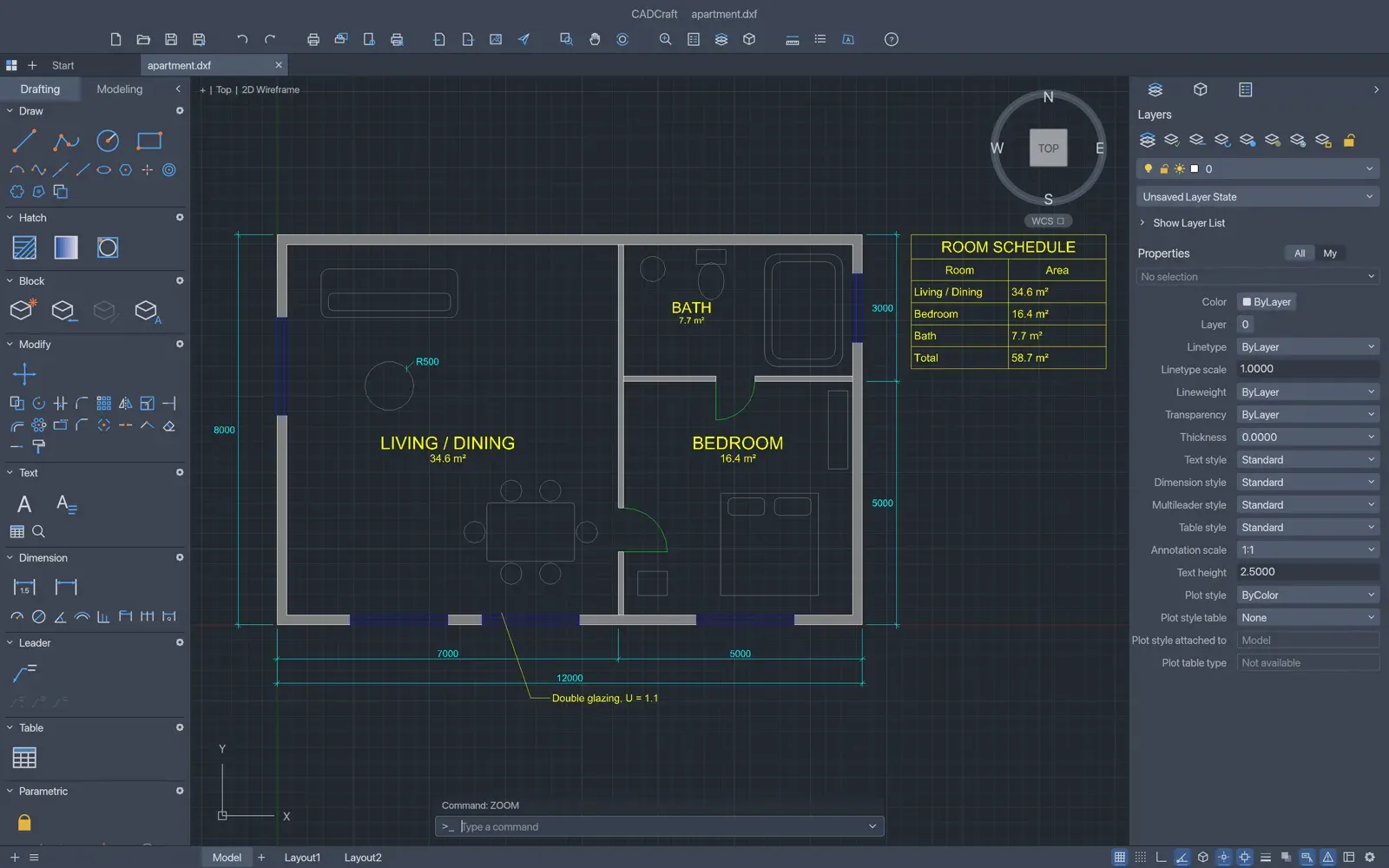
The apartment sample drawing with hatched walls, door swings, a room schedule table, a multileader note and dimensions, with Tool Sets, Layers and Properties panels.
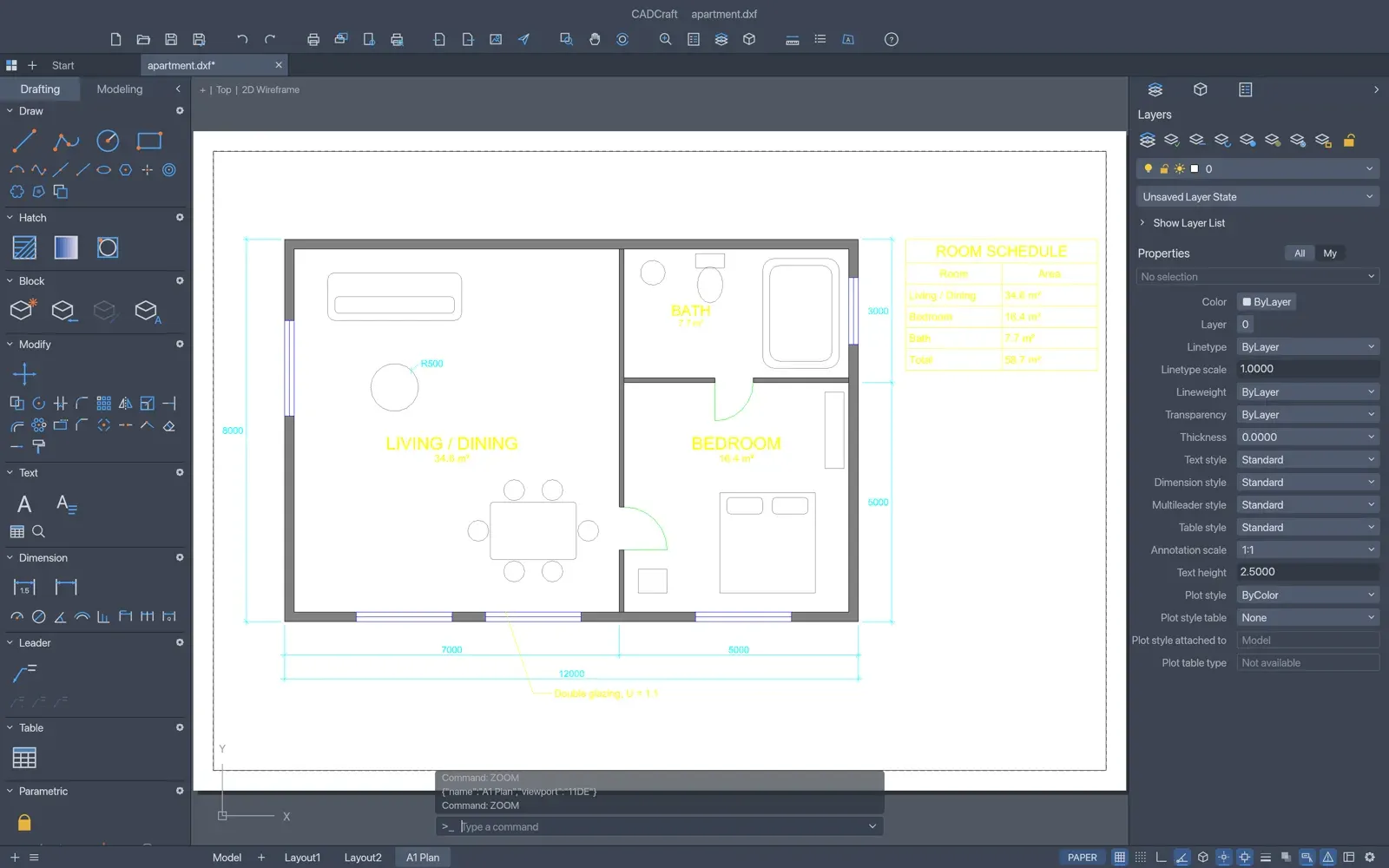
A paper-space layout tab (A1 Plan) with a scaled viewport of the apartment plan on a white sheet, with the PAPER toggle on the status bar.
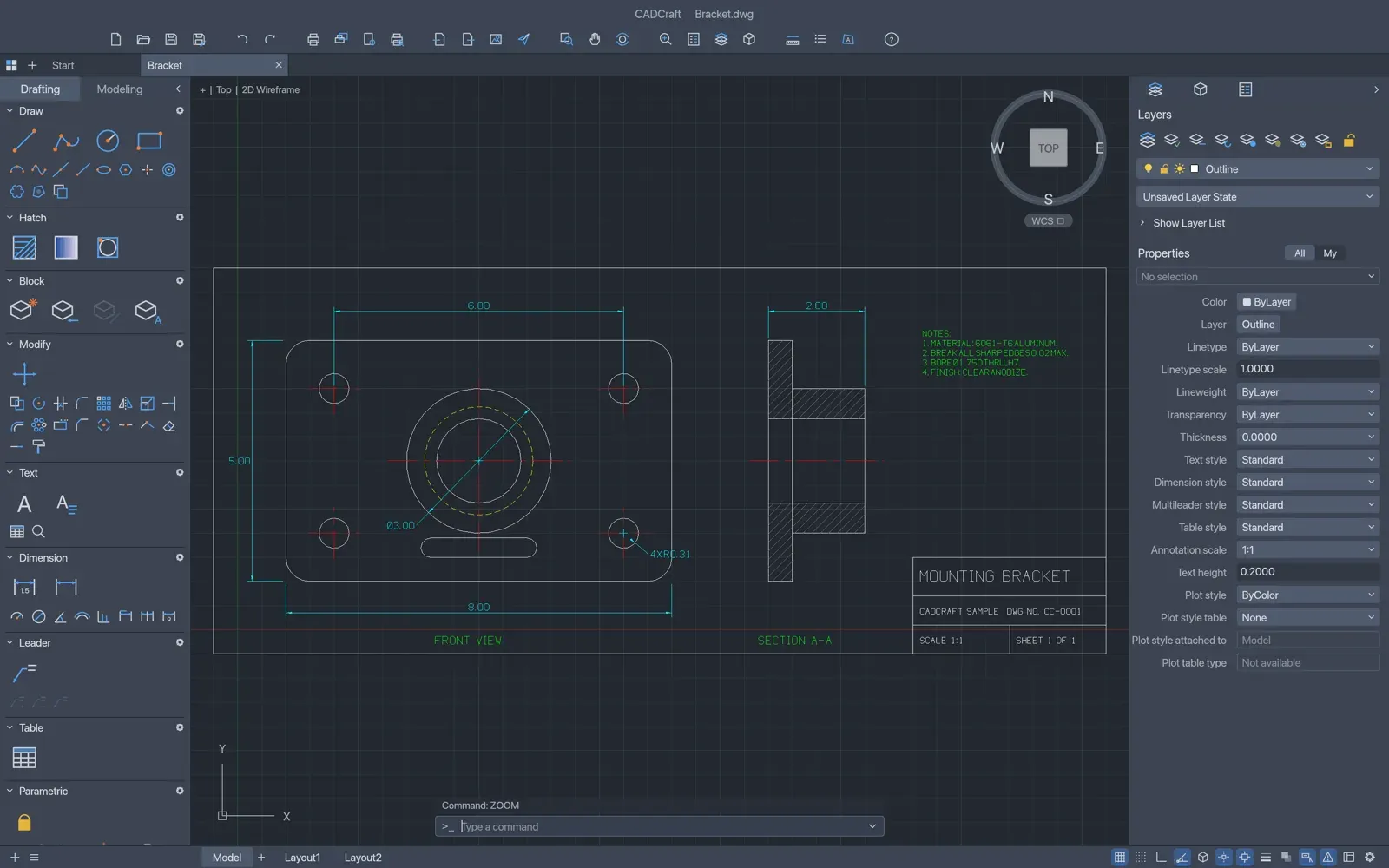
A mounting bracket drawing with a dimensioned front view, centre lines, a hatched section view, notes and a title block.
Source: official CADCraft project page.
Key capabilities
- Command line and drafting workflow Every menu item, tool and prompt is a command, typed by name or alias at a command line with clickable [Keywords], AutoComplete, history and transparent commands; Enter, Space or a right-click repeats the last one. Coordinates are entered as
3,4,@10,0or@5<45, and a bare number is a direct distance along the cursor. F1 opens a searchable command reference. - Precision drafting aids Object snaps cover endpoint, midpoint, center, geometric center, node, quadrant, intersection, insertion, perpendicular, tangent and nearest. Polar tracking, ortho, grid snap, object snap tracking (F11) and dynamic input (F12) are toggled from the status bar. The roadmap still lists approximate ellipse and spline intersections as open work.
- Draw and modify commands Draw commands include LINE, PLINE with arcs and widths, CIRCLE, ARC, RECTANG, POLYGON, ELLIPSE, SPLINE, XLINE, RAY, DONUT, TEXT and MTEXT. Modify commands include MOVE, COPY, ROTATE, SCALE, MIRROR, STRETCH, OFFSET, TRIM, EXTEND, FILLET, CHAMFER, BREAK, JOIN, EXPLODE, arrays and OVERKILL. Hot grips cycle through Stretch, Move, Rotate, Scale and Mirror with Space.
- Layers and properties The Layers palette and Layer Properties Manager set visibility, freeze, lock, plot, colour, linetype and lineweight, and named layer states can be saved and restored. The Properties palette edits selected objects, including true colour and transparency, and since 0.19.0 shows the shared properties of several objects of one type.
- Dimensions, text, leaders and tables All DIM commands are implemented with DIMSTYLE variables, overrides and arrowheads, and dimensions attached to geometry follow it. MLEADER, TABLE, TEXT and MTEXT with formatting codes are supported, using installed TrueType and OpenType fonts and CADCraft's own single-stroke drafting font. SHX fonts are read when the file is next to the drawing or in
CADCRAFT_SHXPATH, and right-to-left and Arabic-script text is laid out and shaped. - Hatches, blocks and external references Pick-point hatch boundaries detect islands and take pattern, solid and gradient fills from the project's own library. Blocks support attributes, nesting, a Block Editor and MINSERT. DWG and DXF references are managed in the Reference Manager (reload, unload, detach, bind, open) and clipped with XCLIP; PDF, DWF and DGN underlays are not supported.
- Parametric constraints Geometric constraints such as parallel, perpendicular and tangent and dimensional constraints for lengths and angles are re-solved by CADCraft's own solver after every edit. AUTOCONSTRAIN infers geometric constraints, and the Parameters Manager accepts expressions and reports conflicts.
- Layouts, plotting and PDF output Paper-space layouts hold viewports with a scale, lock and per-viewport layer freeze. Page setups, plot style tables, the Plot dialog, EXPORTPDF and Batch Publish write PDF, PNG and SVG files; according to the documentation, PDFs keep vector lines, toggleable layers and several sheets. Plotting to system printers is not available yet.
- DXF, DWG and other files CADCraft opens DXF from R12 (binary from R13), DWG from version 2000, DWT templates and SVG geometry, and saves DXF, DWG and DWT in versions 2000 to 2018. A save keeps a
.bakcopy and asks before removing content CADCraft does not model. The file-format parity document lists what is kept and dropped; the web and FreeBSD ARM64 builds cannot open or save DWG. - AutoLISP, scripts and command aliases APPLOAD and
(load "name")run.lsproutines withcommand, entity lists, selection sets andc:commands, andacad.lspandacaddoc.lspload from the support folder, never from a drawing's own folder. Visual LISP ActiveX functions, DCL dialogs, reactors and compiled C++ or .NET plug-ins are not supported. ALIASEDIT imports.pgpfiles, as the customization guide describes. - Headless command-line tool
cadcraft-cliprovidesinfo,convert,run,commandsandmcp.runapplies scripts or JSON commands with--cmd, saves with--saveand exports PNG, SVG or PDF with--export, optionally framed with--window. The CLI reference documents exit codes, JSON output and environment variables. - MCP server for AI agents
cadcraft-cli mcpstarts a Model Context Protocol server on stdio, headless or bridged to the running app with--connect 127.0.0.1:PORT. Tools includecommand_line,execute,inspect_drawing,query_entities,find_text,renderand, with the app,screenshotandui_click. The MCP guide includes a Claude Code and Claude Desktop configuration. - JSON control channel Started with
--control PORT, the desktop app accepts JSON lines on 127.0.0.1 only and refuses requests without the per-session token from an owner-only file, as the control protocol describes. The security policy notes that connected agents can read and write any path the user can. - Interface, languages and accessibility The interface is available in 19 languages, including Ukrainian, German, Spanish, French, Simplified Chinese, Korean, Arabic and Vietnamese, with light and dark themes and dockable panels. Options keep a system cursor visible for screen magnifiers and follow the system's reduced-motion setting, and a 3Dconnexion SpaceMouse pans and zooms in 2D on Windows and Linux.
- Windows downloads The release provides code-signed MSI installers and portable zips for Windows x64 and ARM64. The MSI installs per user by default and supports silent installs with
/qn,DESKTOPSHORTCUT=1andALLUSERS=1. The app uses DirectX 12 by default, andWGPU_BACKENDselects another backend. The README also lists 32-bit x86 packages, which are not attached to v0.20.1. - macOS, Linux and FreeBSD downloads MacOS gets a signed and notarized universal DMG plus a universal CLI zip. Linux builds for x86_64 and ARM64 come as AppImage, Flatpak, .deb, .rpm, Arch package and tarball, RISC-V 64 as tarball, .deb and .rpm, and FreeBSD as x86_64 and ARM64 tarballs.
SHA256SUMS.txtand signature files cover the downloads, and the ArtCraft Linux repositories offer Flatpak, APT and RPM sources. - Web build and self-hosting Each release includes
cadcraft-web-<ver>.zip, a static site with no server-side code for any static host or subpath. The web hosting guide gives about 13 MB of WebAssembly (5 MB compressed) and covers MIME types, caching and iframe embedding. WebGPU needs HTTPS or localhost, with a WebGL2 fallback; the web build has no DWG support and no autosave. - Updates, autosave and source builds The app checks for updates at startup, and the ArtCraft Launcher installs and updates all Crafting Apps after checking release checksums. Autosave files are owner-only, crashes are recovered at the next launch, and crash reports stay local. Source builds need Rust 1.95 according to the README and workspace manifest (the product page lists 1.90) and start with
cargo run --release -p cadcraft.
Where CADCraft fits
Drafting a floor plan from the command line
The README's apartment example (examples/apartment.dxf) is built entirely from CADCraft commands: walls with pick-point hatching, TrueType MTEXT room labels with areas, a room schedule TABLE, a multileader note and architectural dimensions. Points come from typed coordinates or snaps, layers group walls, windows and furniture, and associative dimensions update when the geometry moves.
Producing sheets and PDF plots
A layout tab represents a sheet of paper; MVIEW adds viewports that show model space at a set scale, and double-clicking a viewport switches to model space through it. Page setups and plot style tables such as monochrome output control the result, and PLOT, Export to PDF or Batch Publish write one PDF per sheet or several sheets in one file, as well as PNG or SVG.
Exchanging DXF and DWG drawings
DXF drawings from R12 onward and DWG drawings from version 2000 onward open in the desktop app, and File, Save As writes DXF or DWG in versions 2000 to 2018. Content CADCraft does not model is kept in DXF where possible but can be lost through DWG, and the app asks before a save would remove it. The DWG and DXF guide lists what is kept, the SHX font search path and the formats that cannot be opened yet, such as PDF, DGN and DWF.
Automating drawings with scripts, LISP and the CLI
Existing .scr scripts and many AutoLISP routines run inside the app or headless, for example cadcraft-cli run drawing.dxf --script-file setup.scr --save out.dxf. Every command also has a JSON form listed by cadcraft-cli commands, so batch jobs can chain --cmd steps, refer to the last created handle with {last} and export a framed PNG for review. info and convert report records a reader skipped instead of failing silently.
Driving CADCraft from an AI agent
An MCP client starts cadcraft-cli mcp and calls the same commands people type: drawing with command_line or execute, checking counts and geometry with inspect_drawing and query_entities, measuring closed shapes and implied loops, and viewing the result with render. Bridged to the running app with --connect, the agent's work appears on screen, and the --lazy and --launch options handle an app that is not open yet. The project's own end-to-end test runs such a session through MCP only.
Hosting the web version
The cadcraft-web zip is unpacked onto any static host, CDN bucket or subpath, served with the application/wasm MIME type and compression, and opened in a browser; it can also be embedded in a page through an iframe. Preferences and panel layouts are kept in the browser's local storage. Another Crafting App listed on iThub is Craft Anything.
Reviews of CADCraft
Be the first to share your experience with CADCraft.
Write a review
Loading review form…
Alternatives to CADCraft
 FreeCADFreeCAD is an open-source parametric 3D modeler for product design, mechanical engineering and architecture, with a Python API on Windows, macOS and Linux.
 SolidCraftApache-2.0 parametric 3D CAD application in Rust for Windows, macOS, Linux and browser use, with constrained sketches, an editable feature timeline, CLI and MCP automation.
 MaterialCraftMaterialCraft is a node-based procedural material designer written in pure Rust by the ArtCraft team. It builds tileable PBR maps in a node graph with live 2D and 3D previews, saves SBS packages and runs on macOS, Windows, Linux, FreeBSD and the web.