

What is Godot Engine?
Godot Engine is an open-source game engine and editor for building 2D and 3D games and interactive applications from one interface. Juan Linietsky and Ariel Manzur developed it for several years as an in-house engine for work-for-hire titles before publishing the source in February 2014. Development is community-driven and supported by the Godot Foundation, a Dutch non-profit registered as Stichting Godot and formed on August 23, 2022. The foundation is funded by donations, mainly through the Godot Development Fund, and uses that money to hire engine developers and artists, buy test hardware and pay for hosting.
The editor is a single self-contained executable: you extract the archive and run it, with no installer. The download pages offer a Standard build and a .NET build with C# support for Windows (x86_64, x86_32, arm64), Linux (x86_64, x86_32, arm64, arm32) and macOS (universal). The Android editor is on Google Play, as an APK and on the Meta Horizon Store for Quest 3 and Quest Pro, and an experimental web editor runs in the browser. Steam, itch.io and the Epic Games Store carry the Standard editor only, without .NET. Export templates are a separate download of roughly 1.3 GB.
The latest stable release is Godot 4.7.2, published August 18, 2026: a maintenance release with 57 fixes from 39 contributors and no known incompatibilities with 4.7.1. It fixes mouse input lag at high polling rates on Windows, makes mbedTLS use the engine's OS entropy source, keeps MultiplayerSpawner peers replicating after a spawned node is deleted, corrects PCSS shadow ranges and updates AccessKit to 0.22.3. The feature release Godot 4.7 (June 2026) added AreaLight3D rectangular area lights, HDR output, a new Asset Store in the editor, a per-platform export template downloader, the stable Android build environment and day-one Android XR support. Godot 4.6 made Jolt the default 3D physics engine and Direct3D 12 the default Windows driver for new projects. The 3.x branch still receives maintenance releases, most recently 3.6.3.
The engine is written in C++ and built with SCons using GCC, Clang, MSVC or MinGW. Rendering goes through three renderers: Forward+ and Mobile on Vulkan, Direct3D 12 or Metal, and Compatibility on OpenGL. Scenes are trees of nodes saved as text or binary resources, and the same editor is built with Godot's own GUI toolkit. The engine, editor and export templates are released under the MIT license with no royalties, and games made with it belong to their authors.
Some targets are deliberately outside the open-source tree. Console export templates require platform holder SDKs under NDA, so the project does not ship them; console publishing goes through approved developers or third-party porting companies. C# projects cannot export to the web in Godot 4, the editor does not run on iOS, and the Android editor has no C# support.
Godot Engine screenshots
Explore the interface. Open a screenshot to view it at full size.
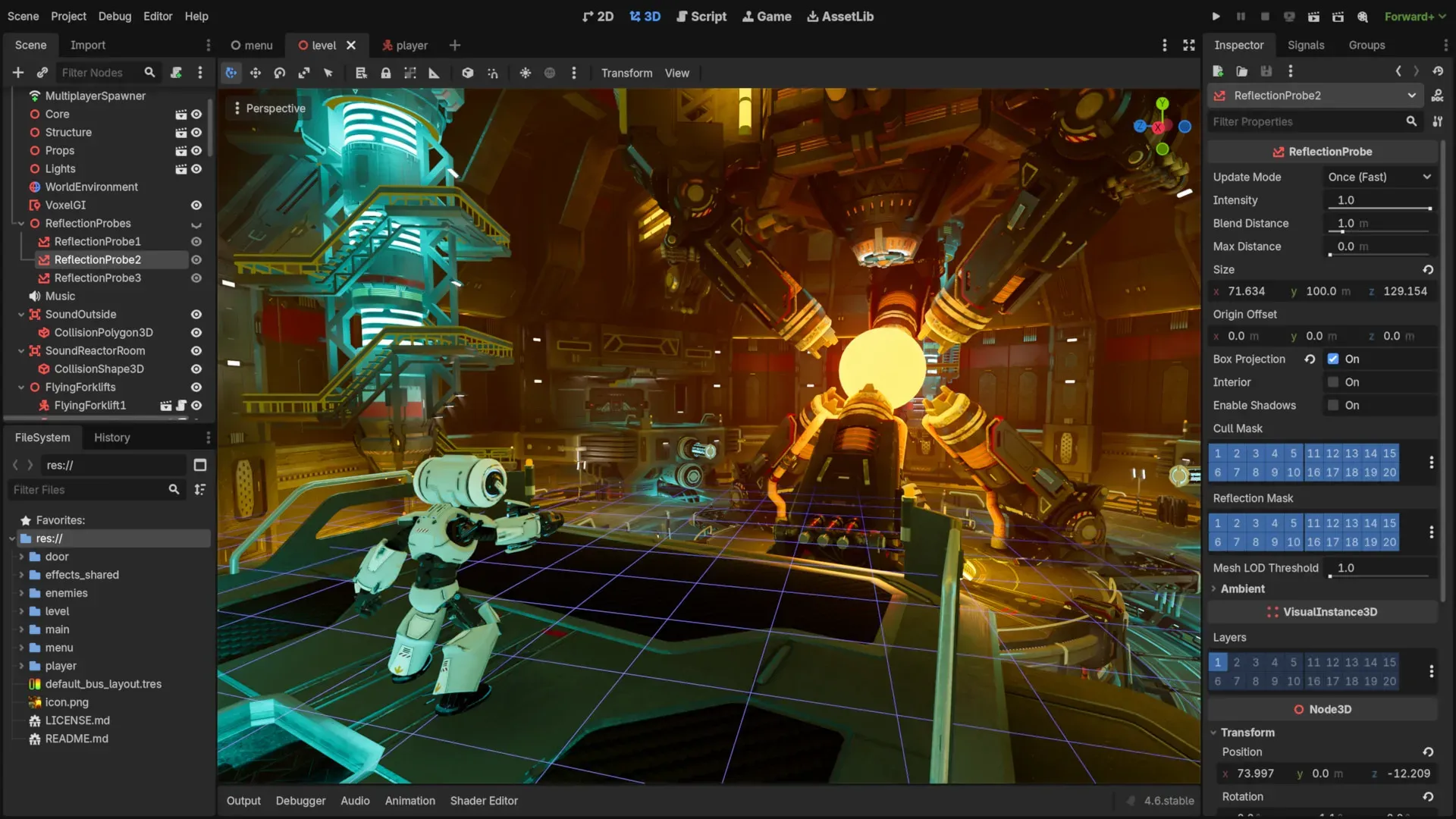
The Godot editor 3D view with the third-person shooter demo, the scene tree on the left and the Inspector on the right, using the Forward+ renderer.
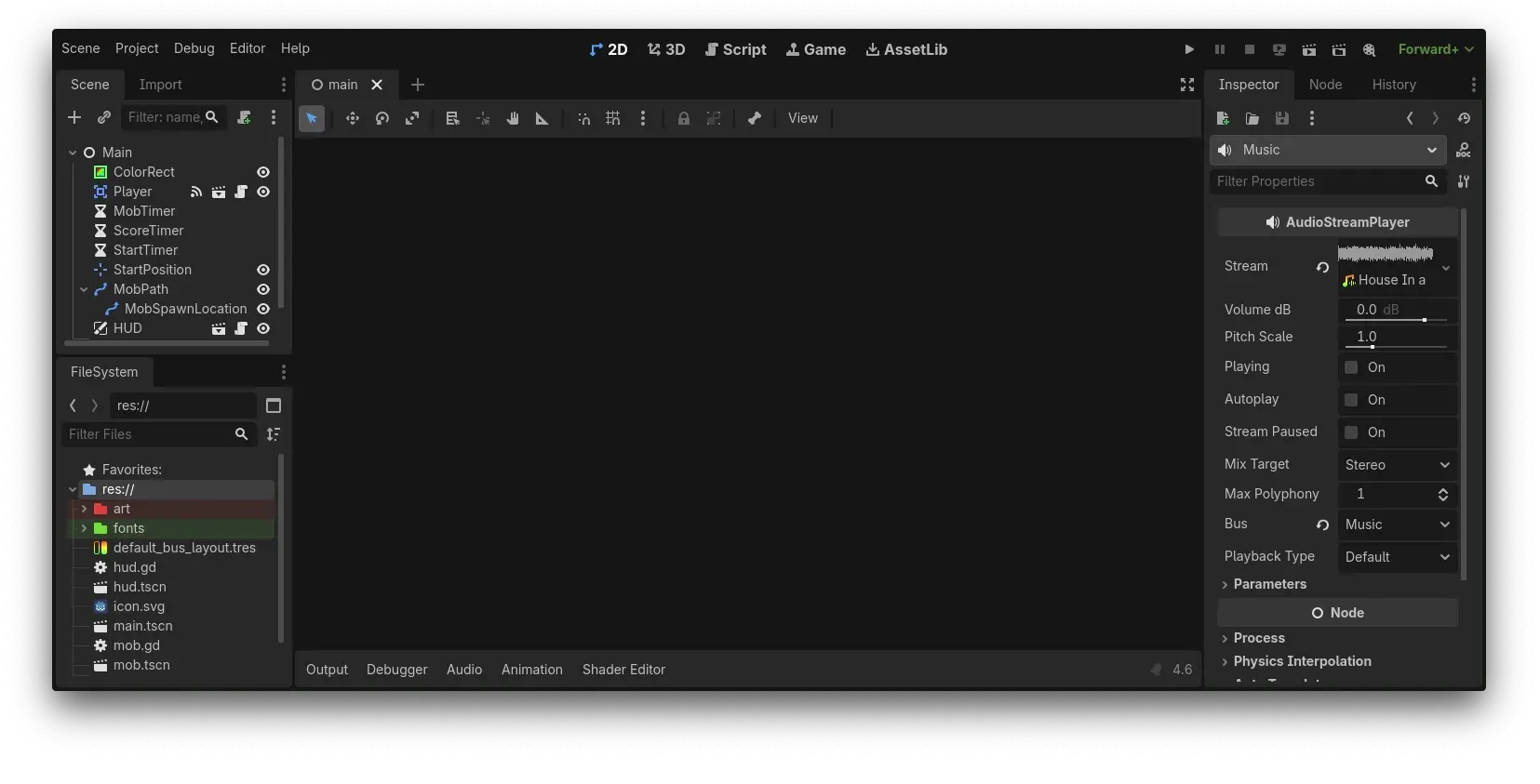
The 2D workspace with a small game's scene tree, FileSystem dock with .gd and .tscn files, and an AudioStreamPlayer selected in the Inspector.
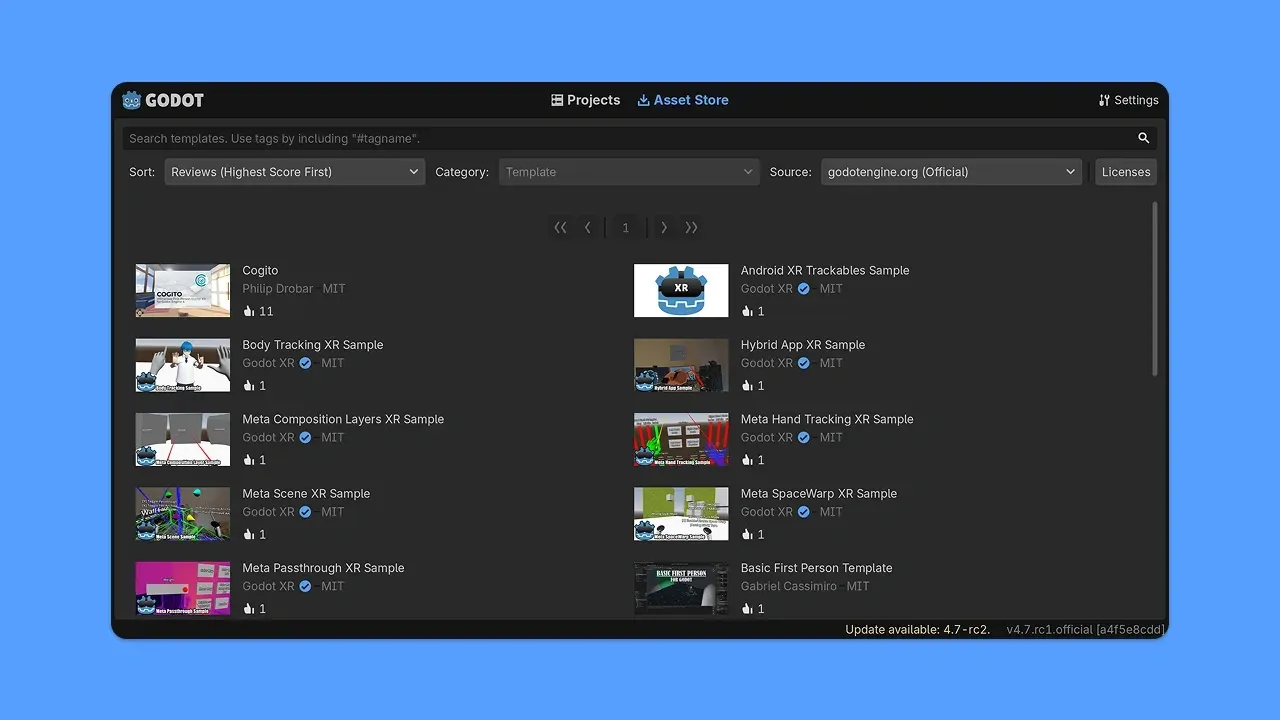
The Asset Store tab introduced in Godot 4.7, listing official XR samples and community templates with license and rating information.
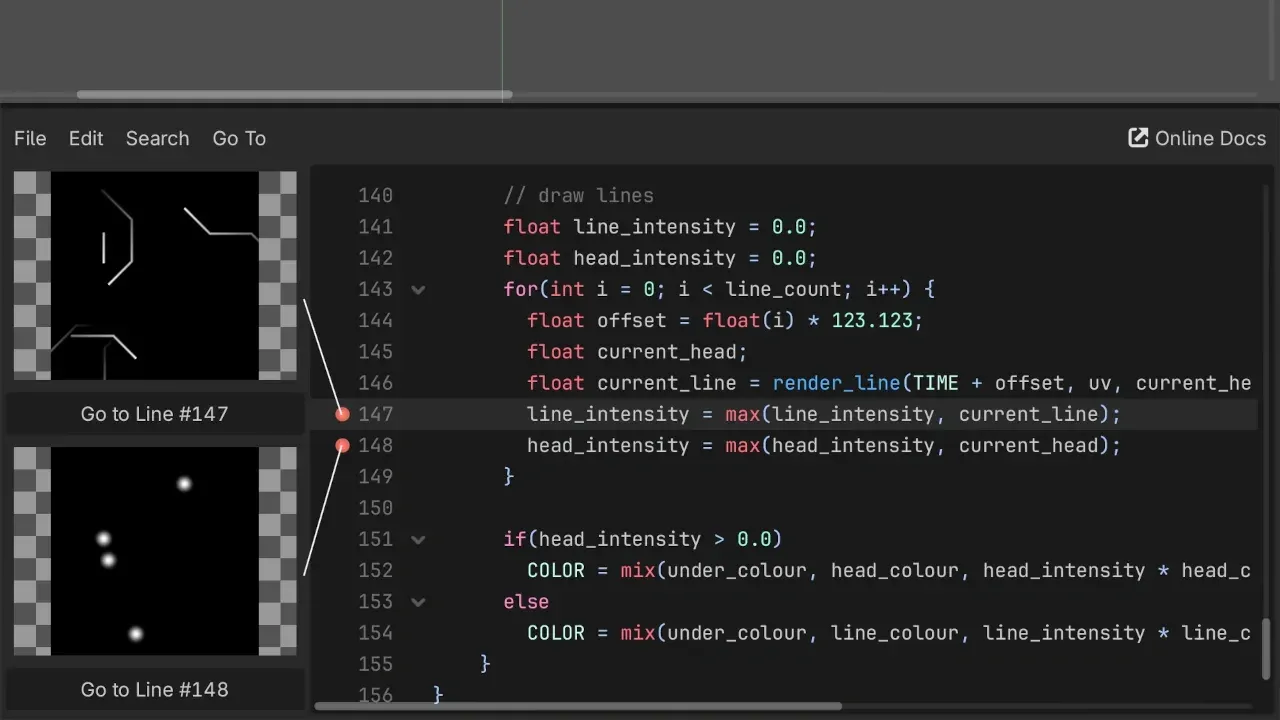
Inline text shader previews from Godot 4.7, showing the intermediate output of two marked shader lines next to the code.
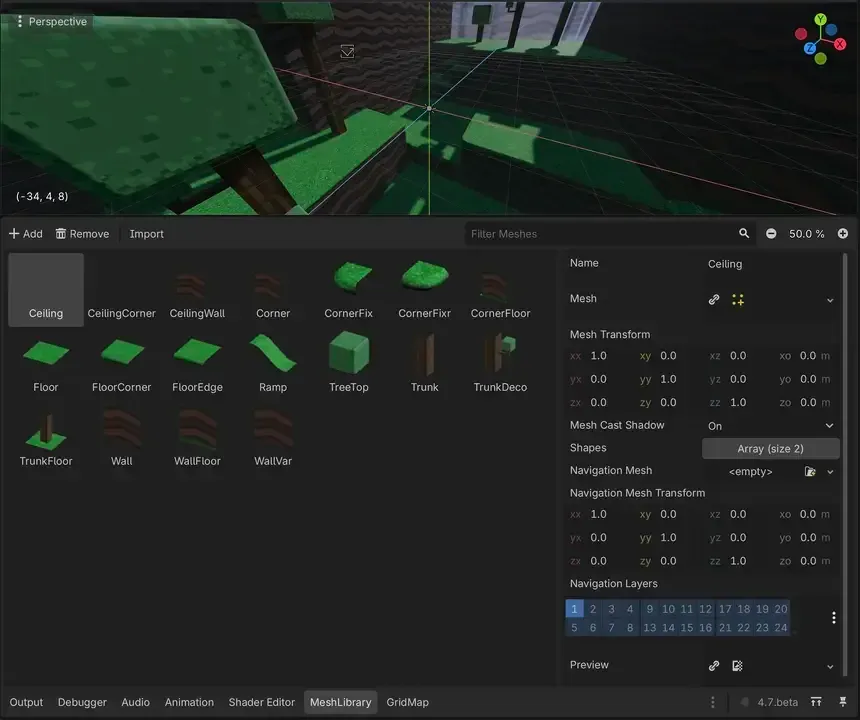
The dedicated MeshLibrary editor added in Godot 4.7, used to manage tiles for GridMap level building.
Source: official Godot Engine project page.
Key capabilities
- Download for Windows Standard and .NET editor builds for x86_64, x86_32 and arm64, distributed as ZIP archives that run after extraction. The .NET build needs the .NET SDK installed and runs only on a Windows system of the matching architecture, without emulation. The GitHub release carries the same archives with a SHA512-SUMS.txt file for verification.
- Download for macOS and Linux MacOS uses one universal build for Intel and Apple Silicon; Linux builds cover x86_64, x86_32, arm64 and arm32, each with a .NET variant. Steam, itch.io and the Epic Games Store distribute the Standard editor with automatic updates, but those store builds do not include C# support. Other Linux architectures such as rv64 or ppc64 require compiling the editor and templates yourself.
- Android, XR and web editors The Android editor is published on Google Play for arm64, arm32, x86_64 and x86_32, as a universal APK and on the Meta Horizon Store for Quest 3 and Quest Pro. It is marked experimental, recommends a keyboard and mouse and has no C# support. An experimental browser editor is also available; it needs more memory than the native editor (8 GB minimum for the web version).
- Three renderers Forward+ (default on desktop) uses clustered lighting, Mobile (default on mobile) targets simpler scenes, and Compatibility (default on the web) runs on OpenGL 3.3, OpenGL ES 3.0 or WebGL 2. Forward+ and Mobile run on Vulkan, Direct3D 12 or Metal. The choice decides which features are available, for example the Mobile renderer limits each mesh to 8 omni, 8 spot and 8 area lights.
- 3D lighting and global illumination Physically based materials, directional, omni, spot and, since 4.7, rectangular area lights. Global illumination options include GPU-baked lightmaps with denoising, VoxelGI for dynamic lights in medium scenes, SDFGI for large open worlds and SSIL. Volumetric fog, screen-space reflections, TAA, FSR 2.2 and AgX or ACES tonemapping are built in; HDR display output arrived in 4.7 on Windows, macOS, iOS, visionOS and Linux under Wayland.
- Dedicated 2D pipeline 2D uses its own pixel-based coordinate system rather than a flattened 3D scene. It provides TileMap layers and a tile set editor, 2D lights with normal maps and soft shadows, GPU and CPU particles, Line2D and Polygon2D, Path2D and a camera with smoothing and drag margins. Optional 2D HDR and MSDF fonts help with scaling and glow effects.
- GDScript The built-in scripting language has Python-like syntax but is not Python. It supports optional static typing, signals as first-class objects, threads and live reloading while the game runs. The editor includes a script editor with completion, a GDScript debugger with thread support and the full class reference offline.
- C# and .NET The .NET editor build targets .NET 8 or newer with C# 12 features. C# exports work on Windows, macOS and Linux, and on Android and iOS as an experimental option since 4.2, with iOS limited to arm64. Web export of C# projects is not supported in Godot 4, so web games need GDScript or GDExtension.
- GDExtension and engine modules Performance-critical code can be written in C or C++ through the official godot-cpp bindings and loaded as a shared library without recompiling the engine. Community bindings exist for Rust, Swift and D. For deeper changes, custom C++ modules are compiled into the engine itself; 4.7 lists a project's GDExtensions in Project Settings.
- Physics 3D physics uses Jolt by default for projects created in 4.6 or later, while existing projects keep their configured engine; Godot Physics remains available. Bodies include static, animatable, rigid, character, arcade vehicle, soft body and ragdoll, with joints and area triggers. 2D physics is a separate implementation with its own shapes and one-way collisions.
- Animation, shaders and UI The animation system keys any property, method calls and audio, with blend trees, state machines and a new inverse kinematics framework from 4.6. Shaders use a GLSL-like language or the visual shader editor, and 4.7 previews text shader output inline. The Control-based GUI toolkit has containers, themes, RichTextLabel with BBCode, bidirectional text and screen reader support on Windows, macOS and Linux.
- Audio, input and localization Audio buses with effects, positional 2D and 3D sound, WAV, Ogg Vorbis and MP3 playback, microphone input and MIDI input. Input mapping covers remappable actions, up to 8 gamepads, gyro sensors, pen pressure and, from 4.7, a VirtualJoystick node. Localization uses CSV or gettext files with pluralization, RTL mirroring and pseudolocalization.
- Networking and multiplayer High-level multiplayer runs over ENet UDP with RPCs, MultiplayerSpawner and MultiplayerSynchronizer nodes. Low-level TCP, UDP, HTTP client, HTTPS with bundled certificates, WebSocket and WebRTC are available on all platforms. A
--headlessmode serves dedicated servers without a display. - XR OpenXR and WebXR are built in, including hand and body tracking extensions. 4.7 added production support for Android XR and Steam Frame, OpenXR composition layers and a simplified default action map. The editor itself runs on supported Quest headsets, and visionOS is limited to flat-window export.
- Export to desktop, mobile and web One project exports to Windows, macOS, Linux, Android, iOS and the web using export templates, packed as a PCK file, ZIP or single executable. Extra PCK files can deliver mods and downloadable content. iOS exports require Xcode on a Mac, and consoles need private templates from approved partners.
- Editor tooling and debugging Live scene editing in a running game, a remote scene inspector, game window embedding with pause and frame advance, a visual CPU and GPU profiler and support for Tracy and Perfetto tracing. External editors such as VS Code, Rider, Zed or Vim can be configured, with a GDScript language server on port 6005 and a debug adapter on port 6006.
- Asset Store and Asset Library Since 4.7 the Project Manager and editor include an Asset Store tab with ratings, previews and license labels, replacing the older Asset Library interface. It lists templates, demos and addons such as the official XR samples. Third-party assets carry their own licenses, which the store displays per item.
- Command line and CI The editor binary exports projects headlessly with
godot --headless --export-release "Preset" path, imports resources with--importand runs scripts with-s. Export templates must be installed on the build machine. Shell completions exist for Bash, zsh and fish, as documented in the command line tutorial.
Where Godot Engine fits
Building a 2D indie game
Create a project with the Compatibility or Forward+ renderer, build levels with TileMap layers, and write player and enemy logic in GDScript attached to scene nodes. The 2D tools work in pixels, so sprite sizes and camera limits match the art directly. Before committing, check that the target resolution and stretch mode suit the art style, and that the chosen renderer is supported on the lowest device you plan to ship to.
Producing a 3D game with physically based rendering
Import characters and levels as glTF 2.0 or directly from .blend files when Blender is installed, then light the scene with VoxelGI, SDFGI or baked lightmaps depending on scene size and whether lights move. New projects use Jolt for 3D physics. Profile on target hardware with the built-in GPU profiler, and keep the system requirements in view: Forward+ needs Vulkan 1.0, Direct3D 12 or Metal 3 at minimum.
Shipping a web or mobile build
Install the export templates from the editor, create presets for Web, Android and iOS, and test each one early. Web exports use the Compatibility renderer and cannot contain C# code. Android exports can be built and signed on Windows, macOS, Linux or from the Android editor with the build environment app; iOS exports need Xcode on a Mac. Check download size, touch input and memory use on a mid-range phone before release.
Automating builds in continuous integration
Commit export_presets.cfg to version control and call the editor binary with --headless --export-release in the pipeline. Pin the exact engine version and matching export templates, since templates must equal the editor version. Run --import first on a clean checkout so resources are imported, and keep signing keys out of the repository through environment variables or CI secrets.
Creating XR applications
Enable OpenXR in Project Settings, add an XROrigin3D and XRCamera3D, and use the first-party Godot XR Tools addon for movement and interaction. Android-based headsets such as Quest, Pico and Android XR devices use the vendor plugin and Android export; the Asset Store lists official XR sample projects. Test passthrough, hand tracking and frame timing on the actual headset rather than only through desktop streaming.
Extending the engine for a team
Write editor plugins in GDScript for in-house tools, or move hot paths into GDExtension libraries built with godot-cpp so designers keep working in the stock editor. If a change needs engine internals, compile a custom engine with a C++ module and custom export templates; the compiling guide covers every platform. Decide early whether the team will track upstream releases, since maintaining a fork adds merge work at every minor version.
Reviews of Godot Engine
Be the first to share your experience with Godot Engine.
Write a review
Loading review form…
Related to Godot Engine
 GIMPGIMP, the GNU Image Manipulation Program, is a free and open source cross-platform image editor for GNU/Linux, macOS and Windows with scripting and plug-ins.AAudacityAudacity is a free, open-source multi-track audio editor and recorder for Windows, macOS and Linux, with plugin support and format conversion.
 LMMSLMMS is an open-source, cross-platform digital audio workstation with a Piano Roll, Beat Sequencer, Song Editor and Mixer plus 15+ built-in synthesizers.