

What is SoundCraft?
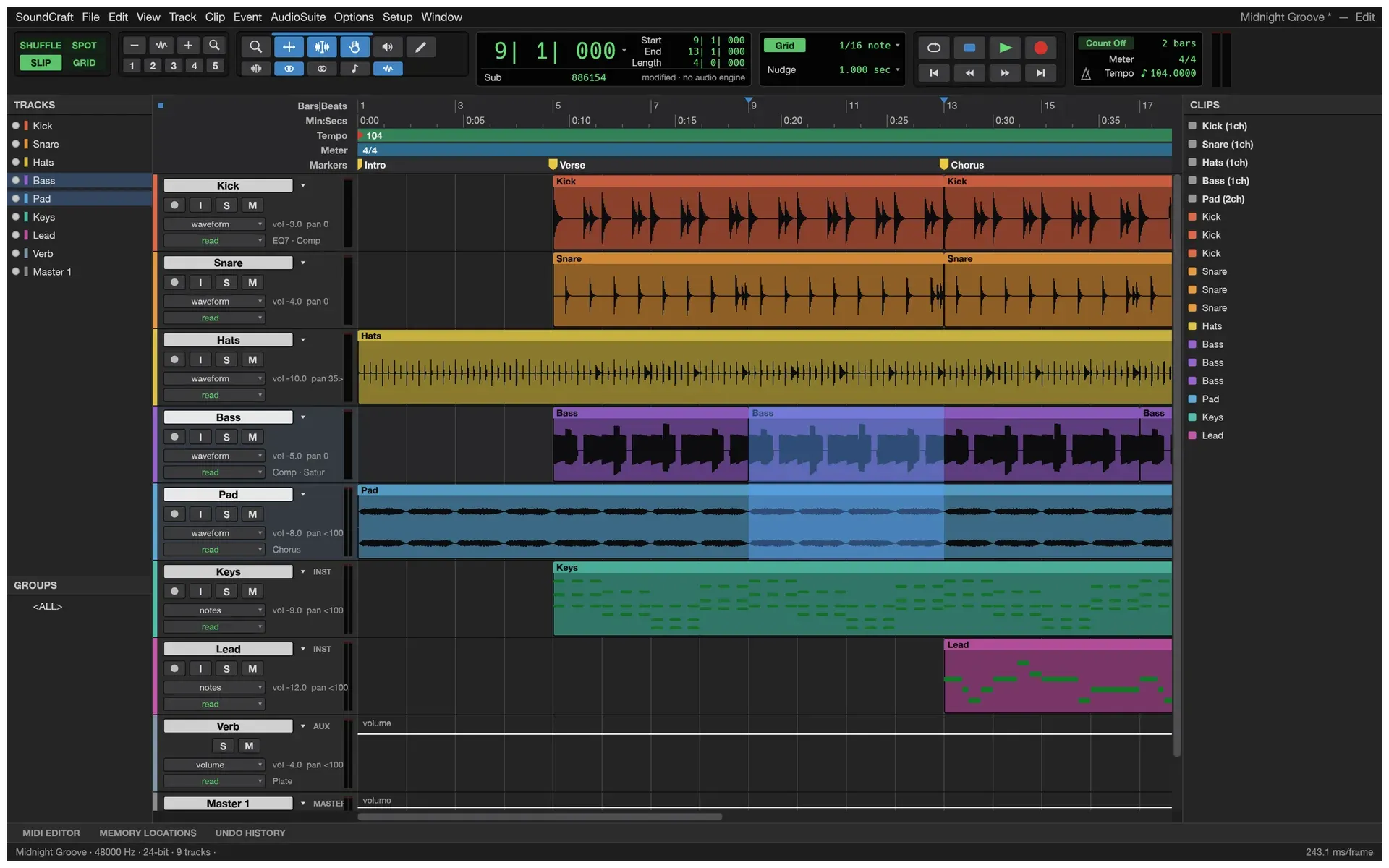
SoundCraft is an open-source digital audio workstation (DAW) for recording, editing and mixing audio, written in Rust. The project README describes an Edit window for arranging and editing, a Mix window for balancing, edit modes, tools, playlists, memory locations and offline AudioSuite processing, with multitrack audio, MIDI, automation, recording and bouncing. The contributor guide defines SoundCraft as a clean-room application built from observed behaviour and public specifications, and the roadmap names Avid Pro Tools as the product it measures parity against. According to the README, every interface icon is drawn in code and the demo song and screenshot audio are synthesised by SoundCraft itself.
SoundCraft is made by the ArtCraft team and is one of the free Crafting Apps listed on getartcraft.com, alongside sister projects such as PhotoCraft, FilmCraft, WordCraft and DeckCraft. The repository was created in October 2026, and nineteen releases have been published since October 8, 2026. The code is dual-licensed under MIT or Apache-2.0 at the user's option; the ArtCraft name, wordmark and logos are trademarks excluded from that license.
The project labels SoundCraft as pre-alpha. Its roadmap reports that 482 of 512 Pro Tools menu leaves (94.1%) are matched, measured with its own parity tool, and estimates about 70% feature breadth and about 40% readiness for real work. The documentation overview states that editing, mixing, bouncing, and saving and reopening sessions work end to end, while recording MIDI from a keyboard or controller and session exchange with other DAWs through AAF and OMF are still missing. Menu items that are not built yet are shown grayed out, the interface is in English only, and only three settings in Preferences work so far.
Version 0.20.0, published on November 11, 2026, made the CLAP host keep queued note-offs on reset so instruments stop at Stop, Play and Locate, compensated a hosted instrument's latency, read volume automation at every sample instead of once per block, kept locked clips whole on trim, separate and range edits, and repaired Flatpak update checks. The latest release, v0.20.1, followed on November 12, 2026; it takes its audio file formats from the shared craft-audio library and patches the Flatpak updater.
SoundCraft is a Cargo workspace of small crates with strict layering: time, MIDI, DSP and plugins, the session model, the mix engine shared by realtime playback and offline bounce, the command engine, audio devices (CoreAudio, WASAPI, ALSA and WebAudio), the automation layer for MCP and the control channel, and an egui interface that nothing below it depends on. The README states that errors are values, so a malformed file or a bad agent call produces a message rather than a crash. Other audio editors on iThub include Audacity and LMMS; the ArtCraft family also includes DeckCraft and PhotoCraft.
Key capabilities
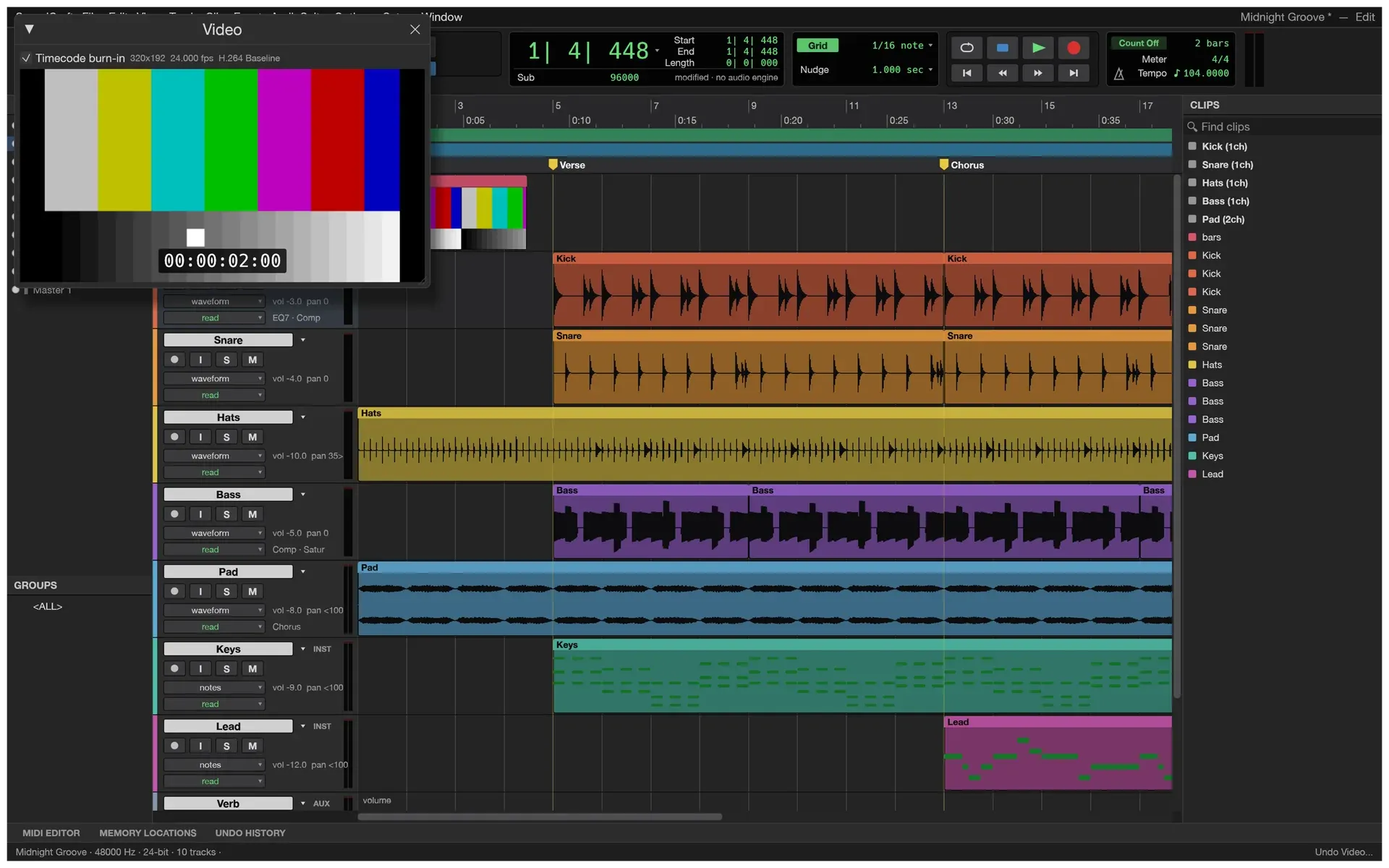
- Edit window and editing tools Shuffle, Slip, Spot and Grid modes sit on F1 to F4, and the Zoom, Trim, Selector, Grabber, Scrubber and Pencil tools on F5 to F10, with a Smart tool as well. Editing commands include separate at the selection, on the grid or at transients, duplicate, repeat, shift, insert silence, heal, consolidate, strip silence and nudge. Fades and crossfades come in five shapes, single-key Commands Focus shortcuts are available, and every edit can be undone.
- Playlists, comping and clip gain Each track has playlists with comping lanes, and each loop-recording take lands on its own playlist. Clip gain lines set a clip's level apart from the fader and can be bypassed or rendered into the audio. Copy, Cut and Clear Special work on clip gain, clip effects or automation alone, and Audio as MIDI turns a single-note melody into MIDI notes. The troubleshooting page lists playlist solo as an open issue.
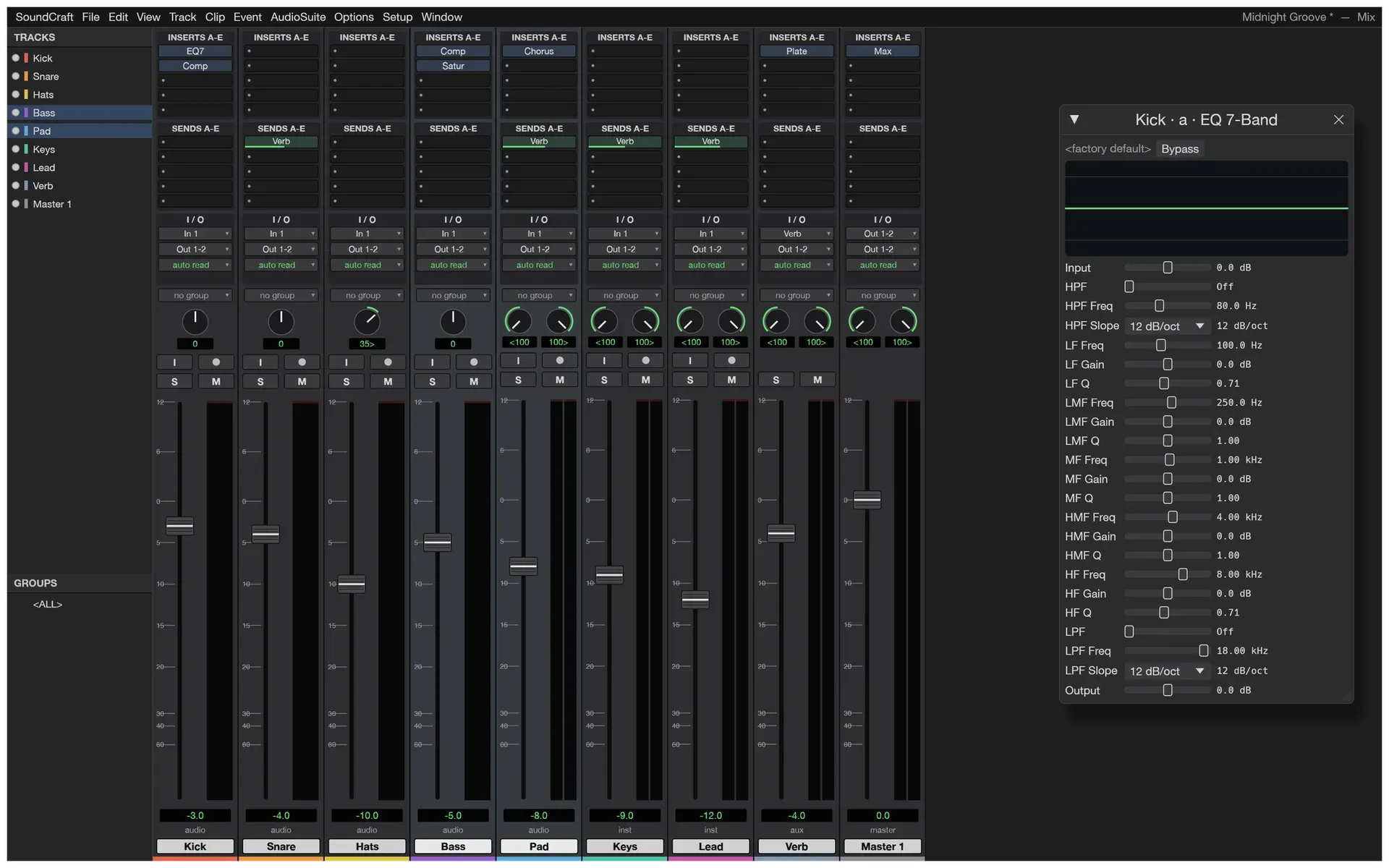
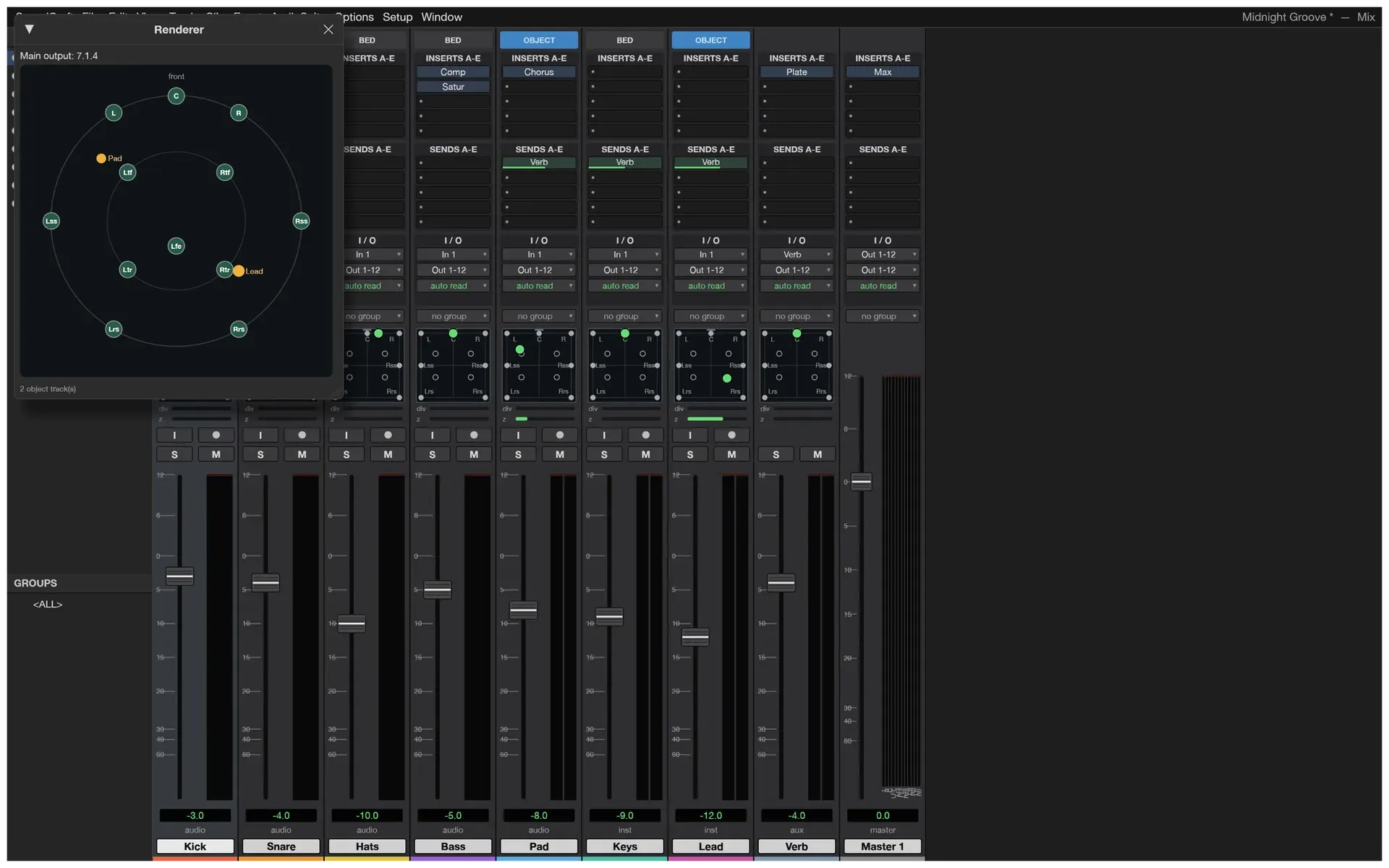
- Mix window and routing Every track has a fader, pan, ten inserts and ten pre or post sends, input and output assignment and record, input, solo and mute buttons. Busses, aux inputs, master faders, VCA masters, routing folders, solo-in-place with implicit solo, mute and solo groups, phase invert and trim are available, and meters hold peaks. Plugin delay compensation is automatic and can be switched off in the Playback Engine settings.
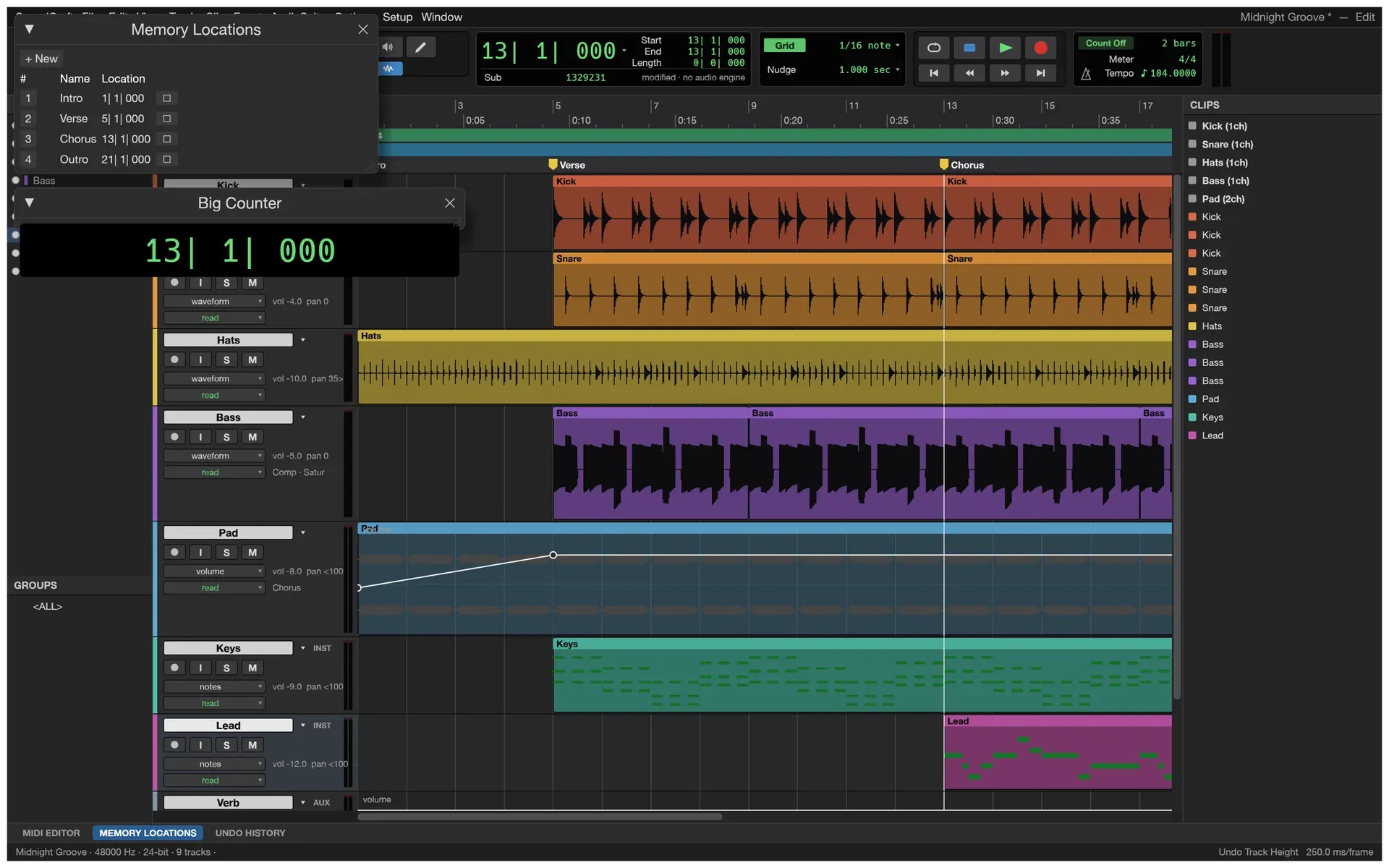
- Automation Volume, pan, mute, sends and every plugin parameter can be automated with breakpoints drawn by the Pencil tool or recorded live from the faders in Write, Touch, Latch, Touch/Latch and Trim modes. Automation can be thinned, glided, coalesced or converted to clip gain. Memory locations, markers set with Enter and a Big Counter window help navigate the session.
- Built-in plugins and AudioSuite The original plugin set includes 7-band and 1-band EQ, compressor and limiter, expander and gate, de-esser, maximizer, channel strip, room and plate reverbs, mod delay, auto pan, chorus, flanger, phaser, ring modulator, saturator, lo-fi, subharmonic, pitch shifter, time shift, signal generator and dither. Any built-in processor also runs offline on selected clips as AudioSuite, and each plugin window saves user presets.
- Third-party plugin hosting SoundCraft lists CLAP and VST3 plugins, plus Audio Units on a Mac, from the standard plugin folders and from
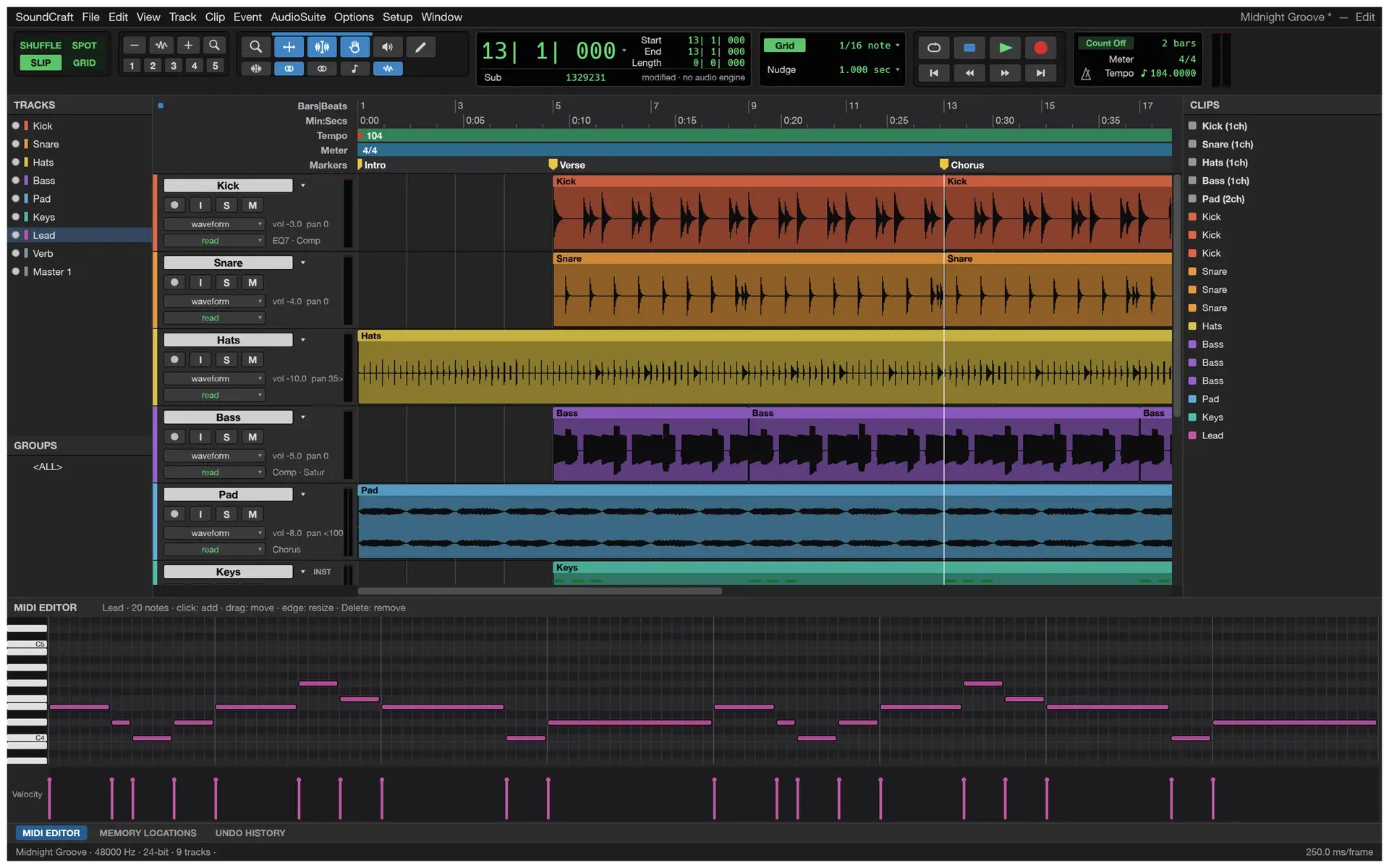
CLAP_PATHorVST3_PATH; instances are created off the audio thread and their state is saved in the session. The workflow guide calls third-party plugins still rough: Audio Units cannot show their own window, VST3 windows do not open on Linux, the signed Mac app may refuse to load third-party plugins, and a crashing plugin closes SoundCraft. The Linux Flatpak sees only plugins in its sandbox paths. - Instruments and MIDI editing Instrument tracks use a built-in subtractive synth, drum synth or sampler that plays WAV, AIFF, FLAC, MP3 or OGG files across the keyboard, or an instrument plugin. The MIDI editor is a piano roll with a velocity lane, next to an event list, step input, quantize, transpose, an on-screen MIDI keyboard and Standard MIDI File import and export. Recording from a MIDI keyboard or controller is not available yet.
- Score Editor and notation export A Score Editor shows MIDI clips in standard notation on treble and bass staves, and engraved scores can be printed. File export to Sibelius writes the MIDI tracks as MusicXML, which most notation programs open.
- Recording Recording supports punch-in on a selection or on the fly, pre and post-roll, QuickPunch, loop recording with a playlist per take, input monitoring through the full channel strip and autosave with recovery. Setup, Playback Engine selects the output and input device, sample rate and buffer size. On Linux, SoundCraft plays through ALSA, which reaches PipeWire or PulseAudio on most desktops, and it does not use JACK. Recording is not supported on FreeBSD or in the web version yet.
- Tempo, meter and timecode Rulers show Bars|Beats, Min:Secs, Timecode at every rate including drop-frame, Feet+Frames and Samples. Tempo and meter maps support linear, parabolic and S-curve ramps, key signatures and detected chords, and Beat Detective analyses up to 20 minutes of audio at a time to separate clips or set the session tempo. The README lists pitch-preserving Elastic Audio warping, while the troubleshooting page lists time stretch as an open issue.
- Surround, immersive and video Main and bus formats range from stereo to 9.1.6 and Ambisonics, with a surround panner that has divergence and height controls, object and bed routing, and a Renderer window with live speaker levels. A video track shows thumbnails, and the Video window follows the playhead with timecode burn-in and sync offset, decoding H.264, ProRes and Motion JPEG from MP4 and MOV files in pure Rust.
- Audio import and bounce SoundCraft imports WAV (including BWF and RF64), AIFF and AIFC, FLAC, MP3, Ogg Vorbis, AAC, ALAC, CAF and the audio of MP4 and MOV movies at any sample rate and bit depth. Bounce Mix and stem bounces write WAV, AIFF or FLAC at 16 or 24-bit or 32-bit float, with optional TPDF dither and normalisation to -0.1 dBFS, and report peak, true peak and integrated loudness in LUFS. MP3 and AAC export are not available yet.
- Sessions, templates and recovery A session is a .scraft file in its own folder, with recorded audio in an Audio Files folder beside it. Save Session Copy In, Save As Template, Import Session Data and Export Selected Tracks as New Session move material between sessions, and Track Commit renders a track with its plugins into a new audio track. Session Audio Health reports missing audio, sample-rate mismatches and clips past their source, and Recover Unsaved Work restores autosaved changes after a crash. Every audio file is currently loaded fully into memory, which the project lists as a known problem for large sessions.
- Command-line tool The command-line guide documents
soundcraft-clisubcommands:infofor audio files and sessions,convertfor resampling, bit-depth changes and normalisation,runandscriptfor engine commands on a new, demo or saved session,commandsanddescribefor the command catalogue,appfor a running window,mcp,parityandplugins. Results go to standard output as JSON where programs read them, and exit codes separate a failed command (1) from a usage error (2). - MCP server and control channel
soundcraft-cli mcpruns a Model Context Protocol server on stdio with a headless engine that has no window and no audio device, optionally starting from the demo session. Repeatable--automation-read-rootand--automation-write-rootflags confine file access, and--connectdrives a running app started with--control, adding screenshots and clicks without the folder limits. The control protocol speaks newline-delimited JSON over TCP on 127.0.0.1, and programmatic commands never open dialogs. - Desktop downloads Release v0.20.1 provides code-signed MSI installers and portable zips for Windows x64 and ARM64, a signed and notarized universal DMG for macOS 11 or later with the CLI as a separate zip, and AppImage, Flatpak, .deb, .rpm, Arch package and tarball builds for Linux x86_64 and aarch64. RISC-V 64 gets .deb, .rpm and tarball builds, and FreeBSD gets x86_64 and aarch64 tarballs. The documentation also lists 32-bit Windows packages, which are not among the v0.20.1 assets. A SHA256SUMS.txt file covers every file, and the ArtCraft Linux repositories and the ArtCraft Launcher deliver updates.
- Web build and source builds The
soundcraft-webzip is a static WebAssembly site that starts with the demo song on any web server. It cannot load third-party plugins, record or choose an audio device, saves a session and its audio as one .scraftz download, and starts sound only after a click. From source,cargo run --release -p soundcraftbuilds the desktop app; the workspace manifest declares Rust 1.90, and Linux builds need the ALSA headers.
Where SoundCraft fits
Recording and comping takes
The input device, sample rate and buffer size are chosen in Setup, Playback Engine, and the record button is armed on each track to record. F12 or the transport record button starts recording, and the Options menu turns on Loop Record, Pre/Post-Roll and QuickPunch. Each loop take lands on its own playlist, from which a comp is assembled; on macOS the system asks for microphone permission the first time.
Mixing a song and bouncing the master
In the Mix window, plugins go into empty insert slots, sends feed an aux input such as a shared reverb, and groups, VCA masters and routing folders control several tracks at once. Automation passes are recorded live in Write, Touch or Latch mode. Bounce Mix renders the edit selection, or the whole session when nothing is selected, to WAV, AIFF or FLAC, and reports the file's peak level and loudness in LUFS when it finishes.
Writing parts with MIDI and notation
An Instrument Track gets a built-in synth, drum synth, sampler or instrument plugin, and notes are entered with the Pencil tool, the MIDI editor, step input or the on-screen keyboard, or imported from a MIDI file. Quantize and Transpose sit under MIDI Operations, the Score Editor shows the part as notation, and the tracks can be exported as MIDI or MusicXML for a notation program.
Audio post-production with picture and surround
A movie imported with File, Import, Video sits on a video track with thumbnails, and the Video window follows the playhead with timecode burn-in. Busses and the main output can use surround formats up to 9.1.6 or Ambisonics, tracks are routed as objects or beds, and the Renderer window shows speaker levels and object positions.
Letting an AI agent edit and mix a session
An MCP client registers soundcraft-cli mcp as a local stdio server, optionally with --demo, and receives requests such as turning the kick down, adding a plate reverb to the snare and bouncing the mix. The agent reads back the session state to check its changes, every change can be undone, and the read and write roots keep a background agent to given folders, as described on the AI agents page.
Batch audio processing from scripts
soundcraft-cli convert resamples, changes bit depth or normalises single files, and soundcraft-cli run applies commands such as a track volume change or an EQ insert to a session, then bounces it to a file. script runs a text file with one command per line and can continue past errors, and info prints an audio file's format or a session summary. Related iThub listings for audio work include LYNX SHARE.
Reviews of SoundCraft
Be the first to share your experience with SoundCraft.
Write a review
Loading review form…
Found SoundCraft useful? Upvote it todayYour vote helps other IT teams find it in the daily ranking.

