
What is Concat?
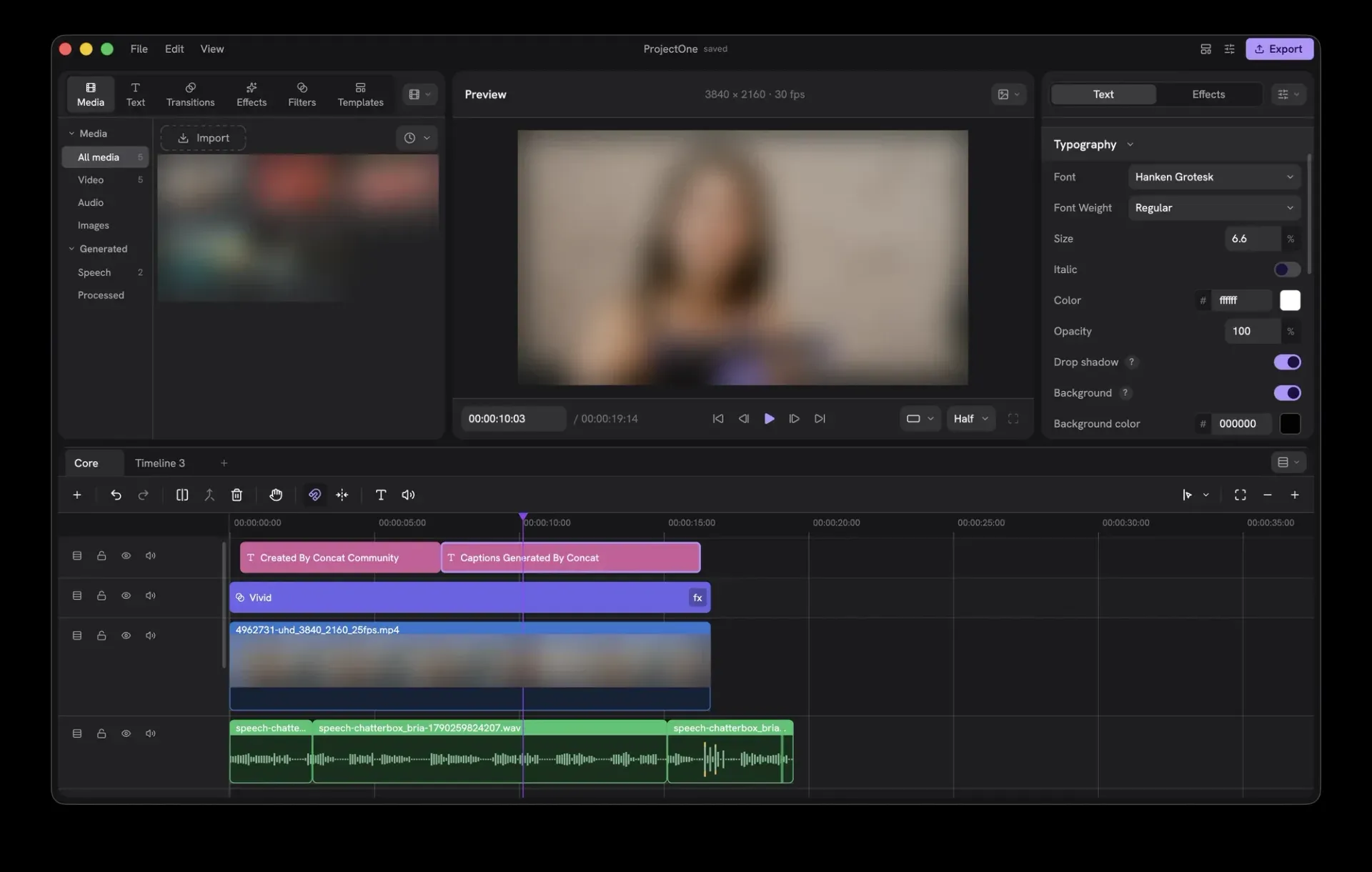
Concat is an open-source, non-linear video editor for Windows, macOS, Linux, Android and iOS/iPadOS, written in Rust and published in the jub0t/Concat repository. The project labels itself as beta: its GitHub description begins with "Beta" and calls Concat "the truly free, open-source, local-first, cross-platform video editor", and the README states that it works but still has rough edges and asks users to report them as issues. The editor combines a multi-track timeline with auto-captions, text to speech with voice cloning, background removal, keyframes, titles and export up to 4K 60.
According to the project, editing, captions, voices and cutout run on the local machine. The AI models are optional downloads from Settings and, once downloaded, work without a network connection. The code signing policy lists the only network requests: the release list from GitHub when Settings, Version is opened or an update check is requested, model downloads, and an optional Remote API that is off by default and listens on 127.0.0.1 with a token. The project states there is no telemetry, no account, no watermark and no paid tier.
Builds are produced by GitHub Actions from tagged commits and published as GitHub release assets with a SHA256SUMS file. Release 0.2.10 (November 11, 2026) ships a Windows x86_64 setup and MSI, macOS disk images for Apple silicon and Intel, Linux x86_64 and aarch64 AppImage, DEB, RPM and Arch packages, an Android arm64 APK and an iOS arm64 IPA for sideloading. Windows builds are not code-signed yet and macOS builds are unsigned. A community Flatpak remote, Flatpark, wraps the x86_64 DEB of each release. Windows ARM builds are paused.
Recent 0.2.x releases list these changes. Version 0.2.8 added the built-in MCP server (concat --mcp), JSON Schema for every API request, stabilization, masks, adjustment layers and saved voices. Version 0.2.9 turned transitions into timeline clips, added transparent projects with ProRes 4444 or VP9 alpha export, speed curves, styled words in titles and captions in a chosen language, and made 4K export about 2.4 times faster according to its notes. Version 0.2.10 added In, Out and Loop animations, voice isolation, a stack of masks per clip, editable shapes, a Shake and Motion shelf and more caption language presets, and fixed caption generation crashing on Windows. A v0.2.11 tag exists in the repository but had no published release at the time of writing.
Concat is copyright Jareer Abdullah and licensed under AGPL-3.0-or-later. The licensing page also offers a separate commercial licence, agreed in writing, for closed-source use, and notes that neither licence grants codec patent rights for formats such as H.264, HEVC or AAC. Third-party parts keep their own licences: the shipped FFmpeg builds are LGPL, Slint is used under its GPL-3.0 option, and the RVM video matting weights, downloaded on demand, are GPL-3.0. The website footer states that Concat is not affiliated with CapCut or ByteDance. Similar open-source editors listed on iThub include Kdenlive, Shotcut, OpenShot and OpenCut.
Key capabilities
- Multi-track, multi-timeline editing Video, stills, titles and sounds can be stacked on any number of tracks for overlays and picture-in-picture, and one project can hold several timelines. Blend modes such as screen, add and multiply, crop and flips are available per clip. Since 0.2.9 captions, titles, overlays and sounds can be linked so they move with the main track.
- Cutting tools The README lists split, trim, ripple, merge, freeze frame and speed changes, with an optional magnetic timeline. A quick split follows the playhead, Up and Down jump between cuts, and copy, paste and duplicate carry every clip setting, including into another project. Projects are folders, and each Concat process locks the project folders it has open.
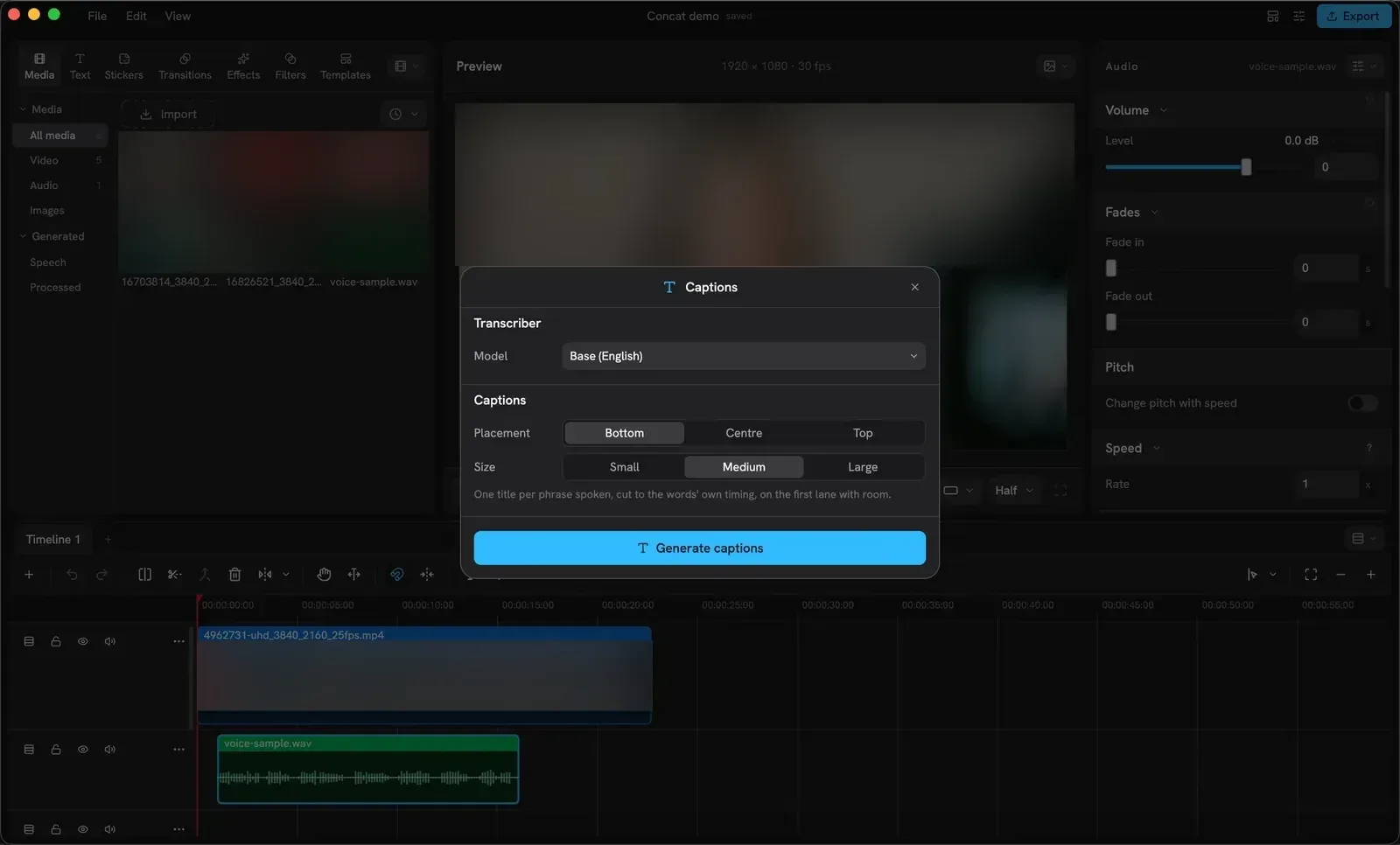
- Auto-captions on the local machine Generate Captions transcribes a clip's voice with a local whisper model and places one title per spoken phrase on the timeline, timed to the words. Models come in Tiny, Base and Small, in English or multilingual versions, at 78 MB, 148 MB or 488 MB each. Captions can also be built from a typed script, and SRT files can be imported and exported. The auto-captions guide covers placement, size and restyling.
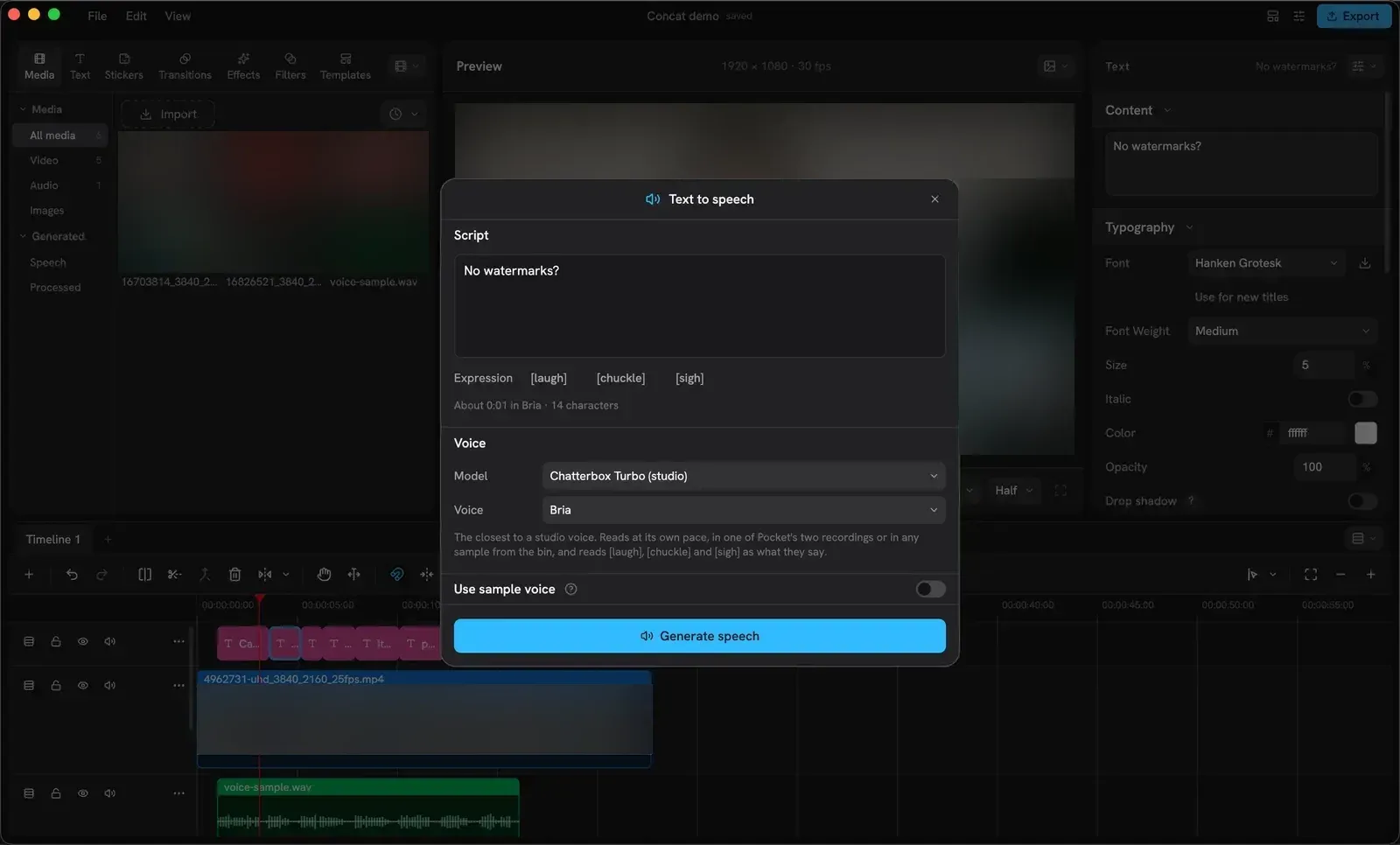
- Text to speech and voice cloning The desktop Studio voice model (about 1.1 GB) has four built-in readers and supports [laugh], [chuckle] and [sigh] tags. It can read in a voice cloned from a few seconds of a recording, and the text-to-speech guide says ten seconds of clean speech is enough. Cloned voices can be saved with a name and picture for other projects. On Android the phone's own system voice is used.
- Background removal and chroma key Auto removal finds a person (15 MB model) or an object (179 MB model) and cuts away the rest. Custom removal adds a model-aware smart brush and eraser (about 40 MB) plus pixel brushes for corrections. Chroma key with an eyedropper, similarity, softness and spill suppression handles green and blue screens, as described in the background removal guide.
- Keyframes and curves Position, scale, rotation, opacity, volume and effect parameters can be keyframed, with ease in, ease out or a drawn curve in the built-in curve editor. Speed curves can be drawn or picked from presets on the Speed tab. Release 0.2.10 added In, Out and Loop animations for clips, pictures, titles and shapes.
- Effects, filters and transitions The README counts 100 effects, filters and transitions that play live in the preview, plus LUT import and adjustment layers. Since 0.2.9 a transition is a clip on the timeline that can be moved and trimmed, and picture or sound effects can be dropped on a lane to cover everything below. Version 0.2.10 added a Shake and Motion shelf.
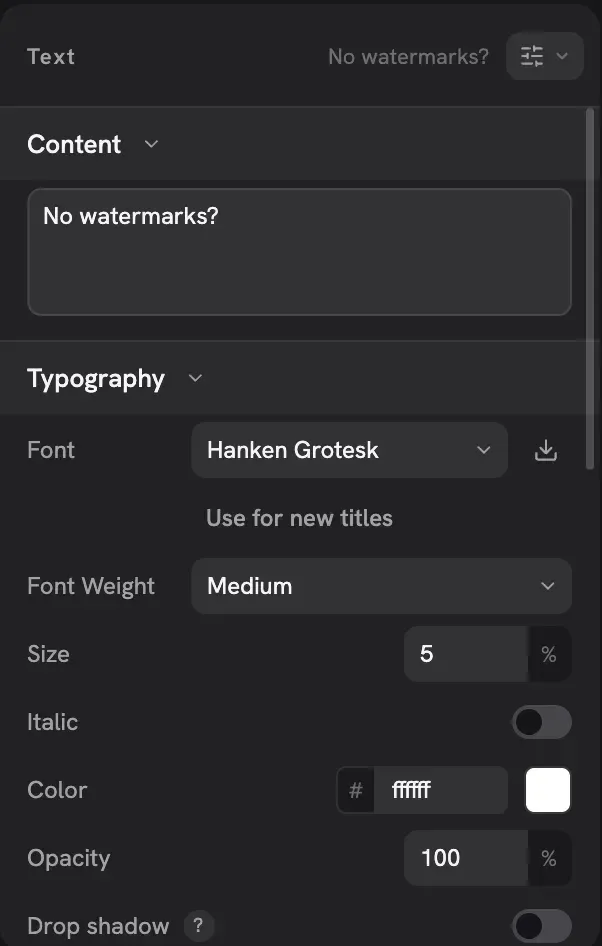
- Titles, masks and shapes Titles support fonts, stroke, shadow and a background plate, with presets, and individual words can get their own colour, weight, size or styling. Clips accept a stack of masks (line, mirror, circle, rectangle, heart or star), each with its own mode and keyframes. Shapes have editable size, corners, gradients, outlines and shadows.
- Audio tools A one-switch voice cleanup denoises, enhances voice and levels loudness, and voice isolation (0.2.10) separates a voice from music or noise with separate levels. Voice styles such as chipmunk, robot and telephone are included. A Concat sound shelf loads CC0 sounds from the project's assets repository only when requested.
- Stabilization and Enhance Stabilization measures camera shake and applies a correction with Smoothness, Max zoom and Tripod settings, in the monitor and in exports. Enhance restores and enlarges a clip's picture with a 5 MB model, up to 2K in 0.2.10, and runs in Concat's own GPU compute shaders according to the 0.2.9 notes.
- Export formats Exports cover H.264, HEVC and AV1 up to 4K 60 with 10-bit colour, and ProRes 4444 or VP9 with alpha for transparent projects. H.264 and HEVC use the platform's hardware encoders first, with Kvazaar and OpenH264 as software fallbacks. Proxies are built in; the README says they let 4K footage scrub smoothly.
- MCP server for AI agents Every desktop release since 0.2.8 can run as an MCP server over stdio with concat --mcp. Tools cover projects, media import, clip editing, masks, titles, captions, keyframes, effects, templates, export and frame previews, with schemas generated from the API types. It works through the open window when Automation is enabled or headless otherwise, and writes files only under the home folder unless CONCAT_MCP_ROOTS allows more. Setup for Claude Code and Claude Desktop is in docs/MCP.md.
- JSON-RPC API and CLI The open editor serves JSON-RPC 2.0 lines from Settings, Automation, protected by a token. A build from source adds concat-cli (api over stdin, serve on 127.0.0.1:7420) and gRPC over HTTP/2. JSON-RPC and gRPC carry the same methods, and exports run as jobs that report progress events. The developer docs list every method, edit command and type.
- Windows installation Windows x64 is offered as a setup .exe and an .msi. The builds are not code-signed, so SmartScreen asks before the first run, and Windows refuses them where Smart App Control is on. Windows ARM builds are paused.
- macOS installation Disk images are published for Apple silicon and Intel. The builds are unsigned, and the project documents clearing the quarantine flag once with xattr after moving Concat to Applications. macOS 12 is required, and on Intel Macs cutout, Enhance and Studio voice need macOS 13.4.
- Linux installation Linux builds exist for x86_64 and ARM64 as AppImage, DEB, RPM and an Arch package. The community Flatpark remote offers a Flatpak that wraps the x86_64 DEB of each release.
- Android and iOS builds An arm64 APK runs on Android 8.0 or later on phones and tablets; the 0.2.10 notes say no automated check has started that APK. The iOS and iPadOS build is a beta IPA for iOS 15 that is installed by sideloading and is not on the App Store.
- System requirements The system requirements guide lists a 64-bit CPU, 4 GB RAM and 500 MB storage as the minimum, with no GPU required because drawing falls back to the CPU. The recommendation is 6 or more cores, a GPU with Metal, DirectX 12 or Vulkan, and 16 GB RAM for 4K timelines. All optional models together take about 2.8 GB.
- Build from source Building requires Rust 1.93 or newer, FFmpeg 7 or newer development libraries, cmake and a C++ compiler. cargo run -p concat starts the editor window. Contributions are accepted under MIT No Attribution with a sign-off.
Where Concat fits
Short-form videos for TikTok, Reels and Shorts
The README names TikTok, Reels and Shorts as a main use. New projects offer vertical and other aspect ratios including 4:5 and 3:4, and the timeline tray holds Generate Captions, Text to Speech and Record Voiceover. Captions land as styled title clips that can be restyled together, and the export uses H.264, HEVC or AV1 without a watermark.
Captioning interviews, tutorials and podcast clips
A clip with speech is selected and Generate Captions transcribes it with a downloaded whisper model, in English or in a picked spoken language. The captions guide describes a 15-second clip taking a few seconds on the Base model. Subtitles can be exported as SRT, and caption language presets were extended in 0.2.10 to Chinese, Korean, Arabic, Hindi, Russian and other languages.
Narration with built-in or cloned voices
Text to Speech generates a WAV narration from a script and places it on the first free lane at the playhead. With Studio voice and Use sample voice, a recording from the bin becomes the voice; saved voices appear in every project. The generated read can then be captioned to put the same words on screen.
Background removal for screen recordings and talking heads
The project documents removing a background without a green screen: Auto removal for a person or object, then smart brush corrections, with a new background placed on a lower lane. Projects can also be made transparent and exported with alpha as ProRes 4444 or VP9 for use in other tools.
Automated editing from AI agents
An MCP client such as Claude Code starts Concat with concat --mcp and can create a project, import media, add clips, titles and captions, apply effects, preview frames and export. In window mode the agent works through the open editor's server and cannot overwrite the project on screen; live editing of the open project is planned in issue 337, per the MCP documentation.
Scripted pipelines over JSON-RPC
Scripts send JSON-RPC lines to the window's Automation socket, or to concat-cli in a source build, to run project.create, media.import, edit.apply and export.run. The developer docs show a five-line JSONL file that creates a project, adds a clip and a title and exports an MP4, with export.progress and export.done events. Errors carry codes such as notOpen, refused and busy.
Reviews of Concat
Be the first to share your experience with Concat.
Write a review
Loading review form…
Found Concat useful? Upvote it todayYour vote helps other IT teams find it in the daily ranking.