
What is Zerobyte?
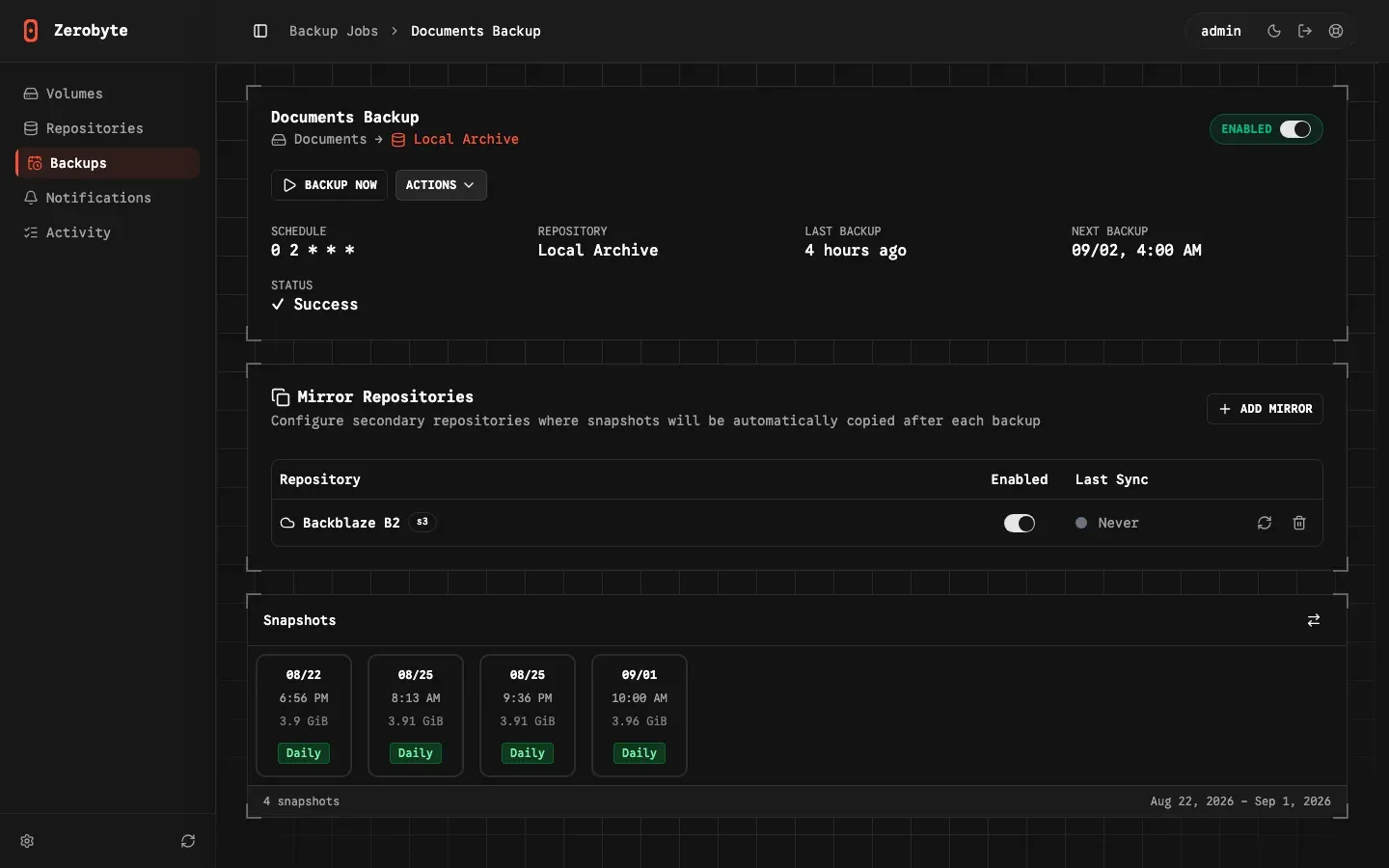
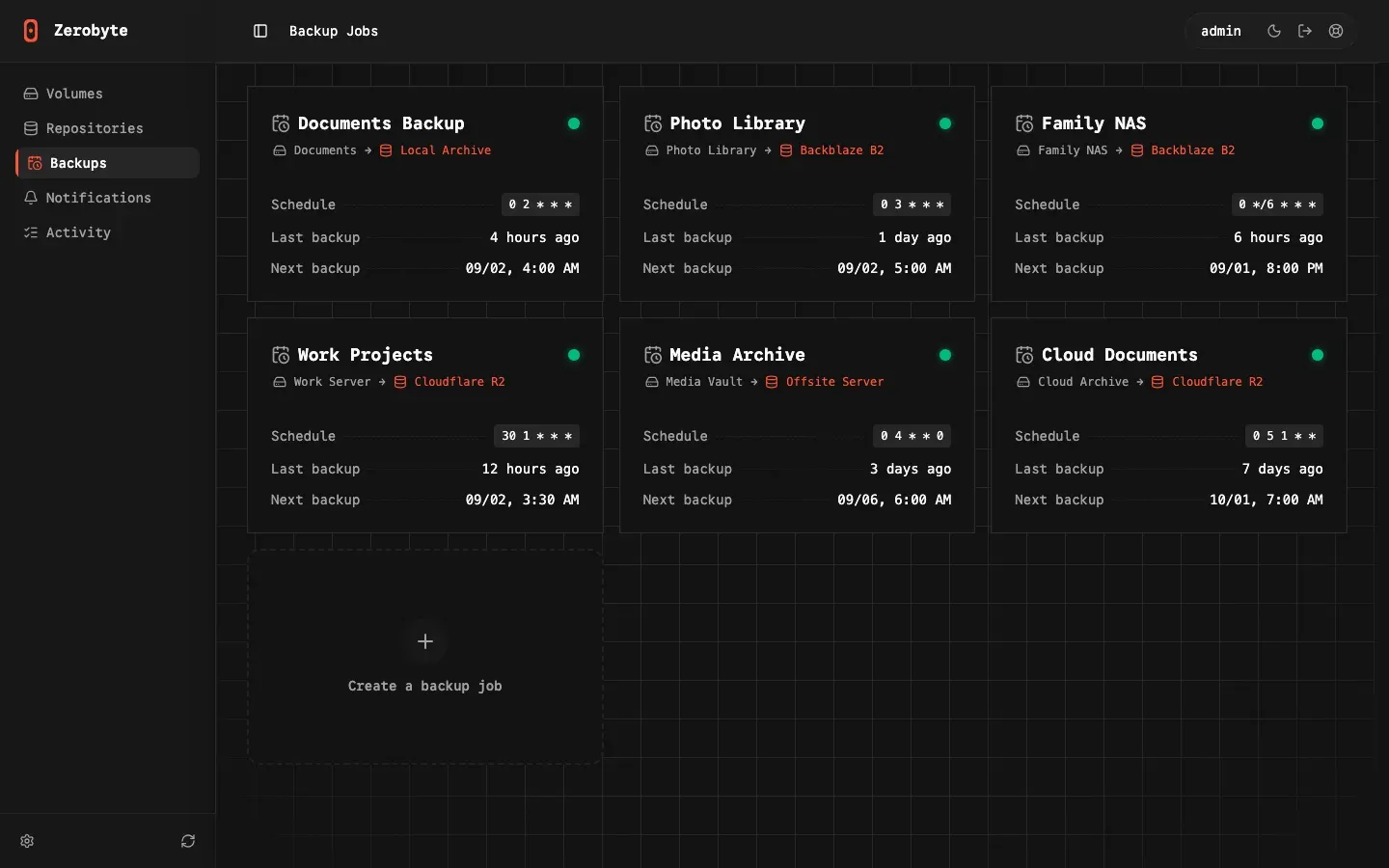
Zerobyte is an open-source backup automation tool for self-hosted servers, built on top of Restic. It adds a web interface for scheduling, running, monitoring and restoring encrypted Restic backups, and the project website presents it as an open-source backup control plane. The model has three parts: sources, which the documentation still calls volumes (the user interface renamed them in v0.44.0); repositories, which are encrypted Restic storage destinations; and backup jobs, which connect a source to a repository with a cron schedule, a retention policy and optional mirror repositories. The introduction lists the supported source and repository types.
The project is developed in the public GitHub repository nicotsx/zerobyte, created in August 2025. The account nicotsx is also the top contributor to Runtipi, the Docker-based homeserver platform. Zerobyte is licensed under AGPL-3.0, and the bundled Restic binary keeps its BSD 2-Clause license, as listed in the README third-party section. Code contributions require signing a Contributor License Agreement. Support runs through Discord and GitHub Discussions. zerobyte.app describes a self-hosted product only, with no hosted service or paid plan; the README links to a donation page.
Zerobyte ships as the container image ghcr.io/nicotsx/zerobyte for linux/amd64 and linux/arm64 and is deployed with Docker Compose, as described in the installation guide. The web interface and API listen on port 4096. According to the Dockerfile and recent release notes, the image bundles Restic 0.19.1, rclone 1.75.2 and Shoutrrr 0.23.0. Releases also attach desktop builds for Windows x64, macOS on Apple silicon and Linux (AppImage); the release notes describe these desktop apps as alpha and not yet officially supported, and the Windows installer is unsigned.
The current GitHub release is v0.44.2, published on November 9, 2026, a bug-fix release for agent heartbeat timeouts during long backups. Zerobyte is still in the 0.x series: both the README and the documentation warn that it is subject to major changes between versions while core features are developed. Version 0.44.1 added CSRF protection for session-authenticated API requests, and v0.44.0 renamed Volumes to Sources and hid stored encrypted credentials in API responses. Earlier releases added an encrypted configuration export and import (v0.43.0) and an Activity page for background operations (v0.42.0). The full history is on the releases page.
It is written in TypeScript on Bun, with React (TanStack Start), Hono, Drizzle ORM and better-auth. Documented limits include: no fine-grained role-based access control for backup operations, remote share mounting only with the SYS_ADMIN capability and /dev/fuse, rclone sources only on Linux hosts, and a README warning against running Zerobyte on a server reachable from the internet without a tunnel or authenticated proxy in front of it. Remote agents for other Linux machines are documented, but the remote agents guide marks them as an unreleased feature still in development.
Key capabilities
- Docker Compose deployment The standard
compose.yamlrunsghcr.io/nicotsx/zerobyte:v0.44withcap_add: SYS_ADMIN, the/dev/fusedevice, port 4096 and a bind mount of/var/lib/zerobytefor data and keys.BASE_URLandAPP_SECRET(32+ characters, orAPP_SECRET_FILE) are required, andTZsets the timezone used by schedules. The documentation states that/var/lib/zerobytemust be on local storage, not a network share,, with a separate ZFS dataset path for TrueNAS. - Reduced-privilege mode without remote mounts The installation guide documents a second Compose file without
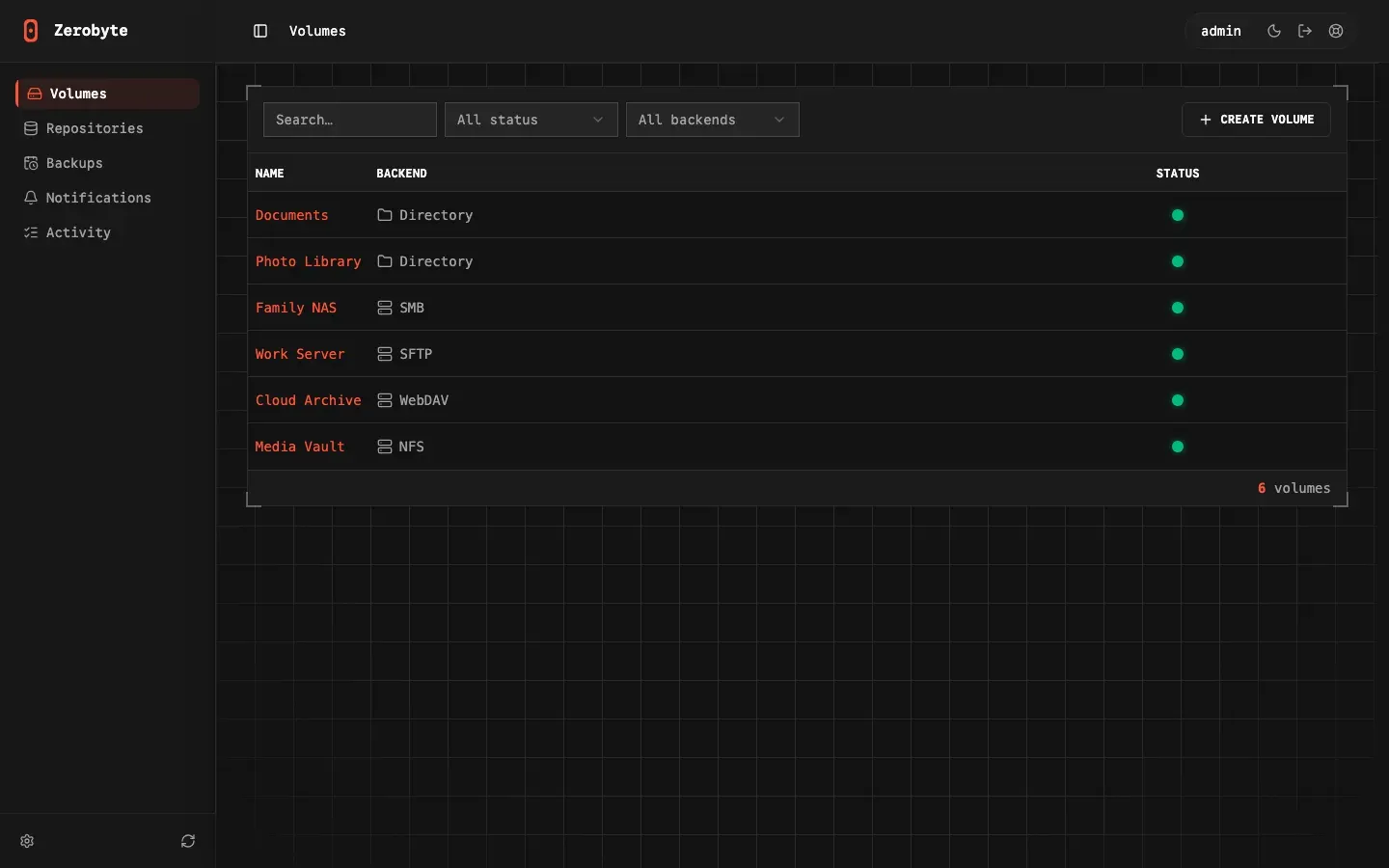
SYS_ADMINand/dev/fuse. In that mode only host directories bind-mounted into the container can be backed up, while all repository types (local, S3, GCS, Azure, rclone) remain available. - Six source types Sources can be a local directory mounted into the container, an NFS export (versions 3, 4 and 4.1), an SMB/CIFS share (protocol 1.0 to 3.0, with optional guest mode and domain), a WebDAV endpoint such as Nextcloud or ownCloud, an SFTP server with password or private key and known-hosts checking, or an rclone remote. Every type can be mounted read-only and browsed in the interface.
- Mount requirements and health checks Per the volumes documentation, NFS, SMB and WebDAV sources need the
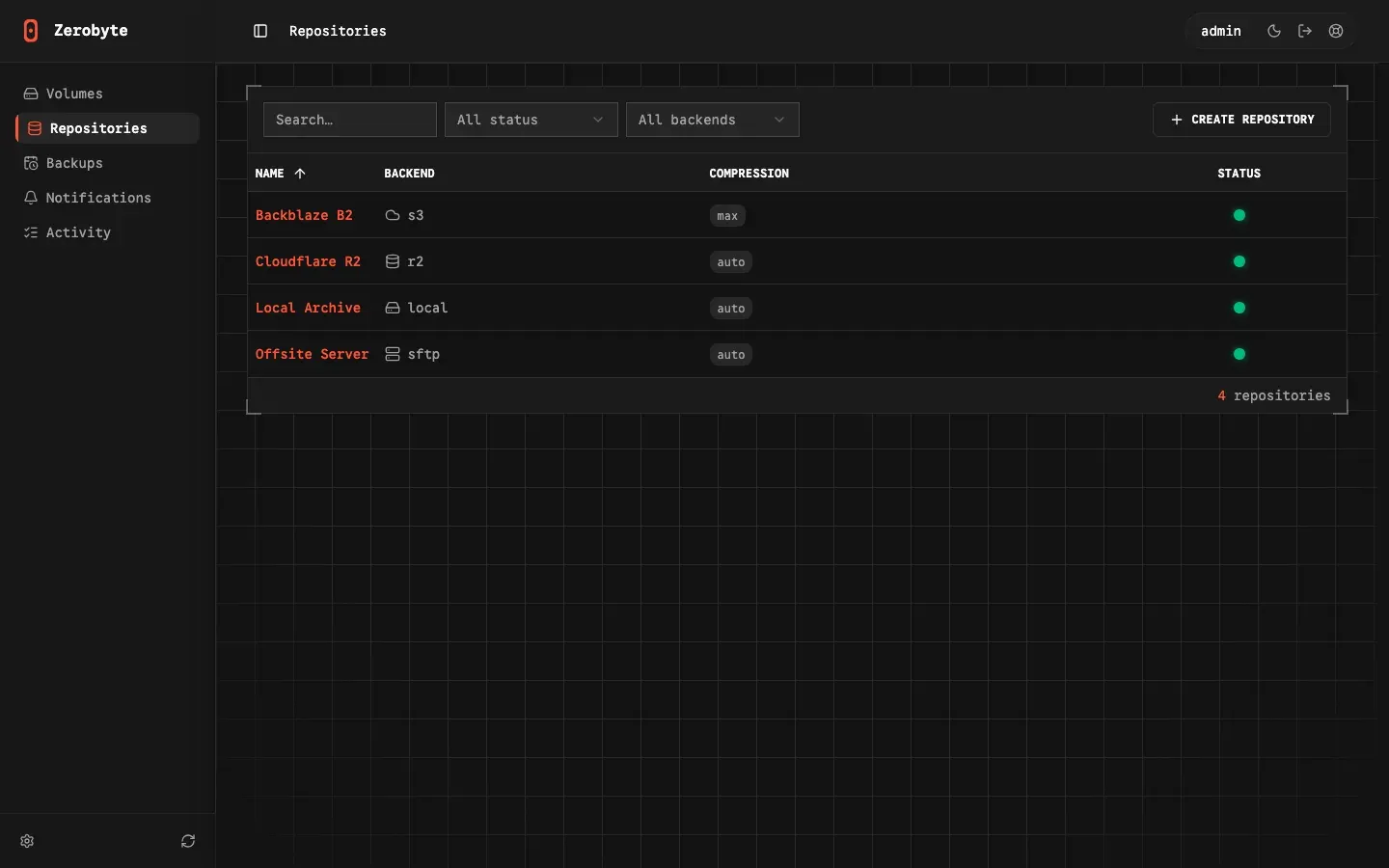
SYS_ADMINcapability, and SFTP and rclone sources need bothSYS_ADMINand/dev/fuse. Rclone sources are Linux-only, since Docker Desktop on macOS and Windows lacks FUSE mounts in containers. Each source shows a Mounted, Unmounted or Error state, and auto-remount, enabled by default, retries failed network mounts. - Eight repository backends The repositories page lists local directories, S3-compatible storage (Amazon S3, MinIO, Wasabi, Backblaze B2, DigitalOcean Spaces), Cloudflare R2, Google Cloud Storage with a service account, Azure Blob Storage, rclone remotes from a mounted
rclone.conf, a Restic REST server and SFTP. An existing Restic repository can be attached without re-initializing it. - Restic encryption and recovery key Data is encrypted by Restic before it leaves the server. Each organization has a Restic password stored as a recovery key (
restic.pass) that owners and admins can download after re-entering their password; the first admin is redirected to the download page until it has been saved. Imported repositories can use a custom password (recovery keys guide). Credentials for sources, repositories and notifications are encrypted in the database withAPP_SECRET; they are unrecoverable if that secret is lost. - Compression, bandwidth and performance settings Compression is set per repository to auto (default), off or max, and since v0.42.0 a backup job can override it. Upload and download limits per repository accept Kbps, Mbps or Gbps. The
GOMAXPROCSvariable caps CPU threads used by Restic, and each schedule accepts custom Restic parameters such as--read-concurrencyor--exclude-larger-than. - Backup jobs and scheduling A job combines one source, one repository, a schedule and an optional retention policy. Frequencies are Manual only, Hourly, Daily, Weekly, Specific days or a custom cron expression, evaluated in the container timezone (UTC if
TZis unset). Include paths and Restic exclude patterns narrow what is backed up, and the Backup now button starts an extra run at any time, as described in the backups documentation. - Retention policies Retention rules keep a number of last, daily, weekly, monthly and yearly snapshots, and a snapshot that matches any rule is kept. Restic prunes snapshots outside the policy after each backup. An empty policy is treated as disabled, so all snapshots are kept.
- Mirror repositories A backup job can copy each new snapshot to one or more additional repositories after a successful run. Since v0.43.0 the interface shows which snapshots are missing from a mirror and lets the user choose which to sync, and mirror synchronization shows live progress and can be cancelled.
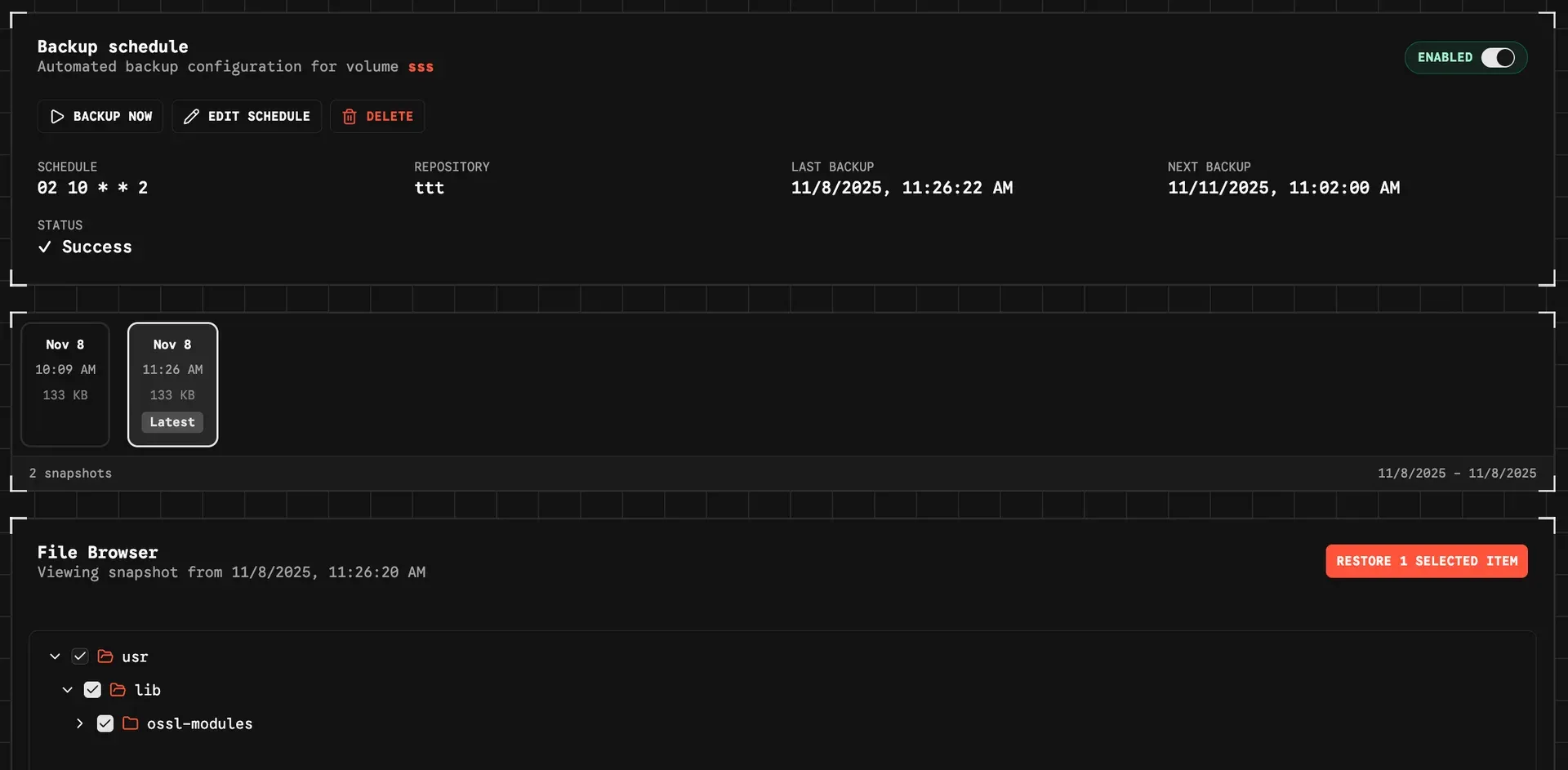
- Snapshot browsing, restore and download Snapshots can be browsed as a file tree with size, modification time and permissions. A restore writes selected files or the full snapshot back to the original location or to a custom path with a choice of overwrite behavior, and a running restore can be cancelled. The Download action retrieves a single selected item or the snapshot contents without writing them to a mounted path; restores to the original location are blocked for read-only sources. Details are in the restoring guide.
- Progress tracking and Activity log Running backups stream file counts, processed data and upload progress to the interface. Job pages show last and next run, last status, snapshot history and per-snapshot statistics. An Activity page added in v0.42.0 keeps a filterable history of background operations with live status and timing.
- Notifications Destinations include Email (SMTP), Slack, Discord, Gotify, ntfy, Pushover, Telegram, a generic webhook and custom Shoutrrr URLs. Every backup job routes the start, success, warning and failure events to chosen destinations independently. Custom HTTP targets must be listed in
WEBHOOK_ALLOWED_ORIGINS(notifications guide). - Pre- and post-backup webhooks Each job can call an HTTP endpoint with a POST request before Restic starts and after it finishes. A failed pre-backup hook stops the run, and a failed post-backup hook turns a clean backup into a warning. Requests time out after 60 seconds by default and must target an allowed origin; the webhooks guide includes an example that stops and restarts a Postgres container around the backup.
- Repository maintenance The Doctor action unlocks a repository, runs
restic checkand repairs the index if Restic reports that it is needed. The documentation notes that Doctor does not run a full--read-datacheck and does not prune unused data. A separate Unlock action removes stale locks. - Organizations, roles and single sign-on Repositories, sources, schedules and notification destinations belong to an organization, with member, admin and owner roles plus an instance-wide admin role. The organizations page states that there is no fine-grained RBAC for backup operations: every member can operate the organization's backup resources. OIDC providers are registered per organization and are invite-oriented, and accounts can use two-factor authentication and passkeys.
- REST API and API keys The API reference is an OpenAPI 3.1 document with 75 paths under
/api/v1, grouped into Auth, API Keys, Volumes, Repositories, Backups, Notifications, System, Tasks and Agents. API keys are created per user and organization in the settings and authenticate API v1 requests without a browser session. - Provisioning and configuration export A JSON file set with
PROVISIONING_PATHdeclares repositories and sources that are synced at startup, with credentials resolved fromenv://variables orfile://Docker secrets. Backup jobs and notifications are not covered (provisioning guide). Separately, v0.43.0 added an encrypted export of an organization's full configuration (a.zbexfile protected by a passphrase) for import into another instance. - Desktop builds and remote agents in development Each release attaches desktop builds (Windows x64 installer, macOS arm64 DMG, Linux AppImage) that the release notes label alpha and not officially supported. Remote agents, enabled with
ENABLE_REMOTE_AGENTS=true, are documented for Linux x64 or ARM64 with glibc, systemd and Restic 0.18.0 or newer, or as theghcr.io/nicotsx/zerobyte-agentcontainer; the guide marks the feature as unreleased.
Where Zerobyte fits
Backing up a NAS share over NFS or SMB
With the standard Compose file (including SYS_ADMIN), a NAS export is added as an NFS source with server, export path and protocol version, or as an SMB source with share name, credentials and SMB version. The source can be mounted read-only, and its health status and auto-remount setting are shown on the source page. A backup job then links the source to a repository with a schedule and retention rules; the documentation names Synology, QNAP and TrueNAS as typical NFS targets.
Protecting Docker host data with bind mounts
For data on the Docker host itself, the documented approach is to bind-mount host folders such as photos, documents or application data into the container and create a Directory source for each container path. This works with the reduced-privilege Compose file that drops SYS_ADMIN and /dev/fuse. Read-only bind mounts protect the source data but block restores to the original location. Pre- and post-backup webhooks can stop and start a container around the run, as in the Postgres example of the webhooks guide.
Following a 3-2-1 layout with mirror repositories
The 3-2-1 guide maps the rule to Zerobyte as live data, a primary repository on fast local storage and a mirror repository offsite on S3-compatible storage, Cloudflare R2, Google Cloud Storage, Azure Blob Storage, SFTP or a REST server. The backup job writes to the primary repository and copies each snapshot to the mirror after a successful run. The guide also covers storing the organization recovery key outside the server, since an offsite copy cannot be decrypted without it.
Restoring files from a snapshot
Recovery starts from the backup job: pick a snapshot, browse its file tree, select files or folders (or nothing, for the whole scope), then choose the original location or a custom path and the overwrite behavior. The restore runs as a background task with progress and can be cancelled. For a single file or a one-off copy to a workstation, the Download action retrieves the selection instead of writing it to a mounted path.
Getting alerts on failed or partial backups
Notification destinations are created once under Notifications, each with a Test button, and then attached to backup jobs with the events they receive. A common pattern described in the notifications guide is failures by email, warnings to a team chat such as Slack or Discord, and successes nowhere. Self-hosted push servers such as ntfy or Gotify need their origin in WEBHOOK_ALLOWED_ORIGINS.
Private access and shared administration
Because the README discourages exposing Zerobyte directly to the internet, the documentation includes a reverse proxy guide for HTTPS with secure cookies and a Tailscale sidecar guide for access over a private tailnet. For shared administration, an organization can register an OIDC provider for invite-based sign-in and assign member, admin or owner roles; the documentation states that all members can operate the organization's backup resources. Repositories and sources can also be declared in a provisioning file, with secrets taken from environment variables or Docker secrets.
Reviews of Zerobyte
Be the first to share your experience with Zerobyte.
Write a review
Loading review form…
Found Zerobyte useful? Upvote it todayYour vote helps other IT teams find it in the daily ranking.