

What is Veeam?
Veeam Software is a data protection company. Its about page says the Veeam story starts in 2006 and cites more than 7,000 employees. The boilerplate of its July 2026 press release describes Veeam as the Data and AI Trust Company, headquartered in Seattle with offices in more than 30 countries, protecting over 550,000 customers worldwide.
The core on-premises product is Veeam Backup & Replication, sold as part of Veeam Data Platform. Veeam describes the platform as protecting cloud, virtual, physical, application and unstructured data. It is available in three editions: Foundation (backup and recovery for every workload), Advanced (adding monitoring, analytics and threat insights) and Premium (adding orchestrated recovery and cyber resilience). Licences are metered per workload through the portable Veeam Universal License.
Veeam Data Platform v13 was launched on November 19, 2025. It introduced the Veeam Software Appliance, a hardened Linux-based appliance that updates itself and supports high availability, plus a browser-based web console, SAML single sign-on, immutability by default and Recon Scanner 3.0 in the Premium edition. Version 13.1 became generally available on July 29, 2026 and added six hypervisors (Red Hat OpenShift Virtualization, Sangfor aSV, XCP-ng, Citrix XenServer, VergeIO and Platform9), for a total of 14, plus EPIC EHR, Db2 on Windows and Oracle support, NAS malware scanning and Active Directory forest recovery. The Veeam build list (KB2680) shows Backup & Replication 13.1.2, build 13.1.2.57, dated October 27, 2026, as the most recent build.
The product family also includes Veeam Kasten for Kubernetes (formerly Kasten K10), Veeam Backup for AWS and Azure, Veeam Backup for Microsoft 365, and Veeam Data Cloud services. A free Community Edition of Backup & Replication protects up to 10 workloads without technical support. Veeam software is proprietary and closed source; documentation is published in the Veeam Help Center. Similar listings on iThub: Acronis and Rescuezilla.
Veeam screenshots
Explore the interface. Open a screenshot to view it at full size.
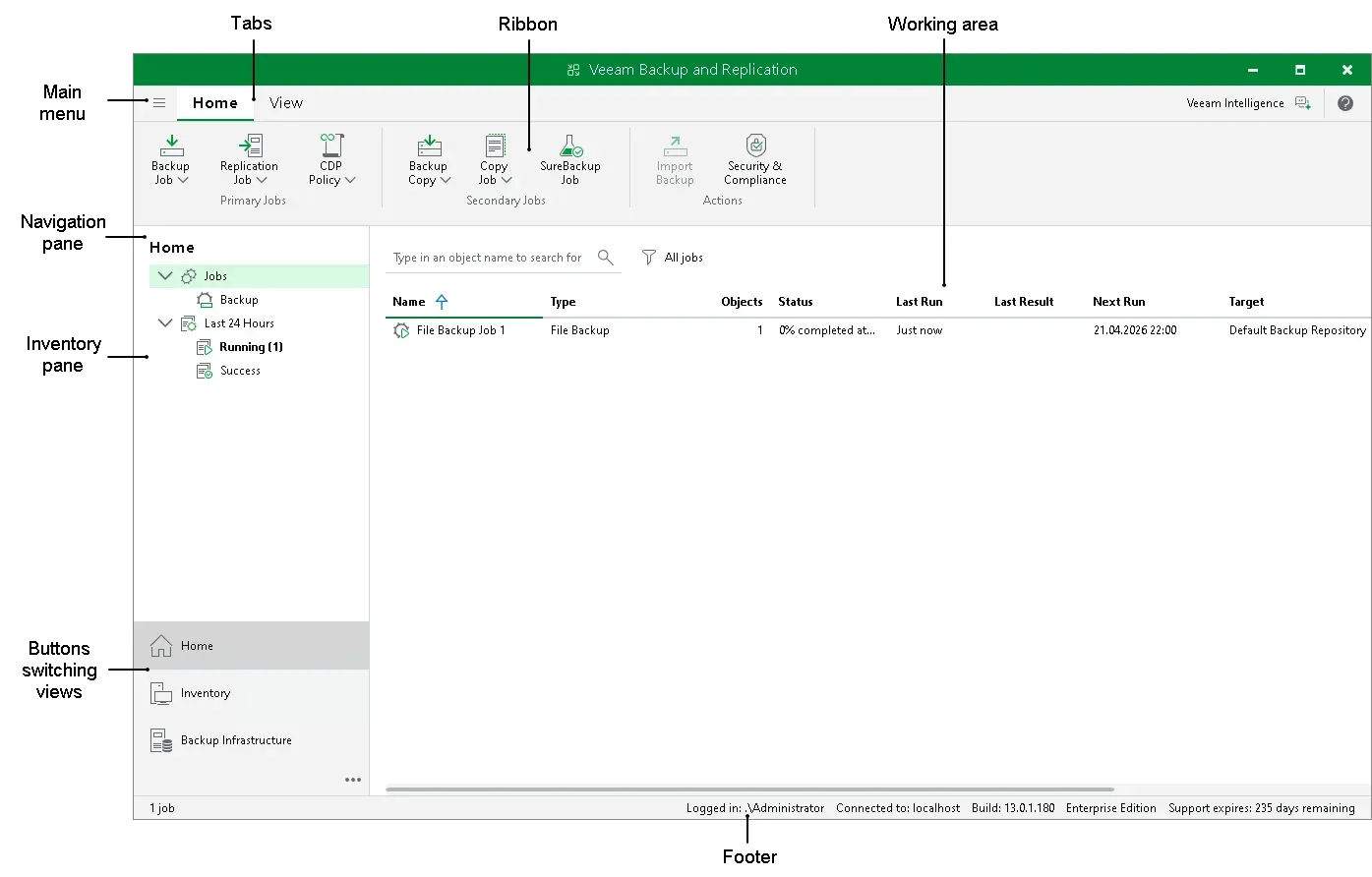
Official Veeam Help Center figure of the Backup & Replication console layout.
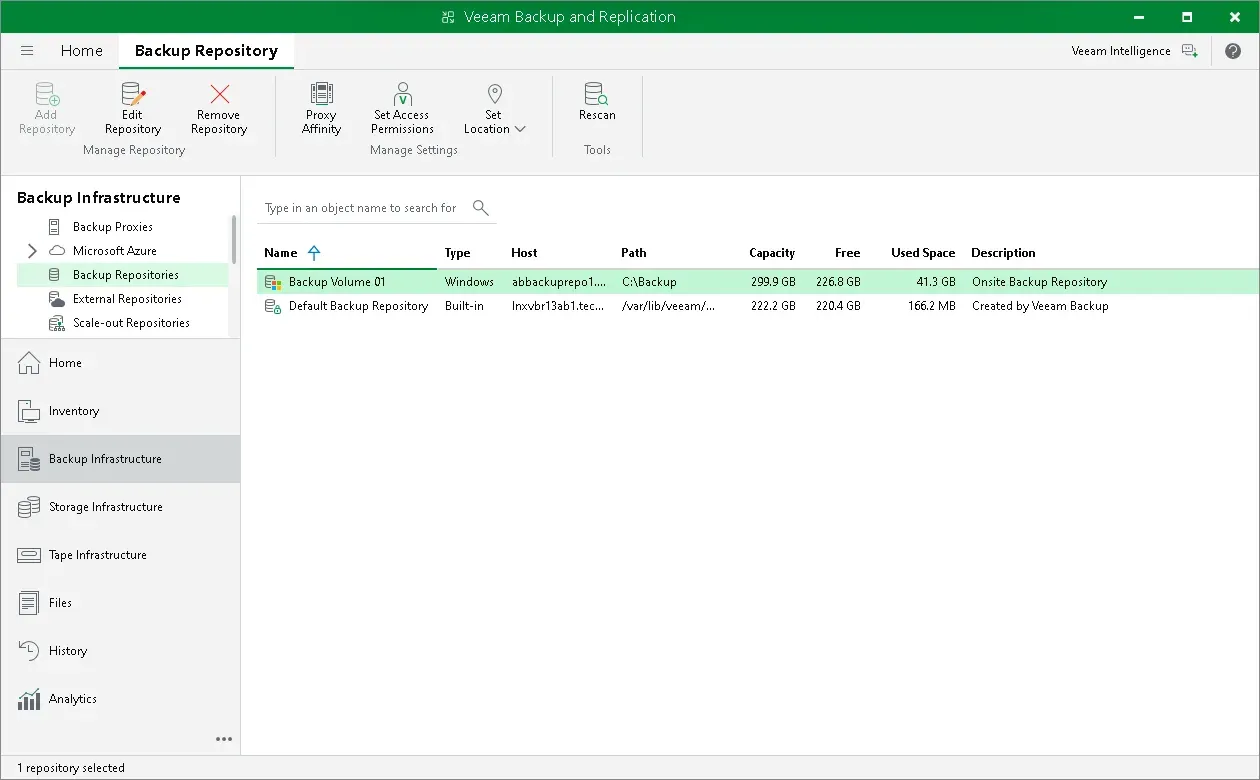
Backup Infrastructure view with the backup repositories list and the navigation pane.
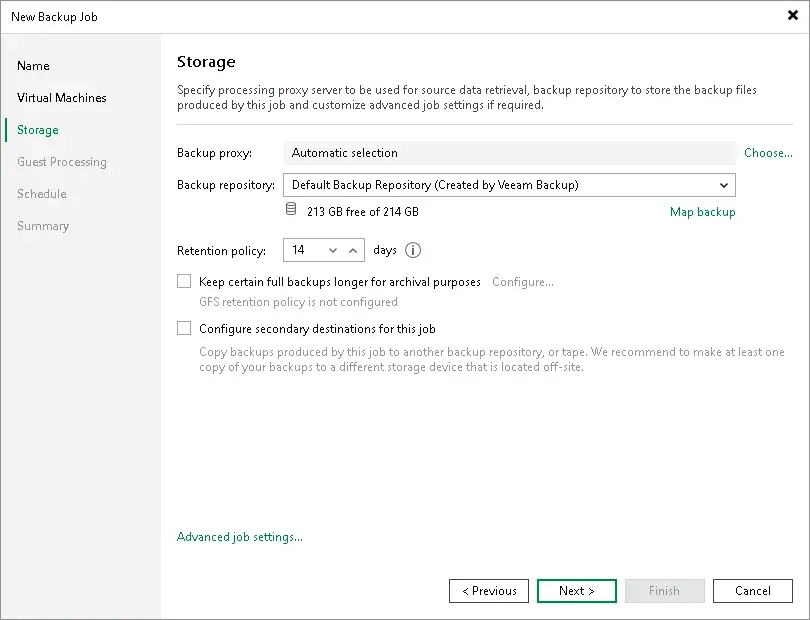
New Backup Job wizard, Storage step: proxy, repository, retention policy and secondary destination options.
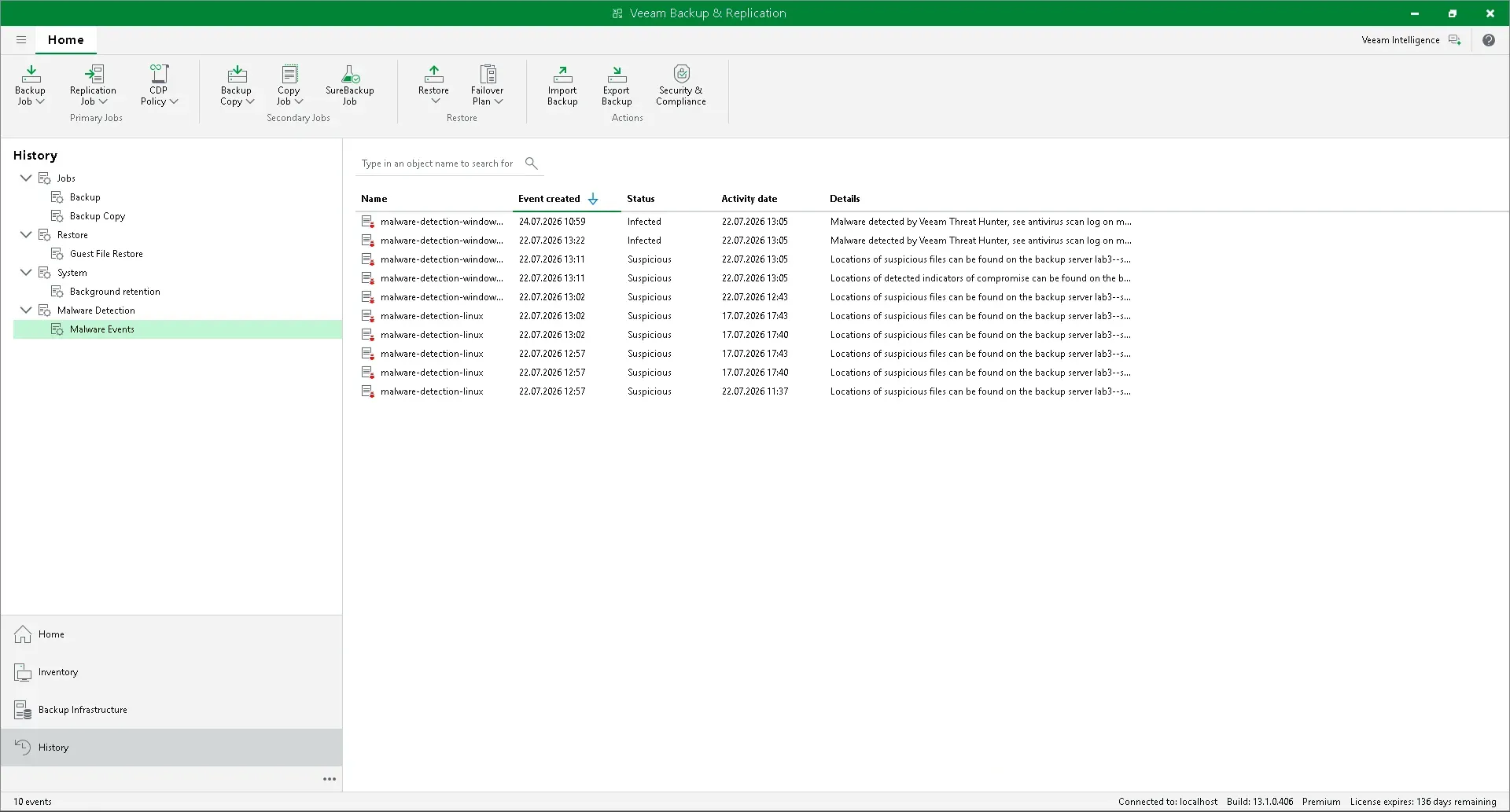
Malware detection events listed in the console History view.
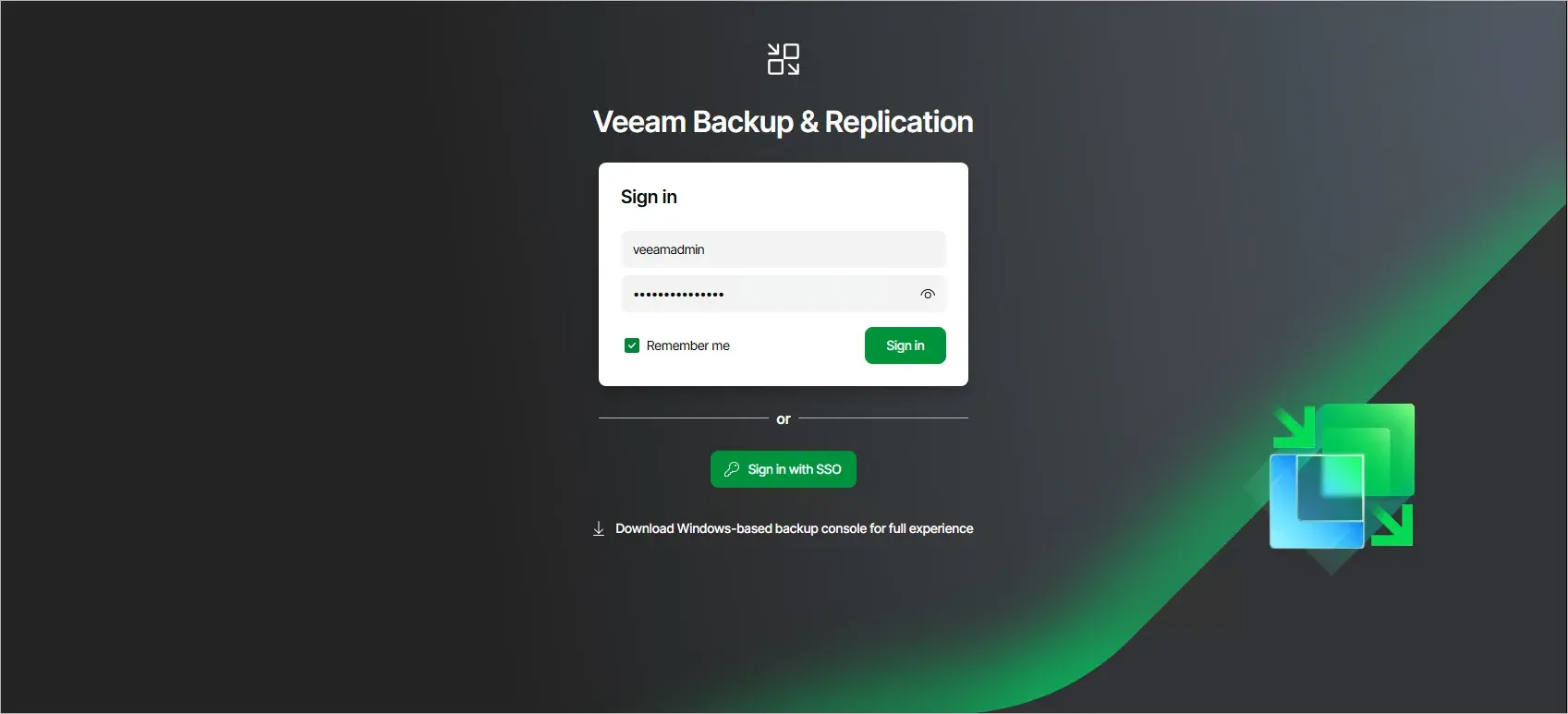
Sign-in page of the Veeam Backup & Replication web UI introduced with version 13.
Source: official Veeam project page.
Key capabilities
- Backup & Replication server The backup server coordinates jobs, proxies and repositories. The v13 user guide lists the Windows installer (with a silent mode) and Linux-based options: the Veeam Software Appliance, deployed from ISO, OVA or a Hyper-V template, and the Veeam Infrastructure Appliance for proxies and repositories. High availability cluster configurations are documented.
- Console and web UI Administrators use the Backup & Replication Console, a Windows application with a ribbon, navigation pane, inventory pane and working area, or the browser-based web UI added in v13. Both are described in the console UI documentation.
- Workload coverage Veeam lists VMware vSphere, Microsoft Hyper-V, Nutanix AHV, Proxmox VE and other hypervisors, Windows and Linux servers, NAS and file shares, and workloads on AWS, Azure and Google Cloud. With v13.1, Veeam states that 14 hypervisor platforms are supported, with more planned through a Universal Hypervisor API.
- Backup jobs and retention Backup jobs are created in a wizard that sets the job name, the objects to protect, the backup proxy, the backup repository and the retention policy in days. Jobs can also be configured to keep GFS full backups for archival purposes and to copy backups to a secondary destination.
- Backup repositories Supported repository types in the user guide include Windows, Linux, hardened Linux repositories, SMB and NFS shares, deduplicating storage appliances and object storage such as Amazon S3 and S3-compatible storage. Veeam Data Cloud Vault is offered as a Veeam-managed cloud storage target.
- Immutability and access control Veeam states that v13 makes backups immutable by default. The FAQ describes immutable repositories, granular role-based access control and four-eyes approvals for sensitive operations, and the user guide documents multi-factor authentication and data encryption.
- Malware detection The malware detection features include file system activity analysis, inline scanning during backup, scanning of existing backups and secure restore, which scans restore points before data is restored. Detection events are listed in the console with object, event type and details.
- Instant Recovery Instant Recovery starts a workload directly from a backup to shorten restore time. Targets documented by Veeam include VMware vSphere, Nutanix AHV and, since v13, Microsoft Azure.
- Granular restore with Veeam Explorers Veeam Explorers restore individual items from backups of Microsoft applications such as Active Directory and SQL Server. The Community Edition page lists file and application-item restore among its features.
- Replication and disaster recovery Replication creates bootable copies of VMs onsite or offsite for migration and disaster recovery. The Premium edition adds orchestrated recovery, and v13.1 adds Active Directory forest recovery for restoring identity after an incident.
- Recon Scanner and threat integrations Recon Scanner 3.0, powered by Coveware by Veeam, flags suspicious activity such as brute force attempts and maps findings to MITRE ATT&CK; it is included with the Premium edition. Veeam lists integrations with CrowdStrike, Palo Alto Networks, Splunk, ServiceNow and Microsoft Sentinel.
- Veeam Kasten for Kubernetes Kasten runs inside a Kubernetes cluster and installs with Helm. Veeam lists Amazon EKS, Azure AKS, Google GKE, Red Hat OpenShift, SUSE Rancher, VMware Tanzu, upstream Kubernetes and K3s among supported platforms, with KubeVirt VM protection, cross-cluster mobility and node-based subscriptions.
- REST API and PowerShell Backup & Replication exposes a REST API reference for v13 and a PowerShell module for automation.
- Editions and licensing Veeam Data Platform comes in Foundation, Advanced and Premium editions, each building on the previous one. Licences are metered per workload with the Veeam Universal License. The packaging page states no list prices and offers request pricing, online purchase and a 30-day trial.
- Free Community Edition Veeam Backup & Replication Community Edition is free for up to 10 workloads, covering Proxmox VE, VMware, Hyper-V, Windows and Linux servers, laptops and NAS. It does not include technical support; Veeam Data Platform Essentials covers up to 50 workloads. Downloading requires registration and email verification.
Where Veeam fits
Backing up a virtualized data center
Administrators add VMware vSphere, Hyper-V, Nutanix AHV or Proxmox VE hosts to the backup infrastructure, then create backup jobs that select VMs, a proxy, a repository and a retention policy. Backups can be copied to a secondary repository or object storage to keep an offsite copy.
Recovering quickly after an outage
Instant Recovery runs a VM or server directly from a backup file while it is moved back to production storage. Veeam documents Instant Recovery to VMware vSphere, Nutanix AHV and Microsoft Azure, alongside full VM, disk, file and application-item restores.
Ransomware protection and clean restore
Backups are stored in immutable or hardened repositories so they cannot be changed or deleted during the retention period. Inline scanning and file system activity analysis flag suspicious changes, and secure restore scans restore points for malware before data is restored. The FAQ describes restoring to an isolated environment to confirm a known good point.
Protecting physical servers and endpoints
Veeam Agents for Windows and Linux are managed from the Backup & Replication console through jobs or policies. According to the Community Edition page, on-premises Windows and Linux VMs, physical servers and endpoints can be restored or migrated to AWS, Azure or Azure Stack.
Protecting Kubernetes applications
Veeam Kasten is installed in its own namespace with a Helm command and protects application data inside and outside the cluster. It supports granular restore, recreation of application stacks in the same or another namespace, and moving applications across clusters and clouds.
Running a hardened backup appliance
Since v13, the backup server can run as the Veeam Software Appliance, a pre-hardened Linux appliance with automated updates, managed through the web UI. Veeam supports high availability for the appliance and dark site deployments for disconnected environments.
Reviews of Veeam
Be the first to share your experience with Veeam.
Write a review
Loading review form…
Alternatives to Veeam
 AcronisAcronis Cyber Protect combines image and file backup, disaster recovery, anti-malware, EDR, patch management and email archiving. It runs as a cloud service or as Cyber Protect Local on premises, under subscription licences.RRescuezillaRescuezilla is a graphical disk imaging and cloning tool, compatible with Clonezilla, that boots from a USB stick on any PC or Mac.