

What is Acronis?
Acronis is a Swiss technology company founded in Singapore. Its company page states that it is headquartered in Schaffhausen, Switzerland, serves businesses in more than 150 countries and protects more than 750,000 businesses, with more than 21,000 service providers using its products. An Acronis anniversary post dates the founding to 2003 in Singapore, with incorporation in Switzerland five years later.
The main business product is Acronis Cyber Protect. The product page groups it into five areas: backup, security, disaster recovery, endpoint management and email archiving. Backup covers full-image and file-level backup, immutable backup and continuous data protection; security covers anti-malware, exploit prevention, vulnerability assessment, URL filtering and endpoint detection and response (EDR). The agent is modular: Acronis states that it can run as backup only, with the security modules optional.
Cyber Protect is sold in the Standard, Advanced and Backup Advanced editions, with Email Archiving as a separate licence. It can be deployed from the Acronis cloud or locally. Acronis Cyber Protect Local uses an on-premises management server for sovereign private cloud, air-gapped operational technology (OT) and enterprise edge sites. Related products named on the site include Cyber Protect Enterprise, Cyber Protect OT, Cyber Protect Small Business and Acronis True Image for home users.
For managed service providers, Acronis offers a multitenant platform. Its service provider page now calls it Acronis Cyber Platform and says the name Acronis Cyber Protect Cloud is no longer actively used. That page lists backup and disaster recovery, MDR, EDR, data loss prevention, email security, remote monitoring and management (RMM), patch management, a service desk and hybrid infrastructure services, deployed in more than 50 Acronis data centers, with more than 300 integrations.
Acronis Cyber Protect is closed-source commercial software. Licences are subscriptions for one, three or five years. Developers can build integrations through the Acronis Public API and CyberApp framework, documented on the Acronis developer portal. Similar listings on iThub: Veeam for backup and recovery, and Bitdefender or ESET for endpoint protection.
Acronis screenshots
Explore the interface. Open a screenshot to view it at full size.
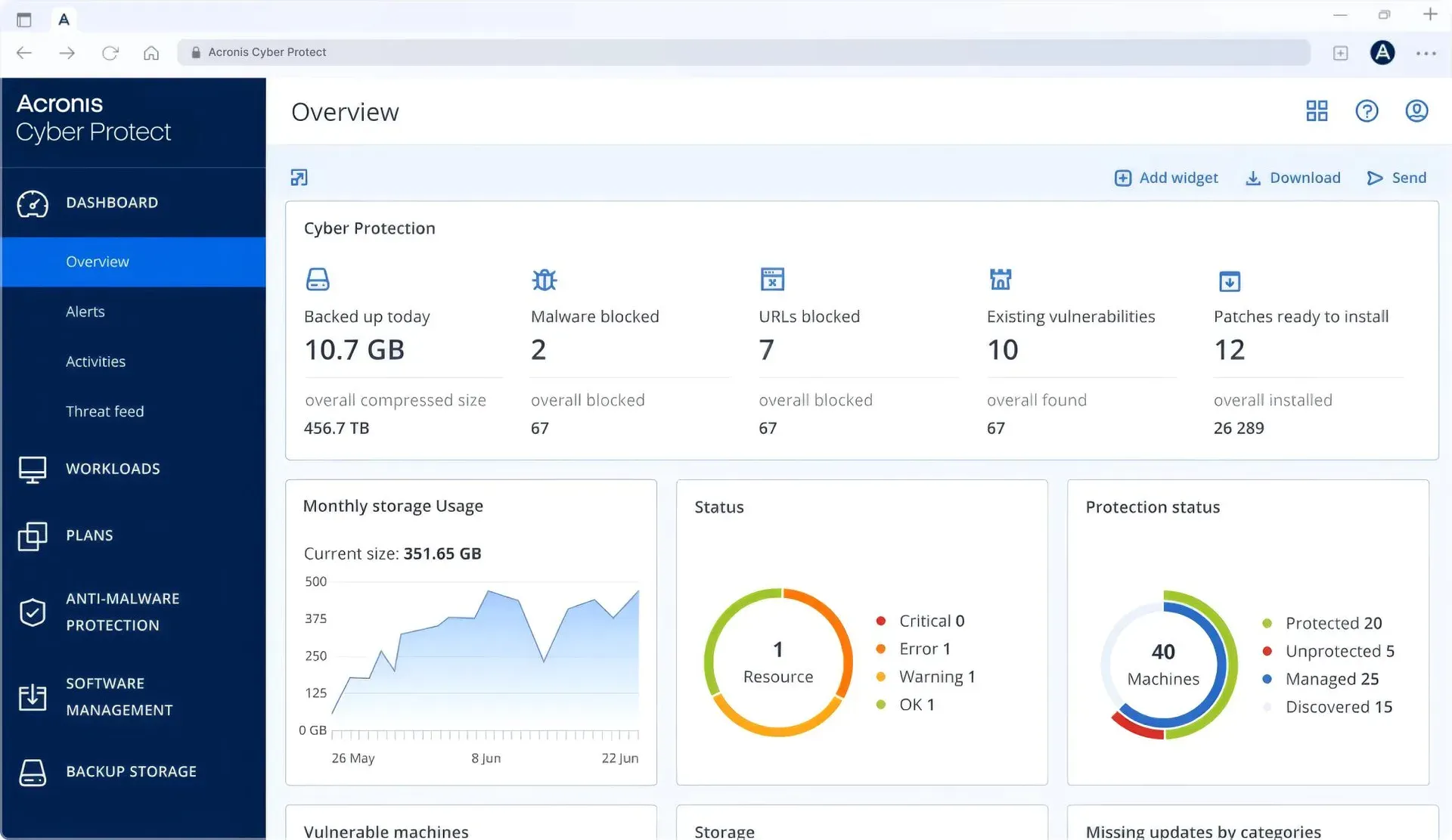
Official Acronis screenshot of the Cyber Protect overview dashboard with storage usage, status and protection status widgets.
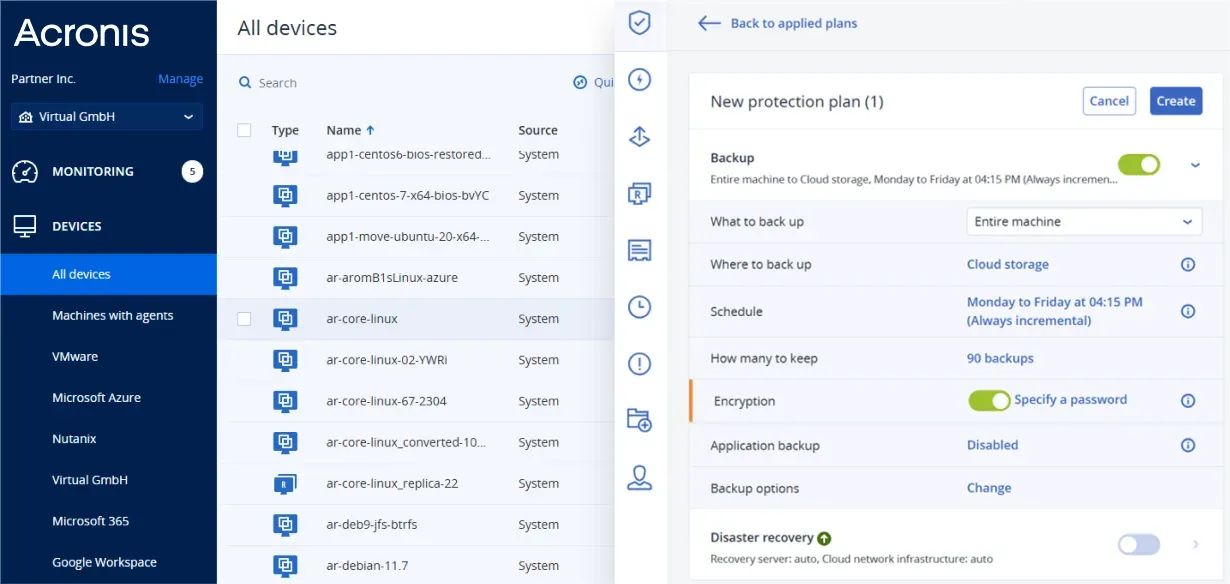
Creating a protection plan: entire machine to cloud storage, weekday schedule, 90 backups kept and encryption.
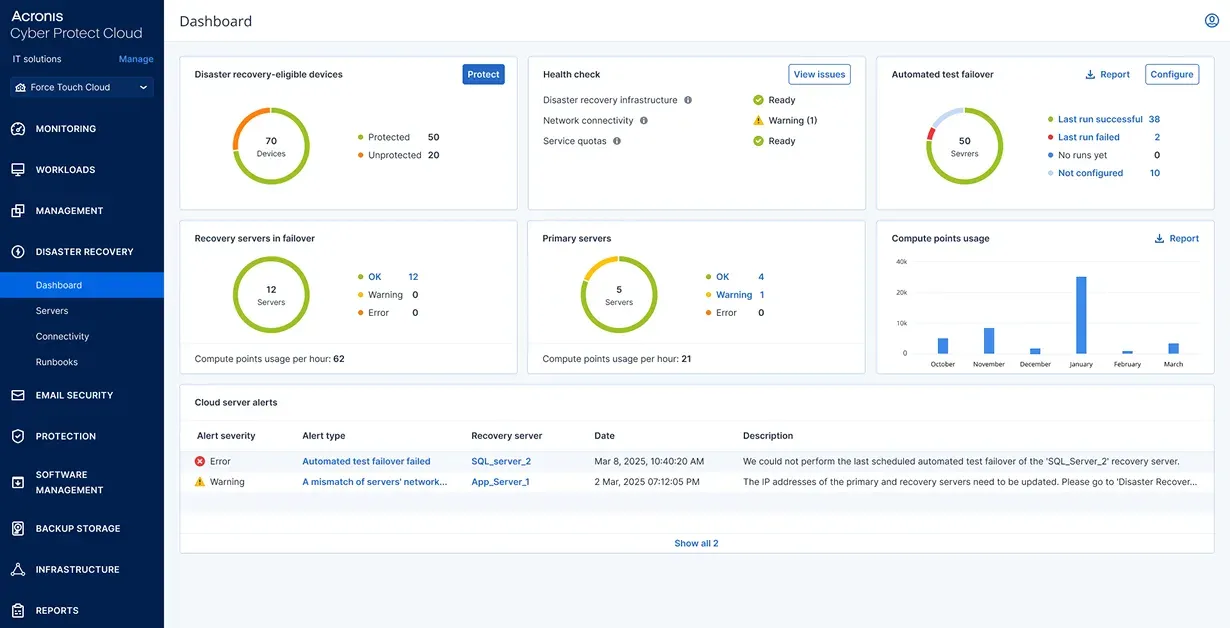
Dashboard with disaster recovery status, cloud server status and backup storage widgets.
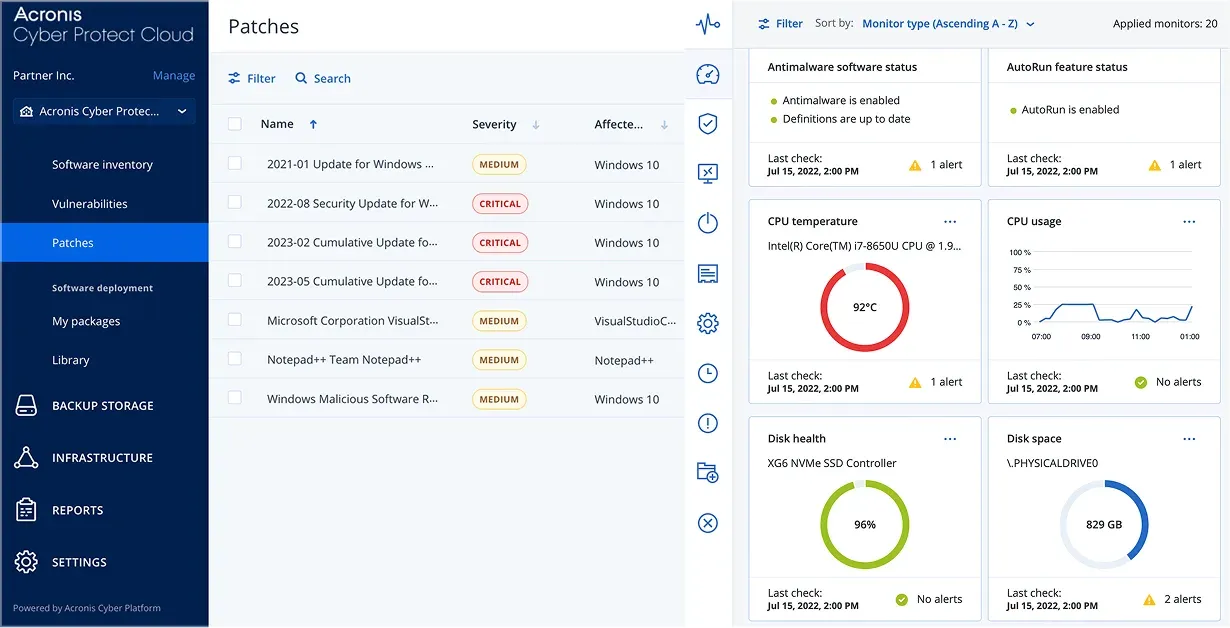
Patch management view listing available updates by severity, with device monitoring widgets.
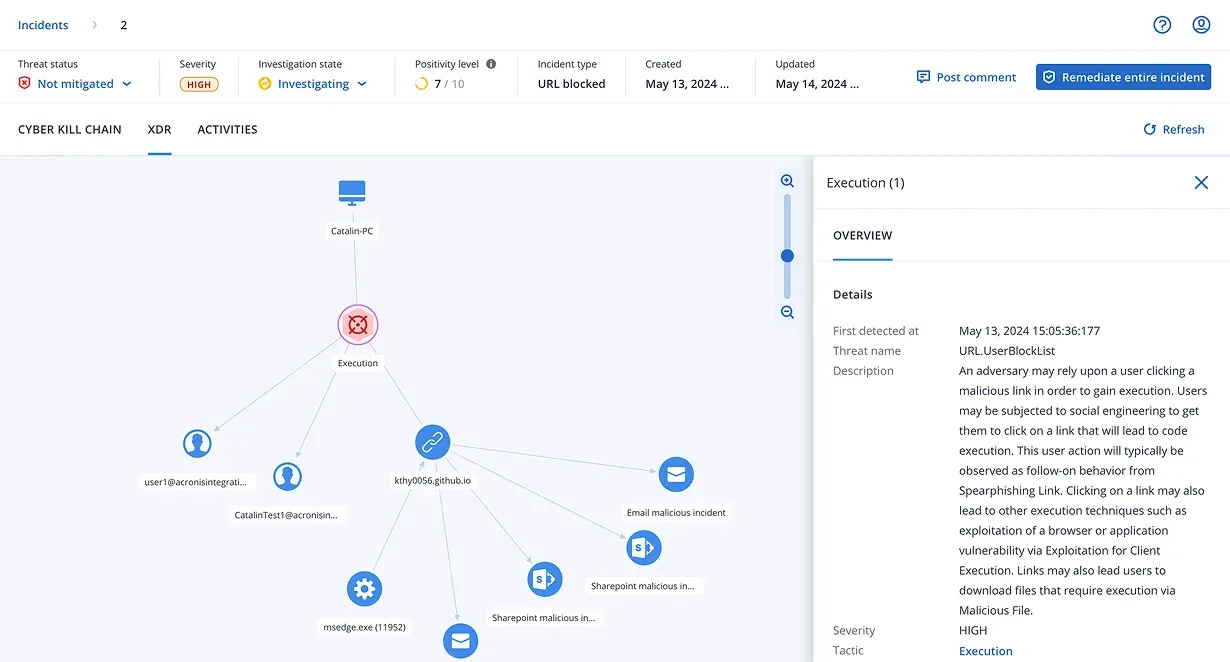
Incident detail in the XDR tab with threat status, severity, investigation state and a remediate entire incident action.
Source: official Acronis project page.
Key capabilities
- Image and file-level backup Cyber Protect backs up entire machines, disks, volumes or individual files. The product page lists immutable backup, rapid recovery, fail-safe patching (a backup before a patch is applied) and continuous data protection. Backup validation uses checksums and, according to the FAQ, AI-assisted post-boot screenshot or heartbeat checks.
- Flexible backup destinations Backups can be written to Acronis Cloud, local or network storage, or public and S3-compatible storage such as Amazon S3. Each licence includes Acronis-hosted cloud storage: 250 GB per server or virtual host, 50 GB per workstation, 40 GB per public cloud VM and 150 GB for Windows Essentials, shared across the account. Additional cloud storage is licensed separately.
- Protection plans Backup, schedules, retention, encryption and disaster recovery are configured in protection plans applied to devices in the web console. Acronis notes that newly created VMs typically must be assigned to a protection plan or policy before they are protected.
- Disaster recovery The disaster recovery module provides failover to cloud replicas of applications and data. Acronis states that replicas are scanned for malware and vulnerabilities before restore, and lists instant failback to a VM, failover to safe restore points and runbooks for automated recovery. Disaster recovery is licensed separately.
- Anti-malware and EDR The security layer includes anti-malware and antivirus, AI-based ransomware protection, exploit prevention, advanced threat monitoring, secure URL filtering and protection for collaboration tools. Endpoint detection and response is part of the Advanced edition and available with cloud deployment only, according to the purchasing page.
- Backup malware scanning and safe recovery In the Advanced edition, backups can be scanned for malware in Acronis Cloud, and safe recovery restores from points that pass the scan. The same edition adds centralized backup plan management, tape support, SAN snapshots and Acronis Notary.
- Endpoint management Management features include vulnerability assessment, patch management, software and hardware inventory, Cyber Scripting, machine learning based performance monitoring, remote desktop, asset discovery and remote monitoring.
- Email archiving for Microsoft 365 Email Archiving is a SaaS archive with immutable storage, a web console and audit logging. Acronis cites GDPR, HIPAA and NIS2 as regulations the feature supports. It is sold in five-seat packs.
- Microsoft 365, Google Workspace and SAP HANA backup The Backup Advanced edition is the only edition listed with Microsoft 365, Google Workspace and SAP HANA backup. Microsoft 365 and Google Workspace backup are cloud-only, sold in five-seat packs with one, three or five year terms, and include unlimited cloud storage.
- Broad workload coverage Supported workloads named on the product page include Windows from XP onward (excluding Vista), macOS 10.9 and later, Android 7.0 and later, iOS 12.0 and later, Windows and Linux servers, and VMware vSphere, Hyper-V, Nutanix, Azure VM, Proxmox, Citrix Hypervisor, Scale Computing HyperCore, Red Hat virtualization, Oracle and Virtuozzo platforms.
- Three editions Standard is described for small environments, including Windows Essentials and Hyper-V, Virtuozzo and VMware vSphere hosts. Advanced adds EDR, backup scanning and support for XenServer, KVM, RHV and Oracle VM Server. Backup Advanced targets backup without security features and includes ransomware and cryptojacking protection.
- Cyber Protect Local The local deployment runs a dedicated on-premises management server with local-only or hybrid cloud storage. Acronis states it can be deployed fully within a perimeter for disconnected environments, supports legacy systems back to Windows XP, and includes P2V and V2V migration and one-click self-service recovery. Each local licence allows an unlimited number of VMs per licensed virtual host.
- Operational technology protection Cyber Protect OT is aimed at OT and industrial control system equipment, with image-based recovery for air-gapped systems. The product page lists IEC 62443-4-1 among Acronis certifications.
- Service provider platform Acronis Cyber Platform, formerly Cyber Protect Cloud, is multitenant and billed to service providers by monthly usage in arrears, while IT departments buy annual subscriptions of one to three years. It includes RMM and PSA capabilities and integrates with third-party RMM and PSA tools.
- APIs and integrations Acronis provides a Public API, the CyberApp integration framework, an API library and Postman collections. The developer page lists more than 300 integrations in its integrations catalog.
- Compliance and certifications The product page lists GDPR, NIS2, HIPAA, ISO 27001 and PCI DSS, and certification badges for SOC 2, GDPR and IEC 62443-4-1. Compliance details are published in the Acronis trust center.
- Licensing Licences are subscriptions per protected workload (workstation, server, virtual host), with every cluster node licensed. Cloud deployment requires a subscription licence; on-premises deployment is required for machines without internet access. Prices vary by region, workload and deployment model and are quoted through a price calculator, sales or partners.
Where Acronis fits
Backing up servers, workstations and virtual machines
An agent is installed on each machine, or a host-level agent protects virtual machines. Administrators create a protection plan that defines what to back up (entire machine or files), where to store it (Acronis Cloud, local or network storage, or S3-compatible storage), the schedule, the number of backups to keep and encryption. The product page lists VMware vSphere, Hyper-V, Nutanix, Proxmox and other hypervisors among supported platforms.
Recovering from ransomware
Acronis combines AI-based ransomware protection with immutable backup. In the Advanced edition, backups can be scanned for malware in Acronis Cloud before restore, and safe recovery restores data from clean points. The EDR module shows incidents with a cyber kill chain and XDR view and offers remediation of an entire incident from the console.
Failing over to cloud replicas
With the disaster recovery service, protected workloads can fail over to cloud replicas in Acronis data centers after an outage or breach. Runbooks automate multi-step recovery, and failback returns workloads to a VM. Acronis states that replicas are checked for malware and vulnerabilities before restore.
Patching and managing endpoints
The endpoint management module runs vulnerability assessments, lists available patches by severity and affected product, and deploys approved patches. Fail-safe patching takes a backup before patches are applied. Inventory, remote desktop, scripting and performance monitoring are part of the same console.
Protecting Microsoft 365 and Google Workspace
Backup Advanced covers cloud-to-cloud backup of Microsoft 365 and Google Workspace in five-seat packs with unlimited cloud storage. Email Archiving for Microsoft 365 keeps an immutable archive with audit logging for compliance and legal retention.
Protecting air-gapped and OT sites
Cyber Protect Local keeps management and storage on premises for sites without internet access, such as OT and industrial control systems. Acronis lists support for legacy Windows systems back to Windows XP, image-based recovery and P2V and V2V migration for these environments.
Reviews of Acronis
Be the first to share your experience with Acronis.
Write a review
Loading review form…
Alternatives to Acronis
 VeeamVeeam Data Platform, built on Veeam Backup & Replication, backs up and restores virtual, physical, cloud and application workloads, with immutable repositories, malware detection and Instant Recovery. A free Community Edition covers 10 workloads.
 BitdefenderBitdefender GravityZone is a business security platform for endpoint protection, detection and response, risk management and ransomware mitigation.
 ESETESET sells endpoint security managed from the ESET PROTECT web console, with ESET Inspect adding XDR-enabling detection and a managed detection service.