

What is Pluton?
Pluton is a self-hosted backup management platform from Amplebyte LLC. It uses Restic for incremental, deduplicated and encrypted backups and Rclone for connections to cloud and remote storage, and wraps both in a web interface for creating backup plans, watching progress and restoring data. The introduction describes a Node.js and Express REST API with a SQLite database, a React-based progressive web app as the frontend, and Restic and Rclone as the backup engine. Pluton runs on Linux, macOS and Windows, on x64 and ARM64, and the website states an idle memory footprint of about 50 MB.
Pluton is distributed in several forms. A Docker image (plutonhq/pluton) runs with Docker Compose and a persistent /data volume. Desktop installers cover Windows 10 and 11 (x64 setup executable) and Linux desktops (x64 and ARM64 AppImage), and macOS Monterey or later is installed through the project's Homebrew tap on Apple Silicon or Intel. Headless Linux servers use an install script that creates a systemd service running as a dedicated non-root pluton user. Every installation asks for an encryption key of at least 12 characters and an admin username and password on first setup.
The latest release is pluton-v0.22.0, published on November 2, 2026. It adds a refactored snapshot browser for very large file lists, prevents command execution through Rclone source paths and fixes restores for unencrypted backup plans. Version 0.21.1 stopped storing some storage credential fields as plain text in the database, 0.21.0 added resumable snapshot downloads and fixed two-factor login, 0.20.0 added browsing of storage files and updated Rclone to 1.75.1, and 0.18.0 introduced backup and restore of Pluton's own configuration. The project is still in the 0.x version range, with frequent releases since early 2026.
Pluton comes in two editions. The open-source edition is licensed under the Apache License 2.0; the README credits Restic (BSD 2-Clause) and Rclone (MIT) as the underlying tools. Pluton PRO is a closed-source, self-hosted edition that adds remote machine backups through a Pluton Agent, real-time sync plans, full Linux server backups with bare-metal recovery, automated recovery testing and snapshot browsing and comparison. The pricing page states that Pluton does not have a cloud offering and that the PRO edition is also self-hosted by the user.
According to the pricing page, the open-source Basic edition costs $0, PRO costs $59 per year including 5 remote machines plus $12 per year for each additional machine, and a PLUS plan at $99 per year (database and virtual machine backups, role-based access, third-party secret providers, white-labeling) is listed as coming soon. Payments carry a 30-day money-back guarantee. Other backup listings on iThub include Veeam and Acronis.
Pluton screenshots
Explore the interface. Open a screenshot to view it at full size.
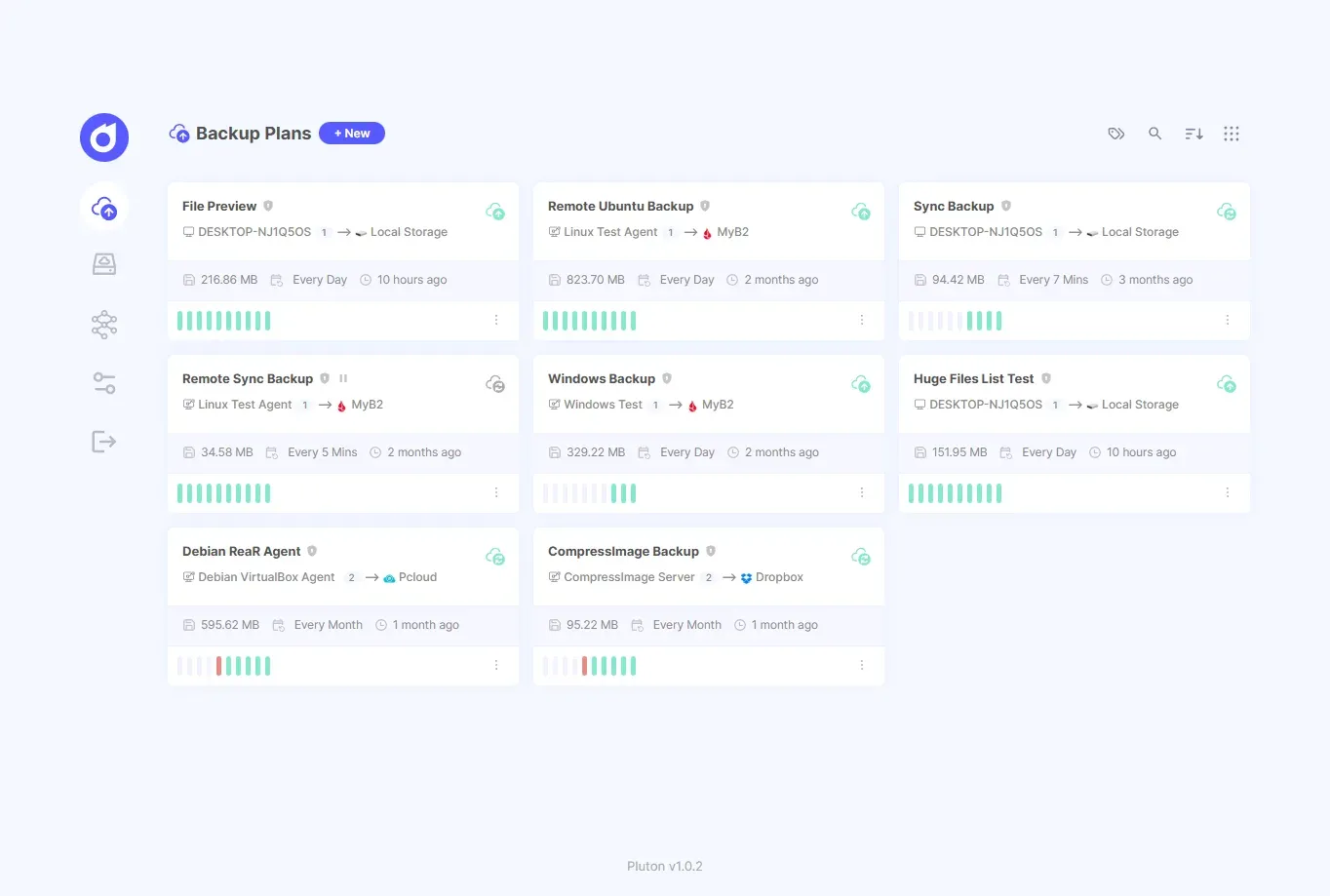
Backup Plans overview from the Pluton documentation; some plans shown use PRO features such as remote agents and sync.
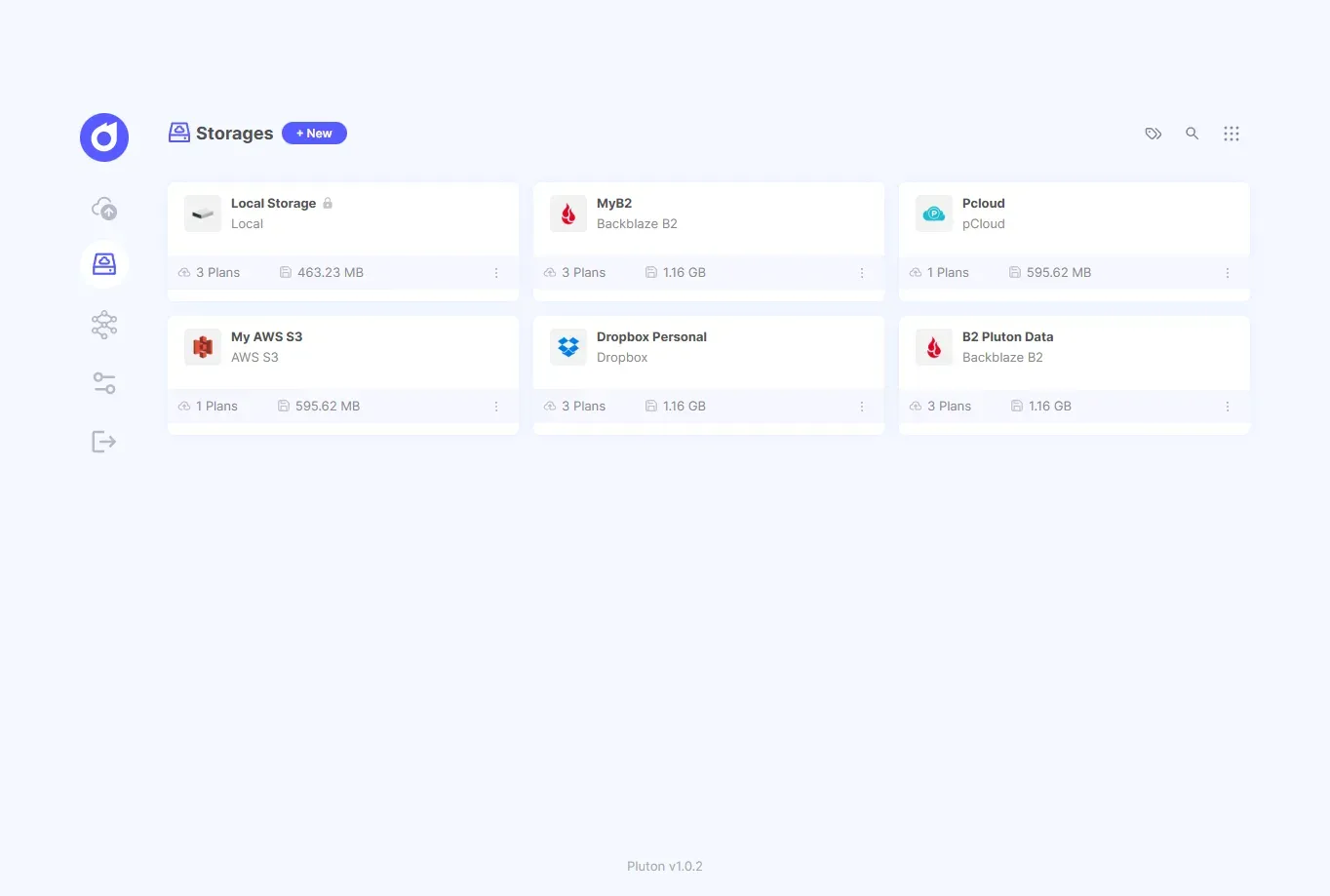
Storages page listing connected destinations with the number of plans and stored size for each.
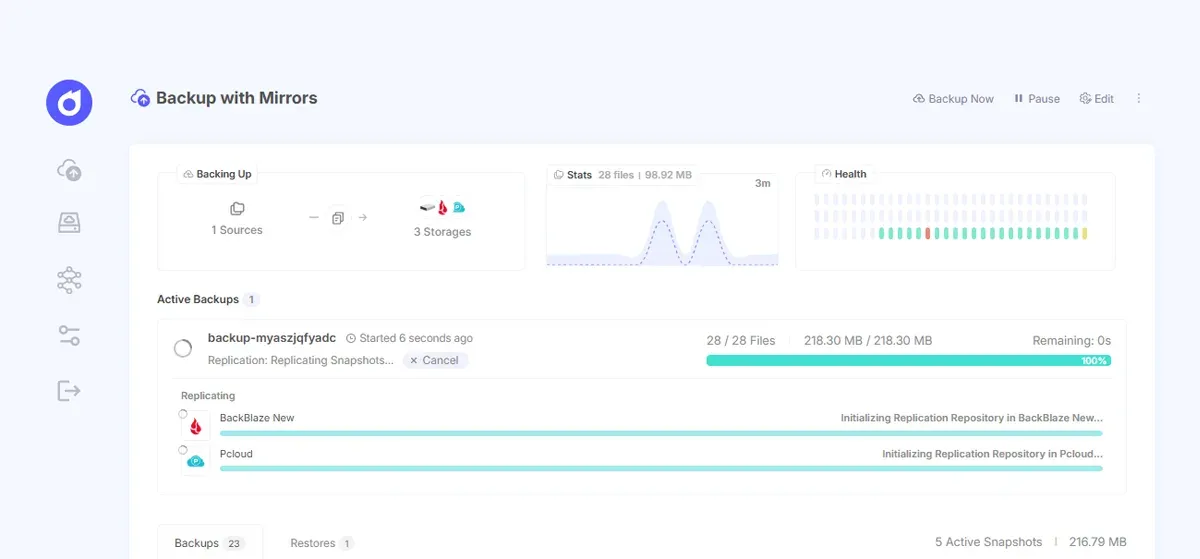
Backup plan detail with live progress, statistics, health history and replication to two mirror storages.
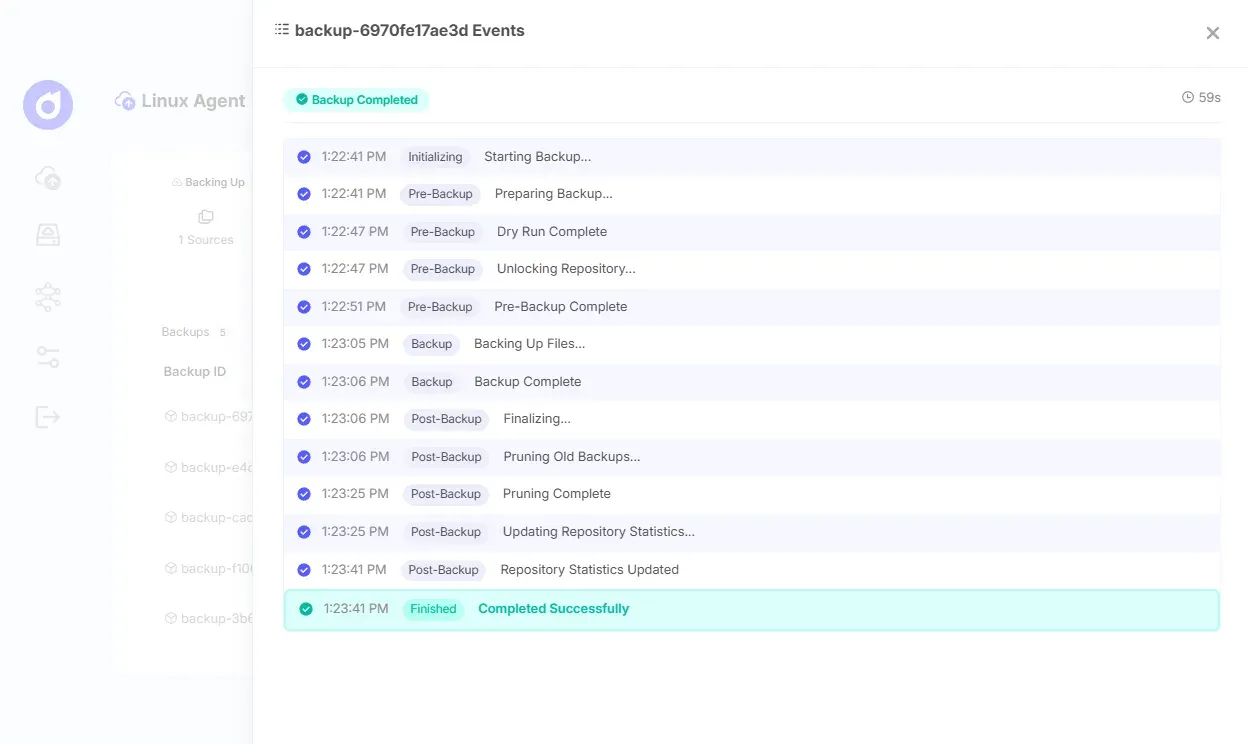
Events panel for one backup run, showing each stage from initialization to pruning and completion.
Source: official Pluton project page.
Key capabilities
- Restic-based incremental backups Each backup plan uses Restic to create snapshots that store only changed data blocks after the first run, with block-level deduplication and built-in compression. Plans define one or more source folders, optional exclude patterns such as
*.tmpornode_modules/, and a destination storage with an optional subfolder. The source device and the destination storage cannot be changed after a plan is created. - Encryption Backups are encrypted with AES-256 before they leave the machine, using the encryption key set during installation. The installation guide warns that a lost encryption key may make backups impossible to restore. The key is stored in a protected local file such as
/etc/pluton/pluton.enc.envon Linux servers orC:\ProgramData\Pluton\pluton.enc.envwith restricted NTFS ACLs on Windows. The introduction describes encryption as optional, and v0.22.0 fixed restores for unencrypted plans. - More than 70 storage destinations Storage connections go through Rclone. The README and pricing page cite more than 70 providers, and the documentation lists setup guides for services such as Amazon S3, Backblaze B2, Cloudflare R2, Azure Blob and Files, Google Drive, Google Cloud Storage, Dropbox, Box, pCloud, IDrive e2, DigitalOcean Spaces, Ceph, FTP and SFTP. A local storage is preconfigured, and storages show connectivity checks, tags and usage statistics.
- Backup replication for 3-2-1 strategies A plan can replicate every backup to additional storages after it completes on the primary one. The open-source edition allows up to two replication destinations per plan and PRO allows five, as stated in the plan creation guide. Replications can run concurrently, each mirror keeps its own copy and status, and restores can use any mirror.
- Scheduling Plans run hourly, daily, weekly, monthly or on a custom cron expression. Plans can be paused and resumed, tagged and tuned for performance, and the number of concurrent backups is set with
MAX_CONCURRENT_BACKUPS(default 2). - Retention and pruning Retention policies keep daily, weekly and monthly snapshots and prune older ones automatically after each backup. Manual prune and cleanup, as well as repository lock management, are available from the interface.
- Automatic retries and safety checks Failed backups are retried according to configurable retry settings. Version 0.19.0 added free-space checks on the destination before backups and restores, clears interrupted jobs on startup and fails a stuck backup instead of locking the job queue.
- Progress, events and logs Running backups show the percentage, transferred data, speed and remaining time, plus the progress of each replication. An events panel lists each stage (initializing, pre-backup, backup, pruning, statistics update), and application and plan logs can be read in the UI.
- Guided restore A four-step wizard restores a whole snapshot or selected files and folders to the original location or a custom path. Overwrite behavior can be set to Always, If Changed, If Newer or Never, and an option deletes files at the destination that are not in the snapshot. A preview is shown before the restore runs, and active restores can be cancelled. The restore guide documents each step.
- Snapshot downloads A complete snapshot can be downloaded as a TAR file from the interface in both editions, and since v0.21.0 these downloads can be resumed. Browsing, searching, previewing and comparing snapshot contents and downloading individual files are listed as PRO features in the documentation.
- Pre and post backup scripts Scripts can run at defined events such as before a backup, after completion or on failure, for example to create a database dump. Scripts need an absolute path and a supported extension (
.sh,.bash,.zsh,.ps1,.bat,.cmdor.py), and theDISABLE_EVENT_SCRIPTSsetting turns them off entirely. - Notifications The README lists notifications by email, Slack, Discord and ntfy push. The documentation feature table lists SMTP email for the open-source edition, and webhooks, ntfy, third-party email services such as SendGrid or Mailgun and daily, weekly or monthly email digests for PRO.
- Backing up Pluton itself Since v0.18.0 Pluton can periodically pack its plans, storages and credentials, backup history and app settings into one encrypted
.plutonfile and upload it to a chosen storage. It uploads only when something changed, keeps a configurable number of copies and can email on failure. The file does not contain the backed-up data itself. - Security settings Authentication uses JWT sessions with a configurable duration. Environment flags can disable custom restore paths, the file browser and event scripts, and HTTPS is provided through a reverse proxy such as nginx, Traefik or Caddy. The website and pricing page list two-factor authentication, while the documentation feature table marks 2FA with recovery codes as a PRO feature.
- Docker deployment The Docker guide provides a Compose file for
plutonhq/pluton:lateston port 5173, withENCRYPTION_KEY,USER_NAMEandUSER_PASSWORDset in an.envfile. Host folders to back up are mounted read-only under/mnt, and local backup destinations need a writable mount. - Desktop installers Windows 10 and 11 use an x64 setup executable that asks for the server port, Linux desktops use an x64 or ARM64 AppImage installed with
--install, and macOS 12 or later installs withbrew tap plutonhq/plutonandbrew install plutonhq/pluton/pluton. On macOS, Full Disk Access must be granted to back up protected folders. The interface then opens athttp://localhost:5173. - Linux server installation The server installer (
curl -sSL https://dl.usepluton.com/server/scripts/install.sh | sudo bash) supports interactive, non-interactive and config-file setups on x86_64 or arm64 with glibc 2.29 or newer and systemd. Apluton-helperbinary handles privileged restores and root hook scripts, which require explicit sudoers rules per script. - PRO edition features PRO adds remote devices managed through a lightweight Pluton Agent, Rclone-based sync plans that can run as often as every 5 minutes with revision history, full Linux server backups with ReaR and bootable ISO creation for bare-metal recovery, and automated recovery testing with metadata, sampling or full integrity checks. A license key is managed from the PRO documentation pages.
Where Pluton fits
Backing up a desktop to cloud storage
On Windows, macOS or a Linux desktop, Pluton is installed locally and opened in the browser at port 5173. The user connects a storage such as Backblaze B2, Google Drive or an S3 bucket, then creates a periodic backup plan for selected folders with a daily schedule and a retention policy. On macOS, Full Disk Access is required for folders such as Desktop and Documents.
Running a 3-2-1 backup plan
A plan writes encrypted snapshots to a primary storage, for example a local disk or NAS mount, and replicates each backup to up to two additional cloud storages in the open-source edition. Each mirror keeps an independent copy with its own status, and restores and integrity checks can use any of them.
Protecting a self-hosted server with Docker
On a server that already runs Docker, Pluton is deployed with the provided Compose file and host directories or Docker volumes are mounted read-only into /mnt. Pre-backup scripts can create database dumps before Restic reads the files, and post-backup scripts can clean up afterwards. Behind a reverse proxy, TRUST_PROXY is enabled and HTTPS is terminated by nginx, Traefik or Caddy.
Restoring files after data loss
The restore wizard selects a snapshot, the files to recover and the destination, which can be the original path or a custom directory. Overwrite rules and the optional deletion of extra files decide how existing data is treated, and a preview shows the result before the restore starts. Whole snapshots can also be downloaded as TAR archives.
Recovering Pluton on a new machine
With self-backup enabled, Pluton uploads an encrypted .pluton file containing its plans, storages and settings. After a failure, a new installation restores that file with the same encryption key, and the plans reconnect to the snapshots already stored on the destinations, as described in the self-backup guide.
Managing backups for several machines (PRO)
With a PRO license, remote Windows, macOS and Linux machines run the Pluton Agent, which connects to the configured storage and runs scheduled backups autonomously while reporting to the central dashboard. The PRO plan includes 5 remote machines, and full Linux server backups with ReaR produce a bootable ISO for bare-metal restore.
Install
curl -sSL https://dl.usepluton.com/server/scripts/install.sh | sudo bashReviews of Pluton
Be the first to share your experience with Pluton.
Write a review
Loading review form…
Alternatives to Pluton
 VeeamVeeam Data Platform, built on Veeam Backup & Replication, backs up and restores virtual, physical, cloud and application workloads, with immutable repositories, malware detection and Instant Recovery. A free Community Edition covers 10 workloads.
 AcronisAcronis Cyber Protect combines image and file backup, disaster recovery, anti-malware, EDR, patch management and email archiving. It runs as a cloud service or as Cyber Protect Local on premises, under subscription licences.RRescuezillaRescuezilla is a graphical disk imaging and cloning tool, compatible with Clonezilla, that boots from a USB stick on any PC or Mac.