

What is Death Plan Switch?
Death Plan Switch is a small self-hosted dead man's switch that the project describes as built for solo web professionals and independent web developers. Once a week it emails its owner a link to a check-in page, where pressing a button counts as the check-in. If the owner stops checking in, the app first asks a next of kin whether everything is all right, and only if nobody confirms that the owner is well does it email the other contacts the messages the owner wrote for them, such as the person who would look after clients or a legal contact. The official website summarizes it as a tool that tells the right people if its owner disappears.
The software is made by Tecky, a one-person web studio in regional New South Wales, Australia, according to the website. It is published on GitHub under the MIT licence. The README states that the project is open source but does not accept pull requests, because it is a security-sensitive tool and outside code is not merged; forking is explicitly allowed. Support is best effort and the software comes with no warranty. Bug reports go to GitHub issues, and vulnerabilities are reported privately by email as described in the security policy, which lists the 1.0.x line as supported.
The current release is Version 1.0.0, published on October 8, 2026, and described in the changelog as the first public release. The preceding 0.9.0 testing version introduced the browser installer, the weekly check-in, the escalation schedule, contact confirmation, pauses of up to 28 days, flat-file storage with locking and backups, a daily test that the data folder is not web-readable, a secret trigger address for hosting without cron and a health address for uptime monitors.
Technically it is one PHP application without a database. It needs PHP 8.1 or newer with the openssl and mbstring extensions, a web server (Apache works as shipped, nginx needs a few configuration lines), an SMTP account, HTTPS and a scheduler that runs every 15 minutes. State is kept as JSON files in a data folder. It bundles PHPMailer 7.1.1, unmodified, under the LGPL 2.1. The README recommends hosting it separately from the sites it protects, so that one outage cannot take down both.
The project lists clear limits. It is a notification tool and not a guarantee: it only sends email, cannot know why its owner stopped checking in, and cannot work when its server, scheduler or mail service is down. It stores no documents and no passwords, offers no SMS, calls or app, and serves exactly one owner per install, with no accounts and no hosted version.
Death Plan Switch screenshots
Explore the interface. Open a screenshot to view it at full size.
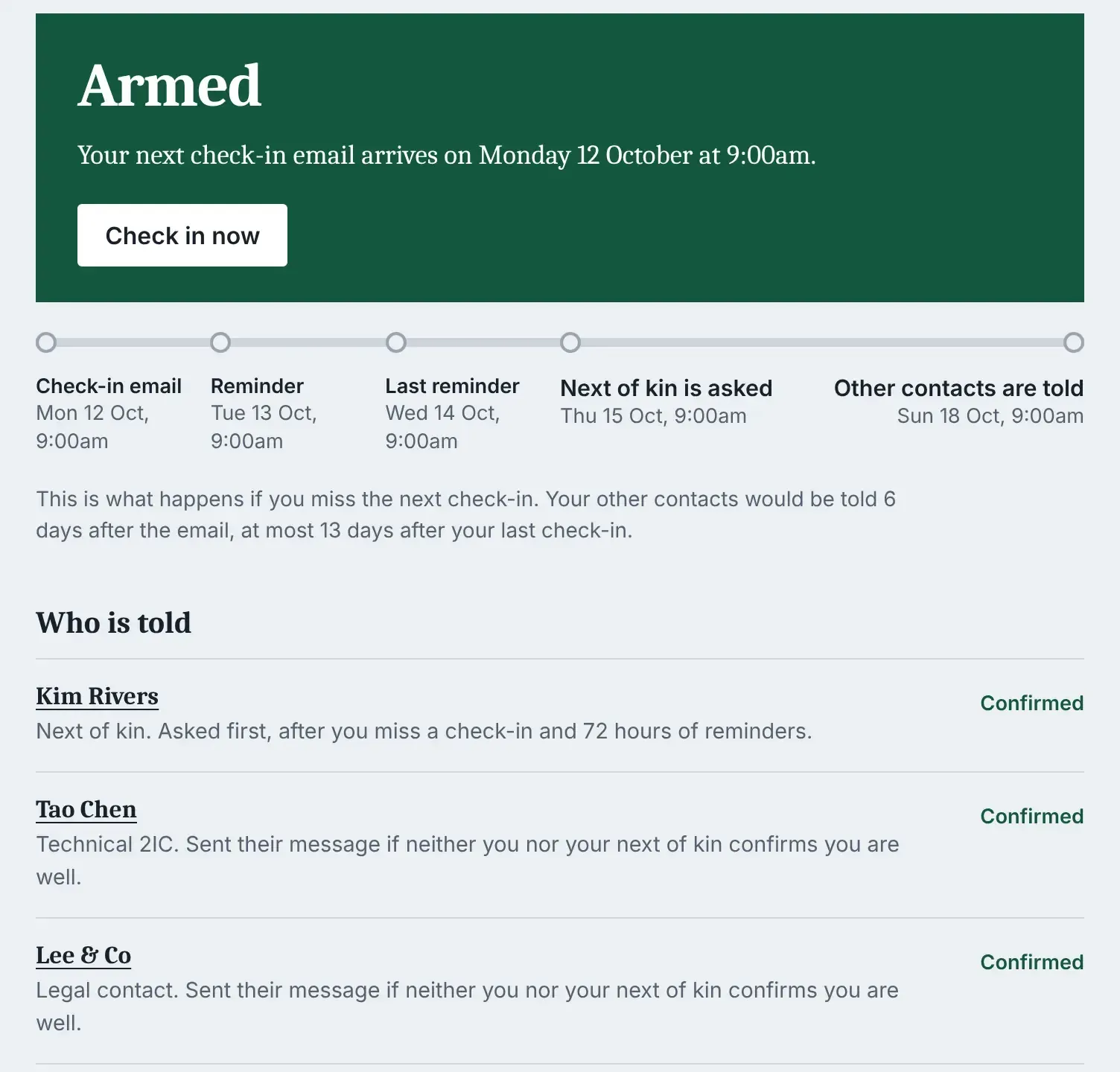
Armed dashboard with the next check-in date, the escalation timeline and the contacts who would be told.
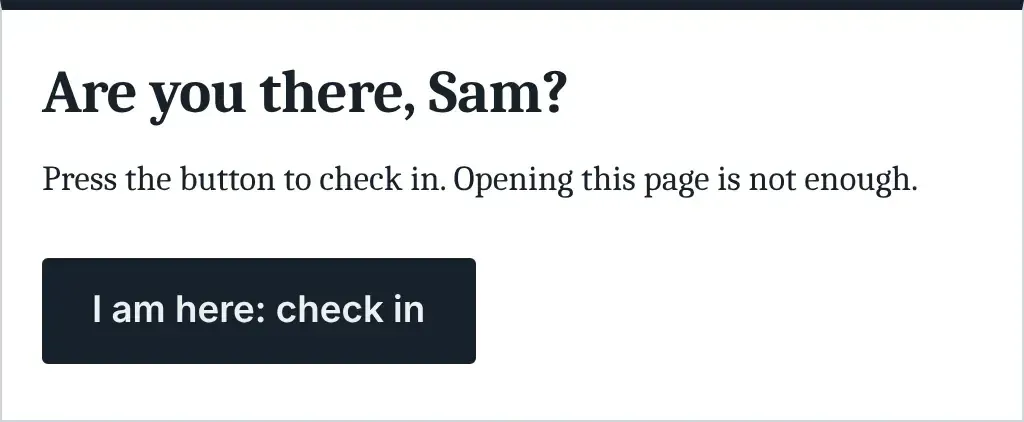
The check-in page: opening it is not enough, the button has to be pressed.
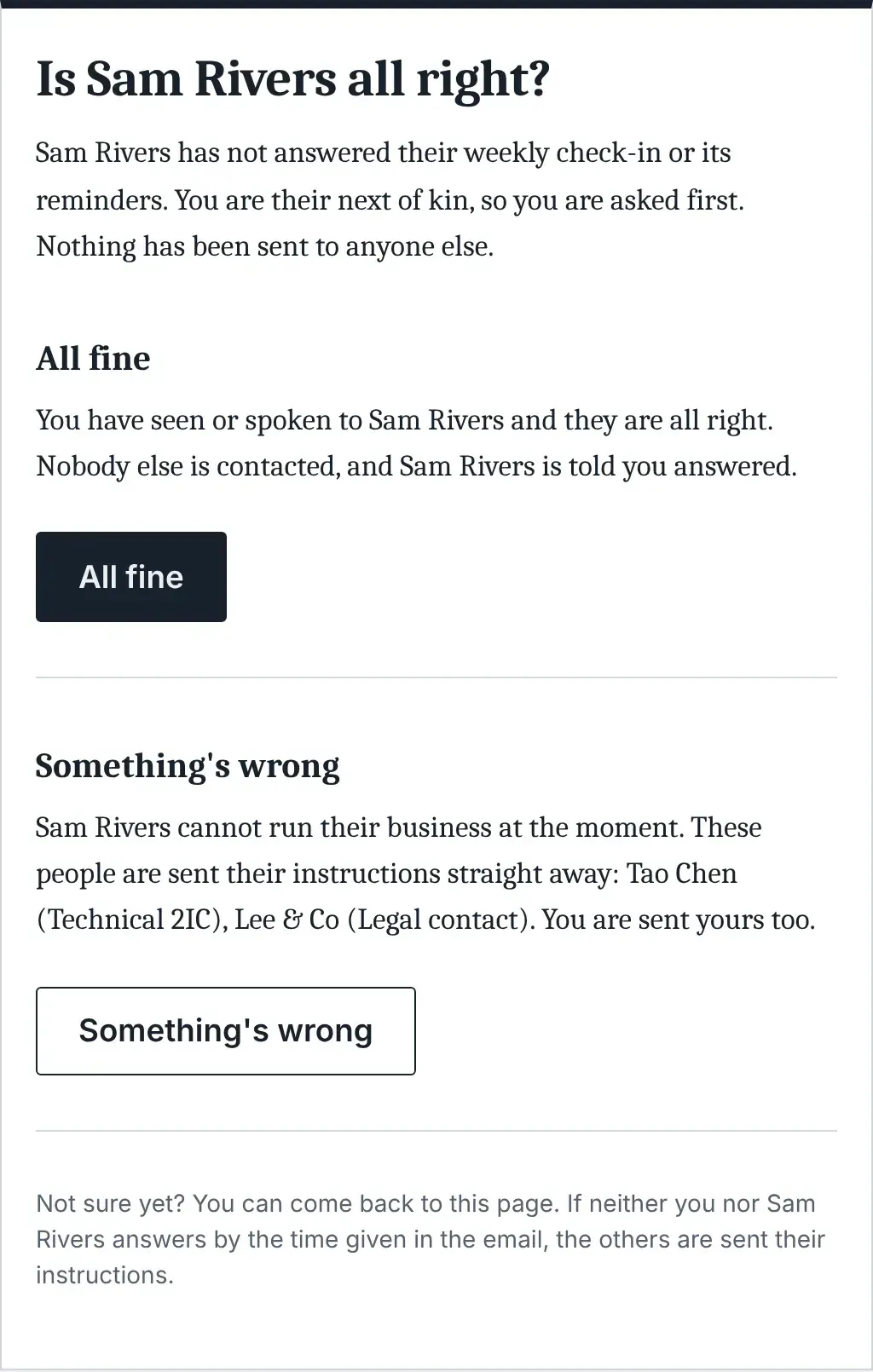
The page a next of kin sees, with each answer explaining what it will do.
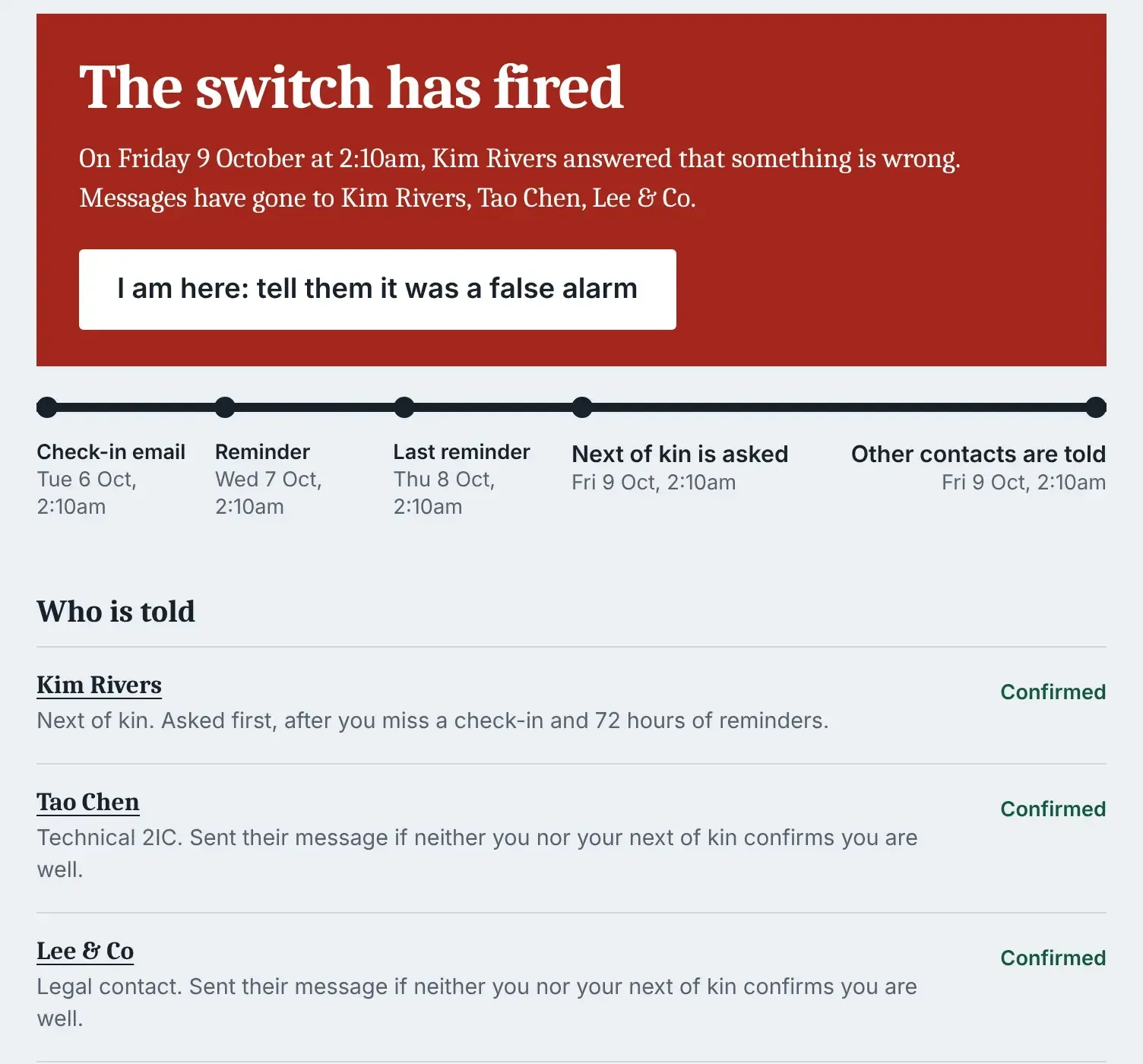
Fired state: messages have gone to the contacts, and one button sends a false-alarm notice.
Key capabilities
- Weekly check-in by email The owner picks a day and hour during installation, and the check-in email goes out at that time each week. Opening the link is not a check-in: the owner has to press the button on the page, because email scanners follow links. The owner can also sign in and press Check in now at any time.
- Fixed escalation schedule Counted from the check-in email, a reminder goes to both owner addresses at 24 hours and a last reminder at 48 hours. At 72 hours the next of kin is asked whether everything is all right, at 120 hours the next of kin is reminded, and at 144 hours every confirmed contact receives the message written for them. According to the README, contacts are told at most 13 days after the last check-in.
- Next of kin decision The next of kin sees two answers, All fine and Something's wrong, each explaining what it will do. All fine ends the escalation and nobody else is contacted. Something's wrong sends the prepared messages to the other contacts immediately, and the owner is told when the next of kin has been asked.
- False-alarm handling The owner can check in at any stage, including after the switch has fired. Everyone who was already contacted is then told that it was a false alarm. The README notes that pointers in messages that were sent should then be treated as seen.
- Contacts with opt-in confirmation A next of kin and a technical contact are required; a legal contact and further contacts are optional, each with an editable role label. Every contact receives an email to confirm their address and role and is never written to before confirming. Contacts do not see their message in advance, and a changed address stays in use until the new one is confirmed.
- Prepared messages with guard rails Each message starts from default wording with a gap in square brackets for a pointer to where things are and who to call. The switch does not arm while such a gap is left. The owner ticks a box for each contact once that person has been given what they need, and the arm button appears only when the dashboard checklist is complete.
- Yearly reconfirmation Once a year each contact is asked to reconfirm. The owner is asked at the same time to confirm that each contact still has what they need.
- Browser installer The installer checks the server and checks that the data folder cannot be read from the web, and it will not continue until that is true. It collects the owner's name, email, password and weekly schedule, proves SMTP with a six-digit code sent by email, and shows the crontab line with the detected PHP path and user, then confirms when the first scheduler run arrives.
- Scheduler with cron or a secret address The scheduler runs every 15 minutes through cron, as the same user as the web pages; otherwise cron.php stops with a message instead of breaking file permissions. Hosting without cron can point an outside scheduler at a secret web address shown in Settings. Steps are computed from stored timestamps, and after a long outage they are sent one at a time at least 12 hours apart.
- Health address for monitoring A secret health address answers 200 when all is well and 503 when the scheduler has stopped, mail is failing or the data folder is exposed. The README describes it as the way to be warned by something outside the server through an uptime monitor. The weekly email also states whether the switch is armed, and every page warns when the scheduler has not run for a day.
- Data folder exposure test The app keeps a probe file in the data folder and requests it over the web during install, once a day and on demand in Settings. If the file is served, the switch refuses to arm, emails the owner and reports a fault on the health address. Apache is protected by an included .htaccess file, nginx needs the rules from the nginx example, and the folder can be moved outside the web root with config.local.php.
- Flat-file storage with backups All state lives in config.json, contacts.json, state.json and history.jsonl. Files are written to a temporary name and renamed under a lock, and the previous good copy is kept as a .bak file. If a file is damaged the app falls back to the backup copy with a warning, and if both are unreadable it stops and reports the fault rather than treating it as a fresh install.
- Pause for travel The switch can be paused for up to 28 days. It resumes by itself so that it cannot be left off by accident.
- Security measures Passwords are hashed with PHP's password_hash and sign-in slows down after five wrong attempts. Forms carry CSRF tokens, pages send a strict Content-Security-Policy and Referrer-Policy no-referrer and load nothing from other sites, and email links are stored only as hashes. There is no password reset by email: a new owner password is set from the command line.
- Command-line tools Php cron.php --verbose runs the scheduler once and prints what it did, cli/status.php prints the switch state and faults, cli/reset-password.php sets a new owner password, and tests/run.php runs the test suite. The tests folder is not part of release downloads and is taken from the repository.
- Rehearsal with time shifting Tests/timeshift.php makes an install believe that time has passed, so a full escalation can be walked through step by step in one session. The README points out that real emails go to the real contacts during such a rehearsal.
- Custom logo A logo saved as assets/logo.svg or assets/logo.png replaces the name at the top of the app's pages. Emails stay plain text in style.
Where Death Plan Switch fits
Continuity notice for a one-person web business
The project's stated use case is a solo web professional whose clients' sites, domains and hosting all run through one person. The owner enters a technical contact who would look after clients, optionally a legal contact, and writes each of them a message that says where things are and who to call. The documents and passwords themselves stay outside the app, held by people such as a lawyer, the next of kin or a backup developer, as the README describes.
Installing on separate hosting
The README asks for hosting that is separate from the protected sites. The folder is uploaded to a private address, the data folder is made writable by the web server user (for example with chown to www-data on a VPS), and the browser installer is opened. After the SMTP test code is confirmed, the crontab line shown by the installer is added, for example a line that runs cron.php with PHP every 15 minutes.
Escalating through the next of kin first
When check-ins stop, the app sends two reminders to the owner and then asks the next of kin. Nobody else hears anything until the next of kin has been asked and has had 72 hours. All fine from the next of kin ends the escalation, Something's wrong sends the messages at once, and if neither the owner nor the next of kin responds, the messages go out at 144 hours.
Monitoring the switch itself
The README names the scheduler as the single point of failure. Three signals are documented: the weekly email that confirms the switch is armed, a warning on every page when the scheduler has not run for a day, and the health address that returns 503 on faults. Uptime monitors listed in this directory, such as Uptime Kuma and Checkmate, are examples of tools that poll an HTTP address.
Rehearsing a full escalation
With tests/timeshift.php the README walks through a week and then successive steps of 24 or 48 hours with the --run flag, run as the web server user, for example through sudo -u www-data. Each step triggers the next stage, up to the switch firing. Checking in afterwards sends the false-alarm notices, and the tests folder is deleted from the server when the rehearsal is over.
Updating and backing up
Backing up the data folder backs up the whole switch, since all contacts, messages, configuration and history are stored there. Updating means replacing every file and folder except data and an optional config.local.php, then signing in and checking the dashboard, as described in the README.
Reviews of Death Plan Switch
Be the first to share your experience with Death Plan Switch.
Write a review
Loading review form…
Related to Death Plan Switch
 Uptime KumaUptime Kuma is a self-hosted monitoring tool that checks HTTP, TCP, ping, DNS and Docker targets at 20-second intervals and publishes status pages.
 CheckmateCheckmate by Bluewave Labs is a self-hosted, AGPL-3.0 monitoring app for HTTP, ping, port, DNS, Docker, gRPC, WebSocket and heartbeat checks, server metrics via the Capture agent, PageSpeed audits, alerts and status pages.