What is Portabase?
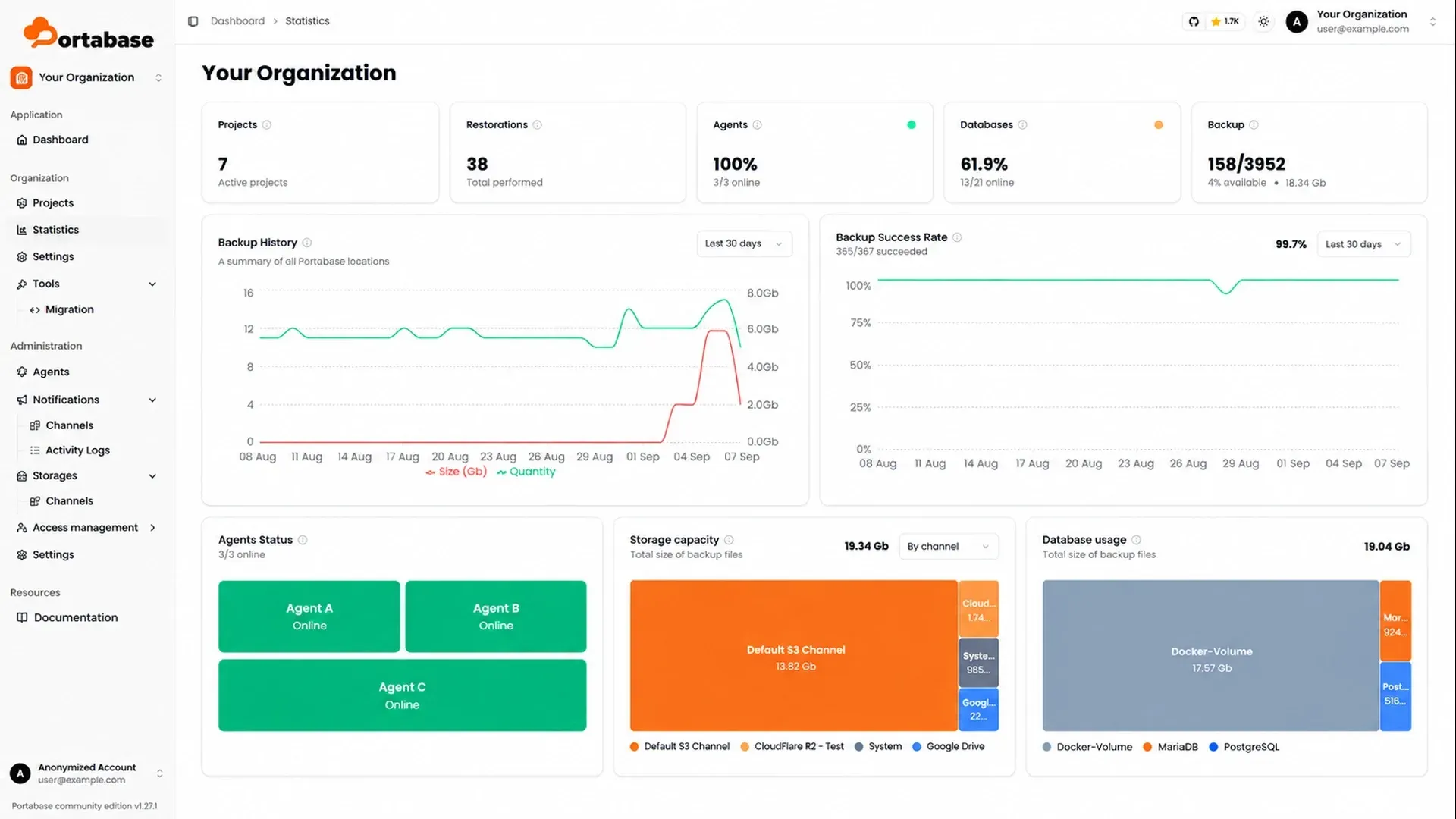
Portabase is an open-source, self-hosted platform for scheduling, storing and restoring backups from one web dashboard. It covers PostgreSQL, MySQL, MariaDB, MongoDB, SQLite, Redis, Valkey, Firebird and Microsoft SQL Server, as well as Docker volumes and plain directories. The project is developed by the Portabase team, which describes the software as made in France, and is published under the Apache License 2.0 on GitHub. Some features were financed by organizations through funded development, for example MSSQL DACPAC backups funded by Solydev, and are released as open source like the rest of the code.
The product has three parts. The dashboard is a Next.js and TypeScript web application that acts as the control plane: it keeps the declared agents, databases, schedules, retention rules, storage channels and notification channels in PostgreSQL. The Portabase agent is a Rust program, rewritten from an earlier Python version, that runs next to the databases and performs dumps, uploads and restores. The Portabase CLI, written in Python and shipped as a single binary for Linux (amd64 and arm64), macOS and Windows, generates Docker Compose files, secrets and database entries and wraps the container lifecycle.
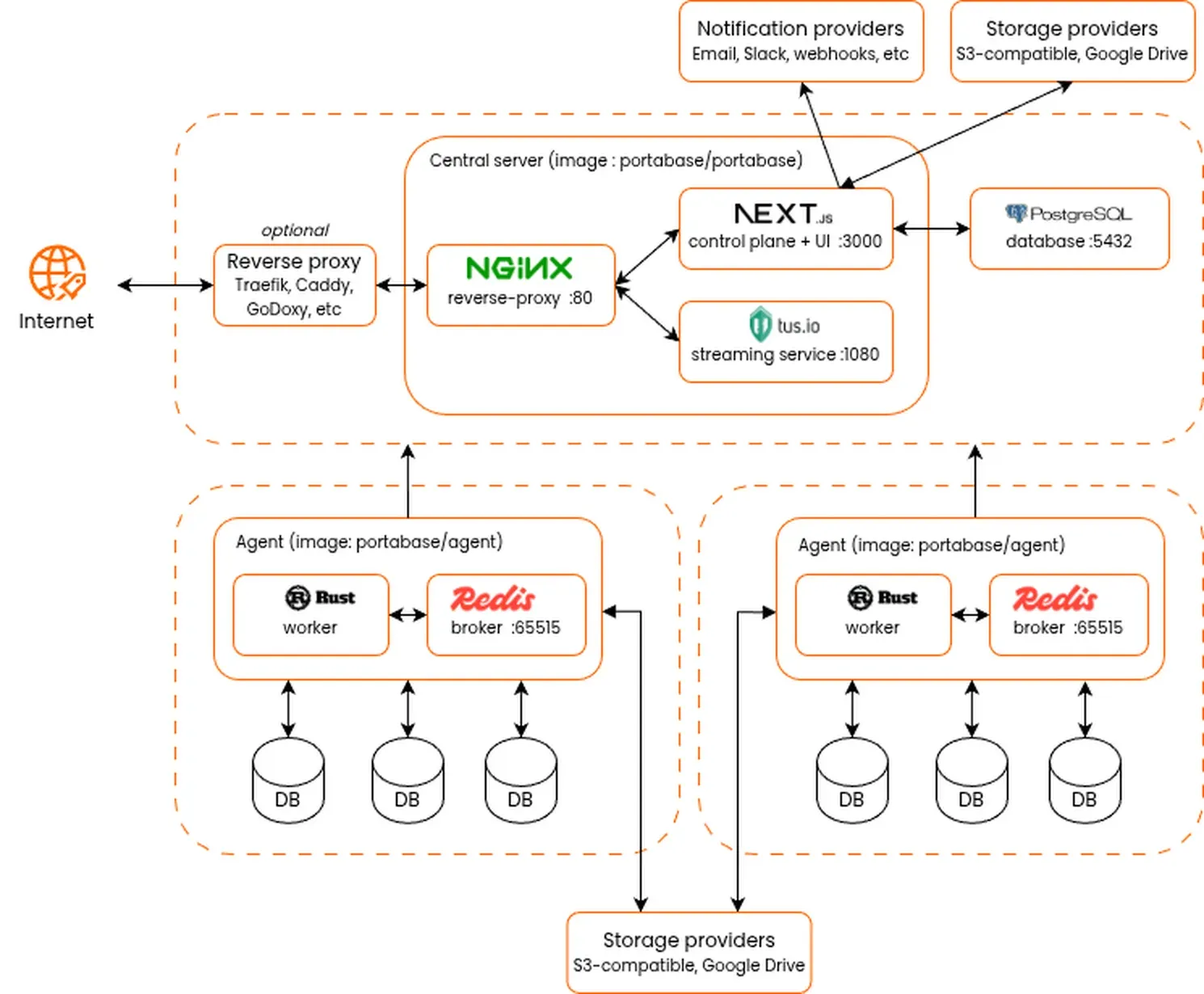
According to the documentation introduction, the dashboard never contacts the agents and never connects to the databases itself. Each agent polls the dashboard (every 5 seconds by default), reports its databases, status and job results, and receives configurations, schedules and restore orders in return, so no inbound port has to be opened in the network that holds the databases. The published architecture diagram shows the dashboard container (image portabase/portabase) with an nginx reverse proxy on port 80, the Next.js control plane on port 3000 and a tus upload service on port 1080, backed by PostgreSQL; each agent container (image portabase/agent) pairs a Rust worker with a Redis broker.
The latest dashboard release is 1.36.2, published on November 13, 2026. It fixes the database page layout so that header actions, the backups table and filters stay on screen with long names and on mobile. Version 1.36.0 added search and filters for agents, databases, backups, activity logs and users, native .bak backups for SQL Server and collection exclusion for MongoDB, and 1.36.1 replaced the fixed 20 GiB cap on uploads to local storage with the TUSD_MAX_SIZE setting. The agent is versioned separately; its release 1.26.2 adds Podman support for Docker volume backups and restores.
Portabase is distributed as Docker images, a Helm chart and catalogue templates for Coolify, Dokploy and Unraid. The official site lists no hosted service and no paid plan: the software is free, and its FAQ states that it runs on the operator's own infrastructure without per-database licensing. The dashboard collects anonymous usage metrics unless the TELEMETRY variable is set to false. Similar self-hosted tools in this directory include Pluton, a backup manager built on Restic and Rclone; the project's comparison overview also lists Veeam, Barman, pgBackRest, WAL-G, Databasus and Databasement.
Key capabilities
- Installation with the Portabase CLI The documented quick start is
curl -sL https://portabase.io/install | bash, followed byportabase dashboard create,portabase agent create, optionallyportabase agent db add, andportabase start. The CLI needs Docker with the Compose plugin, generates thePROJECT_SECRETencryption secret.portabase updateupgrades it; commands were renamed after CLI 26.08.12, and a migration guide lists the changes. - Docker and Docker Compose deployment A single
docker runofportabase/portabasewith the bundled internal database is documented for testing only. The Compose setup runs the dashboard next to apostgres:17-alpinecontainer, publishes port 8887 and readsPROJECT_URL,PROJECT_SECRETandDATABASE_URLfrom.env. The requirements are Docker Engine 20.10+ and Docker Compose 2.0+ on Linux or macOS 10.15+. - Kubernetes, PaaS and NAS installs The dashboard installs on Kubernetes from the OCI chart
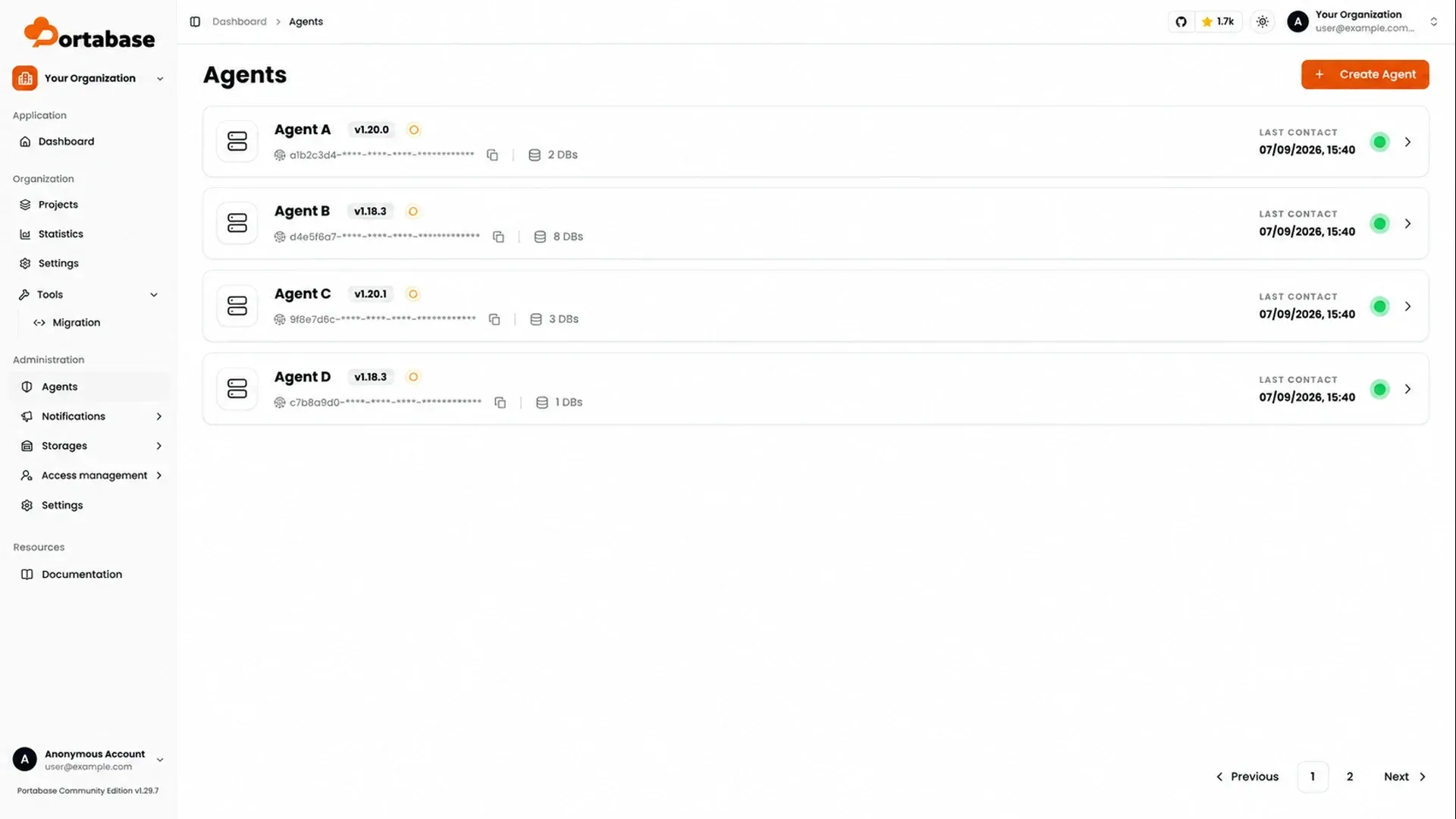
oci://ghcr.io/portabase/charts/portabasewith Helm 3.8+. Official templates exist in the Coolify service catalogue, the Dokploy template catalogue and Unraid Community Applications (with an external PostgreSQL 17). A Proxmox VE helper script is maintained by the community-scripts project and is marked unofficial. Agents are installed with the CLI or Docker only. - Agents and Edge Keys An owner or admin creates an agent under Organisation, Settings, Agents; the dashboard generates an Edge Key that the agent reads from its
EDGE_KEYvariable. One agent can manage several databases on the same host. The agent page shows the Last Contact time, a green or red status and a Health tab with a 12-hour grid of received and missed pings. Databases are then added from the agent page (Dashboard 1.29.0+ and Agent 1.19.0+), withportabase agent db add, or in adatabases.jsonordatabases.tomlfile; dashboard values take precedence over the local file. - PostgreSQL backups and clean restores PostgreSQL 12 to 18 is supported with
pg_dumpfor a single database, orpg_dumpallinpostgresql-clustermode to include every database plus roles, ownership, grants and tablespaces (superuser required). Since 1.33.0,exclude_tablesandexclude_schemasaccept pg_dump patterns. Theclean_modeoption chooses betweennone,clean(default),drop_schemasanddrop_databasebefore a restore; the documentation notes that the two drop modes have no rollback. - MySQL, MariaDB, MongoDB, SQLite and Firebird The supported versions are MySQL 5.7, 8 and 9, MariaDB 10 and 11, MongoDB 4 to 8, SQLite 3.x and Firebird 3.0, 4.0 and 5.0, all with restore. MongoDB uses
mongodumpandmongorestoreand, since 1.36.0, can exclude collections by exact name or prefix. SQLite needs the database file mounted in the agent container. Redis 2.8+ and Valkey 7.2+ can be backed up, but restore is not available for these two engines. - SQL Server backup formats SQL Server 2017, 2019, 2022 and Azure SQL are listed. By default the agent writes a DACPAC with Microsoft
sqlpackage; BACPAC remains selectable, and since Agent 1.26.0 and Dashboard 1.36.0 thebakformat runs a nativeBACKUP DATABASEinto a shared folder, with an optionalRESTORE VERIFYONLY ... WITH CHECKSUM. The documentation states that DACPAC and BACPAC exports are not transactionally consistent when the application writes during the backup, and that a failed restore now leaves the target database unchanged. - Docker volume backups Volumes are archived hot, without stopping the container that uses them, and the agent needs the Docker socket mounted. Giving the container name lets the agent restart that container after a restore. Podman works through its Docker-compatible socket, including rootless sockets.
- File and directory sources Since Agent 1.24.0, a Files source backs up a mounted directory with one of four methods fixed at creation: Archive (a full
tar.gzper run), Snapshots (incremental, deduplicated restic snapshots), Sync (an rclone mirror) or Copy (an rclone copy that keeps deleted files, Agent 1.25.0+). Archive and Snapshots can be restored from Portabase; Sync and Copy keep a single replica without version history and are not restorable from the dashboard. - Cron schedules and manual runs Each database has a cron expression on its Schedule tab, or Manual mode. Backup now queues a job that moves through
waiting,ongoing,successorfailed, and the Logs tab keeps job details. On the agent,MAX_CONCURRENT_BACKUPScaps parallel jobs andRETRY_ATTEMPTS(3 to 5, with exponential backoff) applies to dumps, each storage upload and restore downloads. - Retention policies One retention policy per database keeps the last N backups (1 to 100, default 7), every backup from the last N days (1 to 3,650, default 30) or a Grandfather-Father-Son set: daily, weekly, monthly and yearly levels with defaults of 7, 4, 12 and 3, which keep at most 26 backups over three years. Retention requires an active cron schedule, and deleting the schedule also deletes the retention policy.
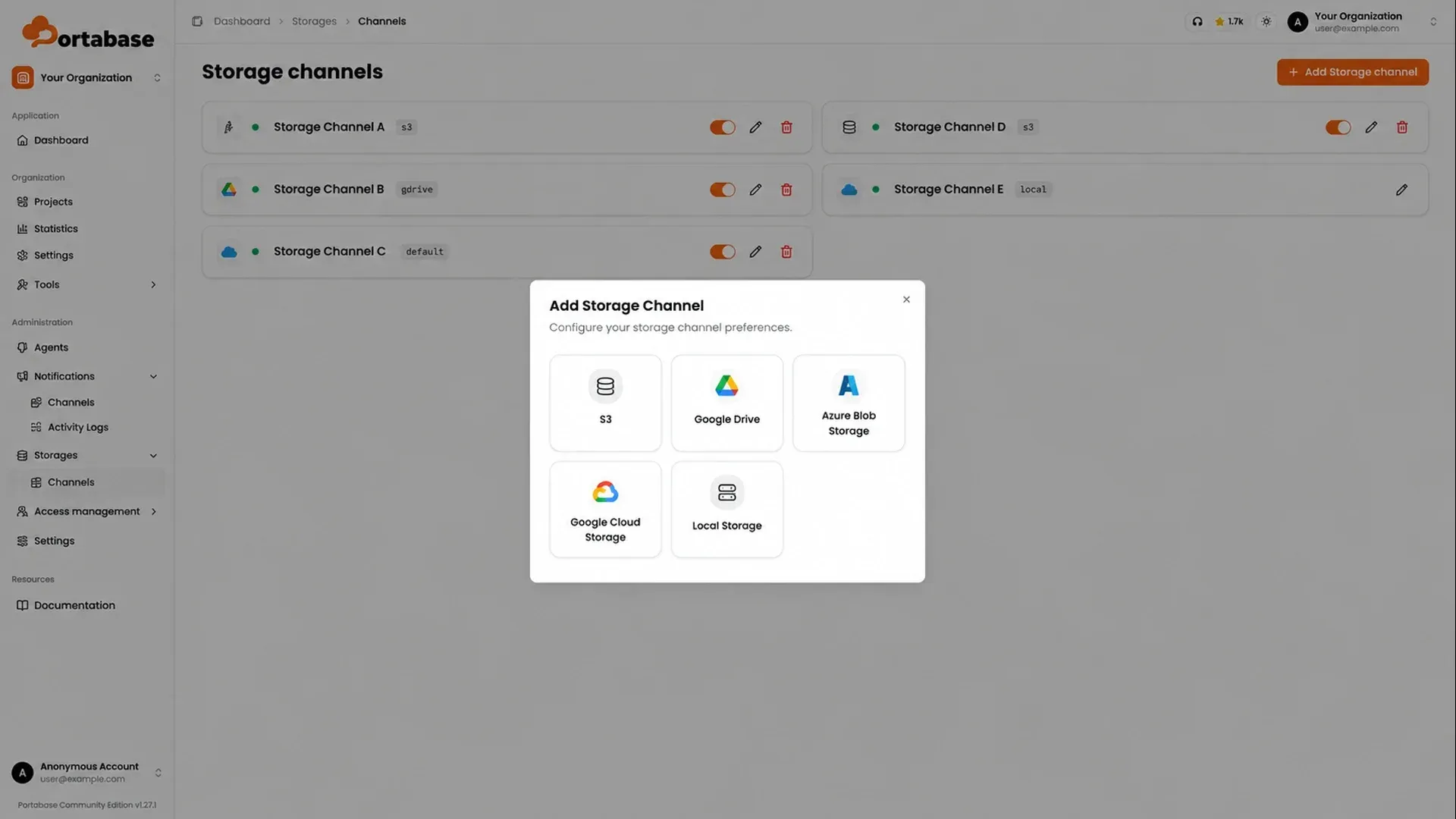
- Storage channels and multiple destinations Storage channels cover local storage, S3-compatible services such as AWS S3, MinIO and RustFS, Google Drive through an OAuth client, Azure Blob Storage, Google Cloud Storage, SFTP and any of the 70+ rclone backends. A database can have several storage policies, and each backup is sent to all active destinations at once with a per-channel status;
successmeans path, size and checksum were verified. SFTP channels accept a password or private key and can pin up to 16 host keys. - Encryption and offline decryption When encryption is enabled, backups are written as AES-256-GCM encrypted
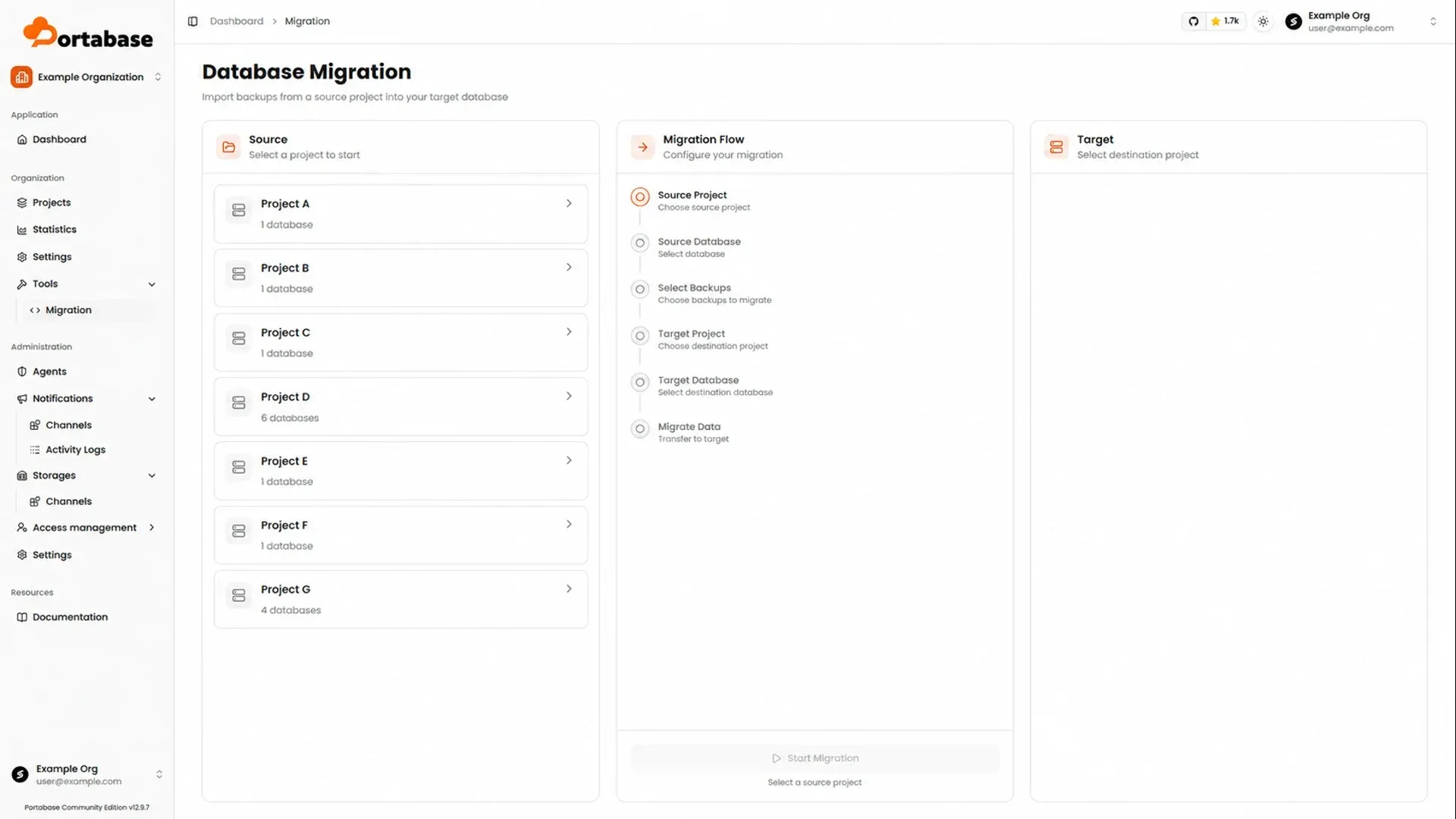
.encfiles. The 32-byte master key can be downloaded from the dashboard settings, andportabase decryptrestores the original archive without a dashboard, one file or a whole folder at a time, streaming large files with bounded memory. Restic snapshots are always encrypted with a key derived from the agent key, while Sync and Copy replicas are plain files. Since 1.34.0, agent callbacks are signed and storage credentials are withheld from agents that cannot decrypt them. - Restore, import and migration The Restore tab restores from a backup in the list or from a file in one of the storage channels, overwriting the current data in the target. External backup files can be imported by drag and drop. The Migration tool under Tools imports backups from a source database into a target database, possibly in another project, after which the migrated backup is restored explicitly.
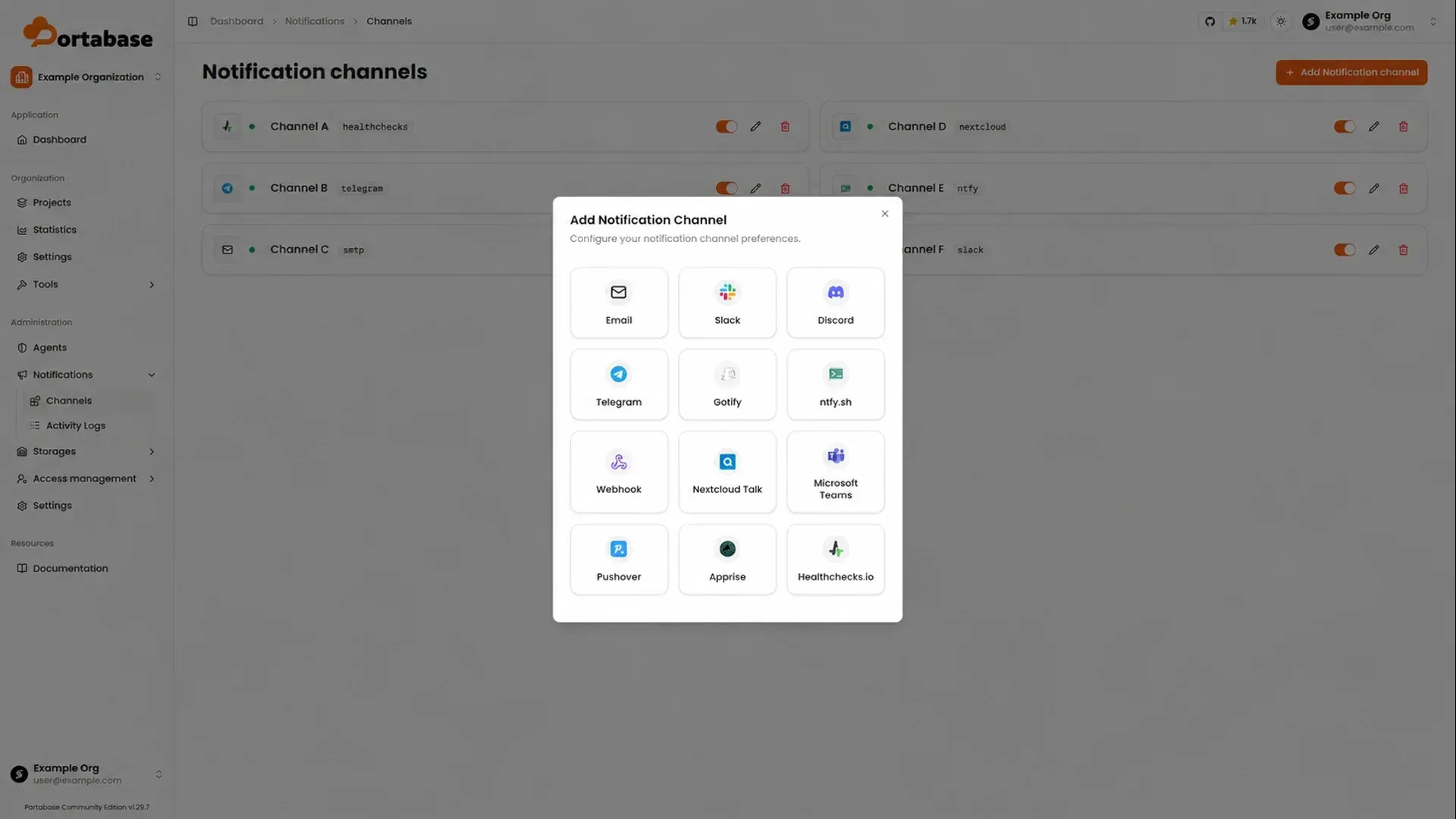
- Notifications and alert policies Notification channels include email over SMTP, Slack, Discord, Telegram, Gotify, ntfy, Microsoft Teams, Nextcloud Talk, Pushover, Apprise, Healthchecks.io and generic webhooks. Alert policies per database subscribe a channel to backup success or failure, restore success or failure, and database health errors reported by the agent; the weekly report event is not implemented yet.
- Organizations, roles and sign-in Organizations group agents, projects and channels. Member, admin and owner roles exist at system and organization level, and instance admins can share global agents and channels with selected organizations. Sign-in supports email and password, optional passkeys, OAuth2 providers such as GitHub, Google, Discord, Apple and LinkedIn, and OIDC providers such as Authentik, Keycloak or PocketID with role mapping.
- REST API and MCP server With
API_ENABLED=true, the dashboard serves a REST API under/api/v1. User-level tokens are sent in thex-api-keyheader and allow 1,000 requests per hour by default.MCP_ENABLED=trueadds an MCP server at/api/v1/mcpwith 58 tools for agents, databases, backups, restorations, channels, policies, organizations and projects, using the permissions of the token.
Where Portabase fits
Backing up databases on a private network
The getting-started sequence is to install the dashboard, create an agent and copy its Edge Key, run the agent next to the databases, add each database from the agent page, then attach it to a project with a schedule and a storage policy. Because the agent opens the connection to the dashboard, databases on a private network or behind a firewall can be covered without exposing them. The agent list and its Health tab show whether each agent is still checking in.
Keeping copies in several locations
The project's 3-2-1 guide creates one storage channel per destination, for example local storage and an S3-compatible bucket with Object Lock, and adds a storage policy for each to the same database. Every backup is then uploaded to all active channels, and the Backups tab shows a separate status for each destination, so a failed upload to one location is visible next to the successful ones.
Upgrading PostgreSQL to a new major version
The PostgreSQL 17 to 18 tutorial adds both servers to one project through an agent that reaches them, backs up both, then uses Tools, Migration to import a chosen PostgreSQL 17 backup into the PostgreSQL 18 database's backup list. The data only reaches the new server when that backup is restored, and the PostgreSQL 17 database keeps running as the rollback path.
Protecting a containerized application
In the Nextcloud example, an agent with access to the Docker socket backs up the application's Docker volumes on a schedule while the containers keep running. A restore writes the volume back and, when the container name is configured, restarts the container. Directories outside volumes can be added as Files sources; of the four Files methods, only Archive and Snapshots can be restored from Portabase.
Recovering a backup without the dashboard
If the dashboard is unavailable, an encrypted .enc file can be fetched directly from the storage destination and decrypted with portabase decrypt and the master key previously downloaded from the dashboard settings. The decrypt guide covers single files and folders; in folder mode a corrupt file or wrong key is reported per file without stopping the batch. The documentation also states that changing PROJECT_SECRET once agents are connected makes previously encrypted data unreadable.
Automating backup operations
With the API enabled, external clients can list databases, trigger backups and restorations or manage policies through /api/v1 with a user token. The MCP server exposes the same operations to assistants such as Claude, Cursor or Windsurf through mcp-remote; each tool call counts as two requests against the token quota, and tool access follows the same organization roles as the REST API.
Install
curl -sL https://portabase.io/install | bashReviews of Portabase
Be the first to share your experience with Portabase.
Write a review
Loading review form…
Found Portabase useful? Upvote it todayYour vote helps other IT teams find it in the daily ranking.