What is Tauri?
Tauri is an open-source framework for building desktop and mobile applications whose user interface is written with web technologies (HTML, CSS and JavaScript) and whose application core is a compiled Rust binary. Instead of shipping a browser engine inside every app, Tauri renders the interface in the webview the operating system already provides: WebView2 on Windows, WKWebView on macOS and iOS, WebKitGTK on Linux and the Android System WebView on Android. Window creation is handled by TAO and webview rendering by WRY, two libraries maintained by the Tauri project, as described in the project README and the What is Tauri? guide.
The project is developed by the Tauri Programme within The Commons Conservancy. According to the governance page, decisions are made by a Tauri Working Group made up of a Board with elected Board Directors, Domains with Domain Leads and smaller Teams. Funding comes through Open Collective and GitHub Sponsors, and the README lists CrabNebula as a partner. The source is published in the tauri-apps/tauri monorepo, with documentation maintained separately in the tauri-docs repository.
The monorepo publishes many packages, each with its own tag: Rust crates such as tauri, tauri-build, tauri-runtime-wry and tauri-bundler, plus the @tauri-apps/api and @tauri-apps/cli npm packages and the tauri-cli crate. GitHub currently marks tauri-cli v2.12.5 as Latest; the version on this page is the core tauri crate v2.12.6, published on November 16, 2026 and also the newest stable version on crates.io. It is a bug-fix release, for example for a deadlock when emitting events from a non-main thread with the tracing feature. The 2.12.0 release of September 26, 2026 added navigation limits to app-bound domains, an appDirectoriesOverride setting for portable apps and access to the webview permission handler. GitHub also lists 3.0.0 alpha pre-releases, including a separate tauri-runtime-cef runtime crate.
Tauri 1.0 was released in June 2022. The Tauri 2.0 stable release followed on October 2, 2024; it added iOS and Android as targets and introduced the capabilities and permissions system. The project states that it undergoes a security audit for major and minor releases, and the Tauri 2.0 audit report by Radically Open Security is stored in the repository. Vulnerabilities are reported through the security policy.
The code is dual-licensed: crates.io lists the tauri crate as Apache-2.0 OR MIT, and the repository ships both LICENSE-APACHE-2.0 and LICENSE-MIT. The README notes that the Tauri logo is licensed separately under CC-BY-NC-ND. Supported platforms per the README are Windows 10 and later, macOS 10.15 and later, Linux with webkit2gtk 4.1 (for example Ubuntu 22.04), iOS and iPadOS 9 and later, and Android 7 and later (currently 8 and later). Similar projects on iThub are the Rust UI frameworks egui and GPUI and the cross-platform toolkit Flutter; apps on iThub built with Tauri include Kanri, SwiftDL and Athas.
Key capabilities
- System webview rendering Tauri does not bundle a browser engine; the webview versions reference explains what each platform uses. WebView2 on Windows is based on Microsoft Edge (Chromium), updates itself and is preinstalled on Windows 11; on older Windows versions the generated installer makes sure WebView2 is present. On macOS and iOS, WKWebView is updated with the operating system, so unsupported macOS versions no longer receive WebKit updates. On Android the version depends on the device's selected WebView provider.
- Any web frontend The interface can be built with any framework that compiles to HTML, CSS and JavaScript, and the Frontend Configuration guide covers common setups. Tauri examples frequently use Svelte with the Vite bundler. Rust frontends such as Yew, Leptos and Sycamore are also offered as starter templates.
- create-tauri-app scaffolding New projects start with
npm create tauri-app@latestor the equivalent for Yarn, pnpm, Deno, Bun, Cargo, a shell script or PowerShell. The create-project guide lists templates for vanilla HTML/CSS/JavaScript, Vue, Svelte, React, SolidJS, Angular, Preact, Yew, Leptos and Sycamore, and a Blazor option for .NET. Existing frontends can be wrapped instead with the CLI'stauri initcommand. - Commands from JavaScript to Rust Rust functions annotated with
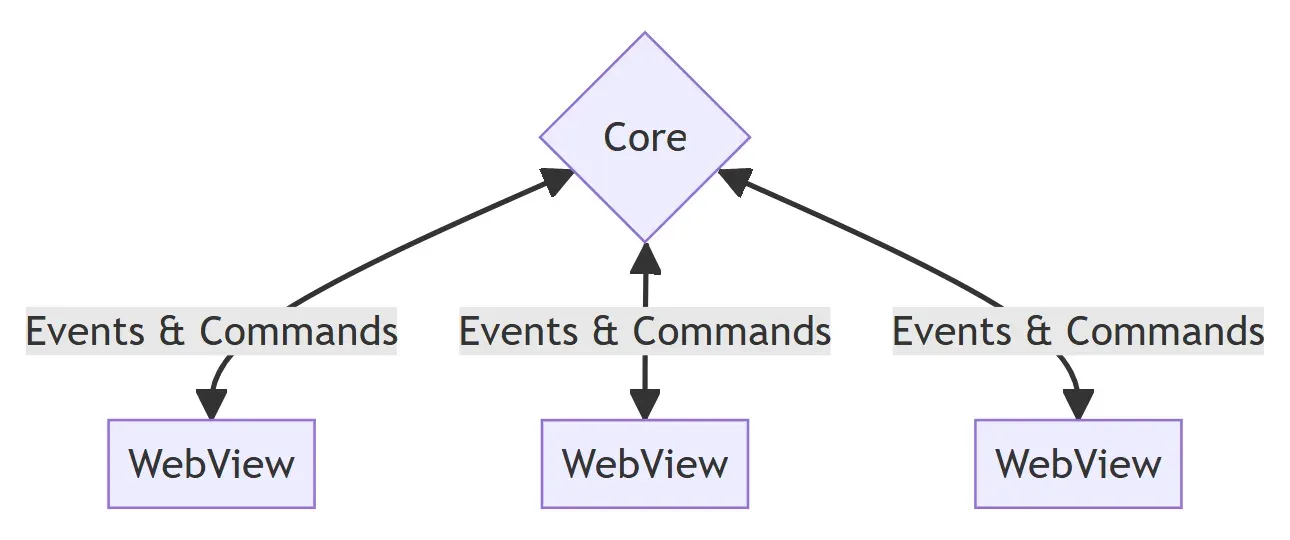
#[tauri::command]and registered throughgenerate_handler!are called from the frontend withinvokefrom@tauri-apps/api/core. Commands accept arguments, return values or errors, and can be async. Because the IPC layer uses a JSON-RPC-like protocol, all arguments and return data must be serializable to JSON. - Events Events are one-way, fire-and-forget messages for lifecycle and state changes. Unlike commands, they can be emitted by both the frontend and the Rust core. Access to the events API is itself governed by event permissions.
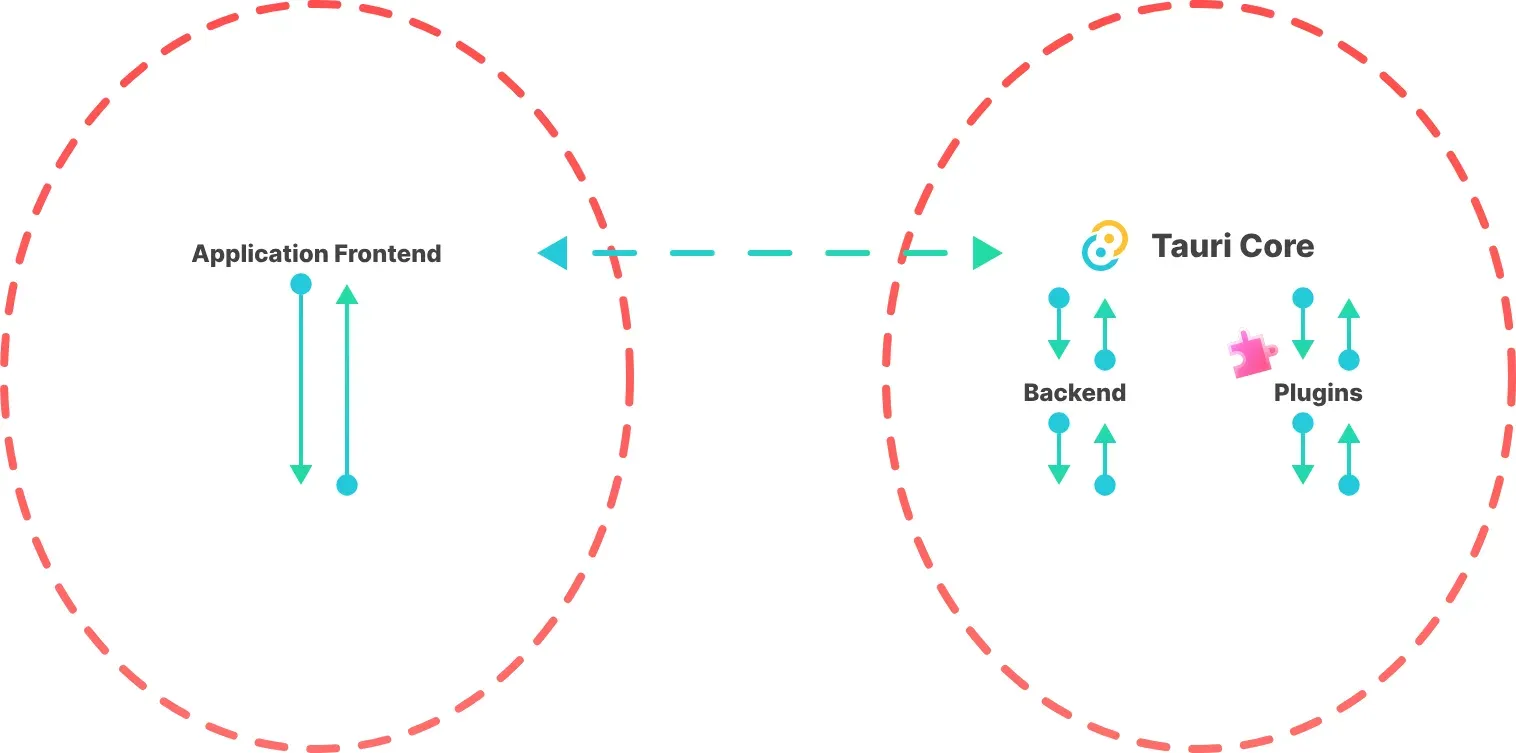
- Multi-process model Every Tauri app has one core process, the only component with full operating system access, which creates windows, tray menus and notifications and routes all IPC. The core starts one or more webview processes for the interface. The process model page describes this split as an application of the principle of least privilege.
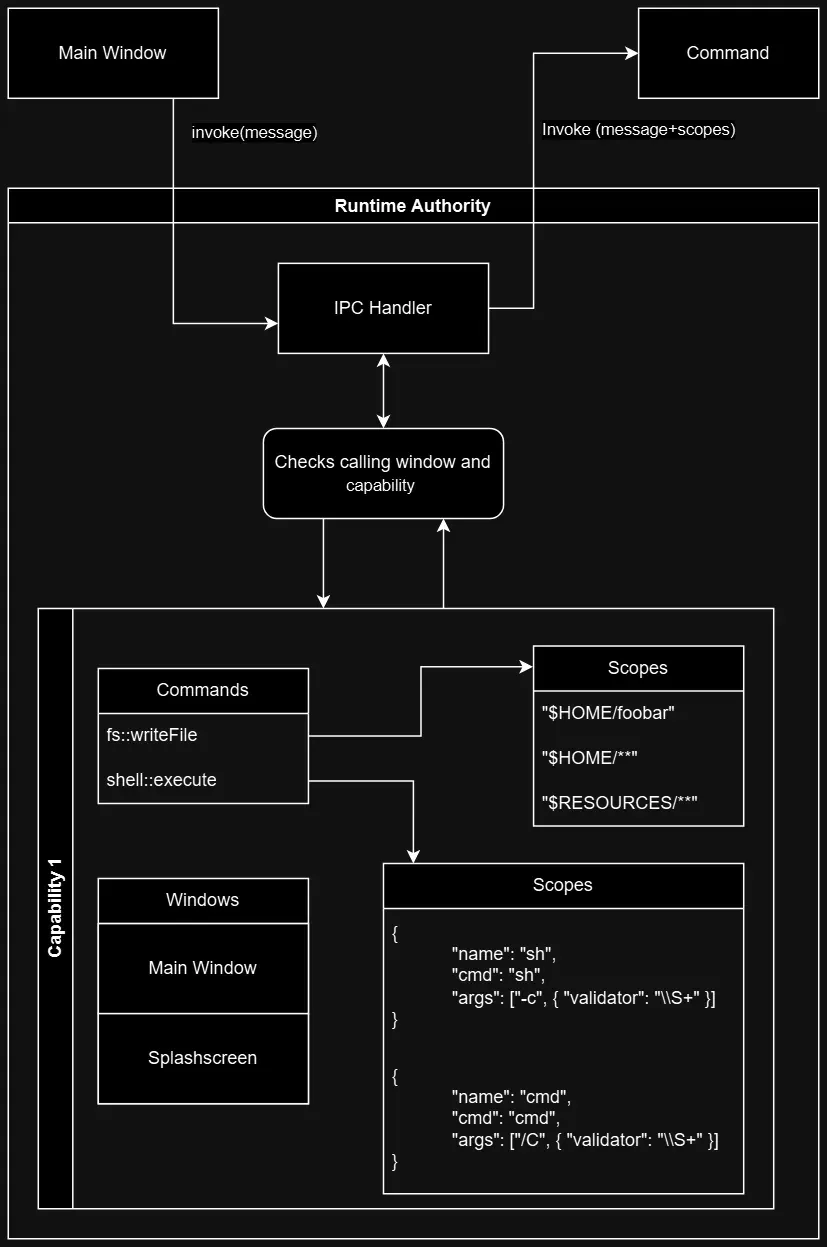
- Permissions, scopes and capabilities Frontend access to core and plugin commands is configured through capabilities: JSON or TOML files in
src-tauri/capabilitiesthat grant permissions such ascore:window:allow-set-titleto named windows or webviews, optionally only on selected platforms. Scopes narrow a permission further, for example to specific file system paths. Commands registered by the app itself are allowed for all windows unless they are listed throughAppManifest::commands, and a window that belongs to several capabilities receives the merged permissions of all of them. - Runtime authority At runtime, the IPC handler checks which window sent a request and whether a capability allows the command, then passes the applicable scopes to the command implementation. Requests that are not permitted are discarded and never reach the Rust function.
- Content Security Policy and isolation pattern Tauri supports a Content Security Policy for the webview and an optional isolation pattern, which injects a separate JavaScript application that can intercept and modify Tauri API messages before they reach the core. Since 2.12, navigations can be limited to app-bound domains.
- No local web server by default Tauri serves the frontend through a native webview protocol rather than starting a localhost HTTP server. An official Localhost plugin exists for apps that need a localhost server in production.
- Official plugins Functionality outside the core ships as official plugins, including file system, dialog, clipboard, HTTP client, notifications, shell, opener, SQL (through sqlx), store, Stronghold, deep linking, global shortcut, single instance, window state, autostart and logging. Mobile-only plugins cover barcode scanning, biometric prompts, NFC, haptics and geolocation. The site also lists community plugins and keeps a platform support table.
- Plugin development A plugin is a Cargo crate, by default named with the
tauri-plugin-prefix, plus an optional npm package with JavaScript bindings. It can also include an Android library and a Swift package, so plugin commands can be implemented in Rust, Kotlin or Swift and hook into the app lifecycle. - Bundler and installers
tauri buildcompiles and bundles the app in one step; build and bundle can be split with--no-bundleandtauri bundle. The built-in bundler produces.appand.dmgon macOS,.deb,.rpmand AppImage on Linux, and NSIS.exeand WiX.msiinstallers on Windows. The documentation also covers Snap, Flatpak and AUR packaging. - Store distribution and code signing The distribution guides cover the Apple App Store for macOS and iOS, the Microsoft Store and Google Play, plus code signing for each platform and notarization for macOS apps distributed outside the App Store. CrabNebula Cloud is listed as a cloud distribution service with update support.
- Updater plugin The updater plugin updates desktop apps from an update server or a static JSON file. Update signatures are mandatory and cannot be disabled: a key pair is created with
tauri signer generate, the public key goes intotauri.conf.jsonand the private key is supplied throughTAURI_SIGNING_PRIVATE_KEYat build time. The plugin requires Rust 1.90 or later. - Android and iOS targets Since 2.0, the same project builds for Android and iOS with
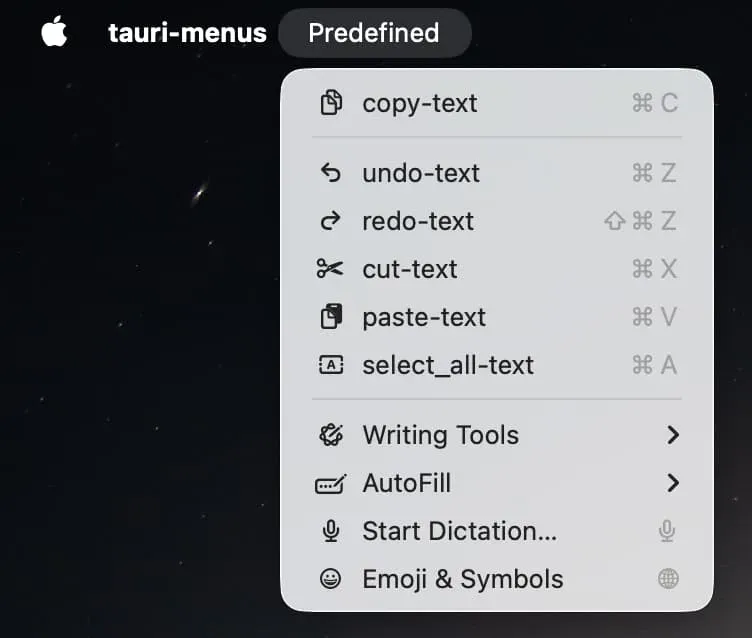
tauri android buildandtauri ios build. Android development needs Android Studio and aJAVA_HOMEsetting; iOS development needs macOS with Xcode, the iOS Rust targets and CocoaPods. Native mobile code is written in Kotlin or Swift inside plugins. - Desktop integration The README lists system tray icons and native notifications among the core features. Apps can create multiple windows and webviews, native menus with predefined items, and splash screens, and the repository's examples cover multiwindow, multiwebview, splashscreen, state and streaming setups.
- Small app size Because the webview is not bundled, a Tauri app contains only its own code and assets; the Tauri website states that a minimal app can be less than 600 KB. The App Size page documents further Cargo profile settings such as LTO, a single codegen unit and size-oriented optimization.
- Tooling The CLI is available as the
@tauri-apps/clinpm package and thetauri-clicrate (cargo tauri). The README also lists a GitHub Action for CI builds and a VS Code extension.
Where Tauri fits
Packaging an existing web app for the desktop
A team with an existing frontend runs tauri init, which asks for the app name, window title and the location of the built web assets, and creates the Rust backend in src-tauri. tauri dev compiles the Rust code and opens a window with the web content, and tauri build produces installers for the configured formats. The frontend keeps its own framework and build tool; Tauri loads its output into the system webview.
Calling native code from the interface
Work that needs operating system access or heavy computation is written as Rust commands and registered in the builder. The frontend calls them with invoke and receives JSON-serialized results, while state changes flow back as events. Global state such as settings or database connections lives in the core process, which the documentation describes as the place to keep business-sensitive data out of the frontend.
Restricting what each window may do
Each window or webview receives only the permissions listed in its capability files, and scopes limit them further, for example file system access to selected directories. Capabilities can be restricted to desktop or mobile platforms. The security overview describes the trust boundary between the Rust core, which has full system access, and webview code, which reaches system resources only through the IPC layer.
Shipping installers and store builds
Release builds are bundled per platform: DMG or app bundles for macOS, MSI or NSIS installers for Windows, and Debian, RPM or AppImage packages for Linux, with separate configuration for App Store, Microsoft Store and Google Play submissions. Most targets require code signing, and macOS builds distributed outside the App Store also need notarization.
Delivering signed updates
Desktop apps add the updater plugin, generate a signing key pair once and publish signed update artifacts with either a dynamic update server or a static JSON manifest. The app verifies each download against the embedded public key before installing it; losing the private key means existing installations can no longer receive updates, as the plugin documentation warns.
Extending a desktop app to Android and iOS
Since Tauri 2.0, a project can add mobile targets with the Android and iOS init and build commands. The web frontend is reused, and platform features come from mobile plugins such as barcode scanning, biometrics, NFC or geolocation, or from custom plugins written in Kotlin and Swift. iOS builds require a Mac with Xcode.
Install
npm create tauri-app@latestReviews of Tauri
Be the first to share your experience with Tauri.
Write a review
Loading review form…
Found Tauri useful? Upvote it todayYour vote helps other IT teams find it in the daily ranking.