
What is Flutter?
Flutter is an open-source framework for building natively compiled, multi-platform applications from a single codebase, written in the Dart language. The official site describes it as supported and used by Google and maintained by a community of developers worldwide. The SDK, framework and engine are developed in the flutter/flutter repository under the BSD-3-Clause license; the repository was created in 2015. Apps target Android, iOS, the web, Windows, macOS and Linux, and the project also documents embedded use through custom embedders.
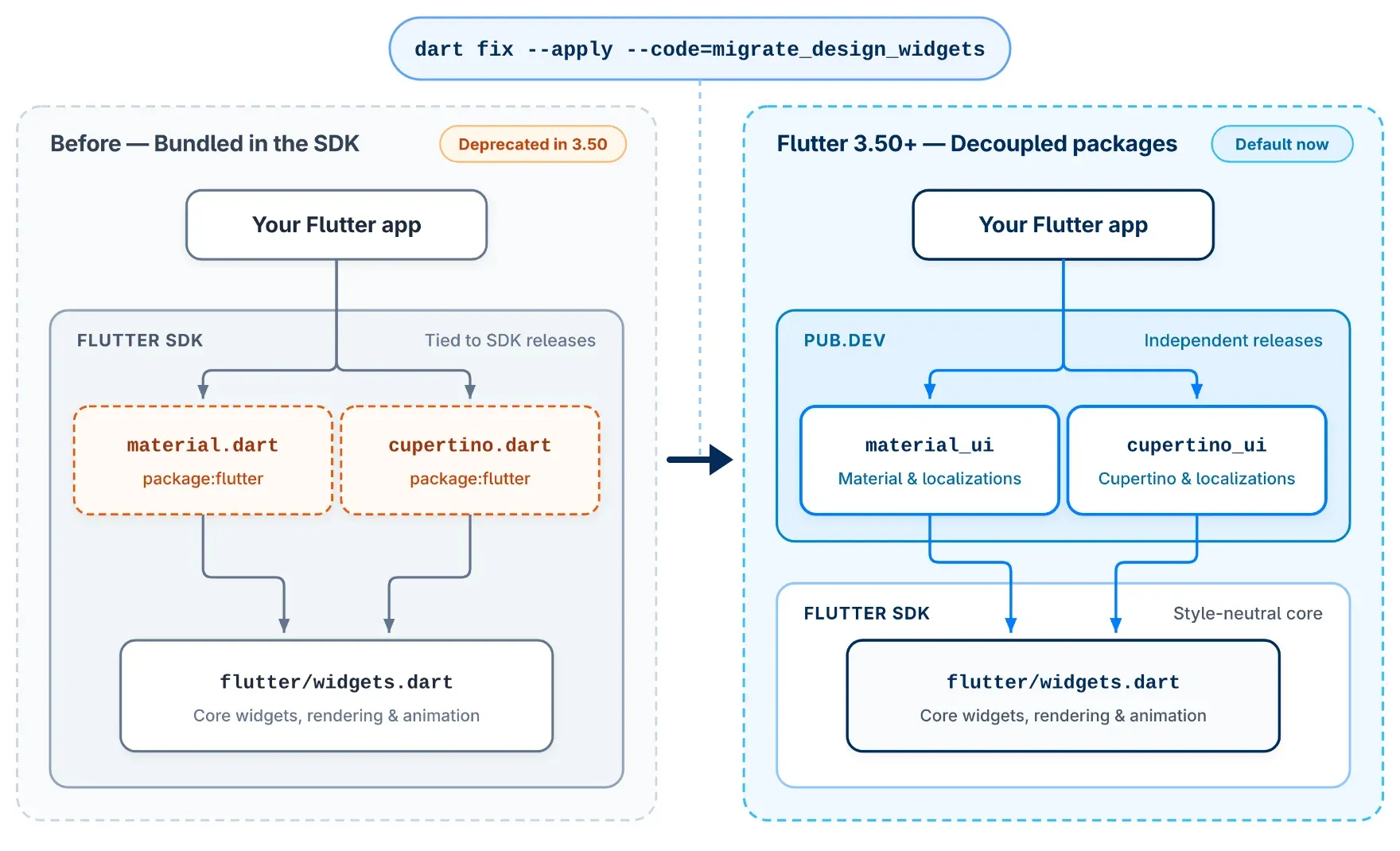
The current stable release is Flutter 3.50.0, published on November 11, 2026 and bundled with Dart 3.14.0, according to the official SDK archive. The 3.50 announcement lists direct native interop as stable (FFIgen for C and Objective-C, JNIgen for Java and Kotlin), opt-in WebAssembly for Safari 26.2+ and Firefox 147+, a --web-content-hash build flag, and the formal deprecation of the bundled material.dart and cupertino.dart libraries in favor of the standalone material_ui and cupertino_ui packages. The same post reports 188 contributors, 69 of them first-time, and more than 1,200 commits in that release cycle. Beta and main channels exist alongside stable; the beta channel was at 3.51.0-0.1.pre on the check date.
Applications are built from widgets: the core flutter/widgets.dart library provides composition, layout, rendering and animation, and design systems sit on top. Flutter code compiles to ARM or Intel machine code and to JavaScript, and web builds can also compile to WebAssembly. Rendering on iOS, Android and desktop uses Impeller, which precompiles a smaller set of shaders at engine build time instead of compiling them at runtime. Per the Impeller documentation, it is the only renderer on iOS, the default on Android API 29+ with an automatic OpenGL fallback on older or non-Vulkan devices, and the default on macOS, Windows and Linux since Flutter 3.47, with an opt-out that a future release will remove. Flutter on the web currently renders with Skia.
The SDK is distributed as a per-OS bundle for Windows, macOS and Linux (ChromeOS is supported through its Linux environment) or installed through the Flutter extension for VS Code, which downloads the SDK and adds it to the PATH. Flutter is phasing out Intel-based Macs as a development host: 3.50 warns once when building on Intel hardware, and a future release will require Apple Silicon. Packages and plugins are published on pub.dev, and the 3.50 announcement states that more than one million Flutter apps have been published on Google Play.
Project changes are tracked publicly: every stable release has release notes and a change log and a breaking changes page with migration guides, and Flutter 3.50 introduced a public Request for Comments process for significant framework and ecosystem changes. Flutter is a client UI toolkit; backend services, hosting and app store distribution are outside the SDK and handled by separate tools such as Firebase or the platform stores.
Key capabilities
- Widget-based UI framework Interfaces are composed from widgets that describe layout, styling, input and animation, and the framework rebuilds the widget tree when state changes. The core
flutter/widgets.dartlibrary is style-neutral, so apps can draw every pixel themselves or use a design-system package on top. Scrolling, slivers, text editing, accessibility semantics and focus traversal are part of the framework; 3.50 added widgets such asSliverClipRectandSliverClipRRect. - Material and Cupertino as standalone packages Material Design and iOS-style Cupertino widgets now ship as the
material_uiandcupertino_uipackages on pub.dev, which reached 1.0 in Flutter 3.47 and release independently of the SDK. Flutter 3.50 deprecates the bundledpackage:flutter/material.dartandpackage:flutter/cupertino.dartlibraries, andflutter createimportsmaterial_uiby default. The migration guide covers the change. - Hot reload and hot restart Hot reload injects changed Dart source into the running Dart runtime and rebuilds the widget tree while keeping app state; it does not rerun
main()orinitState(). Hot restart reloads code and resets state, and a full restart is needed for native code changes. Both work only in debug mode and are available on the web as well as on devices and emulators. - Impeller rendering engine Impeller compiles shaders and builds pipeline state objects ahead of time to avoid runtime shader compilation stutter, and can spread a frame's work across threads. It uses Metal and Vulkan where available, with OpenGL fallbacks. In 3.50 its Signed Distance Field renderer on macOS, Linux and Windows covers lines, thin borders, rounded corners and gradients, and Flutter GPU adds 2D texture arrays for custom 3D and 2D game rendering.
- Supported deployment platforms The supported platforms page for 3.50 lists Android API 24 to 37 (x64, Arm32, Arm64), iOS 15 to 27 (Arm64), Windows 10 and 11 (x64, Arm64), macOS Monterey (12) to Golden Gate (27), Debian 10 to 13 and Ubuntu 20.04 to 24.04 LTS (x64, Arm64), and the latest two versions of Chrome, Edge and Firefox plus Safari 15.6 and newer. Each entry also states which versions are CI-tested on every commit.
- Web builds in JavaScript and WebAssembly
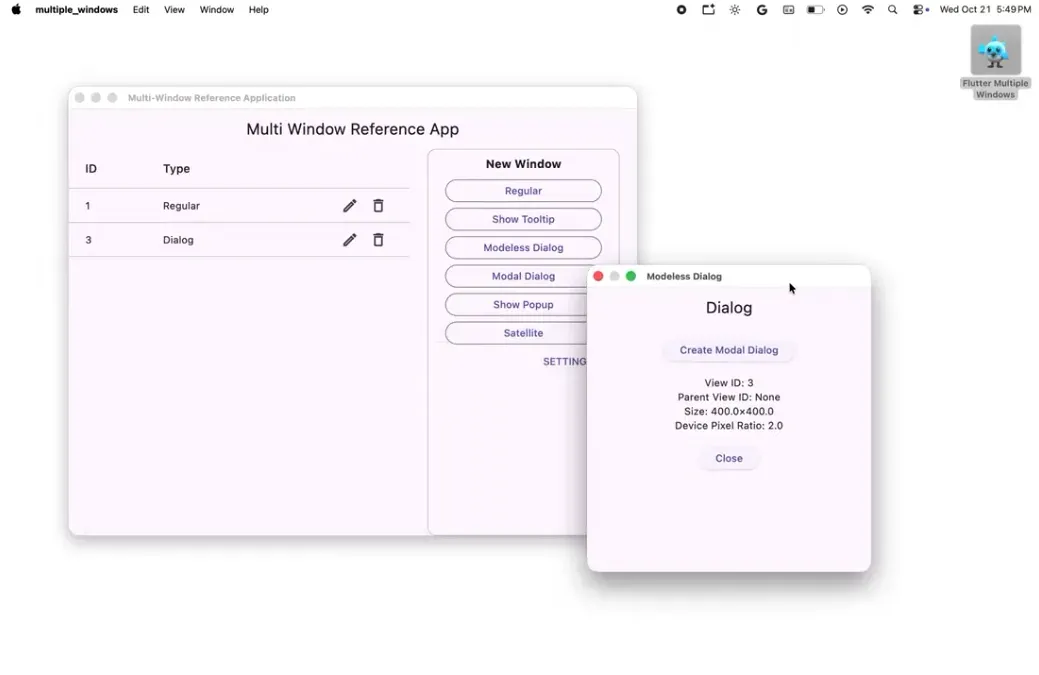
flutter build web --wasmcompiles to both WebAssembly and JavaScript and falls back to JavaScript in older browsers. Chrome and Edge 137+ run the WebAssembly build by default; Safari 26.2+ and Firefox 147+ run it only when listed in the app'swasmAllowList. The--web-content-hashflag adds content hashes to compiled files and assets for long-lived HTTP caching, and--no-deprecated-js-interopfails builds that still use legacy JS libraries. - Desktop apps and multi-window APIs Windows, macOS and Linux apps are built as native desktop binaries from the same codebase. Experimental multi-window APIs, developed in partnership with Canonical, support secondary windows, dialogs, custom title bars on Linux and content-sized windows on macOS. Flutter 3.50 renamed
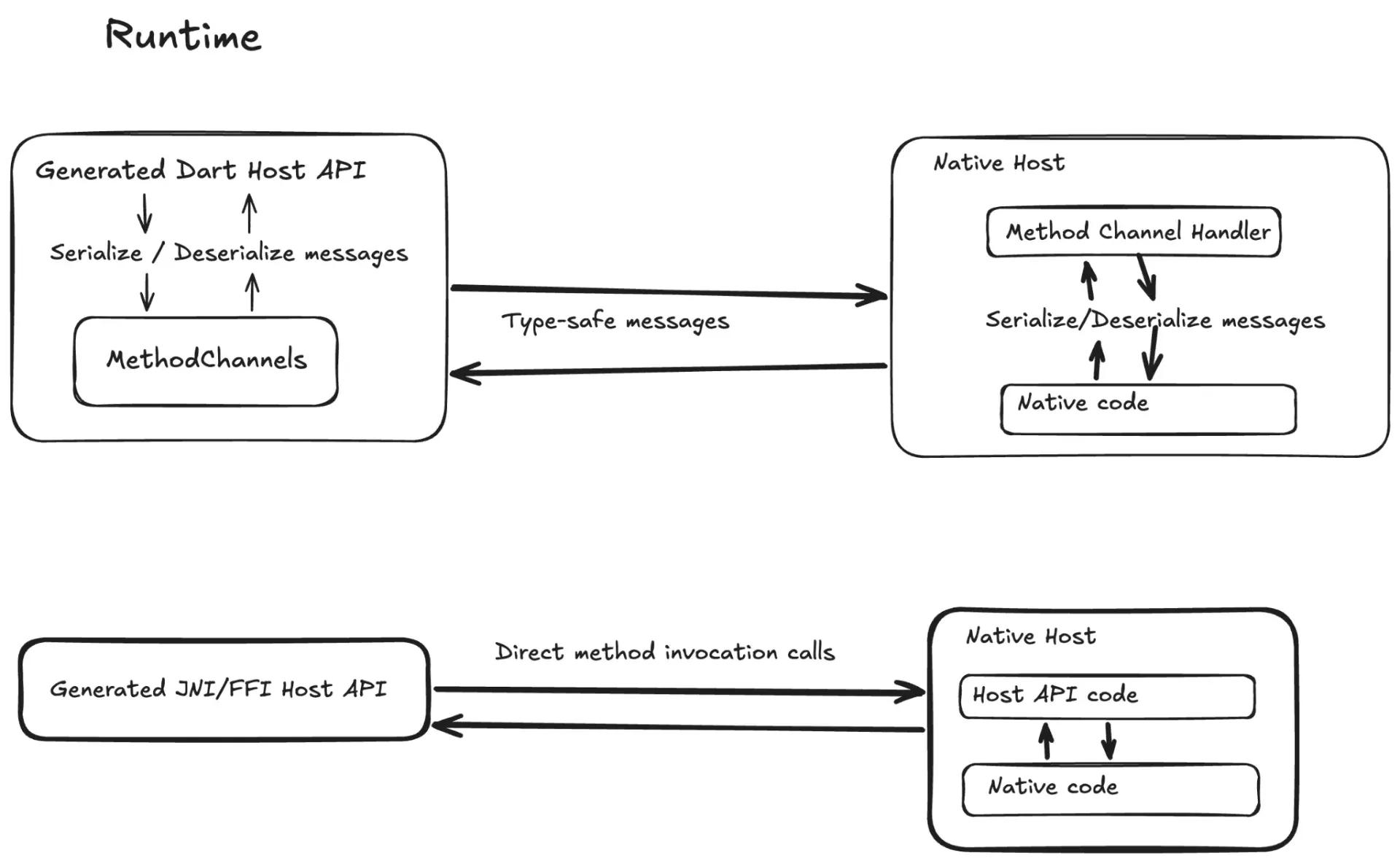
RegularWindowtoWindowand placedWindowManageraboveWidgetsApp. - Direct native interop FFIgen generates Dart bindings for C and Objective-C APIs and JNIgen does the same for Java and Kotlin, both stable as of 3.50. Calls go directly through FFI or JNI, including synchronous calls and calls from background isolates, instead of serialized platform-channel messages. Pigeon's native interop mode, in preview, generates type-safe plugin bindings on top of both generators; classic platform channels remain available.
- Platform views Native Android and iOS views such as maps and web views can be embedded in the widget tree. Hybrid Composition++ hands Android compositing to the operating system and requires Android 14 (API 34) and Impeller on Vulkan, with automatic fallback otherwise; it is enabled with
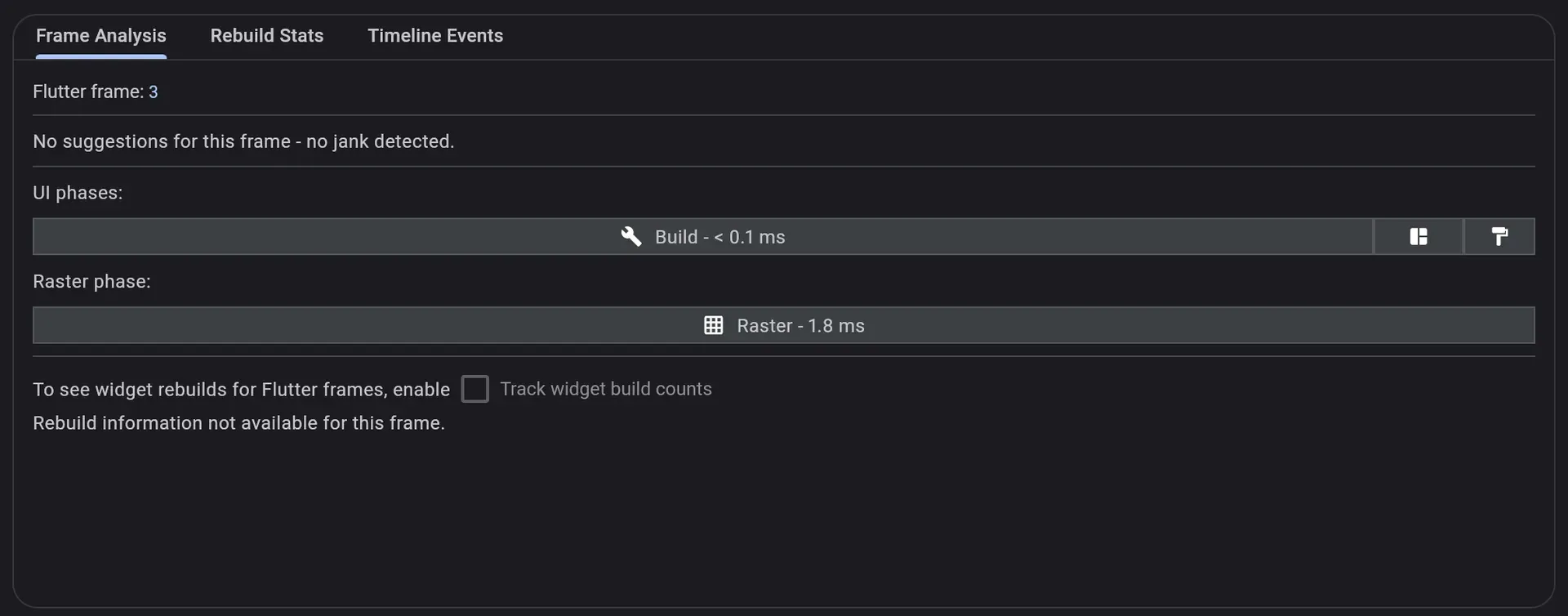
flutter config --enable-hcppon stable and is the default on the beta channel. - Flutter and Dart DevTools DevTools is a suite of debugging and performance tools shipped with the SDK. It inspects widget layout and state, diagnoses jank with a frame timeline, profiles CPU, memory and network, offers source-level debugging and logging, analyzes code and app size, and validates Android and iOS deep links. It opens from VS Code, Android Studio, IntelliJ or the command line.
- Editor plugins and DartPad The Flutter team supports the Flutter extension for VS Code and the Flutter plugin for Android Studio and IntelliJ, which provide code completion, widget editing assists, debugging, hot reload on save and DevTools integration. Other editors can use the Dart SDK's Language Server Protocol and Debug Adapter Protocol support, and DartPad runs single-file Flutter apps in the browser.
- Widget Previews The Widget Previews tool graduated to stable in Flutter 3.47. It shows previews of individual widgets during development, and the stable release added local build caching for faster startup plus real-time search and filtering of previews.
- pub.dev package ecosystem Dependencies are declared in
pubspec.yamland resolved from pub.dev, which hosts Dart packages and Flutter plugins with platform-specific code. First-party plugins live in the flutter/packages repository. From 3.50, packages can ship agent skills in a top-levelskills/directory, and plugins that still apply the Kotlin Gradle Plugin manually will receive lower pub.dev scores in the future. - iOS and macOS toolchain Apple targets are built with Xcode; 3.50 is the first stable release after Xcode 27 and iOS 27 and adds automatic preparation of newly paired iPhones for debugging. Swift Package Manager is replacing CocoaPods: disabling it now prints a warning on every CLI command, and the CocoaPods fallback is scheduled for removal. Apple Silicon-only macOS builds are available with
flutter config --enable-macos-arm64-only. - Android toolchain defaults New Android projects created by 3.50 use Android Gradle Plugin 9.3.1 and Gradle 9.5.0 with a minimum of Java 17, compile and target SDK API 36 and minimum SDK API 24. Release builds ignore entrypoint and route values from external Intent extras and reject runtime engine flags, while debug builds log warnings.
- AI tooling Official Flutter agent plugins bundle agent skills, Dart and Flutter MCP server configuration, specialized agents and agent rules, including a rule that triggers hot reload after edits under
lib/. The AI documentation covers setup with coding assistants, andpackage:skills_lintchecks package skills against the Agent Skills specification. - Installation per host OS The install guide offers an automated setup through the VS Code extension or a manual download of the stable bundle for Windows, macOS (Apple Silicon or Intel) or Linux, extracted to a folder and added to the PATH. Prerequisites are Git on Windows, the Xcode command-line tools on macOS, and curl, git, unzip, xz-utils, zip and libglu1-mesa on Linux and ChromeOS. Target platform toolchains such as the Android SDK or Xcode are set up separately.
- Release channels and SDK archive Stable releases come with announcement posts, release notes and breaking-change lists; bug-fix releases such as 3.47.1 to 3.47.9 are listed in the repository change log.
flutter upgradeupdates an installation, the SDK can be switched between the stable, beta and main channels, and earlier versions can be downloaded from the SDK archive.
Where Flutter fits
Shipping one app to mobile, desktop and web
A project created with flutter create contains a shared Dart lib/ folder plus platform runner folders for Android, iOS, web, Windows, macOS and Linux. The same widget code is compiled per target with commands such as flutter build apk, flutter build ios, flutter build web or flutter build windows, and platform-specific behavior is added through plugins or native interop. Open-source apps listed on iThub that use Flutter include Twake Chat, Twake Mail, Mornye and the learner app of TutorLoom.
Iterating on UI with hot reload and Widget Previews
During development, flutter run or an editor launches the app in debug mode on a device, emulator or browser. Saving a Dart file, or pressing r in the terminal, performs a hot reload that keeps the current screen and state, while R performs a hot restart. Changes to main(), initState() or native code need a restart, as listed in the hot reload documentation. Widget Previews show individual widgets for layout work.
Diagnosing jank and memory issues with DevTools
DevTools connects to a running debug or profile-mode app. The Performance view shows each Flutter frame with its UI and raster phases and flags janky frames, the CPU profiler shows which code consumes time, and the Memory view helps debug memory issues and shows garbage collection events. The widget inspector shows the layout tree and properties, and a separate tool analyzes code and app size.
Calling platform APIs directly
Flutter apps reach Android, iOS, macOS, Windows and Linux APIs through plugins from pub.dev or through generated bindings. With JNIgen, Android system APIs and Java or Kotlin libraries become Dart classes; FFIgen does the same for C and Objective-C headers. The native interop guides also cover Pigeon and bundling native code with build hooks, and platform channels remain an option for message-based integration.
Deploying Flutter web builds
A web build produces static files in build/web that any HTTP server or CDN can host. With --wasm, browsers that run the WebAssembly build load it and older browsers fall back to JavaScript; the WebAssembly guide lists server headers, pre-compression and the wasmAllowList for Safari and Firefox. Hashed file names from --web-content-hash allow immutable caching of app bundles while index.html and flutter_bootstrap.js stay uncached.
Migrating to the standalone design packages
Existing apps that import package:flutter/material.dart or cupertino.dart receive deprecation warnings from Flutter 3.50. Running dart fix --apply --code=migrate_design_widgets rewrites imports and localization delegates to material_ui and cupertino_ui, and MaterialUiCompatibilityBridge helps during the transition. Similar UI toolkits listed on iThub include the Rust libraries egui and Rune.
Reviews of Flutter
Be the first to share your experience with Flutter.
Write a review
Loading review form…
Found Flutter useful? Upvote it todayYour vote helps other IT teams find it in the daily ranking.