
What is Mornye?
Mornye is an open-source music application built with a Flutter and Dart interface, a Rust backend and thin Android and iOS platform bridges. The mornyeapp/Mornye repository describes it as a mobile music utility for managing a personal library, open source, with no ads and no subscription. The official website presents it as a music metadata and tagging app that matches a song from a link or a name across music catalogs and fills in cover art, synced lyrics, ISRC and other tags. The README lists a built-in player, hi-res output, an equalizer, lyrics, a local library, network storage and extensions. The app is available in 20 languages, translated on Crowdin.
The README's disclaimer states that Mornye is licensed under the GNU Lesser General Public License v3.0 only, together with the incorporated GNU GPL v3.0 terms, with a copyright notice for 2026 by zarzet, and that third-party components keep their own license notices. It states that the repository is provided for educational and research purposes, as-is and without warranty; that no copyrighted content is hosted, stored, mirrored or distributed by the repository; and that users must ensure their use is authorized and complies with applicable laws, regulations and third-party terms of service. It adds that the software is free of charge from the maintainer, that the project is independent and not affiliated with other projects of a similar name, and that copyright holders can contact the maintainer to have material investigated and removed. The website footer states that the app is for educational and private use only and is not affiliated with any streaming service.
Downloads and other sources are handled through extensions rather than a built-in server. Extensions are ZIP packages with the .spotiflac-ext extension containing a manifest.json and one JavaScript file that runs in a sandbox, and they can provide metadata, download, lyrics and post-processing functions, as described in the extension development guide. Users add community repositories by URL in the Repo tab. The README FAQ notes that download quality depends on the source and the installed extension, and that some countries restrict access to certain streaming service APIs.
The latest GitHub release is v5.3.1, published on November 5, 2026, with arm64 and arm32 Android APKs (hotfix.2 builds), an unsigned iOS IPA and SHA-256 checksums. Its notes list Google Cast output on Android, iOS and desktop through a Rust cast sender, lyrics editing and syncing from the player, prefetching of upcoming NAS songs, uploading local songs to network storage, offline copies of network songs, whole-library metadata re-enrichment, Last.fm scrobbling on desktop and AI romanization and translation synced to word timing. Desktop builds for macOS 12 or later, Windows x64 and arm64 and Linux x86_64 and arm64 are published from the separate Mornye for Desktop page; at the time of checking it offered version 5.2.6. Similar listings on iThub include the music server Navidrome and the desktop player Nuclear.
Mornye screenshots
Explore the interface. Open a screenshot to view it at full size.
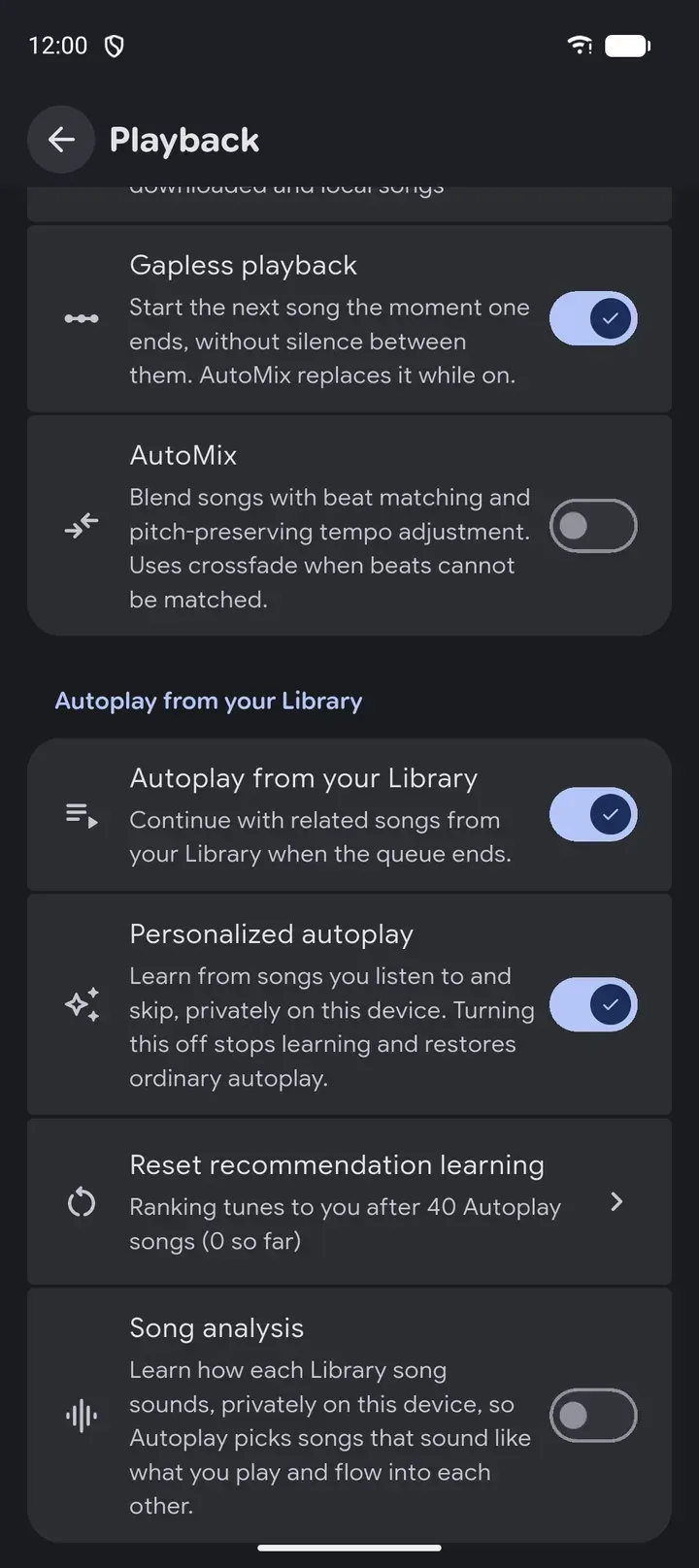
Playback settings in Mornye 5.3, from the official website.
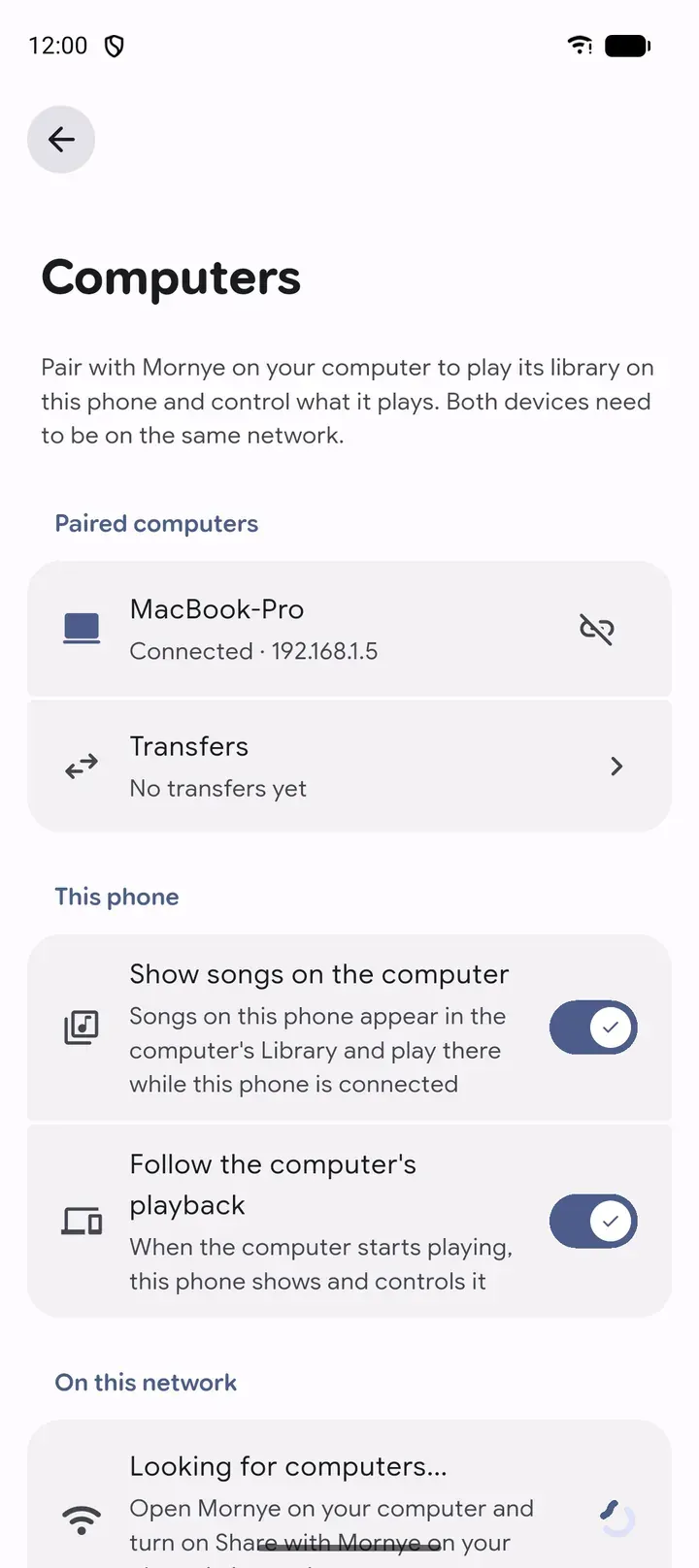
Computers screen for pairing the phone with Mornye on a computer on the same network.
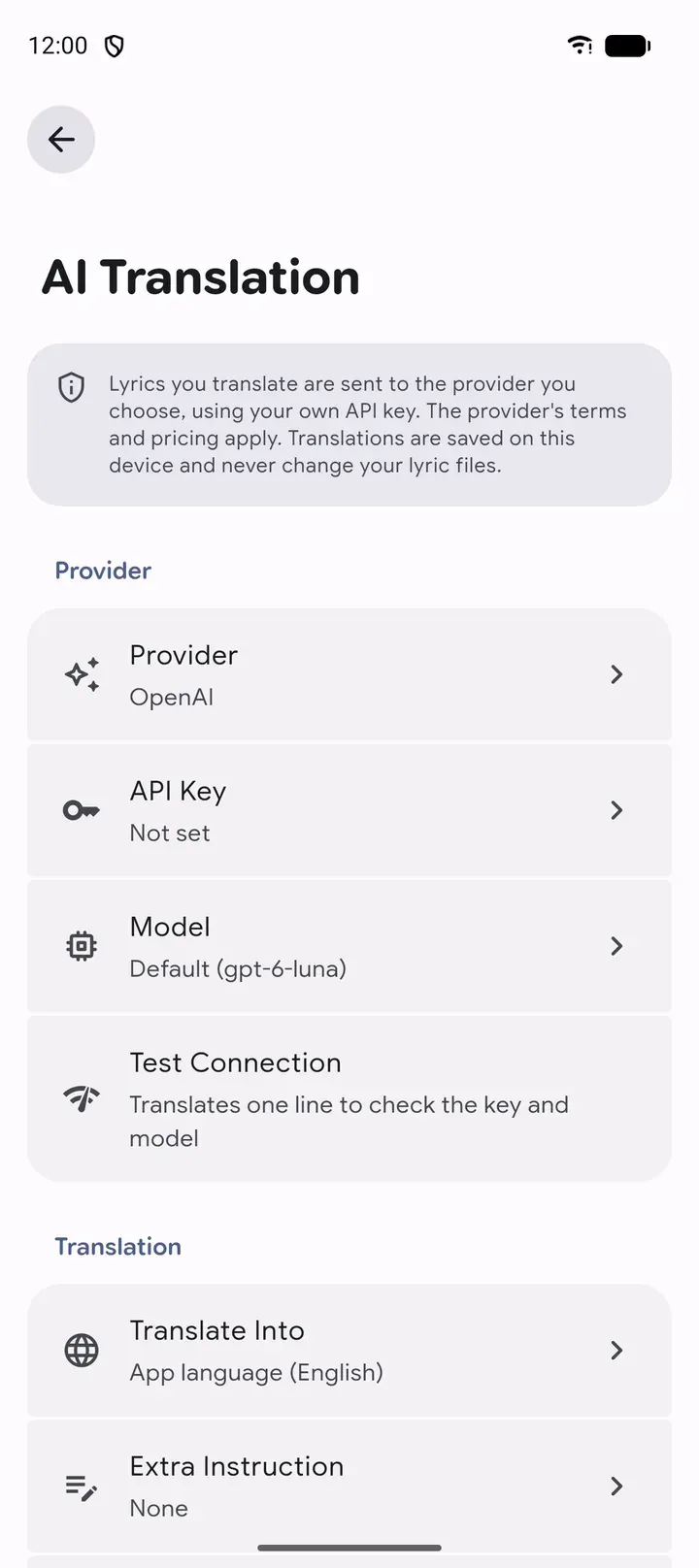
AI Translation settings for lyrics, using a provider and API key chosen by the user.
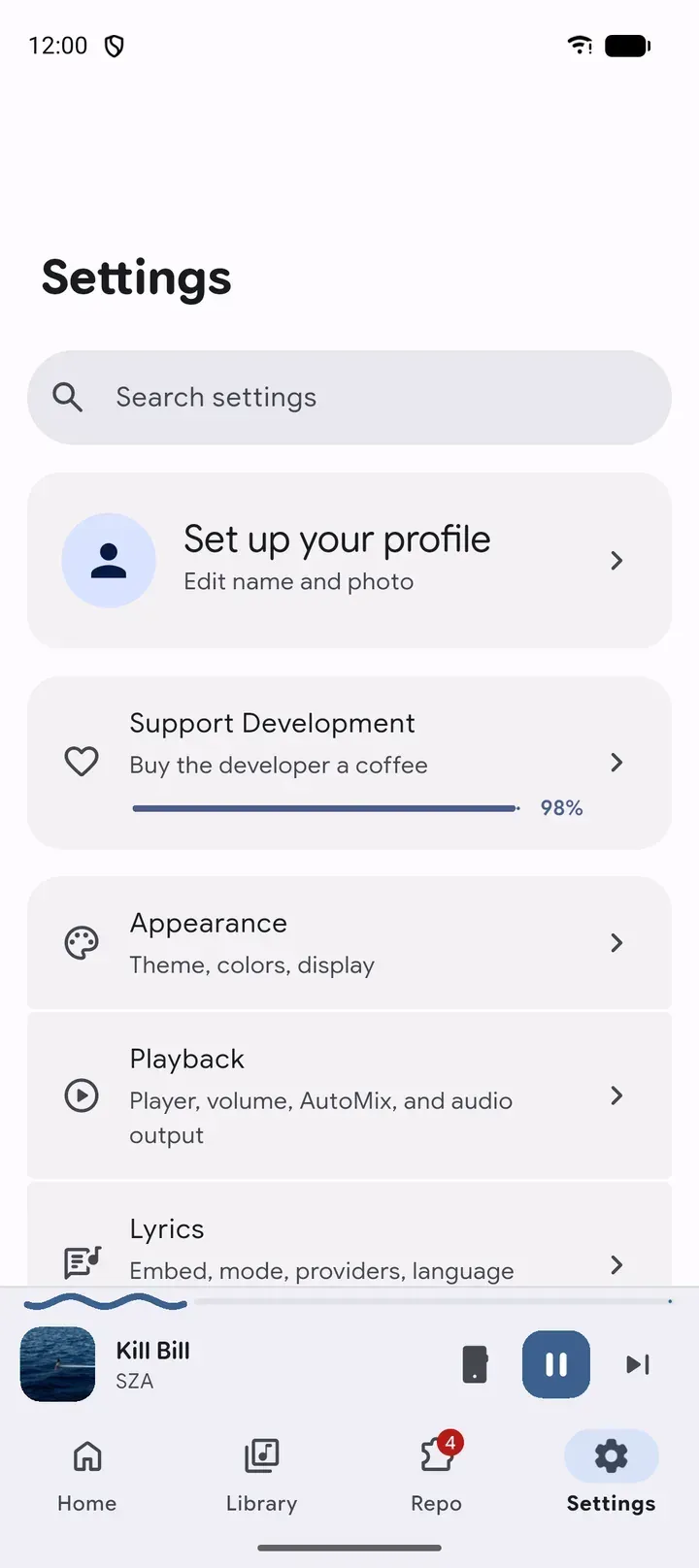
Main Settings screen with the mini player and the Home, Library, Repo and Settings tabs.
Source: official Mornye project page.
Key capabilities
- Built-in player The player shows full-screen cover art, a detailed audio quality label with format, bit depth and sample rate, queue controls and a sleep timer. Gapless playback and AutoMix, which blends songs with its own beat detection and pitch-preserving tempo adjustment, are available. Home screen widgets on Android and iOS follow the wallpaper colours.
- Hi-res and bit-perfect output USB bit-perfect playback works on Android 14 and later, AAudio exclusive mode plays each track at its original rate on DAPs, and a direct USB driver supports native DSD on compatible DACs. The FAQ warns that direct USB can be much louder than normal playback and that the phone volume buttons may not control it. These outputs bypass the equalizer.
- Equalizer and loudness A multiband equalizer with presets is marked beta. Volume normalization and ReplayGain scanning based on EBU R128 work on single tracks or whole selections. The equalizer sits under Settings, Playback and in the Now Playing menu.
- Synced lyrics Lyrics support word-by-word timing, optional translation and romanization lines and a reorderable chain of providers. The default chain is Apple Music through Paxsenix, lrc.red, Zarz-LRC, LyricsPlus and LRCLIB, and lyrics embedded in a file always come first. Up to five lines can be shared as a card, and v5.3.1 added editing and syncing lyrics from the player.
- AI lyrics translation Lyrics can be translated by an AI provider chosen by the user, with the user's own API key. The app states that translated lyrics are sent to that provider under its terms and pricing, and that translations are saved on the device without changing lyric files.
- Local library Music folders are scanned and browsed by songs, albums, artists and playlists, merged with downloads in the Library tab. The library can review duplicates, edit metadata, search saved lyrics and export collections as M3U8. Version 5.3.1 added re-enrichment of metadata for the whole library and rules for reorganizing existing files.
- Metadata and tagging The website describes matching a link, a song name or an ISRC to the same recording across catalogs such as Tidal, Qobuz and Deezer through extensions, then embedding cover art, synced lyrics, genre, label and copyright into the file. On Android 13 and later the app may need All files access to write tags.
- Network storage Music plays from SMB, WebDAV, HTTP and HTTPS servers and from Subsonic and OpenSubsonic servers, with sign-in details stored on the device. An HTTPS server can be pinned to one approved certificate fingerprint. Subsonic is a read-only source with salted-token, password or API-key authentication, while download folders on the network need SMB or WebDAV.
- Extensions from community repositories The Repo tab installs extensions from any GitHub repository URL that contains a
registry.jsonfile. Extensions add metadata, lyrics and download sources, and Settings, Extensions, Provider Priority sets the order in which they are tried. Extensions are written in JavaScript and declare network, storage and file permissions in their manifest. - Albums, playlists and imports Pasting an album or playlist link into the Home search fetches and queues every track, and an artist link opens a page with a Download Discography action. CSV and M3U playlist files can be imported from the search bar.
- Personal statistics and autoplay Rewind recaps listening, personalized autoplay learns from plays and skips on the device, and music haptics follow the beat. The README states that listening statistics are stored only on the device and that a play counts after 30 seconds.
- Phone and computer pairing A phone can pair with Mornye on a computer on the same network, play the computer's library, show its songs on the computer and follow the computer's playback. Google Cast output is available on Android, iOS and desktop since 5.3.1.
- Appearance Material 3 Expressive or the Mornye theme can be selected, with Dynamic Color, an AMOLED mode, Material Symbols and layouts for tablets and large screens.
- Android TV and Google TV The Android APK installs on ARM TV devices, appears in the TV launcher and opens in landscape with a sidebar and larger controls operated with the D-pad. The default app folder avoids the need for a shared-storage permission during TV setup.
- Download for Android The arm64 APK targets most phones and the arm32 APK older 32-bit devices; the website lists Android 7.0 or later. On Android the App Folder saves to
Music/Mornyeby default, or any folder can be picked with the system folder picker. - Download for iOS An unsigned IPA for iOS 14.0 or later is published for sideloading. The official AltStore and SideStore source at
apps.jsonin the repository delivers updates inside those apps. - Desktop builds Mornye for Desktop shares the Flutter and Rust core and offers a universal macOS DMG, Windows x64 and arm64 installers and portable zips, and Linux AppImages and DEB packages for x86_64 and arm64. It watches music folders, edits tags in a sortable table and is driven by keyboard shortcuts.
- Backup and restore Settings, listening history and playlists can be backed up and restored. The website states that every release is scanned with VirusTotal, and the README points to the repository's code and build workflows for inspection.
Where Mornye fits
Playing a local music collection
Music folders added under Settings, Local Library are scanned and merged with downloaded files in the Library tab. The built-in player shows format, bit depth and sample rate, plays gapless or with AutoMix, and applies the equalizer, normalization and ReplayGain values unless a bit-perfect output is active. Duplicates can be reviewed and collections exported as M3U8.
Bit-perfect playback on a USB DAC
The FAQ describes turning on Hi-res and bit-perfect audio under Settings, Playback and choosing the direct USB driver or AAudio exclusive mode. Without either, Android USB output needs Android 14 or later. The direct USB driver supports native DSD on compatible DACs, and the FAQ advises lowering DAC or amplifier volume first because the phone buttons may not control it.
Streaming from a NAS or home server
Settings, Network storage connects to SMB, WebDAV, HTTP or HTTPS shares and to Subsonic or OpenSubsonic servers. Subsonic supports browsing artists and albums, search, streaming and syncing the server catalogue into the Library. Version 5.3.1 prefetches upcoming NAS songs to a local cache, saves network songs offline and edits metadata and lyrics on SMB and WebDAV.
Tagging files with metadata and lyrics
The website describes looking up a song from a Tidal, Qobuz or Deezer link or a name, matching it across catalogs and embedding cover art, synced lyrics, ISRC, genre, label and copyright into the file. Missing tags depend on which catalog stores which fields, and enabling more services through extensions gives the app more places to look.
Building or installing extensions
Extension authors package a manifest and an index.js file as a .spotiflac-ext archive that can act as a metadata, download or lyrics provider and run post-processing hooks. Users add a repository URL in the Repo tab, install extensions and order them under Provider Priority. The README disclaimer places responsibility for authorized and lawful use, including third-party terms of service, on the user.
Using Mornye on a TV or a computer
On Android TV and Google TV, the APK runs in landscape with remote-control navigation and network storage for music from a NAS. On a computer, Mornye for Desktop keeps a watched library current, and a paired phone can browse and control it over the local network, or send audio to Google Cast devices. Related iThub listings: Jellyfin and Kodi.
Reviews of Mornye
Be the first to share your experience with Mornye.
Write a review
Loading review form…
Alternatives to Mornye
 NuclearNuclear is a free AGPL-3.0 music player for Windows, macOS and Linux. Plugins supply search, streams, lyrics and dashboards, and a local MCP server, HTTP API and MPD server let agents and scripts control it.
 NavidromeNavidrome is a GPL-3.0 music server written in Go. It indexes your own library from its tags, streams it to a browser or to Subsonic, OpenSubsonic and Jellyfin clients, and runs as a single binary or Docker container, even on a Raspberry Pi.
 JellyfinJellyfin is a free software media server that manages your media and streams it from a dedicated server to end-user devices through multiple apps.