

What is Nuclear?
Nuclear is a free, open-source desktop music player for Windows, macOS and Linux, started by the developer nukeop in 2016 and maintained in the public nukeop/nuclear repository. It has no built-in music catalog and no account system. A fresh installation contains no content providers: you install plugins from a built-in store, and those plugins decide where search results, metadata, audio streams, lyrics and dashboard content come from. The player itself owns the interface, playback engine, queue, playlists, favorites, listening history, settings and themes.
The current codebase is a pnpm and Turborepo monorepo. The desktop application is built with Tauri, which pairs a Rust shell with a React 18 and TypeScript interface, styled with Tailwind v4 and routed with TanStack Router. Shared packages cover the UI kit, the theming system, the data model, an HTML5 audio engine called hifi, internationalization and the @nuclearplayer/plugin-sdk used by plugin authors. The How Nuclear works page explains the split between the player and its providers.
Releases are published on GitHub Releases as a per-user Windows setup EXE and an MSI, macOS DMGs for Apple Silicon and Intel, and Linux AppImage, DEB, RPM, Flatpak and Snap packages. The installation guide also lists winget, a Homebrew tap, Flathub and two AUR packages. The latest release is 1.54.2, published November 6, 2026, which fixes queue panel virtualization for large queues. Version 1.54.1 fixed YouTube searches that returned nothing, tracks longer than about 90 minutes that failed with an unsupported format error, and slow favorites views on large libraries. Version 1.54.0 added a View API that lets plugins, the HTTP API and MCP clients register custom sidebar views.
Earlier releases in the same cycle added playlist folders and direct play buttons on cards (1.53.0), signature verification of yt-dlp before installation (1.53.0), verification of plugins installed from the store and manual playlist reordering (1.52.0), lyrics in the Nuclear Jam phone remote (1.51.0) and plain, line-synced and word-synced lyrics with furigana, translations and romanization (1.50.0). Releases arrive frequently, often several per week, so pin a version if you need a stable baseline for a managed desktop.
Nuclear is licensed under AGPL-3.0. It does not host music, and what you can play depends entirely on the plugins you enable and the services they reach. The macOS builds are not signed with an Apple Developer certificate, so Gatekeeper blocks the first launch unless you use the Homebrew cask or clear the quarantine attribute. Library browsing and stored playlists are not part of the MPD server, and the project offers no paid tier, hosted service or support contract. The official site is nuclearplayer.com.
Nuclear screenshots
Explore the interface. Open a screenshot to view it at full size.
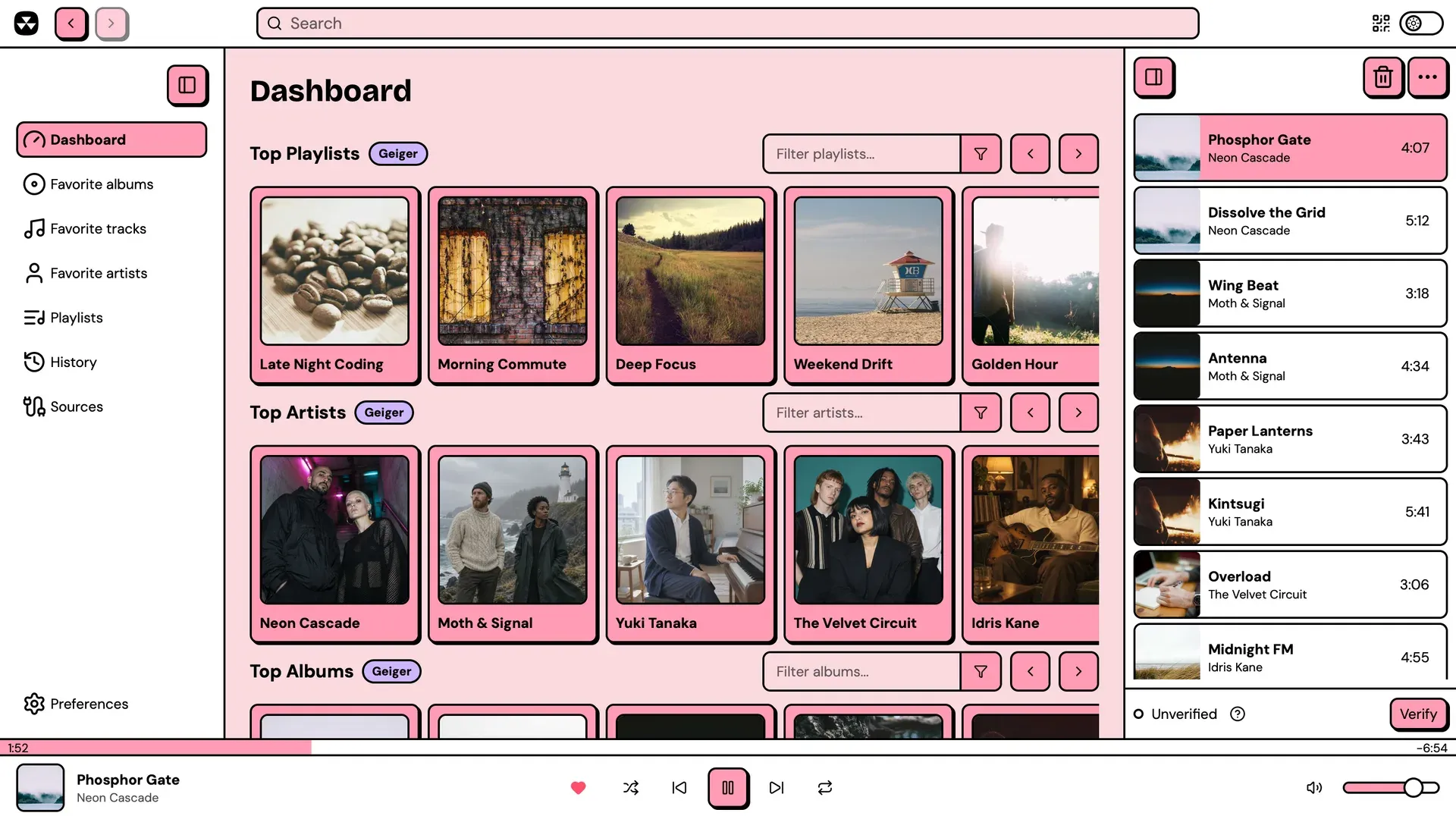
Official documentation screenshot of the Nuclear dashboard, populated by a dashboard plugin with sample content, with the queue and stream verification bar on the right.
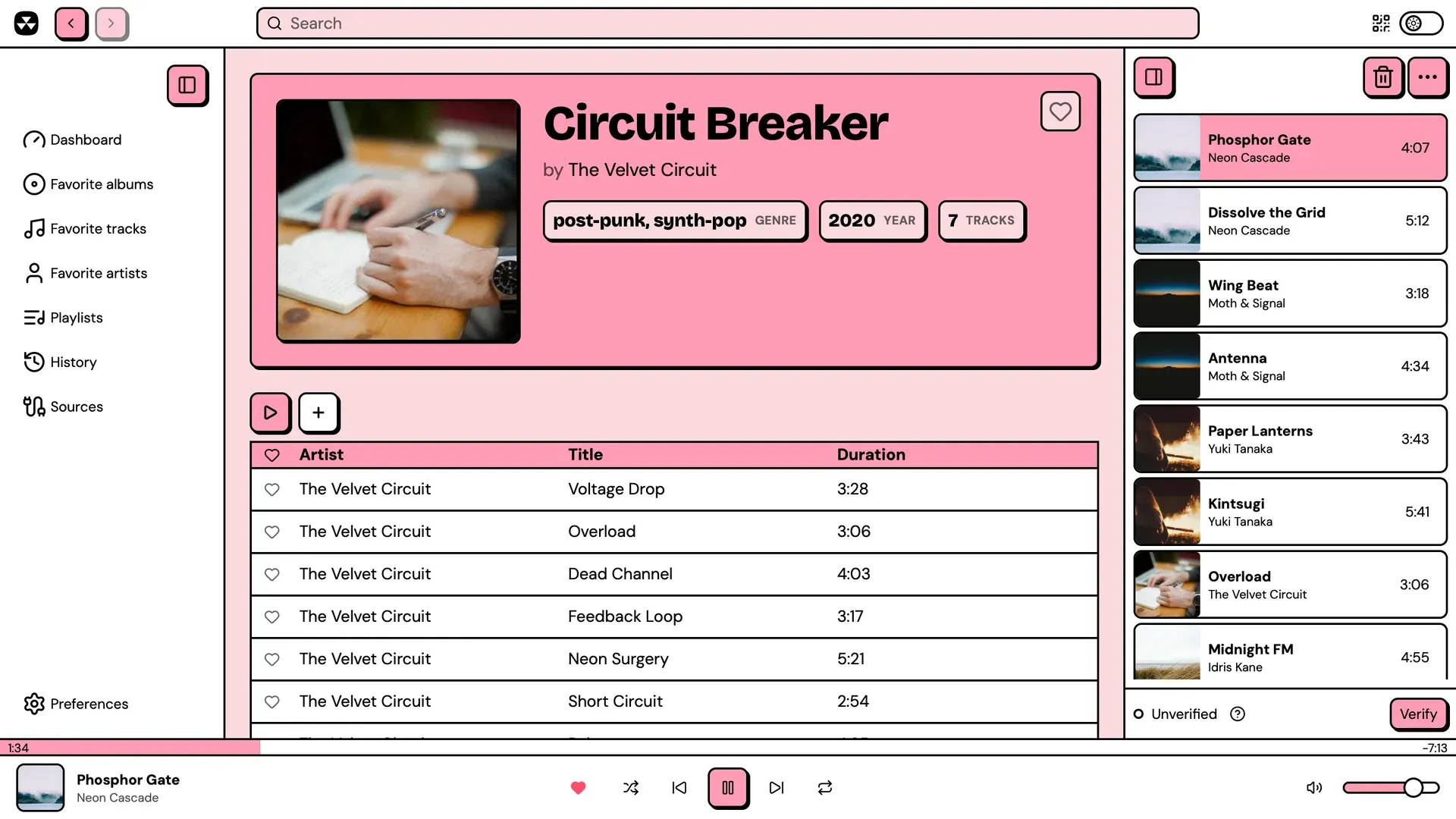
Album page with genre, year and track count badges, play and add-to-queue buttons and the tracklist, from the official documentation.
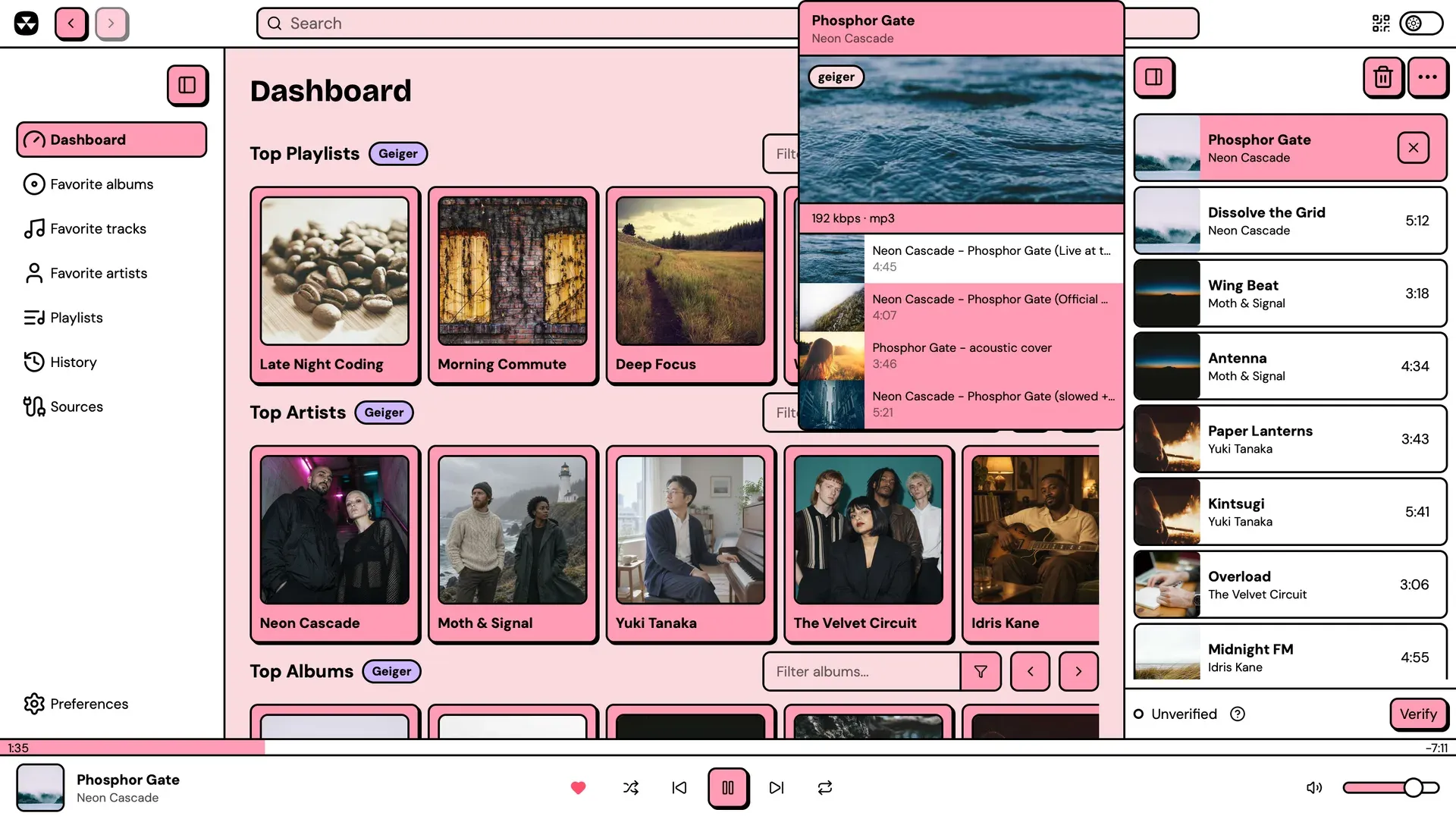
Stream candidates for a queued track, with bitrate and format, used to switch to the right version before verifying it.
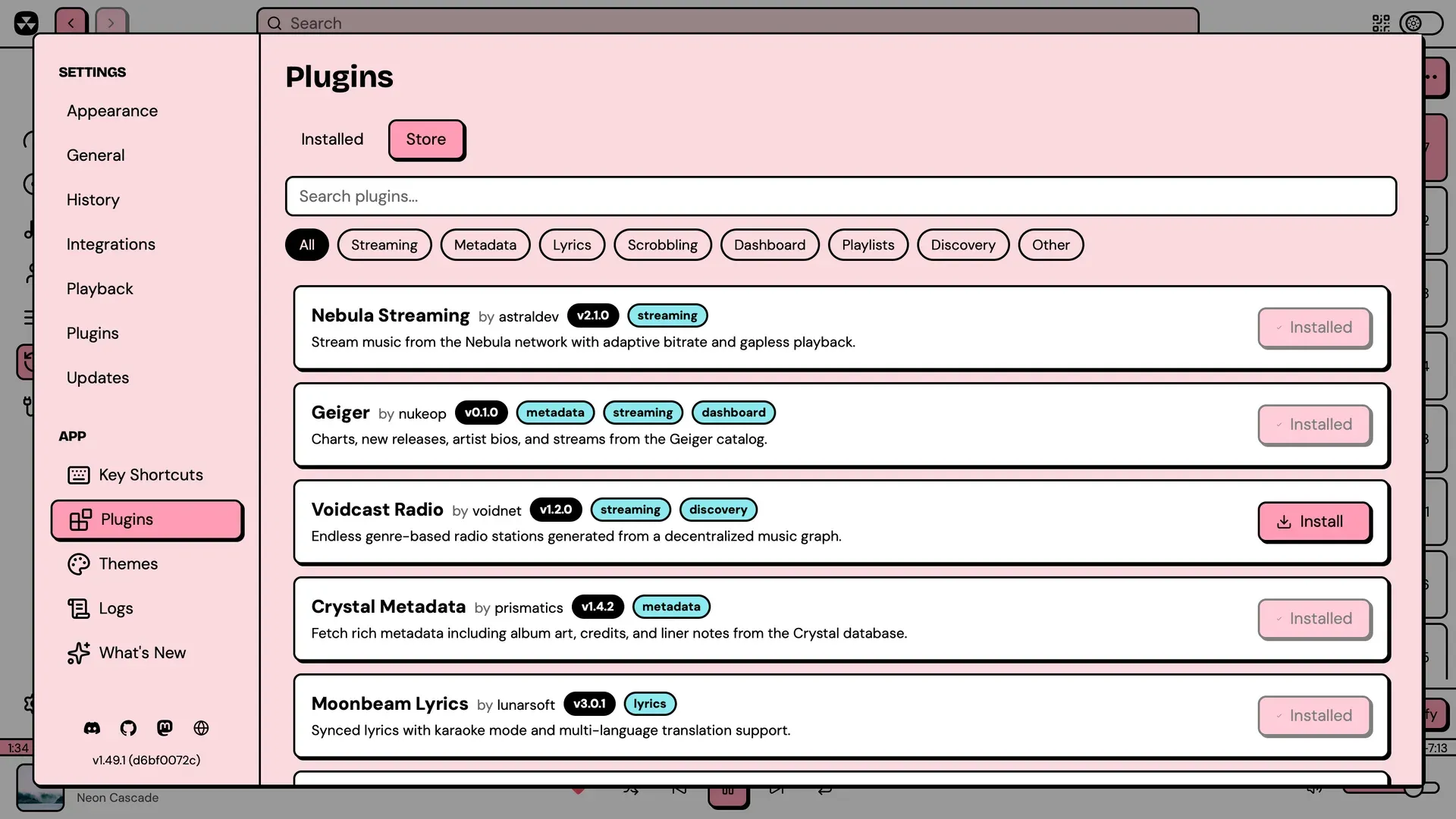
The Plugins store in Settings, filtered by category, as shown in the official documentation with sample plugin entries.
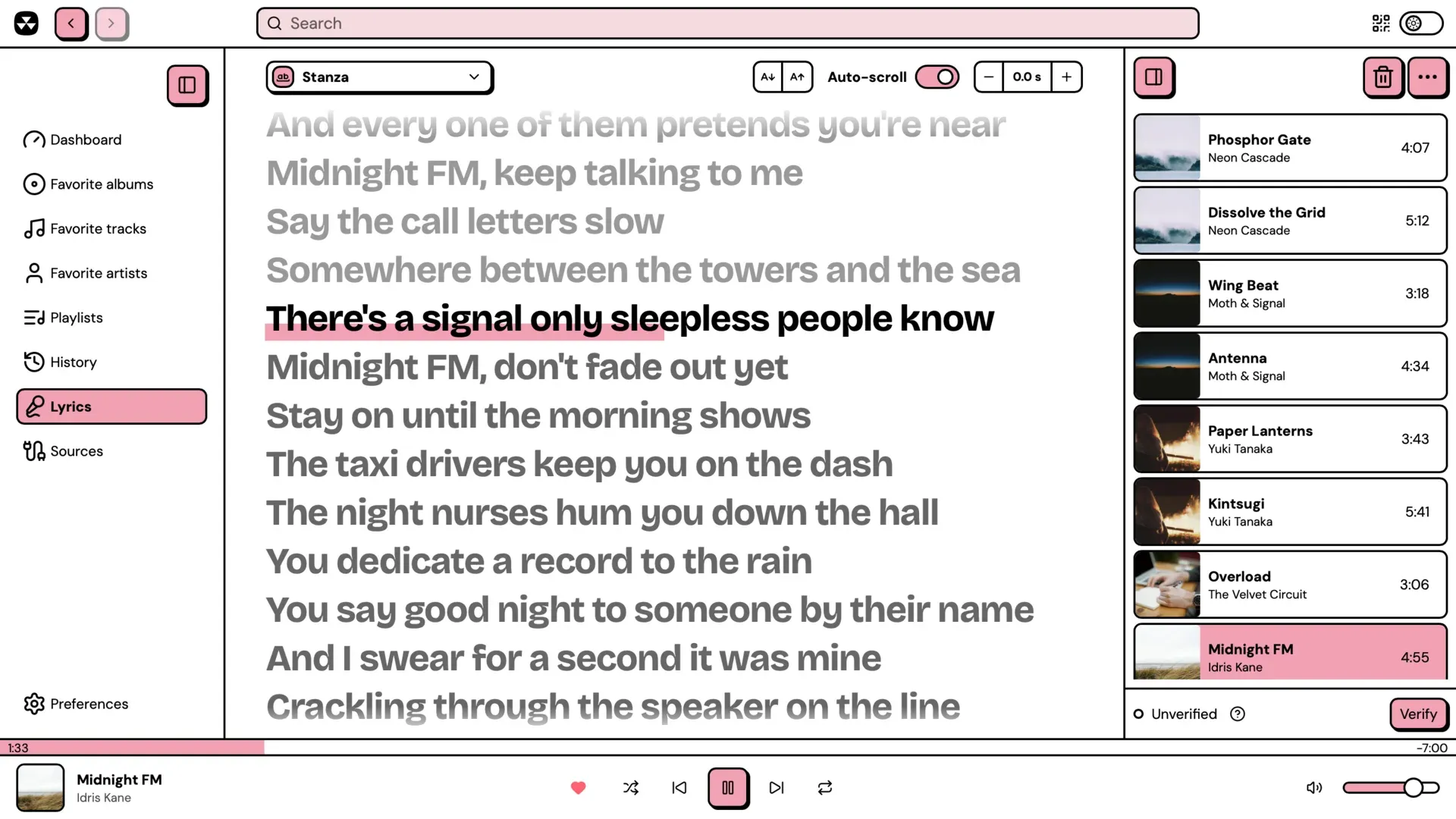
Lyrics view with word-synced highlighting, source picker, font size, auto-scroll and offset controls.
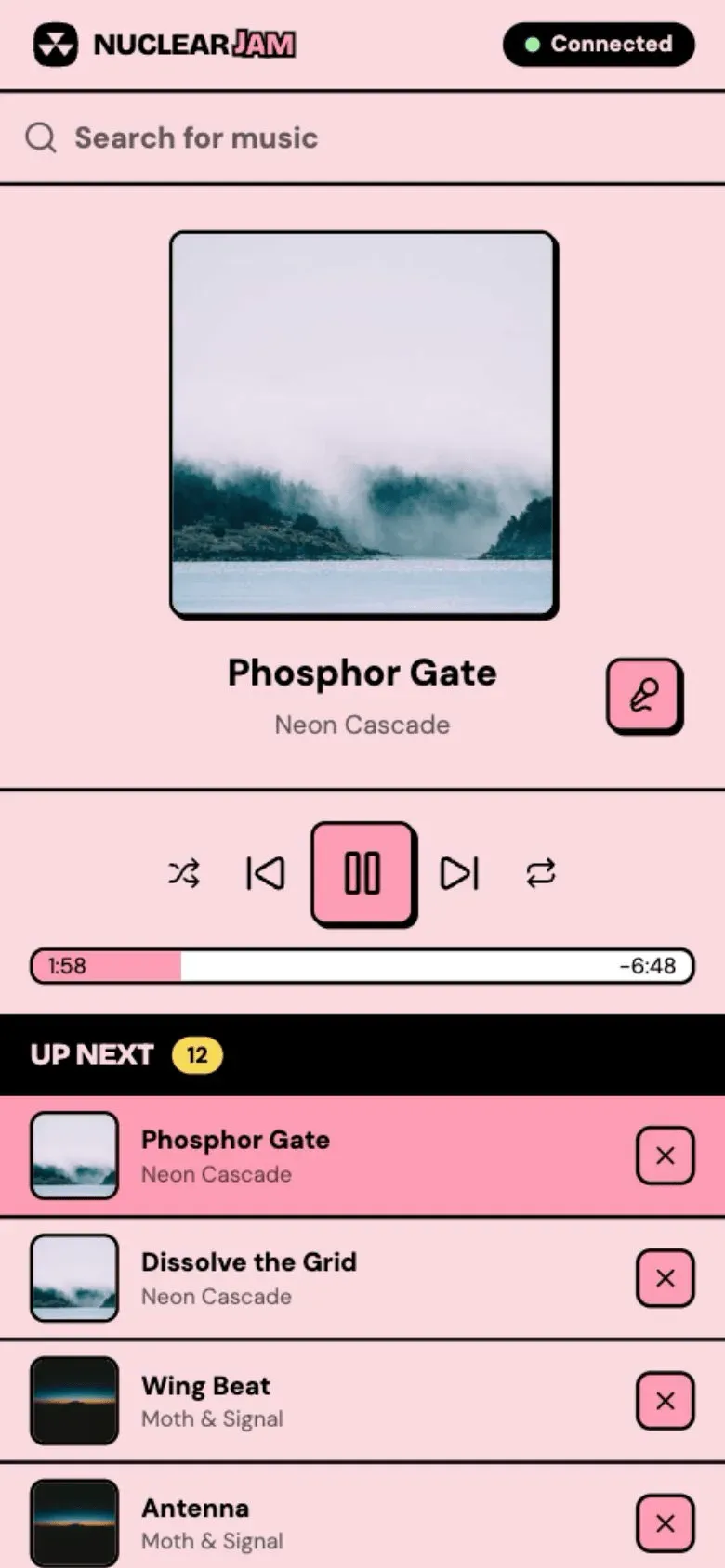
Nuclear Jam browser remote on a phone, connected over the local network, with search, controls and queue.
Source: official Nuclear project page.
Key capabilities
- Download Nuclear for Windows Two x64 installers are published per release:
Nuclear_x.y.z_x64-setup.exeinstalls per user without administrator rights, andNuclear_x.y.z_x64_en-US.msiis intended for system-wide or managed deployment, for example through Group Policy. Nuclear can also be installed withwinget install nukeop.nuclear. Both installers ship with a signature file used by the built-in updater. - Download Nuclear for macOS Separate DMGs exist for Apple Silicon (aarch64) and Intel (x64) Macs; drag the app to Applications. The app is not signed with an Apple Developer certificate, so the first launch needs a right-click Open or removing the quarantine attribute with
xattr. The Homebrew casknuclearplayer/tap/nuclearremoves that attribute automatically. - Download Nuclear for Linux Each release includes an amd64 AppImage, a DEB for Debian and Ubuntu derivatives, an x86_64 RPM for Fedora and openSUSE, a Flatpak and a Snap. The docs recommend Flathub where available, while noting that the Flatpak sandbox can block some features. Arch users can choose
nuclear-player-binornuclear-player-gitfrom the AUR. Published Linux builds target x86_64 only. - Plugin store and provider model The Store tab lists plugins from the official plugin registry; installing one downloads the latest release from that plugin's own GitHub repository. Plugins register metadata, streaming, dashboard, discovery, playlists and lyrics providers. Since 1.52.0, store installs are verified before installation, and store plugins update automatically on startup unless you turn that off.
- Sources view and provider pairing When several plugins offer metadata, streaming or discovery, the Sources view lets you pick the active one from a dropdown. Dashboard, playlists and lyrics providers are all active at once. Some metadata providers are paired with a specific streaming provider; selecting one locks the streaming choice, and a warning appears if the paired plugin is missing.
- Search, artist and album pages The active metadata provider powers search with Albums, Artists and Tracks tabs, plus artist pages with biographies, top tracks, discographies and related artists, and album pages with tracklists. Sections only appear when the provider declares the matching capability, so an artist page without a biography usually means the provider does not supply one.
- Queue with stream candidates The queue persists across restarts and supports shuffle, repeat, drag-and-drop reordering and saving the queue as a playlist. Right-clicking a queued track shows the stream candidates the streaming provider found, with bitrate and format, so you can switch from a live version or cover to the intended recording. Queue rendering was reworked in 1.54.2 for large queues.
- Stream verification Clicking Verify stores the chosen stream locally so Nuclear always plays it for that track. With Online verification on, Nuclear also votes on a shared verification service and prefers streams with the most votes; it sends artist, title, streaming source and a random ID, and the service sees your IP address. Both switches are under Settings, Playback, and turning off Online verification keeps everything on your computer.
- Favorites, playlists and folders Tracks, albums and artists can be saved to favorites. Playlists can be created, reordered manually, imported and exported as JSON, or imported by URL through playlist plugins. Since 1.53.0 playlists can be grouped into one level of folders by drag and drop or through a menu; folders cannot contain other folders.
- Listening history and stats History is recorded in a local database and shown by day, with pagination at 10, 25 or 50 entries. The Stats tab shows top artists, albums and tracks, listening time by hour and weekday, and a 12-month activity calendar. Multi-artist tracks credit each artist with the full duration. Recording can be switched off without deleting existing entries.
- Lyrics Installing at least one lyrics plugin enables the Lyrics view. Nuclear queries every lyrics plugin and prefers word-synced, then line-synced, then plain lyrics, with a source picker for the alternatives. Synced lines are highlighted and clickable, and furigana, translations and romanization are supported when the provider returns them.
- Discovery With a discovery plugin installed and the boombox button switched on, Nuclear sends the last 10 queued tracks to the discovery provider when you reach the end of the queue and appends its recommendations. Without such a plugin the button does not appear.
- Themes and the theme store Built-in themes cover light and dark modes. Advanced themes are JSON files that control colors, accents, fonts, corner radii, borders and shadows, with live preview while you edit. Community themes can be installed from the in-app theme store.
- Nuclear Jam remote control Enabling Nuclear Jam starts a small web server on your LAN address, on a port between 4120 and 4129, and shows a QR code. Any browser on the same network gets now playing, controls, the queue, search and lyrics, and several devices stay in sync. Connections from outside the local network are refused, but every device on the same Wi-Fi can control playback and settings, so the docs advise against public networks.
- Local HTTP API with server-sent events When Jam is on, the same server exposes a REST-style API documented in the HTTP API reference: playback, volume, queue, favorites, playlists, search, settings, lyrics and navigation, plus an
/api/eventsSSE stream for queue and playback changes. The/api/viewsendpoints run code inside Nuclear, so they only accept requests from the local machine. - Built-in MCP server Settings, Integrations has an Enable MCP Server toggle that starts a Streamable HTTP endpoint on
http://127.0.0.1:8800/mcp, falling back to ports 8801 to 8809. It exposes four tools (list_methods,method_details,describe_type,call) across domains such as Queue, Playback, Playlists, Lyrics and Views. The docs give setup lines for Claude Code, Codex CLI, OpenCode, Claude Desktop, Cursor and Windsurf, plus a downloadable agent skill. - MPD-compatible server An optional MPD server listens on
127.0.0.1:6600(or up to 6609) so clients such asmpc,ncmpcppandmpDris2can control playback and the queue and receive notifications. Only the subset of the protocol needed for playback control is implemented; library browsing and stored playlists are not supported yet. - Plugin SDK and custom views Plugins are written in TypeScript against
@nuclearplayer/plugin-sdk, with APIs for queue, playback, favorites, playlists, settings, events, HTTP, logging, navigation, views and yt-dlp. Local folders can be loaded as dev plugins with a reload button. Publishing to the store means a GitHub release with aplugin.zipasset and a pull request to the registry, as described in the plugin getting-started guide. - Updates, shortcuts and diagnostics Nuclear checks for application updates on startup and can install them automatically; the toggle is under General, Updates. Keyboard shortcuts are configurable, the interface is localized in several languages, and Settings includes a log viewer and a What's New page for the installed version.
Where Nuclear fits
Setting up a first working source
After installation the Dashboard asks you to install plugins, because nothing plays without them. Open Settings, Plugins, Store and install at least one metadata provider and one streaming provider, or a plugin that supplies both, then confirm the active choices in the Sources view. Check each plugin's repository and description before installing: a plugin decides which external service is queried and what that service learns about your listening. The getting-started guide walks through this path.
Correcting wrong streams
Streaming providers match on artist and title, so the first result can be a live recording, cover or remix. Right-click the queued track, pick the correct candidate and click Verify. Decide deliberately whether Online verification should stay on: it improves defaults through shared votes, but it contacts the verification service for each unverified track. The stream verification page documents the lookup order and the data sent.
Controlling playback from a phone
Turn on Nuclear Jam in Settings, Integrations and scan the QR code from the top bar with a phone on the same network. Test search, queue removal and lyrics from the phone, and check that your firewall allows the 4120 to 4129 port range. Keep Jam off on shared or public networks, because any device that can reach the port can change playback and settings.
Letting an AI agent drive the player
Enable the MCP server, copy the URL shown in Settings and register it in your agent, for example with claude mcp add nuclear --transport http http://127.0.0.1:8800/mcp. The agent discovers methods through list_methods and method_details before calling them. Views registered by MCP clients live under the plugin ID bridge and disappear on restart. Review what the agent may change, since the API covers the queue, playlists and settings. The MCP server docs list the domains and tools.
Scripting and terminal control
Use the HTTP API for scripts, status bars or alternative remotes, and subscribe to /api/events for state changes instead of polling. Linux users who already rely on MPD clients can enable the MPD server and point mpc or ncmpcpp at the bound port. Test the commands you depend on, because the MPD server implements only playback, queue and notification commands.
Deploying on several desktops
Use the MSI for managed Windows machines and the per-user EXE elsewhere; on Linux choose Flatpak for automatic updates, or DEB, RPM or AppImage if the sandbox blocks a feature you need. Application data lives under com.nuclearplayer in the platform app-data folder, which is the path to back up for playlists, history and plugins. Decide whether automatic app and plugin updates fit your change policy before rollout.
Install
flatpak install flathub com.nuclearplayer.NuclearReviews of Nuclear
Be the first to share your experience with Nuclear.
Write a review
Loading review form…
Alternatives to Nuclear
 FreeTubeFreeTube is an open-source YouTube desktop client for Windows, macOS and Linux that plays videos without ads and keeps subscriptions on your computer.
 JellyfinJellyfin is a free software media server that manages your media and streams it from a dedicated server to end-user devices through multiple apps.