What is Microsoft Hyper-V?
Hyper-V is the hypervisor that Microsoft builds into Windows Server and Windows. The Hyper-V overview on Microsoft Learn describes it as a type-1 hypervisor that runs directly on the hardware and supports many versions of Windows, Linux and FreeBSD as guest operating systems. Microsoft positions Hyper-V in Windows Server for enterprise deployments with live migration, high availability and disaster recovery, and Hyper-V in Windows as a lighter option for development and test machines. Hyper-V is also a key component of Azure Local, Microsoft's platform for running Azure services on premises.
Hyper-V is not a separate download or product. Microsoft states that it is included with Windows Server and Windows, and the Windows Server editions comparison lists the Hyper-V role in Standard, Datacenter and Datacenter: Azure Edition. On the client side, the overview names Windows 11 Pro, Enterprise and Education, while the installation guide lists Windows 10 or Windows 11 Pro or Enterprise; it cannot be installed on Windows 10 Home or Windows 11 Home.
Virtualization rights come from the Windows Server license. The Windows Server pricing page states that Standard allows 2 virtual machines plus one Hyper-V host per license and Datacenter an unlimited number, and that Hyper-V isolated containers follow the same 2 versus unlimited split. It lists suggested MSRPs for Windows Server 2025 of 1,176 USD for Standard and 6,771 USD for Datacenter, each for 16 core licenses, with Client Access Licenses required for every user or device. Some Hyper-V related features are Datacenter only, including Storage Spaces Direct, Host Guardian Hyper-V Support for shielded VMs and the Network Controller for software-defined networking.
Hyper-V capabilities follow Windows Server releases rather than a separate version number. Microsoft's release information lists Windows Server 2025 as the current Long-Term Servicing Channel release, available since November 1, 2024, with mainstream support until November 13, 2029 and extended support until November 14, 2034. The Hyper-V documentation applies to Windows Server 2016 through 2025, Windows 10 and 11, and Azure Local 2311.2 and later. Management comes through Hyper-V Manager, the Hyper-V PowerShell module, Windows Admin Center and System Center Virtual Machine Manager.
Other virtualization platforms listed on iThub include VMware and Proxmox, and HVTools is a free inventory tool for Hyper-V hosts and clusters.
Key capabilities
- Hypervisor inside the operating system Hyper-V is enabled as a server role on Windows Server or as an optional feature on Windows, not installed as a separate product. Windows Server 2025 hosts can run Server with Desktop Experience for full GUI management or Server Core for a smaller attack surface and lower resource use.
- Generation 1 and generation 2 VMs Generation 2 VMs use UEFI firmware with Secure Boot, and a virtual TPM 2.0 lets guests use BitLocker and Windows Hello for Business. Generation 1 VMs keep IDE controllers, COM ports and a virtual floppy device, and boot from an IDE disk.
- VM limits on Windows Server 2025 The scale limits page lists up to 2,048 virtual processors for a generation 2 VM (configurable through PowerShell only) and 64 for generation 1, 240 TB of memory for generation 2 and 1 TB for generation 1, 256 SCSI disks, 64 network adapters for generation 2 and 50 checkpoints, depending on available storage.
- Host and disk limits A Windows Server 2025 host supports 1,024 running VMs, 2,048 logical processors and 4 PB of memory with 5-level paging or 256 TB with 4-level paging. VHDX virtual disks reach 64 TB and older VHD disks 2,040 GB. Windows Server 2022 hosts stop at 1,024 logical processors and 1,024 virtual processors per VM.
- Failover Clustering Failover Clustering with Cluster Shared Volumes moves virtual machines to other nodes when a node fails. Microsoft lists up to 64 nodes and 8,000 running VMs per cluster for all supported Windows Server versions, and the editions comparison includes Failover Clustering in Standard and Datacenter.
- Live, shared nothing and storage migration Live migration moves running VMs between hosts for planned maintenance. Shared nothing live migration does the same between hosts without shared storage, and storage migration moves VM files between storage arrays without downtime. The
Move-VMandMove-VMStoragecmdlets script both. - Hyper-V Replica Hyper-V Replica replicates VMs asynchronously to a secondary site over standard network connections, with a recovery point objective that Microsoft gives as low as 30 seconds. Azure Site Recovery extends replication, failover and failback to Azure as the secondary site, and
Enable-VMReplicationturns replication on per VM. - Storage options Hyper-V uses local disks, iSCSI and Fibre Channel SANs with Multipath I/O, SMB 3.0 and NFS file storage, Storage Spaces pools built from JBOD enclosures, and Storage Spaces Direct for hyperconverged clusters. Storage Spaces Direct needs Datacenter edition and 2 to 16 servers.
- Security and isolation Shielded virtual machines protect workloads with BitLocker, Secure Boot and TPM 2.0 attestation, and the Host Guardian Service decides which hosts may run them. Network isolation uses VLANs, private virtual switches and software-defined networking. Shielded VMs and discrete device assignment need newer hardware, as the hardware requirements describe.
- Resource features Dynamic Memory adjusts VM memory to demand, with smart paging and memory overcommit used for higher consolidation, GPU partitioning (GPU-P) shares one GPU among several VMs, SR-IOV and RDMA bypass the hypervisor for high-bandwidth networking, persistent memory is supported, and nested virtualization runs hypervisors inside VMs.
- Guest operating systems Microsoft lists many versions of Windows, Linux and FreeBSD as supported guests and maintains a separate list of supported Windows guest operating systems for Hyper-V on Windows Server. The scale limits page points out that a guest operating system can support less than the Hyper-V maximums, so vendor limits apply on top.
- Cluster storage caching In failover clusters, CSV Cache keeps frequently read data in memory, and CSV Block Cache uses system memory on storage-rich nodes to speed up reads. Hyper-V also works with Data Deduplication, which Microsoft describes as reducing storage needs in VDI and backup scenarios.
- Active Directory integration Hyper-V uses the existing Windows authentication infrastructure without extra configuration, and domain-joined hosts inherit existing Group Policy settings and security configurations automatically, according to the overview.
- Management tools without the hypervisor SLAT is required only for the virtualization components such as the Windows hypervisor. Virtual Machine Connection (VMConnect), Hyper-V Manager and the Hyper-V cmdlets for PowerShell can be installed on a computer without SLAT and used to manage remote Hyper-V hosts, including Server Core hosts that have no local GUI.
- Discrete device assignment GPUs and NVMe devices can be assigned to a VM. The host needs Intel EPT or AMD NPT, interrupt and DMA remapping (Intel VT-d or an AMD I/O MMU), access control services on PCI Express root ports and firmware tables that expose the I/O MMU to the hypervisor.
- Management tools Hyper-V Manager handles day-to-day graphical work, and the Hyper-V PowerShell module scripts it with cmdlets such as
New-VM,Start-VM,Checkpoint-VMandExport-VM. PowerShell Direct manages a guest from its host without network connectivity. Windows Admin Center adds browser-based management, with a Virtualization Mode for fabric management at scale, and System Center Virtual Machine Manager adds automated provisioning, capacity planning and self-service portals. - Containers Per the Windows Server pricing page, Standard allows unlimited Windows Server containers and 2 Hyper-V isolated containers per license, while Datacenter allows unlimited containers of both kinds.
- VMware conversion in Windows Admin Center The VM Conversion extension, in preview under prerelease license terms, migrates Windows and Linux VMs from vCenter 6.x, 7.x and 8.x to Hyper-V hosts or Windows Server failover clusters in batches of up to 10, and preserves static IP configurations.
- Hyper-V on Windows 11 On client editions Hyper-V serves local labs and test machines, with Quick Create for fast VM setup. Microsoft notes that VMware Workstation or VirtualBox VMs might not start or might run unreliably while the Hyper-V hypervisor is running.
Where Microsoft Hyper-V fits
Checking a host for Hyper-V
Hyper-V needs a 64-bit processor with second-level address translation (SLAT), VM Monitor Mode extensions, hardware-assisted virtualization (Intel VT or AMD-V) turned on in the BIOS or UEFI, and hardware-enforced Data Execution Prevention (the XD bit on Intel, the NX bit on AMD). Microsoft asks to plan for at least 4 GB of RAM plus the memory of every VM that runs at the same time. Running systeminfo.exe shows a Hyper-V requirements section in which every item must read Yes.
Adding the role on Windows Server
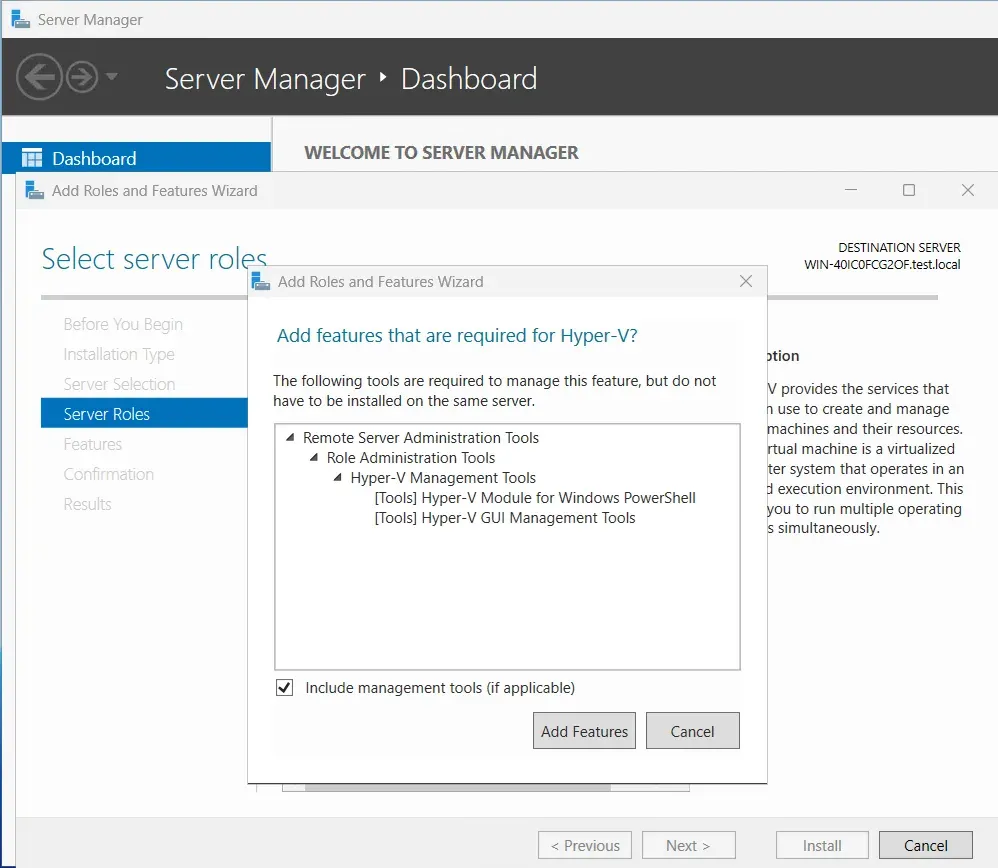
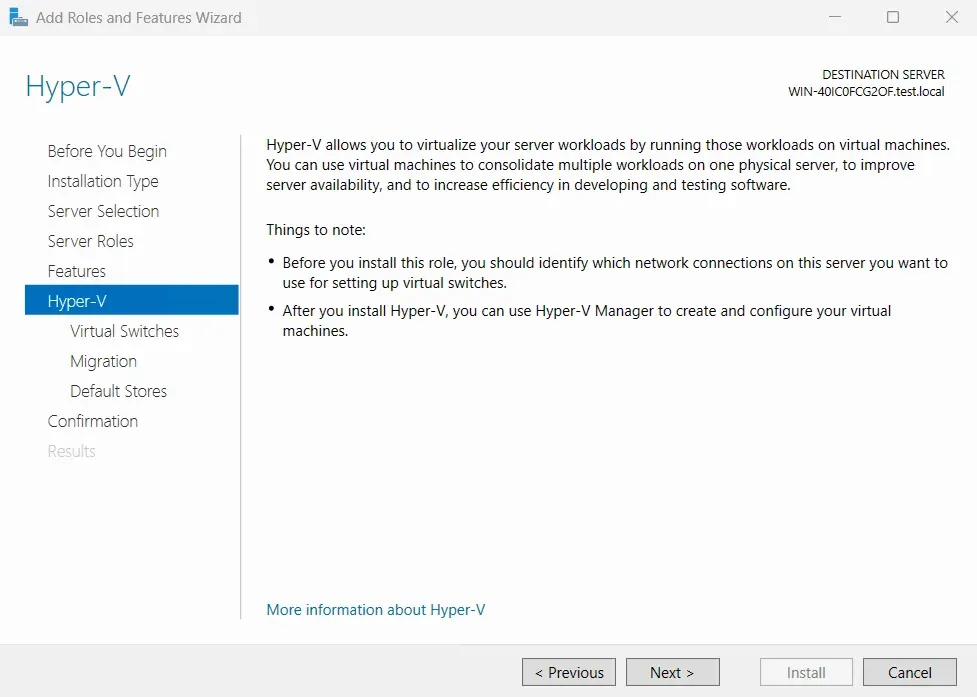
In Server Manager, Add Roles and Features installs the Hyper-V role and offers the virtual switch, migration and default store settings. From an elevated PowerShell session, Install-WindowsFeature -Name Hyper-V -IncludeManagementTools -Restart does the same, and -ComputerName targets a remote server. On a Server Core installation the command installs only the Hyper-V PowerShell module, and Hyper-V Manager connects from another computer.
Enabling Hyper-V on Windows 11
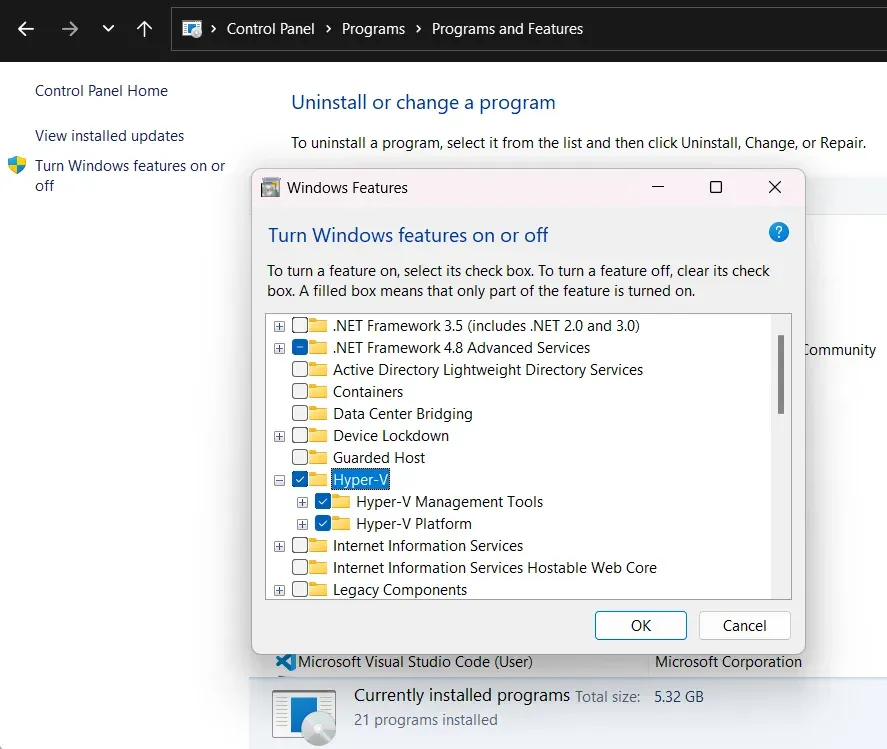
Hyper-V is turned on from Turn Windows features on or off in the Control Panel, with Enable-WindowsOptionalFeature -Online -FeatureName Microsoft-Hyper-V -All in an elevated PowerShell session, or with DISM /Online /Enable-Feature /All /FeatureName:Microsoft-Hyper-V. A restart completes the installation.
Working with checkpoints
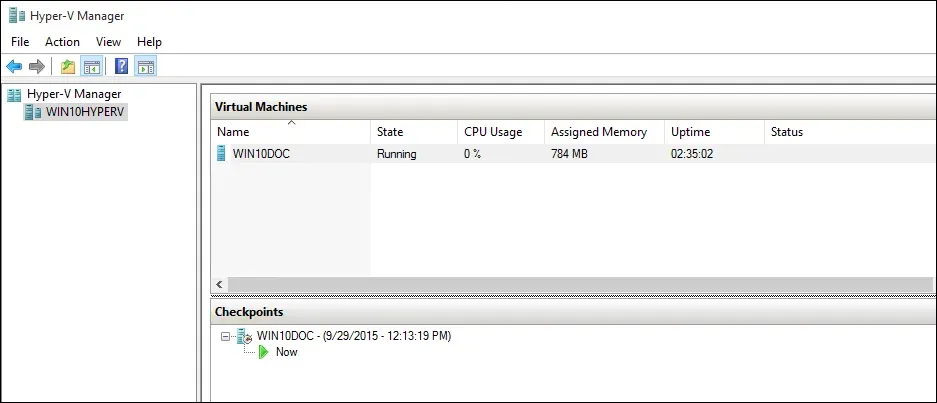
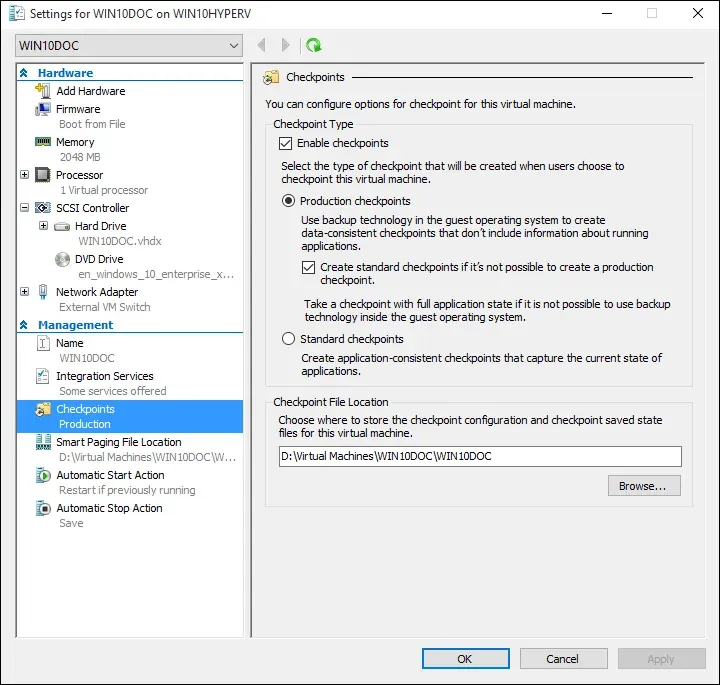
Each VM can use production checkpoints, which rely on backup technology inside the guest to create data-consistent checkpoints, or standard checkpoints, which capture the full application state. The setting and the checkpoint file location are in the VM's Management settings in Hyper-V Manager, and a VM holds up to 50 checkpoints, depending on available storage. The Checkpoint-VM cmdlet creates checkpoints from PowerShell, and Hyper-V Manager lists them in a tree under the selected VM, as in the Microsoft Learn screenshots.
Replicating VMs to a second site
Hyper-V Replica copies a VM asynchronously to a secondary site over a standard network connection, without SAN replication, with a recovery point objective as low as 30 seconds. Enable-VMReplication configures it per VM. With Azure Site Recovery, Azure takes the role of the secondary site, including automated failover and failback.
Migrating VMs from VMware
The VM Conversion extension in Windows Admin Center connects to one or more vCenter servers, makes an initial full copy of each source VM into a VHDX file while it keeps running, and then uses Change Block Tracking to replicate only changed blocks. At cutover the source VM is powered off, a final delta synchronization runs and the VM is imported into Hyper-V.
Building a highly available cluster
Hyper-V hosts join a Windows Server failover cluster of up to 64 nodes, with Cluster Shared Volumes giving every node access to the same storage on a SAN, SMB file share or Storage Spaces Direct. With Storage Spaces Direct on Datacenter edition, the internal drives of 2 to 16 servers form the shared storage pool for a hyperconverged cluster.
Install
Install-WindowsFeature -Name Hyper-V -IncludeManagementTools -RestartReviews of Microsoft Hyper-V
Be the first to share your experience with Microsoft Hyper-V.
Write a review
Loading review form…
Found Microsoft Hyper-V useful? Upvote it todayYour vote helps other IT teams find it in the daily ranking.