What is XCP-ng?
XCP-ng is an open-source virtualization platform built on the Xen hypervisor. The name stands for XCP New Generation: according to the project history, it started as a friendly fork of Citrix XenServer after features were removed from the free XenServer edition following version 7.3, with the aim of keeping the full feature set open and changing as little as possible against upstream. The first XCP-ng release, 7.4, shipped on March 31, 2018. xcp-ng.org describes XCP-ng as a Xen Project incubation project hosted by the Linux Foundation.
XCP-ng installs from an ISO on a 64-bit x86 machine dedicated to hosting virtual machines. It creates a hardened Linux control domain (dom0) with a Xen-enabled kernel that manages the interaction between VMs and the hardware, and it uses XAPI, the toolstack shared with XenServer. Hosts are grouped into resource pools of up to 64 servers, and virtual disks live in storage repositories on local disks, network storage or the hyperconverged XOSTOR.
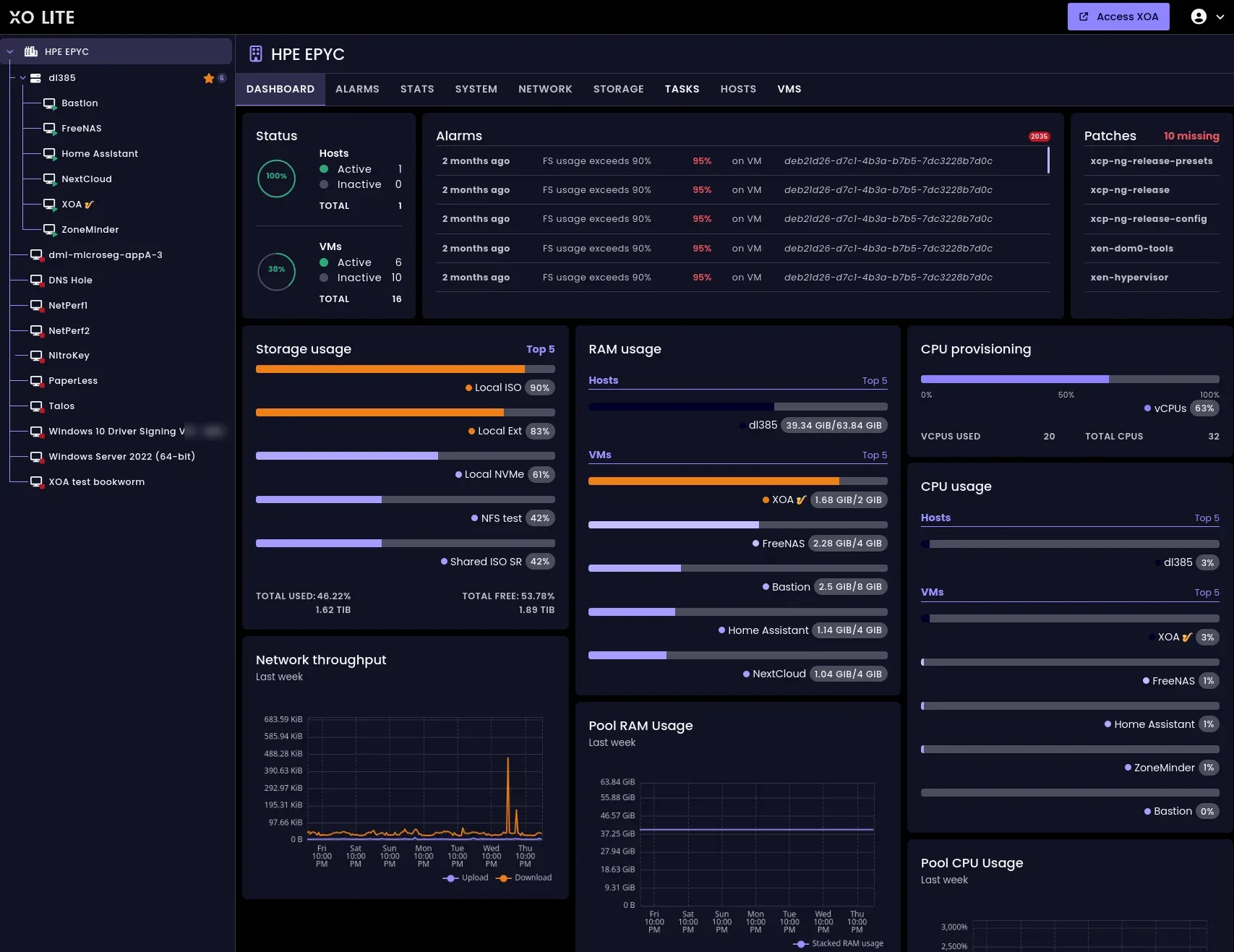
Vates, which states that it was founded in 2012 and is a French open source software editor, develops XCP-ng together with the Xen Orchestra management console and sells both as the Vates VMS subscription. Xen Orchestra is agentless and talks to XAPI directly. Vates distributes it as the Xen Orchestra Appliance (XOA), a prebuilt VM, while its source code is released mostly under the AGPL v3 according to the Xen Orchestra license page. XO Lite, a web client still in progress, is served by the host itself over HTTPS, and the older Windows client XCP-ng Center is marked end of life and community-maintained only. Source code is on GitHub under the xcp-ng organization, with the xcp-ng/xcp repository as the entry point for issues and the wiki.
The current release is XCP-ng 8.3 LTS. It was released on October 7, 2024, became a Long Term Support release on June 16, 2025, and is supported until November 30, 2028. It is partly based on XenServer 8, runs Xen 4.17.5 with patches, and keeps a CentOS 7 base in dom0 with security fixes backported by the XCP-ng security team, with a 4.19 Linux kernel. xcp-ng.org distributes the installer image xcp-ng-8.3.0-20260806.iso. XCP-ng 8.2 LTS reached end of life on September 16, 2025, and the Xen Orchestra requirements page states that the next major branch, 9.x, is in development for x86 and ARM.
The licenses page states that XCP-ng is free software built from components such as the Linux kernel (GPLv2) and Xen (GPLv2, LGPLv2+ or BSD depending on the component), that all features are available for free and that professional support is available from Vates; the documentation is published under CC BY-SA 2.0. Community support runs mainly through the XCP-ng forum, with a Discord server and Reddit as other channels. Similar virtualization platforms listed on iThub include Proxmox and VMware.
Key capabilities
- Installer images The 8.3 LTS full ISO is 648 MiB and the net-install ISO 167 MiB. xcp-ng.org gives a
ddcommand for writing the image to a USB key and names Rufus for Windows. Repositories, ISOs and RPM packages are signed with a published GPG key, and SHA256 checksums are listed next to each download. - Host hardware requirements The requirements page asks for one or more 64-bit x86 CPUs at 1.5 GHz or more with Intel VT-x or AMD-V enabled and SLAT support (Intel EPT or AMD RVI/NPT), 2 GB of RAM (8 GB or more recommended), 46 GB of local disk (70 GB or more recommended) and a 100 Mbit/s NIC. Installing on USB drives or SD cards is strongly discouraged because of the write load from the XAPI database and logs.
- Host and VM limits A host supports up to 6 TB of RAM, 960 logical processors, 16 physical NICs and 800 VLANs. Untrusted VMs are security-supported up to 32 vCPUs and trusted VMs up to 128, with Windows guests limited to 64. A VM takes up to 1.5 TiB of RAM with memory snapshots, 241 virtual disks, 16 virtual NICs, 8 virtual GPUs and 6 passed-through USB devices.
- Resource pools A pool holds up to 64 hosts with CPUs from the same vendor; XAPI masks CPU features to the common subset. A joining host needs a static IP or static DHCP lease, a clock synchronized with the pool master, no shared storage configured and the same XCP-ng version and update level. Mixing Intel and AMD needs a forced join and prevents live migration between them.
- Storage repositories Officially supported types are Local EXT and NFS on the file side and Local LVM, iSCSI, HBA and XOSTOR on the block side; File SRs are marked "use with caution". ZFS, XFS, GlusterFS, CephFS, Ceph RBD and other drivers are provided as-is with less testing. The storage guide notes that thick provisioning costs much more space when snapshots are taken for backups.
- Disk formats VHD remains the default format and stops at 2040 GiB. QCOW2 reaches 16,381 GiB on most drivers but is not supported on XOSTOR or SMB SRs. With default settings, a disk larger than 2040 GiB is created as QCOW2 where supported, and an existing VHD disk is not converted automatically.
- XOSTOR XOSTOR builds a replicated shared SR from the local disks of a pool using LINSTOR and DRBD from LINBIT. It needs at least 3 hosts, allows at most 7 per pool, and keeps 1, 2 or 3 copies of each volume; the replication count cannot be changed after creation. A dedicated 10G or faster network for DRBD is listed as a prerequisite.
- Xen Orchestra Appliance The XOA requirements list three presets: Small with 2 vCPUs and 4 GiB, Medium with 4 vCPUs and 8 GiB, and Large, the default, with 8 vCPUs and 16 GiB. The VM also needs 20 GiB of free SR space, or 2 GiB on a thin-provisioned SR. Registration with a Vates account enables updates and a free 30-day trial.
- XO 6 and XO 5 interfaces XO 6 is the default interface, with a searchable tree of pools, hosts and VMs, dashboards at every level, in-browser consoles, light and dark modes, five themes and 21 languages. XO 5 runs on the same instance for anything XO 6 does not cover yet, and both use the same data.
- XO Lite XO Lite is reached by browsing to a host's IP address over HTTPS. The 8.3 release notes describe it as a work-in-progress web client for basic pool management when the full Xen Orchestra is not installed or unavailable, and it fetches its latest version in the browser automatically.
- Backup and replication Vates lists full and incremental backups, full replication, chained and encrypted backup jobs, backup reports and storage on Amazon S3 or other S3 storage among the Xen Orchestra features. Vates also lists Veeam, Commvault, NAKIVO, Bacula, Storware and Vinchin as officially compatible backup products, with agentless Veeam Backup & Replication support since version 13.1.
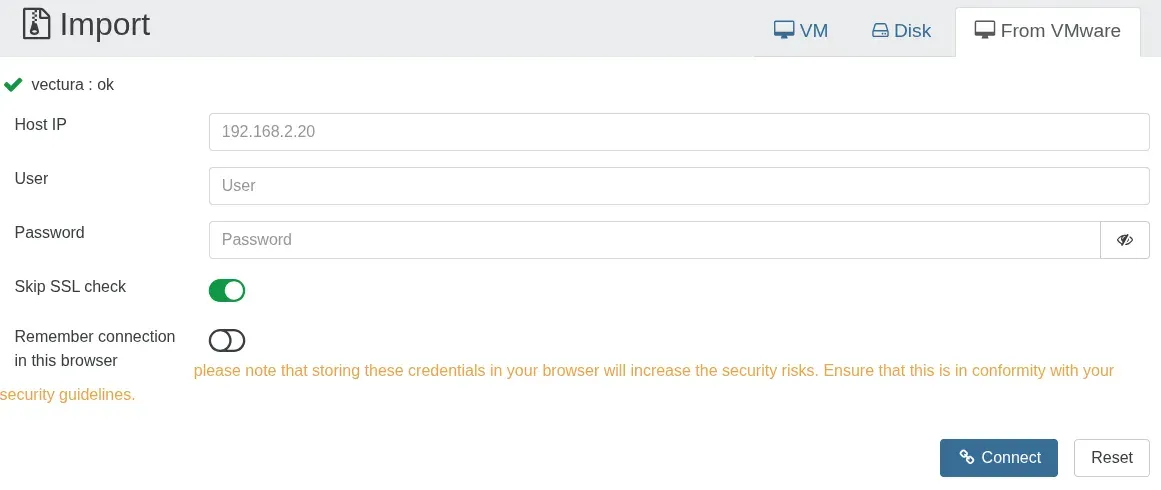
- VMware import (V2V) Xen Orchestra imports VMs from ESXi using warm migration: it copies data up to the last snapshot while the VM runs, then stops it and transfers the rest. It needs only HTTP access to the ESXi API. Raw disks are not supported, ESXi 6.x hosts are not supported by current Xen Orchestra versions, and since Xen Orchestra 5.112 disks larger than 2040 GiB import as QCOW2 on XCP-ng 8.3.
- Other migration paths The migration guide covers OVA import (also for VirtualBox exports), Hyper-V disks exported or converted to VHD format, KVM and Xen sources. A XenServer host is upgraded by booting the XCP-ng ISO and choosing the upgrade option, which keeps storage, VMs and settings.
- Networking with Open vSwitch The architecture page states that all networking in XCP-ng is managed by Open vSwitch: XAPI hands network configuration to
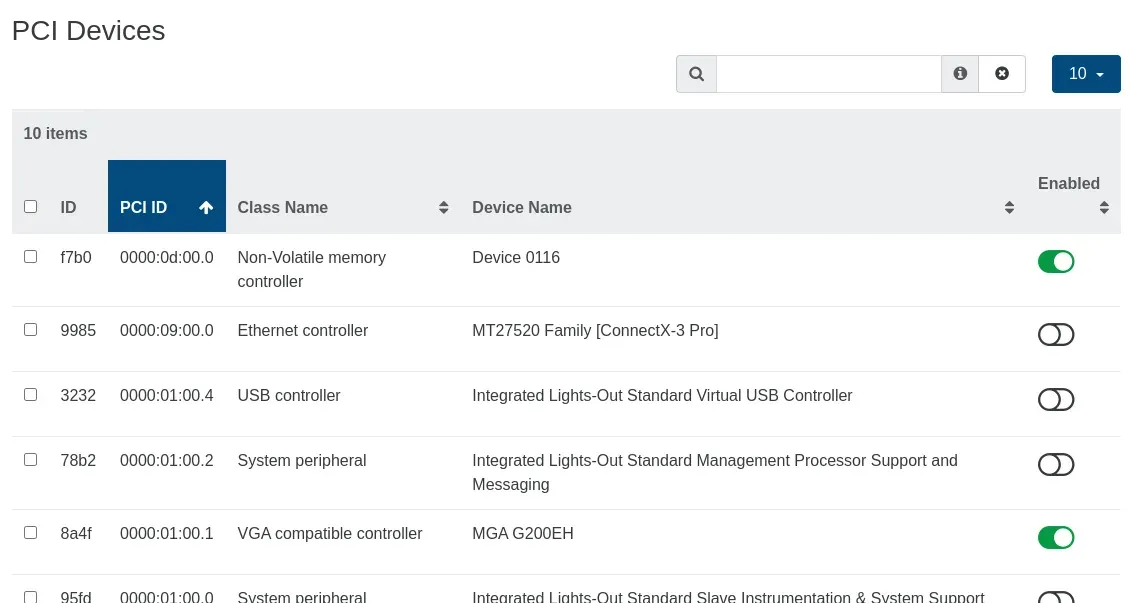
xcp-networkd, which applies it with OVS commands, and theopenvswitch.kokernel module handles bridges and bonds. Since 8.3 the control domain can be installed in IPv6 only, IPv4 only or IPv4 plus IPv6 mode, the last one still marked experimental; this setting does not apply to VM networking. - Guest features Any UEFI VM can get a virtual TPM, and the Windows 11 template provisions one automatically. The 8.3 release notes state that BitLocker in guests is not officially supported. PCI devices can be passed through to VMs from Xen Orchestra, and nested virtualization is available again in 8.3.
- APIs and automation Xen Orchestra has a REST API that exposes nearly all of its capabilities, with full access for admins and RBAC-based access for other users, next to the older JSON-RPC API and
xo-cli. xcp-ng.org mentions Terraform and Packer providers, and an MCP server gives AI assistants read-only tools by default, with write actions enabled only throughXO_MCP_ENABLE_ACTIONS=1. - Kubernetes and monitoring A Xen Orchestra recipe deploys a Kubernetes cluster on XCP-ng VMs together with the Xen Orchestra Cloud Controller Manager. The platform exposes metrics to Prometheus and Grafana through OpenMetrics, according to the Vates ecosystem page.
- Vates VMS subscriptions The pricing page lists Essential at 2,000 per year (up to 3 hosts, 6 tickets a year), Essential+ at 4,000 per year (up to 3 hosts, unlimited tickets), Pro at 1,000 per host per year (minimum 3 hosts) and Enterprise at 1,800 per host per year (minimum 4 hosts, 24/7 support, 1 hour Severity 1 response), each shown in US dollars and euros. Every plan includes one XOA; Essential plans allow 3 hosts per pool and Pro and Enterprise 64. XOSTOR support starts at 2,400 per year.
Where XCP-ng fits
Installing a host
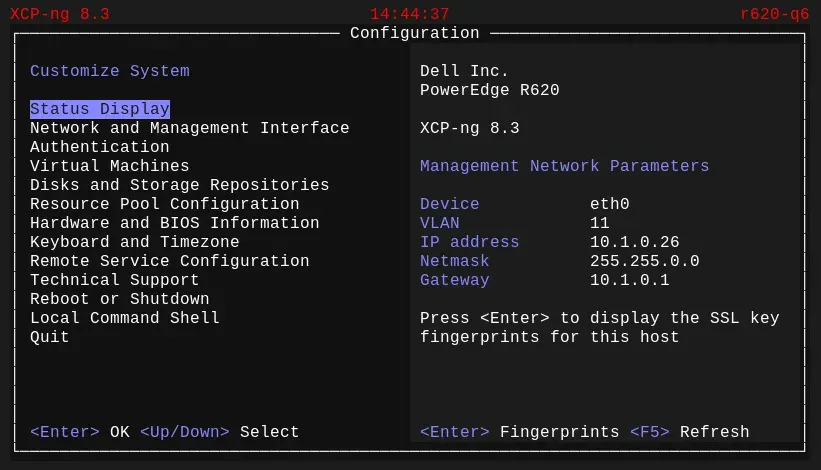
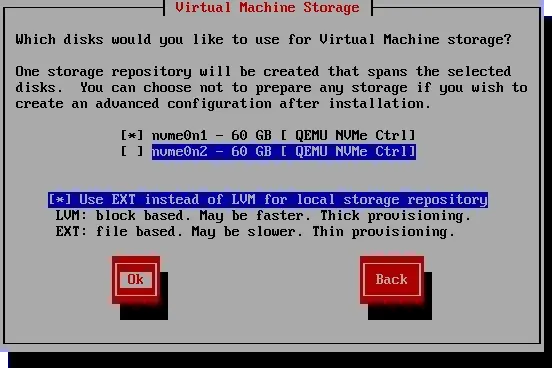
The installer boots from the ISO in BIOS or UEFI mode, asks for keymap, primary disk and optional software RAID, and then for the disks that hold the local storage repository, where EXT gives file-based thin provisioning and LVM block-based thick provisioning. The management network can use IPv4 or IPv6, and the requirements page states that hosts must not have a public IP address on the management network. The installation guide also covers the NTP server setting and PXE boot installs from a TFTP and HTTP or FTP server.
Deploying Xen Orchestra
The form at vates.tech/deploy imports XOA onto a host; per the Xen Orchestra installation guide, it runs between the browser and the host. After first login, registration with a Vates account enables updates and the 30-day trial. Appliances deployed with other methods start with 2 vCPUs and 2 GiB, which the requirements page calls a strict minimum for labs, and can be resized at any time.
Migrating VMs from VMware
In Xen Orchestra, the Import view has a From VMware tab that connects to an ESXi host with its IP address and credentials. Warm migration needs at least one snapshot; on NFS datastores the VM can keep running, on VMFS 5 warm migration is reported to work in most cases, and VMs on VMFS 6 must be shut down first. Xen Orchestra reads VMFS, NFS and vSAN datastores directly, so no Xen Orchestra remote is needed. The guide asks to uninstall VMware Tools, remove unneeded snapshots and unmount ISO files. XAPI tasks are limited to 24 hours by default, and the transfer uses the default backup network.
Upgrading existing hosts
Upgrades to 8.3 run from the installation ISO only; an in-place upgrade with yum is not supported. Supported starting points are an up-to-date 8.2.1, 8.0, 8.1 or an 8.3 prerelease, and older pools must reach 8.2.1 first. XenServer hosts are upgraded the same way and keep their storage and VMs. A dedicated upgrade ISO exists for pools running 8.2 with XOSTOR.
Building pools with shared storage
Hosts are added to a pool from Xen Orchestra once they meet the pool requirements. Shared storage comes from NFS, iSCSI or Fibre Channel arrays, which are reached through the standard drivers, or from XOSTOR built from the local disks of 3 to 7 hosts. The storage guide notes that the Ceph RBD driver, provided as-is, cannot hold HA state metadata because of LVM backend restrictions in the XAPI drivers. NFS servers must allow sub-directory mounts for the SR to be created.
Automating the stack
REST API calls authenticate with a token created in the Xen Orchestra user space or with xo-cli, and the same API serves scripts, the Terraform and Packer providers and the MCP server. Kubernetes clusters are created from Hub, Recipes in Xen Orchestra 5, which also deploys the Cloud Controller Manager that links the cluster to Xen Orchestra.
Reviews of XCP-ng
Be the first to share your experience with XCP-ng.
Write a review
Loading review form…
Found XCP-ng useful? Upvote it todayYour vote helps other IT teams find it in the daily ranking.