
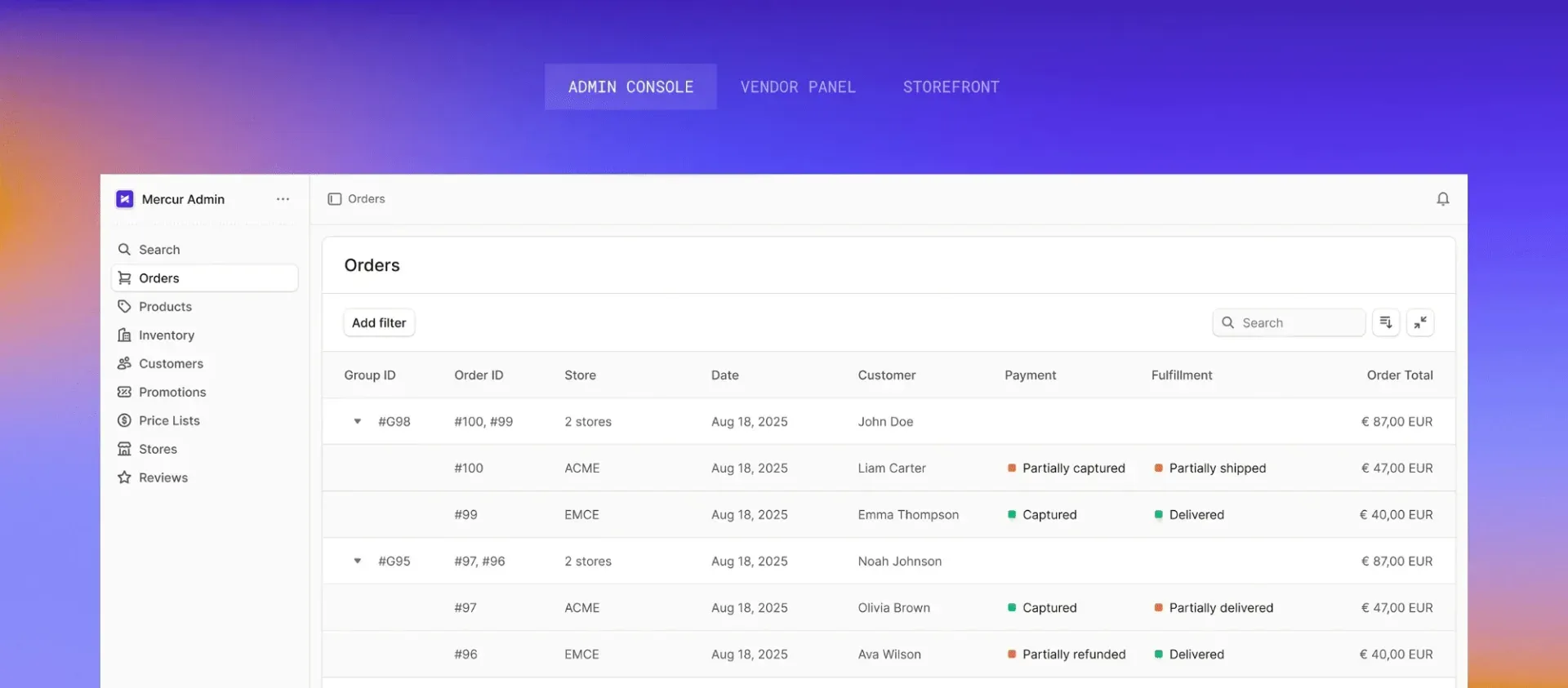
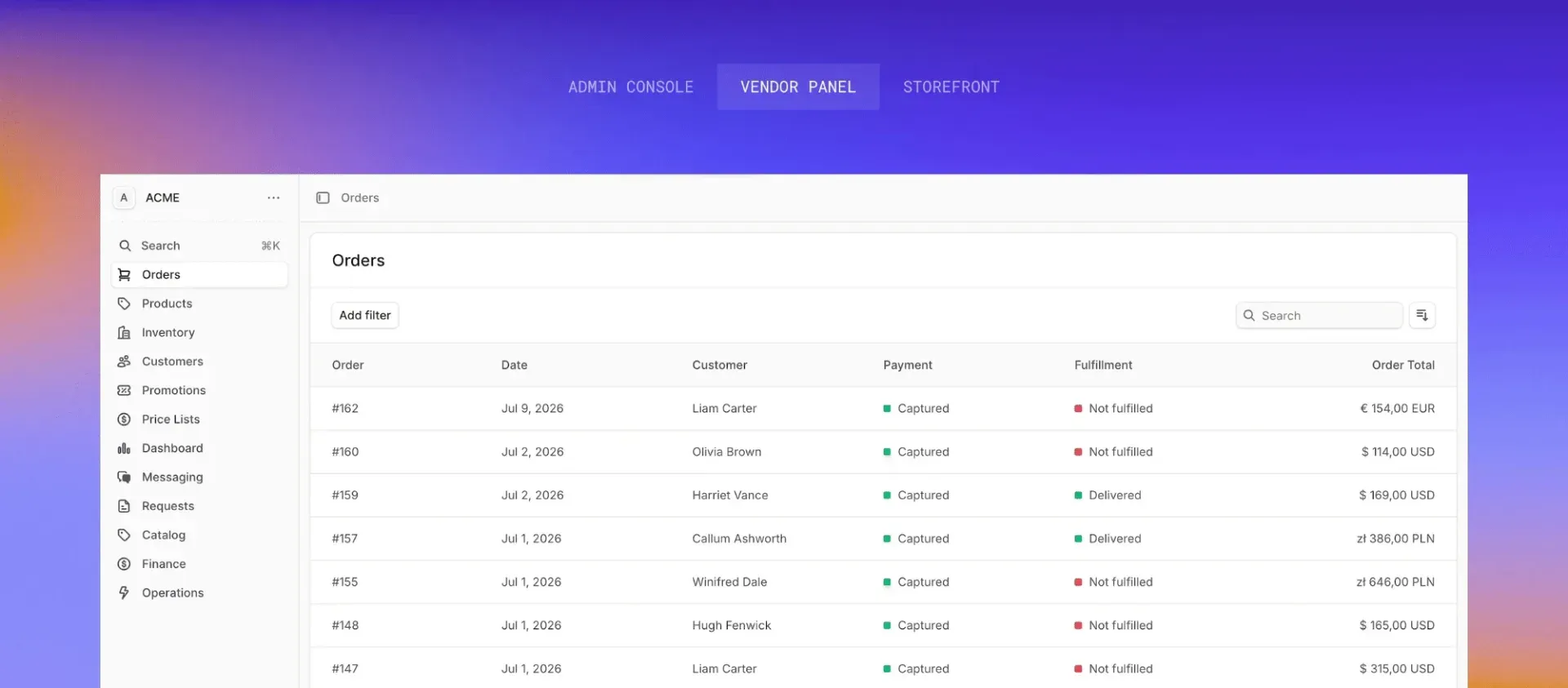

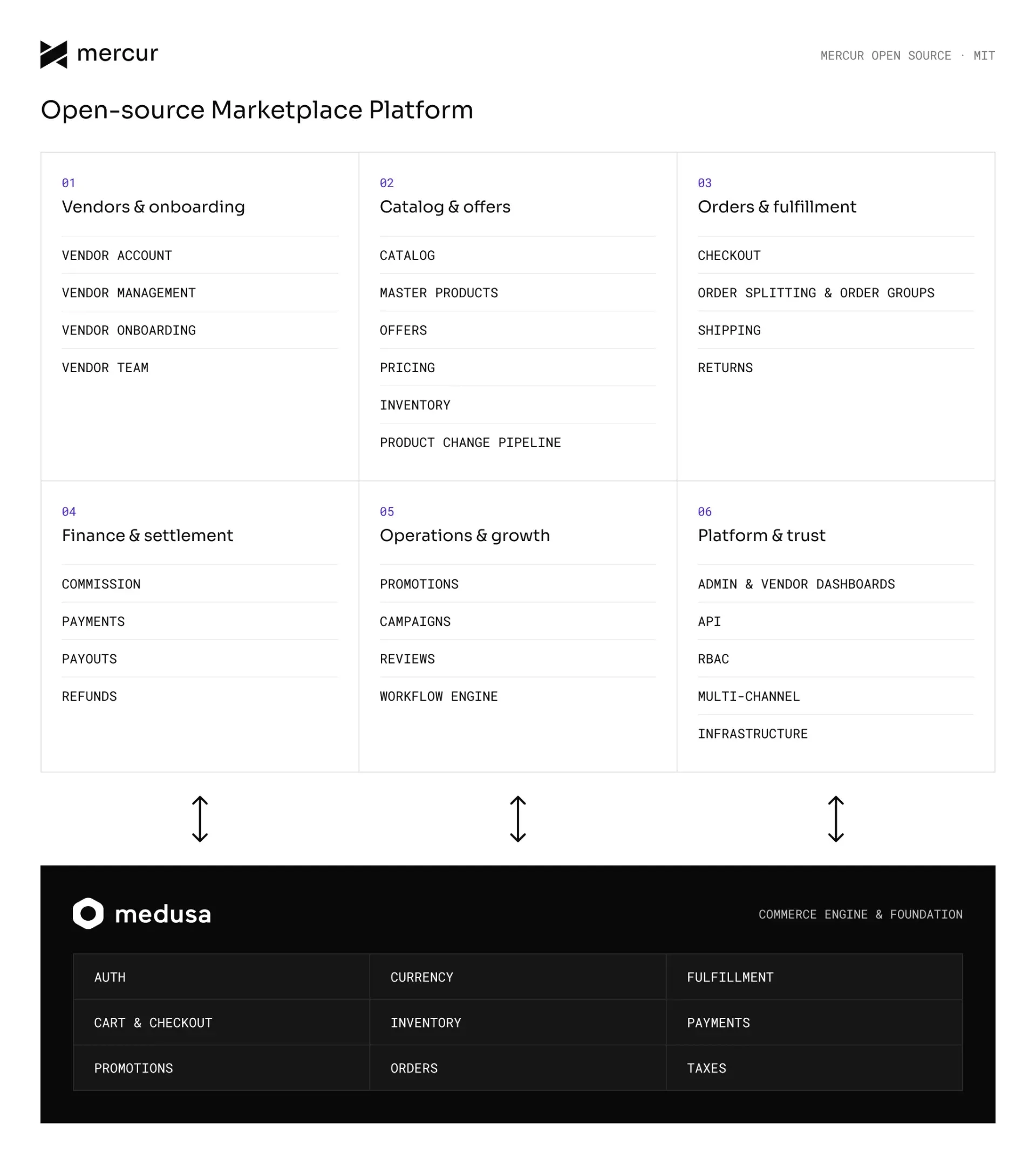
What is Mercur?
Mercur is an open-source platform for building multi-vendor marketplaces, developed by Rigby, a commerce engineering company with offices in Warsaw, Wroclaw and Rzeszow, Poland. It is a plugin for Medusa: Medusa provides products, pricing, carts, orders, fulfillment and payments, and Mercur adds the marketplace layer on top, with sellers and their teams, a shared catalog with a review pipeline, offers, order splitting, commissions and payouts. The README presents it as an open-source alternative to Mirakl for B2C, B2B and hybrid marketplaces.
The mercurjs/mercur monorepo holds the @mercurjs/core plugin, the React and Vite admin and vendor dashboards, the @mercurjs/cli, a typed API client, a dashboard SDK, the Stripe and Magento 2 connector plugins, a Next.js storefront app and the integration test suites. New projects are created with bun create mercur-app@latest, which scaffolds the API, an admin host app and a vendor host app in one Turborepo workspace. The earlier separate admin-panel, vendor-panel and b2c-marketplace-storefront repositories are now archived, and the documentation includes a migration guide from Mercur 1.x to 2.x.
The latest GitHub release is v2.4.1, published November 4, 2026 and matching @mercurjs/core 2.4.1 on npm. It moves product and offer lists to the Medusa index engine, turns the Medusa Caching Module on by default, closes security advisories after an audit of the core (with hashed invite tokens and new ownership checks on vendor routes), adds a Products Inbox for operators and updates Medusa to 2.22.3. Release v2.4.0 of November 2, 2026 split payouts into a core module plus a Stripe connector plugin, added the Magento 2 connector and seller regions, and moved to Medusa 2.22.0, which requires Node.js 22.22 or later. The documentation lists Node.js 24.22.1 or later (or 22.23.4 or later), Bun 1.3 or later and PostgreSQL 14 or later, with Redis used in production.
The core is licensed under MIT. Mercur Enterprise is a separately licensed suite deployed on the customer's own infrastructure, with modules such as EAN matching and deduplication, a Buy Box engine, master-data governance, multi-channel stock sync, automated split payouts, vendor KYC, single sign-on and audit logging, plus a support SLA. The Enterprise page, checked on November 18, 2026, publishes no prices; it states that there are no GMV fees and that Mercur Cloud, managed hosting on Medusa Cloud, is purchased separately. Other commerce platforms in the same iThub category include Saleor, Vendure, Bagisto and Spree Commerce.
Key capabilities
- Project scaffolding with create-mercur-app The CLI asks for a project name and a template (
basicorplugin), installs dependencies, creates and migrates the PostgreSQL database, seeds data and starts the dev server. Flags such as--db-connection-string,--no-depsand--skip-dbskip or preconfigure steps. The seed creates three approved demo sellers, and the CLI opens the admin invite page so the operator can set a password. - Admin Panel for operators The operator dashboard at
/dashboardis used to approve, suspend or terminate stores, review catalog changes, configure commission rules, see orders across every seller and monitor payouts. Release 2.4.1 added a Products Inbox listing newly proposed products and pending edit or deletion requests, with search, filters and sorting. - Vendor Panel for sellers The seller portal at
/selleris scoped to one store: sellers create offers against the shared catalog with their own SKU, price, inventory and shipping, fulfill and refund orders, handle returns, complete payout onboarding and invite team members. New sellers register at/seller/register, complete an onboarding wizard and appear in the operator approval queue. - Stores, teams and lifecycle The Seller module stores each store, its business details, members and invites. A member can belong to several stores, each membership has one of five roles, the owner membership is protected, and invite tokens expire after 7 days by default. Stores go through four statuses, starting in
pending_approval, and can have scheduled closures, a premium flag and assigned regions, as described in the stores documentation. - Shared catalog with review Each item exists once as a master product that several stores sell through offers. A product allowlist can restrict which stores may sell a product, vendor submissions start as
proposedand an operator publishes, rejects or sends them back for revision, and every step writes an attributed change record. Typed attributes can become variant axes and storefront filters. - Product edit pipeline Seller edits to shared products are staged as field-level diffs with typed actions such as
UPDATE,VARIANT_ADDorPRODUCT_DELETE, and touch the product only after an operator confirms them. A change can be confirmed, declined or canceled, only one open change per author is allowed on a product, and turning off theproduct_requestflag applies edits immediately. - Offers An offer points at one master variant with a SKU unique within its store. Prices are stored on the variant price set with an
offer_idrule, inventory items link to the offer so stock never mixes between stores, and each offer names the store's shipping profile. Operators define conditions such as new or refurbished under which offers are listed, as documented in the offer module. - Split checkout and order groups A single cart can hold offers from several sellers. Completing it runs a split-order workflow that groups items by seller, creates one order per seller under an order group with a shared display id, and returns the existing group if the same cart is completed twice. Group totals and seller counts are computed from the child orders at query time.
- Commissions Commission rates are a percentage of the line subtotal or a fixed amount per line, with per-currency amounts, and rules scope them by product, product type, collection, category or seller. The most specific matching rate wins, a seeded default rate is the only one applied to shipping, and commission lines are recomputed on order edits, returns, claims and exchanges. The commission documentation also describes replacing the built-in calculation with a custom provider.
- Payouts module The marketplace registers one payout provider; a built-in system provider runs when none is configured. Each store gets one payout account and an onboarding record, each order is paid once as its total minus its commission lines, and later refunds create payout reversals. The core ships no scheduled jobs, so payouts run from the Stripe plugin schedule or from the operator's own jobs.
- Stripe Connect connector The
@mercurjs/stripe-connector-pluginpackage creates a Stripe Express account and onboarding link for every new seller, authorizes a multi-seller cart once with manual capture, transfers each seller's share when an order is fulfilled and nets payouts into one nightly bank settlement per seller and currency. It requires Mercur 2.3.9 or later and Node.js 22.22 or later; the Stripe Connect guide lists Standard and Custom accounts and direct or destination charges as not yet supported. - Reviews Customers rate a product or a store from an order they own, once per target and order. Reviews start as pending until an operator publishes or rejects them, a store can post one public answer, and service helpers compute average ratings per product or store.
- Blocks registry Additional features ship as blocks that the CLI copies into the project as source code, for example
bunx @mercurjs/cli@latest add reviews, with updates applied explicitly throughdiffandadd --overwrite. The registry in the repository lists blocks for product CSV import and export, wishlists, vendor notifications, Algolia search, Meilisearch search, admin approval of requests, TalkJS vendor chat and buyer-vendor messaging. - Magento 2 connector The MIT-licensed Magento 2 connector lets a Magento 2 or Adobe Commerce store sell seller offers next to its own products, with a buy box on product pages, one checkout and one payment. Magento keeps the storefront, cart and payment, while Mercur handles sellers, offers, per-seller orders, commission and payouts.
- Storefront and Store API The Store API under
/store/*exposes sellers, offers and a cart that spans several sellers. The monorepo includes a Next.js B2C storefront app, moved to Next 16 in release 2.4.0, whose README lists home, listing, product, cart, seller and wishlist pages and uses Algolia for search. - APIs and panel extensions The HTTP API is split into Admin (
/admin/*), Vendor (/vendor/*) and Store routes, documented in the API reference. Custom routes generate a typed client, workflows expose hooks and emit events, and the dashboard SDK adds pages and widgets to the admin and vendor panels without forking them. - Self-hosting The self-host guide deploys PostgreSQL, Redis and the same API build twice, once in server mode (serving the Admin panel) and once in worker mode for jobs and subscribers, on hosts with at least 2 GB of RAM per instance. Production setups swap in Redis cache, event bus, workflow engine and locking modules, an S3 file provider and a notification provider such as SendGrid or Resend; the Vendor panel is a static Vite build.
- Medusa Cloud deployment A Mercur project pushed to GitHub can also be deployed on Medusa Cloud, which provisions the database, Redis and file storage. One deployment serves the API, the admin panel at
/dashboardand the vendor panel at/sellerfrom the same origin, and the build fails ifMERCUR_BACKEND_URLis not set. - Documentation for AI coding agents Projects install
@mercurjs/docs, which places version-matched documentation innode_modules, and the template addsAGENTS.mdandCLAUDE.mdfiles that point coding agents to it. A documentation MCP server athttps://docs.mercurjs.com/mcpoffers a search tool over the docs.
Where Mercur fits
Running a standalone multi-vendor marketplace
An operator creates a project with bun create mercur-app@latest, runs the API with the admin panel at /dashboard and the vendor panel at /seller, and connects a storefront to the Store API. Shoppers fill one cart with offers from several sellers, checkout splits it into one order per seller, commission lines are computed per order and payouts reach each seller's connected account, as described in the standalone marketplace use case.
Adding marketplace offers to an existing Magento store
A merchant that already runs Magento 2 or Adobe Commerce installs both halves of the Magento 2 connector and keeps its storefront, checkout and payment. Seller offers appear on product pages next to the merchant's own stock, published seller products are imported into Magento, and Mercur turns the seller lines of each Magento order into per-seller orders with commission and payouts.
Onboarding and governing sellers
Sellers register in the vendor panel and complete the onboarding wizard, and their store waits in pending_approval until the operator approves it. Operators can later suspend or terminate a store, schedule closure windows, mark stores as premium and assign them to regions, while each store owner invites team members with one of five roles.
Curating a shared catalog with competing offers
Operators keep one master product per item and decide which stores may sell it. Sellers propose new products and edits, which land in the review queue and the Products Inbox until an operator publishes, declines or asks for a revision. Several sellers then list offers on the same variant with their own SKU, price, condition, stock and shipping.
Collecting payments and paying sellers through Stripe Connect
With the Stripe connector plugin, the platform Stripe account charges the customer once for a multi-seller cart and acts as merchant of record. Each seller completes Stripe Express onboarding from the vendor panel, receives a transfer for every fulfilled order minus commission, and gets one nightly bank settlement; operators follow captures, settlements and adjustments under Integrations, Stripe in the admin panel.
Extending the platform with blocks and custom code
Developers add features such as reviews, wishlists, Algolia or Meilisearch search and buyer-vendor messaging as blocks whose source code is copied into the project. Custom API routes, workflow hooks, subscribers and dashboard SDK extensions change behavior without patching the core, and coding agents read the version-matched docs bundled in @mercurjs/docs.
Install
bun create mercur-app@latestReviews of Mercur
Be the first to share your experience with Mercur.
Write a review
Loading review form…
Found Mercur useful? Upvote it todayYour vote helps other IT teams find it in the daily ranking.