

What is Medusa?
Medusa is an open-source commerce platform written in TypeScript for Node.js, with a built-in framework for customization. It supplies the commerce primitives a business application needs, such as products, carts, orders, pricing, promotions and payments, so teams can build direct-to-consumer stores, B2B portals, marketplaces, distributor platforms or point-of-sale systems without rewriting that logic. A Medusa application consists of a server exposing the Store and Admin APIs, the Medusa Admin dashboard served by the same process, and a storefront that you write yourself or start from the official Next.js Starter Storefront. The project is developed by MedusaJS, Inc., which holds the copyright and sells the managed Medusa Cloud service.
All packages are published on npm from a single Yarn workspaces monorepo. A new project is created with npx create-medusa-app@latest, which requires Node.js v22.22.0 or later and a running PostgreSQL database, and sets up the backend and admin with an optional storefront. The Docker guide runs a development stack from the dtc-starter repository with postgres:15-alpine and redis:7-alpine containers. For production, the project can be self-hosted as separate server and worker deployments, or run on Medusa Cloud, a paid managed environment with GitHub deployments, preview environments, managed PostgreSQL, Redis and S3 storage.
The current release is v2.22.4, published November 6, 2026. It adds TypeScript 7 support for applications and plugins, a Jest preset for Medusa projects, dashboard fixes for breadcrumbs, invites and order actions, and dependency updates aimed at security. v2.22.3 completed role-based access control across the dashboard, API routes and JS SDK, as an Enterprise License feature, and added off-session payments to the Adyen provider that v2.22.2 introduced in beta. v2.22.0 dropped Node.js 20, added customer CSV export and multiple payment accounts in Medusa Payments, and redacted most query parameter values in traced HTTP spans. v2.21.1 introduced the Search Module, and v2.21.0 made every Store API route return only fields on an explicit allowed list.
The architecture is layered. API routes receive HTTP requests from storefronts and the admin, call workflows built with the Workflows SDK, and the workflows call modules that persist data in PostgreSQL. Commerce Modules cover domains such as product, cart, order, inventory, pricing, tax and fulfillment. Infrastructure Modules cover event bus, caching, file storage, locking, notifications, analytics and the workflow engine, each with swappable providers such as Redis, S3, SendGrid or PostHog.
Licensing follows an open-core model. The repository is MIT-licensed except for the Enterprise Edition materials listed in ENTERPRISE-LICENSE.md, currently the RBAC and SSO code paths, which require a commercial agreement with MedusaJS, Inc. even though their source is visible. Medusa is not a hosted shop builder with themes: the storefront, deployment, payment accounts and operations remain the responsibility of the team running it, unless Medusa Cloud takes over the hosting part.
Medusa screenshots
Explore the interface. Open a screenshot to view it at full size.
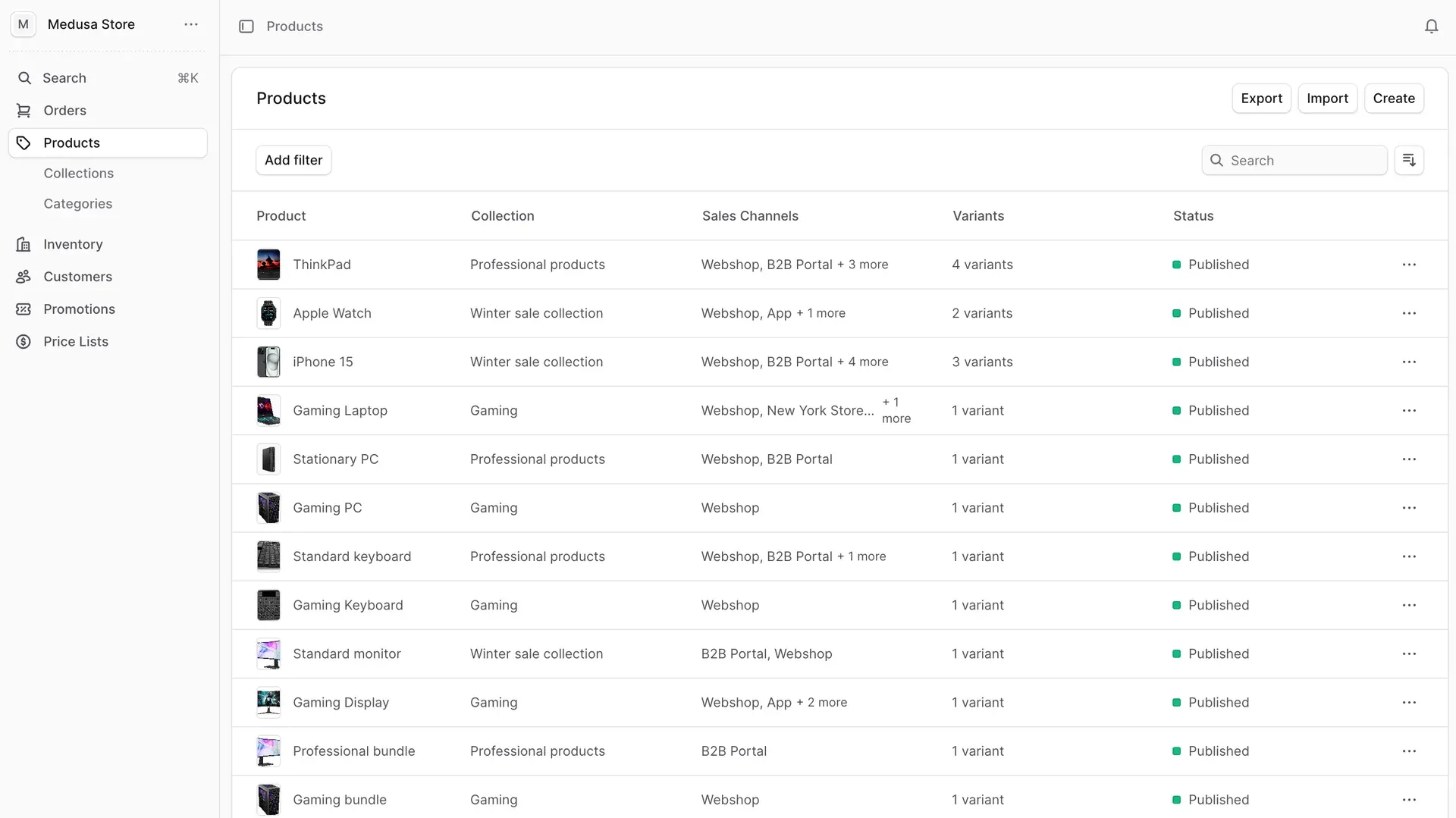
Official Medusa user guide screenshot of the admin product list, with Export, Import and Create actions and filters.
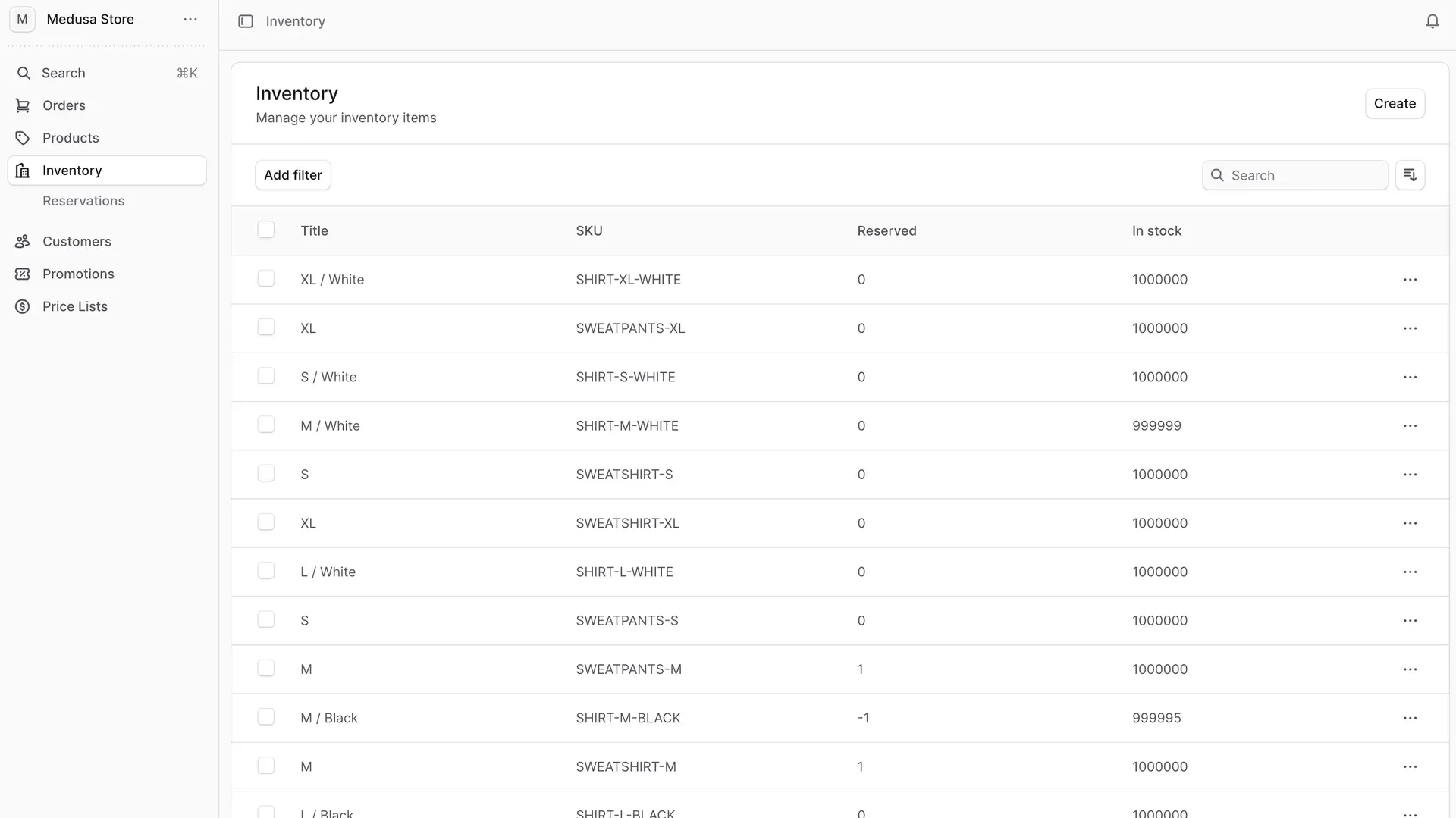
Official user guide screenshot of inventory items with SKU, reserved and in-stock columns, and the Reservations entry in the sidebar.
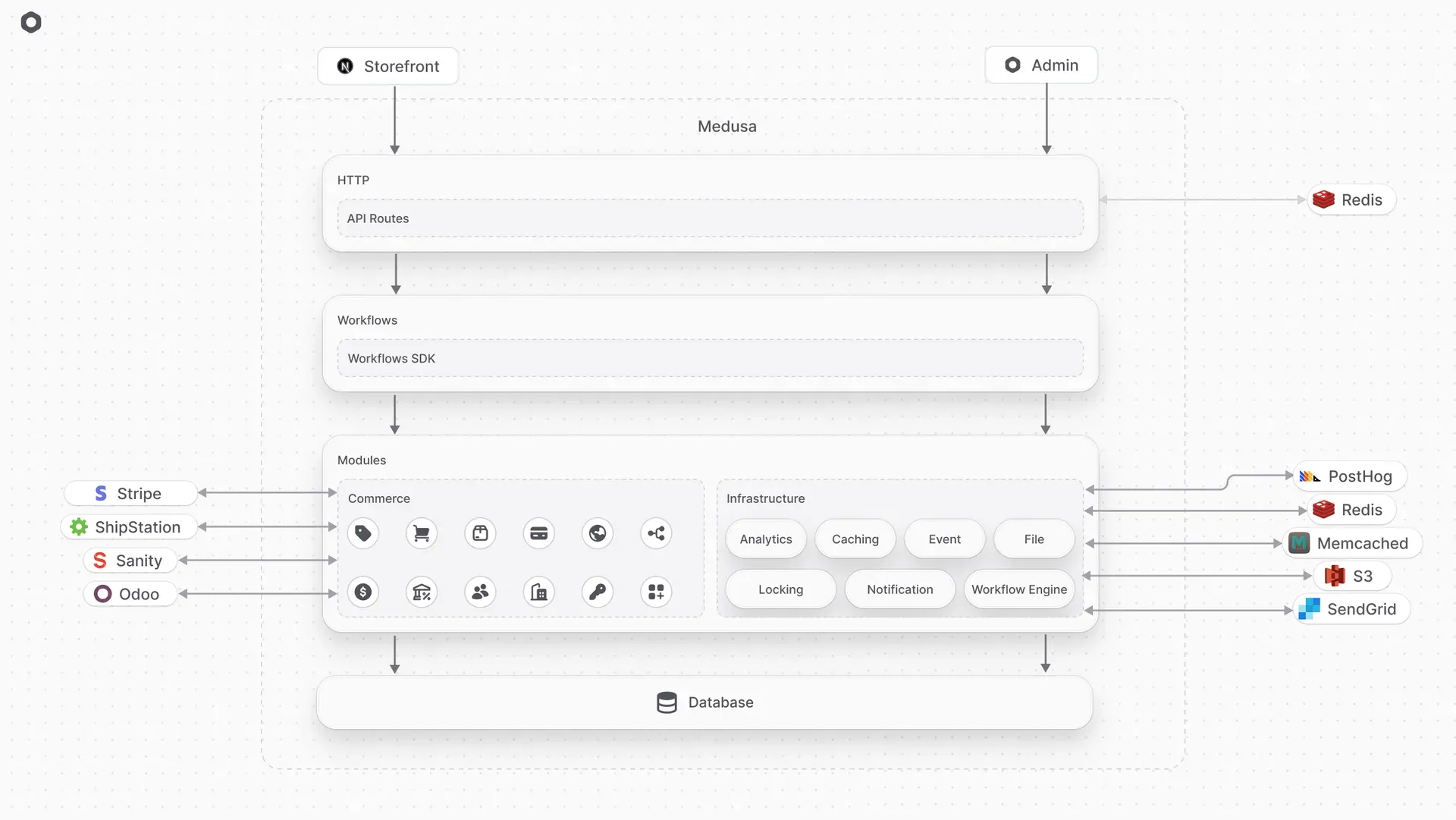
Official architecture diagram: HTTP API routes, the Workflows SDK, Commerce and Infrastructure Modules, the database and example providers such as Stripe, Redis, S3 and SendGrid.
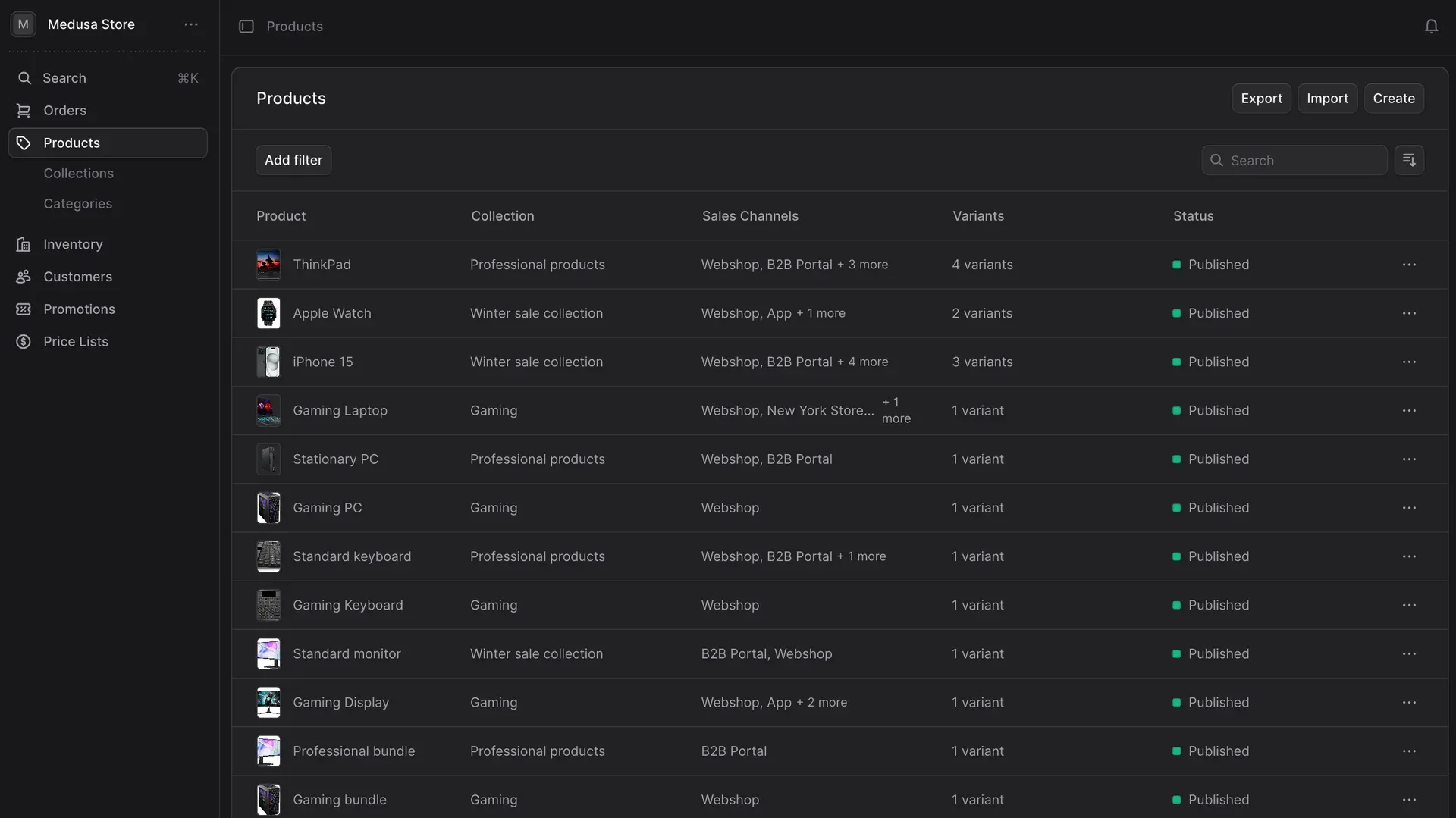
Official user guide screenshot of the same product list with the admin dark theme enabled.
Source: official Medusa project page.
Key capabilities
- Local project with create-medusa-app Run
npx create-medusa-app@latest my-medusa-store, or the yarn and pnpm equivalents, on a machine with Node.js v22.22.0 or later, Git and a running PostgreSQL server. The installer creates a database, a monorepo with the backend and admin inapps/backendand, on request, the Next.js Starter Storefront inapps/storefront. The server listens on port 9000, the admin on/appand the storefront on port 8000. The installation guide notes that the storefront needs Node v24 LTS or lower. - Docker development stack The official Docker guide clones the dtc-starter repository and starts four services: PostgreSQL 15, Redis 7, the Medusa backend on a node:22-alpine image and the storefront. An admin user is created with the
medusa usercommand inside the container. This setup runs withNODE_ENV=developmentand the Vite dev server; it is not a production image. - Self-hosted production deployment The deployment guide describes two deployments of the same codebase: a server instance that serves the APIs and the admin, and a worker instance for subscribers and scheduled jobs, selected with
MEDUSA_WORKER_MODE. Production needs PostgreSQL, Redis, at least 2 GB of RAM per host, randomCOOKIE_SECRETandJWT_SECRETvalues and CORS settings for each frontend. Migrations run through the predeploy script, and/healthreturns OK when the server is up. - Medusa Cloud managed hosting Medusa Cloud deploys a Medusa project from GitHub, creates preview environments for pull requests and provides managed PostgreSQL, Redis and S3. The pricing page lists Develop at $29 per month, Launch at $99 and Scale at $299, with usage-based overages for compute, storage, transfer and emails. There is no free tier, Redis and custom domains start at Launch, and orders, products and admin users are not counted or charged per unit.
- Commerce Modules The documentation lists 23 Commerce Modules, including Product, Cart, Order, Payment, Pricing, Promotion, Inventory, Stock Location, Fulfillment, Tax, Region, Sales Channel, Customer, Currency, Translation, Store Credit and Loyalty. Each module owns its data models and is combined with others through links, not database joins.
- Medusa Admin dashboard The React admin is served at
/appby the server instance and covers orders, products, collections, categories, inventory and reservations, customers, promotions, price lists and store settings. Product and inventory exports, product import and, since v2.22.0, customer CSV export are available from the list views. The user guide documents each screen for merchants, and a dark theme is included. - Store and Admin REST APIs with a JS SDK Storefronts call the Store API with a publishable API key, and back-office tools call the Admin API with authenticated users or secret API keys. Both are documented as OpenAPI references, and
@medusajs/js-sdkwraps them for TypeScript clients. Since v2.21.0 every Store route returns only fields on an explicit allowed list; extra fields must be added with theallowFieldsmiddleware. - Workflows SDK with compensation Business operations such as checkout, order edits, returns and exchanges are implemented as workflows composed of steps in
@medusajs/core-flows. Each step can define a compensation function that undoes its changes when a later step fails, which keeps data consistent across modules and external systems. Hooks let a project extend predefined workflows without forking them. - Custom modules, data models and module links Projects add their own modules with data models defined in TypeScript, generate migrations with the Medusa CLI and expose services to workflows. Module links connect a custom model to a core model, such as a brand to a product, and Query retrieves linked data across modules in one call.
- Admin widgets and UI routes The admin can be extended with widgets injected into existing pages and UI routes that add new pages to the sidebar. Extensions are React components built with the admin SDK and the Medusa UI component library, which includes icons and a Tailwind preset. v2.22.3 added Tailwind CSS 4 support.
- Events, subscribers and scheduled jobs Modules emit events such as order placement or price list changes, and subscribers react to them in the worker process. Scheduled jobs run recurring tasks, for example syncing stock or prices with an ERP. In production, the event bus and workflow engine should use the Redis-based modules instead of the in-memory defaults so that events survive restarts and work across instances.
- Payment providers The repository contains official Stripe and Adyen payment providers; Adyen was added in beta in v2.22.2 and gained off-session payments for recurring and deferred charges in v2.22.3. PayPal is covered by an integration guide rather than a bundled provider. Medusa Payments, the Cloud payment service, supports several payment accounts per project since v2.22.0, such as one per region.
- Infrastructure Modules and providers Infrastructure Modules handle caching, event bus, file storage, locking, notifications, analytics and the workflow engine. Bundled providers include Redis for caching, events, locking and workflows, PostgreSQL locking, local and S3 file storage, SendGrid notifications, PostHog analytics, and email/password, GitHub, Google and OIDC authentication. The local file and in-memory providers are intended for development only.
- Search Module Introduced in v2.21.1, the Search Module indexes products or any custom data model from a TypeScript index definition with searchable, filterable and facetable fields. Self-hosted projects use the PostgreSQL search provider. Medusa Cloud adds Medusa Search, with full-text search on all plans and vector and hybrid search on Scale and Enterprise.
- Next.js Starter Storefront The optional Next.js Starter Storefront is a Next.js storefront built on the Store API, with a checkout that works with the Stripe payment provider. It is a starting codebase to modify, not a hosted theme, and it runs as a separate deployment from the Medusa server.
- Role-based access control and SSO Since v2.22.3, merchants can define custom roles with granular permissions and assign them to admin users, enforced across the dashboard, API routes and JS SDK. RBAC and SSO are Enterprise Edition features: their code is in the repository, but using or enabling them requires a commercial agreement with MedusaJS, Inc. Without that license, plan admin access as if every admin user can reach every admin function.
- Tooling for AI coding agents Medusa publishes agent skills installable in Claude Code with
/plugin install medusa-dev@medusaafter adding the medusajs/medusa-agent-skills marketplace, or in other agents withnpx skills add medusajs/medusa-agent-skills. A Docs MCP server and an llms.txt index expose the documentation to AI tools, and the Cloud CLI lets agents inspect Cloud resources. - Instrumentation and testing Medusa can export OpenTelemetry traces for HTTP requests, workflows, Query, database calls and cache operations, configured in an instrumentation file. Since v2.22.0, only the values of a short list of query parameters are recorded by default, and others are traced as REDACTED. Since v2.22.4, the test-utils package also ships a Jest preset for Medusa applications and plugins.
Where Medusa fits
Launching a direct-to-consumer store
Create the project with create-medusa-app and accept the Next.js Starter Storefront, then configure regions, currencies, tax settings, shipping options and a payment provider such as Stripe in the admin. Add the storefront publishable API key to its environment and place a test order end to end, including a refund and a return. Before launch, replace in-memory and local file providers with Redis and S3-compatible storage, and confirm that the storefront still receives every field it needs from the Store API allowed lists.
Running a B2B portal next to a retail shop
Use sales channels to separate the B2B portal from the webshop, customer groups with price lists for negotiated prices, and the draft orders plugin for orders entered by staff. The B2B recipe shows how to model companies and their employees in a custom module linked to customers and customer groups. Check that publishable API keys are scoped to the correct sales channel, so retail customers cannot see B2B prices or products.
Building a multi-vendor marketplace
Medusa has no marketplace module out of the box. The marketplace recipe adds a vendor module, links vendors to products and orders, and splits orders per vendor in a custom workflow. Vendor admins authenticate through custom API routes and need either admin customizations or a separate vendor dashboard. The recipe does not cover payouts, so plan them with your payment company before writing code.
Connecting an ERP or CMS
Use workflows, subscribers and scheduled jobs to sync products, prices, stock and orders with back-office systems. The documentation provides an Odoo ERP recipe and integration guides for Strapi, Payload CMS, Sanity and Contentful. Decide which system owns each field, make each sync step idempotent and give it a compensation function, and monitor failed workflow executions rather than assuming every event was processed.
Upgrading across minor releases
Medusa ships frequent minor releases, and several recent ones carried breaking changes: v2.21.0 enforced Store API allowed fields, v2.22.0 required Node.js v22.22.0, and v2.22.2 changed BigNumber behavior for invalid values. Read each release note, upgrade all @medusajs packages to the same version as described in the update guide, run database migrations, then rerun storefront and integration tests against a staging copy before production.
Building features with AI coding agents
Install the Medusa agent skills and connect the Docs MCP server so an agent uses current Medusa APIs instead of outdated examples. Ask for small units, such as one module, one workflow or one admin widget, and require migrations and integration tests with each change. Review generated code for Store API exposure, missing compensation steps and secrets in configuration before merging.
Install
npx create-medusa-app@latest my-medusa-storeReviews of Medusa
Be the first to share your experience with Medusa.
Write a review
Loading review form…
Alternatives to Medusa
 OdooOdoo is a web-based suite of business apps from Odoo S.A. The LGPLv3 Community edition covers CRM, sales, invoicing, inventory, manufacturing, POS and website modules on PostgreSQL; Enterprise apps, Studio and hosting are sold per user.
 Next.jsNext.js is an open-source React framework maintained by Vercel for full-stack web applications. It adds file-based routing, Server Components, caching, image and font optimization, and deploys as a Node.js server, Docker image or static export.