

What is Payload CMS?
Payload is an open-source, code-first CMS and application framework built for Next.js and TypeScript. You describe collections, globals and fields in a Payload config, and the project generates an admin panel, a database layer with migrations, REST and GraphQL APIs, authentication, access control and file uploads from it. It can run as a headless CMS behind a separate front end, or inside the same Next.js /app folder as the site it serves. The code is published by Payload CMS, LLC under the MIT license, per the repository license file.
Payload installs as packages into a Next.js project. The installation guide lists Node.js ^22.23.4 or 24.22.1 and newer, a package manager (pnpm preferred, yarn 1.x unsupported), specific Next.js 15 and 16 ranges, and a database: MongoDB through Mongoose, or Postgres or SQLite through Drizzle, each via its own adapter package. The quickest start is npx create-payload-app, with official website and ecommerce templates in the repository. Deployment targets include Vercel, Cloudflare Workers with D1 and R2, Docker and any host that runs Next.js.
The reviewed release is Payload v3.93.0, published on November 4, 2026. Its notes flag vital security updates and list fixes for block read access in queries, restrictions on remote upload URLs, tenant-constrained global redirects and escaping in rich-text HTML converters, plus a new auth.passwordHashIterations option for environments that limit PBKDF2. A parallel 4.0 line is in beta, and v4.0.0-beta.7 was published the same day with refresh tokens and session expiration changes. Teams on 3.x should read the migration guide before planning a major upgrade.
Payload is a developer framework first. Editors get the generated admin panel, with live preview, versions and drafts, localization and a Lexical rich text editor, but content modeling happens in TypeScript code reviewed like any other change. Enterprise features such as SSO, publishing workflows, a visual editor and AI auto-embedding are described on the official site, which routes enterprise inquiries to a demo request. This profile is based on public documentation and release notes.
Payload CMS screenshots
Explore the interface. Open a screenshot to view it at full size.
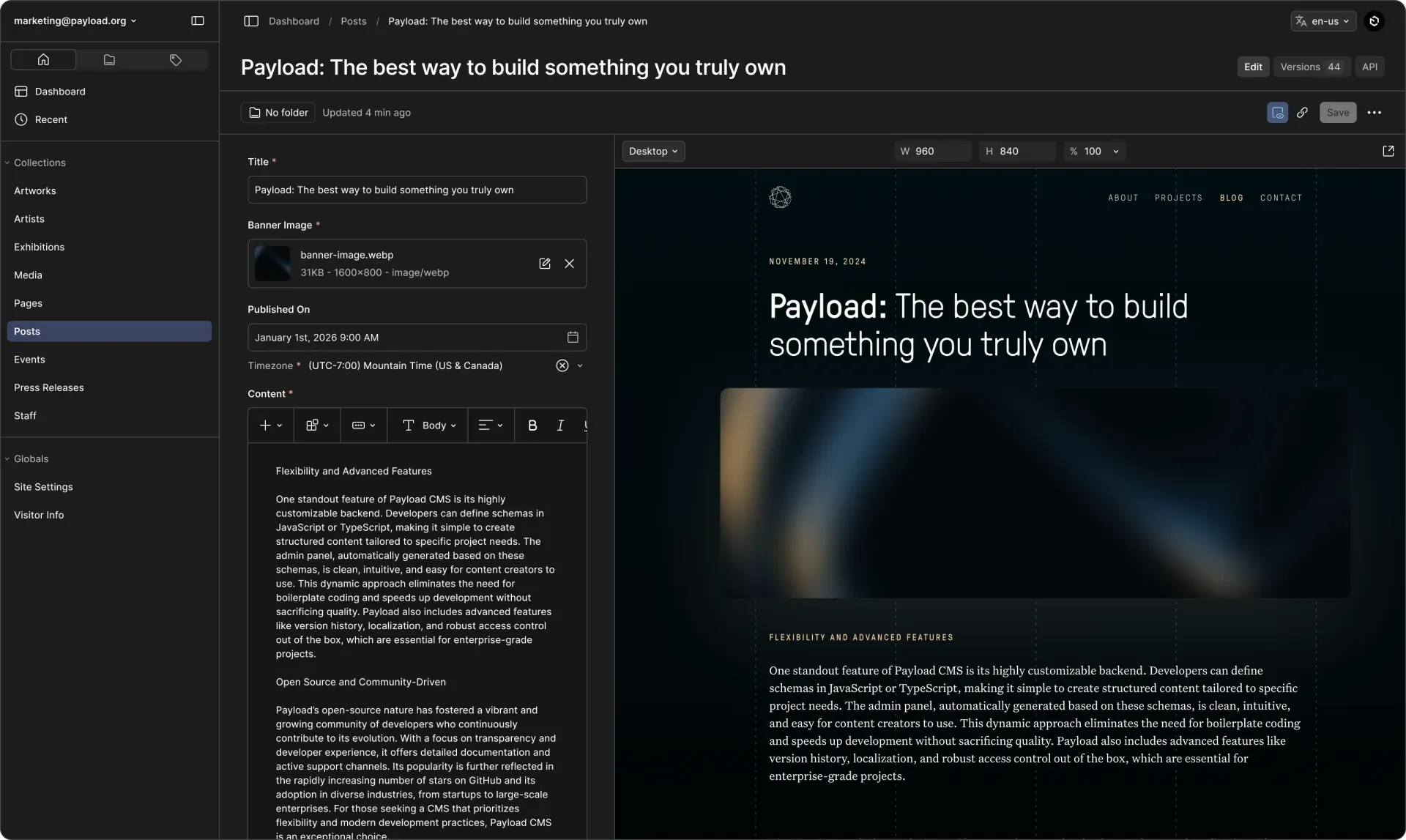
Official product screenshot: the edit view of a Posts collection with the collection sidebar, rich text content and a live front-end preview.
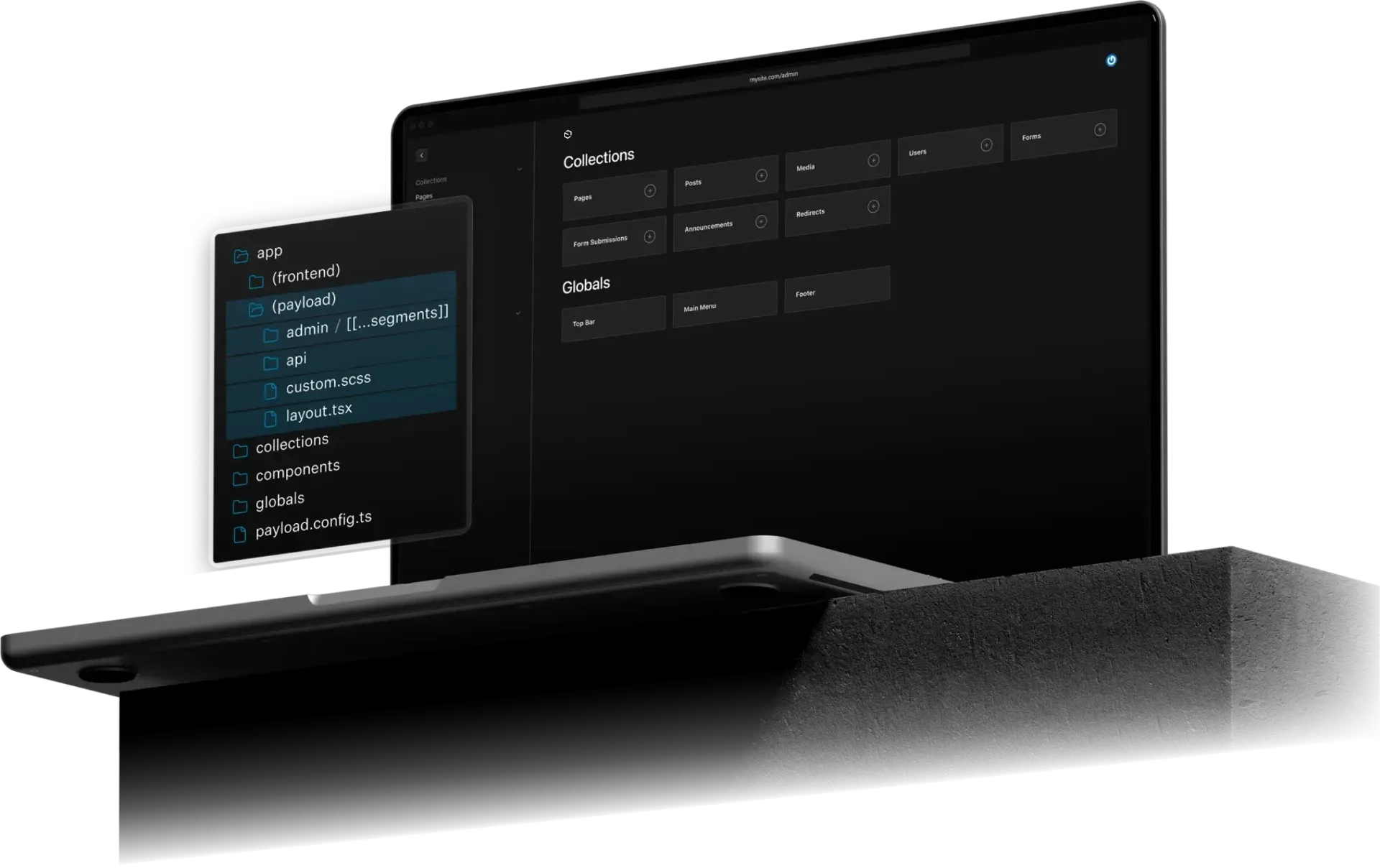
Official illustration of the admin dashboard listing collections and globals, next to the app folder that contains the payload route group.
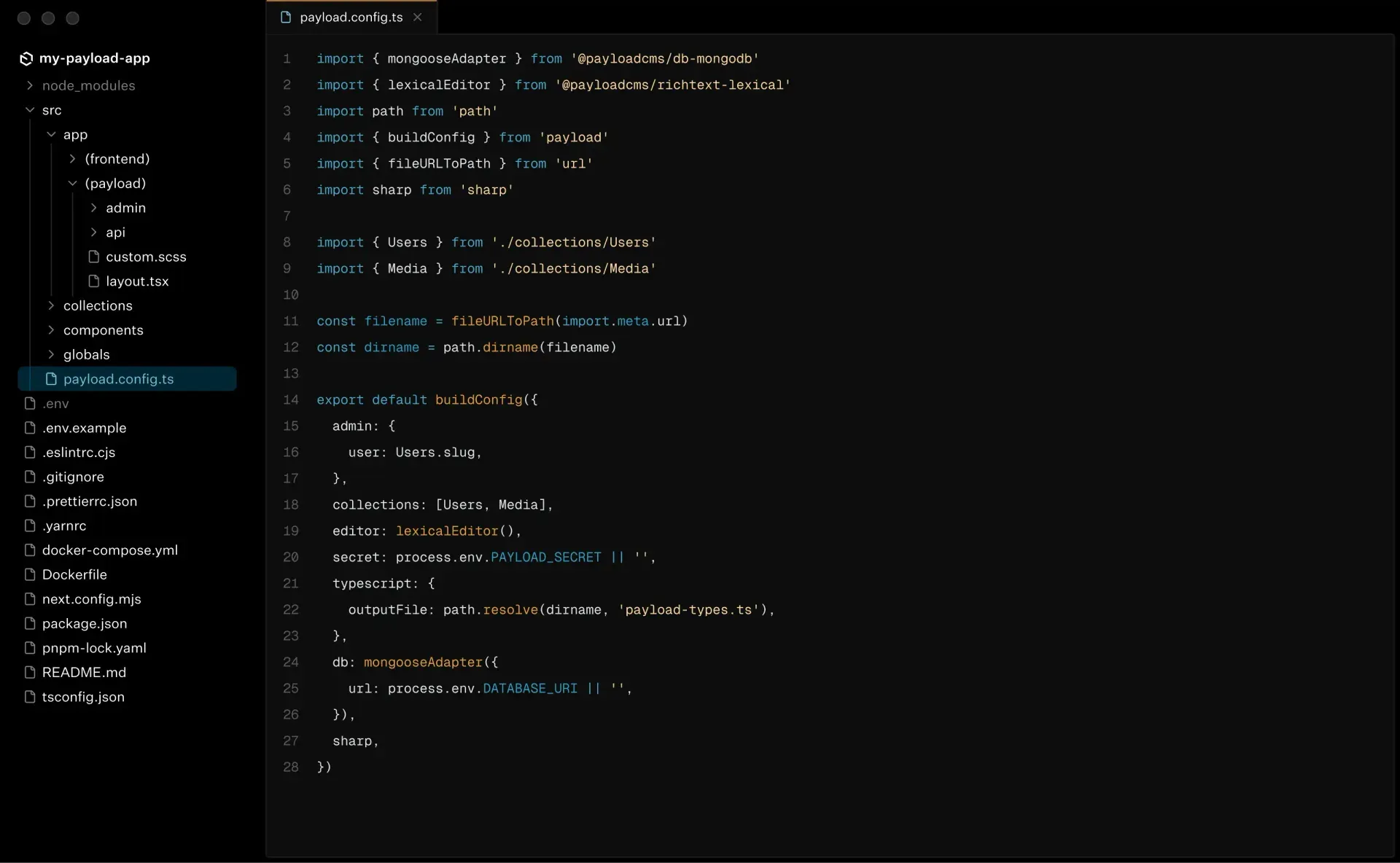
Official figure of a Payload project in an editor, with payload.config.ts defining the admin user, collections, editor and database adapter.
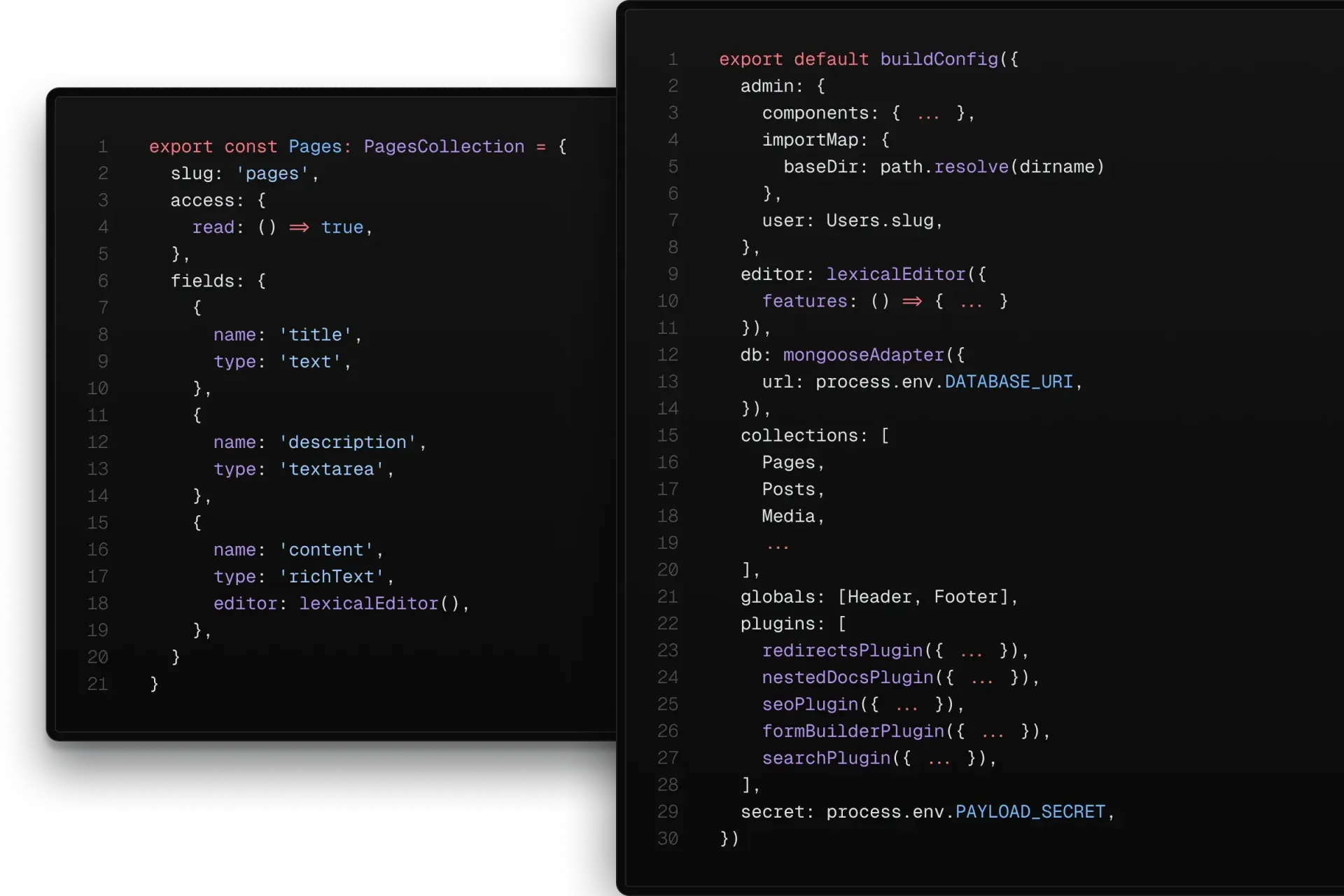
Official figure of a collection definition with access and fields next to a config with plugins, which Payload turns into the admin panel and APIs.
Source: official Payload CMS project page.
Key capabilities
- Config-driven backend A single
payload.config.tsholds collections, globals, fields, plugins, the editor and the database adapter. From it Payload builds the admin panel, APIs and generated TypeScript types, so the schema in code is the source of truth. See the what is Payload overview. - Runs inside Next.js Payload can install into an existing Next.js app, with the admin panel and API routes mounted under the
(payload)route group of the same/appfolder. Server components can query the database through the Local API without an HTTP round trip. Only certain Next.js version ranges are supported, so check them before upgrading Next. - Database adapters Official adapters cover MongoDB with Mongoose, Postgres with Drizzle and SQLite with Drizzle. The documentation describes MongoDB as a fit for dynamic, document-shaped data and relational databases for strongly structured models. Adapters are separate packages that you install and version yourself.
- Generated admin panel The React admin panel is generated from your config and lists collections and globals with list views and edit forms. Components can be replaced with your own React components, including server components, and the panel can be white-labeled with your own branding.
- REST, GraphQL and Local APIs Each collection is mounted by slug under
/api, with CRUD operations, pagination, depth, sort,wherefilters, locale, select and joins. A GraphQL schema is generated as well, and the Local API gives direct access in server code. See the REST API reference. - Authentication Setting
auth: trueon a collection adds account creation, login, logout, password reset, email verification and the UI to manage those users. It can serve the admin panel and also your own front end, with HTTP-only cookies, as the README describes. Version 4 beta adds refresh tokens. - Access control Rules run at the collection, global and field level and per operation, receiving the user and the document. The default only requires a logged-in user. Role-based access, per-organization data and owner-only records are expressed as functions you can test. Release 3.93.0 tightened block read access in queries.
- Hooks and endpoints Collection, field and global hooks run before and after operations such as validation, change, read and delete. Custom endpoints and server functions extend the API. Hooks are where teams add side effects such as revalidation, search indexing or notifications, so test them under failure.
- Versions and drafts Documents can keep version history, drafts, autosave and scheduled publishing, with a Versions count visible in the editing view. Restoring and comparing versions helps editorial review. Release 3.93.0 includes a fix preserving shared localized draft changes.
- Live preview and visual editing Live Preview shows your actual front end beside the edit form, as the product screenshot illustrates, with device-size controls. Visual editing features for in-page edits are described on the product site and are tied to enterprise offerings there, so confirm the edition before relying on them.
- Localization Fields can be localized per locale, with fallback locales available in queries. The admin interface itself is translated, and release notes show ongoing fixes to translated labels. Plan how editors review untranslated content before launch.
- Lexical rich text and blocks The Lexical editor is configurable per field, and block fields support layout-builder patterns for pages. Stored values are structured data, and HTML converters exist for rendering, with escaping fixes in 3.93.0. Keep front-end renderers in sync with the blocks you allow.
- Uploads and media Upload-enabled collections store files with image resizing, focal-point cropping and access control. Storage adapters exist for cloud providers, and permanent storage is a deployment decision because serverless hosts have ephemeral disks. Release 3.93.0 enforced restrictions for remote URL uploads.
- Jobs queue Tasks can be queued for later or scheduled runs, such as vector embeddings, third-party syncs, scheduled publishing and emails. Jobs run on separate compute that you trigger, for example through cron or a route. Monitor failures and retries in production.
- Plugins Official plugins include SEO, redirects, nested docs, form builder and search, shown in the project's own config examples and listed in the plugin documentation. Your own plugins are functions that transform the config. Community plugins also exist, so review their maintenance before adoption.
- Templates and one-click deploys Official website and ecommerce templates pair a Tailwind and React Server Components front end with Payload in one repository. The README offers one-click deployment to Vercel, with Neon and Vercel Blob, and to Cloudflare, with Workers, R2 and D1.
- Multi-tenancy and white-label use The site lists multi-tenancy and white-label admin as features for agencies and enterprise apps. Tenant constraints appear in release fixes, such as limiting global view redirects to available tenants. Test cross-tenant access explicitly before sharing one deployment.
- Open-source community and support Help is available through GitHub Discussions, the Discord server and the community help page. The repository has frequent releases, with several 3.x versions per month. Pin versions and read notes, especially those marked as security updates.
Where Payload CMS fits
Building a marketing website with editors
Start from the website template, define pages and posts as collections, and use blocks for layouts. Turn on drafts, live preview and on-demand revalidation so editors can check the real page before publishing. Confirm that unpublished content is hidden by access control and not only by front-end logic.
Adding a CMS to an existing Next.js application
Run npx create-payload-app inside the project or install payload and @payloadcms/next manually. Verify your Next.js version is inside a supported range, mount the route group, and choose the database adapter that matches existing infrastructure. Check that the admin panel and your own routes do not collide.
Running a headless content API
Expose REST or GraphQL for separate front ends, mobile apps or other services. Use depth, select and pagination to limit payload size, and generate types from the config for the consuming code. Add read access rules per collection and test them with an unauthenticated request.
Building an internal tool or customer portal
Use auth-enabled collections for accounts, access functions for ownership rules and hooks for workflow steps. The admin panel gives staff a data interface while your front end serves customers. Review the security-focused release notes, since access rules and query behavior are central here.
Managing commerce and media catalogs
Use the ecommerce template and upload collections to model products, variants and assets, then connect payment and storage providers through plugins or adapters. Verify image resizing, file permissions and storage durability on your host. Check that order data has stricter access than catalog data.
Operating Payload in production
Set a long random secret, use production database credentials and configure permanent file storage and email. Run migrations as a deployment step for relational adapters, back up the database and stage upgrades from one minor version to the next. Read the production deployment guide before the first release.
Install
npx create-payload-appReviews of Payload CMS
Be the first to share your experience with Payload CMS.
Write a review
Loading review form…
Alternatives to Payload CMS
 StrapiStrapi is an MIT-licensed headless CMS in JavaScript and TypeScript with a visual Content-Type Builder, generated REST and GraphQL APIs, i18n, roles and plugins, self-hosted on Node.js or on Strapi Cloud, with paid Growth and Enterprise features.
 DirectusDirectus wraps any SQL database with REST and GraphQL APIs, a visual Studio and an MCP server, self-hosted or on Directus Cloud.
 WordPressWordPress is the free, GPL-licensed content management system from wordpress.org that you install on your own PHP and MySQL or MariaDB host. Not to be confused with WordPress.com, the managed hosting service built on the same software.