

What is Strapi?
Strapi is an open-source headless CMS written in JavaScript and TypeScript. Developers define content models, and Strapi generates REST and GraphQL APIs for them, while editors work in an admin panel to create, translate and publish content. The software is developed by Strapi Solutions SAS; the license file carries a copyright notice from 2015, and the company lists Index Ventures, Accel and Stride.VC as investors on its about page.
The Community Edition is licensed under the MIT Expat license. Code in ee/ directories forms the Enterprise Edition and falls under a separate commercial license, and paid features such as Releases, Content History, Review Workflows, Audit Logs and SSO are unlocked by Growth or Enterprise licenses on self-hosted projects. Strapi Cloud is the official managed hosting platform with a built-in database, media library, email provider and CDN.
A new project is created with npx create-strapi@latest. The deployment requirements support only Active LTS and Maintenance LTS releases of Node.js (currently v22, v24 and v26) and list npm 6 or later or pnpm as package managers. Supported databases are SQLite, PostgreSQL, MySQL and MariaDB. The README states that Strapi does not ship official Docker images: each project builds its own image, and the docs provide Dockerfile and Docker Compose examples. Requests pass through routes, middlewares, controllers and services, all of which can be customized in code.
The current major version is Strapi 5. The latest GitHub release is v5.61.0, published on November 4, 2026, which records history restores, discarded drafts, settings updates and media events in Audit Logs and fixes a large number of content manager, content-type builder and Releases issues; a v5.61.1 tag followed on November 9. The website also announces Strapi MCP as generally available, letting AI agents manage Strapi content, and Strapi AI for content modeling, media alt text and translations.
Other headless CMS projects on iThub include Directus and Payload CMS.
Strapi screenshots
Explore the interface. Open a screenshot to view it at full size.
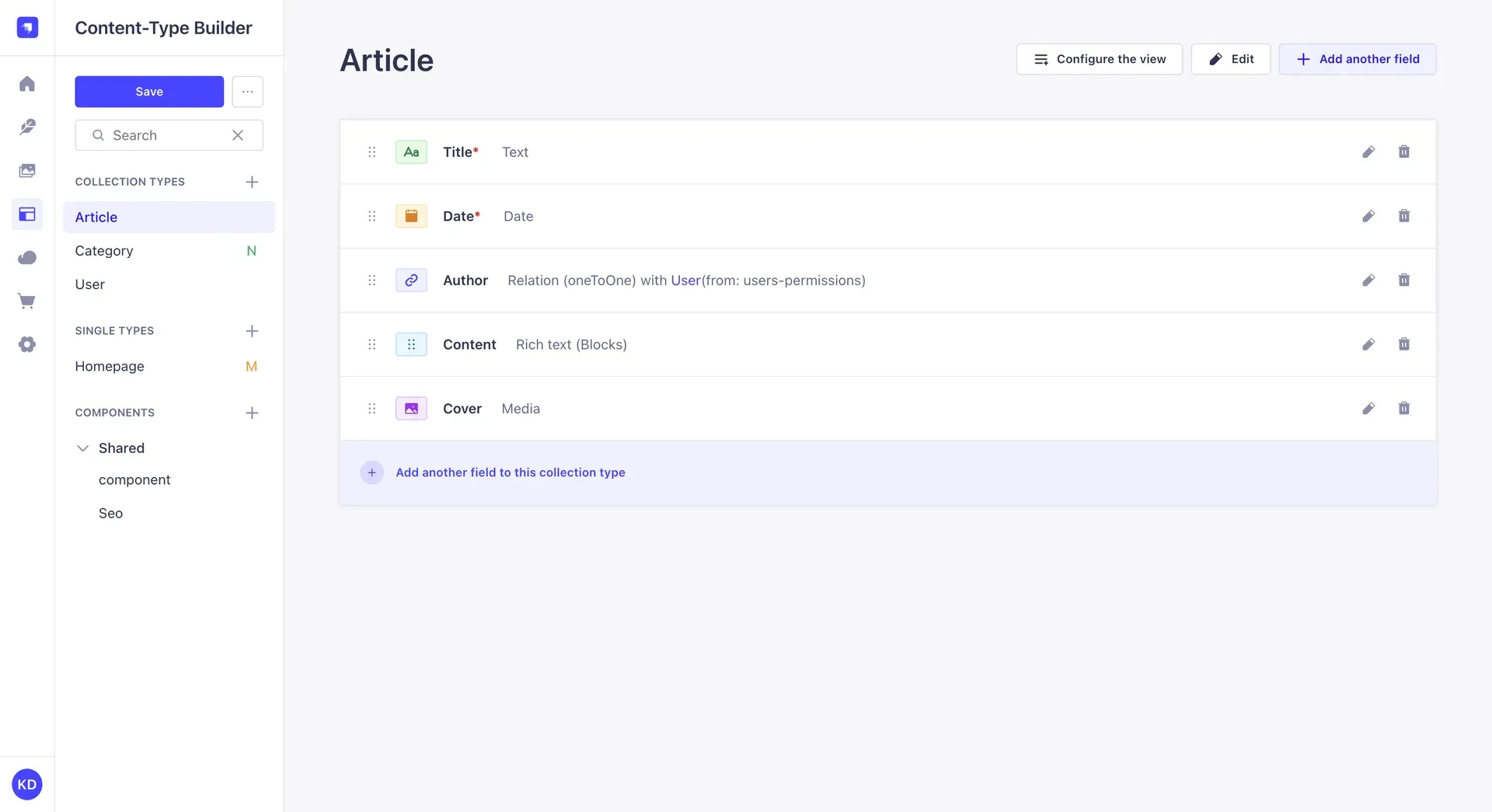
Content-Type Builder with an Article collection type.
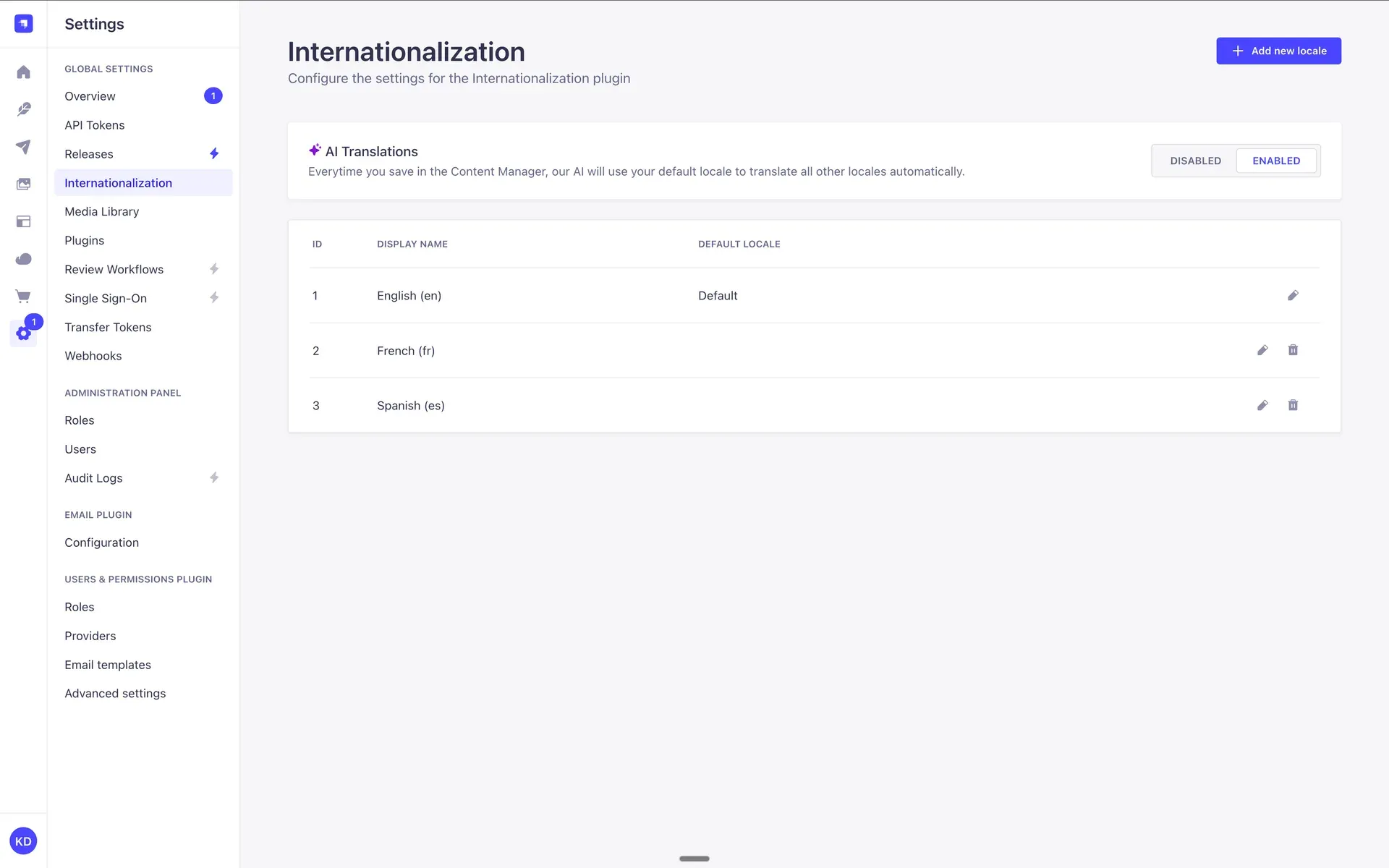
Internationalization settings with the AI Translations toggle.
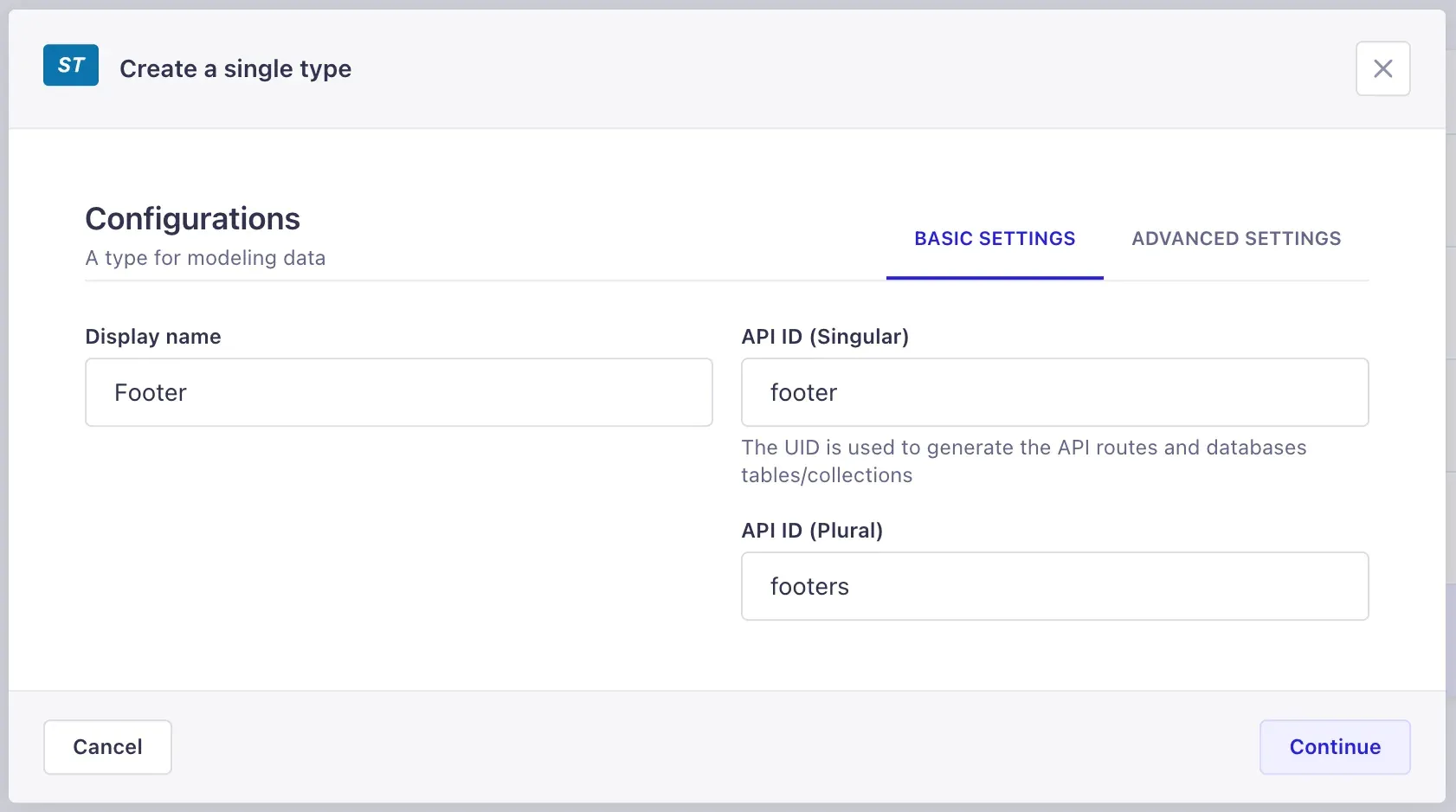
Creating a single type; the API IDs become API routes and database tables.
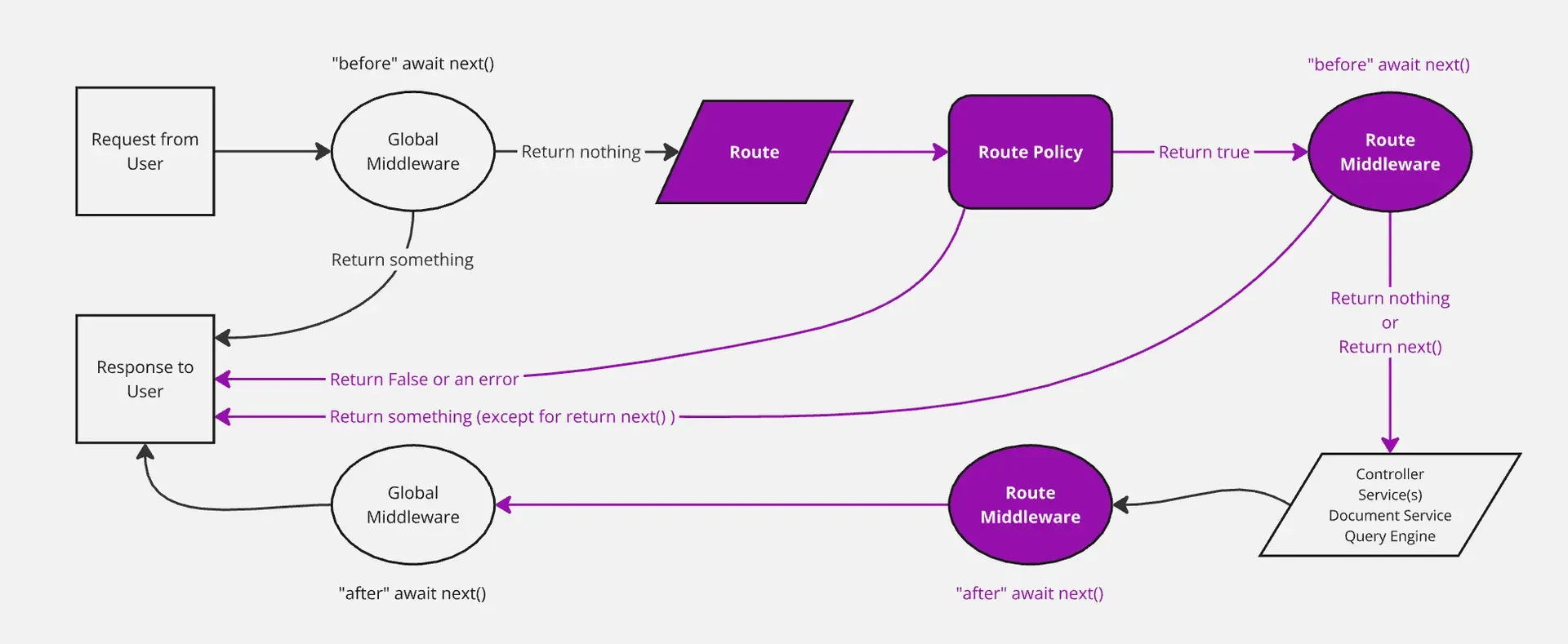
Documentation diagram of the Strapi backend request flow.
Source: official Strapi project page.
Key capabilities
- Content-Type Builder Collection types, single types and reusable components are designed visually in the admin panel without writing code. Each type receives singular and plural API IDs that become its API routes and database tables. The Content-Type Builder docs cover fields, relations, dynamic zones and advanced settings.
- Generated REST and GraphQL APIs Every content type gets a REST API with filtering, sorting, pagination and population of relations. The GraphQL plugin adds a GraphQL endpoint for the same content. API tokens control programmatic access.
- Content Manager Editors create and edit entries in list and edit views whose displayed fields and layout can be configured. The Blocks editor provides structured rich text, and custom fields extend the available field types.
- Draft and Publish Content types can keep a draft and a published version of each document. Release v5.61.0 fixed publish actions on types without Draft and Publish and guards switching between collection and single types.
- Internationalization Locales are added in the Internationalization settings, and each document can be translated per locale. With Strapi AI enabled, AI Translations can translate other locales automatically from the default locale on save.
- Media Library Images, videos and files are uploaded into folders with grid and table views, filters and search. The documentation covers upload provider options and inserting media into content fields.
- Roles and permissions Admin panel roles define what each administrator can do, and the Users and Permissions plugin manages authentication and access for API consumers. Unlimited roles are included on every plan.
- Releases and Content History Releases group entries so they can be published or unpublished together, and Content History keeps previous versions with 14 days of retention on Growth. Both are paid features on self-hosted projects.
- Review Workflows and Audit Logs Enterprise adds unlimited review workflow stages with assignees and audit logs of admin actions. Since v5.61.0 audit logs also record history restores, discarded drafts, settings updates and media events.
- Live Preview Growth and Enterprise include Live Preview, which shows how content renders on the frontend while it is being edited.
- Single Sign-On SSO with Okta, Active Directory and other SAML 2.0 or OAuth2 providers is an add-on at $150 per month plus $50 per user on Growth and is included in Enterprise options, according to the CMS pricing page.
- Strapi AI Strapi AI Growth is Strapi-managed and includes 1,000 credits per month for content modeling, translation and media tagging, with extra credits at $1.50 per 100. Strapi AI Enterprise uses a customer-chosen model provider so content does not pass through Strapi.
- Plugins and marketplace The plugin system extends the admin panel and the server, and a Marketplace lists community and official plugins. Plugins can add fields, settings pages, providers and API routes.
- Backend customization Routes, policies, middlewares, controllers and services can be overridden or extended in TypeScript or JavaScript. Webhooks, CRON jobs and lifecycle hooks are available on all plans.
- Data transfer The CLI supports data import, export and transfer between Strapi instances, using transfer tokens for remote transfers. Transfer tokens are configured in the settings.
- Self-hosted installation Projects are created with
npx create-strapi@latestand run on supported Node.js LTS versions with SQLite, PostgreSQL, MySQL or MariaDB. Docker deployments use a project-specific image built from the documented Dockerfile examples. - Strapi Cloud The Cloud pricing page lists Starter at $35, Pro at $90 and Business at $450 per project per month, with 100,000, 1 million and 10 million API requests respectively. Pro adds backups and CRON jobs; Business adds daily backups and a 99.9% uptime SLA. Starter projects sleep when idle.
- LaunchPad demo LaunchPad is the official demo template that combines Strapi with Next.js, available as a hosted demo or to run locally.
Where Strapi fits
Content backend for a Next.js or Astro site
A developer models pages, articles and global settings as collection and single types, then fetches them from the frontend through the REST or GraphQL API. The website lists integrations for React, Next.js, Vue, Nuxt, Astro, Svelte and other frameworks, and LaunchPad shows a complete Strapi and Next.js setup.
Multilingual websites
Teams add locales in the Internationalization settings, translate each document per locale and query content by locale through the API. Strapi AI can translate other locales from the default locale on save.
Editorial workflows with review and scheduling
Editors work on drafts, move entries through review workflow stages with assignees, and group related changes into a release that is published at once. Content History allows restoring earlier versions.
Backend for mobile and multi-channel apps
The same content API serves websites, mobile apps and other clients. The Strapi solutions pages mention mobile applications, ecommerce, intranets and product information systems as use cases, and the Users and Permissions plugin handles end-user authentication.
Custom APIs on top of content
Developers add custom routes, controllers and services alongside the generated APIs, enforce rules with policies and middlewares, and react to changes with lifecycle hooks and webhooks. The backend customization docs describe the request flow.
Moving content between environments
Developers export data from one project and import it into another, or transfer content directly between a local instance and a remote one using transfer tokens. This is used to seed staging environments or move content created locally to production, and the Data Import, Export and Transfer features are listed on every plan.
AI agents managing content
With Strapi MCP, AI agents can read and manage content in a Strapi project through the Model Context Protocol, and Strapi AI assists with content modeling and media alt text inside the admin panel.
Install
npx create-strapi@latest my-projectReviews of Strapi
Be the first to share your experience with Strapi.
Write a review
Loading review form…
Alternatives to Strapi
 DirectusDirectus wraps any SQL database with REST and GraphQL APIs, a visual Studio and an MCP server, self-hosted or on Directus Cloud.
 Payload CMSOpen-source, code-first CMS and application framework for Next.js and TypeScript. One config generates an admin panel, REST and GraphQL APIs, auth and access control on MongoDB, Postgres or SQLite.
 GhostGhost is an open source publishing platform for building a website, sending email newsletters and selling paid memberships, self-hosted or on Ghost(Pro).