

What is Vendure?
Vendure is an open-source headless commerce platform written in TypeScript on Node.js, NestJS and GraphQL. The vendurehq/vendure repository is the source monorepo: it contains the @vendure/core framework, the React and TanStack admin Dashboard, the CLI, the official plugins and an end-to-end testing harness. The README describes Vendure as a commerce backend for B2B, D2C, marketplace and omnichannel sales served from one GraphQL API, and the website headlines it as a B2B ecommerce platform for customer pricing, company accounts and approvals. The LICENSE file names Vendure GmbH as copyright holder, and the vendure.io footer carries a copyright line for Elevantiq GmbH. The GitHub repository dates from June 2018.
According to the architecture overview, a Vendure application has four parts. The server answers requests on two GraphQL APIs, the Shop API for storefronts and the Admin API for administration, and hands long-running work to a job queue. The worker processes that queue: search index updates, emails and other tasks that need retries. The Dashboard is the admin application built with React and Tailwind CSS. The storefront is a separate client built with any frontend technology. Data lives in an SQL database through TypeORM; PostgreSQL, MySQL, MariaDB and SQLite are officially supported, and the docs name Amazon Aurora, CockroachDB and PlanetScale as API-compatible variants.
New projects are created with npx @vendure/create my-shop, which scaffolds the server, worker, Dashboard and GraphQL APIs and can add an official TanStack Start or Next.js storefront in the same monorepo. The installation guide lists Node.js 22, 24 and 26 as tested and supported; Node.js 20 still runs but reached end-of-life on 30 April 2026. The README states that Vendure runs anywhere Node.js runs, including Docker, Kubernetes, a single VM or any cloud provider, and that self-hosting is free with data kept in your own database. Vendure Cloud is the managed runtime: the README describes deploys on git push, a preview environment per pull request and managed database, queues, search, backups and scaling. Cloud is in design-partner preview, with general availability planned for Q1 2027.
The latest release is v3.8.1, published October 23, 2026. It fixes three reported vulnerabilities: a high-severity issue where the Admin API job, jobs and jobsById queries returned stored job data including email verification and password-reset tokens (job data is now redacted), stack traces in GraphQL error responses, and a file-existence leak in the GraphiQL plugin asset server. It also looks up Channels by token instead of caching every Channel, and the scaffolded Dockerfile moves to node:24. No database migrations are required. The v3.8.0 minor release of October 12, 2026 added the @vendure/mcp-plugin and @vendure/mcp-sdk packages, secret custom fields encrypted at rest, an OrderRecalculationStrategy, composed plugins, an administrator password reset flow, a Dashboard refresh with v2 of the Vendure design system, NestJS 12 with Apollo Server 5, and opt-in support for TypeORM v1 alongside v0.3.
Vendure is dual-licensed. Without a separate written agreement with Vendure GmbH, the GPLv3 applies (the Community Edition, SPDX GPL-3.0-or-later in the core package). A plugin exception under section 7 of the GPL allows Vendure plugins to be distributed under other licenses, and the licensing FAQ states that modifications to the framework itself must stay under GPLv3. The Vendure Commercial License is included in every paid plan. The paid plans (Starter, Growth, Scale and Enterprise) add B2B capabilities such as company accounts, quotes, contract pricing, approvals, single sign-on and audit logs, direct support and Vendure Cloud. Other open-source commerce backends listed on iThub include Medusa, Saleor and Bagisto.
Vendure screenshots
Explore the interface. Open a screenshot to view it at full size.
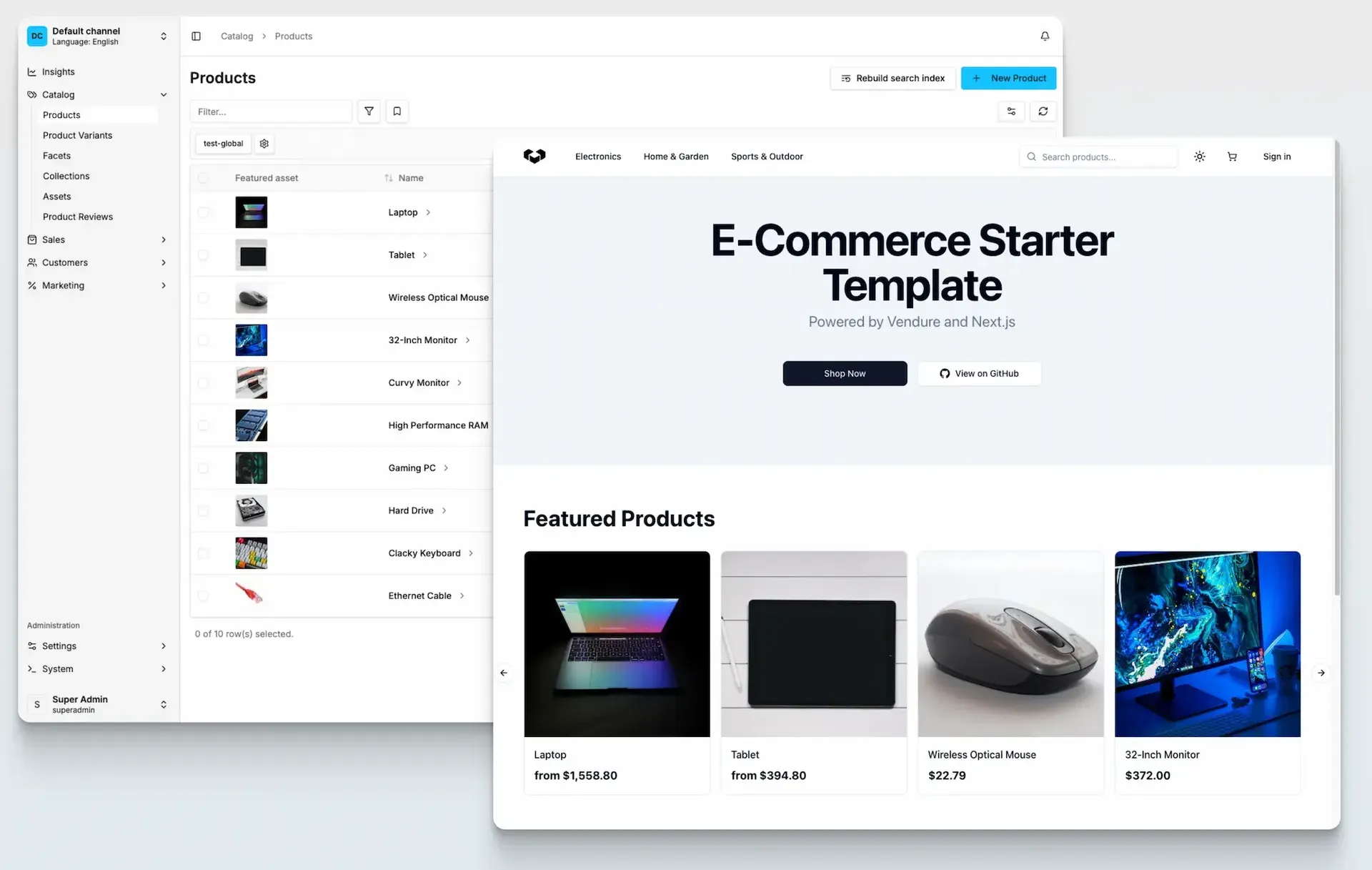
Official image from the Vendure installation docs: the Dashboard product list in the default channel beside the Next.js storefront starter, shown with sample catalog data.
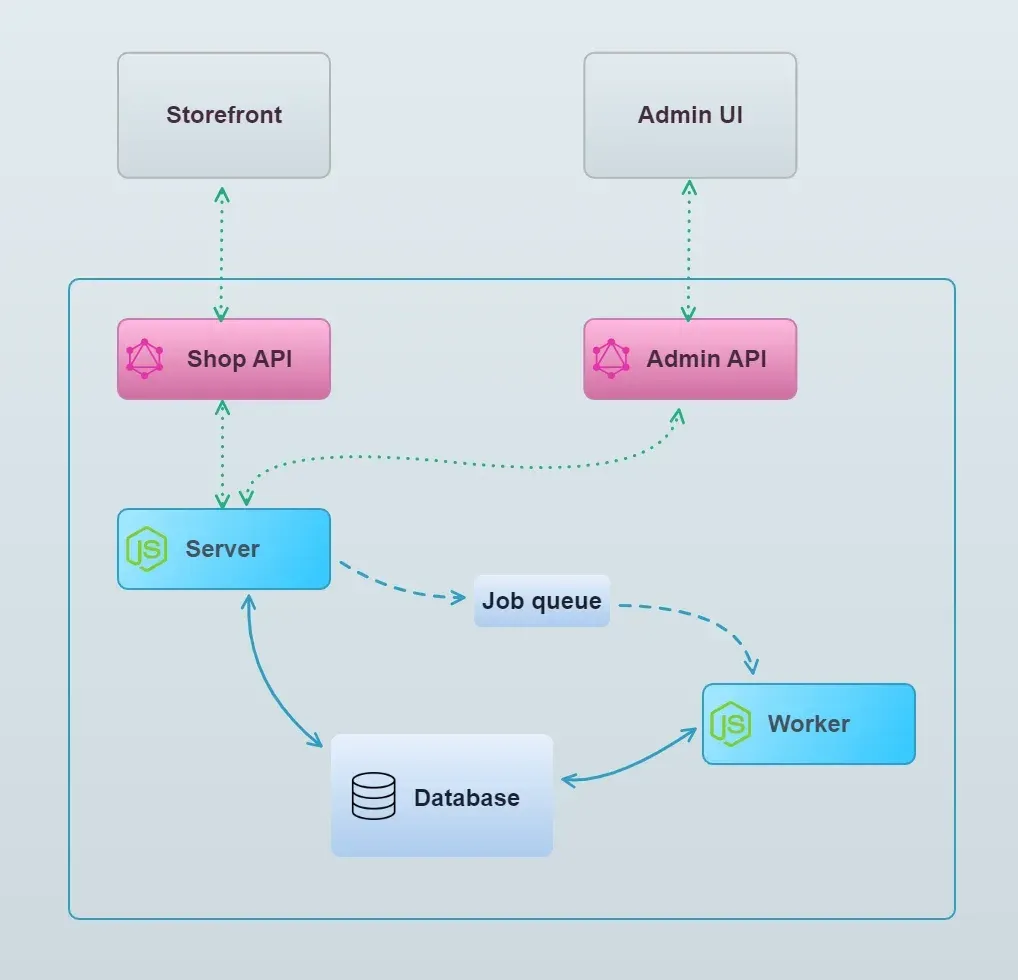
Official architecture diagram from the Vendure overview docs: clients call the Shop and Admin GraphQL APIs, the server queues jobs for the worker, and both use the database.
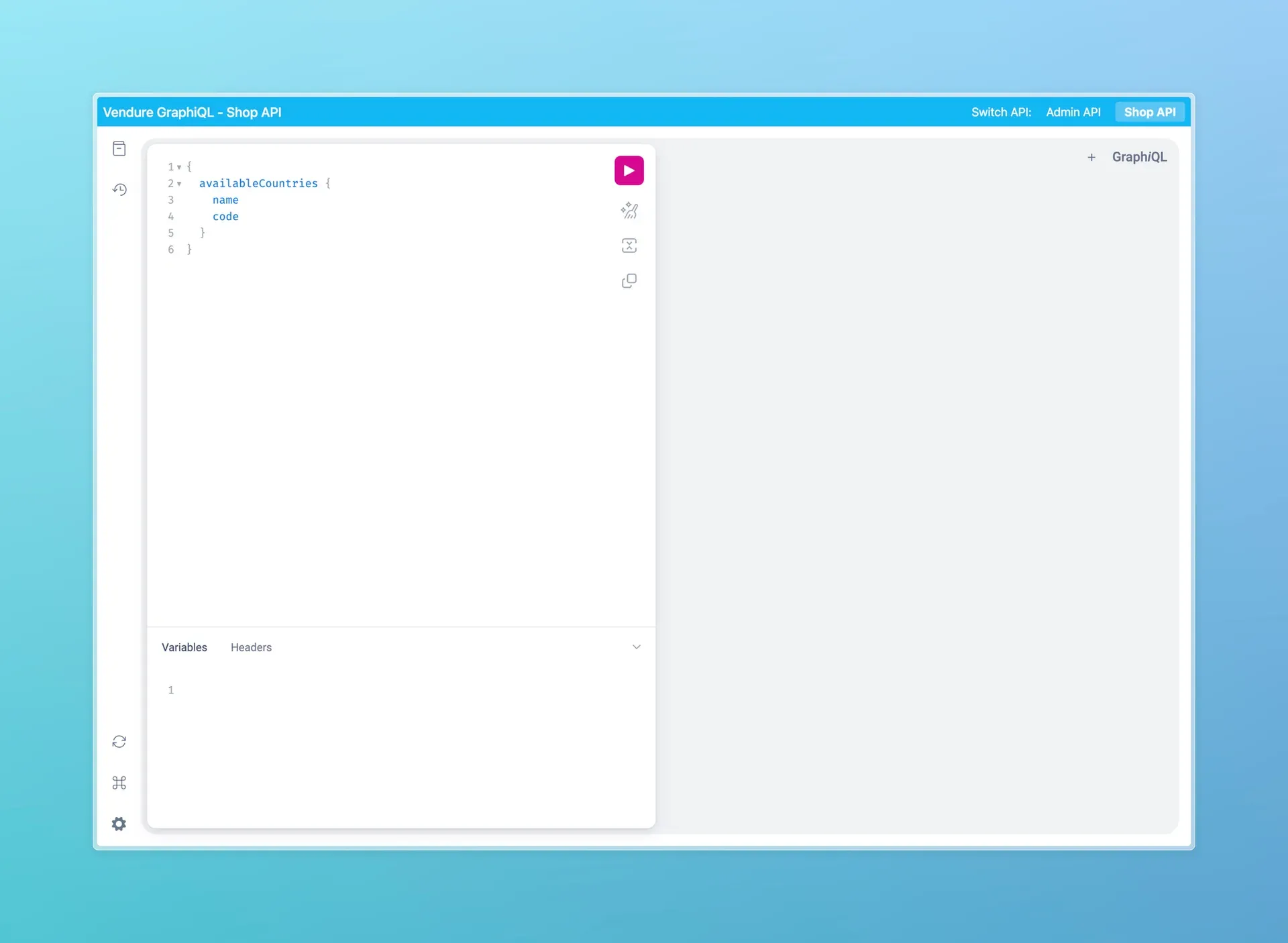
GraphiQL playground from the Vendure Try the API guide, querying available countries on the Shop API, with a switch between the Admin and Shop APIs.
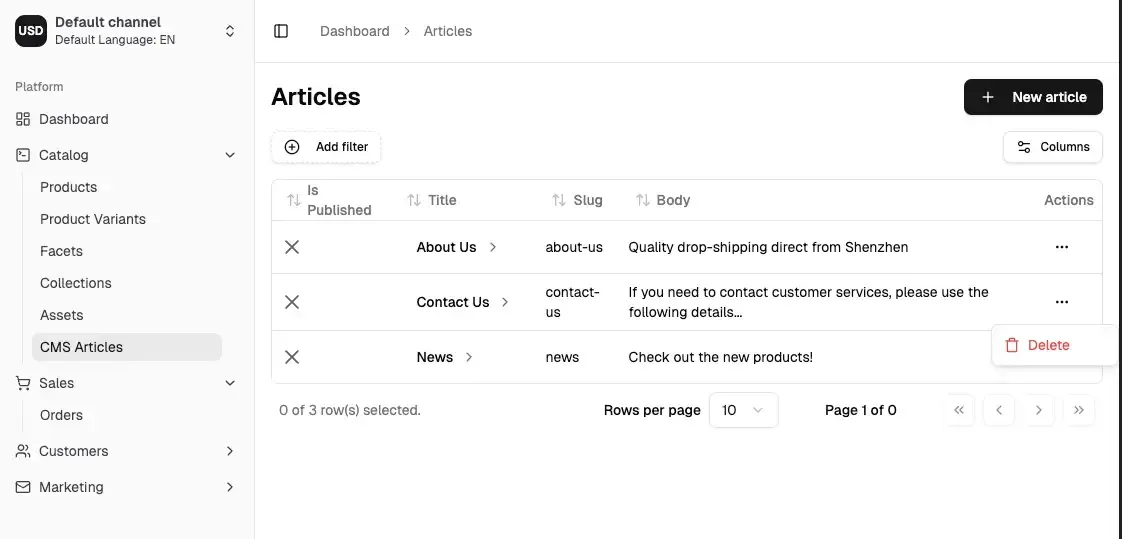
Example from the Dashboard extension docs: a custom CMS Articles list page added to the Catalog navigation, shown with sample articles.
Source: official Vendure project page.
Key capabilities
- Shop API and Admin API The server exposes two typed GraphQL APIs: the Shop API for storefronts and customer-facing clients, and the Admin API for administrative operations. Both are powered by Apollo Server, can be extended by plugins with new types, queries and mutations, and are documented in the GraphQL API reference. The README notes that agent frameworks and MCP servers can read the schema through introspection. A GraphiQL plugin provides a browser playground with a switch between the two APIs.
- Catalog and custom fields The catalog is built from products, product variants, facets and collections, with assets attached to products, variants and collections. Custom fields can be added to any entity; v3.8 added indexed custom fields, cascade options and exposed IDs on relation custom fields, custom fields on
Roleand localized custom fields onSeller. Fields markedsecret: trueare encrypted in the database and redacted in API responses. - Orders The order model covers carts, draft orders, order modifications, fulfillment and returns, driven by a configurable order state machine. From v3.8, checkout recalculates the order and re-checks shipping eligibility when it moves to
ArrangingPayment, and a newOrderRecalculationStrategywith a built-in TTL strategy keeps long-lived carts in sync with price and promotion changes. Refund destinations are pluggable, for example refunds to store credit. - Inventory and stock locations Stock control tracks stock on hand, allocated units and an out-of-stock threshold per variant, with saleable stock calculated from these values and backorders supported. Multiple stock locations such as warehouses or retail stores are modelled as
StockLocationentities, and aStockLocationStrategydecides which location is used for availability, allocation, release, sale and cancellation; the default strategy uses a single default location. The defaultStockDisplayStrategyshows only in stock, out of stock or low stock to the storefront. Stock control can be switched off globally or per variant when another inventory system is the source of truth. - Promotions Promotions are composed from conditions and actions, and custom conditions and actions can be written as plugins. Promotions are channel-aware, so a promotion can be limited to specific channels. Configurable operation strings are translated from i18n catalogs and resolved from
Accept-Languagesince v3.8. - Payments and shipping Payment and shipping integrations are provider-agnostic. A PaymentMethod combines an optional eligibility checker with a handler, and supports single-step capture or separate authorization and settlement, for example capture on fulfillment or payment on delivery. Payments are added with the
addPaymentToOrdermutation once the order reachesArrangingPayment. The docs point to the vendurehq community-plugins repository for working payment integrations. - Channels Channels represent several sales channels in one instance, each with its own currency, language, tax and shipping defaults. Products are assigned per channel with channel-specific prices, and assets, facets, collections, promotions, payment and shipping methods, stock locations, customers and orders are channel-aware. Administrator roles can be limited to one or more channels. The docs list multi-tenancy, multi-vendor marketplaces, region-specific stores and separate sales channels as use cases.
- Multi-vendor marketplace support Each channel is assigned a
Seller. The multi-vendor guide, based on APIs introduced in Vendure v2.0, describes anOrderSellerStrategythat assigns order lines to sellers and splits orders, with price synchronization across channels. The example multi-vendor plugin in the repository is marked as for educational purposes only, without email verification or a real payment setup. - Plugin system The plugin system is the main extension mechanism: plugins can modify the configuration, add custom fields, extend the GraphQL APIs, define database entities, respond to events and run background jobs on the worker. Many behaviours are implemented as replaceable strategies. Since v3.8, a plugin can bundle other plugins through its
@VendurePluginmetadata. Core plugins in the repository include the asset server, email, job queue (BullMQ), GraphiQL, harden, telemetry and Dashboard plugins. - Dashboard The Dashboard (
@vendure/dashboard) is a React and TanStack admin application built with Vite, standard in new projects since v3.5.0. It covers catalog, sales, customers, marketing, settings and system sections, plus an Insights page with configurable widgets. Extensions add custom pages, page blocks, form components, action bar buttons and navigation entries. v3.7 added an experimental, opt-in pre-bundled mode (useExperimentalBundle). The older Angular-based Admin UI packages remain in the repository. - Storefront starters The storefront starters page lists two official starters with the same design. The TanStack Start starter uses TanStack Router, Vite and Paraglide and includes listings, search with facets, cart and checkout, customer accounts, multi-language and multi-currency support and a managed upgrade workflow. The Next.js starter uses the App Router, next-intl and Tailwind CSS. Both can be added by
@vendure/create; the paid Scale plan adds a ready-made B2B storefront. - MCP server for AI agents
@vendure/mcp-plugin, added in v3.8.0, exposes 42 built-in tools: 18 on the shop toolset (served at/mcp/shop) and 24 on the admin toolset (/mcp/admin). Each tool is classified as readonly, mutating or destructive, and the seven destructive tools, includingplace_order, require a confirmation round trip. Assistants can run inside the Vendure server or outside it with OAuth and consent, and administrators can enable or disable individual tools.@vendure/mcp-sdklets plugins add tools with the@McpTooldecorator. - CLI The Vendure CLI provides
vendure dev(server, worker and Dashboard with reload),vendure build,vendure start,vendure addfor scaffolding plugins and features,migrate,schemaandcodemod.vendure doctor, added in v3.7, runs Project, Dependencies, Config, Schema and Database checks plus a production profile, with JSON output for CI. Since v3.8, plugins can register their own CLI commands. - Installation with @vendure/create
npx @vendure/create my-shopoffers a Quick Start, which creates a PostgreSQL database in Docker when Docker Desktop is running and otherwise uses SQLite, or a Manual Configuration with a choice of MySQL, MariaDB, PostgreSQL or SQLite and optional sample data. The tool supports npm, bun, pnpm and yarn, and new projects include anAGENTS.mdfile for AI coding agents. After installation it prints the Dashboard URL, admin credentials and project path. - Docker and self-hosting New projects include a sample Dockerfile; the Docker guide shows a multi-stage build where one image runs both the server (
npm run start:server, port 3000) and the worker (npm run start:worker), plus a Docker Compose file with PostgreSQL. The deployment section also has guides for Northflank, DigitalOcean App Platform, Railway, Render and Google Cloud Run. In v3.8.1 the scaffolded Dockerfile usesnode:24and setsNODE_ENV=production. - Resource requirements and scaling The resource guide states that the server and worker each use around 200 to 300 MB of RAM when idle, with 512 MB per process as a practical minimum for a small, low-traffic project. Because Node.js is single-threaded, one process uses one CPU, and the docs describe horizontal scaling of server and worker with Docker, Kubernetes or PM2. Multi-instance setups need an external job queue (database or BullMQ on Redis), a shared cache strategy (database or Redis) and the same cookie secret on every instance.
- Security releases Vulnerabilities are reported through GitHub private vulnerability reporting and disclosed as advisories in release notes. v3.8.0 fixed a high-severity issue where a Shop API session of a user who is also an administrator could be replayed against the Admin API, and serialized request contexts no longer store session tokens in job data. v3.8.1 fixed three more advisories, one high and two low.
- Paid plans and pricing The pricing page lists Starter at EUR 199 per month, Growth at EUR 599 per month and Scale at EUR 2,499 per month, each on a 12-month term billed monthly and excluding VAT, and Enterprise from EUR 60,000 per year on contract. Starter, Growth and Scale have 30-day trials; Scale requires card details at signup. Enterprise includes all 32 capabilities, such as PunchOut, quote negotiation and a product configurator. Paid plans include the commercial license and Vendure Cloud, with no fee on revenue, orders or users; Cloud usage above the included resources is billed separately, and the Framework alone remains free under GPLv3.
Where Vendure fits
Running several stores or regions from one instance
Each store, region or sales channel is set up as a Channel with its own default currency and language, tax and shipping defaults, and a subset of products with channel-specific prices. Storefronts send a channel token with each request and receive that channel's products and prices, while administrator roles can be restricted to selected channels. Every server keeps a default Channel that contains all entities, as described in the channels guide.
Building a headless storefront
Storefronts talk only to the Shop API. The official TanStack Start and Next.js starters can be generated together with the server by @vendure/create, or a custom frontend can be built with any technology that sends GraphQL requests, following the storefront guides on connecting to the API, cart, checkout and customer accounts. iThub also lists Next.js, the framework behind one of the starters.
Adding custom business logic with plugins
Project-specific behaviour such as custom pricing, new entities, integrations with ERP or shipping systems, or event handlers is written as plugins in the same TypeScript codebase. A plugin can add custom fields, extend the Shop or Admin API, override strategies and push work to the worker through the job queue. The README presents this as the way to change core behaviour without forking the framework.
Building a multi-vendor marketplace
Each seller gets a Channel and a Seller entity, along with roles, an administrator account, a shipping method and a stock location. The OrderSellerStrategy assigns each order line to the right seller, and orders are split per seller after checkout. The marketplace guide walks through the example multi-vendor plugin, which the docs mark as educational and incomplete for production.
Exposing the store to AI agents over MCP
With @vendure/mcp-plugin, an assistant can browse products, manage a cart and place orders through the shop toolset, or perform administrative tasks through the admin toolset, subject to Vendure permissions. External assistants act for a signed-in customer or administrator through OAuth with consent, destructive tools require confirmation, and administrators can switch individual tools off in the MCP Server section of the Dashboard. Custom tools are added with @vendure/mcp-sdk.
Deploying to production
A typical deployment builds one Docker image and runs it as a server process and a worker process against PostgreSQL, MySQL or MariaDB, with the Dashboard built by npm run build:dashboard. For more throughput, server and worker instances are scaled horizontally with a shared job queue such as BullMQ on Redis and a shared cache. The production configuration guide covers security settings, and the paid plans add Vendure Cloud as a managed runtime.
Install
npx @vendure/create my-shopReviews of Vendure
Be the first to share your experience with Vendure.
Write a review
Loading review form…
Alternatives to Vendure
 MedusaMedusa is an open-source commerce backend for Node.js with products, carts, orders, payments and inventory as modules, a React admin and Store and Admin APIs. Self-host it with PostgreSQL and Redis or run it on Medusa Cloud.
 SaleorSaleor is an open-source, API-only commerce platform: a GraphQL API on Python and Django with channels, warehouses, checkout, promotions and payment apps, plus a separate Dashboard and Next.js storefront. Self-host with Docker or use Saleor Cloud.
 BagistoMIT-licensed e-commerce application on Laravel 13 and Vue.js from Webkul, with seven product types, channels, nine core payment methods, RMA, GDPR and EU price rules. Self-host via Composer or Docker, or use paid Bagisto Cloud.