

What is Bagisto?
Bagisto is an open-source e-commerce platform built as a complete Laravel application, with Vue.js components inside Blade pages for both the admin panel and the storefront. It is developed by Webkul Software, a company established in 2010 that also publishes Krayin CRM. The first Bagisto release was published on October 30, 2018, according to the Bagisto about page. A merchant gets a catalog, cart and checkout, order management, customers, marketing rules, CMS pages, themes and reporting in one codebase, and a public demo store shows the default storefront.
Distribution is self-hosted first. The usual route is composer create-project bagisto/bagisto followed by php artisan bagisto:install; a Git checkout, a release download, a browser installer and Laravel Sail are also documented in the installation guide. The webkul/bagisto Docker images bundle a web server (Nginx, Apache or OpenLiteSpeed), PHP, a database (MySQL 8.0, MariaDB 10.11 or PostgreSQL 16) and an installed store with sample products. Webkul also lists an AWS Marketplace image and sells managed Bagisto Cloud hosting, advertised from $25 per month.
The current release is v2.5.1, published on November 6, 2026. It adds Swahili as a locale, East African Community currencies in the installer, a bagisto:storage:sync command that copies existing media to Amazon S3 or Cloudflare R2, a separate cart for Buy Now, proper 503 responses for JSON requests during maintenance, and order creation from PayPal Standard notifications. Version 2.5.0 (October 6, 2026) moved to Laravel 13 on PHP 8.4, added PostgreSQL, Tailwind CSS 4, an admin command palette, real-time admin notifications, S3 and R2 storage drivers, an engine-agnostic search layer and an Omnibus price disclosure package. The 2.4 line still receives patch releases, most recently v2.4.14 on November 3, 2026.
Each functional area is a package under packages/Webkul: the architecture overview counts 42 of them, including Admin, Shop, Product, Sales, Checkout, CartRule, CatalogRule, Inventory, Tax, RMA, GDPR, Omnibus, MagicAI and the payment gateways. Modules register through Konekt Concord and data access goes through repositories built on prettus/l5-repository. Admin, storefront and installer assets are prebuilt and committed, so a stock install needs no npm step; Node.js 22 is only needed to rebuild them or run Playwright tests.
The core is released under the MIT license. Several products sold on the Bagisto website are separate from the core repository: the Multi Vendor Marketplace, the B2B commerce suite, multi-tenant SaaS, point of sale and most of the 200+ listed extensions. The REST and GraphQL APIs ship as the separate bagisto/bagisto-api package, and the Flutter mobile app and the Next.js storefront live in their own repositories. Bagisto does not include accounting, ERP functions or a CRM.
Bagisto screenshots
Explore the interface. Open a screenshot to view it at full size.
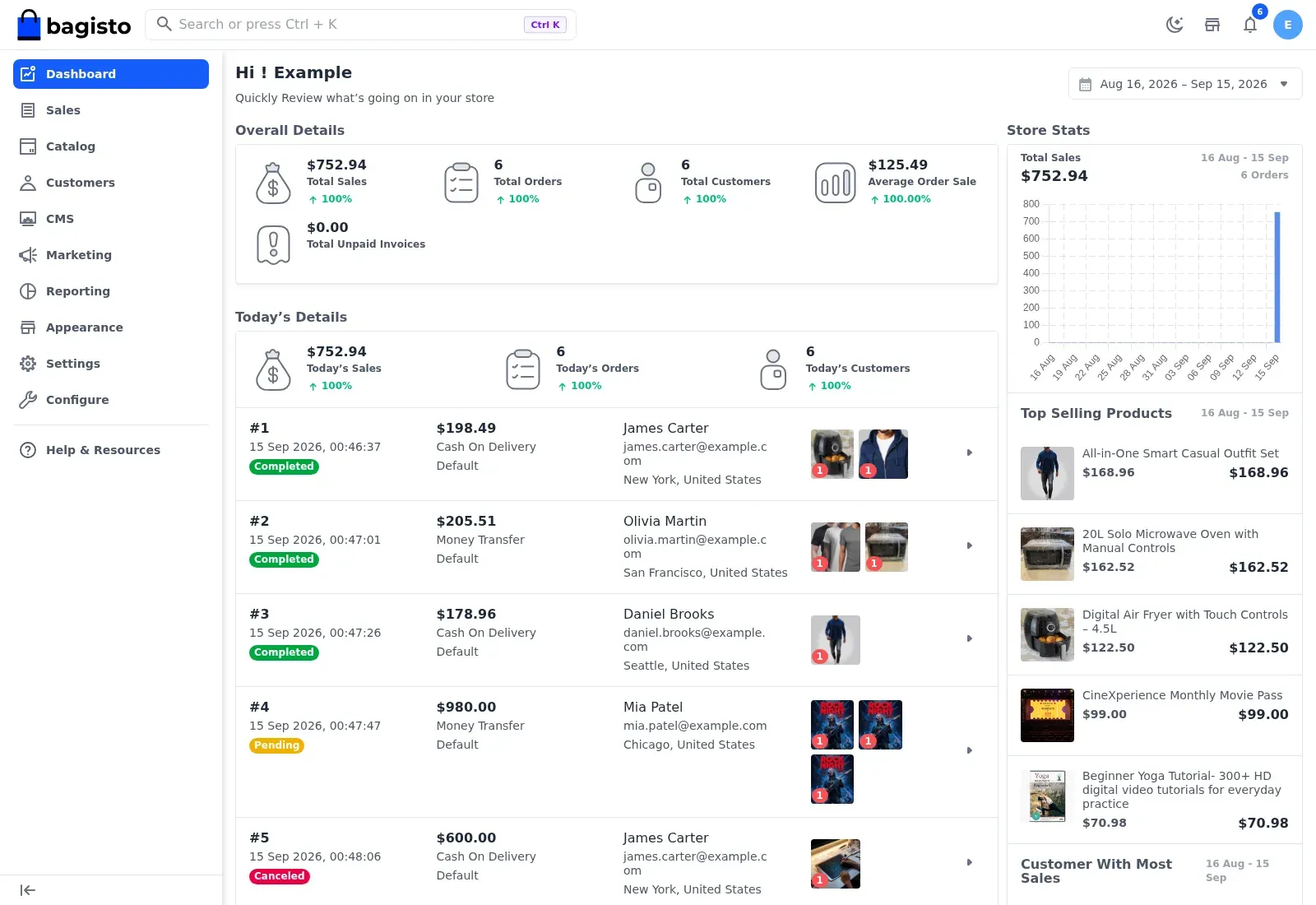
Official user guide screenshot of the admin dashboard with demo data: overall and daily totals, recent orders with Cash On Delivery and Money Transfer, a 30-day sales chart and top selling products.
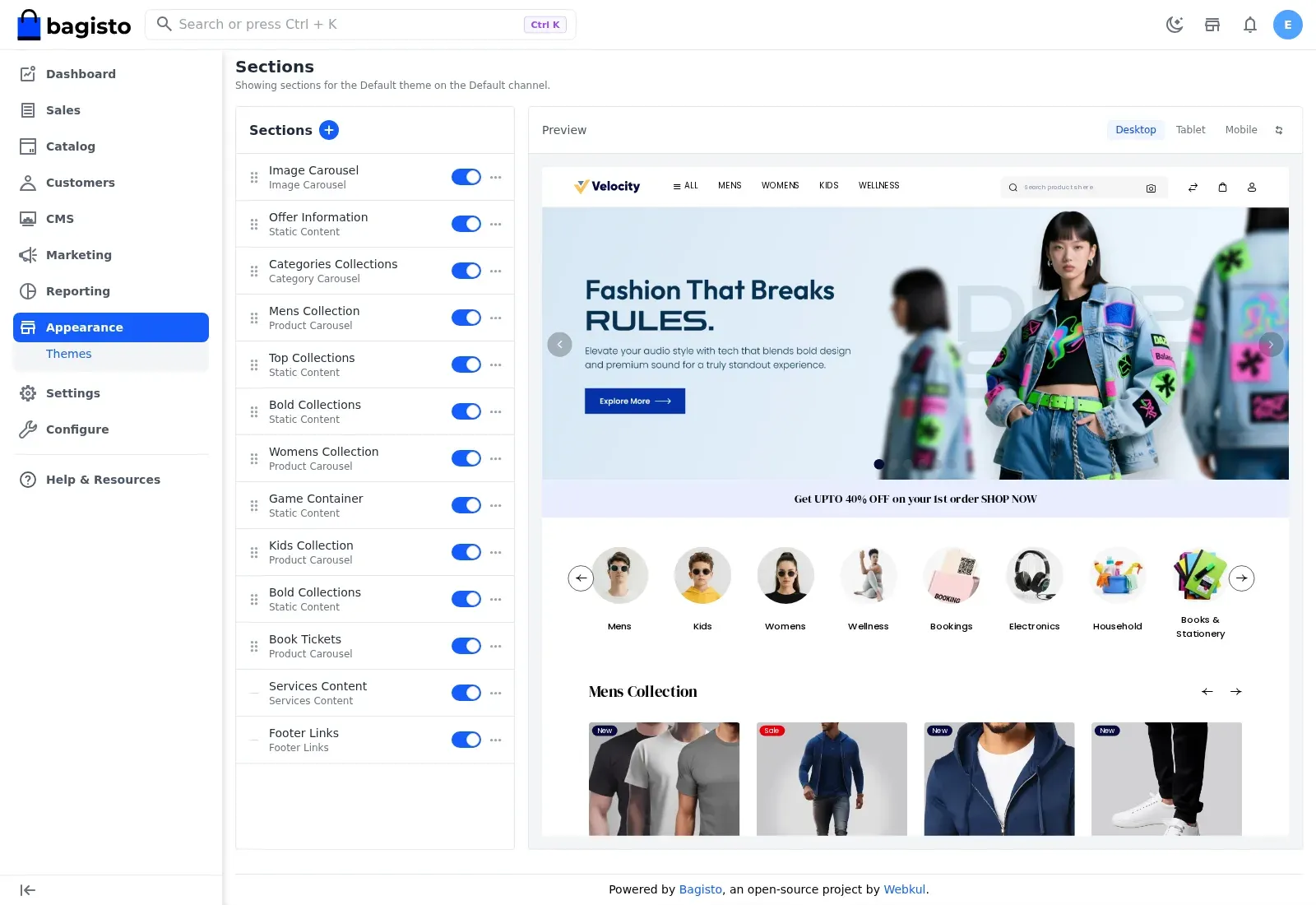
Official user guide screenshot of the theme section editor, with toggles for each home page section and a desktop, tablet and mobile preview of the default storefront.
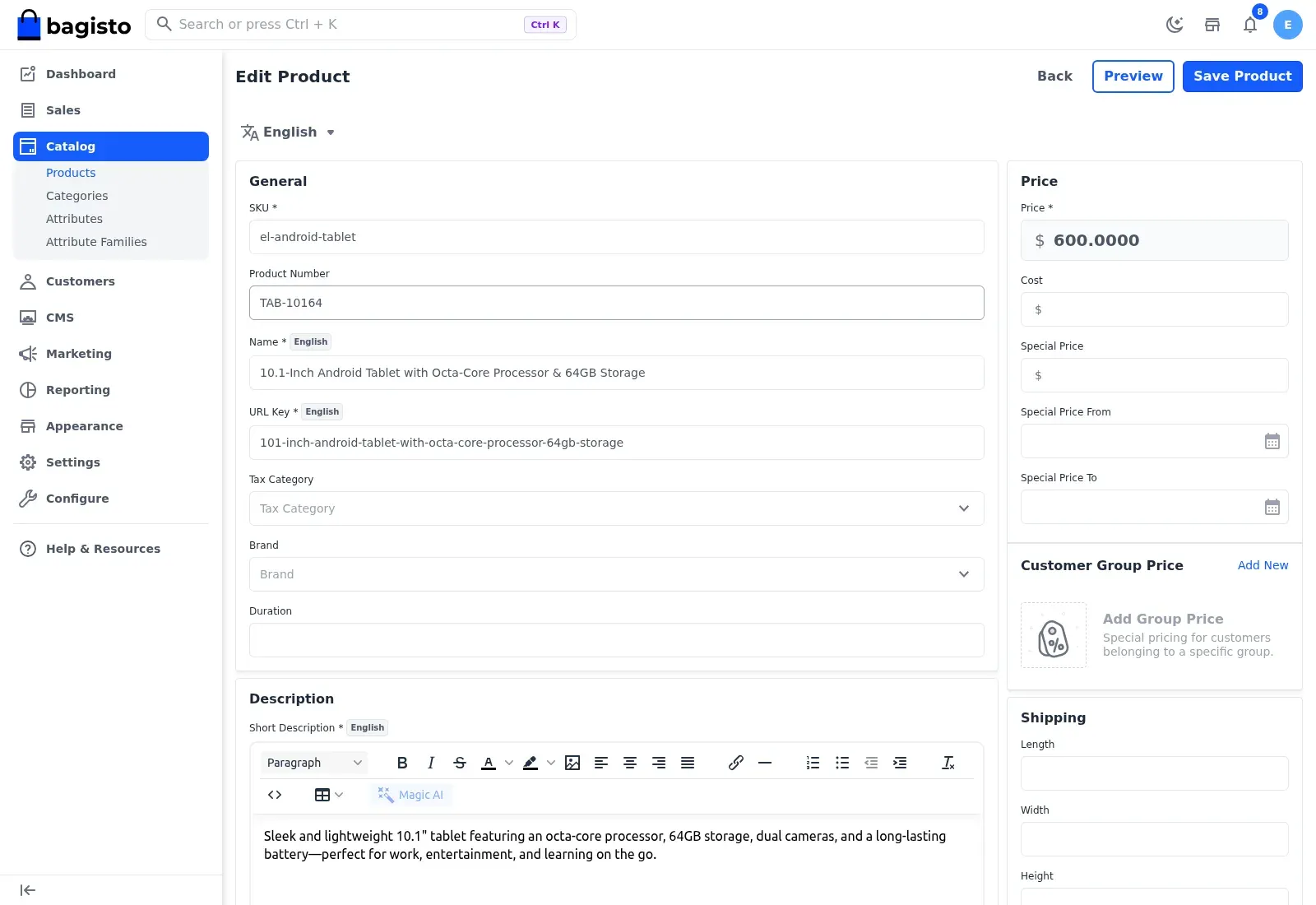
Official user guide screenshot of the product edit screen, showing General, Price, Customer Group Price, Shipping and Description sections for a demo product.
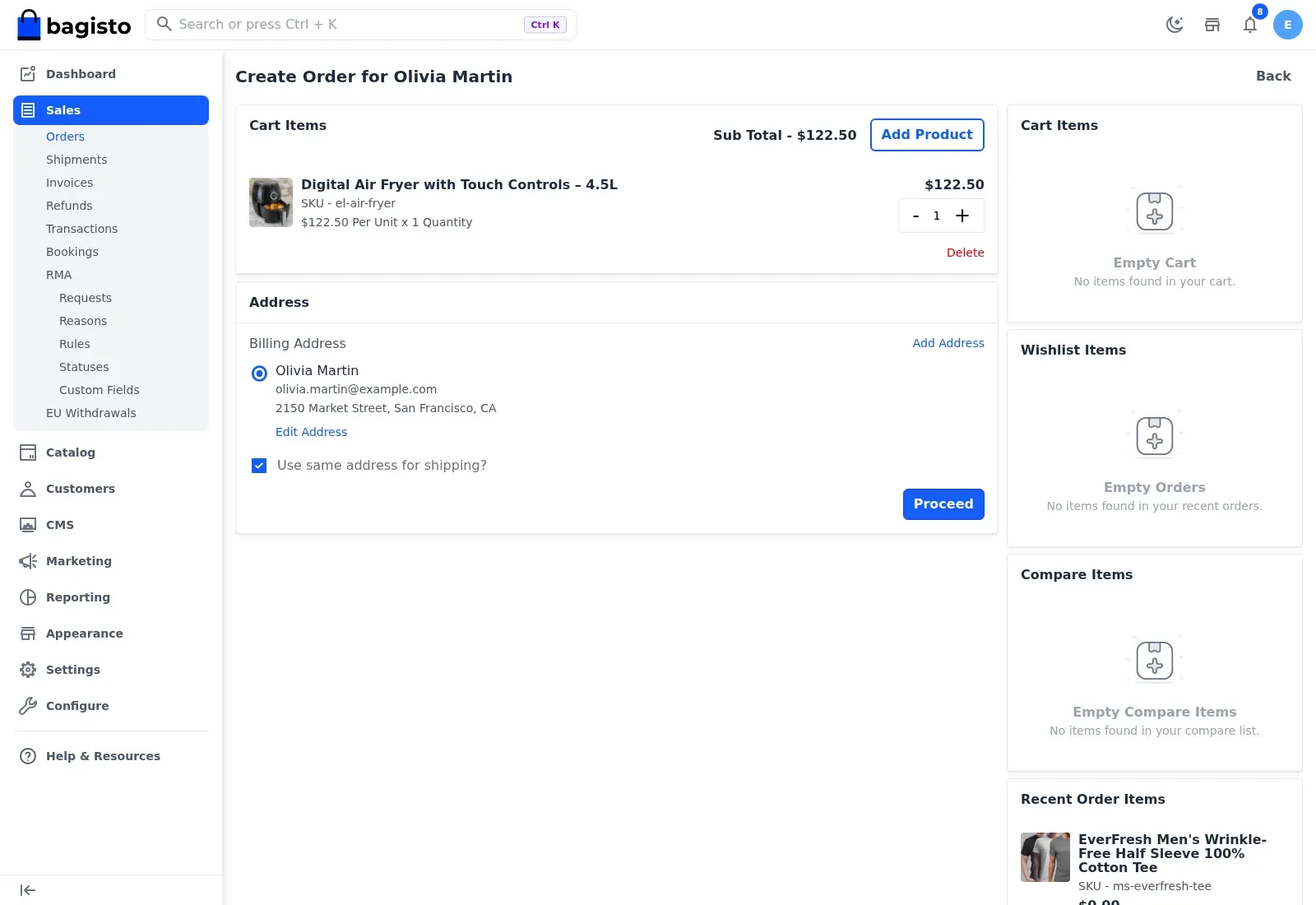
Official user guide screenshot of an admin creating an order for a customer, with the Sales menu expanded to show RMA and EU Withdrawals.
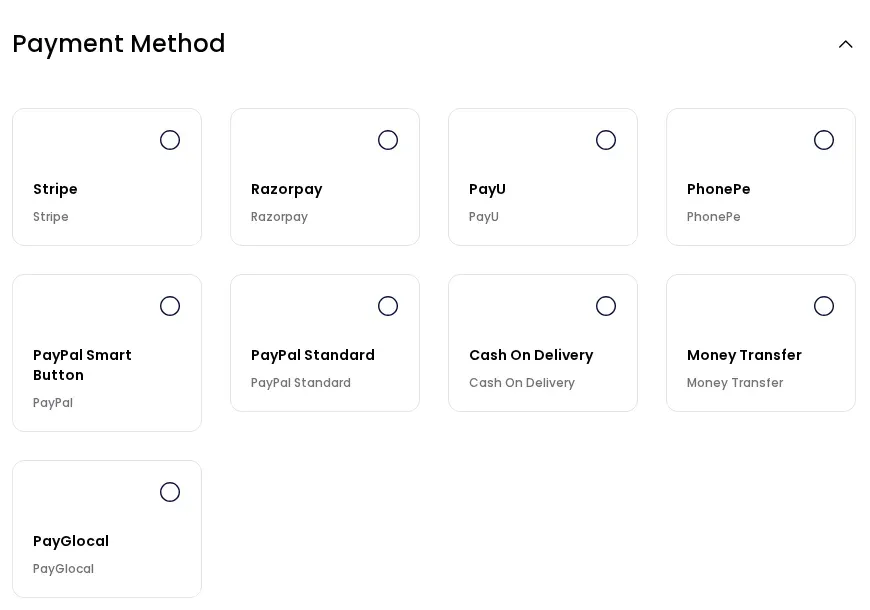
Official user guide screenshot of the core payment methods offered as cards at checkout when all of them are enabled.
Source: official Bagisto project page.
Key capabilities
- Composer installation Run
composer create-project bagisto/bagisto my-bagisto-store, thenphp artisan bagisto:install, which asks for the application URL, timezone, locales, currencies, database, the first administrator and whether to load the demo catalog. The installer runsdb:wipeandmigrate:fresh, so it must never be run against a store that has data; upgrades usephp artisan migrate. - Docker images The
webkul/bagistoimages are published per web server and database, for examplelatest-nginx-postgresorlatest-apache-mariadb, and a release can be pinned with tags such as2.5.0-nginx-postgres. SettingDB_HOSTto an external server skips the bundled database. Without mounted volumes, data is lost when the container is removed, and the default admin password must be changed on any reachable store. - Laravel Sail and web installer The repository
docker-compose.ymlis a Laravel Sail file with PHP 8.4, Redis, Elasticsearch, Kibana and Mailpit, plus Compose profiles for MySQL, MariaDB or PostgreSQL and an optional Nginx, Apache or OpenLiteSpeed front. A browser installer at/installchecks PHP extensions and runs migrations for teams that prefer not to use the console. - Documented requirements Bagisto 2.5 requires PHP 8.4 with extensions such as intl, curl, mbstring, gd and pdo, Composer 2, and MySQL 8.0, MariaDB 10.11 or PostgreSQL 16. Nginx, Apache or OpenLiteSpeed serve production; CI tests all three databases. Bagisto 2.4 runs on PHP 8.3 or 8.4 and does not support PostgreSQL, per the system requirements.
- Seven product types The Product package ships simple, configurable, grouped, bundle, virtual, downloadable and booking types, each with its own type class. Products belong to attribute families, carry customer group prices, special prices with dates, related, up-sell and cross-sell links, and per-source inventory. Developers add new types by extending the AbstractType class.
- Channels, locales and currencies A channel is a storefront with its own hostname, theme, root category, locales, currencies, logo and inventory sources, all managed from one admin panel. The Shop package carries translations for 23 locales after Swahili was added in 2.5.1, including Arabic, Hebrew and Persian. Exchange rates and per-channel currency lists are configured in Settings.
- Checkout and payment gateways The core checkout offers Stripe, Razorpay, PayU, PhonePe, PayPal Smart Button, PayPal Standard, PayGlocal, Cash on Delivery and Money Transfer, each with its own sandbox switch. Core shipping carriers are flat rate and free shipping; carrier-specific integrations come from extensions or custom packages. Guest checkout and the Buy Now button are configuration settings.
- Order administration Admins can create orders on behalf of customers, then issue invoices, shipments and refunds, and track transactions and bookings. The Return Merchandise Authorization module, added in 2.4.0, handles per-item return or cancellation requests with statuses such as Pending Review, Approved and Refunded, configurable rules, reasons and custom fields.
- Promotions Cart rules combine conditions, such as a subtotal threshold, with actions such as a percentage discount or Buy X Get Y, and can generate batches of coupon codes with a chosen length, format and prefix. Catalog rules adjust product prices before the cart, and search synonyms and sitemaps sit in the Marketing area.
- EU compliance features The GDPR package adds customer data update and deletion requests, a sign-up agreement checkbox and a cookie notice, all off by default and set per channel and language. EU Withdrawal implements the online withdrawal declaration from Directive (EU) 2023/2673 but does not check order age, and the Omnibus package records prices to show the lowest price of the previous 30 days next to a discount.
- Theme editor and CMS The Appearance area lists theme sections such as image carousels, category carousels, product carousels and static content, with a live desktop, tablet and mobile preview. CMS pages hold static content per channel. Custom storefront and admin themes are Laravel packages with their own Vite builds, as the theme development guide describes.
- Search engines Product search in the storefront, the storefront API and the admin grid goes through one manager that chooses the database or Elasticsearch 8 per context. Since 2.5.0 the engine, host, credentials and index prefix are configured in the admin with a connection test; stores upgrading from 2.4 must re-enter Elasticsearch credentials that were held in
.env. - Performance options The developer documentation covers Elasticsearch, a full page cache, Varnish, Laravel Octane and load balancing. Redis can back the cache, sessions, queue and page cache. The default
.env.exampleruns queued jobs synchronously, so production needs a queue worker and the Laravel scheduler running. - Media storage Uploads stay on the local disk by default. Since 2.5.0, Amazon S3 and Cloudflare R2 can be selected under Configuration, File Management, and 2.5.1 adds a resumable sync of existing media to the remote disk. Image cache templates generate small, medium and large variants.
- Magic AI The MagicAI package uses the Laravel AI SDK with eight providers: Anthropic, DeepSeek, Gemini, Groq, Mistral, Ollama, OpenAI and xAI. It generates text in the admin editors and product images, and can power storefront image search, review translation and a checkout message. API keys are stored as configuration values in the database, and every feature is switched on separately.
- REST and GraphQL APIs The separate
bagisto/bagisto-apipackage, built on API Platform for Laravel, exposes a Shop API and an Admin API over both REST and GraphQL, with Swagger UI and GraphiQL playgrounds. Shop calls use a public storefront key plus customer or guest-cart tokens; Admin calls use an integration token bound to one admin role. Its current 2.4.x line does not yet name Bagisto 2.5 as tested, per the API installation page. - WebMCP storefront tools The storefront declares five WebMCP tools that a browser AI agent can call: view a product, add to wishlist, view the wishlist, view the cart and open the checkout. They submit ordinary forms in the shopper session, and no tool places an order or pays. The bridge does nothing in browsers without the WebMCP interface.
- Import, export and admin security The DataTransfer package imports products, customers and tax rates with validation, and admin grids export their rows. Administrators can enable two-factor authentication, roles control access through an ACL, and storefront customers can sign in through Facebook, GitHub, Google, LinkedIn or X (Twitter) when social login is configured.
- Developer tooling Pest and Playwright suites run in CI, Laravel Pint enforces code style, and the repository ships
AGENTS.mdandCLAUDE.mdfor coding agents. The separate bagisto/agent-skills repository provides skills for packages, themes, payment and shipping methods, tests and the API.
Where Bagisto fits
Launching a single-brand online store
Install with Composer or a pinned Docker tag, run the installer once, then set the channel hostname, locales, currencies, tax categories, inventory sources and payment methods before importing products. Check that APP_URL matches the public address including scheme and port, since image and link URLs are built from it. Configure SMTP in the admin, start a queue worker and the scheduler, and replace the default admin@example.com account before the store is reachable.
Running several storefronts from one installation
Create one channel per brand, region or market, each with its own hostname, theme, root category, languages and currencies, and assign the inventory sources it sells from. Products and customers live in one database, so decide early which attributes are channel-specific and which are shared. Test checkout, tax and currency rounding separately on every channel, because GDPR, EU Withdrawal and Omnibus settings are also stored per channel.
Selling to EU consumers
Turn on GDPR for data requests, the sign-up agreement and the cookie notice, enable EU Withdrawal for the channels that sell into the EU, and switch on Omnibus price disclosure so discounted products show the 30-day lowest price. Bagisto accepts a withdrawal for any order on an enabled channel without checking its age or delivery status, so staff still need to verify the withdrawal period before refunding. The user guide documents each screen.
Building a headless or mobile front end
Install bagisto/bagisto-api, issue a storefront key and use the Shop API over REST or GraphQL from a custom front end, the Next.js commerce starter or the open-source Flutter app. Admin integrations use a separate integration token that carries one admin role, so keep it on servers only. Because the package line does not yet name Bagisto 2.5 as tested, run it against a copy of the store before production.
Extending the platform with packages
New payment methods, shipping carriers, product types, admin grids and themes are built as Laravel packages with their own providers, migrations, routes, ACL entries and configuration fields. Keep changes out of packages/Webkul and vendor, which upgrades overwrite. The package development guide and the agent skills describe the expected structure, and the Pest suite shows how core packages are tested.
Upgrading between release lines
Back up the database and storage/, rehearse on a copy, and follow UPGRADE.md for each line in order. The 2.5 line renamed hyphenated route names to snake_case, renamed translation keys, moved breadcrumb definitions and storage folders, and changed search configuration codes, so custom modules and themes need review. Check route calls, overridden translations and Elasticsearch settings before switching traffic.
Install
docker run -d --name bagisto -p 80:80 webkul/bagisto:latestReviews of Bagisto
Be the first to share your experience with Bagisto.
Write a review
Loading review form…
Alternatives to Bagisto
 MedusaMedusa is an open-source commerce backend for Node.js with products, carts, orders, payments and inventory as modules, a React admin and Store and Admin APIs. Self-host it with PostgreSQL and Redis or run it on Medusa Cloud.
 OdooOdoo is a web-based suite of business apps from Odoo S.A. The LGPLv3 Community edition covers CRM, sales, invoicing, inventory, manufacturing, POS and website modules on PostgreSQL; Enterprise apps, Studio and hosting are sold per user.
 Open MercatoOpen Mercato is an MIT-licensed TypeScript framework for business applications. A new app starts with CRM, catalog, sales, warehouse and portal modules, multi-tenancy and RBAC, plus AGENTS.md rules and skills for Claude Code, Codex and Cursor.