

What is Spree Commerce?
Spree Commerce is an open-source commerce platform written in Ruby on Rails, with a REST API, TypeScript SDKs, a React admin dashboard, a seller panel for marketplace vendors and a separate Next.js storefront. The project describes one set of commerce primitives that serves direct-to-consumer stores, multi-vendor marketplaces, B2B and wholesale channels, cross-border selling and omnichannel setups. The repository LICENSE lists Spree Commerce Inc. (2007 to 2015), Spark Solutions (2015 to 2024) and Vendo (2024 onward) as copyright holders, and the README states that Spree is built and maintained by a funded team behind the open-source project.
Licensing is split by edition. The core in the spree/spree repository is released under the BSD 3-Clause license, and the TypeScript packages and the Next.js storefront are MIT-licensed. The pricing page lists a free Community Edition under the open-source license and an Enterprise Edition with custom pricing under an Enterprise License Agreement, described as source-available with enterprise support. Enterprise code is on the Enterprise license. According to the README, the APIs, SDKs, dashboard, marketplace, B2B and cross-border features are all in the open-source repository, and Enterprise adds modules such as multi-tenant SaaS, B2B approval workflows, marketplace automations, audit logging, encryption at rest and SLA support.
The current release is Spree 6.0.3, published November 5, 2026. It brings PayPal back as an official provider through the spree_paypal_checkout gem (PayPal, Pay Later, Venmo and guest card payments, added with spree add paypal), lets AI agents connected through the MCP server run every Admin API action, adds Admin API endpoints to activate, archive or draft a single product, and shows stock totals on the admin and seller product lists. It also fixes product saves that dropped categories or tags added elsewhere and an admin error when the dashboard is opened over plain HTTP on an address other than localhost. Spree 6.0, released October 27, 2026, is described by the project as a complete redesign and rewrite of Spree Core, with a new React dashboard, marketplace and B2B features, an Admin MCP server, built-in reporting, data privacy tooling and a new official Docker image. Stores on 5.6 upgrade with npx spree upgrade and the 5.6 to 6.0 upgrade guide.
The backend is a set of Ruby gems (spree_core, spree_api, spree_dashboard, spree_mcp, spree_emails and provider gems for Stripe, PayPal, EasyPost and Meilisearch). spree_core 6.0 requires Ruby 3.2 or later and Rails 8.1. The admin dashboard is a Vite and React application built on TanStack Router and Query, shadcn/ui and Tailwind; the storefront uses Next.js 16, React 19, Tailwind CSS 4 and TypeScript. The deployment documentation lists PostgreSQL as the recommended database, with MySQL/MariaDB and SQLite as alternatives (SQLite for development, evaluation and small stores); background jobs, caching and real-time updates run inside the application container by default, and Redis or Valkey, Sidekiq and Meilisearch are optional.
Spree is distributed as source, Ruby gems, npm packages and official Docker images; it can run on AWS, Render, Fly.io, other PaaS, a VPS, Kubernetes, on-premise or air-gapped. A hosted free sandbox provides a store with the admin dashboard and APIs in the browser. Similar commerce platforms listed on iThub include Medusa (TypeScript) and Bagisto (Laravel and Vue.js).
Spree Commerce screenshots
Explore the interface. Open a screenshot to view it at full size.

Home page of the open-source Spree Next.js storefront demo, with currency selector, search, account and cart.
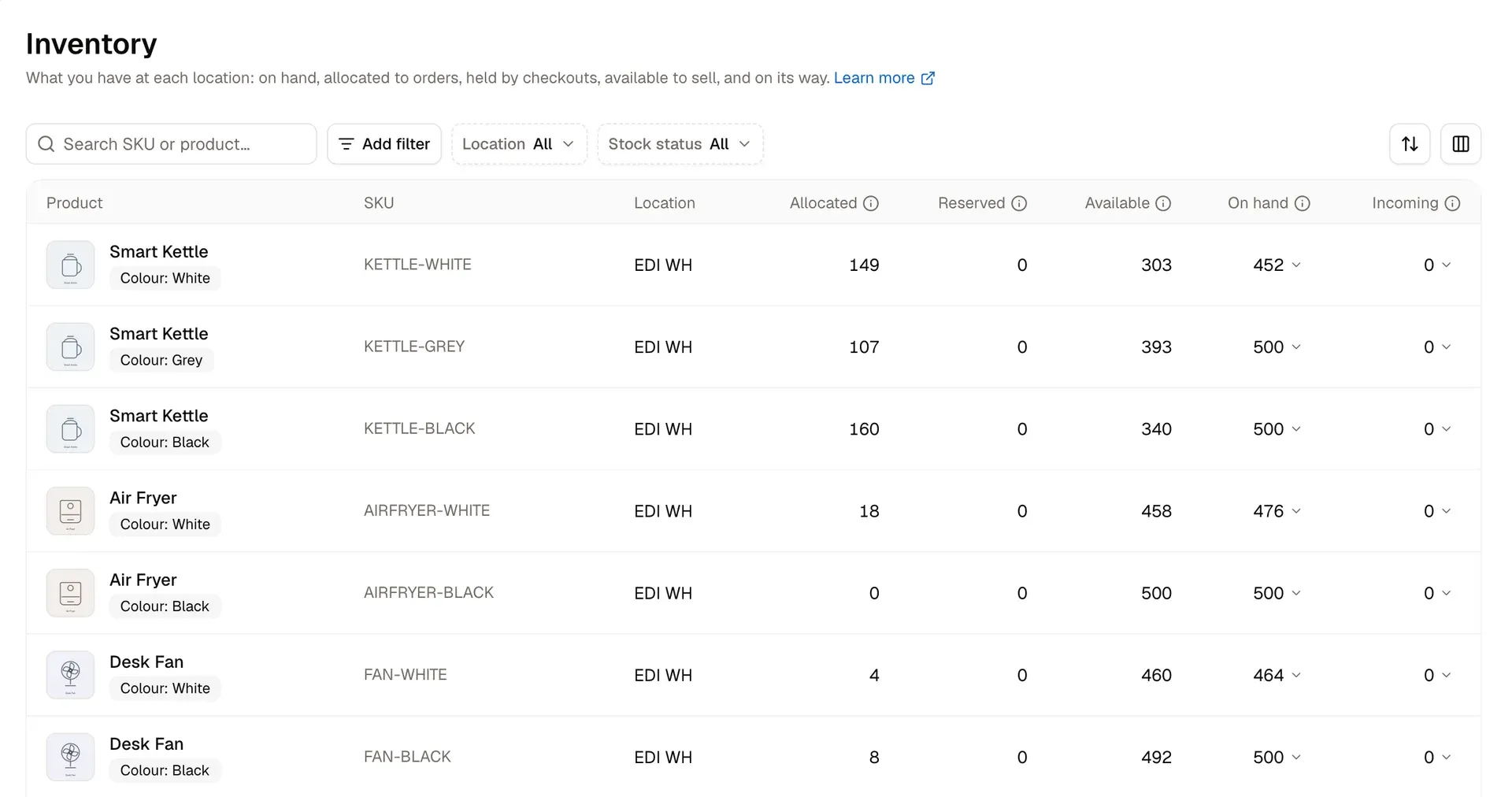
Inventory screen of the Spree admin dashboard, showing stock per SKU and location.
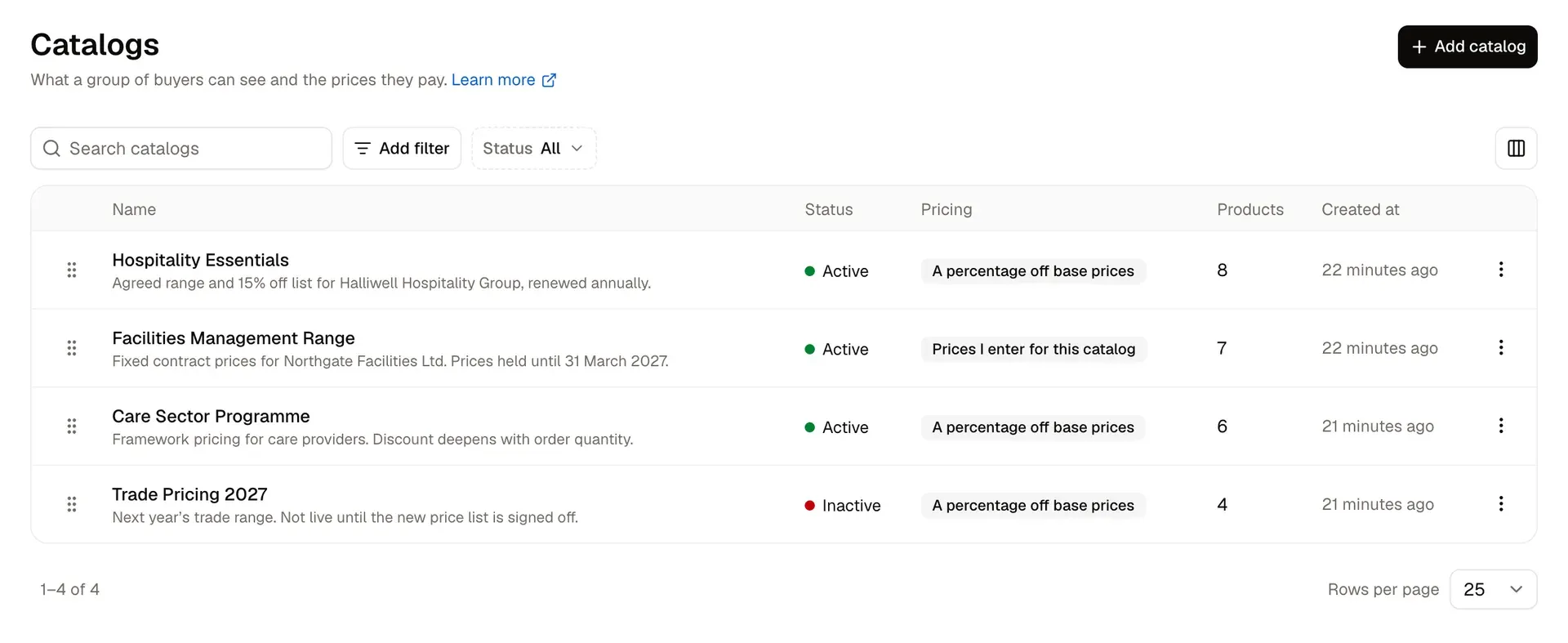
B2B catalogs in the Spree admin dashboard, each defining what a group of buyers sees and pays.

Product detail page of the Spree Next.js storefront demo, with variant selection, stock status and properties.
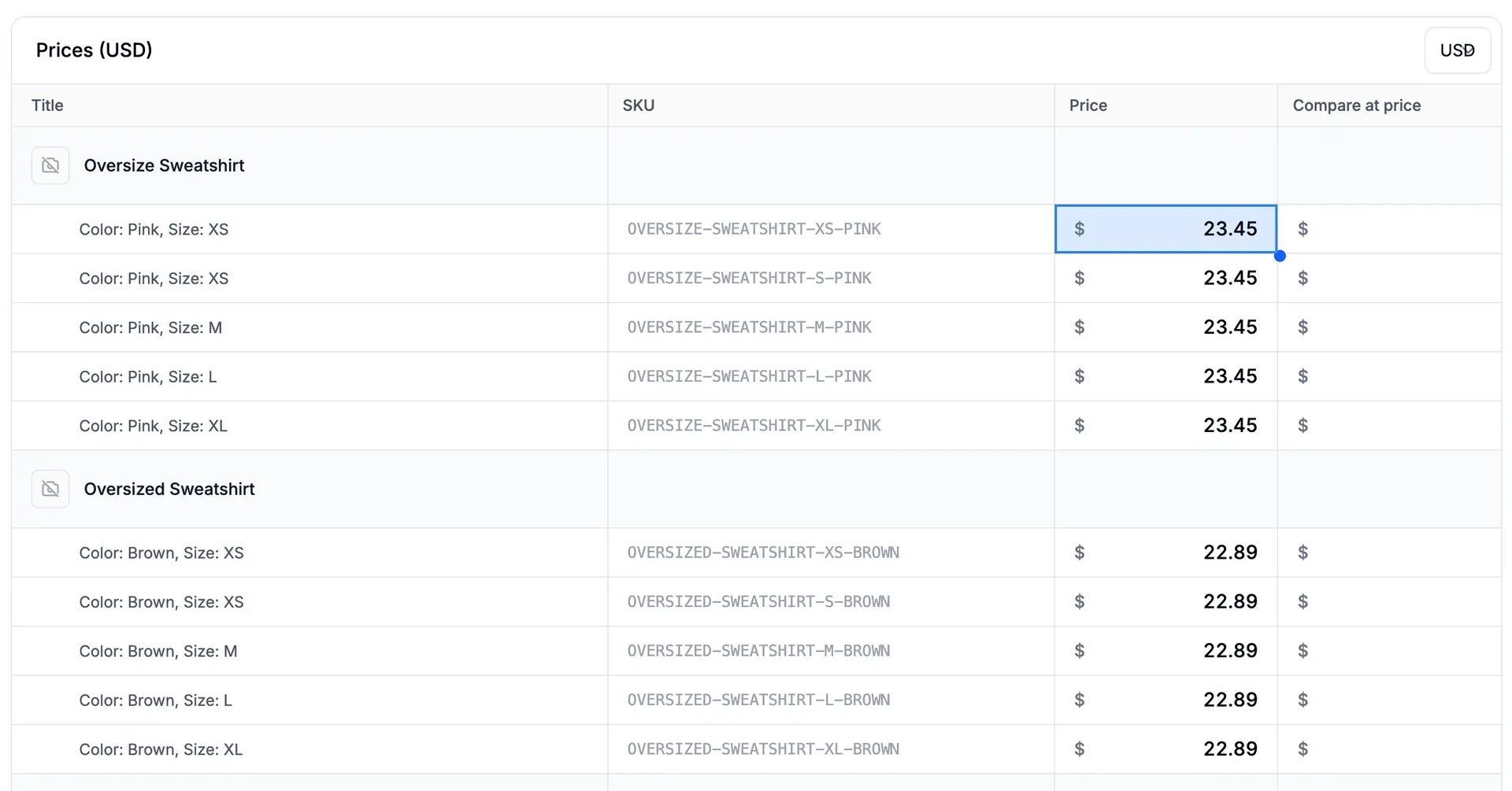
Price list editor in the Spree admin, from the volume pricing guide in the Spree documentation.
Source: official Spree Commerce project page.
Key capabilities
- Local installation with create-spree-app
npx create-spree-app@latest my-storecreates a monorepo with a Docker stack (PostgreSQL and the Spree API), the React admin dashboard, a seller dashboard for marketplaces and, optionally, the Next.js storefront. The quickstart requires Node.js 24 or later with npm 9 or later and a running Docker installation. Setup writes a read-only Admin API key to.spree/credentials.jsonand opens a browser window to set the store name, currency and admin login. - Docker deployment The backend runs from one application container plus one database. PostgreSQL is recommended, MySQL/MariaDB and SQLite are supported, and the docs state a store starts on 1 GB of RAM. Web and worker can run combined or split (with
SOLID_QUEUE_IN_PUMA=falseon the web service). Documented targets include AWS EC2 with RDS, ECS Fargate, a Render Blueprint, Fly.io, VPS or bare metal, Kubernetes and air-gapped installs. - REST API with three surfaces One REST API serves storefronts (Store API), back-office tools (Admin API) and marketplace vendors (Seller API). It uses publishable keys, scoped secret keys and rate limiting, and ships an OpenAPI 3.0 specification. The API reference documents each surface.
- TypeScript SDKs
@spree/sdk(Store API),@spree/admin-sdkand@spree/seller-sdkare MIT-licensed npm packages versioned with the core (6.0.3). Release 6.0.3 addsclient.extend()so an extension's own endpoints get a typed namespace sharing auth, locale and retries, and aspree sdk generatecommand that writes that client from the extension's OpenAPI document. - React admin dashboard The dashboard is a Vite and React application on TanStack Router and Query, shadcn/ui and Tailwind, with dark mode and a mobile-ready layout. Projects can change navigation, add or remove routes, modify table columns and insert UI widgets into slots without forking, as described in the dashboard docs. Staff can sign in through an existing identity provider, and roles and permissions are managed in the UI.
- Next.js storefront The separate
spree/storefrontrepository is an MIT-licensed storefront built with Next.js 16, React 19, Tailwind CSS 4 and the Spree TypeScript SDK. It includes the shopping flow, multi-region URL routing, customer accounts, SEO and Stripe payments with Apple Pay, Google Pay, Klarna and Affirm. It can be deployed to Vercel, Netlify, any Node.js host or Docker; a live demo runs at demo.spreecommerce.org. - Multi-vendor marketplace Sellers are invited, onboarded against a configurable requirements checklist (terms, returns address, bank account, business registration) and approved or suspended. Orders split per seller at completion while the shopper pays once, a commission engine works by seller, category or product with EU commission taxation, and a payout ledger tracks earnings, with Stripe Connect or a custom payout provider. Sellers get their own white-label panel and Seller API. These features are in the open-source core.
- B2B and wholesale Companies model a customer organization with locations, contacts and validated tax exemptions; buyers can invite colleagues. Price lists support volume tiers and negotiated rates, customer groups segment buyers, and catalogs define per-segment assortments and prices. Spree 6.0 adds minimum quantities and pack multiples, minimum order values, purchase order numbers at checkout and freight units such as cartons and pallets. Approval workflows for orders are an Enterprise feature.
- Markets, channels and cross-border selling Markets bundle currency, language, payment methods and shipping per region, and channels give web, app, POS or wholesale surfaces their own catalog, pricing and payment methods. Product translations, VAT number capture with EU reverse charge, customs duties and import fees as separate lines, and commodity codes with country of origin are included. Tax can be calculated through Avalara or Stripe Tax.
- Payments Payment sessions are provider-agnostic and complete even if the customer closes the tab mid-payment. Stripe, Adyen and PayPal ship with Spree, and a Payment Provider SDK adds others; offline methods such as cheque, bank transfer and cash on delivery are supported. Capture can happen immediately, on dispatch or manually. The docs describe a PCI-compliant architecture where card data never touches the store server.
- Inventory and fulfillment Multi-location inventory tracks on hand, allocated, reserved, available and incoming stock, with purchase orders, suppliers and receiving records (including damage and shortfalls). Fulfillment covers shipping, digital delivery and in-store pickup, delivery profiles and zones, live carrier rates through the EasyPost integration and label purchase. Returns, exchanges and claims are tracked separately, with refunds to the original payment, store credit or both.
- Promotions, gift cards and fees A rules-based promotions engine handles percentage and fixed discounts, free shipping, BOGO offers and generated coupon codes. Store credits and gift cards are native. Fees and surcharges appear as their own order lines.
- Products, search and reporting Product types, rule-based collections, custom fields on any record, CSV imports and exports, digital products with controlled download links and a shared media library cover catalog data. Meilisearch provides typo-tolerant search and faceted filtering, or a custom search provider can be added. The 6.0 dashboard ships more than 20 built-in reports and lets staff build and share their own.
- Provider contracts for existing systems Provider contracts connect an ERP, PIM, WMS and carriers, DAM, SSO and payout systems so that, for example, an ERP stays the authority on stock. OpenID Connect single sign-on is available for staff and customers, and custom auth adapters accept any JWT issuer. See the providers overview.
- Admin MCP server The store exposes an MCP endpoint at
/api/v3/admin/mcp, built into Spree with nothing extra to deploy. The connecting person signs in and chooses permissions; tools that were not approved are hidden and actions go through the same permission checks as the rest of the store. The MCP documentation lists 58 tools and names Claude and Cursor as example clients; it points to the Admin API or thespree apiCLI for scheduled work. - Spree CLI and agent tooling
@spree/cliboots, generates, migrates and upgrades projects and calls the Admin API withspree api getorpost.spree add aiinstalls the Spree agent skills and connects coding tools to a separate documentation MCP server; scaffolded projects also get AGENTS.md and CLAUDE.md files, and the docs are published as llms.txt and per-page Markdown. - Events, webhooks and observability An event bus and webhooks report store changes to other systems, and OpenTelemetry instrumentation is available through the
spree_opentelemetrygem. Native integrations include Google Analytics 4, Google Tag Manager and Klaviyo. - Data privacy tooling Spree 6.0 handles data export and deletion requests from the dashboard, anonymizes deleted customers so accounting and tax records stay intact, stores consent records, keeps EU Omnibus price history and supports right-of-withdrawal windows per market.
- Enterprise Edition The paid edition, with custom pricing, adds multi-tenant white-label commerce (tenant sign-up, dashboards and management), order approval workflows, Shopify and WooCommerce seller sync, marketplace extras such as refund clawbacks, Stripe reconciliation and DAC7 payout reporting, an audit trail, full data encryption and HIPAA-ready deployment. It also includes private cloud hosting with a contractual SLA and region choice, LTS patch lines, a dedicated success manager and dedicated support channels, according to the Enterprise page.
Where Spree Commerce fits
Running a headless direct-to-consumer store
A store team starts a project with create-spree-app, keeps the Spree backend and admin dashboard, and deploys the Next.js storefront to Vercel or another Node.js host with a publishable key. The storefront talks to the Store API through @spree/sdk, and Stripe, Adyen or PayPal handle checkout. The storefront quickstart describes the setup.
Operating a multi-vendor marketplace
The operator invites sellers, defines the onboarding checklist, reviews seller products before they go live and sets commissions by seller, category or product. Each order is split per seller after a single shopper payment, the payout ledger records what every seller earned and was paid, and Stripe Connect or a custom payout provider moves the money. Sellers work in the seller panel or through the Seller API. The project guide Build a marketplace covers the flow.
Selling wholesale to business customers
A B2B setup models each buyer organization as a company with locations, contacts and tax exemptions, assigns it to customer groups and publishes catalogs with negotiated prices or volume tiers. Minimum quantities, pack multiples, order minimums and purchase order numbers are enforced at checkout, and storefronts can be gated to approved buyers. The B2B guide walks through the configuration.
Selling across regions and channels
Markets give each region its own currency, language, payment methods and shipping, while channels separate web, mobile, POS and wholesale surfaces with their own catalogs and pricing. A channel can be restricted to specific warehouses. Customs duties and import fees appear as separate lines, and Avalara or Stripe Tax can calculate tax.
Connecting Spree to an existing ERP, PIM or warehouse
Provider contracts let an ERP remain the source of truth for stock, a PIM own product data, a DAM supply media and a WMS or 3PL handle fulfillment. Webhooks and the event bus notify other systems of store changes, and the Admin API and @spree/admin-sdk cover custom integrations.
Managing a store with AI assistants
Merchants connect an assistant such as Claude or Cursor to the store's Admin MCP endpoint, sign in and approve a set of permissions; the assistant can then run Admin API actions within those permissions, and since 6.0.3 it also covers returns, claims, exchanges and nested records such as an order's items. Developers use the agent skills and documentation MCP server installed by spree add ai while customizing a project.
Install
npx create-spree-app@latest my-storeReviews of Spree Commerce
Be the first to share your experience with Spree Commerce.
Write a review
Loading review form…
Alternatives to Spree Commerce
 MedusaMedusa is an open-source commerce backend for Node.js with products, carts, orders, payments and inventory as modules, a React admin and Store and Admin APIs. Self-host it with PostgreSQL and Redis or run it on Medusa Cloud.
 BagistoMIT-licensed e-commerce application on Laravel 13 and Vue.js from Webkul, with seven product types, channels, nine core payment methods, RMA, GDPR and EU price rules. Self-host via Composer or Docker, or use paid Bagisto Cloud.
 OdooOdoo is a web-based suite of business apps from Odoo S.A. The LGPLv3 Community edition covers CRM, sales, invoicing, inventory, manufacturing, POS and website modules on PostgreSQL; Enterprise apps, Studio and hosting are sold per user.