What is Carbon?
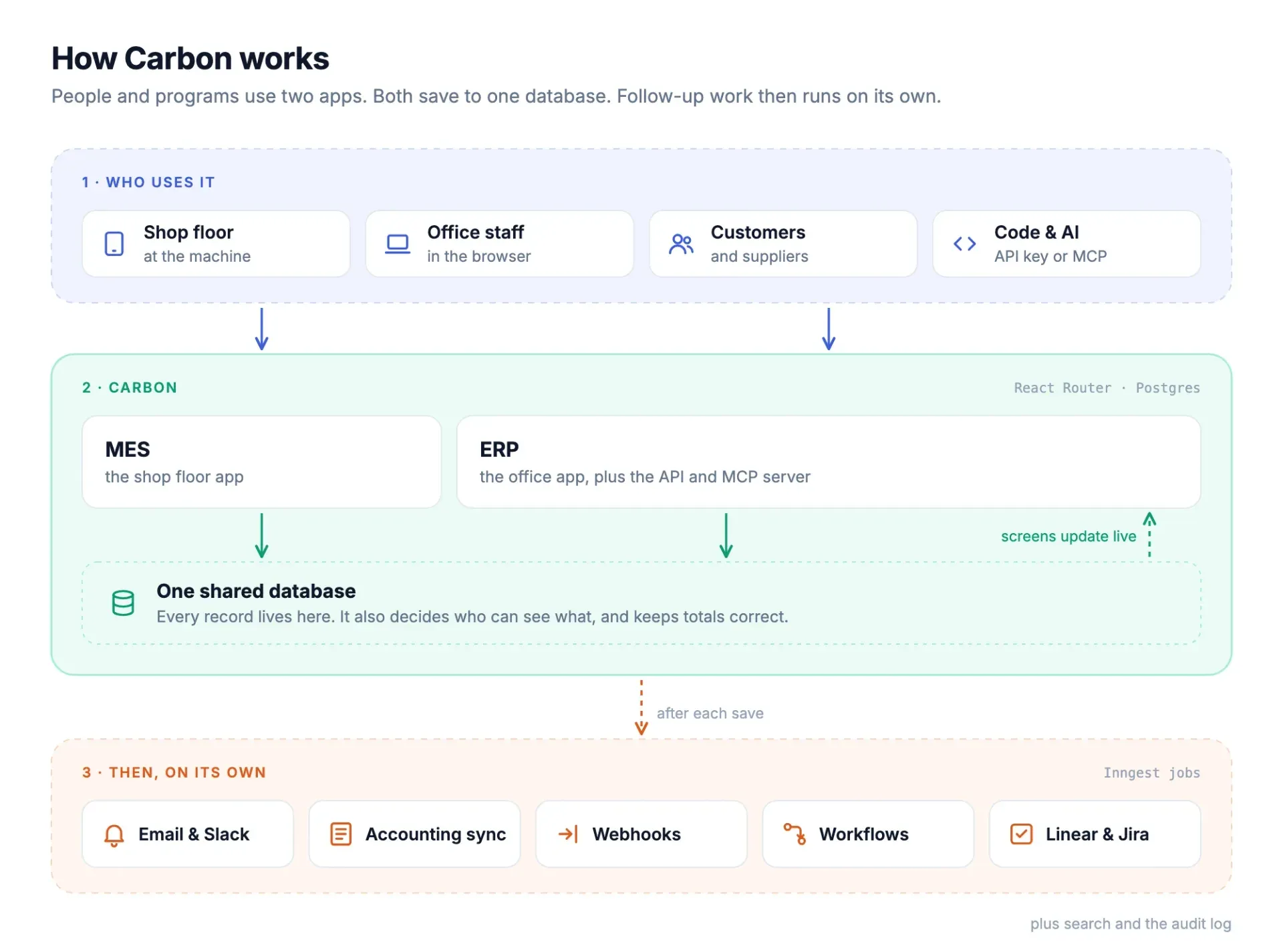
Carbon is an open-core manufacturing system that combines ERP, MRP, MES and QMS in one application suite. It is developed by Carbon Manufacturing Systems Corporation in the public crbnos/carbon repository and presented on carbon.ms. The project covers quoting, sales and purchase orders, inventory, material requirements planning, finite-capacity scheduling, shop floor execution, quality records and lot and serial traceability. All modules write to a single Postgres schema, so engineering, planning, production, quality and accounting work on the same records instead of synchronized copies.
Carbon is distributed in two ways. Carbon Cloud is the managed service with Starter, Business and Enterprise plans and a 30-day trial. The self-hosted path runs the same codebase on your own infrastructure: the documentation provides a Docker with Caddy recipe for a single Linux VPS and an AWS with SST recipe that runs the two apps on ECS Fargate. The vendor also offers bring-your-own-cloud, GovCloud and air-gapped deployments under Enterprise agreements. The repository does not publish tagged GitHub releases; development happens continuously on the main branch.
The stack is TypeScript end to end. The ERP and MES are React Router 7 apps on Vite, with Tailwind, Radix and React Aria for the interface. Data lives in Postgres with row-level security, served through the Supabase data plane (PostgREST, GoTrue auth, Realtime, Storage and Edge Functions) and queried with Kysely. Background work such as notifications, accounting sync, webhooks and workflows runs on Inngest, Redis handles caching and rate limiting, and the API is built with oRPC and published as an OpenAPI spec. An optional Rust service called assembler uses OpenCASCADE and FCL to convert STEP files to GLB and plan assembly motion for 3D work instructions. The architecture guide follows a request through these layers.
Licensing is split. According to the root LICENSE file, everything in the repository is under the GNU AGPLv3 (version 3 only), except the Enterprise files: every file in packages/ee and every file whose name contains .ee.. Those files are under the Carbon Commercial License, which allows viewing and sharing the source but not running, testing or modifying them without a commercial agreement. GitHub therefore reports the license as NOASSERTION. The licensing page calls the AGPL part Community Edition (CE) and the commercially licensed self-hosted variant Enterprise Edition (EE).
Several capabilities sit in the Enterprise code and are therefore not part of a free self-hosted install: API keys and the MCP server, webhooks, third-party integrations, workflow automation, demand forecasting, customer portals, custom roles and approval rules, audit logs and enforced 2FA. On Carbon Cloud they come with the Business plan. Carbon positions itself against systems such as NetSuite, Epicor, SAP Business One, Plex, Odoo and ERPNext on its comparison pages, with a focus on complex assembly, contract manufacturing, configure-to-order and high-mix, low-volume production. Similar listings on iThub: ERPNext and Odoo.
Key capabilities
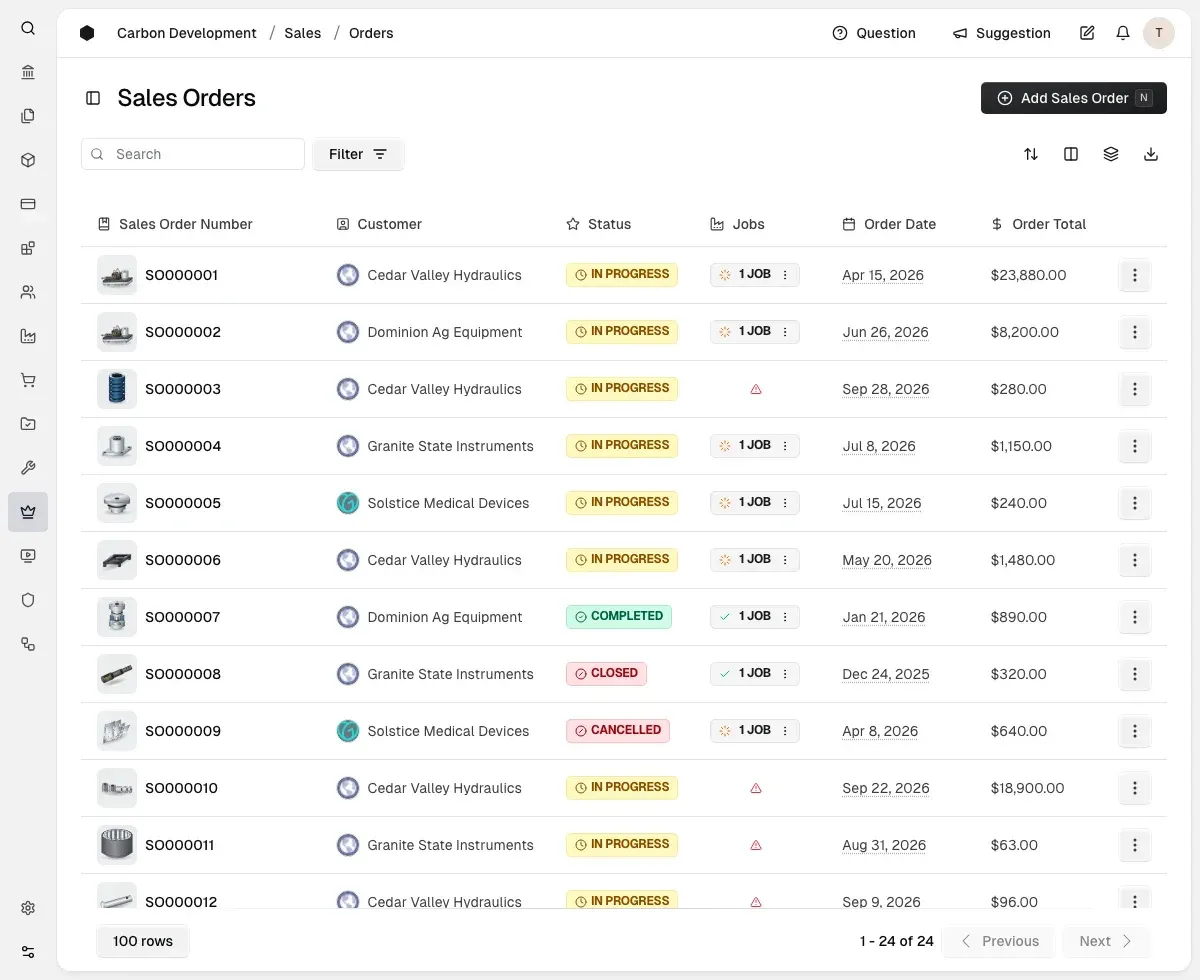
- Quoting, sales and purchasing Quotes, sales orders, purchase orders and invoices link to the same jobs, so one record follows an order from quote to cash. The sales order list shows status, linked jobs and order totals per customer. Purchasing and receiving update inventory and job costs directly in the shared database.
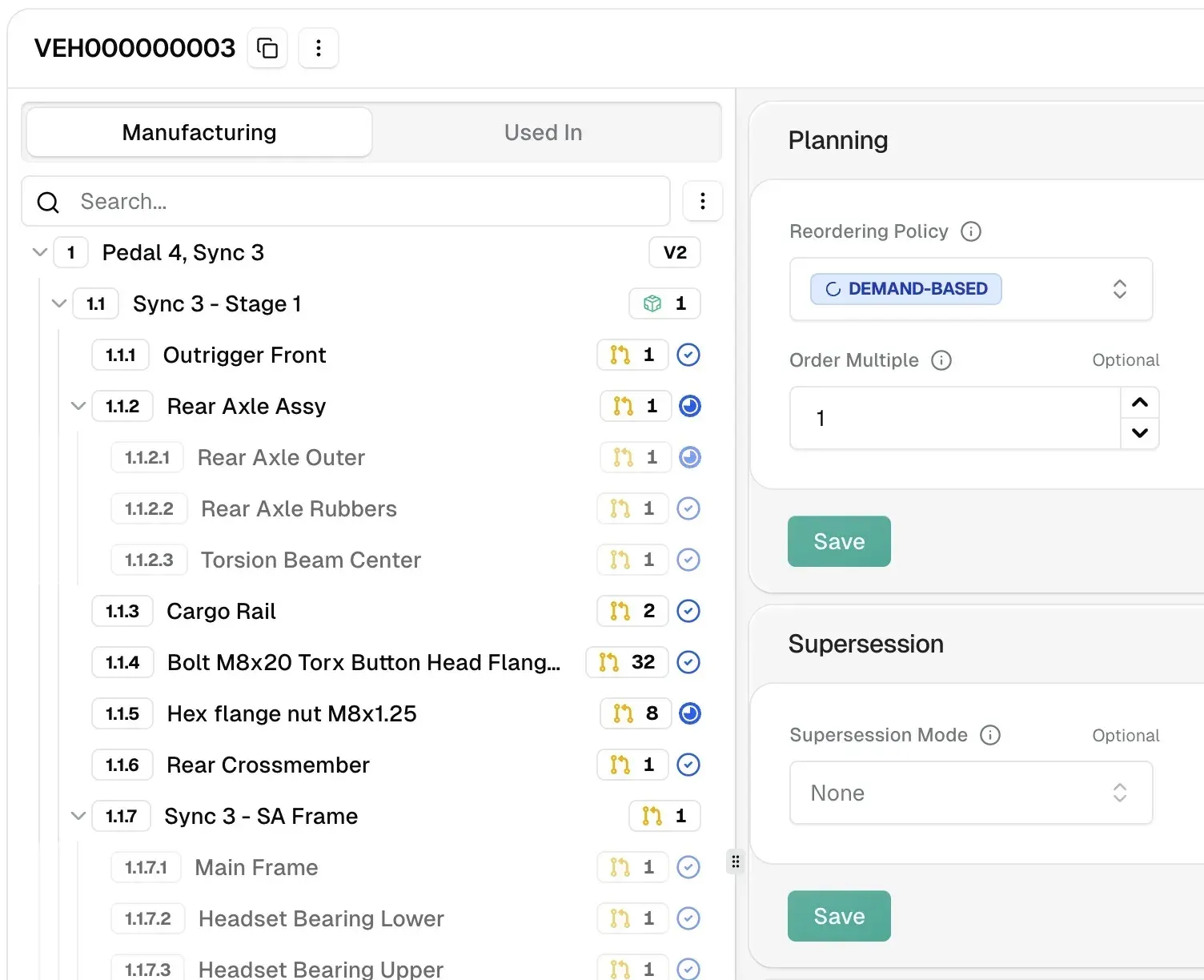
- Inventory and actual job costing The ERP module tracks inventory by location, receipts, splits and consumption, and records actual job costs rather than reconstructing them after the fact. Kanban replenishment is part of the maintenance and assets area. Reorder policies such as demand-based ordering and order multiples are set per item.
- MRP and finite-capacity scheduling The planning module covers demand, supply planning, versioned BOMs and routings, and finite-capacity scheduling, implemented in the
@carbon/planningpackage. Demand forecasting is listed as a Business plan feature. Schedules are served from the same instance that runs the shop floor app. - Engineering: BOMs, revisions and configurator Multi-level bills of materials support revisions, change orders and supersession. A rules-based product configurator generates BOMs and routings from configuration rules, which the Starter plan and Community Edition include. The BOM view shows nested assemblies with planning settings next to the structure.
- MES for the shop floor The MES is a separate React Router app meant to run on tablets next to machines. It provides digital travelers, operator terminals, barcode and QR tracking, and labor capture against jobs. A shop floor console mode is a Business plan feature.
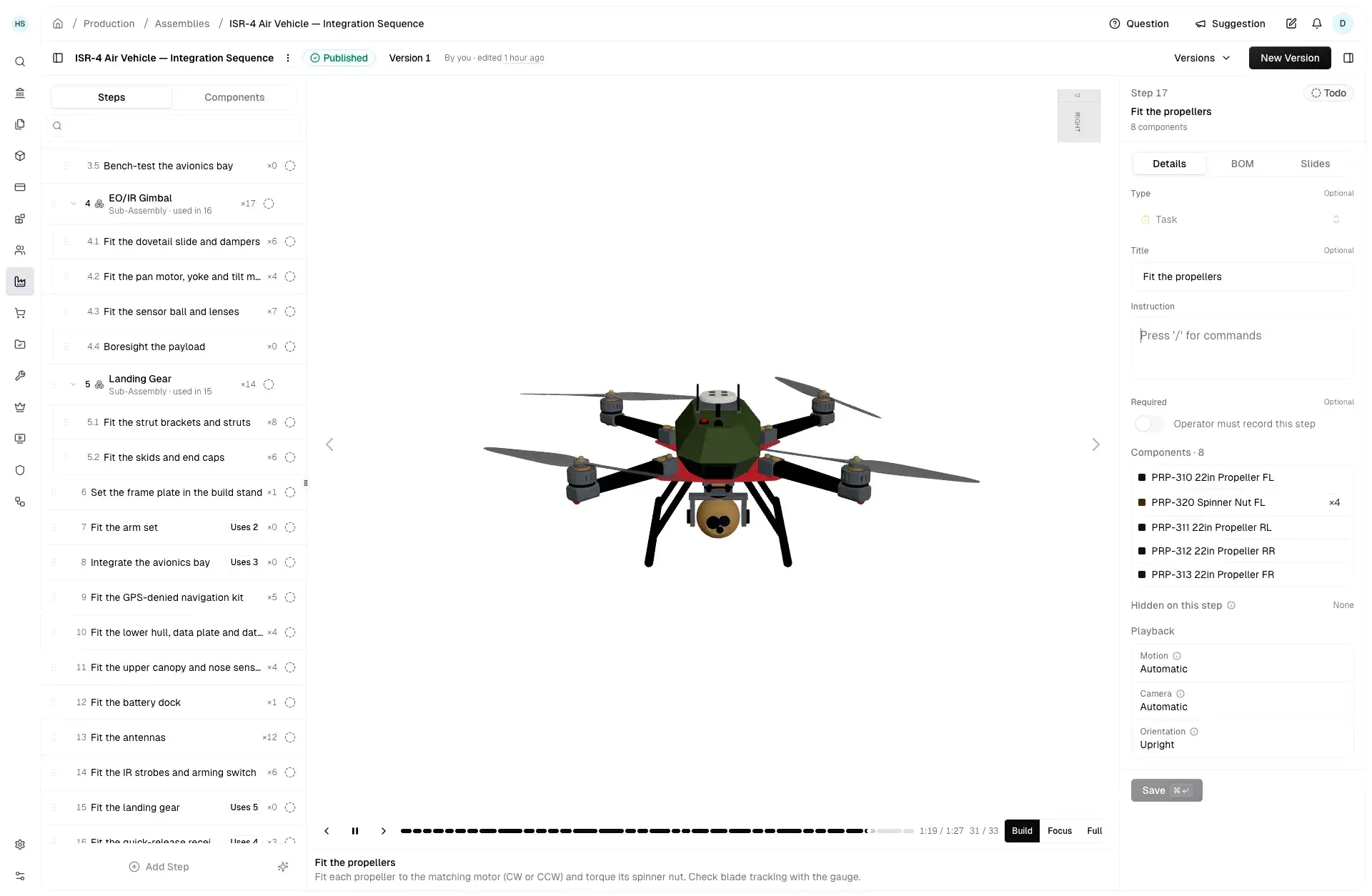
- 3D work instructions Assembly instructions can be authored step by step from the CAD model, with components per step, playback controls and camera settings. The optional Rust
assemblerservice converts STEP to GLB and plans assembly motion; ERP and MES run without it, but the 3D convert and plan endpoints then stay unavailable. Building its OpenCASCADE dependency takes about 15 to 30 minutes once per machine according to the README. - Quality management (QMS) The QMS area covers inspections, first article inspection (FAI), nonconformance reports, CAPA, calibration and risk management. Quality records link to the same production records as jobs and serials. Certificates can be generated from live data.
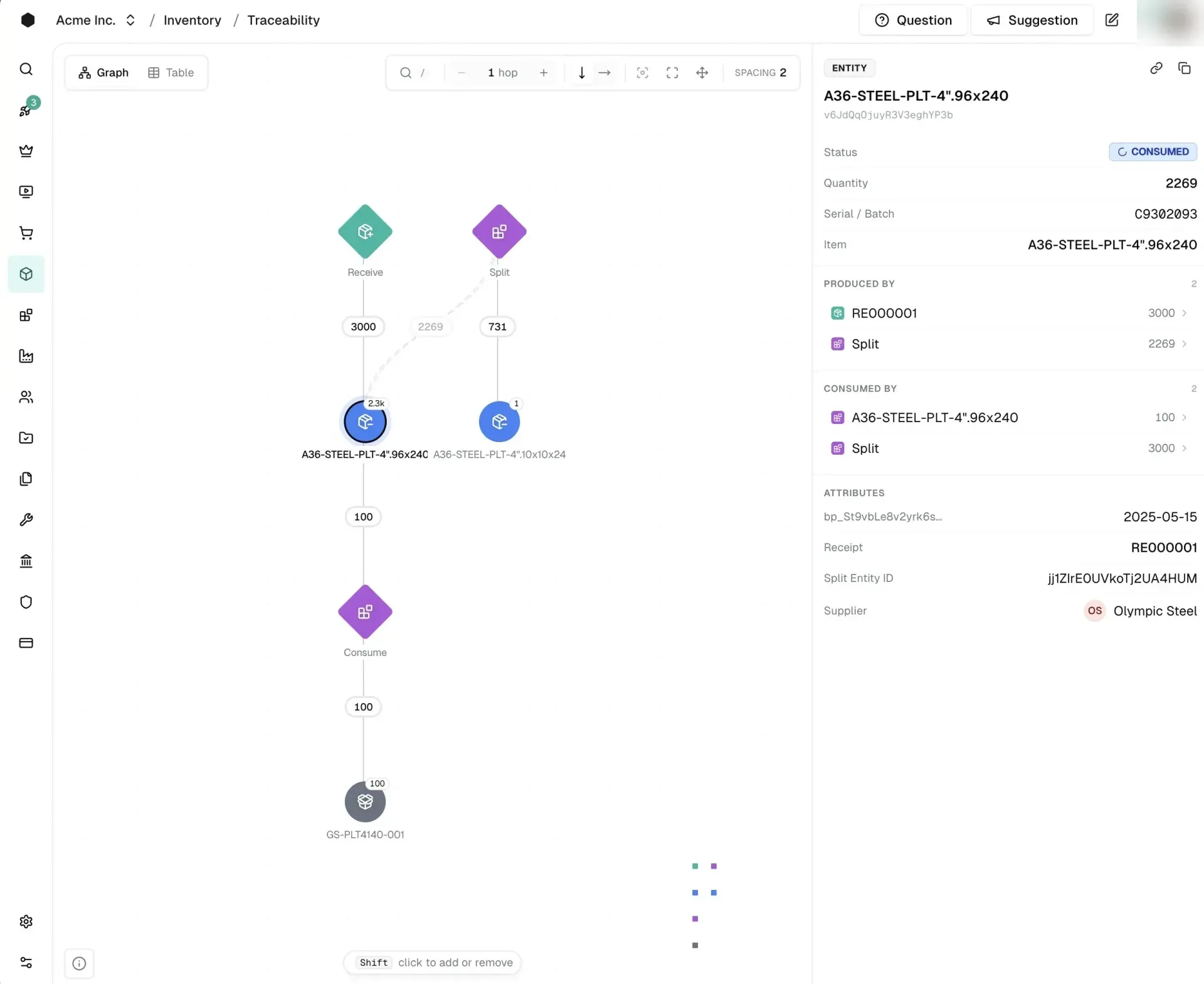
- Lot and serial traceability Traceability follows lot and serial genealogy forward and backward. A graph view shows receive, split and consume events with quantities, and an entity panel lists what produced and consumed a lot along with its supplier and attributes. The same data is available in a table view.
- Accounting Carbon includes a general ledger, journals, financial reports, fixed assets, multi-entity books and multi-currency, all in the open core. Ledger synchronization with Xero or Rillet requires Enterprise Edition or the Business plan; the docs list QuickBooks Online as not available yet. An exchange-rates service is available on every plan.
- Carbon API The Carbon API exposes the operations the app itself uses as
POST /api/v1/{module}/{operation}calls, with a published OpenAPI spec for generating typed clients. Self-hosted deployments serve it at/api/v1, and a Data API gives direct access to permitted tables and views. API keys are scoped, stored as hashes and rate limited (20 requests per minute per new key, 60 per company). API access needs the Business plan or a commercial license. - MCP server for AI clients An MCP server at
/api/mcplets clients such as Claude Code, Claude Desktop, Cursor and ChatGPT read and write Carbon data under the permissions of the signed-in user or API key. Instead of registering all 1,814 operations as tools, it exposes three meta-tools:search_tools,describe_toolandcall_tool. It is covered by the same plan and license rules as the API. - Webhooks and workflows Event-driven webhooks push record changes to your own endpoints, and rule-based workflows run triggers and actions with a run history. Both are executed as Inngest background jobs after each save. They belong to the Business features in
packages/ee. - Integrations Documented first-party integrations include Onshape for CAD data, Linear and Jira for quality issues, Paperless Parts for quotes and BOMs, Sense machine sensors for machine time, Slack for notifications and the Carbon Assistant, and Xero and Rillet for accounting. The README also names SolidWorks, Ramp, Stripe and Zebra. Integrations are an Enterprise Edition capability; email and exchange rates work on every plan.
- Security model in the database Every table is scoped to a company and guarded by Postgres row-level security. Role-based access per module and action applies to employees, customers and suppliers, and is enforced the same way in the app, the API and MCP. Passkeys and SSO are supported; enforced 2FA and audit logging are Business plan features, SSO/SAML is listed under Enterprise.
- Custom fields and starter app Custom fields extend records without changing the core schema. The repository includes an
apps/starterexample app built on the API, intended as a base for custom sales or shop-floor front ends with Carbon as the system of record. - Self-hosting with Docker and Caddy The single-VPS recipe runs a one-node Docker Swarm with Caddy for automatic HTTPS, the ERP and MES apps, Supabase Postgres 17, the Supabase data plane, Supavisor, Redis and Inngest. Requirements are Ubuntu 22.04 or later with at least 4 GB RAM (about 8 GB to build images on the host), Docker Engine with the Compose plugin, OpenSSL and DNS records for the ERP, MES and API hosts. Only ports 80 and 443 are public.
- Self-hosting on AWS The AWS recipe provisions the ERP and MES apps on ECS Fargate with SST for teams that need Carbon inside their own AWS account. Managed BYOC, where Carbon operates releases, certificates and monitoring inside the customer account, is sold as part of Enterprise subscriptions.
- Local development Running from source needs Docker, Node.js 24.22.1 or later and pnpm through Corepack.
pnpm devboots Postgres, PostgREST, auth, storage, realtime, Inngest, Redis and a mail catcher in Docker, applies migrations and starts the ERP on port 3000 and the MES on port 3001. Demo datasets (satellite, robotics, precision, motor) can be seeded for testing.
Where Carbon fits
Quote to cash for a job shop
A quote is converted into a sales order, which creates or links a production job. Purchasing, receiving and labor capture update the job cost as work happens, and the invoice closes the record. The sales order list shows each order with status, linked jobs and totals, so the commercial and production side refer to the same job.
Material planning and scheduling
MRP reads demand from orders and forecasts, compares it with stock and open supply, and proposes purchase and production orders based on each item's reordering policy and versioned BOMs and routings. Finite-capacity scheduling then places operations on work centers. Demand forecasting is part of the Business features.
Running the shop floor
Operators use the MES app on tablets at the machine: they open digital travelers, scan barcodes or QR codes, clock labor against operations and follow 3D assembly instructions authored from the CAD model. Screens update live through Postgres realtime subscriptions, so the office ERP sees progress as it is recorded.
Quality and traceability for regulated parts
Inspections and first article reports are linked to jobs and serial numbers. Nonconformances move through an NCR to CAPA workflow with sign-off, and calibration records cover the gauges used. The traceability graph shows, for any serial or lot, which receipts produced it, which jobs consumed it and the supplier behind it, in both directions.
Connecting AI agents and custom software
With an API key from Settings, API Keys (Business plan or commercial license), scripts call operations over HTTP or generate a typed client from the OpenAPI spec. AI clients connect to the MCP server and discover operations through search, describe and call meta-tools, acting only with the permissions of that key or user. Webhooks push changes back to external systems.
Keeping data inside your own boundary
Manufacturers with ITAR or CMMC requirements can run Carbon in their own VPC, on premises or air-gapped. The self-hosted page states that BOMs, travelers, serial genealogy and costs then stay in a Postgres database in the customer network, and that air-gapped deployment and licensing are Enterprise features. Enterprise BYOC deployments include inputs for SSP, POA&M and SPRS documentation.
Reviews of Carbon
Be the first to share your experience with Carbon.
Write a review
Loading review form…
Found Carbon useful? Upvote it todayYour vote helps other IT teams find it in the daily ranking.