What is Estella?
Estella is a 2D and 3D game engine published by the ESEngine Team under the Apache License 2.0. The engine core is written in C++ and runs as WebAssembly in the browser and as native code on desktop and mobile, while game logic is written in TypeScript as Entity-Component-System (ECS) components and systems. A visual editor for scenes, assets and project packaging ships alongside the engine, and one project exports to the web, Windows, macOS and Linux desktops, seven Chinese mini-game platforms, single-file playable ads and native Android and iOS apps.
The editor is also a Model Context Protocol server. According to the README, an MCP client such as Claude Code, Cursor or Codex gets 167 tools that call the same pipelines as the editor's menus, inspector and toolbar. Each call is one undo step, the editor starts read-only, and an agent can only edit after the user switches it to "Can edit" in Window, Connect AI Tools. The AI agents documentation describes the one-click connection for Claude Code, Cursor, Claude Desktop and VS Code and a manual configuration for other clients.
The editor is distributed as a Windows 10/11 x64 installer and a macOS 12+ disk image for Apple silicon, both from the official download page (served from the project's dl.estella.games mirror) and from GitHub releases. The project states that installers are currently unsigned, so SmartScreen and Gatekeeper warn on first launch, and that Intel Macs and Linux need a build from source. Release assets also include native runtime templates for Android, iOS, Windows, macOS and Linux, which are installed once per editor version for native exports.
The latest release is v0.106.0, published on November 15, 2026; six minor versions (v0.101.0 to v0.106.0) were released between November 10 and November 15, 2026, and the project keeps a CHANGELOG under Semantic Versioning. Version 0.106.0 adds wss:// sockets on the native desktop and mobile runtimes, a clear-coat material layer, a Starfield post-process effect, Distortion and Particle shaders, perspective for screen UI, a CanvasEffect component for whole-HUD materials, a NavGrid that lies on the x/z plane, and command-line bake-model, draw-image and adopt commands. Textures now ship at their source size by default instead of being capped at 2048.
The introduction describes three layers: the TypeScript SDK (the esengine package), a WasmBridge with a generated, hash-checked memory layout, and the C++ core that holds ECS storage, the renderer, resources, particles, tilemaps and text. One renderer covers 2D and 3D on WebGL 2 and WebGPU; on Android and iOS the same core is compiled to arm64 and renders through an embedded Dawn on Vulkan or Metal, with scripts on V8 (Android) or QuickJS-ng (iOS). Scenes, prefabs and materials are stored as JSON text.
The business model statement splits the product in two. The runtime, SDK, asset pipeline, CLI, project templates and editor plugin API are Apache-2.0, with no royalties or seat fees. The visual editor is a free download but its source is not public; it was Apache-2.0 in this repository through v0.55.0 and has been developed in a private repository since. The bundled Spine Runtimes are not open source, so a game using the Spine integration needs its own Spine license. The repository does not accept pull requests; bug reports and feature requests go to GitHub issues. Other game engines listed on iThub include Godot Engine, GDevelop and MonoGame.
Key capabilities
- Editor MCP server with 167 tools The README groups the tools into core (scene tree, entities, components, play, step, input, screenshots, logs, undo), assets and prefabs, look and render, code and project, image, sound and modeling, and play, view and device. Every call goes through the editor's command surface, so it appears in the window and can be undone like a manual edit. The MCP server is a small Node script bundled inside the editor that speaks MCP over stdio and launches or attaches to an editor instance.
- Permission switch and client setup An editor window starts read-only; "Can edit" is granted per window, is never saved and applies live to every connected tool. Window, Connect AI Tools writes the estella entry into the MCP configuration of Claude Code, Cursor, Claude Desktop or VS Code without touching other entries, and gives copyable JSON, TOML or command text for clients such as Windsurf, Zed and Codex. A manual setup outside the one-click dialog needs Node.js 20 or later on the PATH, as described in the MCP guide.
- Agent checks: screenshots, frame replay and playtests Agents can take screenshots of the viewport and the running game, replay a frame draw call by draw call, place the game beside a reference image and step a paused game deterministically, so "play three seconds, then look" yields the same frame each run. Scripted playtests read the running world back, and device tools drive a build running on a connected phone.
- Asset generation inside the editor Image, sound and modeling tools let an agent draw sprites and textures, compose sound effects and music, and build 3D models from steps. Model sources (.esmodel) and picture sources (.esimage) are text recipes; release 0.106.0 added bake-model and draw-image commands that produce the same meshes, maps and PNGs from the command line without the editor.
- TypeScript ECS SDK Game logic uses defineComponent, defineSystem, Query, Mut, Res and Commands, so the compiler knows what each system reads and writes. defineBehavior registers an update hook and a component in one call, and the editor watches scripts and picks up new components after a save. The ECS guide and a generated TypeScript API reference document the surface.
- 2D toolset The engine covers sprites and sprite animation, tilemaps with LDtk import and isometric or staggered orientation, Spine 2.1 to 4.3 and DragonBones, 2D lights and shadows, UI with layout, rich and bitmap text, particles, Box2D physics and native 2D rigs. Spine use requires a separate license from Esoteric Software, as stated in the project's NOTICE file.
- 3D rendering and simulation 3D support lists glTF and FBX import, PBR materials, directional, point and spot lights with shadows, a sky atmosphere with time of day and weather (mist, rain and snow), baked lightmaps, light and reflection probes, SSR, SSGI, height fog, terrain, water and foliage. Skeletal animation with spring bones, navigation, a choice of Jolt or PhysX physics and streamed large worlds complete the list.
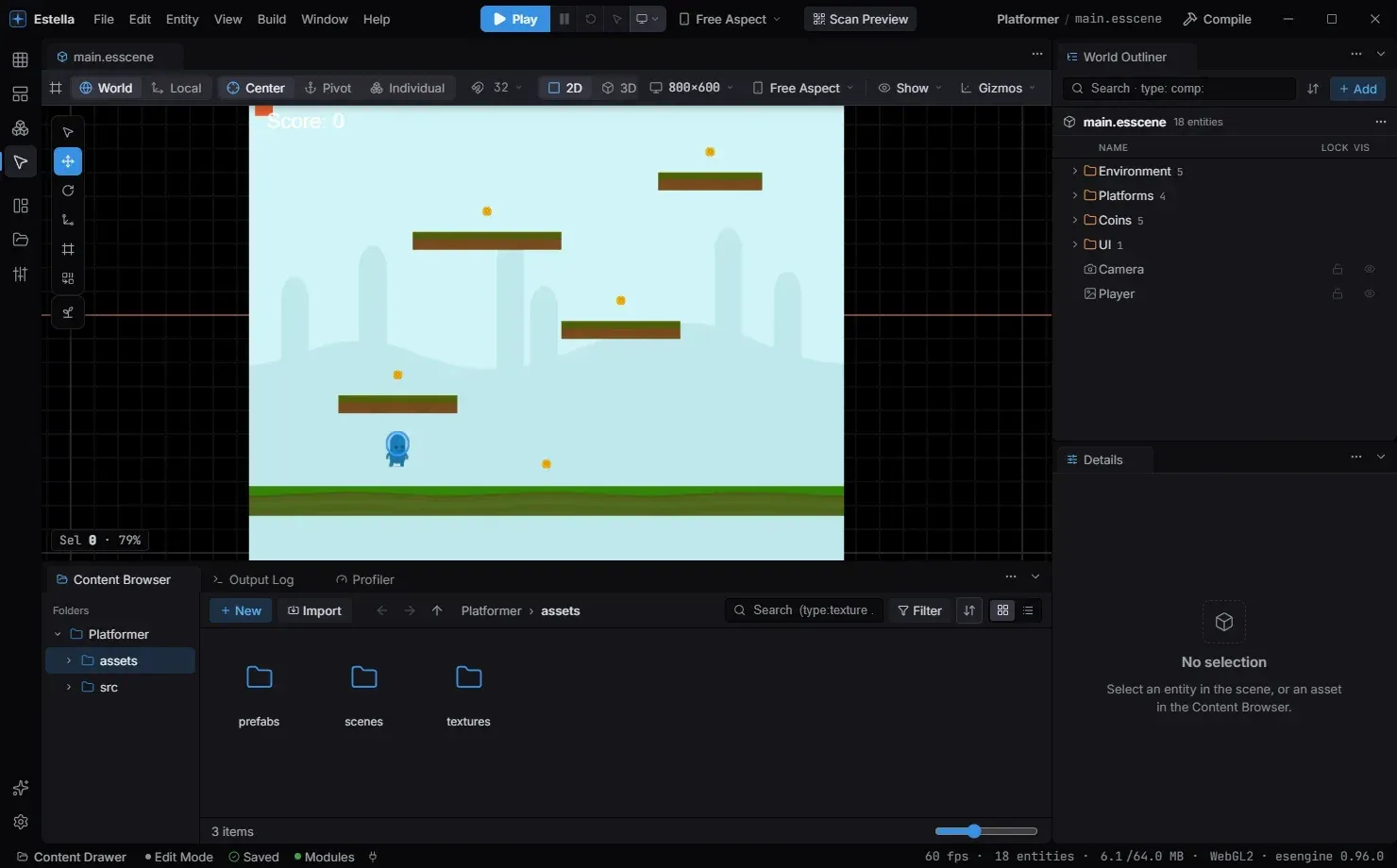
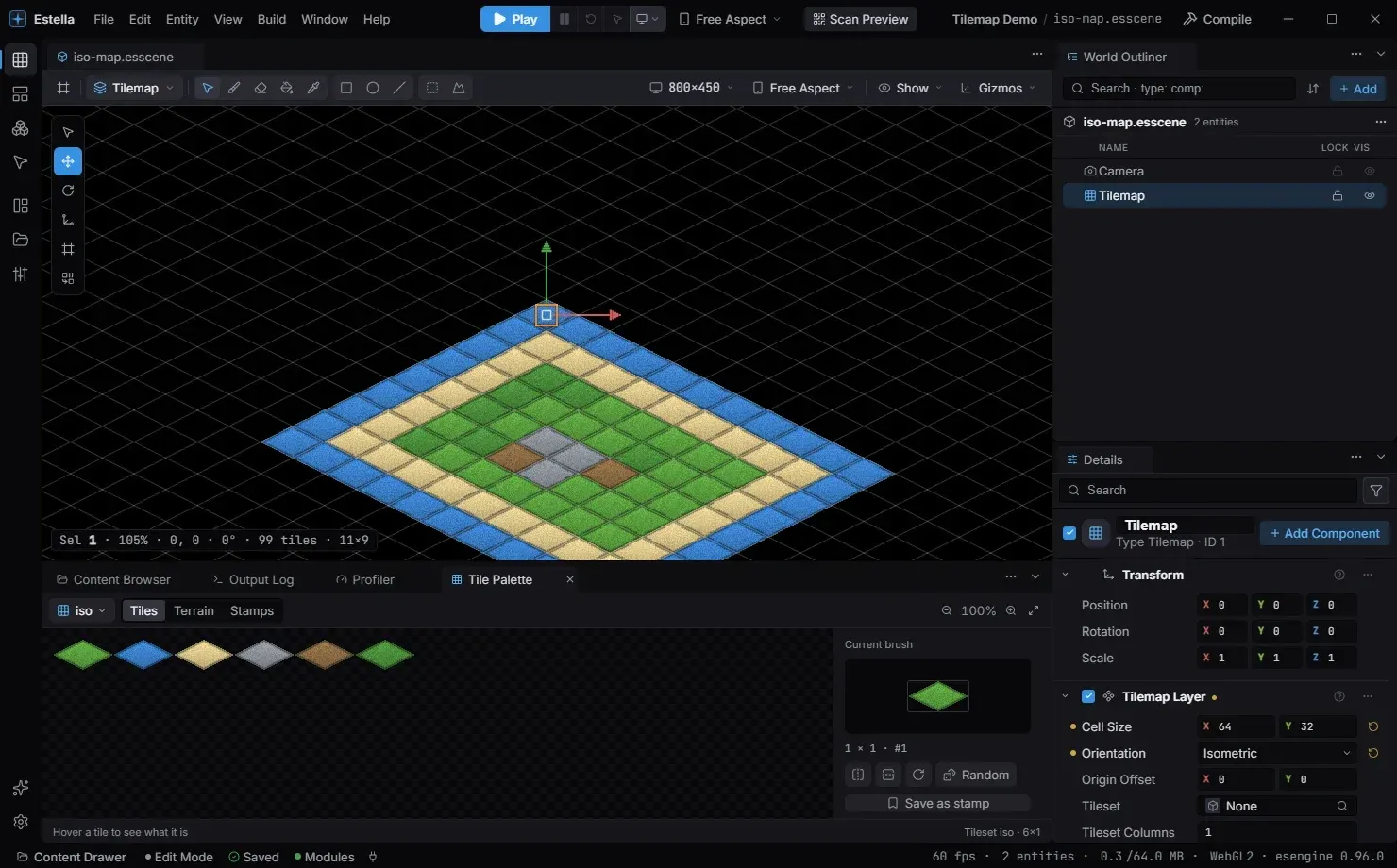
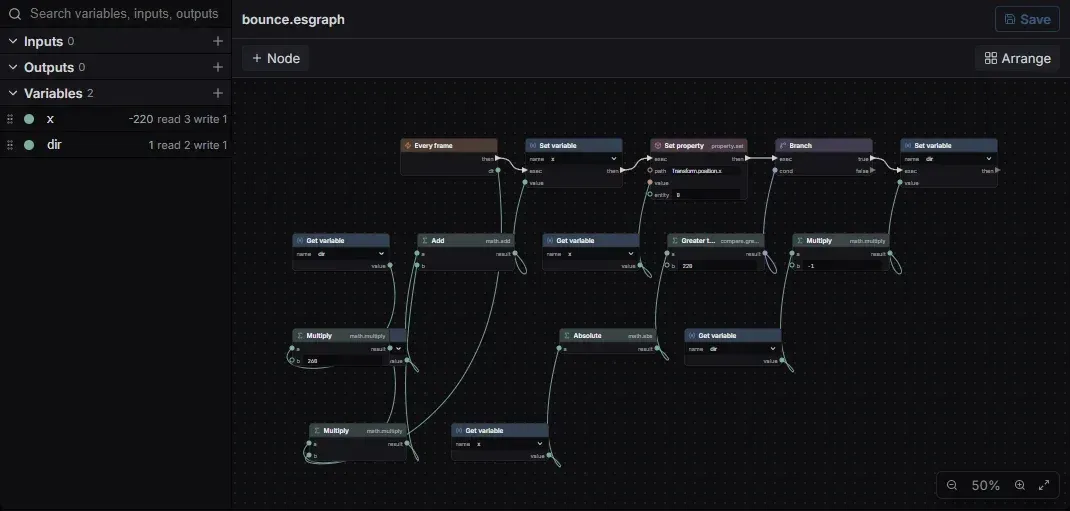
- Visual editor The editor provides a scene graph and World Outliner, a Details inspector, a Content Browser, a tilemap palette, particle and animation tools, prefabs, visual event binding, script graphs and plugins built on the Apache-2.0 editor plugin API. Play mode runs in its own realm and never writes back to the scene being edited.
- Web export The Web target produces a static, self-contained build in dist-web/ that runs on WebGL 2 or WebGPU. A web build needs an http origin, so the editor offers Preview over http on a local loopback server; opening index.html from disk does not stream the WebAssembly. Advanced options include a CDN root, a size budget and source maps.
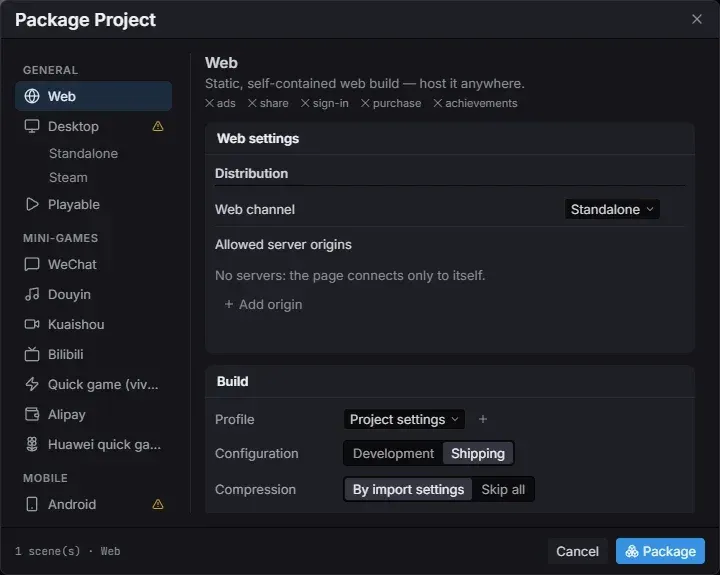
- Mini-game platforms The Package Project dialog lists WeChat, Douyin, Kuaishou, Bilibili, quick games, Alipay and Huawei quick games as separate targets, each with its own settings. The mini-game platform guide covers what each platform needs.
- Single-file playable ads The Playable target inlines a game into one index.html for Meta, Google, Unity, AppLovin, Mintegral, TikTok and Pangle, and MRAID ad networks. It ships the startup scene only because the output is a size-capped single file.
- Native desktop export Desktop builds are native apps without Chromium or an npm project: a .app on macOS, a folder with an .exe on Windows, and a binary on Linux, one per installed desktop runtime template. Selecting the Steam channel also writes depot scripts.
- Native Android and iOS apps Mobile exports compile the C++ core to arm64 and render through Dawn on Vulkan (Android) or Metal (iOS); they are not a WebView. Packaged games need Android 10 (API 29) with Vulkan 1.0.3, or iOS 17.0. The editor assembles a signed .apk or an Android Studio project on any desktop OS, while iOS output is an Xcode project that must be finished on macOS, per the Android and iOS guide.
- Content hot-update A shipped game can download content-addressed asset groups and apply them atomically. The website states that updates are verified by digest and rolled back if they do not match. Build options in the editor set the CDN used for delivery.
- Command-line pipeline Node pipeline/bin/estella.mjs lists templates, creates a project from a template, exports a web build without opening the editor, bakes models, draws picture sources and registers assets that lack a .meta file (adopt). This allows projects to be created and exported from scripts or build machines.
- Editor installers and updates The editor is offered for Windows 10/11 x64 and macOS 12+ on Apple silicon. Help, Check for Updates downloads a new version from dl.estella.games and installs it on restart, falling back to GitHub when the mirror is stale. Installers are unsigned at present, according to the installation guide.
- Build from source The open engine builds with Node.js 18 or later, pnpm 8 or later and exactly Emscripten 5.0.0, which a pnpm script installs into tools/emsdk. The repository's CONTRIBUTING.md holds the full build reference, and the project states that everything needed to build, run and ship a game is in the open repository.
Where Estella fits
Building a game through an AI agent
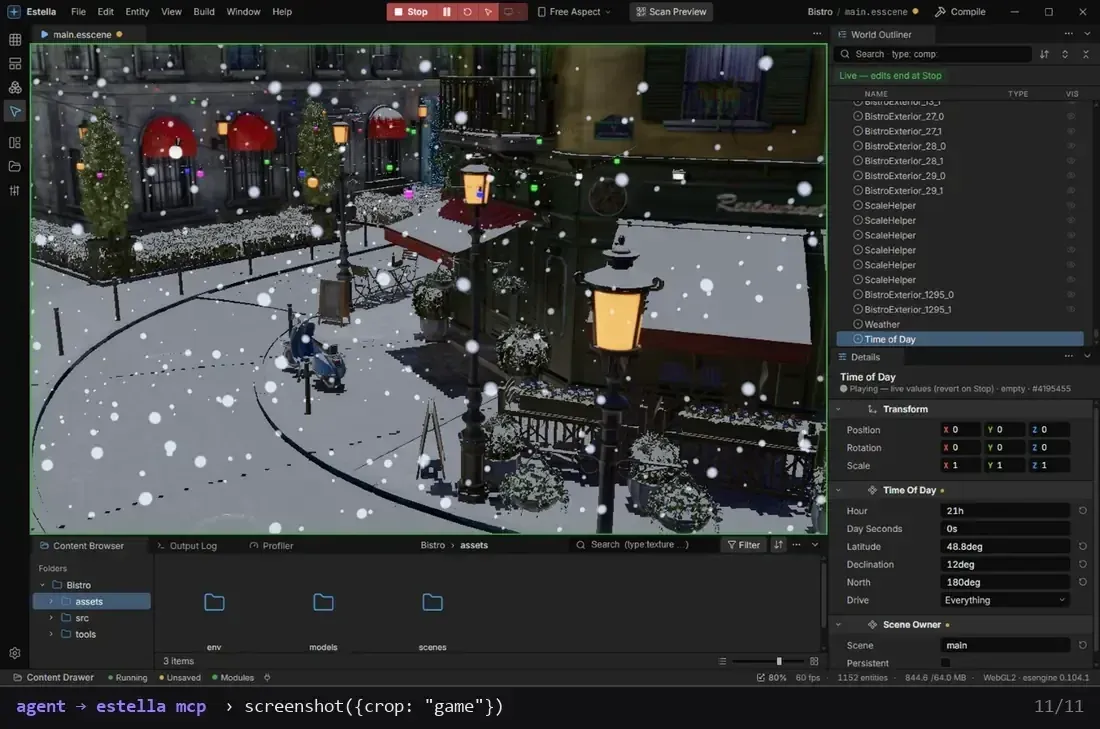
A developer connects Claude Code, Cursor or another MCP client from Window, Connect AI Tools and switches the editor window to "Can edit". The agent can then create a project, spawn entities from the Create catalog, write component fields and scripts, run type-checks, enter Play mode and take screenshots of the result. The README's demonstration shows an agent opening the Bistro project, turning the weather to snow, setting the time to 9 pm, pressing Play and capturing the frame, all as MCP calls that the person watching can undo.
Writing gameplay in TypeScript
The Quick Start starts from the Blank template with a camera, adds a Shape entity, and defines a Player behaviour in src/components.ts that moves with the arrow keys. The behaviour's state appears as editable fields in the Details panel, and F5 starts play. The guide notes that engine components such as Transform are decoded out of WebAssembly memory on each read, so a script reads a copy, changes it and hands it back with ctx.set.
2D games with tilemaps and skeletal animation
Tilemaps are painted from a Tile Palette with tiles, terrain and stamps, in square, isometric, hexagonal or staggered layouts, and LDtk files can be imported. Characters can use sprite animation, Spine 2.1 to 4.3 or DragonBones, with Box2D physics, 2D lights and UI layered on top.
Real-time 3D scenes with time of day and weather
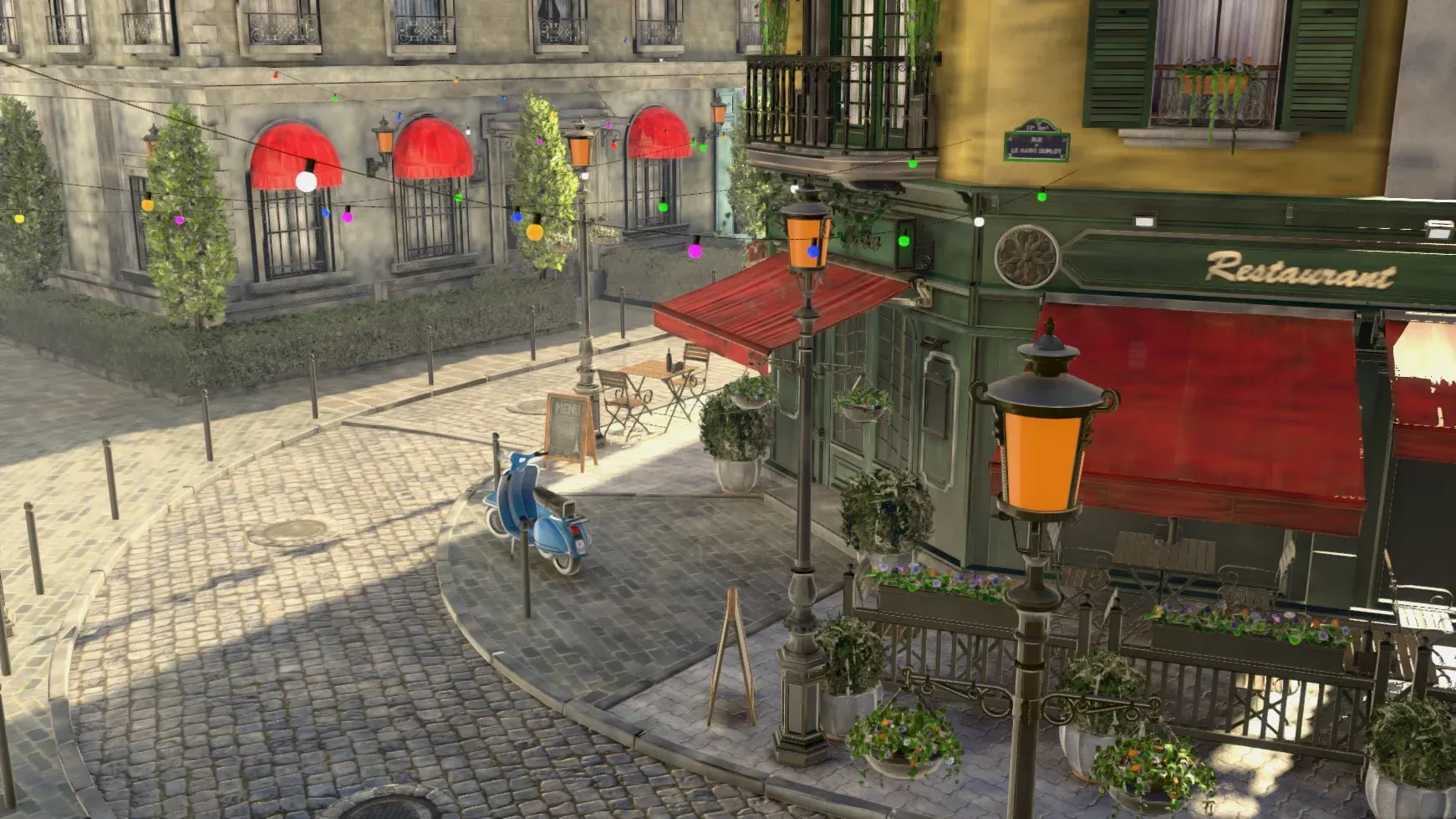
The project's showcase is the Amazon Lumberyard Bistro scene rendered through a full day: a sun that follows the clock, mist, rain with puddles and snow settling on surfaces, with baked bounce light, reflections and volumetric haze. The Time of Day and Weather guides document the components that drive this.
Publishing to mini-games and playable ads
From Build, Package Project, a team selects a mini-game platform such as WeChat or Douyin, or the Playable target, chooses a Development or Shipping configuration and compression, and packages. Playable output is one inlined HTML file with only the startup scene, intended for ad networks including Meta, Google, AppLovin and TikTok and Pangle.
Native releases for desktop, Android and iOS
After installing the runtime template for the current editor version, the same project packages as a native desktop app, optionally with a Steam depot, as a signed Android .apk or Android Studio project, or as an Xcode project for iOS. Shipped games can then receive content updates through hot-update asset groups, as described in the hot-update guide.
Reviews of Estella
Be the first to share your experience with Estella.
Write a review
Loading review form…
Found Estella useful? Upvote it todayYour vote helps other IT teams find it in the daily ranking.