

What is MonoGame?
MonoGame is a .NET framework for building games in C#. It is an open-source re-implementation of the API of Microsoft's XNA Framework, which Microsoft discontinued, and it keeps that familiar structure: a Game class with initialize, update and draw steps, plus classes for graphics, audio, input and content. The project's own documentation is explicit that MonoGame is a framework rather than an engine. It has no standalone editor or scene designer, and games are written and built through the normal .NET workflow in an editor such as Visual Studio, Visual Studio Code or JetBrains Rider.
The code is owned and developed by the MonoGame Foundation, a US non-profit (MonoGame Foundation, Inc.) that, according to the official website, relies on community donations and charges no subscription, royalty or runtime fee. The copyright notice in the repository runs from 2009. The framework is licensed under the Microsoft Public License (Ms-PL) except for a few portions of the code, and third-party libraries keep their own licenses, as the license file and README describe.
MonoGame is distributed as NuGet packages, project templates installed with the dotnet command line, and release archives on GitHub. The latest GitHub release is v3.8.6.1, published November 4, 2026. It fixes a stale scissor state after Clear on DesktopGL, a Song.Dispose race condition and several Vulkan and DirectX 12 backend issues, and it adds a "MonoGame Empty Game" template. The preceding v3.8.6 release added Nintendo Switch 2 support, a native OpenGL backend and fixes across the Vulkan and DirectX 12 backends. The README describes Vulkan and DirectX 12 support as a preview for supported platforms.
The repository is written mostly in C# with native components. It contains the game framework, the content pipeline, the command-line mgcb content builder, the mgfxc effect compiler, the MGCB editor and project templates. The README lists Streets of Rage 4, Carrion, Celeste and Stardew Valley among shipped games built with it. Console targets are only available to developers registered with the platform holders, and the framework is out of scope for anyone expecting a ready-made level editor, physics engine or asset store.
MonoGame screenshots
Explore the interface. Open a screenshot to view it at full size.
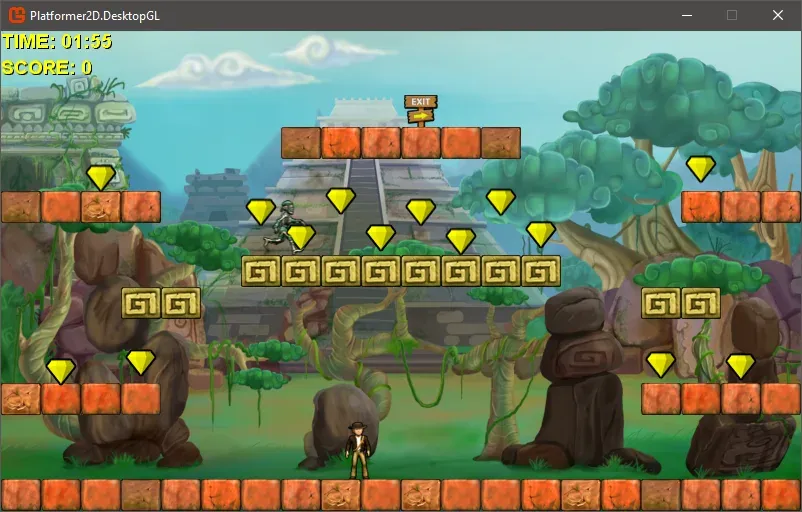
Official Platformer 2D sample, ported from the XNA samples and running in a desktop window.
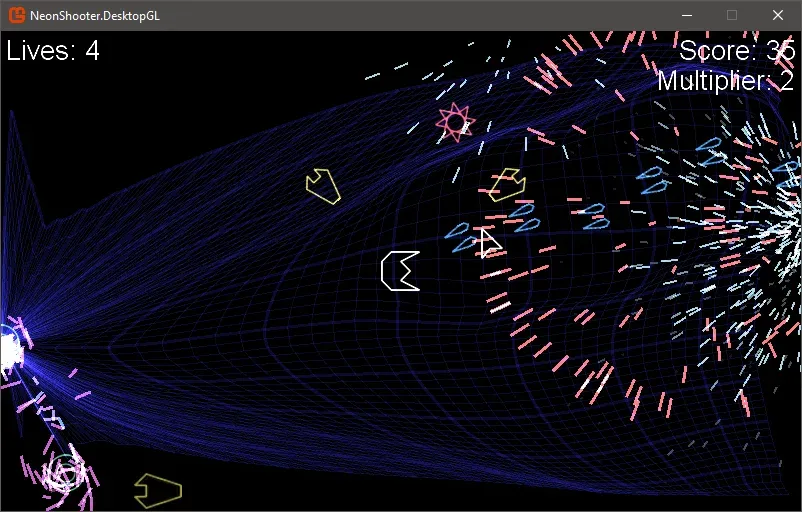
Official NeonShooter sample, a twin-stick shooter that demonstrates particle effects and save data.
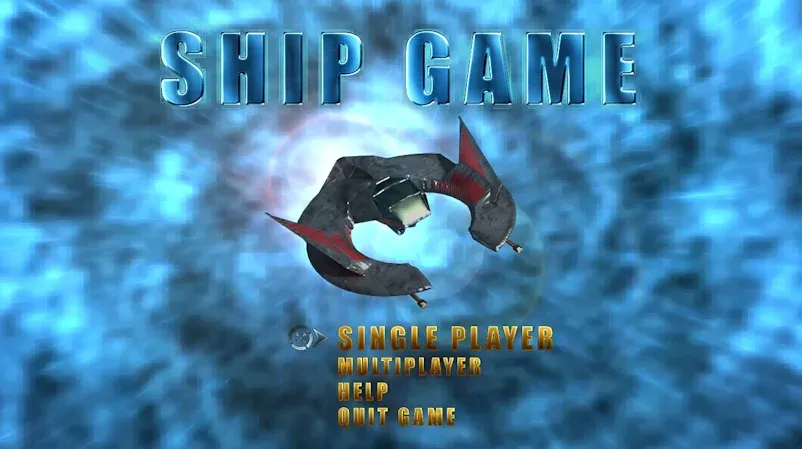
Official Ship Game 3D sample menu, a 3D sample brought over from the XNA archives.
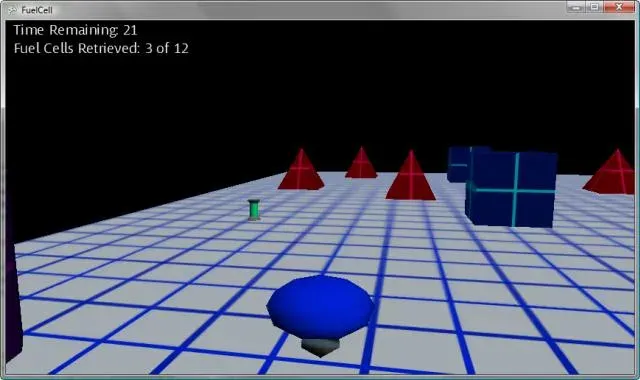
Official FuelCell 3D sample from the MonoGame samples repository.
Source: official MonoGame project page.
Key capabilities
- Game loop and C# API The
Gameclass drives initialization, content loading, update and draw. Graphics, audio, input, storage and math types follow the XNA design, so existing XNA knowledge and many XNA-era tutorials still apply. Code is plain C# against the .NET SDK, with no proprietary scripting layer. - Desktop targets Windows 10 (22H2 and later) supports OpenGL and DirectX 10 backends. macOS 13 Ventura and later and Linux with glibc 2.27 or newer (SteamOS 3.0, Ubuntu 22.04, Debian 12, CentOS 9 and others) use OpenGL. The README lists these as the supported desktop baseline, so older operating systems are outside the stated support.
- Mobile targets Android 6 (API 23) and later and iOS or iPadOS 12.2 and later are supported through OpenGL. Building for them needs the matching .NET mobile workloads, installed with
dotnet workload install androidordotnet workload install ios, as the getting-started pages explain. - Console targets for registered developers PlayStation 4, PlayStation 5, Xbox (GDKX and XDK) and Nintendo Switch 1 and 2 are listed. Access is restricted: the console access page explains the process, which depends on agreements with the platform holders rather than on MonoGame alone.
- Graphics backends including Vulkan and DirectX 12 previews Alongside the established OpenGL and DirectX paths, Vulkan and DirectX 12 support is being added in preview, and a native OpenGL backend arrived in 3.8.6. The README notes that experimental Vulkan and DirectX 12 implementations are available to source-code users. Treat preview backends as opt-in and test them against your own content.
- SpriteBatch 2D rendering SpriteBatch batches textured quads, text from SpriteFont, and render-state changes for 2D games. It is the core of most MonoGame titles and the focus of the official Building 2D Games tutorial.
- 3D rendering with effects and shaders Models, vertex and index buffers, render targets, depth and stencil state and custom effects are available. Effects are written as HLSL-based
.fxfiles and compiled by themgfxctool for each target, so shader work depends on the compiler tooling for your build platform. - Content pipeline and Content Builder Source textures, audio, fonts, models and custom data are transformed into platform-optimized bundles that the game loads at runtime. From 3.8.6 the documentation calls the Content Builder, a console project in your solution, the recommended way to build content. The older
mgcbcommand line and the MGCB editor remain available. - Audio and video Sound effects, streamed songs and video playback are covered by the framework API. Release notes show ongoing fixes in this area, for example the
Songdisposal race condition fixed in 3.8.6.1, so check the notes for the version you ship. - Input devices Keyboard, mouse, gamepad, touch and related input classes are part of the API. The 3.8.6.1 release changed how DirectX 12 maps GamePad triggers to the button bitmask, which shows that input behavior can differ by backend.
- Project templates The templates package
MonoGame.Templates.CSharpcreates projects preconfigured for a MonoGame version and target platform, including a new "MonoGame Empty Game" template in 3.8.6.1. The Visual Studio extension, distributed as a release asset, is only needed for launching the MGCB editor from Visual Studio. - .NET SDK requirement The getting-started documentation recommends .NET 9 as the minimum SDK as of MonoGame 3.8.4 and says .NET 10 is also supported. Check the documentation page for your release before installing, because the supported SDK moves with the framework.
- Release archive for offline use Each GitHub release attaches a full binary archive, for example
MonoGame.3.8.6.1.zip, for offline installs, along with the Visual Studio extension. Packages are also published on NuGet, and development packages come from the organization's GitHub Packages feed. - Samples repository The team maintains MonoGame.Samples, including Platformer 2D, NeonShooter, Auto Pong and Ship Game 3D. They are useful for seeing project structure, content setup and per-platform differences.
- Documentation and API reference The documentation hub contains tutorials, how-to guides and a generated API reference. The tutorials are the sensible starting point, because MonoGame leaves architecture choices such as entity systems, UI and physics to the developer.
- Community support channels The official channels are GitHub Discussions, a Discord server, a community forum at community.monogame.net and the issue tracker. The README asks that personal support questions go to Discussions or Discord rather than the issue tracker.
- Source builds The repository can be cloned with submodules and built from per-platform solutions. A separate requirements file lists prerequisites. Building from source is the route to experimental backends and unreleased fixes.
Where MonoGame fits
Building a 2D game from scratch
Install the .NET SDK, run dotnet new install MonoGame.Templates.CSharp, and create a project from a template for the platform you target first. Follow the official 2D tutorial, which walks from a blank window to a playable game. Check that you chose a SpriteBatch-based loop you are comfortable owning, since MonoGame supplies no scene system.
Porting an XNA project
Because MonoGame mirrors the XNA API, much XNA game code compiles with project-level changes. Start by moving the code to a current MonoGame template, then replace the content project with the Content Builder or an MGCB file. Verify assets, shaders and audio formats on every platform you ship, as these rather than code are where ports usually differ.
Shipping to desktop and mobile from one codebase
Keep platform-neutral game logic in a shared project and add thin launchers per target, as the template layout suggests. Install the Android or iOS workloads only when needed. Test on real devices at the minimum supported operating system versions in the README, and check touch input, screen sizes and the OpenGL backend behavior on each.
Authoring shaders and custom effects
Write effects as .fx files and compile them through the content pipeline or the mgfxc tool. Confirm that the effect compiler runs on your build machine, because the toolchain differs between Windows, macOS and Linux. Test any effect under every graphics backend you plan to support, including preview Vulkan or DirectX 12 paths if you opt in.
Targeting consoles
Console builds require registered developer status with each platform holder and access to MonoGame's console-specific code through the process on the console access page. Plan time for that approval before committing to a console date, and expect platform-specific certification work that the framework does not remove. Keep console-specific code and assets in the private repositories the platform agreements require, separate from the public framework source.
Building from source to try fixes
Clone the repository with its submodules, read the requirements file, and build the solution for your target. This is how you reach experimental backends or confirm that an unreleased fix resolves your bug. Pin the commit you built from, and return to a tagged release or NuGet package for shipping builds. Share the commit hash with teammates so everyone reproduces the same behavior.
Install
dotnet new install MonoGame.Templates.CSharpReviews of MonoGame
Be the first to share your experience with MonoGame.
Write a review
Loading review form…
Alternatives to MonoGame
 Godot EngineGodot Engine is a free, MIT-licensed game engine for 2D and 3D projects. The self-contained editor runs on Windows, macOS, Linux and Android, scripts in GDScript, C# or C++ through GDExtension, and exports to desktop, mobile, web and XR targets.
 GDevelopGDevelop is an open-source game engine and editor for 2D, 3D and multiplayer games. Logic is built with visual events and behaviors, with optional JavaScript, and games export to the web, Windows, macOS, Linux, Android and iOS.