

What is CC Switch?
CC Switch is an open-source desktop app that manages the configuration of AI coding tools from one place. It covers twelve tools: Claude Code, Claude Desktop, Codex, Gemini CLI, Grok Build, OpenCode, OpenClaw, Hermes Agent, Pi, MiniMax Code, Kimi Code and Oh My Pi. Each tool keeps its own configuration format, so switching API providers normally means hand-editing JSON, TOML or YAML files. In CC Switch you pick one of more than 90 provider presets, enter a key and switch in one click; only the endpoint, key and model are replaced, so plugins, hooks, MCP settings and comments stay as they are.
The app also syncs MCP servers and Skills to the tools you choose, keeps a per-tool prompt library that writes CLAUDE.md, AGENTS.md or GEMINI.md, and turns session logs into a reading view with resume commands. Routing mode forwards requests through your machine, converts between Anthropic, OpenAI and Gemini API formats and fails over to the next provider when a request fails. Aggregation mode puts models from several providers into one model list in Claude Code or Codex, and a usage dashboard tracks tokens, spending and remaining quotas.
CC Switch is developed by Jason Young (farion1231 on GitHub) and released free under the MIT licence. It is built with Tauri 2 and runs on Windows 10 and above, macOS 12 and above as a signed and notarized Universal build, and Linux x86_64 or ARM64 with glibc 2.35 and WebKitGTK 4.1. It installs with Homebrew, paru on Arch Linux, or MSI, DMG, .deb, .rpm and AppImage packages from GitHub releases.
CC Switch screenshots
Explore the interface. Open a screenshot to view it at full size.
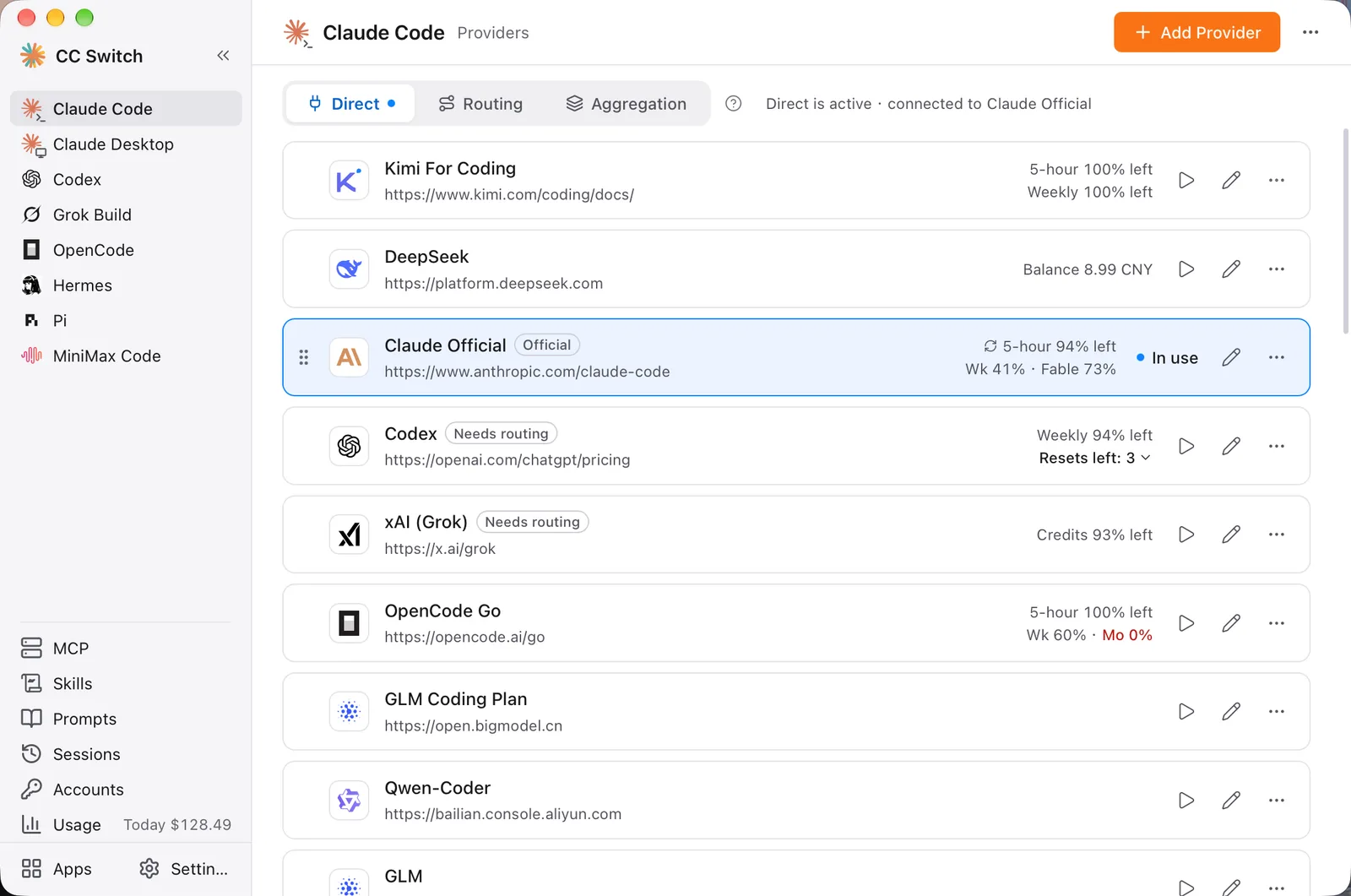
Source: official CC Switch project page.
Key capabilities
- One-click provider switching More than 90 presets, including AWS Bedrock and NVIDIA NIM, replace only the endpoint, key and model in each tool's config.
- System tray switching The tray shows one row per tool and switches providers for Claude Code, Claude Desktop, Codex, Gemini CLI and Grok Build.
- Central MCP and Skills Add MCP servers and Skills once, then choose which tools to sync them to.
- Prompt library Enabling a prompt writes it to CLAUDE.md, AGENTS.md or GEMINI.md and saves the file's existing content to the library first.
- Session reading view Session logs show what each turn did, which files changed and which step failed.
- Usage and quotas A dashboard tracks tokens, cache hit rate and spending, and provider cards show remaining subscription quota.
- Cloud sync Configuration syncs across devices through WebDAV or S3-compatible storage.
Where CC Switch fits
- Local routing Converts requests between Anthropic Messages, OpenAI Chat Completions, OpenAI Responses and Gemini Native, so GPT works in Claude Code and Claude in Codex.
- Auto-failover A per-tool failover queue moves to the next provider when a request fails, backed by a circuit breaker and health monitoring.
- Aggregation mode Models from several providers appear in one model list in Claude Code or Codex.
- Subscription accounts GitHub Copilot, ChatGPT and xAI accounts can serve as providers in Claude Code, Claude Desktop and Codex.
- CLI tool management The Apps page shows current and latest versions of tools such as Claude Code and Codex and upgrades them in one click.
- Deep links A ccswitch:// link imports providers, MCP servers and prompts or adds skill repositories.
- Safe config writes Existing configs are imported on first launch and each config file is backed up before its first rewrite.
Install
brew install --cask cc-switchReviews of CC Switch
Be the first to share your experience with CC Switch.
Write a review
Loading review form…
Alternatives to CC Switch
 AlacrittyAlacritty is an Apache-2.0 GPU-accelerated terminal emulator for Linux, BSD, macOS and Windows. It offers vi mode, scrollback search, regex hints and multi-window IPC, configured in TOML, and leaves tabs and splits to tmux.
 AthasAthas is an AGPL-licensed desktop code editor for macOS, Windows and Linux built with Tauri, Rust and React. It combines CodeMirror 6 editing, Git and GitHub views, terminals, database viewers and AI agents, with optional paid hosted AI and Cloud Agents.
 CodeEditCodeEdit is an MIT-licensed code editor written in Swift for macOS, aimed at projects outside Apple platforms. It offers tree-sitter highlighting, tasks, terminals and Git, and is still in development with 0.x releases.