
What is CodeEdit?
CodeEdit is a free, open-source code editor for macOS, written in Swift with SwiftUI and AppKit and developed by the CodeEditApp community on GitHub. Its README describes it as an editor built by the community for the community and written entirely for macOS. The official website states that CodeEdit is not meant to replace Xcode but to supplement it for projects that do not target Apple platforms, such as web, backend or scripting work in other languages.
The project is in development. The README states that CodeEdit is not yet recommended for production use and invites users to try pre-release versions and report issues, and the website header repeats that CodeEdit is currently in development and points to the public roadmap board. Version numbers are still in the 0.x range: v0.1.0 was published on March 18, 2024 as the first DMG release, and the latest release is v0.3.6, published on August 26, 2025. No newer release appears on the GitHub releases page as of November 11, 2026, although commits continue on the main branch.
v0.3.6 is titled Task Output, External File Changes, Invisible Characters. It adds editor restoration across files, tabs and sessions, a global search keyboard shortcut, task output shown in a full terminal emulator, ⌘R and ⌘. shortcuts with a Tasks menu, automatic reloading of files changed outside the app, and an invisible characters setting with configurable replacement and warning characters. It also adds a language server installation menu in Settings that the release notes call experimental and expected to change. The previous release, v0.3.5 of July 9, 2025, added a minimap, an indentation-based code folding ribbon, a reformatting guide column, a hide interface command and language server syntax highlights.
According to the project's blog post on why it is being built, CodeEdit started as a personal design project of Austin Condiff, who shared mockups of a Mac-native editor and then a first repository; the post says it passed 5,000 GitHub stars within a few weeks. The repository was created in March 2022. The stated mission is to keep CodeEdit open source and free forever, supported by the community, with an experience that starts as light as TextEdit and scales toward Xcode, while following Apple's Human Interface Guidelines.
The editor is split across several MIT-licensed Swift packages in the same organization: CodeEditSourceEditor (a tree-sitter based code editor view), CodeEditTextView (the underlying text view), CodeEditLanguages (tree-sitter grammars), CodeEditKit (the interface between CodeEdit and extensions) and CodeEditCLI. CodeEdit itself is licensed under the MIT license. It is distributed only as a macOS app; there are no Windows, Linux, web or hosted versions. Similar editors listed on iThub include Zed, Athas and Neovim.
CodeEdit screenshots
Explore the interface. Open a screenshot to view it at full size.
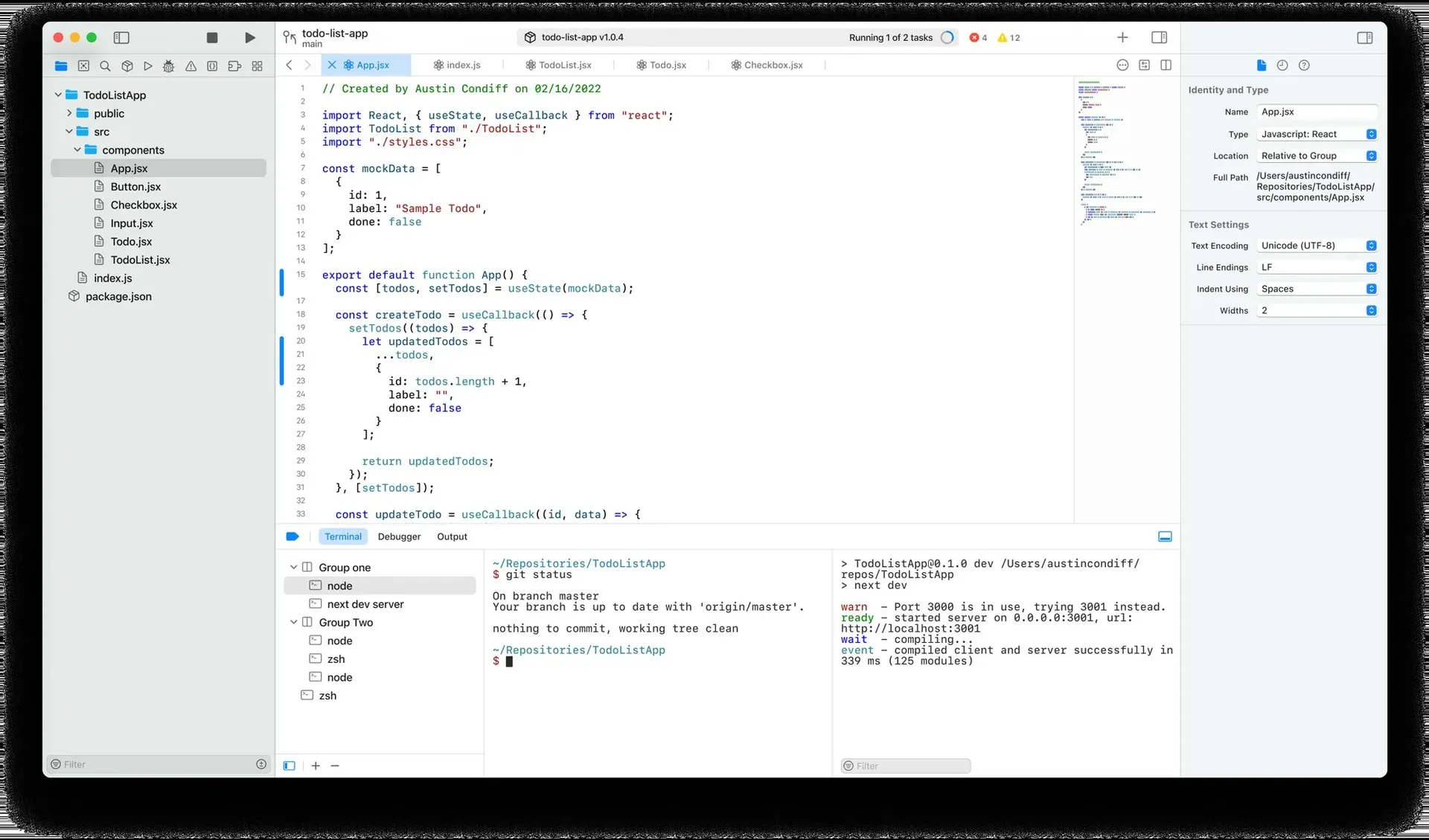
Official CodeEdit website screenshot: project navigator, tabbed editor with minimap, inspector with text settings, and terminals running git status and next dev.
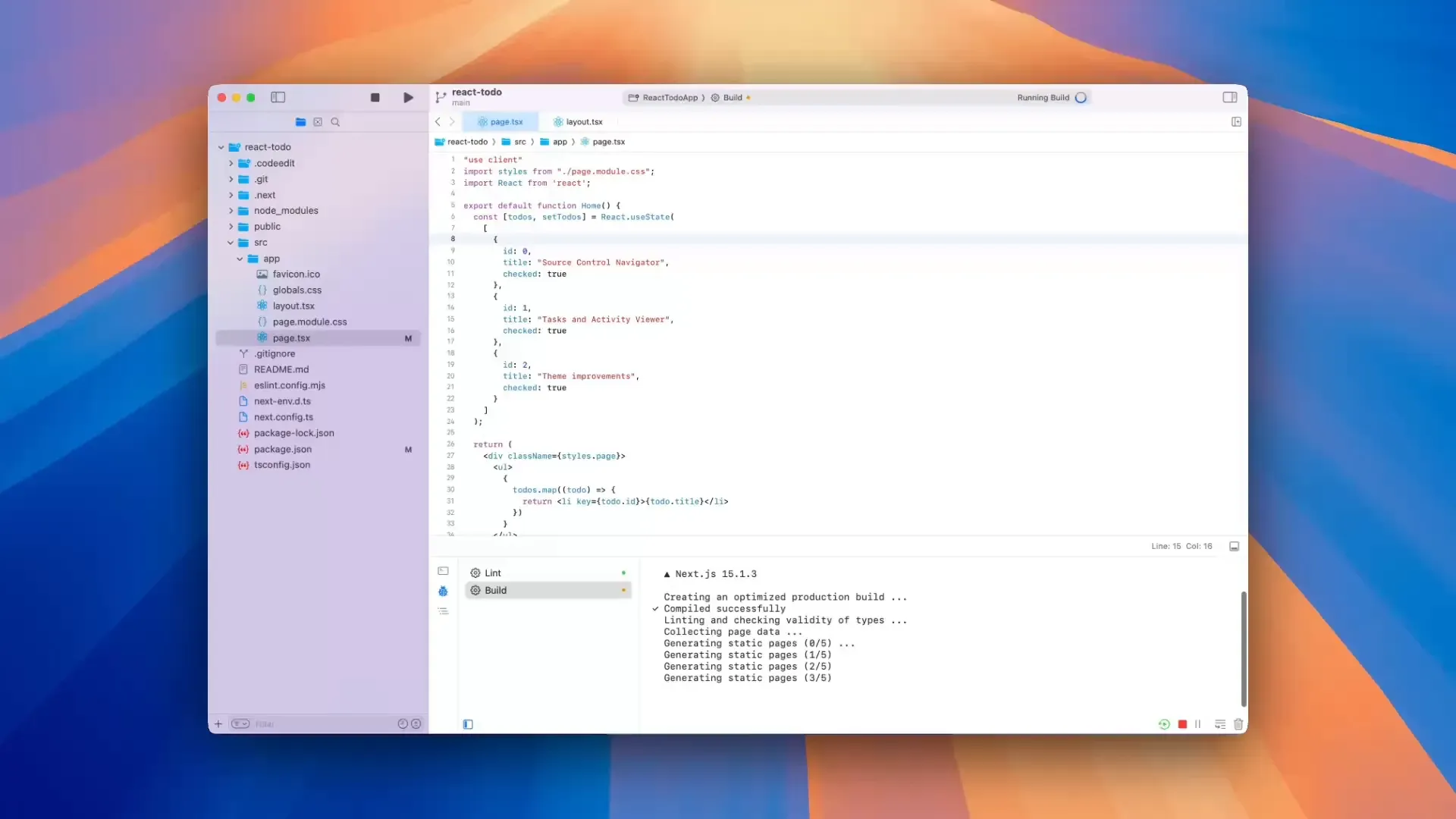
Frame from the official 2024 year-in-review video: a Build task running from the Activity Viewer with its output in the utility area.
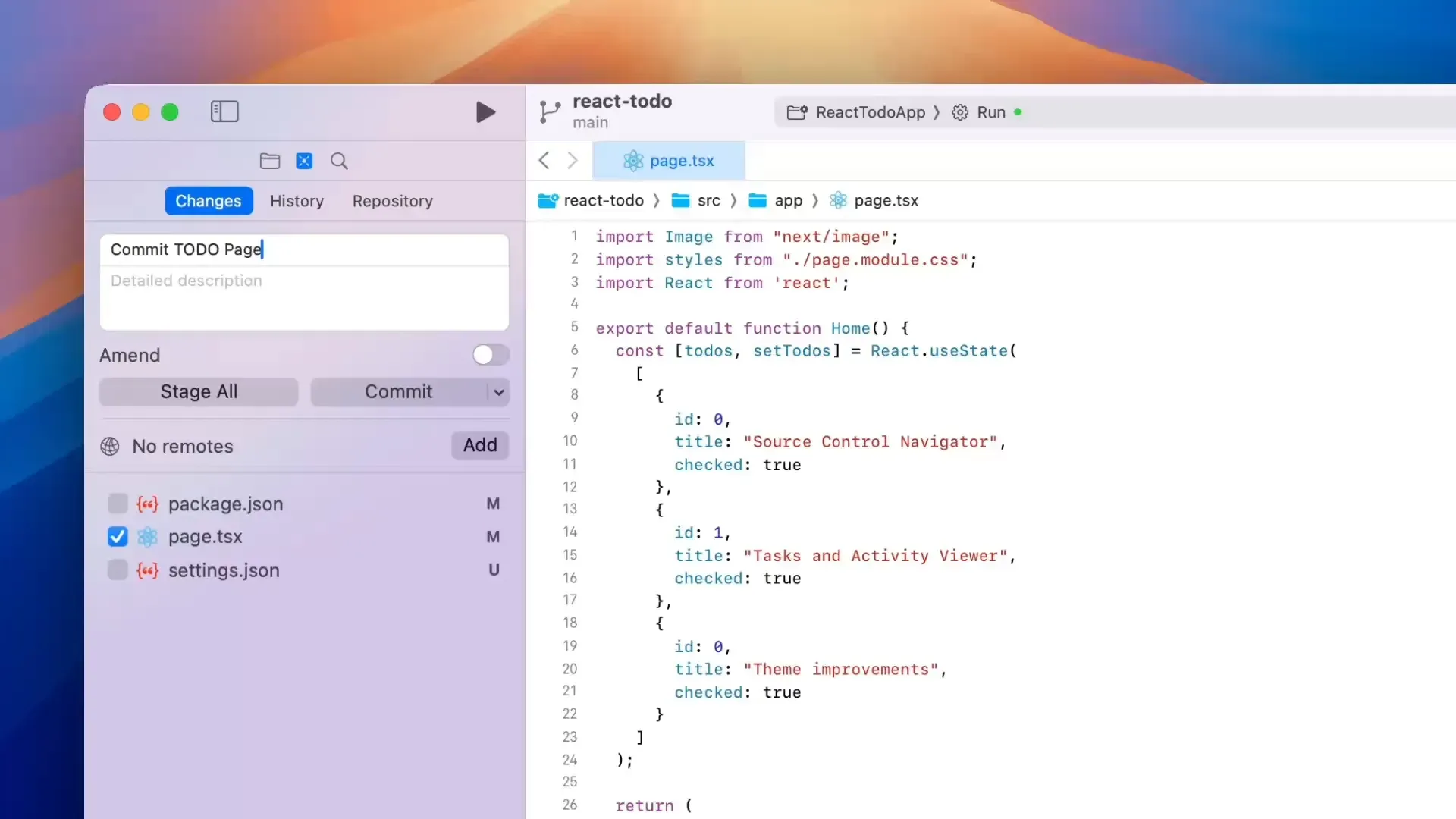
Frame from the official 2024 year-in-review video: staging a file and writing a commit message in the source control navigator.
Source: official CodeEdit project page.
Key capabilities
- Native macOS application CodeEdit is written in Swift and built with SwiftUI and AppKit, without Electron or another cross-platform layer. The website describes a completely native architecture, and the README states the goal of following Apple's Human Interface Guidelines and development patterns. The app runs only on macOS.
- Development status The README marks CodeEdit as in development and not yet recommended for production use. Releases are numbered 0.x, and the GitHub releases page lists v0.1.0 (March 2024) through v0.3.6 (August 26, 2025), the latest release as of November 11, 2026. The Sparkle update feed for v0.3.6 uses a channel named dev.
- Download and system requirements Each release ships CodeEdit.dmg on the latest release page; the v0.3.6 DMG is about 36 MB. The v0.3.6 appcast declares a minimum system version of macOS 13.0, and the release notes for v0.3.6 include a fix for a crash on macOS Ventura. The project file on the main branch now sets a macOS 14.0 deployment target for future builds.
- In-app updates Releases include an appcast.xml file for the Sparkle update framework, which carries the version, build number (47 for v0.3.6), minimum macOS version and a link to the What's New page. Release notes are also published on the website's What's New page with a download link per version.
- Source editor and syntax highlighting Editing is provided by CodeEditSourceEditor, a code editor view powered by tree-sitter, on top of CodeEditTextView. Grammars come from CodeEditLanguages, whose table lists syntax highlighting for languages including Bash, C, C++, C#, CSS, Dart, Dockerfile, Elixir, Go, Haskell, HTML, Java, JavaScript/JSX, JSON, Kotlin, Lua, Markdown, Objective-C, OCaml, PHP, Python, Ruby, Rust, Scala, SQL, Swift, TOML, TypeScript/TSX, YAML and Zig. Agda, Julia, Perl and Verilog grammars are implemented without highlighting.
- Autocomplete and jump to definition The v0.3.6 release updated CodeEditSourceEditor from 0.14.1 to 0.15.1, which added an autocomplete feature and jump to definition, with the definition hover shown only when available. Earlier work listed in the 2024 year-in-review post added tag autocomplete powered by tree-sitter, a comment shortcut (⌘/) and indent and unindent commands.
- Language servers (experimental) V0.3.5 added language server syntax highlights, and v0.3.6 added a language server installation menu in Settings plus a language server output view. The v0.3.6 notes call the installation section experimental and say it will change over the next releases, with clearer installation permissions and package information planned.
- Minimap, folding and editor display V0.3.5 introduced a minimap that can be dragged to navigate, a code folding ribbon that currently folds by indentation (syntax-aware folding is described as planned), and a reformatting guide drawn at a chosen column. v0.3.6 added an invisible characters setting with customizable replacement characters and warning characters for problematic Unicode characters. Each option has its own setting.
- Workspace navigation and search The window follows an Xcode-like layout with a navigator sidebar, editor area with tabs and a jump bar, inspector sidebar and a utility area. v0.1.0 added project find and replace, generic fuzzy search and a navigation style setting to open files in place instead of tabs. v0.3.6 added a global search keyboard shortcut and editor restoration that reopens your place across files, tabs and sessions.
- Tasks and Activity Viewer Tasks are shell commands defined per workspace, such as starting a development server or running a build, and were introduced in v0.3.0 together with the Activity Viewer in the toolbar. Since v0.3.6 task output is shown in a full terminal emulator, tasks start with ⌘R and stop with ⌘., and a dedicated Tasks menu is available.
- Integrated terminal The utility area at the bottom of the window contains terminals that can be grouped, plus debugger and output tabs shown in the website screenshot. The v0.3.6 release fixed terminals losing output, and the settings include a terminal section.
- Source control CodeEdit's source control navigator has Changes, History and Repository views for staging, committing and browsing history and branches. v0.3.0 added push, pull, fetch and stash, including force push and tag options, and v0.3.5 added a source control filter and a check that Git is installed. The README lists git integration and code review among the editor's features.
- Themes CodeEdit bundles a set of themes, and v0.1.0 updated the Xcode themes and added more bundled themes. According to the 2024 year-in-review post, bundled themes now update with new releases, the theme list has fuzzy search, and a new theme can be created from an existing one in Settings without editing a JSON file.
- External file changes and autosave Since v0.3.6, files modified by other applications are reflected automatically in open editors. v0.3.5 improved autosave and file renaming and fixed repeated changed-by-another-application warnings, and v0.3.6 stopped Makefile from being renamed to Makefile.make on save.
- Extensions The README lists extensions among CodeEdit's features, and the app has an Extensions menu. CodeEditKit is the dynamic library shared between CodeEdit and its extensions, with its own documentation. The project wiki describes an Extension Store and Extension Library, and the January 2025 year-in-review post lists extension architecture as a focus area for 2025, so the extension system is still being built.
- Command-line tool CodeEditCLI provides a
codeeditcommand to open CodeEdit, folders and files, optionally at a line and column (for examplecodeedit index.html:50:50). Its README recommends installing it from the project's Homebrew tap withbrew install codeeditapp/formulae/codeedit-cli, or downloading a universal binary into /usr/local/bin. It requires a Release build of CodeEdit. - Reusable Swift packages The organization publishes parts of the editor as standalone packages: CodeEditSourceEditor, CodeEditTextView, CodeEditLanguages and CodeEditKit, plus WelcomeWindow and AboutWindow, which were introduced in July 2025 and integrated in v0.3.5 for use in other macOS apps. CodeEditTextView, CodeEditLanguages and CodeEditKit have DocC documentation hosted on GitHub Pages.
- License and funding CodeEdit is released under the MIT license, and the project states it will remain free. Development is supported through GitHub Sponsors, and the README lists company sponsors including Vercel, MacStadium, GitBook, DevUtils and Proxyman. There is no paid edition or hosted service.
- Community and contributing The project uses a Discord server and GitHub Discussions, and holds a weekly community meetup on Discord every Saturday at 3pm UTC. Contributors work from an organization-wide project board; the wiki covers getting started, code style, terminology and troubleshooting, and pull requests must pass tests and SwiftLint.
Where CodeEdit fits
Editing non-Apple projects in a native Mac app
The website positions CodeEdit for projects not intended for Apple platforms, for example a React or Next.js project, while Xcode remains the tool for Apple platform apps. A folder is opened as a workspace, files appear in the project navigator, and the editor provides tree-sitter highlighting for the languages listed by CodeEditLanguages. Because the project states it is not yet recommended for production use, the README asks users to report problems through GitHub issues.
Running builds, linters and dev servers as tasks
Tasks are configured per workspace as shell commands and appear in the Activity Viewer in the toolbar. A task such as Lint or Build is started with ⌘R or from the Tasks menu and stopped with ⌘.; its output appears in the utility area in a terminal emulator, as shown in the official 2024 year-in-review video. The utility area also holds grouped terminals for interactive commands.
Committing and reviewing changes with Git
The source control navigator lists changed files for staging and committing, shows the commit history of the current branch and lets you work with local and remote branches. Since v0.3.0 it supports push, pull, fetch and stash. Git must be installed on the Mac; v0.3.5 added a check for it.
Customizing themes and editor display
Settings include General, Accounts, Navigation, Themes, Text Editing, Terminal, Search, Source Control and Locations sections. A new theme can be created from an existing one and its text, cursor, invisibles, background, current line and selection colors adjusted. The minimap, folding ribbon, reformatting guide and invisible characters each have their own toggles and options.
Opening files from the terminal
With CodeEditCLI installed from the codeeditapp/formulae Homebrew tap, codeedit ./my-project opens a folder and codeedit index.html:50 opens a file at a given line. The CLI README notes that it works only with a Release build of CodeEdit, not a Debug build.
Building and contributing to CodeEdit
Contributors fork the repository and open CodeEdit.xcodeproj in Xcode; the Getting Started guide describes the package-by-feature folder structure, and the troubleshooting page lists macOS 13.5 and Xcode 15.0 or later and SwiftLint installed via Homebrew. The contribution guide asks contributors to get an issue assigned before starting and requires passing tests and SwiftLint checks on pull requests.
Reviews of CodeEdit
Be the first to share your experience with CodeEdit.
Write a review
Loading review form…
Alternatives to CodeEdit
 ZedZed is an open source code editor from Zed Industries, written in Rust for speed, with AI agent editing, real-time collaboration and native Git support.
 AthasAthas is an AGPL-licensed desktop code editor for macOS, Windows and Linux built with Tauri, Rust and React. It combines CodeMirror 6 editing, Git and GitHub views, terminals, database viewers and AI agents, with optional paid hosted AI and Cloud Agents.
 NeovimNeovim is an Apache 2.0 text editor that refactors Vim for extensibility. It adds Lua configuration, a built-in LSP client, Tree-sitter parsing, an embedded terminal, a msgpack RPC API and a plugin manager.