

What is Weblate?
Weblate is a web-based continuous localization platform. It connects to the version control repository of a software project, reads its translation files, lets translators and reviewers work in the browser and commits the results back to the repository. It is written in Python on Django and is developed by Weblate s.r.o., based in Cvikov, Czechia. The project started in 2012; the about page names Michal Čihař as its founder. Weblate can be self-hosted or used as a service on Hosted Weblate.
The source code is licensed under the GNU General Public License version 3 or any later version (GPL-3.0-or-later), as stated in the README and in the package metadata; GitHub displays it as GPL-3.0. The repository follows the REUSE specification, and bundled files under other terms (MIT, Apache-2.0, CC0-1.0 and others) are listed in its LICENSES folder. The hosting page states that self-hosting requires no paid license or support subscription.
Weblate switched to calendar versioning with release 2026.5 on May 15, 2026; the previous release was 5.17.1. Feature releases arrive roughly monthly with patch releases in between, and upgrades are supported only from releases of the current or previous calendar year. The latest release is Weblate 2026.11.2, published on November 12, 2026. It adds the DEFAULT_WORKSPACE_TM setting for workspace translation memory, processes browser uploads in the background with a matching REST API mode, and fixes seven security issues, among them login enforcement for Git repository exports and stable Keycloak subjects in Docker. Release 2026.11 (November 2) added customizable built-in roles, a bot-protection preview, a languages tab for workspaces, a unified bulk edit with regular expressions, an optional OpenID Connect identity provider and eTranslation suggestions. Release artifacts ship with Sigstore signatures and a CycloneDX SBOM.
A Weblate installation consists of the Django web application, Celery workers for background tasks, PostgreSQL 15 or later and a Valkey or Redis 6+ datastore for cache and task queue. The installation guide requires Python 3.12 or newer, lists Linux, FreeBSD and macOS as known to work and Windows as unsupported, and gives 3 GB of RAM, 2 CPU cores and 1 GB of storage as the minimum for a single host, with at least 4 GB of RAM recommended for hundreds of components. Weblate is distributed on PyPI, as Docker images with an example Compose setup, as a Helm chart for Kubernetes and as an OpenShift template.
Hosted Weblate at hosted.weblate.org is run by the same company. According to the hosting page, it stores and processes customer data and backups in the EU, while integrations configured by a project, such as external machine translation services, can send data elsewhere. Public libre projects can request gratis hosting under the Libre plan.
Key capabilities
- Version control integration Components are linked to Git repositories (including Git LFS and submodules), Mercurial, Subversion or local files. Weblate can push directly or open pull and merge requests on GitHub, GitLab, Gitea, Bitbucket Data Center and Cloud, Pagure and Azure DevOps, and supports Gerrit reviews. Details are in the version control docs.
- Continuous localization Webhooks from code-hosting services trigger repository updates, Weblate merges or rebases upstream changes, and translations are committed with lazy commits that group edits. Daily automatic updates, repository maintenance actions and translation propagation between components with the same strings are documented in continuous localization.
- File formats The features page lists 53 file format entries, including gettext PO, XLIFF 1.2 and 2.0, Android string resources, Apple strings and stringsdict, ARB, i18next, FormatJS and go-i18n JSON, YAML, RESX, Java properties, Qt TS, Fluent, Markdown and MDX, HTML, AsciiDoc, ODF, IDML, Excel, CSV, subtitles and TBX. Format-specific capabilities are listed per format in the format documentation.
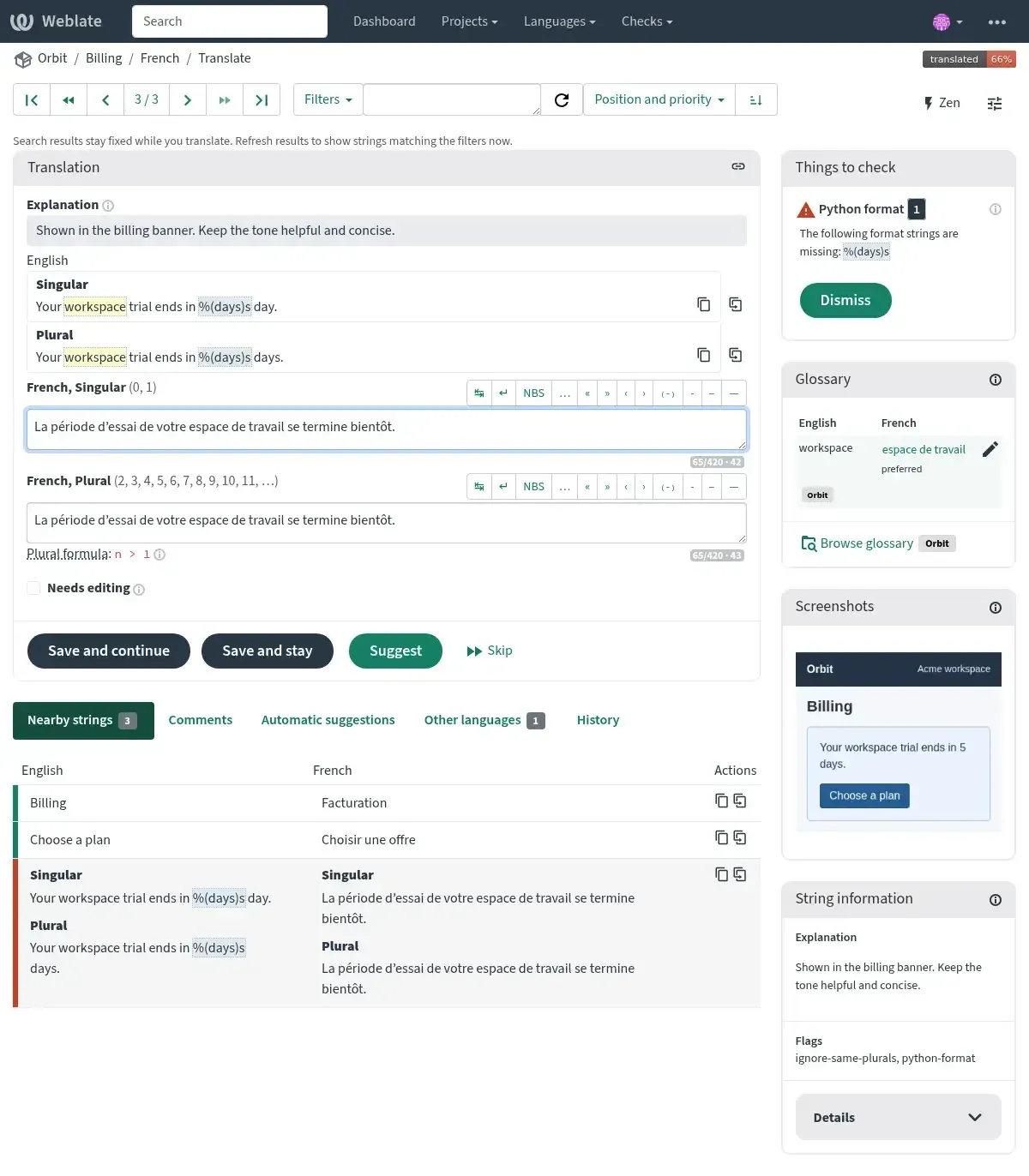
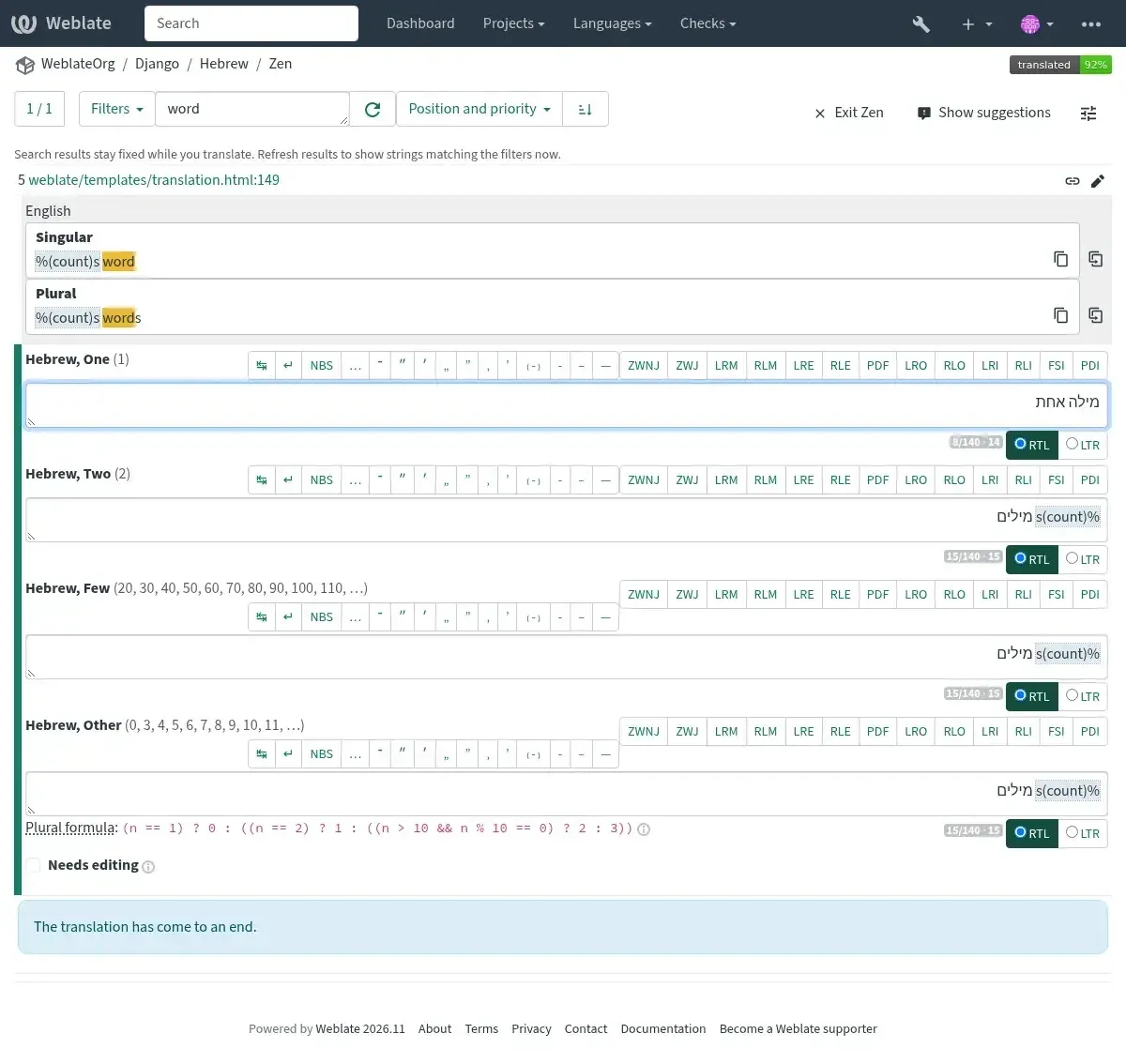
- Translation editor The editor shows the source string with explanation, plural forms with their plural formula, highlighted placeholders and glossary terms, a toolbar for special characters, and tabs for nearby strings, comments, automatic suggestions, other languages and history. Zen mode lists strings in a continuous view, and right-to-left languages get RTL and LTR toggles and bidirectional control characters.
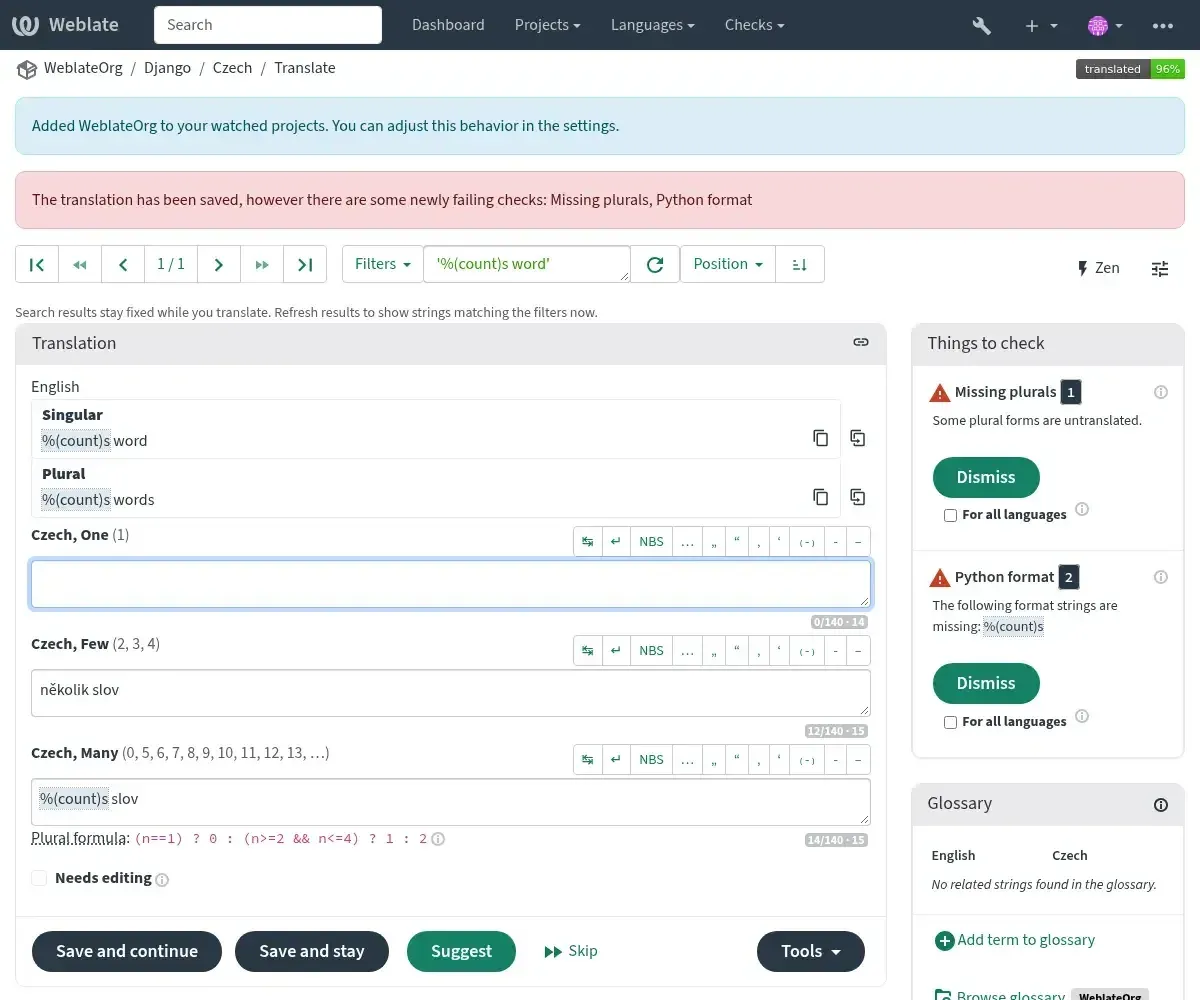
- Quality checks Weblate documents about 90 checks for translations and source strings, covering format strings for C, Python, Java, JavaScript, PHP, ICU MessageFormat, i18next and other syntaxes, placeholders, plurals, punctuation and spacing, maximum length, and HTML, XML, Markdown, reStructuredText and MDX markup. Checks can be dismissed per string or disabled with flags; see checks and fixups.
- AI quality evaluation An add-on sends translations to Anthropic, OpenAI, Azure OpenAI, Mistral or Ollama for evaluation on a schedule. Results appear as AI checks for accuracy, fluency, formatting, style and terminology alongside the rule-based checks.
- Machine translation and LLM suggestions The translation services screen lists about 30 services, among them DeepL, Google Cloud Translation Basic and Advanced, Azure AI Translator, Amazon Translate, ModernMT, LibreTranslate, Systran, Yandex, Baidu, Youdao, Alibaba, eTranslation, OpenAI, Azure OpenAI, Anthropic, Mistral and Ollama. LLM-based services can receive extended context: string explanations, secondary-language translations, plurals, failing checks and placeholders. Services can be installed at site, workspace or project scope, per the machine translation docs.
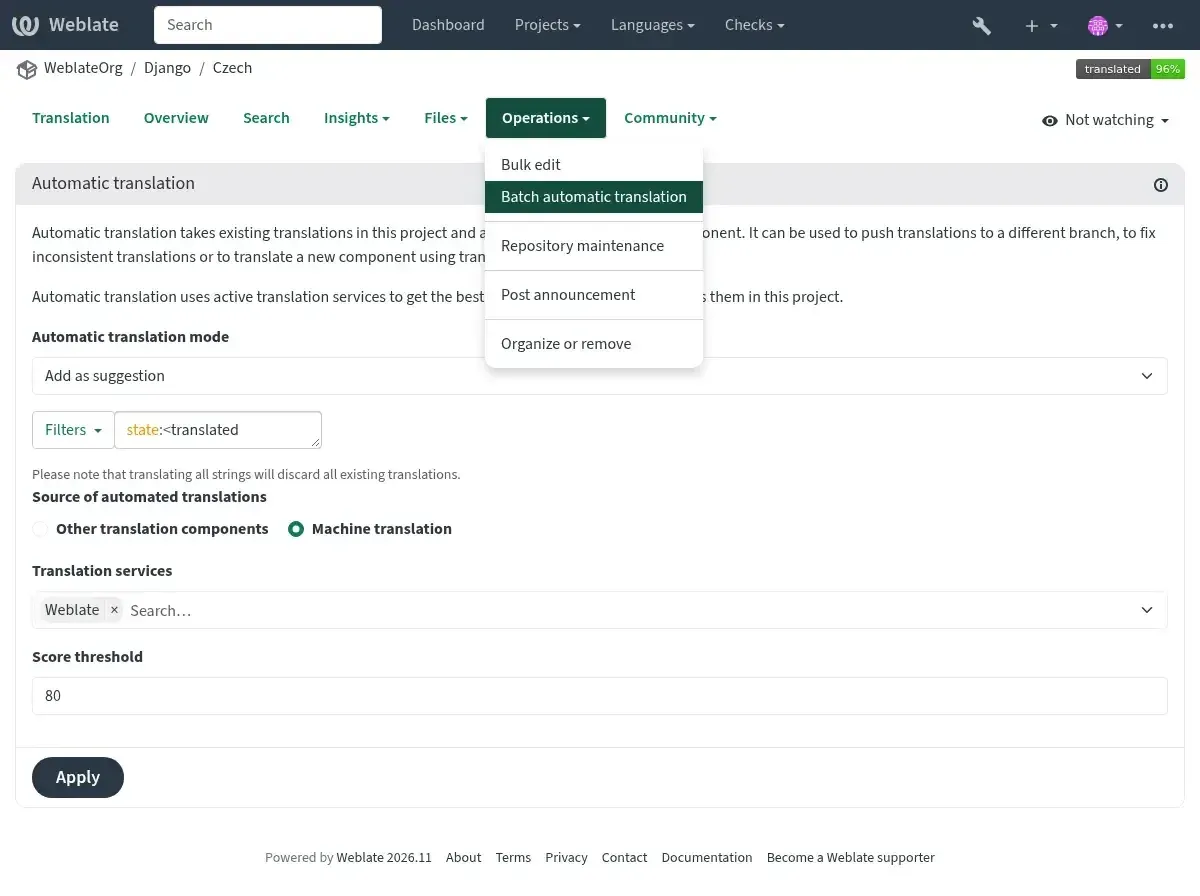
- Automatic translation Batch automatic translation fills strings from other translation components or from machine translation services above a score threshold, either as suggestions or as translations, filtered by search query. An add-on applies the same process to new and updated strings.
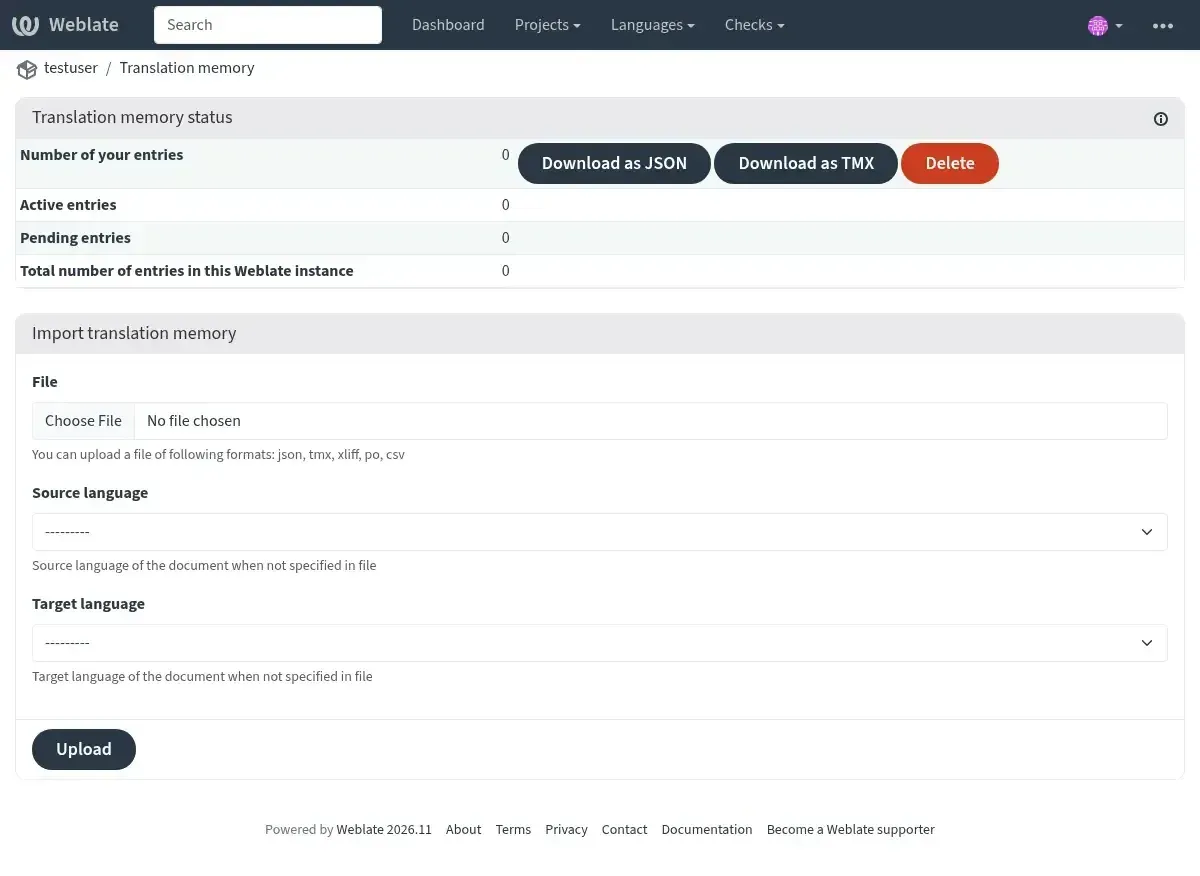
- Translation memory The built-in translation memory collects translations made in Weblate and imported memories, separated into personal, project and shared scopes. Users can import JSON, TMX, XLIFF, PO or CSV files and export their entries as JSON or TMX.
- Glossary Each project can hold glossary components whose terms are highlighted in source strings and shown next to the editor with their translations and flags such as preferred terms. Glossaries are translated like other components, and terms can be imported from CSV or TBX files, per the glossary docs.
- Context: screenshots, explanations and labels Screenshots can be uploaded and linked to strings, with OCR to find matching strings in the image. Strings carry explanations, labels and flags, and source string review lets developers clarify unclear source text.
- Review workflows and access control Projects can require suggestions to be voted on or approved by reviewers, enforce contributor agreements and restrict new languages. Access is managed with teams, roles (customizable since 2026.11) and workspaces that group projects across an organization.
- Add-ons and automations About 40 documented add-ons cover gettext tasks such as msgmerge, MO compilation and xgettext, component discovery, file cleanup, pseudolocalization, squashing Git commits, JSON, YAML and XML formatting, webhooks, Slack notifications and CDN publishing. Automations run bulk edits and other actions on selected strings, with visual and YAML editors.
- Authentication Weblate supports local passwords, social logins (GitHub, GitLab, Gitea, Bitbucket, Google, Facebook, Microsoft Entra ID, Slack), Keycloak and other OpenID Connect providers, SAML, LDAP and Active Directory, CAS and two-factor authentication. Since 2026.11 it can also act as an OpenID Connect identity provider; see authentication.
- REST API and Weblate Client A REST API exposes projects, components, translations, units, memory and statistics. The separate wlc command-line client, installed with
pip install wlcor run throughuvx wlc, also works as a Python module and is available as a Docker image. - Reports, notifications and engagement Weblate produces contributor and progress reports, sends per-user notifications including digests, provides RSS feeds and offers an engage page and status widgets that invite contributors to a project.
- Backups and migration Built-in backups (Borg based) cover whole installations, and project backups can be restored on another instance; the hosting page names backups as the route for project transfers and full-installation migration.
- Hosted Weblate plans Prices on the hosting page (checked November 21, 2026, excluding VAT) depend on hosted strings, counted as source strings multiplied by target languages plus one: 10k at €47 per month or €470 per year, 40k at €70 or €700, 160k at €114 or €1,140, 640k at €193 or €1,930, 2.5M at €342 or €3,420 and 10M at €616 or €6,160, each with unlimited projects, components and translators and a 14-day trial. A dedicated instance with options such as SSO, a custom domain and branding starts at €95 per month on yearly billing. Self-hosted support costs €53 per month (basic) or €106 per month plus a €480 installation package (extended). The Libre plan is gratis for public libre projects with the limits of the 160k plan.
Where Weblate fits
Localizing a public open-source project on Hosted Weblate
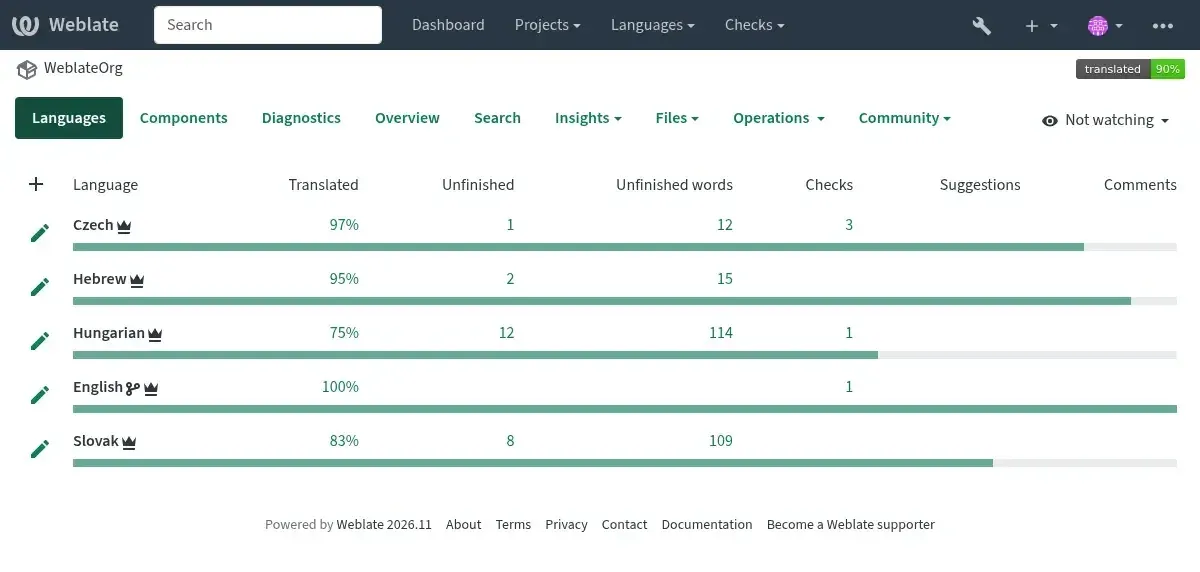
Maintainers of public libre projects can request the Libre plan, connect their repository and let volunteers translate in the browser. The features page lists 160,000 hosted strings and one project for this plan. The engage page and status widgets show translation progress and link new contributors to the project, while Weblate pushes completed translations back to the repository.
Connecting a repository for continuous localization
A component points to a repository branch and a file mask such as locale/*/LC_MESSAGES/django.po. A webhook from GitHub, GitLab, Gitea, Bitbucket or Azure DevOps tells Weblate when new source strings arrive, and Weblate commits translations and pushes them directly or as a pull request. The continuous localization guide describes how lazy commits and rebasing keep merge conflicts low.
Pre-translating with machine translation and memory
Projects that enable services such as DeepL, an LLM provider or the translation memory can run batch automatic translation over untranslated strings, storing the results as suggestions for review or as finished translations above a score threshold. The automatic translation add-on repeats this for new strings, and translators see the same services in the Automatic suggestions tab of the editor.
Keeping terminology and formatting consistent
Glossary terms appear beside each string in the editor, and quality checks flag missing plural forms, broken format strings, inconsistent translations between components or exceeded length limits as soon as a translation is saved. Teams can review failing checks from the Checks menu, dismiss false positives per string, and add the AI quality evaluation add-on for accuracy and style checks by an LLM.
Scripting translation workflows
The wlc client and the REST API let CI pipelines and scripts pull and push repositories, upload and download translation files, lock components during releases and read statistics; wlc commands include pull, push, commit, lock, unlock, upload, download and stats. Since 2026.11.2 uploads through the API can run in background mode for large files.
Running a self-hosted instance
The Docker deployment clones the WeblateOrg docker-compose repository, adds a docker-compose.override.yml with site settings and starts PostgreSQL, Valkey and Weblate with docker compose up; larger setups use the Helm chart. Operators configure authentication (for example SAML, LDAP or an OpenID Connect provider), e-mail, backups and HTTPS through a reverse proxy, following the Docker installation docs. Similar localization platforms listed on iThub include Tolgee.
Install
uv pip install "weblate[all]"Reviews of Weblate
Be the first to share your experience with Weblate.
Write a review
Loading review form…
Found Weblate useful? Upvote it todayYour vote helps other IT teams find it in the daily ranking.


